How to Build B2B Contact Lists That Convert in 2026
Bought lists bounce, decay, and burn your domain. Here's how to build, verify, and scale B2B contact lists that actually convert in 2026.
TL;DR
- A B2B contact list is only as valuable as it is accurate — decayed data bounces, hurts sender reputation, and wastes rep hours.
- Buying a generic list is the fastest way to torch your domain; building a targeted, verified list is slower but converts far better.
- The winning workflow is source → verify → enrich → segment → refresh, run on a quarterly cycle.
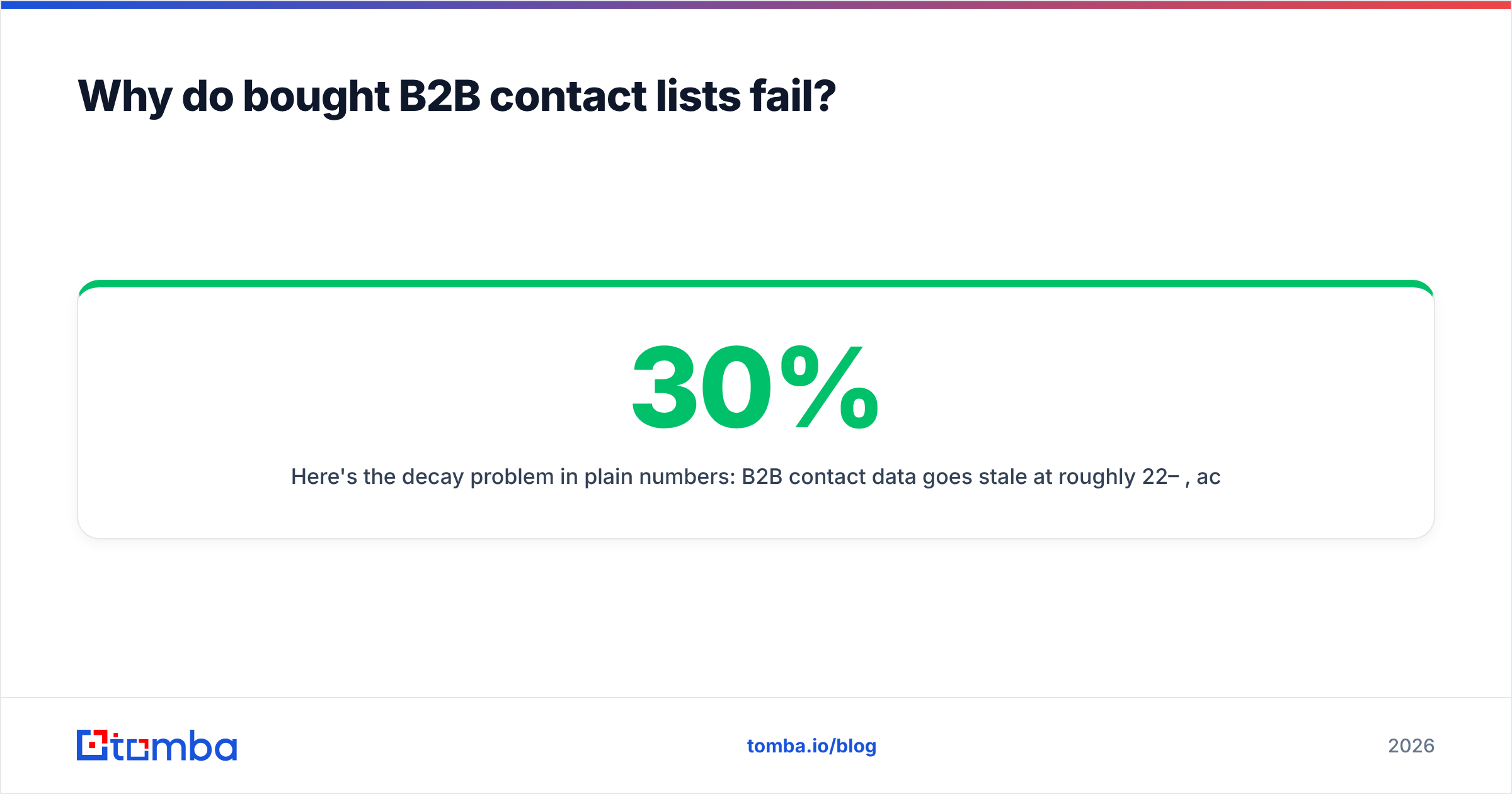
- Verification is non-negotiable: B2B data decays roughly 22–30% per year as people change jobs.
- Tools like the Tomba Email Finder plus a built-in email verifier let you assemble clean lists without paying for stale, recycled databases.
What is a B2B contact list?#
A B2B contact list is a structured set of business contacts — names, job titles, company, work email, phone, and often LinkedIn or firmographic data — that your sales and marketing teams use to run outbound campaigns.
Think of it like a guest list for a dinner party. A good list isn't the longest one; it's the one where every name belongs in the room, the address is current, and nobody's moved away. Technically, that means each row should map to a real decision-maker at a target-fit account, with a deliverable email and a verifiable role.
There are two ways to get one:
- Buy it — a vendor hands you a CSV or database access with thousands of pre-collected contacts.
- Build it — you define an ideal customer profile (ICP), source matching contacts, then verify and enrich each one.
The rest of this guide explains why option two wins almost every time, and how to do it without burning weeks of manual work.
Why do bought B2B contact lists fail?#
Bought lists fail because the data is shared, stale, and unverified. When you buy a list, you're rarely the only buyer — the same contacts get sold to dozens of companies, so prospects are hammered with cold pitches and your message drowns. Worse, the data was often collected months or years ago.
Here's the decay problem in plain numbers: B2B contact data goes stale at roughly 22–30% per year, according to widely cited industry research on data hygiene. People switch jobs, companies rebrand, and email formats change. A list that was 95% accurate when it was scraped can be under 70% accurate a year later.
The consequences hit deliverability hard:
- High bounce rates signal to mailbox providers that you're sending to bad addresses, which tanks your sender reputation.
- Spam traps hidden in purchased lists can get your domain blacklisted outright.
- Low engagement from irrelevant contacts trains filters to route you to spam.

If you care about email deliverability — and you should, because it's the difference between landing in the inbox and the void — a bought list is the single fastest way to wreck it.
Bought list vs. built list: which is better?#
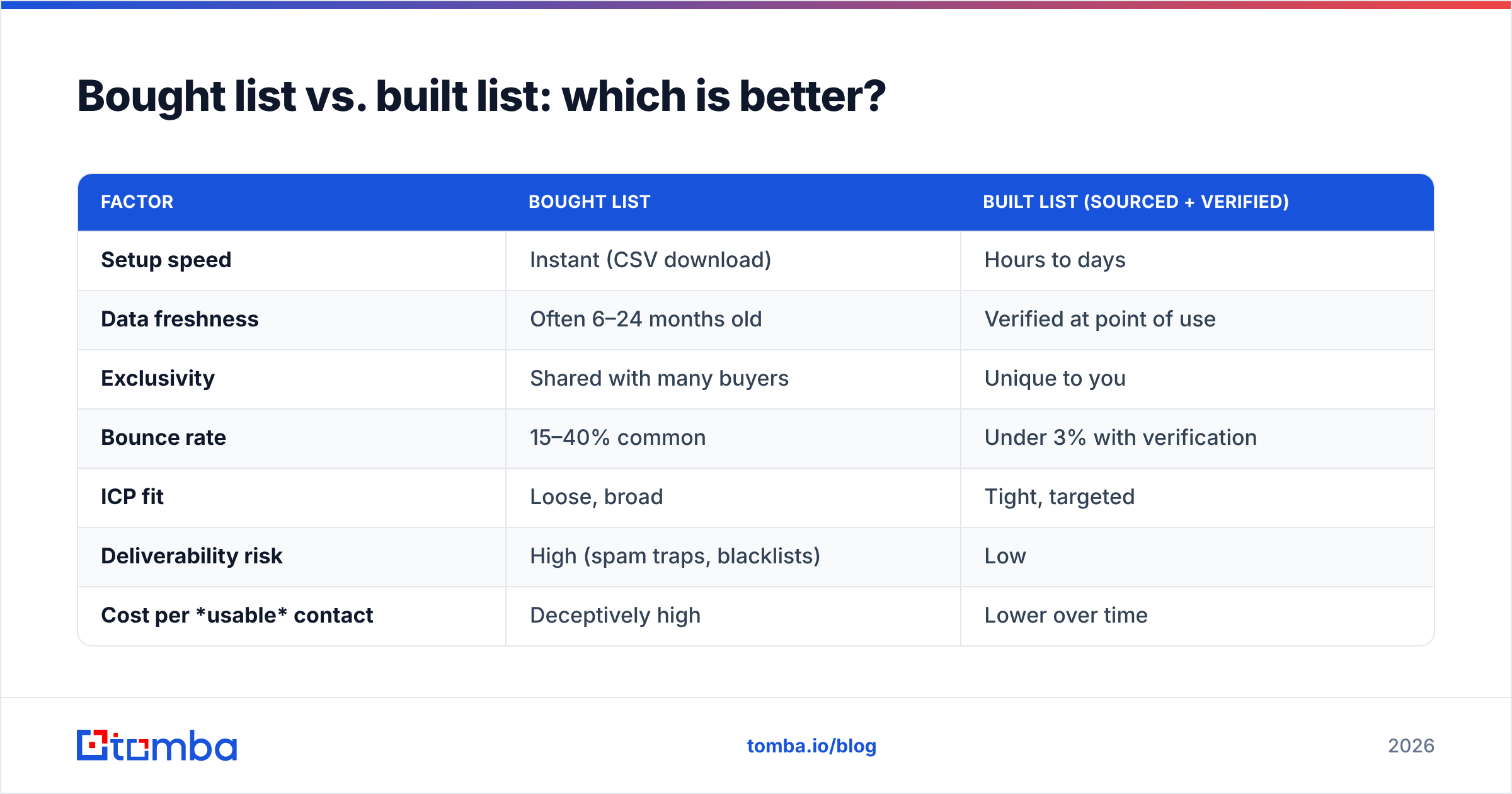
A built list wins on every metric that matters except raw speed. Here's the honest comparison:
| Factor | Bought List | Built List (sourced + verified) |
|---|---|---|
| Setup speed | Instant (CSV download) | Hours to days |
| Data freshness | Often 6–24 months old | Verified at point of use |
| Exclusivity | Shared with many buyers | Unique to you |
| Bounce rate | 15–40% common | Under 3% with verification |
| ICP fit | Loose, broad | Tight, targeted |
| Deliverability risk | High (spam traps, blacklists) | Low |
| Cost per usable contact | Deceptively high | Lower over time |
| Compliance control | Unknown provenance | You control sourcing |
The "cost per usable contact" row is the one most teams miss. A $0.10/contact bought list looks cheap until 35% bounce and another 30% are off-ICP — suddenly your real cost per workable lead is triple the sticker price, and you've also damaged your domain in the process.

How do you build a B2B contact list step by step?#
Building a high-converting list follows a repeatable five-stage workflow. Treat it as a pipeline, not a one-time project.
- Define your ICP first. Before sourcing a single contact, write down firmographics (industry, company size, revenue, region) and the buyer persona (job titles, seniority, department). A list without an ICP is just noise.
- Source contacts at target accounts. Use a domain search to pull every known email pattern at a company, or an email finder to get a specific person's work address by name and domain. This is where you turn a company list into a contact list.
- Verify every email. Run the list through an email verifier to remove invalid, role-based, and risky addresses before you send. Catch-all domains get flagged separately so you can decide how aggressive to be.
- Enrich with context. Add job title, LinkedIn, phone, and company data so reps can personalize. Data enrichment turns a bare email into a real, researchable lead.
- Segment and refresh. Split the list by persona and intent, then re-verify quarterly. Data decays whether you use it or not.
This source-verify-enrich-segment-refresh loop is what separates a clean, durable asset from a one-and-done CSV that rots in your CRM.

Where should the data actually come from?#
Source quality determines list quality. Prioritize providers that explain where the data comes from and verify at the point of retrieval rather than serving a cached dump. Public web data, validated company patterns, and live SMTP checks beat a recycled database every time. When a vendor won't tell you how data was collected, treat that as a compliance red flag, not a minor detail.
How do you keep a B2B contact list clean over time?#
You schedule maintenance — clean lists are a habit, not an event. Even a perfectly built list degrades, so the goal is to slow decay and catch rot early.
- Re-verify quarterly. Run the full list through verification every 90 days. Bulk verification makes this painless even for tens of thousands of rows.
- Suppress hard bounces immediately. Never re-send to an address that already bounced. Maintain a permanent suppression list.
- Watch role-based and catch-all addresses.
info@,sales@, and catch-all domains behave unpredictably; segment them and send carefully. - Track engagement decay. A contact who hasn't opened in six months is a re-verification (or removal) candidate.
- Deduplicate on import. Merge duplicate rows so you don't double-send and look spammy.
Tools matter here. The bulk email finder and verification stack let you clean an entire list in one pass, and integrations with HubSpot or Salesforce keep your CRM from re-introducing dirty records. For a quick one-off check, a free email checker handles single addresses.
What does a high-quality list row look like?#
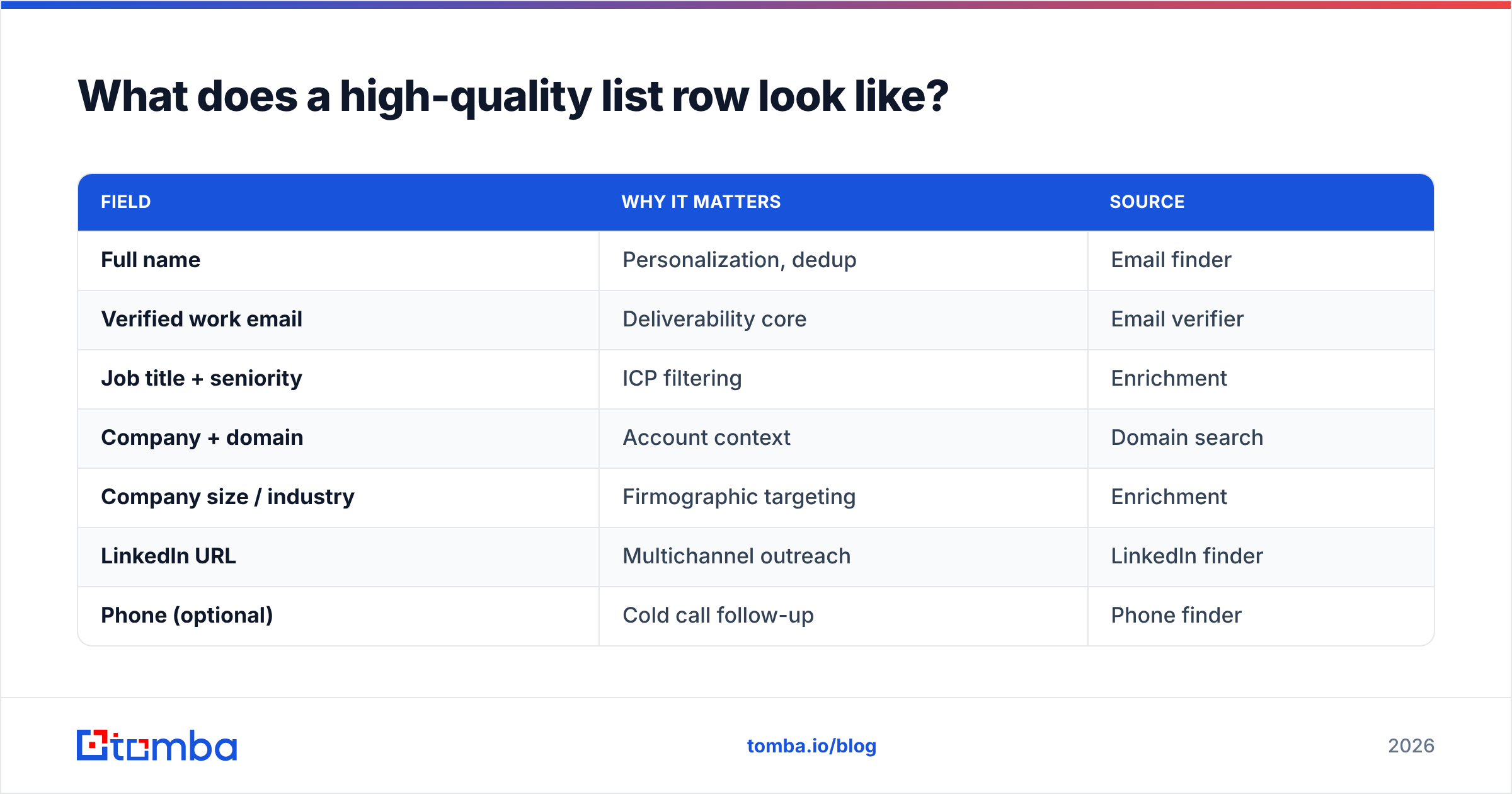
Aim for completeness without bloat. Every field should earn its place by enabling targeting or personalization.
| Field | Why it matters | Source |
|---|---|---|
| Full name | Personalization, dedup | Email finder |
| Verified work email | Deliverability core | Email verifier |
| Job title + seniority | ICP filtering | Enrichment |
| Company + domain | Account context | Domain search |
| Company size / industry | Firmographic targeting | Enrichment |
| LinkedIn URL | Multichannel outreach | LinkedIn finder |
| Phone (optional) | Cold call follow-up | Phone finder |
| Verification status | Send/suppress decision | Verifier |
Notice that "verification status" is a column, not an assumption. The moment you treat deliverability as a stored, refreshable attribute rather than a hope, your campaigns get measurably more predictable.
How big should a B2B contact list be?#
Smaller and tighter beats bigger and broader — every time. A focused list of 500 perfectly matched, verified contacts will out-convert a generic list of 50,000 almost without exception, because relevance drives reply rates and clean data protects your domain.
The math is simple. Sending to 50,000 loosely targeted contacts at a 0.5% reply rate gets you 250 replies but risks blacklisting. Sending to 500 ICP-perfect, verified contacts at a 6% reply rate gets you 30 replies with zero deliverability risk — and those replies are from people who actually fit. Scale the quality motion once it works; don't start by scaling volume.
If you're chasing volume for a specific play (broad awareness, event invites), segment ruthlessly and warm your sending domain first. Use a warmup calculator to ramp send volume safely instead of blasting a cold domain.
Is buying B2B contact lists legal and compliant?#
It depends on jurisdiction and consent — and "the vendor said it's fine" is not a defense. Under GDPR (EU) and similar regimes, you generally need a lawful basis to process personal data, and legitimate-interest outreach has strict conditions. The U.S. CAN-SPAM Act permits cold B2B email but requires accurate headers, a real physical address, and a working opt-out.
The practical takeaways:
- Know your data's provenance. If you can't explain how a contact ended up on your list, you can't defend it. This is reason enough to favor transparent, documented data sources over anonymous database dumps.
- Honor opt-outs instantly and keep a permanent suppression list.
- Target by role, not by scraping en masse. Building a list of relevant decision-makers is far easier to justify than buying a bulk dump.
For authoritative guidance, the official GDPR portal and the FTC's CAN-SPAM compliance guide are the primary sources — read them, don't rely on a vendor's marketing page. You can also compare data-provider reputations on G2 before committing.
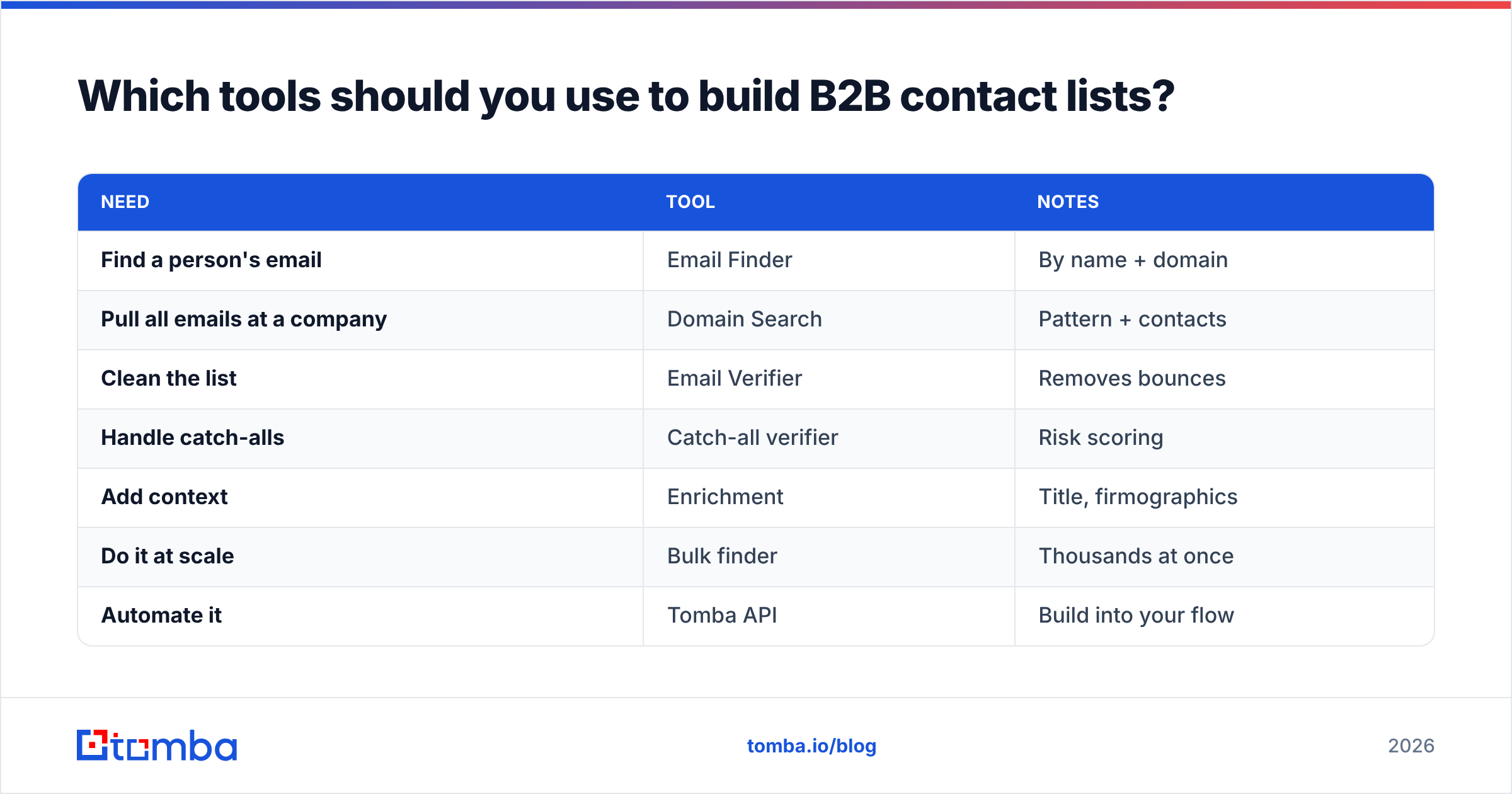
Which tools should you use to build B2B contact lists?#
The ideal stack handles sourcing, verification, and enrichment in one workflow so you're not stitching CSVs between five vendors. Here's how the core capabilities map to Tomba's toolset and typical pricing:
| Need | Tool | Notes |
|---|---|---|
| Find a person's email | Email Finder | By name + domain |
| Pull all emails at a company | Domain Search | Pattern + contacts |
| Clean the list | Email Verifier | Removes bounces |
| Handle catch-alls | Catch-all verifier | Risk scoring |
| Add context | Enrichment | Title, firmographics |
| Do it at scale | Bulk finder | Thousands at once |
| Automate it | Tomba API | Build into your flow |
On pricing, Tomba runs a Free tier (25 searches/mo), then Starter at $49/mo, Growth at $99/mo, Pro at $249/mo, and custom Enterprise — so you can validate the workflow before scaling spend. Compared with buying a static database, you're paying for fresh, verified contacts at the moment you need them, not a depreciating snapshot.
Bottom line#
Stop renting other people's stale data and start building lists you actually own. A B2B contact list is a living asset: source it against a tight ICP, verify every address before you send, enrich it for personalization, and refresh it quarterly. Do that, and your bounce rate drops, your domain stays healthy, and your reply rates climb.
Ready to build clean lists without the bounce pile? Start with the Tomba Email Finder to source verified, ICP-matched contacts by name, company, or domain — then run them through the built-in verifier so every row in your list is one you can actually send to. The Free tier gives you 25 searches to test the workflow before you scale.
// get started
Find, verify and enrich your first contacts today
Start on the free plan with 25 searches a month, then scale when your team is ready.
Free plan · No credit card required · GDPR & CCPA
// about the author