B2B Customer Journey Touchpoints: The 2026 Mapping Guide
Map every B2B customer journey touchpoint from first ad to renewal. A practical 2026 framework for stages, channels, owners, and the data that connects them.
A B2B buyer rarely walks a straight line from "never heard of you" to "signed contract." They bounce between a webinar, three review sites, a cold email, two colleagues, and a sales demo — often over months. Each of those moments is a touchpoint, and if you can't name them, you can't improve them.
This guide breaks the B2B customer journey into concrete touchpoints, shows who owns each one, and explains how to connect them with clean data instead of guesswork.
TL;DR#
- A touchpoint is any interaction between a prospect or customer and your company — ads, emails, sales calls, support tickets, renewal reviews.
- B2B journeys span six stages: awareness, consideration, decision, onboarding, retention, and advocacy. Each has its own touchpoints and owners.
- The average B2B deal involves 6–10 decision-makers and dozens of touches, so mapping matters more than in B2C.
- Most teams lose deals in the gaps between touchpoints, not at the touchpoints themselves — usually because data doesn't follow the buyer.
- A shared data layer (clean contact records, enrichment, and accurate emails) is what turns a list of touchpoints into a connected journey.
What is a B2B customer journey touchpoint?#
A touchpoint is any moment a buyer interacts with your brand, product, or people. Think of it like stops on a subway line: the journey is the full route, and each station is a touchpoint where the rider can get on, transfer, or get off. Miss a station — or label it wrong on the map — and people get lost.
In B2B specifically, touchpoints are messier than in consumer marketing for three reasons:
- Multiple buyers. A single deal involves a champion, an economic buyer, technical evaluators, and often procurement and legal. Each one has their own touchpoints.
- Longer cycles. Sales cycles of 3–12 months mean a prospect may touch your brand 20+ times before talking to sales.
- Mixed channels. A buyer reads a blog post, clicks a LinkedIn ad, downloads a PDF, then replies to a cold email — all before your CRM shows a single "real" activity.
According to Gartner research on B2B buying, buyers spend only about 17% of their journey actually meeting with potential suppliers. The other 83% happens at touchpoints you don't directly control — which is exactly why mapping them is worth the effort.
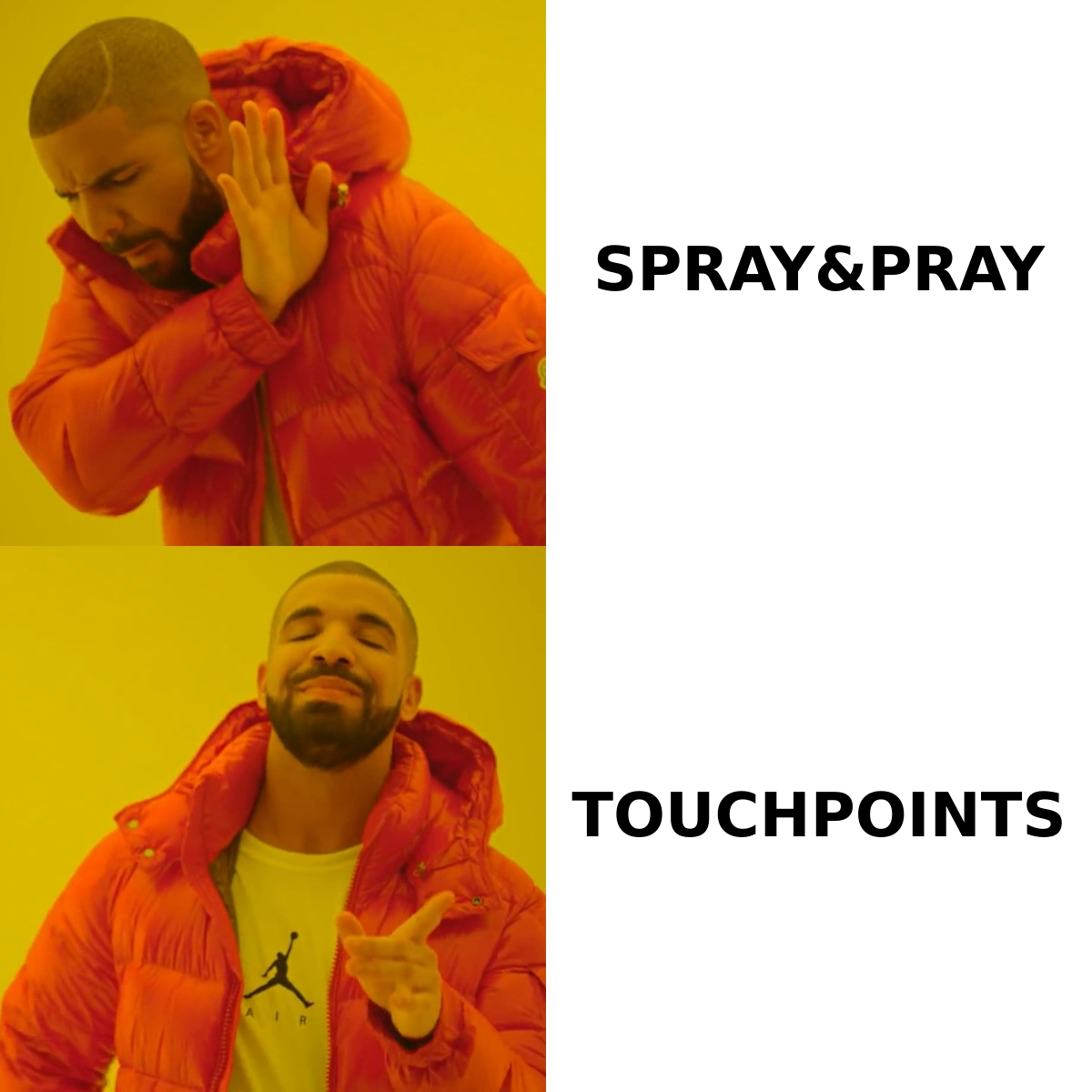
What are the main stages and touchpoints in a B2B journey?#
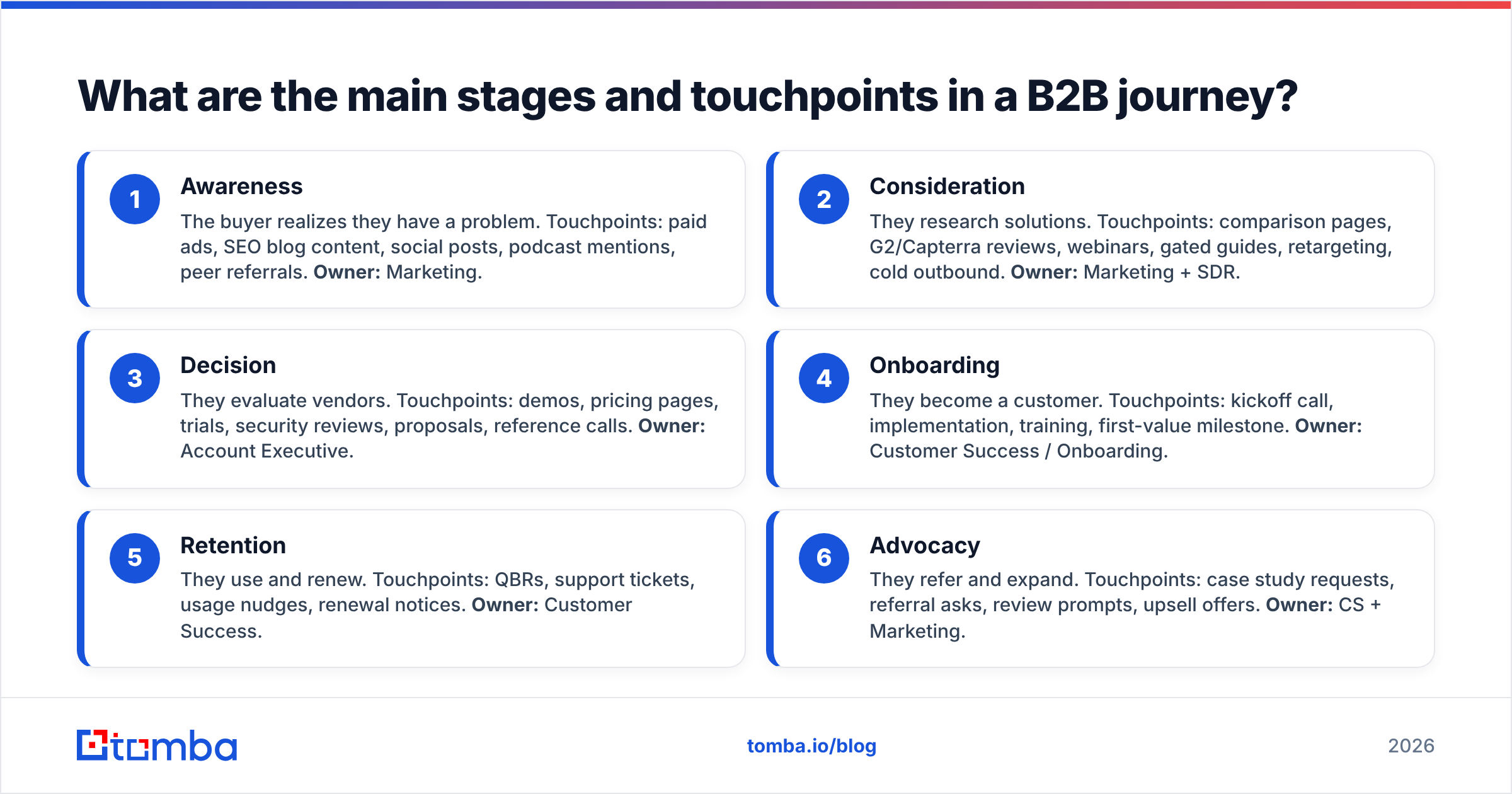
Most B2B journeys flatten into six stages. Here's a structured map of each stage, the typical touchpoints inside it, and who owns them.
- Awareness — The buyer realizes they have a problem. Touchpoints: paid ads, SEO blog content, social posts, podcast mentions, peer referrals. Owner: Marketing.
- Consideration — They research solutions. Touchpoints: comparison pages, G2/Capterra reviews, webinars, gated guides, retargeting, cold outbound. Owner: Marketing + SDR.
- Decision — They evaluate vendors. Touchpoints: demos, pricing pages, trials, security reviews, proposals, reference calls. Owner: Account Executive.
- Onboarding — They become a customer. Touchpoints: kickoff call, implementation, training, first-value milestone. Owner: Customer Success / Onboarding.
- Retention — They use and renew. Touchpoints: QBRs, support tickets, usage nudges, renewal notices. Owner: Customer Success.
- Advocacy — They refer and expand. Touchpoints: case study requests, referral asks, review prompts, upsell offers. Owner: CS + Marketing.
The point of writing it this way isn't bureaucracy. It's accountability: when every touchpoint has a named owner, the handoffs between marketing, sales, and success stop being a place where deals quietly die.
How many touchpoints does a B2B sale actually take?#
The honest answer: more than most teams think, and the number keeps climbing.
Industry benchmarks from sources like HubSpot's sales research consistently show that closing a B2B deal takes many more touches than reps expect — frequently eight or more meaningful interactions before a buyer commits. Combine that with the 6–10 person buying committee typical in enterprise deals, and a single closed-won logo can represent 50+ individual touchpoints across the account.
This is why "we sent one email and they didn't reply" is not a strategy. It's why journey mapping beats one-shot outreach. And it's why your response rate depends less on any single clever message and more on showing up consistently, with relevant context, across the whole journey.
What's the difference between a touchpoint, a channel, and a stage?#
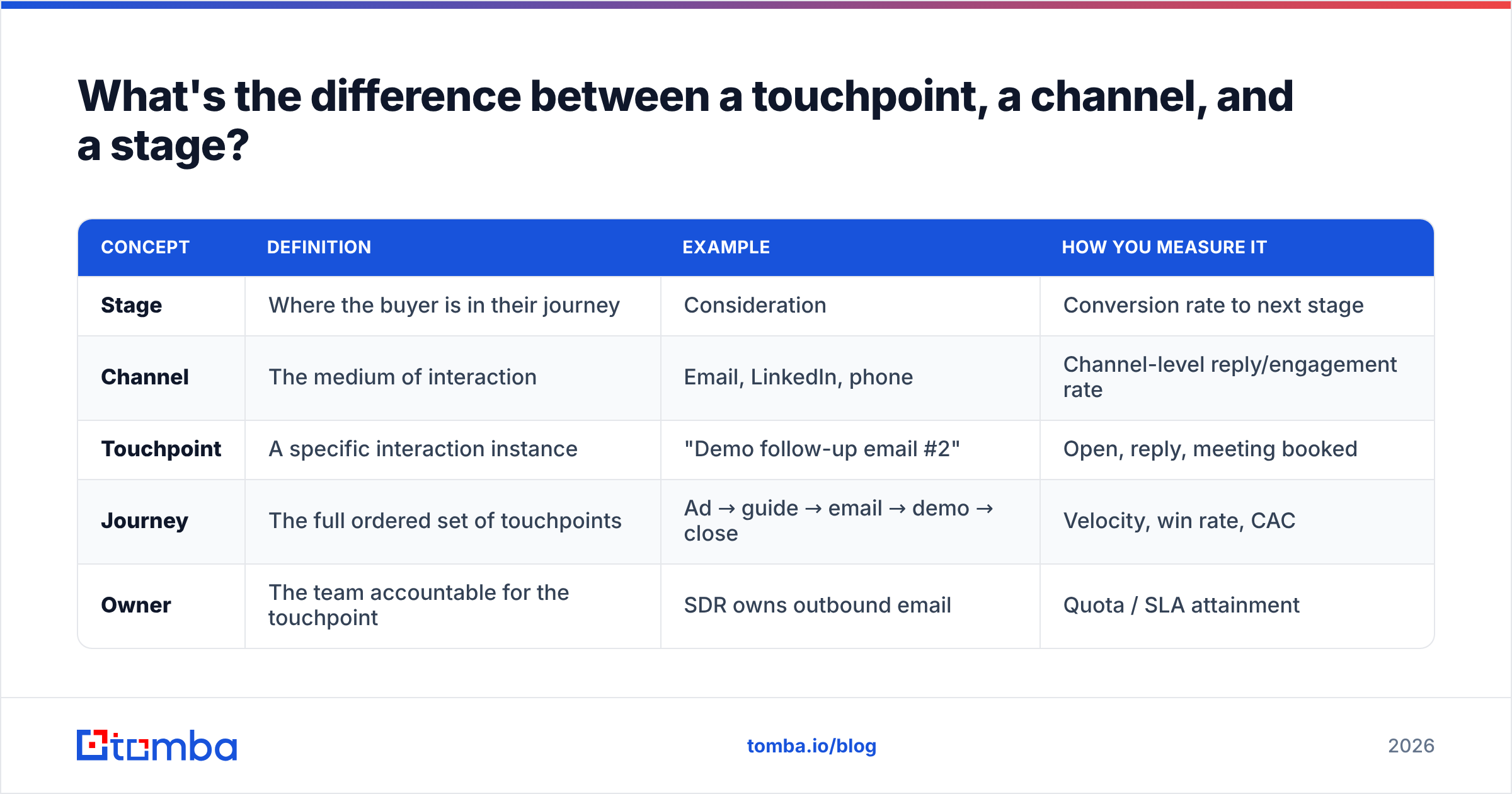
These three terms get blurred constantly, and the confusion leads to bad reporting. Here's a clean comparison.
| Concept | Definition | Example | How you measure it |
|---|---|---|---|
| Stage | Where the buyer is in their journey | Consideration | Conversion rate to next stage |
| Channel | The medium of interaction | Email, LinkedIn, phone | Channel-level reply/engagement rate |
| Touchpoint | A specific interaction instance | "Demo follow-up email #2" | Open, reply, meeting booked |
| Journey | The full ordered set of touchpoints | Ad → guide → email → demo → close | Velocity, win rate, CAC |
| Owner | The team accountable for the touchpoint | SDR owns outbound email | Quota / SLA attainment |
When you separate these cleanly, your dashboards finally make sense. A drop in "email channel" performance is a different fix than a drop at the "decision stage," and you can act on each without guessing.
Why do B2B journeys break between touchpoints?#
Deals don't usually die at a touchpoint. They die in the gap between two of them — when data fails to follow the buyer from one interaction to the next.
Picture a relay race. Each runner (touchpoint) might be fast, but if the baton (the buyer's context and contact data) gets dropped at the handoff, the whole team loses. The most common dropped batons in B2B:
- Marketing-to-sales handoff. A lead downloads three guides, but the SDR gets a name and a generic info@ inbox instead of the buyer's direct email.
- SDR-to-AE handoff. The AE re-asks discovery questions the SDR already answered, because notes lived in someone's head, not the CRM.
- Sales-to-success handoff. Promises made in the deal never reach the onboarding team, and the customer repeats themselves.
- Stale data. People change jobs every few years; by renewal, your champion may have left and your contact record points nowhere.
Most of these breaks share a root cause: the contact data underneath the journey is incomplete, outdated, or wrong. You can map the most elegant journey in the world, but if the email bounces or the phone number is dead, the touchpoint never happens.
How does data quality connect your touchpoints?#
Clean, enriched contact data is the connective tissue of the journey. It's the difference between a list of disconnected events and a real, trackable path.
Three data jobs make touchpoints actually connect:
- Find the right person. When a target account shows buying signals, you need the decision-maker's direct contact — not a guess. An email finder turns a name and company domain into a verified, reachable address so the outbound touchpoint lands in a real inbox.
- Verify before you send. Sending to dead addresses tanks your sender reputation and corrupts your journey analytics. Running an email verifier before each outbound wave keeps bounce rates low and keeps your email deliverability healthy across every stage.
- Enrich the record. Title, company size, location, and social profiles let you route, score, and personalize touchpoints. Data enrichment fills the gaps so the AE walking into a demo knows exactly who they're talking to.
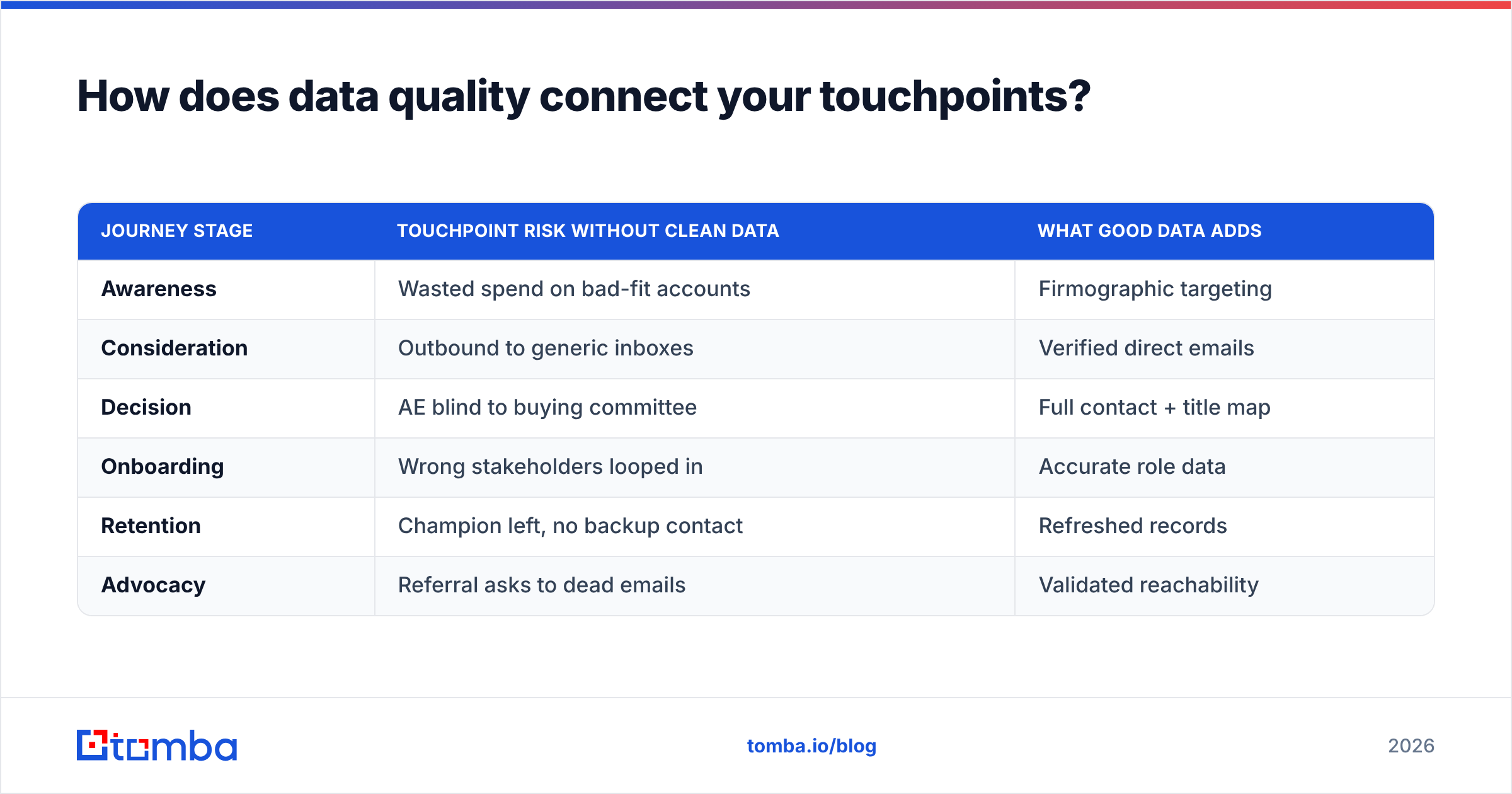
Think of it as keeping everyone's address book current so the baton never drops. Below is how a data-first approach changes each stage.
| Journey stage | Touchpoint risk without clean data | What good data adds |
|---|---|---|
| Awareness | Wasted spend on bad-fit accounts | Firmographic targeting |
| Consideration | Outbound to generic inboxes | Verified direct emails |
| Decision | AE blind to buying committee | Full contact + title map |
| Onboarding | Wrong stakeholders looped in | Accurate role data |
| Retention | Champion left, no backup contact | Refreshed records |
| Advocacy | Referral asks to dead emails | Validated reachability |
This is the unglamorous engine behind every polished journey map. The strategy gets the credit; the data does the work.
How do you actually map your B2B customer journey touchpoints?#
You don't need a six-figure consulting engagement. You need a whiteboard, your CRM, and a few hours. Here's a practical sequence.
- List your stages. Start with the six above and rename them to match how your buyers actually move.
- Inventory every touchpoint. Pull real data — emails sent, ads run, calls logged, tickets opened — and slot each into a stage. Don't invent touchpoints you wish you had.
- Assign an owner to each. One team, one name, per touchpoint. Ambiguous ownership is where journeys rot.
- Mark the handoffs. Circle every place the baton passes between teams. These are your highest-risk zones.
- Attach a metric. Give each touchpoint one number it's accountable for (reply rate, demo-booked rate, activation rate).
- Audit the data underneath. For every outbound touchpoint, ask: is the contact data verified? If not, fix the data before you optimize the message.
Once the map exists, review it monthly. Touchpoints drift — new channels appear, old ones decay, and buyer behavior shifts. A journey map is a living document, not a one-time deck. Tools like Salesforce's journey mapping resources can help you templatize this, but the discipline matters more than the tool.
What metrics tell you a touchpoint is working?#
Pick metrics that reveal movement, not vanity. A touchpoint is working if it pushes the buyer toward the next stage — full stop.
- Stage conversion rate — % of buyers who advance from this stage to the next. The single most important journey metric.
- Touchpoint reply/engagement rate — Did the interaction get a response? Low rates often signal a data problem, not a copy problem.
- Time-in-stage (velocity) — How long buyers sit before advancing. Stalls reveal weak or missing touchpoints.
- Multi-thread coverage — How many committee members you've touched. Single-threaded deals are fragile.
- Win rate by entry channel — Which awareness touchpoints produce deals that actually close, so you can double down.
If a touchpoint can't move at least one of these numbers, it's decoration. Cut it or fix it.
What does a connected B2B journey look like in practice?#
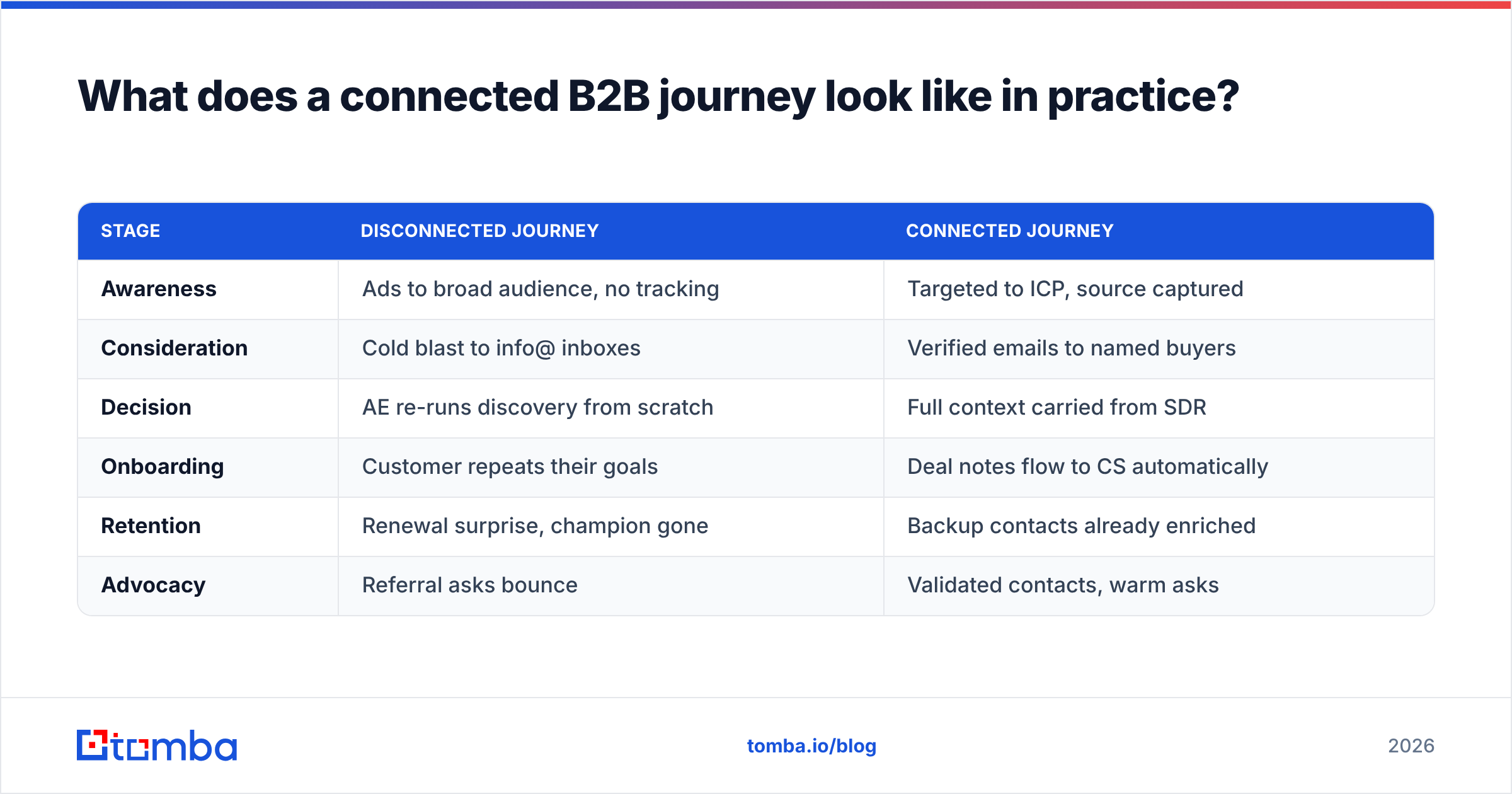
Here's the contrast in one table — the same six stages, run two ways.
| Stage | Disconnected journey | Connected journey |
|---|---|---|
| Awareness | Ads to broad audience, no tracking | Targeted to ICP, source captured |
| Consideration | Cold blast to info@ inboxes | Verified emails to named buyers |
| Decision | AE re-runs discovery from scratch | Full context carried from SDR |
| Onboarding | Customer repeats their goals | Deal notes flow to CS automatically |
| Retention | Renewal surprise, champion gone | Backup contacts already enriched |
| Advocacy | Referral asks bounce | Validated contacts, warm asks |
The connected version isn't smarter people. It's the same team with data that follows the buyer. When you compare Tomba pricing against the cost of one mishandled enterprise deal, the math on a clean data layer makes itself.
Closing: build the journey on data that doesn't break#
You can map touchpoints all day, but the journey only holds together if the contact data underneath it is accurate. Every outbound touchpoint — the cold email that opens the relationship, the follow-up that books the demo, the re-engagement that saves a stalled deal — depends on reaching a real person at a real address.
That's where Tomba Email Finder fits. It turns a name and company domain into a verified, deliverable email so your touchpoints actually land, with verification and contact enrichment built in to keep records fresh as buyers change roles. Start on the free tier (25 searches/month) to map your own journey, then scale up as your pipeline grows. Map the journey, own the touchpoints — and build them all on data you can trust.
Ready to find emails that actually work?
Join 150,000+ professionals who stopped guessing and started sending. Free credits on signup — no credit card required.
Get the Tomba newsletter
Practical outbound tactics and product updates — once every two weeks.
About the author