Best B2B Data Enrichment Tools in 2026: A Buyer's Guide
Stale CRM records quietly kill pipeline. Here's how the top B2B data enrichment tools compare on coverage, accuracy, pricing, and workflow fit in 2026.
Your CRM is decaying right now. B2B contact data goes stale at roughly 25–30% per year as people change jobs, companies rebrand, and phone numbers get reassigned. Data enrichment is how you fight that decay — automatically filling in and correcting the fields your reps need to actually reach a buyer.
This guide breaks down what B2B data enrichment tools do, how to judge them, and how the major players compare in 2026 so you can pick one without a three-month bake-off.
TL;DR#
- B2B data enrichment tools append, correct, and refresh contact and company records — email, phone, title, firmographics, and intent — against a database or live lookup.
- The three metrics that matter are match rate (coverage), accuracy (how often the data is right), and cost per verified record — not the size of the marketing-claimed database.
- Real-time API enrichment beats periodic batch uploads for inbound forms and lead routing; batch is fine for cleaning a backlog.
- For email-first enrichment with verification built in, Tomba is a strong, affordable pick; ZoomInfo and Clearbit win on breadth at much higher cost.
- Always verify enriched emails before you send. Enrichment without email verification just fills your CRM with confident-looking bounces.
What are B2B data enrichment tools?#
A B2B data enrichment tool is like a fact-checker for your contact database. You hand it a thin record — maybe just an email or a company domain — and it returns a complete profile: full name, job title, verified work email, phone number, LinkedIn URL, company size, industry, revenue, and tech stack.
Technically, enrichment works in one of two modes. Match-and-append takes an identifier you already have (email, domain, or LinkedIn URL) and looks up the rest from a maintained database. Discovery starts from a company and finds net-new contacts that match your buyer persona. Most serious platforms do both.
The data itself comes from a blend of sources: public web crawling, partner data co-ops, SMTP and catch-all verification, and user-contributed records. The quality of that blend — and how aggressively it's re-verified — is what separates a tool you can trust from a list broker.
)
Why does enrichment matter more than a bigger lead list?#
Conclusion first: a smaller list of accurate records outperforms a huge list of stale ones, every time. Bad data taxes every downstream step.
- Deliverability. Sending to outdated addresses spikes your bounce rate, which damages sender reputation and pushes your good emails into spam.
- Routing and scoring. If firmographics are missing, your lead-scoring model misfires and routing sends enterprise deals to the SMB queue.
- Rep productivity. SDRs waste 20–30% of their time on manual research that enrichment does in milliseconds.
- Personalization. You can't tailor a message to a title and industry you don't have on file.
According to Gartner, poor data quality costs organizations millions annually in wasted effort and missed revenue — and B2B contact data is the fastest-decaying category of all.
How do the top B2B data enrichment tools compare in 2026?#
The table below compares the platforms most teams shortlist. Prices are entry paid tiers as of 2026; enterprise pricing is quote-only for the larger vendors.
| Tool | Best for | Entry price | Free tier | Core strength |
|---|---|---|---|---|
| Tomba | Email-first enrichment + verification | $49/mo | 25 searches/mo | Accurate emails, domain search, built-in verifier |
| Clearbit (Breeze) | Inbound form + HubSpot enrichment | Bundled with HubSpot | Limited | Firmographic depth, real-time API |
| Apollo | All-in-one prospecting + enrichment | $49/mo | 1,200 credits/yr | Database + sequencing in one |
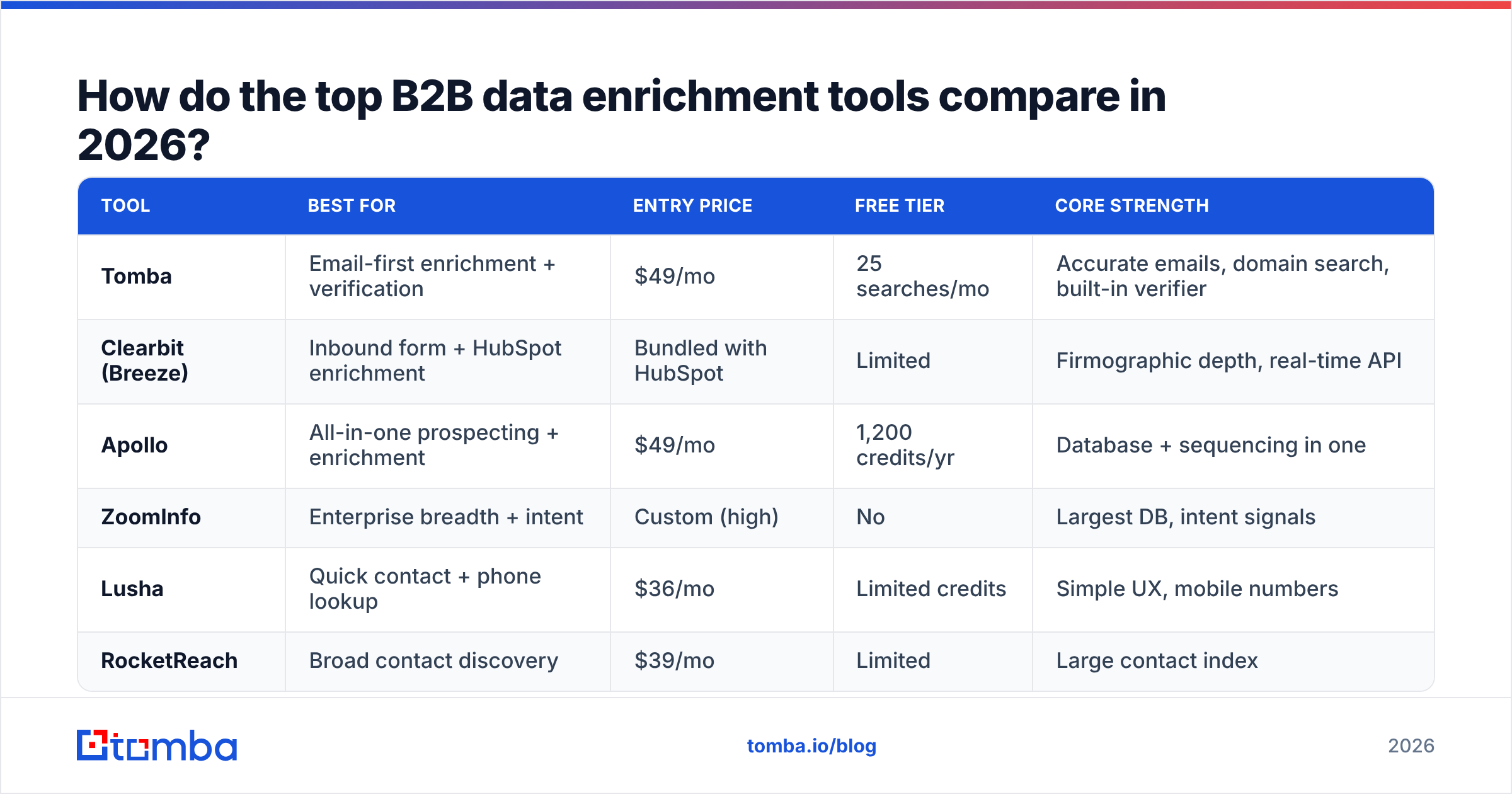
ZoomInfo | Enterprise breadth + intent | Custom (high) | No | Largest DB, intent signals | | Lusha | Quick contact + phone lookup | $36/mo | Limited credits | Simple UX, mobile numbers | | RocketReach | Broad contact discovery | $39/mo | Limited | Large contact index |
A few honest caveats. ZoomInfo has the deepest dataset, but contracts routinely run five figures and lock you in for a year — overkill unless you're enriching at real enterprise scale. Apollo bundles enrichment with sequencing, which is convenient but means you pay for outreach features you may not need. Clearbit is excellent if you're already deep in HubSpot, since it became Breeze Intelligence after the acquisition. If your primary need is finding and verifying work emails at a sane price, a focused tool like Tomba covers it without the platform tax.
How should you evaluate them?#
Score every tool against the same five criteria instead of trusting database-size claims:
- Match rate — On a sample of your records, what percentage gets enriched? Run the same 500-row test file through each vendor's trial.
- Accuracy — Of the matches returned, how many are correct and current? Spot-check 50 emails through a verifier.
- Freshness — How often is the database re-verified? Monthly beats "whenever."
- Coverage fit — A tool strong in North American SaaS may be thin in EMEA manufacturing. Test your actual ICP geography and industry.
- Cost per verified record — Divide real spend by the number of records you'd actually send to. This reorders most shortlists dramatically.
What's the difference between real-time and batch enrichment?#
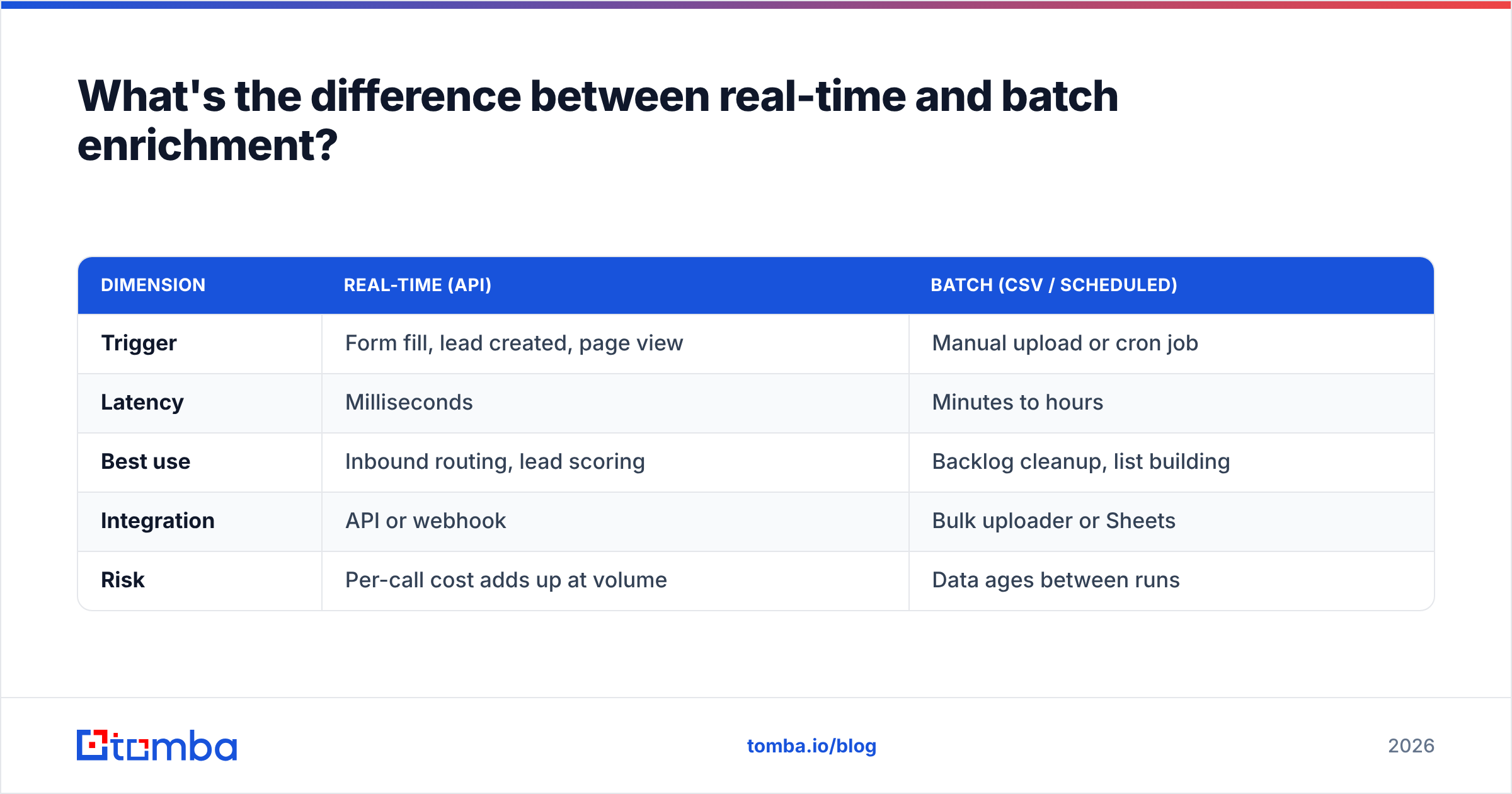
Real-time enrichment fires the moment a record is created — a form submit, a new CRM contact, a website visitor. Batch enrichment processes a file or CRM segment on a schedule.
| Dimension | Real-time (API) | Batch (CSV / scheduled) |
|---|---|---|
| Trigger | Form fill, lead created, page view | Manual upload or cron job |
| Latency | Milliseconds | Minutes to hours |
| Best use | Inbound routing, lead scoring | Backlog cleanup, list building |
| Integration | API or webhook | Bulk uploader or Sheets |
| Risk | Per-call cost adds up at volume | Data ages between runs |
Most teams need both. Use real-time for inbound — you want a lead routed and scored before an SDR sees it. Use batch to clean the backlog and to enrich outbound lists you build from a domain search. Tools like Tomba expose the same data through a real-time API, a bulk uploader, and a Google Sheets add-on, so you don't switch vendors to switch modes.
)
How do you keep enriched data clean over time?#
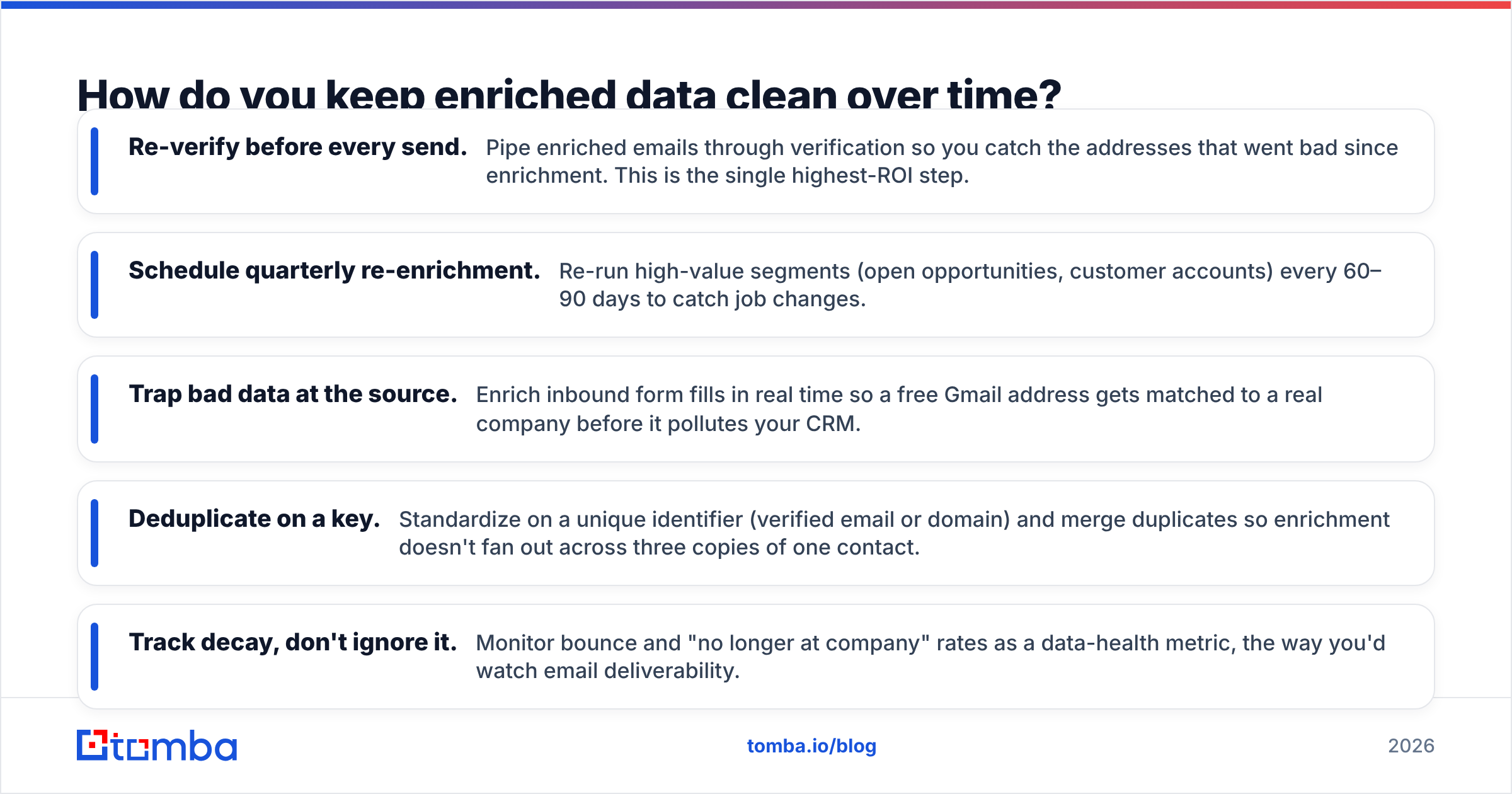
Enrichment is not a one-time event — it's a maintenance habit. Records you enriched in January are already decaying by Q2.
- Re-verify before every send. Pipe enriched emails through verification so you catch the addresses that went bad since enrichment. This is the single highest-ROI step.
- Schedule quarterly re-enrichment. Re-run high-value segments (open opportunities, customer accounts) every 60–90 days to catch job changes.
- Trap bad data at the source. Enrich inbound form fills in real time so a free Gmail address gets matched to a real company before it pollutes your CRM.
- Deduplicate on a key. Standardize on a unique identifier (verified email or domain) and merge duplicates so enrichment doesn't fan out across three copies of one contact.
- Track decay, don't ignore it. Monitor bounce and "no longer at company" rates as a data-health metric, the way you'd watch email deliverability.
A practical pattern: enrich on entry, verify on exit. Append everything you can when a record is created, then re-verify the contactable fields right before the record is used in an outbound motion.
Is a dedicated enrichment tool worth it over a CRM's native feature?#
Short answer: usually yes, because CRM-native enrichment is shallow and capped. HubSpot, Salesforce, and Pipedrive all offer some enrichment, but it's typically limited to firmographics, gated behind higher tiers, and not tuned for finding and verifying personal work emails at scale.
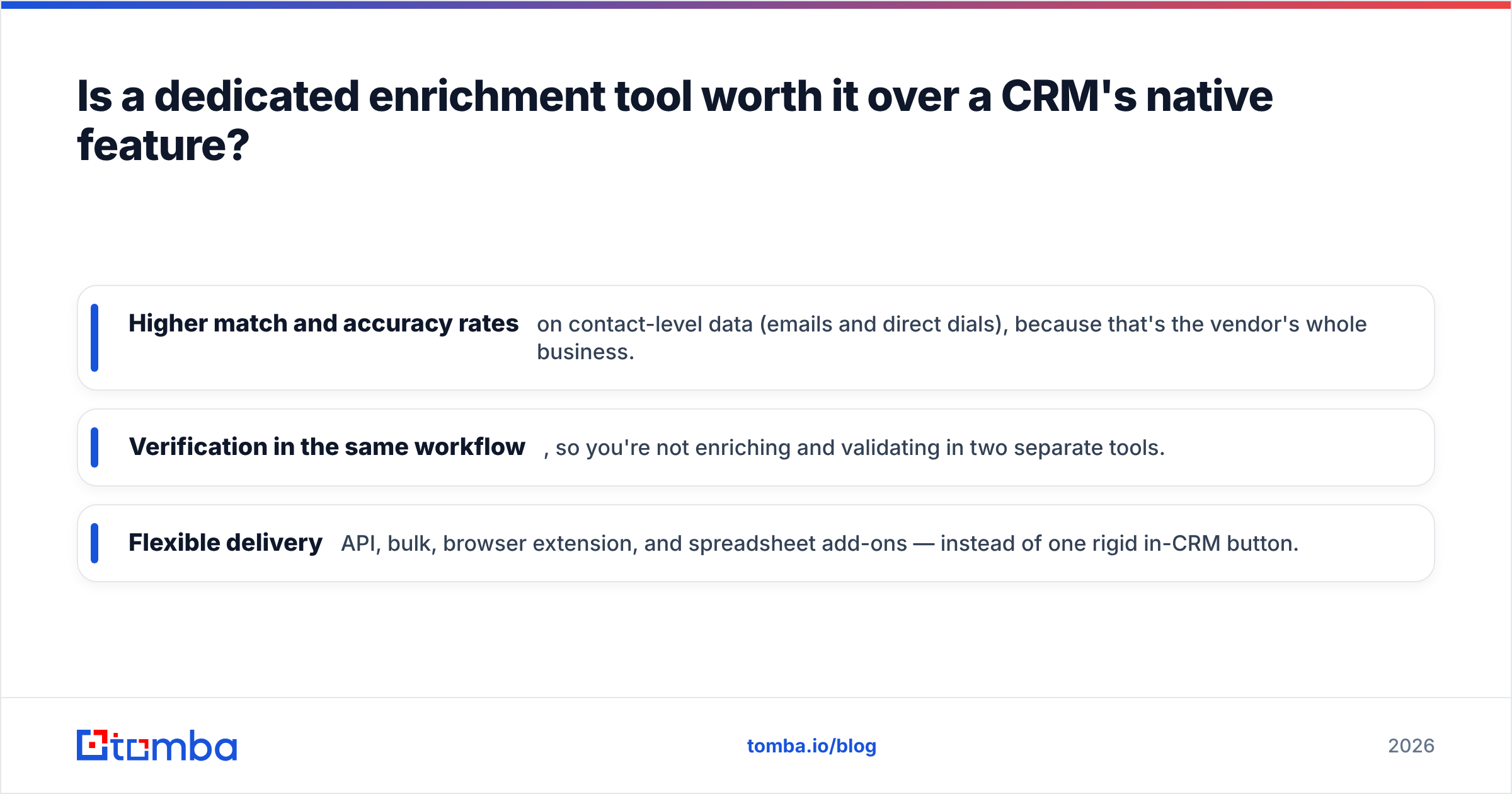
A dedicated tool gives you three things native features rarely match:
- Higher match and accuracy rates on contact-level data (emails and direct dials), because that's the vendor's whole business.
- Verification in the same workflow, so you're not enriching and validating in two separate tools.
- Flexible delivery — API, bulk, browser extension, and spreadsheet add-ons — instead of one rigid in-CRM button.
The pragmatic setup for most teams: keep your CRM as the system of record, and connect a focused enrichment provider through a native HubSpot or Salesforce integration so enriched, verified data flows in automatically. You can compare full plan details on the Tomba pricing page against your CRM's enrichment add-on cost — the dedicated tool is often cheaper per usable record.
What should a small team buy versus an enterprise?#
The right answer scales with your motion and budget.
- Solo founder / small team: Start with a generous free tier and an entry plan around $49/mo. You want accurate emails, basic firmographics, and verification — not a 30-field enterprise profile. A focused email-finder-plus-enrichment tool is the sweet spot.
- Scaling SMB / mid-market: Add real-time API enrichment for inbound, bulk for list building, and a CRM integration. Watch cost-per-record as volume climbs.
- Enterprise: You may genuinely need intent data, deep firmographics, and org charts — the territory where ZoomInfo and Clearbit/Breeze earn their price. Even then, many enterprises run a cheaper email-verification layer underneath to control bounce rates.
Don't over-buy. A common mistake is purchasing an enterprise intent platform to solve what is really a "we have dirty emails" problem — which a verification and enrichment workflow at a fraction of the cost would fix.
The bottom line#
The best B2B data enrichment tool is the one that returns accurate, verified records for your ICP at a defensible cost per usable contact — not the one with the biggest database on the homepage. Run the same test file through your shortlist, score match rate and accuracy yourself, and verify before you send.
If your enrichment problem is fundamentally about finding and confirming real work emails — the field that decays fastest and hurts most when it's wrong — start with the Tomba Email Finder. It pairs domain search, contact discovery, and built-in verification in one workflow, with a free tier to test against your own list and paid plans from $49/mo. Enrich on entry, verify on exit, and let your reps spend their time selling instead of researching.
// get started
Find, verify and enrich your first contacts today
Start on the free plan with 25 searches a month, then scale when your team is ready.
Free plan · No credit card required · GDPR & CCPA
// about the author