Best B2B Email Lookup Tool in 2026: Accuracy, Pricing & Picks
A B2B email lookup tool turns a name, domain, or LinkedIn profile into a verified work email. Here's how the top options compare on accuracy, price, and bounce rates in 2026.
TL;DR
- A B2B email lookup tool converts a name + company (or a domain, or a LinkedIn URL) into a verified business email address, so you stop guessing formats and stop bouncing.
- The only metrics that matter are accuracy, verified-rate, bounce rate, and cost per valid email — not the size of the marketing claims.
- Free format guessers (permutators) are fine for one-off lookups; they fall apart at scale because they don't verify.
- Tomba covers finder + verifier + domain search + enrichment in one credit pool, with a free tier (25 searches/mo) and paid plans from $49/mo.
- Below: a side-by-side comparison table, the accuracy benchmarks, and a decision framework for picking the right tool for your motion.
What is a B2B email lookup tool?#
A B2B email lookup tool is software that takes the little you already know about a prospect — a full name and a company domain, a LinkedIn profile, or just a company website — and returns the person's verified work email address.
Think of it like a phone book that rebuilds itself every day. Old directories rot the moment someone changes jobs. A good lookup tool re-checks its sources, re-pings the mail server, and tells you whether the address is still live right now — not whether it was live last year.
Under the hood, most tools combine three techniques:
- Pattern detection — they learn that a company uses
first.last@domain.comorflast@domain.comand apply that pattern to your target. - Data sourcing — they cross-reference public web pages, corporate sites, and proprietary databases to confirm the address actually exists.
- SMTP verification — they connect to the receiving mail server to check whether the mailbox accepts mail, without sending anything.
The difference between a toy and a tool is step 3. Anyone can generate john.smith@acme.com. Only a real platform tells you whether John still reads that inbox.

How does an email lookup tool actually work?#
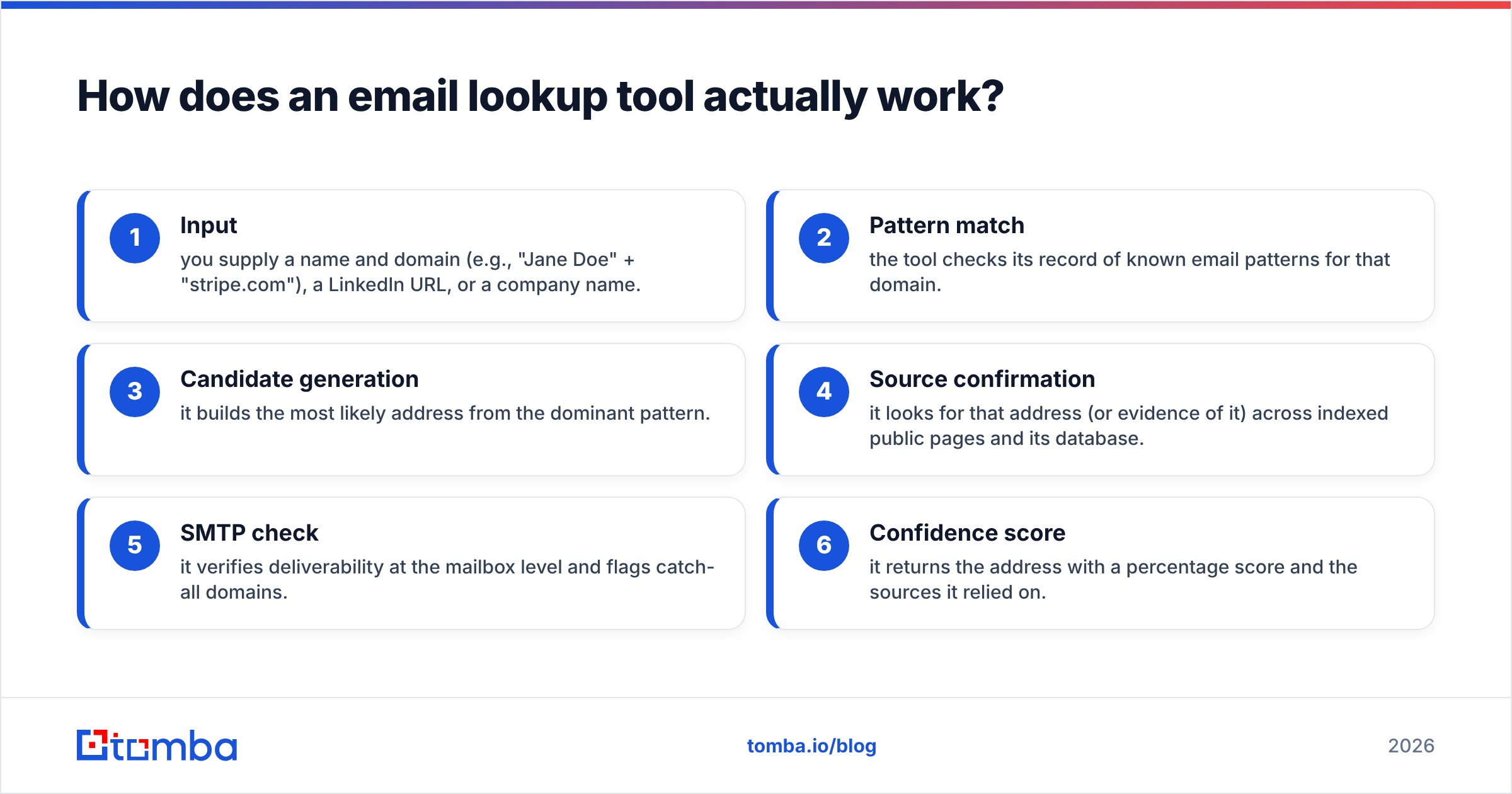
Here is the typical flow when you run a single lookup, end to end:
- Input — you supply a name and domain (e.g., "Jane Doe" + "stripe.com"), a LinkedIn URL, or a company name.
- Pattern match — the tool checks its record of known email patterns for that domain.
- Candidate generation — it builds the most likely address from the dominant pattern.
- Source confirmation — it looks for that address (or evidence of it) across indexed public pages and its database.
- SMTP check — it verifies deliverability at the mailbox level and flags catch-all domains.
- Confidence score — it returns the address with a percentage score and the sources it relied on.
For one prospect, you'd use a email finder or a Chrome extension. For a whole company, a domain search returns every discoverable address on a domain at once. For a spreadsheet of 5,000 leads, a bulk email finder processes the list and hands back a verified file.
The piece people skip — and then regret — is verification. Even the best finder occasionally returns a stale address. Running results through an email verifier before you load them into a sequence is what keeps your bounce rate under the 2–3% that inbox providers tolerate before they start throttling you.
What separates a good B2B email lookup tool from a bad one?#
Five attributes. Ignore everything else on the pricing page.
- Match rate — what percentage of your input list returns any email. High match rate with low accuracy is a trap.
- Accuracy / verified rate — of the emails returned, how many are actually valid and deliverable. This is the number that protects your sender reputation.
- Bounce rate in the wild — the inverse of accuracy, measured after you actually send. Aim for under 3%.
- Catch-all handling — domains that accept all mail are the hardest case. A serious tool flags them and offers a catch-all verifier instead of silently marking them "valid."
- Cost per valid email — not cost per credit. A cheap credit that returns garbage is more expensive than a pricey credit that returns gold.

Accuracy is where most "free" tools quietly lose you money. A 70%-accurate list looks fine in the spreadsheet and then torches your domain reputation the week you send it. If you want to understand how providers track that damage, Google's own Postmaster Tools documentation explains how spam rate and reputation feed into whether your mail even reaches the inbox.
Which B2B email lookup tool is best in 2026?#
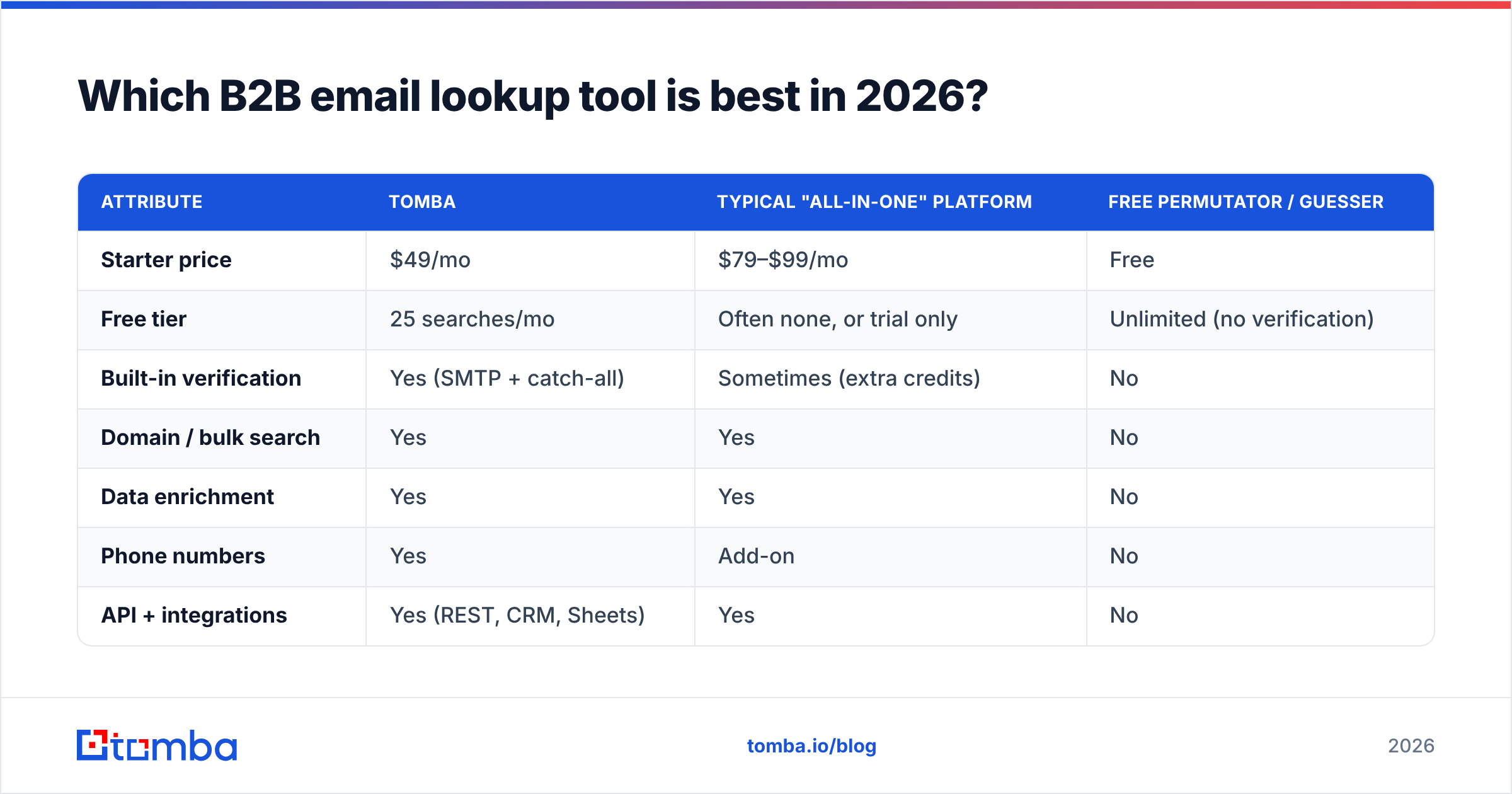
There's no single winner — there's a best fit for your volume and budget. Here's how the main categories stack up.
| Attribute | Tomba | Typical "all-in-one" platform | Free permutator / guesser |
|---|---|---|---|
| Starter price | $49/mo | $79–$99/mo | Free |
| Free tier | 25 searches/mo | Often none, or trial only | Unlimited (no verification) |
| Built-in verification | Yes (SMTP + catch-all) | Sometimes (extra credits) | No |
| Domain / bulk search | Yes | Yes | No |
| Data enrichment | Yes | Yes | No |
| Phone numbers | Yes | Add-on | No |
| API + integrations | Yes (REST, CRM, Sheets) | Yes | No |
| Best for | Accuracy-first teams, SMBs to scaleups | Large outbound orgs with budget | One-off manual lookups |
The honest read: if you only need to find one email a week, a free email permutator plus a manual check is enough. The moment you're running real outbound — dozens to thousands of contacts a month — you need a tool that finds and verifies in one pass, or you'll spend your savings cleaning bounces.

For a deeper feature-by-feature breakdown against specific competitors, the Apollo alternative and RocketReach alternative comparisons go line by line. And if you want to validate vendor claims independently, third-party review sites like G2 aggregate real-user bounce-rate feedback that marketing pages won't show you.
How much should a B2B email lookup tool cost?#
Price by cost per valid email, not by sticker price or credit count.
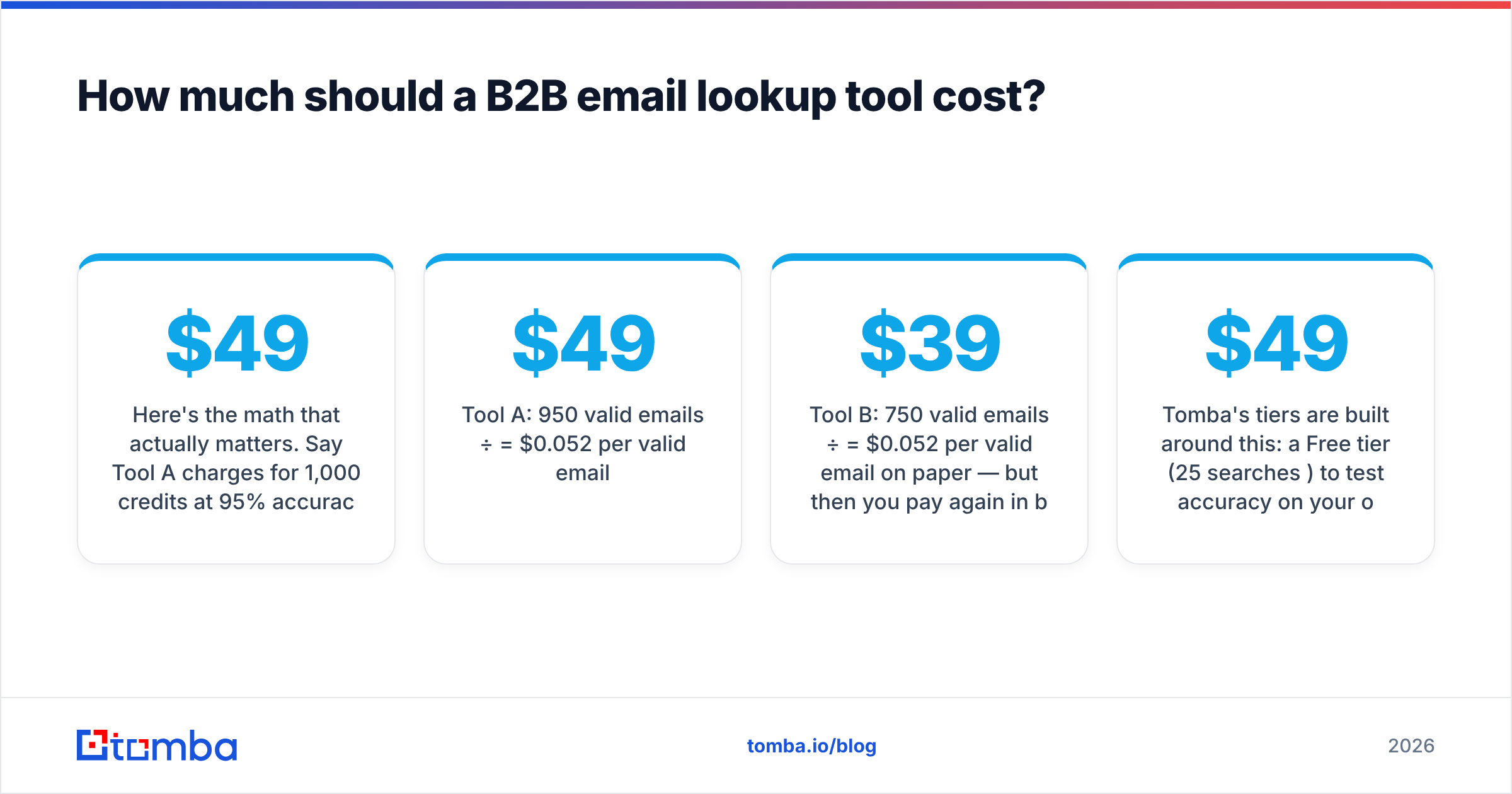
Here's the math that actually matters. Say Tool A charges $49/mo for 1,000 credits at 95% accuracy, and Tool B charges $39/mo for 1,000 credits at 75% accuracy:
- Tool A: 950 valid emails ÷ $49 = $0.052 per valid email
- Tool B: 750 valid emails ÷ $39 = $0.052 per valid email on paper — but then you pay again in bounces, blocked sends, and a damaged domain you can't easily un-damage.
The cheaper credit isn't cheaper. It just moves the cost somewhere you can't see on the invoice.
Tomba's tiers are built around this: a Free tier (25 searches/mo) to test accuracy on your own list, Starter at $49/mo, Growth at $99/mo, Pro at $249/mo, and custom Enterprise pricing. Full numbers live on the Tomba pricing page. The rule of thumb: run your own sample list through the free tier of any tool before you pay, and judge by valid-email yield, not by the headline credit count.
When should you use a finder vs. a verifier vs. enrichment?#
These three jobs get confused constantly. Match the tool to the job:
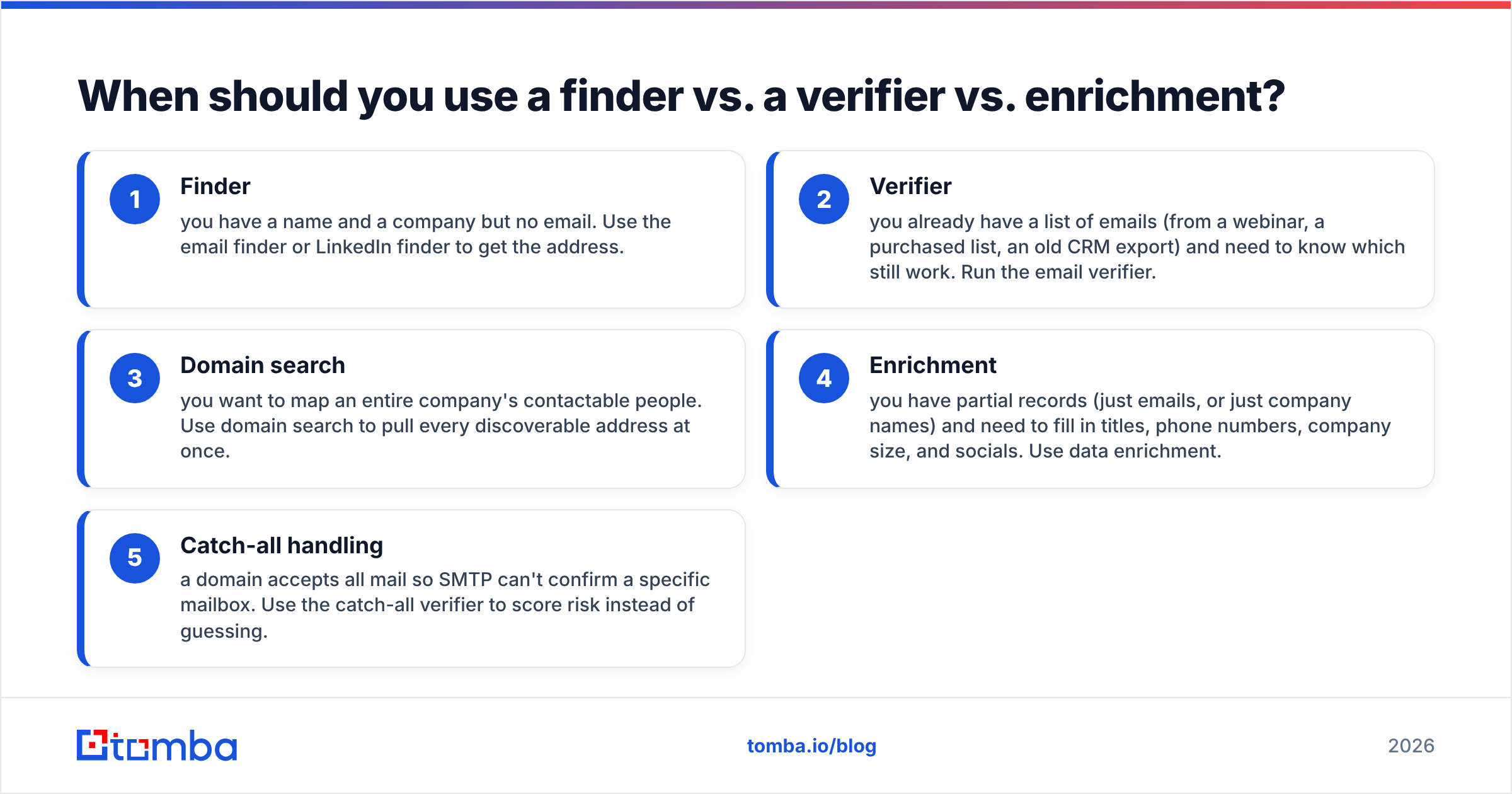
- Finder — you have a name and a company but no email. Use the email finder or LinkedIn finder to get the address.
- Verifier — you already have a list of emails (from a webinar, a purchased list, an old CRM export) and need to know which still work. Run the email verifier.
- Domain search — you want to map an entire company's contactable people. Use domain search to pull every discoverable address at once.
- Enrichment — you have partial records (just emails, or just company names) and need to fill in titles, phone numbers, company size, and socials. Use data enrichment.
- Catch-all handling — a domain accepts all mail so SMTP can't confirm a specific mailbox. Use the catch-all verifier to score risk instead of guessing.
Most teams need a finder + verifier combo at minimum. Buying them from one vendor on a shared credit pool is cheaper and less error-prone than stitching two subscriptions together — and it keeps your enrichment, phone, and CRM sync (HubSpot, Salesforce, Pipedrive) working off one source of truth.
How do you evaluate a B2B email lookup tool before buying?#
Run this five-step test on any tool — including Tomba — before you commit:
- Build a known-answer sample. Take 50 contacts whose real emails you already know (colleagues, past clients, public press contacts). This is your answer key.
- Run the sample through the free tier. Record match rate and how many returned addresses match your key exactly.
- Send a verification ping (or use the tool's own verifier) to measure real deliverability, not just "found."
- Check catch-all behavior. Include a couple of catch-all domains and see whether the tool flags them honestly or marks them "valid" to pad its score.
- Project the cost per valid email at your real monthly volume — then compare across two or three tools.
Whatever survives that test is your tool. Marketing copy can't fake a known-answer sample.
If you also need phone coverage for multi-channel outreach, check that the same vendor offers a phone finder on the same plan — bouncing between a separate dialer-data vendor doubles your reconciliation work.
Common mistakes to avoid#
- Trusting match rate over accuracy. A tool that "finds" everything but verifies nothing is a liability, not an asset.
- Skipping verification before a send. Even a great finder needs a verifier pass on cold lists. Always verify before you sequence.
- Ignoring catch-all domains. Marking them all "valid" inflates your numbers and your bounce rate. Score them separately.
- Buying credits in bulk before testing. Test on the free tier first. Always.
- Treating data as permanent. Roughly 2–3% of B2B contacts change jobs every month. Re-enrich your list quarterly or it decays under you.
Final verdict: which tool should you pick?#
Pick by volume. One-off lookups: a free permutator plus a manual check. Real outbound at SMB-to-scaleup scale: a finder-plus-verifier platform with honest catch-all handling and a transparent cost-per-valid-email. Enterprise with deep budget: an all-in-one suite, as long as you've verified its accuracy on your own sample first.
For most teams running outbound in 2026, the sweet spot is a single platform that finds, verifies, and enriches off one credit pool — so your bounce rate stays low and your reps stop guessing email formats.
That's exactly what the Tomba Email Finder is built for. Start on the free tier (25 searches/mo), run your own known-answer sample through it, and watch the valid-email yield before you pay a cent. When you're ready to scale, plans start at $49/mo with verification, domain search, enrichment, and CRM integrations included — no separate subscriptions to stitch together. Find the right emails, verify them in the same pass, and keep your sender reputation intact.
// get started
Find, verify and enrich your first contacts today
Start on the free plan with 25 searches a month, then scale when your team is ready.
Free plan · No credit card required · GDPR & CCPA
// about the author