B2B Email Marketing Tips: 12 Tactics That Convert in 2026
Twelve B2B email marketing tips that lift open, reply, and conversion rates in 2026 — from list hygiene and segmentation to subject lines, timing, and deliverability.
B2B email still outperforms almost every other channel on cost per qualified meeting — but only when the fundamentals are right. Most teams blame their copy when the real problem is a dirty list, weak segmentation, or a sending domain that's quietly being throttled. This guide fixes that, in order.
TL;DR#
- Clean before you send. A verified list beats a bigger list every time — bounces above 2% wreck your sender reputation and suppress the inbox placement of every future send.
- Segment by intent, not just industry. Tailored emails to 200 right-fit contacts beat a generic blast to 2,000.
- Subject line + first line do 80% of the work. They decide opens and previews; spend disproportionate time here.
- Deliverability is a system, not a setting. SPF, DKIM, DMARC, warmup, and volume pacing all compound.
- Measure replies and meetings, not opens. Apple Mail Privacy Protection broke open rates years ago; optimize for what pays.
What counts as B2B email marketing in 2026?#
B2B email marketing is any email you send to a business audience to build pipeline — newsletters, nurture sequences, product announcements, and cold outbound all fall under it. The line between "marketing" and "sales" email has mostly dissolved; what matters is whether the message is relevant to the recipient and lands in the inbox.
Two things changed the game recently. First, Google and Yahoo's bulk-sender rules made authentication (SPF, DKIM, DMARC) non-negotiable for anyone sending volume. Second, privacy features stripped open rates of their meaning, pushing serious teams toward reply rate, click-to-meeting rate, and pipeline influenced as the metrics that count.
Here's the mental model for everything below — think of your email program as a restaurant. The list is your ingredients, segmentation is the menu, copy is the plating, and deliverability is the health inspection that decides whether you're allowed to serve at all. Skip the inspection and the best plating in the world never reaches a table.
The five levers that decide B2B email performance#
- List quality — Are the addresses real, current, and right-fit? Everything downstream depends on this.
- Segmentation — Are you sending the right message to the right slice of the list?
- Copy and offer — Does the subject line earn the open and the body earn the reply?
- Timing and cadence — Are you reaching people when they can act, without fatiguing them?
- Deliverability — Is your infrastructure trusted enough to reach the primary inbox?
Get these in order. Polishing copy while sending to a stale, unverified list is like repainting a car with four flat tires.

How do you build a clean B2B email list?#
Start with verified, permission-aware data and keep it clean continuously. List decay is brutal in B2B — roughly 22-30% of contacts change roles, companies, or emails every year, so a list you bought 18 months ago is already a liability.
Two non-negotiables:
- Verify every address before the first send. Run new contacts through an email verifier to drop invalids, role accounts, and traps. Aim to keep hard bounces under 2%.
- Source addresses you can trust. Instead of scraping or buying questionable lists, use a domain search to find verified contacts at target companies, or an email finder to confirm a specific person's work address by name and domain.
Catch-all domains deserve special attention. They accept any address at the SMTP layer, so a "valid" result can still bounce. A dedicated catch-all verifier gives you a confidence score instead of a coin flip, which protects your bounce rate on enterprise domains that almost always run catch-all.
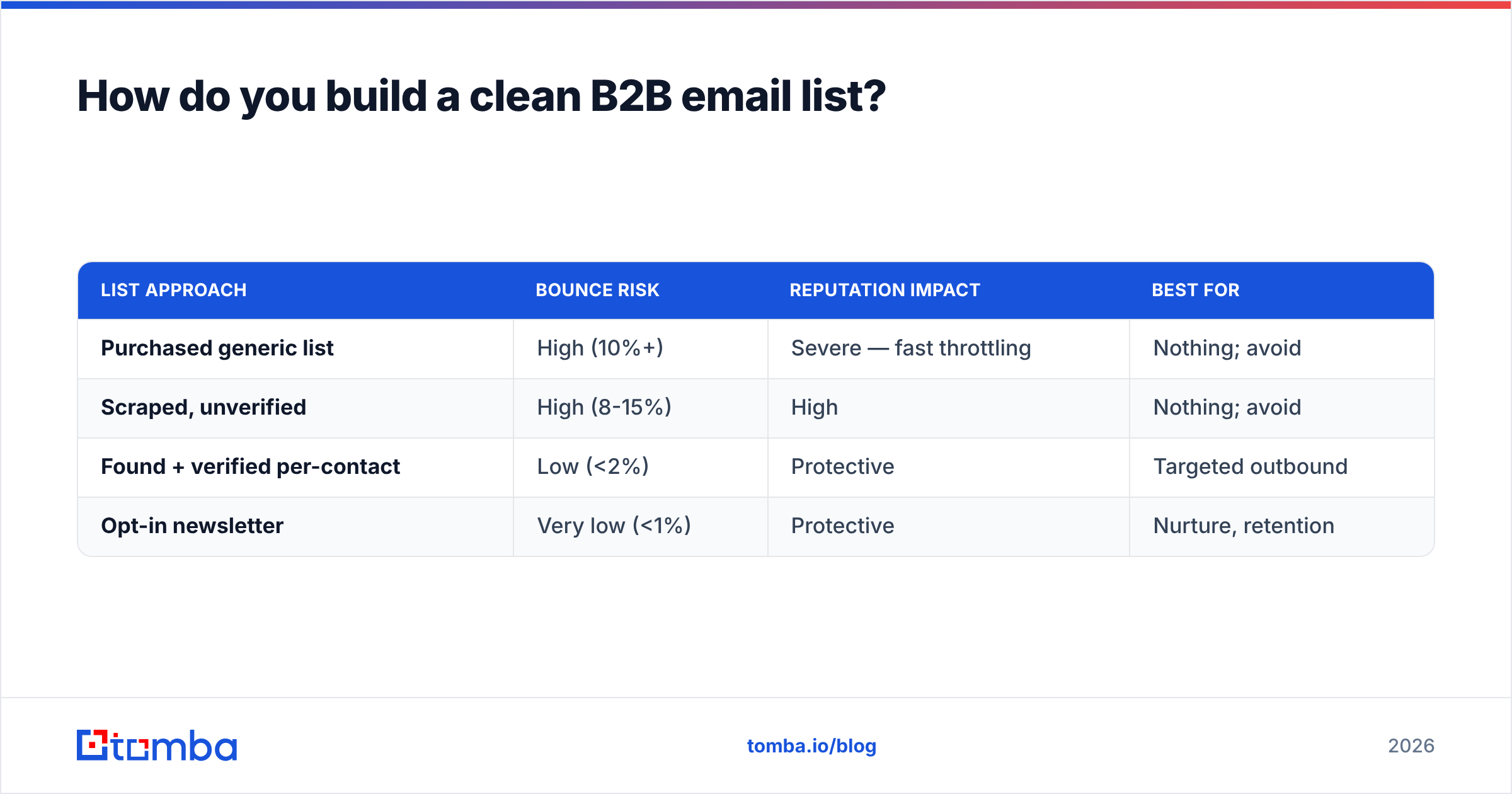
| List approach | Bounce risk | Reputation impact | Best for |
|---|---|---|---|
| Purchased generic list | High (10%+) | Severe — fast throttling | Nothing; avoid |
| Scraped, unverified | High (8-15%) | High | Nothing; avoid |
| Found + verified per-contact | Low (<2%) | Protective | Targeted outbound |
| Opt-in newsletter | Very low (<1%) | Protective | Nurture, retention |
The pattern is obvious once you see the numbers: the cost of a bad list isn't the wasted sends, it's the suppressed deliverability of every good email that follows it.
Why does segmentation matter more than volume?#
Because relevance is the single biggest multiplier on reply rate, and segmentation is how you manufacture relevance at scale. A message written for "VP of Engineering at a 200-person SaaS company scaling infra" will always beat one written for "anyone in tech."
Practical segmentation axes that actually move numbers in B2B:
- Role and seniority — A champion-level individual contributor needs a different angle than the economic buyer who signs the check.
- Company stage and size — Pain points at a 20-person startup differ wildly from a 5,000-person enterprise.
- Trigger events — New funding, a new hire in a relevant role, a tech-stack change, or recent expansion are all reasons to reach out now rather than someday.
- Engagement — Separate people who've opened/clicked from cold contacts, and stop hammering the unengaged.
Enrich your segments so the personalization holds up. Pulling firmographic and role data via data enrichment lets you reference something specific — the recipient's actual stack, headcount, or recent move — instead of a mail-merge {{first_name}} and nothing else.
What makes a B2B subject line get opened?#
Specificity, relevance, and curiosity — in that order — without tripping spam filters. The subject line and the preview text (your first sentence) are the only things most recipients see before deciding, so they carry most of the weight.
What works in 2026 B2B inboxes:
- Short and lowercase-ish. 3-6 words often outperforms clever long lines. It reads like a human, not a campaign.
- Specific over clever. "question about your onboarding flow" beats "Unlock 10x growth today."
- No false urgency or spam triggers. Avoid ALL CAPS, excessive punctuation, and words like "free," "guarantee," and "act now" stacked together.
- Personal relevance. Reference the company, role, or trigger event when you genuinely can.
If you want a fast starting point, a subject line generator can produce variants to A/B test, but always edit for your specific audience — generated lines are a draft, not a final.
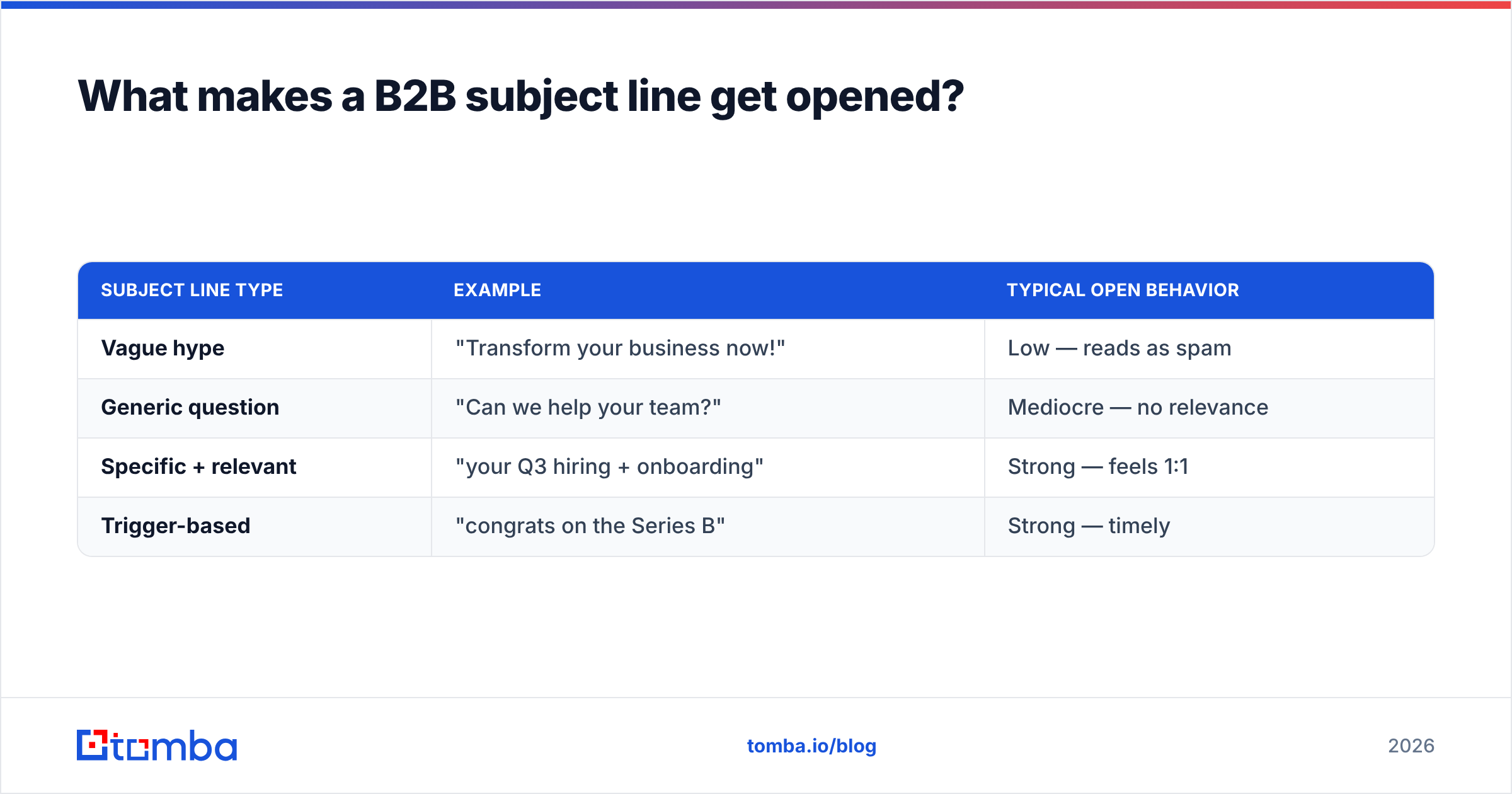
| Subject line type | Example | Typical open behavior |
|---|---|---|
| Vague hype | "Transform your business now!" | Low — reads as spam |
| Generic question | "Can we help your team?" | Mediocre — no relevance |
| Specific + relevant | "your Q3 hiring + onboarding" | Strong — feels 1:1 |
| Trigger-based | "congrats on the Series B" | Strong — timely |
How long should B2B marketing emails be?#
Short enough to read on a phone in under 20 seconds — usually 50 to 125 words for outbound, slightly longer for opt-in nurture. The job of a cold or semi-cold email is to earn a single reply or click, not to close the deal in one shot.
A reliable structure:
- One-line relevant opener — Why them, why now. No "I hope this email finds you well."
- One problem you solve — Framed around their world, not your feature list.
- One proof point — A comparable customer, a number, a specific result.
- One clear ask — A single, low-friction next step ("worth a 15-minute look?").
You can lean on proven cold email templates as scaffolding, but rewrite them in your own voice. The fastest way to get filtered — by spam systems and by humans — is to send the exact template thousands of other reps are blasting.

When is the best time to send B2B emails?#
Mid-morning on Tuesday through Thursday is the safe default, but your own data beats any benchmark. The "best time" myth gets recycled every year; the truth is that it depends on your audience's timezone, role, and habits.
Principles that hold up better than fixed time slots:
- Match the recipient's timezone, not yours. Sending to a London list at 9 a.m. Pacific means you hit them at 5 p.m. — end of day.
- Avoid Monday morning and Friday afternoon for anything that needs a thoughtful reply.
- Pace your volume. Sudden spikes from a cold domain look like spam to inbox providers. Ramp gradually.
- Test and let data decide. Send the same campaign split across two time windows and compare reply rates, not opens.
How do you keep B2B emails out of spam?#
Treat deliverability as infrastructure: authenticate your domain, warm it up, keep your list clean, and pace your volume. Great copy can't save a domain that providers don't trust. According to Google's bulk sender guidelines, authentication and low spam-complaint rates are now table stakes.
The deliverability checklist that matters:
- Authenticate. Publish SPF, DKIM, and DMARC records. Without them, bulk mail to Gmail and Yahoo gets rejected or junked outright.
- Protect your sender reputation. Keep complaint rates under 0.3% and bounces under 2%. Both are tracked and both compound.
- Warm up new domains and inboxes. Don't go from zero to 500 sends a day. Use an email warmup calculator to plan a realistic ramp.
- Use a subdomain for outreach. Protect your primary domain's reputation by sending cold outbound from a dedicated subdomain.
- Honor unsubscribes instantly and make them one-click. It's required and it lowers complaints.
For a deeper primer, the concept of email deliverability covers the full system of reputation signals that decide inbox placement.
Which metrics actually matter for B2B email?#
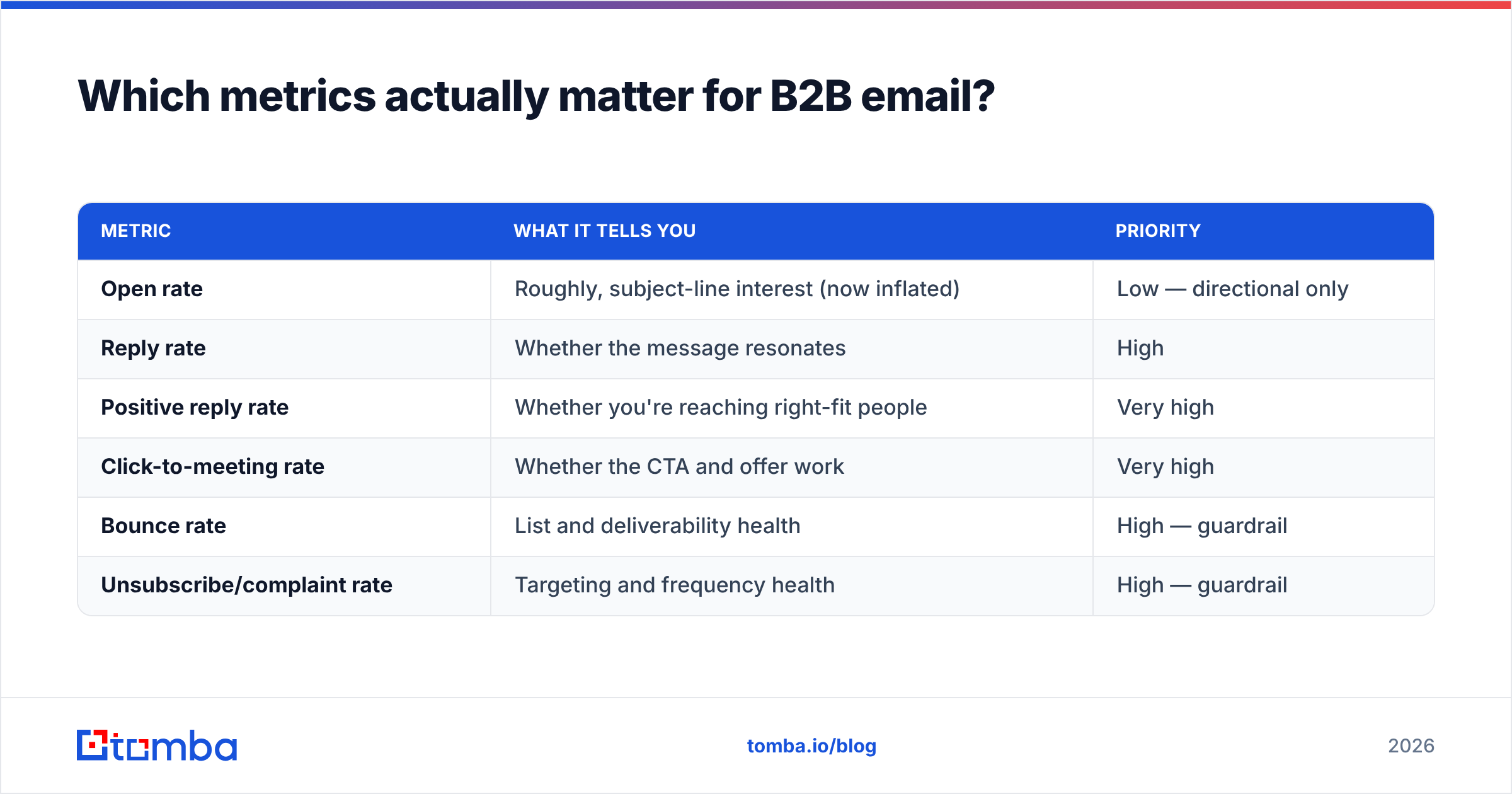
Reply rate, positive reply rate, click-to-meeting rate, and pipeline influenced — not open rate. Apple's Mail Privacy Protection auto-loads tracking pixels, inflating open numbers and making them nearly useless as a primary KPI.
| Metric | What it tells you | Priority |
|---|---|---|
| Open rate | Roughly, subject-line interest (now inflated) | Low — directional only |
| Reply rate | Whether the message resonates | High |
| Positive reply rate | Whether you're reaching right-fit people | Very high |
| Click-to-meeting rate | Whether the CTA and offer work | Very high |
| Bounce rate | List and deliverability health | High — guardrail |
| Unsubscribe/complaint rate | Targeting and frequency health | High — guardrail |
Set guardrails (bounce, complaints) and optimization targets (reply, meetings) separately. The guardrails protect the program; the targets grow it.
What does a strong B2B email workflow look like?#
A repeatable loop: source → verify → segment → personalize → send → measure → refine. Here's how the pieces fit together with the right tools at each step.
- Source right-fit contacts with a bulk email finder or domain search at your target accounts.
- Verify the full list before loading it into your sending platform.
- Segment by role, stage, and trigger event.
- Personalize using enriched firmographic and contact data.
- Send from an authenticated, warmed-up domain at a paced volume.
- Measure replies and meetings; ignore vanity opens.
- Refine — prune non-responders, double down on the segments that reply.
If you compare tools at this layer, third-party reviews on G2 and HubSpot's own email marketing benchmarks are useful sanity checks against any vendor's self-reported numbers.
Common B2B email mistakes to avoid#
- Buying lists. It tanks deliverability and often violates anti-spam law. Find and verify instead.
- One message for everyone. Generic equals ignored.
- Optimizing for opens. You'll chase a broken metric and ship clickbait subject lines.
- Skipping warmup. New domains that blast volume get throttled within days.
- Never cleaning the list. Decay is constant; verification has to be ongoing, not one-time.
- Burying the ask. One clear, low-friction CTA beats three competing ones.
Bringing it together#
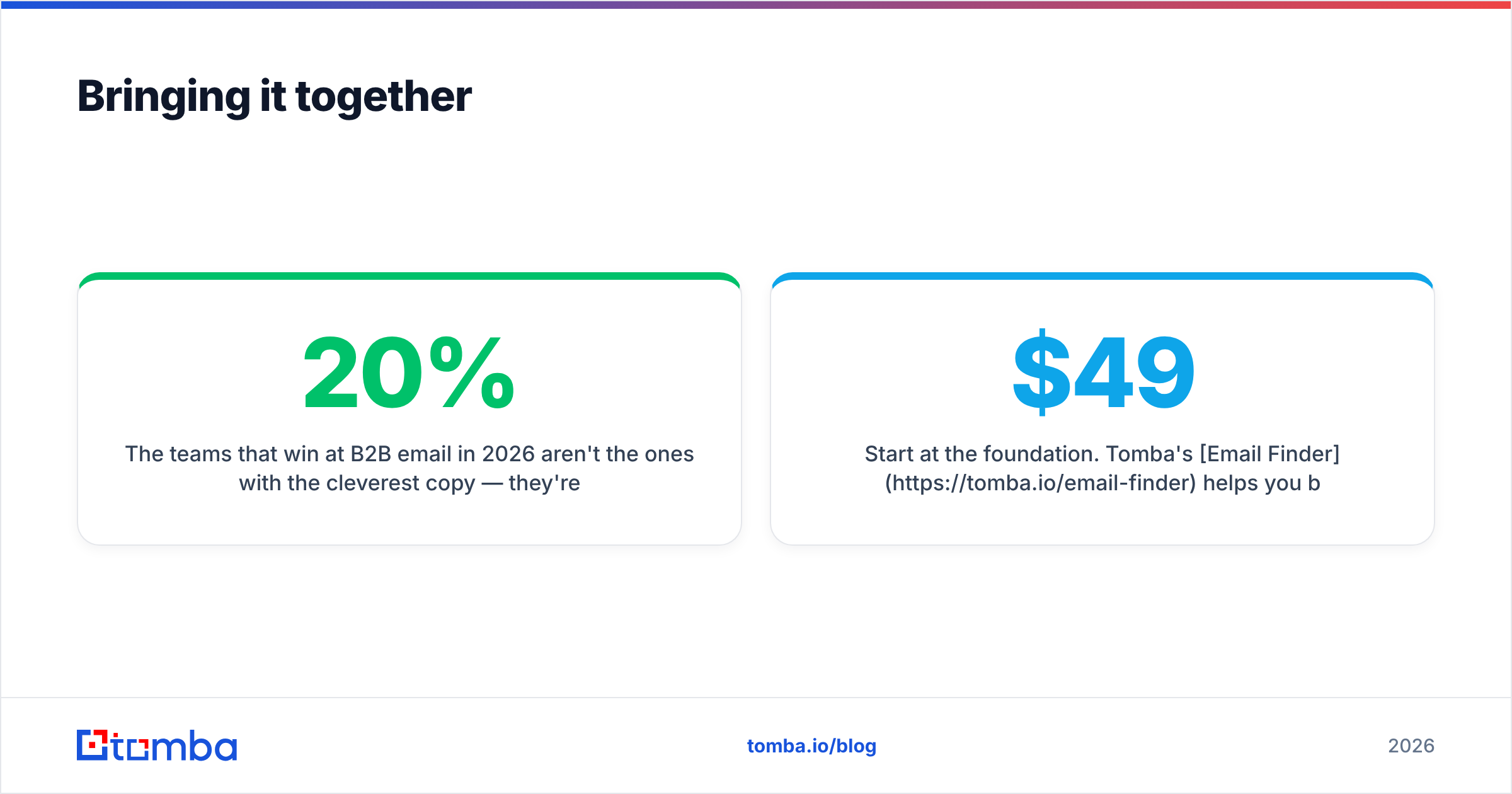
The teams that win at B2B email in 2026 aren't the ones with the cleverest copy — they're the ones with clean, well-segmented data flowing into an authenticated, well-paced sending system. Copy is the last 20%. Get the list and deliverability right first, and average copy will still book meetings; get them wrong, and brilliant copy never gets read.
Start at the foundation. Tomba's Email Finder helps you build a verified, right-fit list — find professional addresses by name, domain, or company, then confirm they're real before you ever hit send. You can test it on the Free tier (25 searches/month), and scale into the Starter plan at $49/mo as your outbound grows; see full Tomba pricing for Growth ($99/mo), Pro ($249/mo), and Enterprise options. Clean inputs are the cheapest performance upgrade your email program will ever get.
// get started
Find, verify and enrich your first contacts today
Start on the free plan with 25 searches a month, then scale when your team is ready.
Free plan · No credit card required · GDPR & CCPA
// about the author