B2B Email Segmentation in 2026: The Complete Playbook
Stop blasting one list. Learn how B2B email segmentation lifts reply rates, protects deliverability, and turns raw contact data into pipeline in 2026.
B2B email segmentation is the difference between an inbox that converts and a domain that lands in spam. If you still send the same message to every contact in your CRM, you are leaving pipeline on the table and quietly burning your sender reputation. This guide shows you how to segment a B2B audience in 2026 — the data you need, the segment types that actually move revenue, and how to keep the whole system clean.
TL;DR#
- B2B email segmentation means splitting your contact list into smaller groups based on firmographics, role, behavior, and lifecycle stage so each message is relevant.
- Segmented campaigns consistently beat batch-and-blast on open rate, reply rate, and unsubscribe rate — and they protect deliverability.
- You need three data layers to segment well: identity (who), firmographics (where they work), and behavior (what they do).
- Bad data kills segmentation. Verify and enrich before you slice, or you segment garbage into smaller piles of garbage.
- Start with 4–6 high-impact segments, prove lift, then expand. Do not build 40 segments on day one.
What is B2B email segmentation?#
B2B email segmentation is the practice of dividing your email contacts into defined groups so you can send each group a message tuned to its context. Think of it like a restaurant seating guests by party size and occasion: a table for two on an anniversary gets a different menu pitch than a table of twelve on a corporate lunch. Same kitchen, different service.
In B2B specifically, the "context" is richer than in consumer email. You are not just segmenting by age or location — you are segmenting by company size, industry, tech stack, job title, buying stage, and how the contact has interacted with you. A VP of Engineering at a 2,000-person fintech and a solo founder at a pre-seed startup might both be good fits for your product, but they need almost nothing in common in their inbox.
The payoff is concrete. Relevant email earns replies; irrelevant email earns spam complaints. And complaints are not a soft metric — once your complaint rate climbs, mailbox providers throttle you, and even your good messages stop landing. Segmentation is as much a deliverability strategy as it is a marketing one.
Why does segmentation matter more in 2026?#
Three forces made segmentation non-negotiable this year.
- Stricter inbox enforcement. Google and Yahoo's bulk-sender rules now expect a complaint rate under 0.3% and authenticated, low-spam sending. Generic blasts trip those thresholds fast. (Google's sender guidelines spell out the requirements.)
- Buyer fatigue. The average B2B buyer gets more cold outreach than ever. Undifferentiated messages get ignored or marked as spam on sight.
- AI raised the floor. Everyone can now generate decent copy. The differentiator is no longer "good writing" — it is sending the right message to the right segment at the right moment.
Segmentation is how you stay relevant when volume and scrutiny are both rising. It is the structural fix that copy tweaks alone cannot deliver.
What are the main types of B2B email segmentation?#
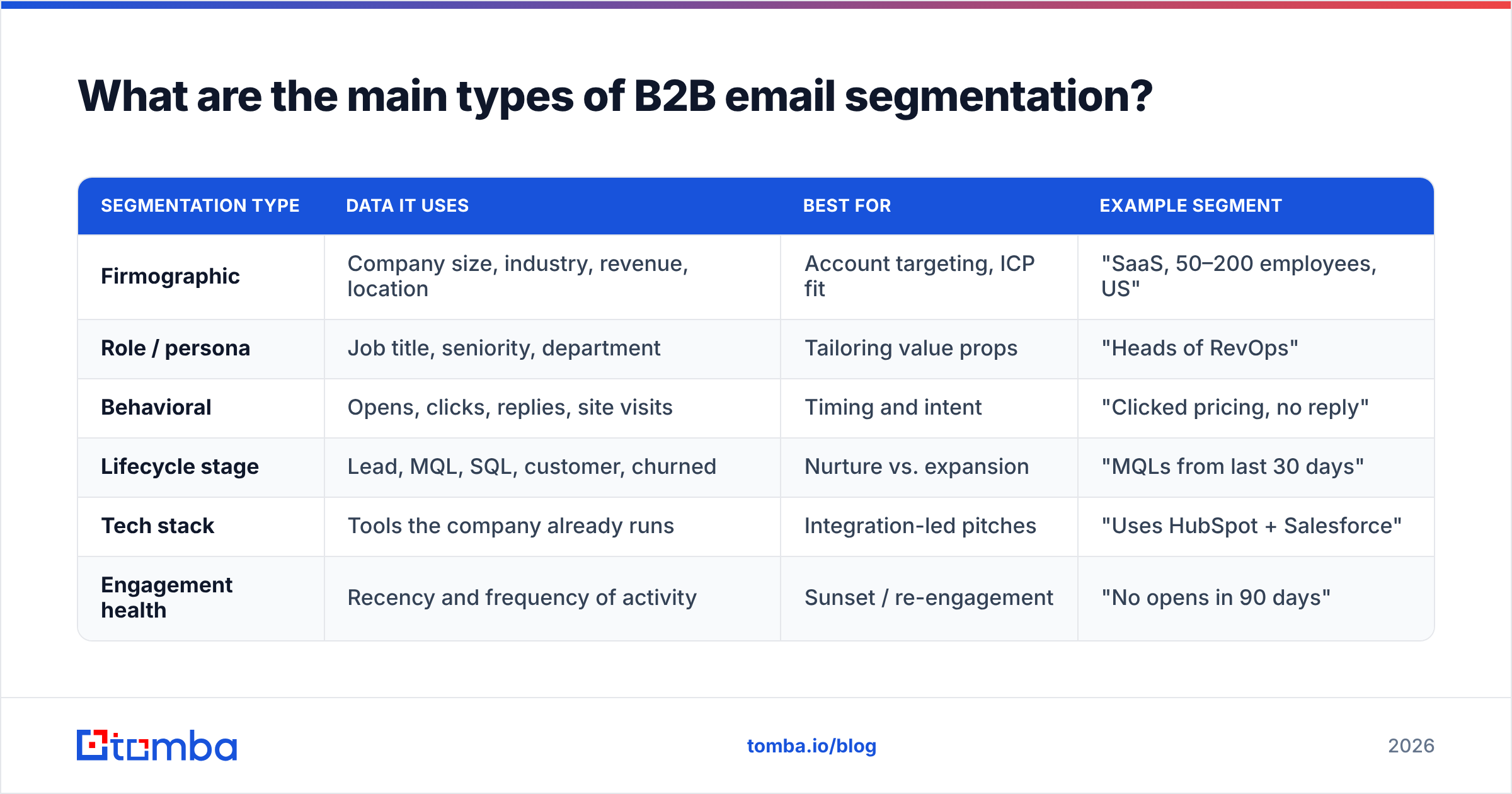
There is no single correct way to slice a list. The strongest programs layer several segmentation models. Here are the core types, what they use, and where each shines.
| Segmentation type | Data it uses | Best for | Example segment |
|---|---|---|---|
| Firmographic | Company size, industry, revenue, location | Account targeting, ICP fit | "SaaS, 50–200 employees, US" |
| Role / persona | Job title, seniority, department | Tailoring value props | "Heads of RevOps" |
| Behavioral | Opens, clicks, replies, site visits | Timing and intent | "Clicked pricing, no reply" |
| Lifecycle stage | Lead, MQL, SQL, customer, churned | Nurture vs. expansion | "MQLs from last 30 days" |
| Tech stack | Tools the company already runs | Integration-led pitches | "Uses HubSpot + Salesforce" |
| Engagement health | Recency and frequency of activity | Sunset / re-engagement | "No opens in 90 days" |
A practical rule: combine two or three dimensions per campaign, not all six. "Firmographic + role + behavior" — for example, RevOps leaders at mid-market SaaS who visited your pricing page — is specific enough to write a sharp message without shrinking the segment to a handful of contacts.
What data do you need to segment B2B email?#
Segmentation is only as good as the underlying data. You need three layers:
- Identity data — the verified email, name, and current company of the contact. If the email bounces or the person changed jobs, every segment they sit in is wrong.
- Firmographic data — industry, headcount, revenue band, location, and ideally tech stack. This is what powers ICP-based slicing.
- Behavioral data — opens, clicks, replies, form fills, and site activity captured in your ESP, CRM, or website visitor reveal tooling.
Most teams have plenty of behavioral data and weak identity and firmographic data. That is backwards. Behavioral signals are useless if they are attached to a stale or unverified contact.
This is where finding and verifying contacts up front pays off. Using an email finder to source role-accurate contacts by domain, then running them through an email verifier before they enter any segment, means you are slicing clean data instead of noise. Enrichment fills the firmographic gaps so your "mid-market SaaS" segment actually contains mid-market SaaS companies.
How do you build a segmentation strategy step by step?#
You do not need a six-month data project. Here is a sequence you can run this quarter.
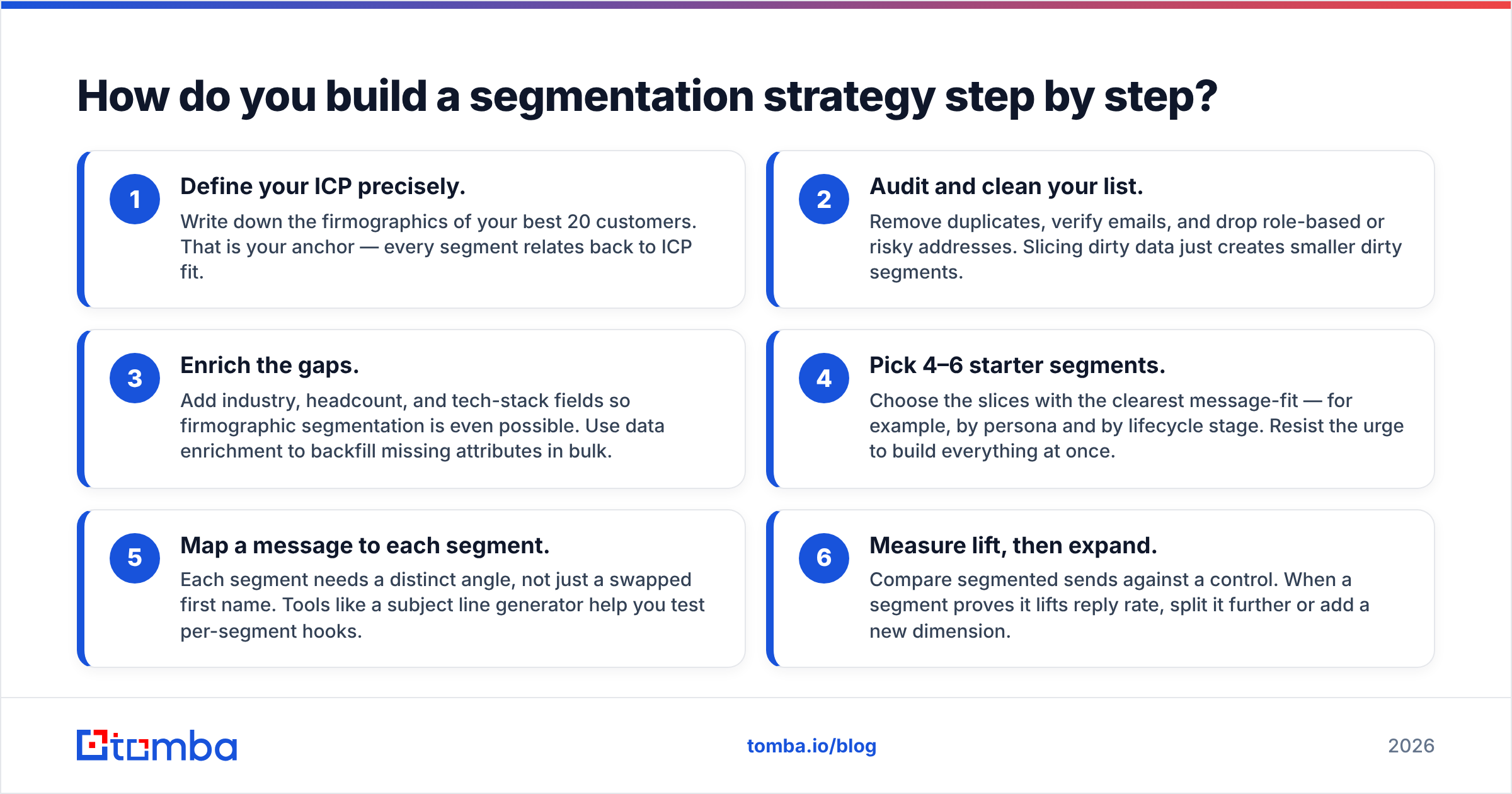
- Define your ICP precisely. Write down the firmographics of your best 20 customers. That is your anchor — every segment relates back to ICP fit.
- Audit and clean your list. Remove duplicates, verify emails, and drop role-based or risky addresses. Slicing dirty data just creates smaller dirty segments.
- Enrich the gaps. Add industry, headcount, and tech-stack fields so firmographic segmentation is even possible. Use data enrichment to backfill missing attributes in bulk.
- Pick 4–6 starter segments. Choose the slices with the clearest message-fit — for example, by persona and by lifecycle stage. Resist the urge to build everything at once.
- Map a message to each segment. Each segment needs a distinct angle, not just a swapped first name. Tools like a subject line generator help you test per-segment hooks.
- Measure lift, then expand. Compare segmented sends against a control. When a segment proves it lifts reply rate, split it further or add a new dimension.
The discipline is in step four. Segmentation programs fail when teams over-engineer the taxonomy before proving any of it converts.
Is segmentation better than personalization?#
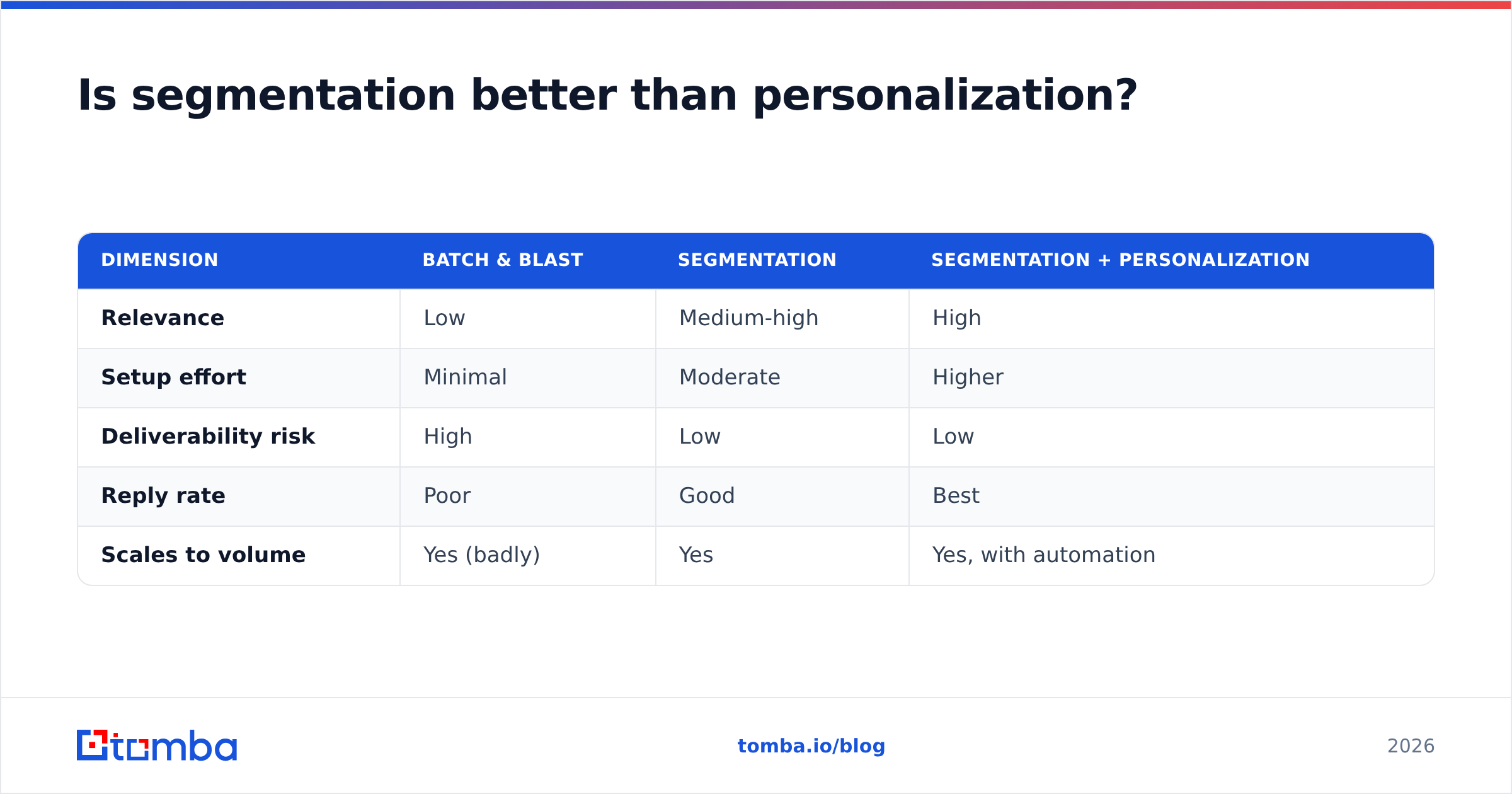
They are not competitors — they are layers. Segmentation decides who gets which campaign; personalization decides how the message feels to one person. You segment to a group, then personalize within it.
Here is how the trade-offs compare:
| Dimension | Batch & blast | Segmentation | Segmentation + personalization |
|---|---|---|---|
| Relevance | Low | Medium-high | High |
| Setup effort | Minimal | Moderate | Higher |
| Deliverability risk | High | Low | Low |
| Reply rate | Poor | Good | Best |
| Scales to volume | Yes (badly) | Yes | Yes, with automation |
The winning move in 2026 is segmentation as the backbone and lightweight personalization as the finish — a personalized opening line and a segment-specific value prop, not a hand-written essay for every contact. That keeps quality high without destroying throughput.
How does segmentation protect deliverability?#
Segmentation directly improves the signals mailbox providers watch. When messages are relevant, more people open and reply and fewer mark you as spam. Those positive engagement signals tell Gmail and Outlook your mail belongs in the inbox.
Specifically, segmentation lets you:
- Suppress disengaged contacts. Sending only to people who have opened in the last 90 days keeps your engagement rate high and your sender reputation intact.
- Match volume to warmth. New or cold segments get smaller, slower sends; warm segments can take more.
- Avoid spam-trap exposure. Verified, recently active segments are far less likely to contain traps than a years-old "everyone" list.
Before any big segmented send, it is worth running your list through verification one more time and checking your domain health with an email reputation checker. Segmentation and list hygiene are two sides of the same coin — neither works alone.
What are common B2B email segmentation mistakes?#
- Segmenting dirty data. The most common failure. Verify and enrich first, always.
- Too many segments, too soon. Forty micro-segments you cannot maintain is worse than six you actually use.
- Static segments that never refresh. People change jobs every few years. A segment built once and never updated decays fast — re-verify and re-enrich on a schedule.
- Confusing segmentation with personalization. Inserting a first name into a generic blast is not segmentation. The message has to change, not just the merge tag.
- Ignoring lifecycle stage. Sending a "book a demo" CTA to existing customers, or an onboarding email to a cold lead, signals you do not know who they are.
- No control group. If you never compare segmented vs. unsegmented sends, you cannot prove the lift or defend the effort.
How do you keep segments fresh over time?#
Segments rot. A contact who was an SQL last quarter may have closed, churned, or left the company. Treat your segmentation as a living system:
- Re-verify quarterly. Run active segments back through an email verifier to catch new bounces and job changes.
- Re-enrich on a trigger. When a contact engages after a long gap, refresh their firmographics — their company may have grown into or out of your ICP.
- Automate the plumbing. Pipe finding, verification, and enrichment through the Tomba API or a Zapier integration so list hygiene runs without manual exports.
- Track engagement decay. Move contacts with no activity in 90–180 days into a re-engagement or sunset segment instead of letting them drag your reputation down.
The teams that win at segmentation are not the ones with the cleverest taxonomy. They are the ones whose data stays accurate month after month.
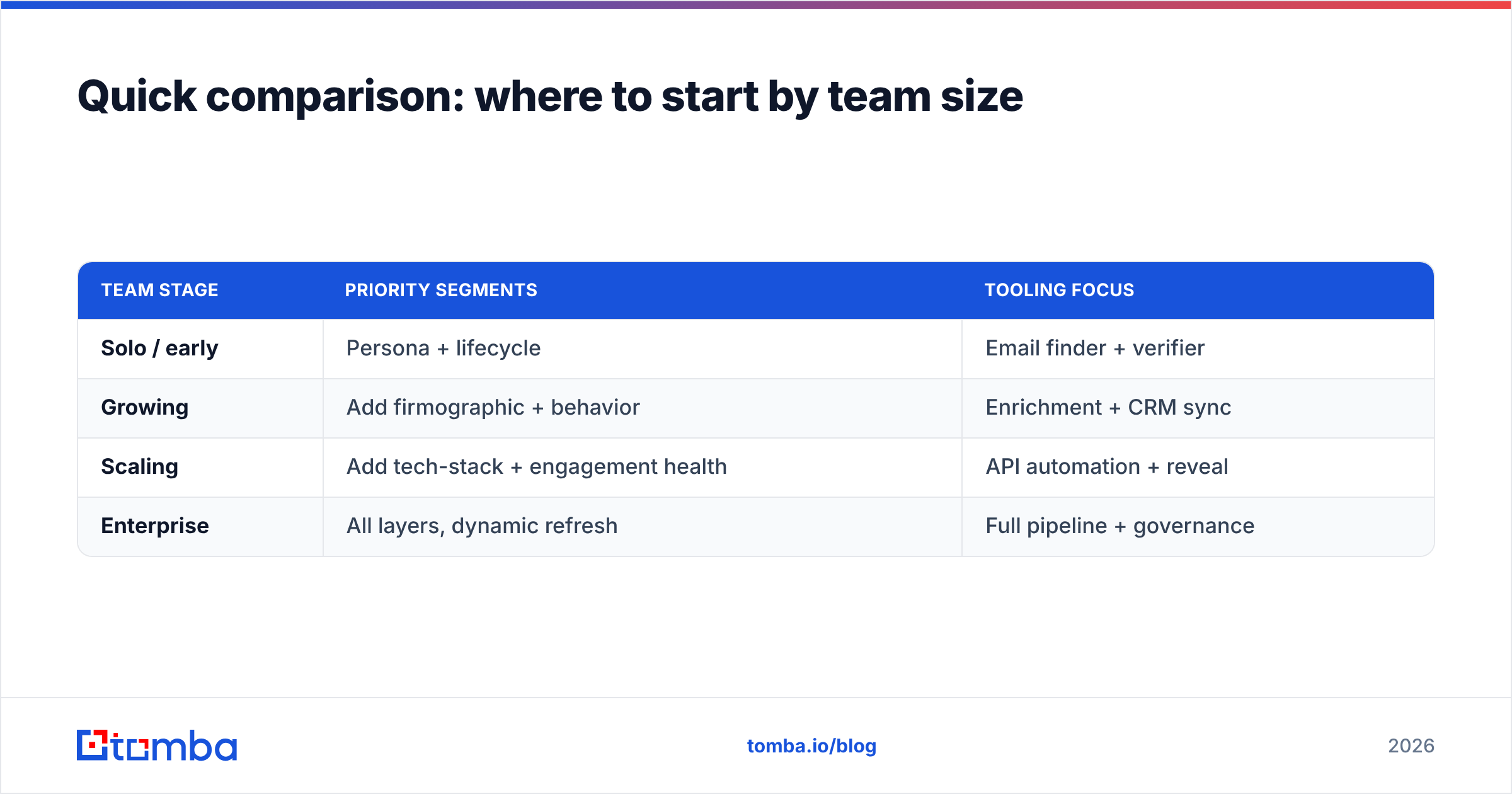
Quick comparison: where to start by team size#
| Team stage | Priority segments | Tooling focus |
|---|---|---|
| Solo / early | Persona + lifecycle | Email finder + verifier |
| Growing | Add firmographic + behavior | Enrichment + CRM sync |
| Scaling | Add tech-stack + engagement health | API automation + reveal |
| Enterprise | All layers, dynamic refresh | Full pipeline + governance |
Match the ambition to the stage. A two-person team does not need engagement-health micro-segments; it needs clean personas and a reliable verifier. Compare what each tier of Tomba pricing unlocks before you over-invest.
Get the data layer right first#
Segmentation is a multiplier, not a magic trick. It amplifies whatever data you feed it — so if the data is accurate, relevant, and fresh, segmentation turns it into replies and pipeline. If the data is stale, it just helps you send the wrong message to smaller groups, faster.
That is why the data layer comes first. Source role-accurate contacts with the Tomba Email Finder, verify every address before it enters a segment, and enrich the firmographic gaps so your slices mean something. Start free with 25 searches a month, then scale on the Starter plan at $49/mo when your segmentation engine is proving its lift. Clean data in, segmented pipeline out — that is the whole game in 2026.
// get started
Find, verify and enrich your first contacts today
Start on the free plan with 25 searches a month, then scale when your team is ready.
Free plan · No credit card required · GDPR & CCPA
// about the author