B2B Lead Enrichment in 2026: The Complete Data Playbook
B2B lead enrichment turns thin form-fills into sales-ready records. Here's how it works, what data to add, the tools that do it, and the ROI math for 2026.
TL;DR
- B2B lead enrichment appends missing firmographic, contact, and intent data to a raw lead (often just an email or company name) so reps can prioritize and personalize without manual research.
- The highest-ROI fields are not "nice to have" — they are job title, verified email, company size, industry, tech stack, and direct phone. Everything else is noise until those are right.
- Build-vs-buy almost always favors buy: a single accurate provider beats stitching five free APIs that disagree with each other.
- Accuracy and freshness matter more than database size. A 200M-record database that's 18 months stale is worse than a smaller live-verified source.
- Enrichment without verification just scales bad data. Verify emails before you sync them to your CRM or sequencer.
What is B2B lead enrichment?#
B2B lead enrichment is the process of taking a sparse lead record and automatically filling in the attributes your sales and marketing teams actually need to act. Think of it like a business card that arrives with only a name scribbled on it — enrichment is the assistant who, in seconds, writes in the person's title, company, headcount, industry, LinkedIn URL, and a verified email so you can follow up intelligently.
Technically, enrichment matches an input identifier (an email, a domain, a full name + company, or a website visitor) against one or more data sources, then returns a structured profile. Modern stacks do this in real time through an API or in bulk over a CSV of thousands of rows.
The reason it matters in 2026: inbound forms keep getting shorter. Buyers won't fill in 11 fields, so you ask for an email and infer the rest. Enrichment is what turns that one field into a record a rep can sell to.
What data should you actually enrich?#
Not all fields are equal. Chasing 60 attributes when you use 6 is how teams burn credits and slow pipelines. Prioritize in this order:
- Verified work email — the single field that decides whether your outreach lands or bounces. Treat it as mandatory, not optional.
- Job title and seniority — drives routing, qualification, and whether this lead is even in your ICP.
- Company firmographics — headcount, revenue band, industry, HQ location. This is your segmentation backbone.
- Technographics — the tools a company runs. If you integrate with Salesforce, knowing who uses it is a buying signal.
- Direct phone / mobile — still the fastest path to a conversation for high-intent accounts.
- Social and LinkedIn profile — context for personalization and social selling.
A useful rule: a field earns its place only if a rep changes a decision based on it. If nobody filters, routes, or personalizes on a field, stop enriching it.
How does the enrichment pipeline work?#
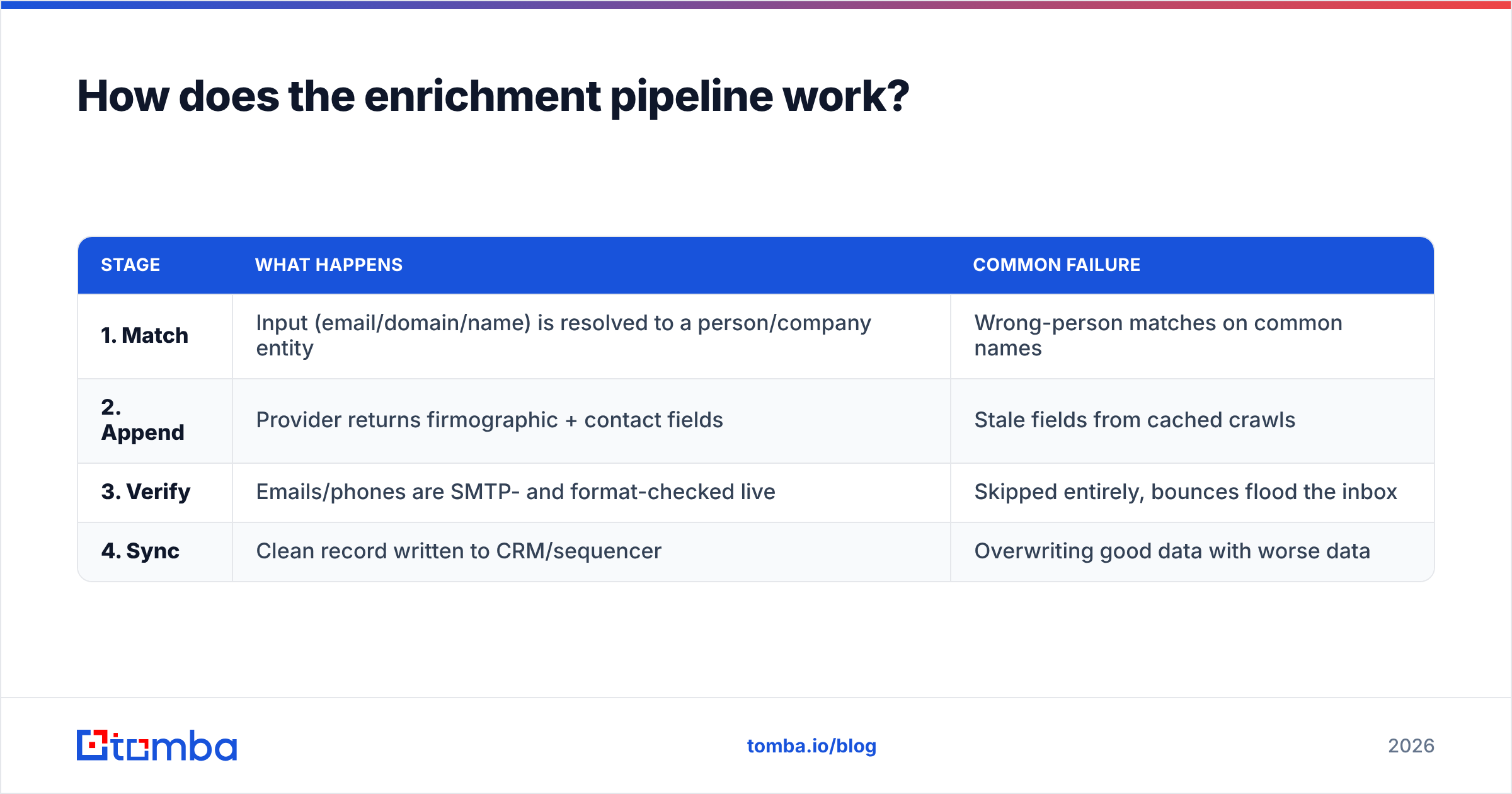
A production enrichment flow has four stages, and skipping any one of them is where data quality dies.
| Stage | What happens | Common failure |
|---|---|---|
| 1. Match | Input (email/domain/name) is resolved to a person/company entity | Wrong-person matches on common names |
| 2. Append | Provider returns firmographic + contact fields | Stale fields from cached crawls |
| 3. Verify | Emails/phones are SMTP- and format-checked live | Skipped entirely, bounces flood the inbox |
| 4. Sync | Clean record written to CRM/sequencer | Overwriting good data with worse data |
The verify stage is the one teams cut to save time, and it's the one that quietly destroys sender reputation. Always run an email verifier before a record reaches your sending tools — a 5% bounce rate is enough to get a domain throttled. For domains that accept everything, a dedicated catch-all verifier keeps you from guessing.
For high-volume work, batch the whole pipeline with a bulk email finder instead of hammering single-lookup endpoints row by row.
Should you build or buy lead enrichment?#
Buy it. Building looks cheap until you account for data freshness.
The DIY path is "just call a few free APIs and merge." In practice you get three providers returning three different job titles, no SMTP verification, and a maintenance burden every time an endpoint changes. According to Gartner research on data quality, poor data costs organizations millions annually in wasted effort and bad decisions — most of it from exactly this kind of unreconciled, decaying data.
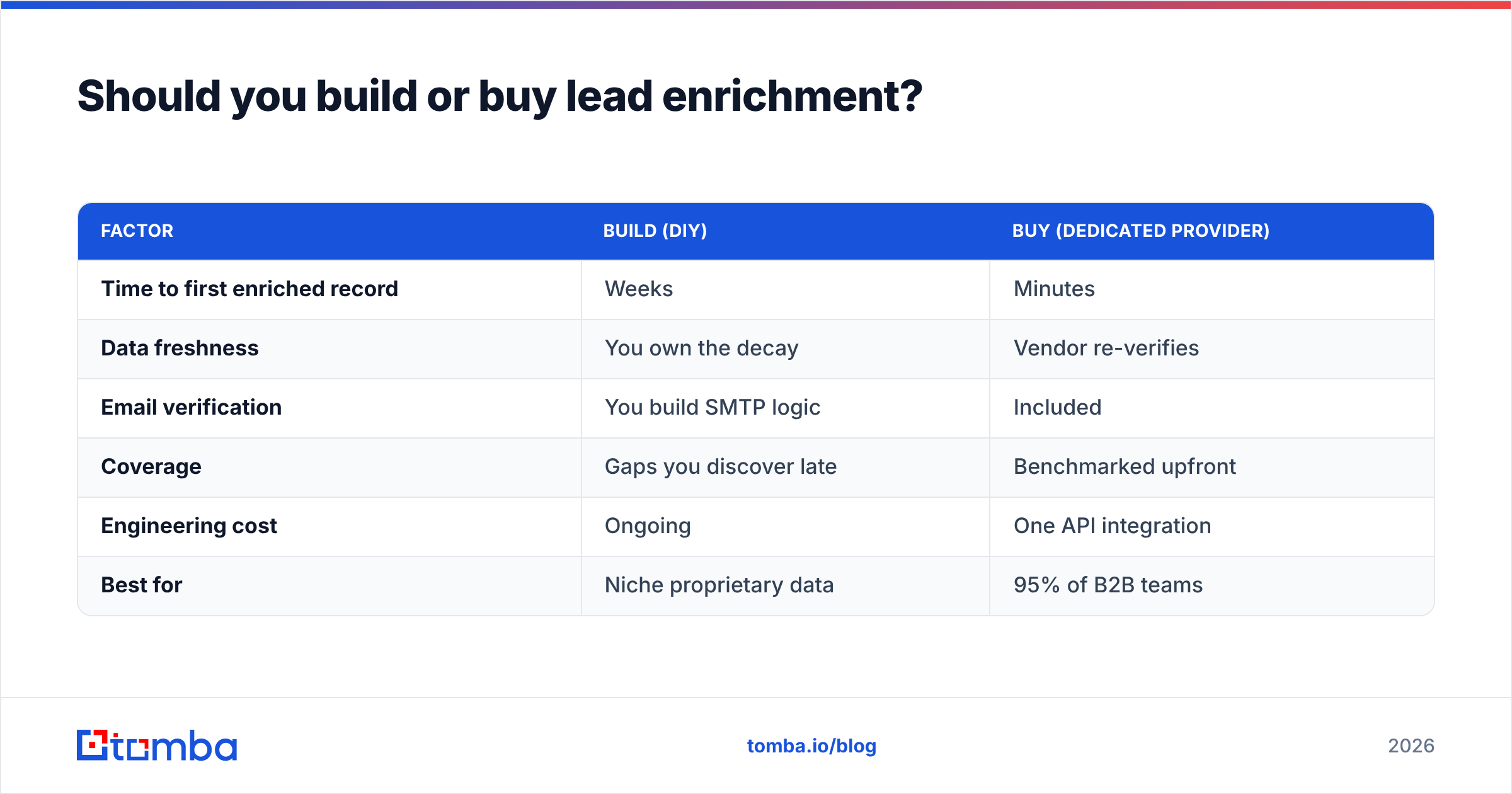
Here's the honest comparison:
| Factor | Build (DIY) | Buy (dedicated provider) |
|---|---|---|
| Time to first enriched record | Weeks | Minutes |
| Data freshness | You own the decay | Vendor re-verifies |
| Email verification | You build SMTP logic | Included |
| Coverage | Gaps you discover late | Benchmarked upfront |
| Engineering cost | Ongoing | One API integration |
| Best for | Niche proprietary data | 95% of B2B teams |
Build only when your enrichment data is proprietary (e.g., your own product-usage signals). For standard firmographic and contact data, a vendor with a verified B2B database and a clean email finder API wins on every axis that matters.
How do the main enrichment approaches compare?#
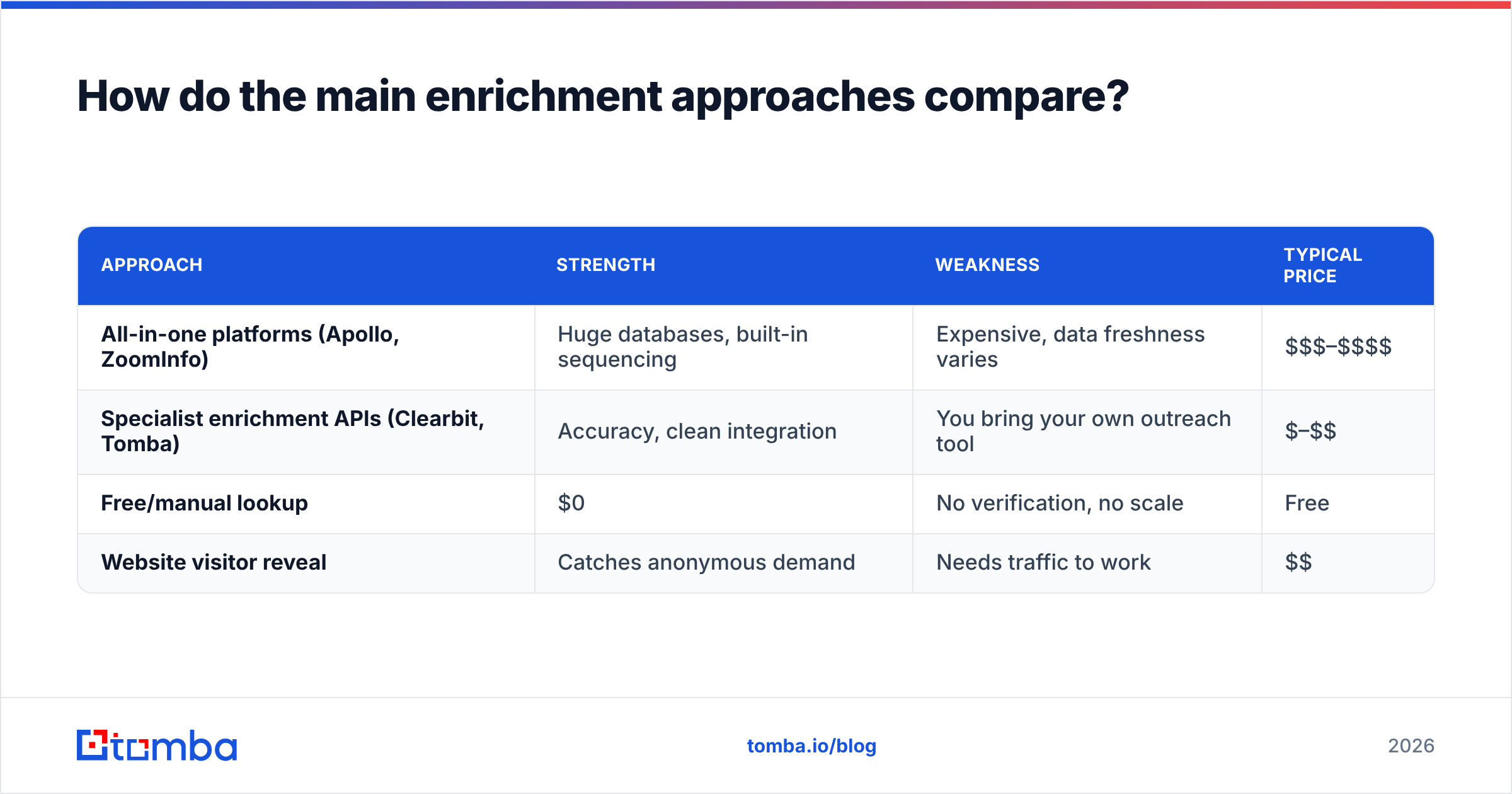
There are four families of tooling, and most teams blend two of them.
| Approach | Strength | Weakness | Typical price |
|---|---|---|---|
| All-in-one platforms (Apollo, ZoomInfo) | Huge databases, built-in sequencing | Expensive, data freshness varies | $$$–$$$$ |
| Specialist enrichment APIs (Clearbit, Tomba) | Accuracy, clean integration | You bring your own outreach tool | $–$$ |
| Free/manual lookup | $0 | No verification, no scale | Free |
| Website visitor reveal | Catches anonymous demand | Needs traffic to work | $$ |
If your bottleneck is finding and verifying contacts at scale, a focused tool beats a bloated suite you half-use. Tomba's data enrichment sits in the specialist column: you feed it an email, name, or domain and get back a verified, structured record without paying for a sequencing engine you already own.

How accurate is the data, really?#
Accuracy is the whole game, and "database size" is a vanity metric that hides it. A provider boasting 700M contacts tells you nothing about whether the 50 emails you need today are deliverable.
Ask vendors three questions:
- How recently was this record verified? Freshness beats volume. Contact data decays roughly 25–30% per year as people change jobs.
- What's the live SMTP verification rate? A real provider verifies at request time, not from a months-old crawl. See how a tool documents its data sources before trusting it.
- What happens on catch-all domains? Most "98% accurate" claims quietly exclude catch-all domains, which are common at larger companies.
Cross-check any vendor's self-reported numbers against independent reviews on G2 rather than the marketing page. The gap between claimed and reviewed accuracy is your real risk.
How do you measure enrichment ROI?#
Tie it to pipeline, not to credits spent. The math is straightforward once you instrument it.
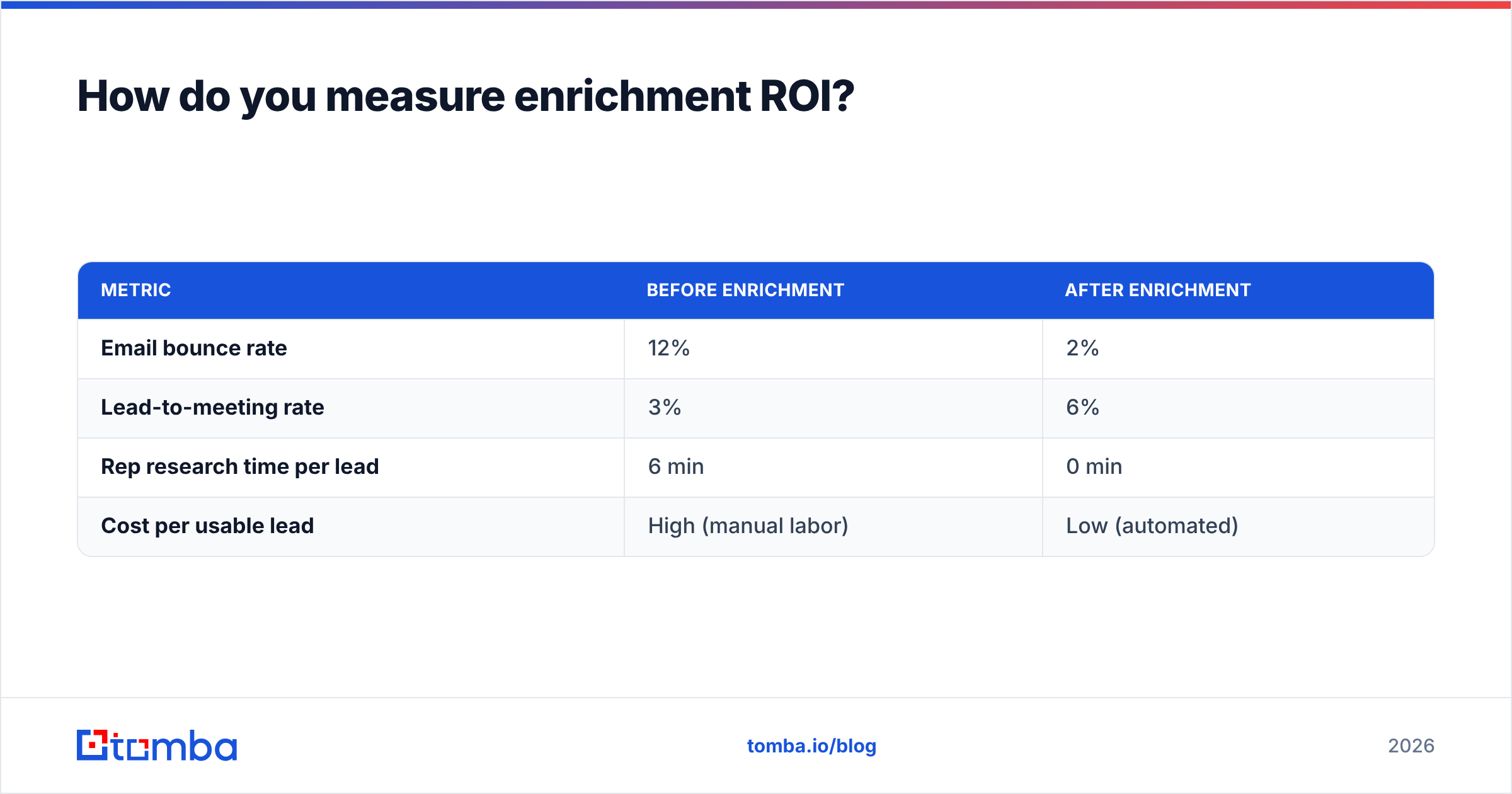
A simple model: if enrichment lifts your connect rate because emails are verified and titles are correct, calculate the additional meetings booked, multiply by close rate and average deal size, then subtract the tool cost.
| Metric | Before enrichment | After enrichment |
|---|---|---|
| Email bounce rate | 12% | 2% |
| Lead-to-meeting rate | 3% | 6% |
| Rep research time per lead | 6 min | 0 min |
| Cost per usable lead | High (manual labor) | Low (automated) |
The hidden win is the research-time line. Reps who stop Googling prospects spend that time selling. Across a team, reclaimed hours often dwarf the subscription cost. Integrate enrichment directly into your CRM — for example via a native HubSpot integration — so the clean data lands where reps already work, and pair it with sound email deliverability hygiene so the verified addresses actually reach the inbox.
For context on how this fits a broader revenue motion, HubSpot and Salesforce both publish strong frameworks on lead scoring and routing that consume exactly the fields enrichment provides.
What are the common mistakes to avoid?#
- Enriching everything. Enrich your ICP and your inbound — not a scraped list of 2M random companies you'll never contact.
- Skipping verification. Appending an unverified email is worse than no email; it costs you sender reputation.
- Overwriting good data. Set merge rules so enrichment fills gaps and never clobbers a manually corrected field.
- Ignoring freshness. Re-enrich active records on a schedule (quarterly is a sane default) instead of a one-time blast.
- Buying on database size. Buy on verified coverage of your specific market.
Frequently asked questions#
What's the difference between lead enrichment and data enrichment? Lead enrichment is data enrichment applied specifically to sales/marketing lead records. The technique is the same; the scope is contacts and companies in your funnel.
Is B2B lead enrichment GDPR-compliant? It can be, when the provider sources data lawfully and you have a legitimate-interest or consent basis for processing. Confirm the vendor's compliance documentation before syncing EU contacts.
How often should I re-enrich my database? Quarterly for active pipeline, and trigger-based (e.g., before a campaign) for the rest. Contact data decays fast enough that annual is too slow.
Can I enrich leads from just an email address? Yes. A reverse lookup resolves an email to a person and company, then appends the rest of the profile.
Get started with Tomba#
If your enrichment problem is really a "find and verify the right contact" problem — and for most B2B teams it is — start with the Tomba Email Finder. It locates professional email addresses by domain, name, or company and verifies them in the same step, so the records you push to your CRM are deliverable on day one. Pair it with Tomba's enrichment and bulk tools, and you can move from a thin form-fill to a sales-ready profile in seconds rather than minutes. Plans start free with 25 searches a month, scale to Starter at $49/mo, and grow with you from there — see full Tomba pricing to match a tier to your volume.
// get started
Find, verify and enrich your first contacts today
Start on the free plan with 25 searches a month, then scale when your team is ready.
Free plan · No credit card required · GDPR & CCPA
// about the author