B2B Sales Database Guide 2026: Build, Buy, and Maintain
A B2B sales database is only as good as the data inside it. Here's how to build, buy, and maintain one that actually drives pipeline in 2026 — without paying for dead records.
A B2B sales database sounds like a back-office detail until your reps start bouncing emails, dialing dead numbers, and missing quota because half their list is fiction. The database is the engine room of outbound — and most teams are running on data that quietly rots at roughly 2-3% per month.
This guide breaks down what a B2B sales database actually is, whether you should build or buy one, how to judge data quality, and how to keep it alive once you have it.
TL;DR#
- A B2B sales database is a structured store of company and contact records — names, titles, emails, phones, firmographics — that powers prospecting, routing, and enrichment.
- Build vs buy is the first fork: building gives you control and lower long-run cost; buying gives you speed and coverage. Most teams do both.
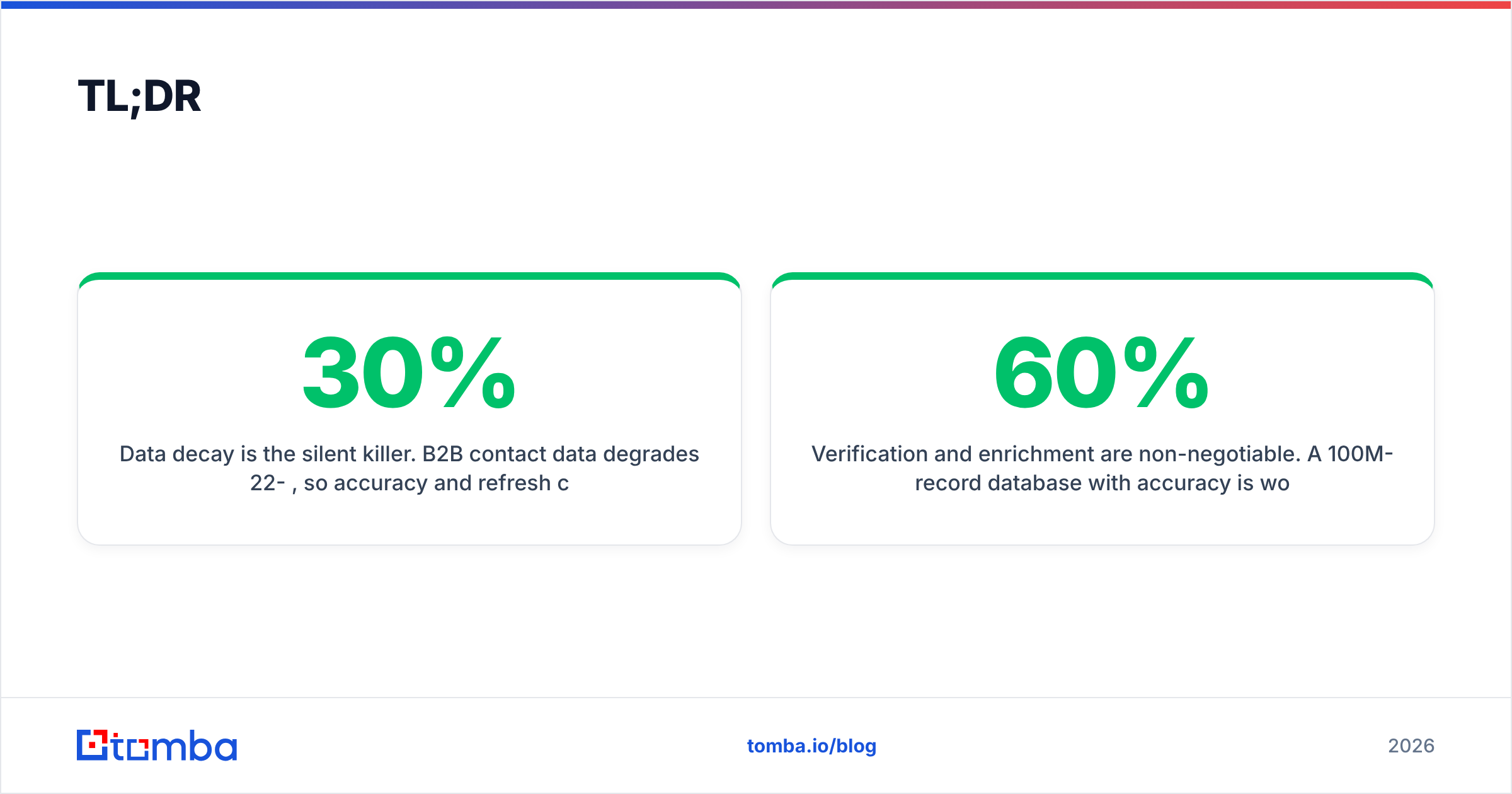
- Data decay is the silent killer. B2B contact data degrades 22-30% per year, so accuracy and refresh cadence matter more than raw record count.
- Verification and enrichment are non-negotiable. A 100M-record database with 60% accuracy is worse than a 10M-record one at 95%.
- Tools like Tomba let you query a live B2B database, verify on the fly, and enrich existing records instead of buying a static dump.
What is a B2B sales database?#
A B2B sales database is a structured collection of business contacts and companies your team uses to find, qualify, and reach buyers. Think of it as the contact book for your entire revenue motion — except it has to stay current across millions of people who change jobs, companies that rebrand, and emails that get deactivated.
A useful record usually carries three layers of data:
- Contact data — full name, job title, work email, direct dial, LinkedIn URL.
- Firmographic data — company name, domain, industry, employee count, revenue band, HQ location.
- Intent and technographic signals — what software a company runs, hiring trends, funding events, and buying signals that tell you when to reach out.
The difference between a spreadsheet and a real sales database is queryability and freshness. You should be able to filter "VP-level marketing contacts at 50-200 person SaaS companies in the US that use HubSpot" and trust that the emails returned were verified recently — not scraped in 2022 and never touched again.
Should you build or buy a B2B sales database?#
Buy for speed and coverage; build for control and margin. The honest answer for most teams is a hybrid: buy the breadth, then build a proprietary layer your competitors can't replicate.
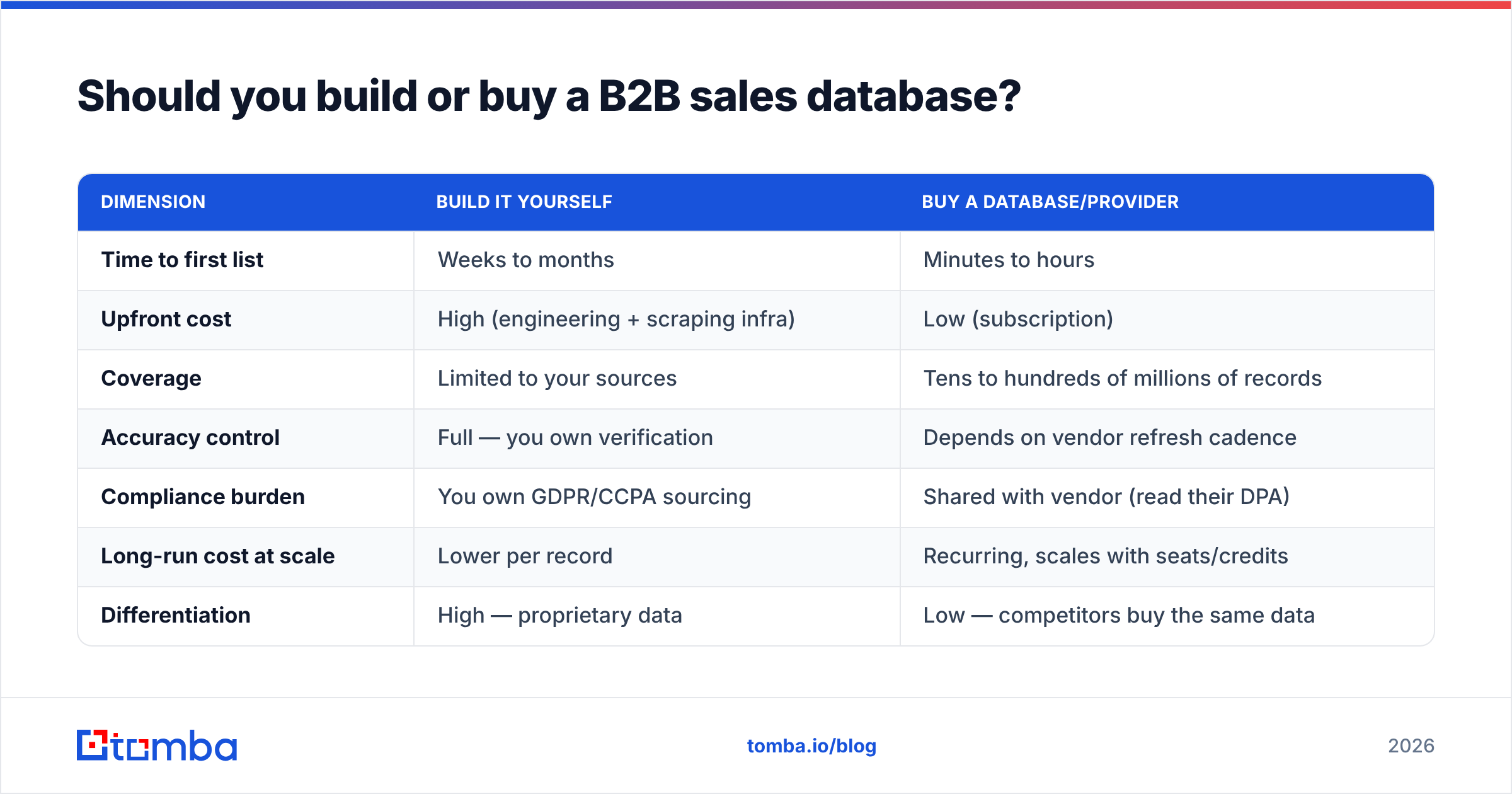
Here's how the two paths compare on the dimensions that actually decide the project.
| Dimension | Build it yourself | Buy a database/provider |
|---|---|---|
| Time to first list | Weeks to months | Minutes to hours |
| Upfront cost | High (engineering + scraping infra) | Low (subscription) |
| Coverage | Limited to your sources | Tens to hundreds of millions of records |
| Accuracy control | Full — you own verification | Depends on vendor refresh cadence |
| Compliance burden | You own GDPR/CCPA sourcing | Shared with vendor (read their DPA) |
| Long-run cost at scale | Lower per record | Recurring, scales with seats/credits |
| Differentiation | High — proprietary data | Low — competitors buy the same data |
A few decision rules that hold up in practice:
- If you're under ~10 reps and need pipeline this quarter, buy. Building a compliant, deduplicated, verified database is a real engineering project, not a weekend script.
- If your ICP is niche (say, dental clinics in three states), a focused build or a targeted domain search often beats a giant generic database you'll mostly ignore.
- If data is your moat — you're selling intent or signals — you'll eventually build, because reselling someone else's dump isn't a business.
Most mature teams land on "buy the base, enrich and verify continuously, layer in first-party data." That's the model the rest of this guide assumes.
What makes a B2B sales database good?#
Accuracy beats volume every time. A database's headline record count is the vanity metric vendors love; the numbers that move pipeline are coverage of your ICP, verification rate, and refresh frequency.
Judge any B2B sales database — bought or built — on these criteria:
- Email accuracy / deliverability. What percentage of emails pass SMTP verification? Anything claiming "99% accuracy" without explaining their verification method deserves skepticism. Real accuracy lives in the low-to-mid 90s for verified records.
- Direct-dial coverage. Mobile and direct numbers, not just the corporate switchboard. Phone data is harder to source, so coverage gaps here are normal — measure them.
- Refresh cadence. How often are records re-verified? Monthly is good; "we bought it in 2023" is a liability.
- ICP fit, not total size. 200 million global records are useless if only 4% match your segment. Ask for coverage stats inside your exact target.
- Compliance and sourcing. Where does the data come from, and can the vendor document lawful basis? Check their data sourcing practices before you sign.
- Deliverability protection. Sending to unverified records tanks your sender reputation and gets your domain blacklisted. Verification isn't optional hygiene — it's deliverability insurance.
For an independent read on vendor quality, cross-check claims against review platforms like G2 and analyst coverage from Gartner rather than taking marketing pages at face value.
How does data decay affect your database?#
Data decay is the reason a "complete" database is never done. B2B contact data degrades roughly 22-30% per year as people switch jobs, companies restructure, and email accounts get deactivated. At a typical 2.5% monthly decay, a list you bought clean in January is meaningfully wrong by summer.
That single fact reshapes how you should think about the whole project:
- A static, one-time purchase is a depreciating asset from the day it lands.
- "Number of records" matters far less than "records verified in the last 30-90 days."
- Continuous verification and enrichment are operating costs, not one-time setup.
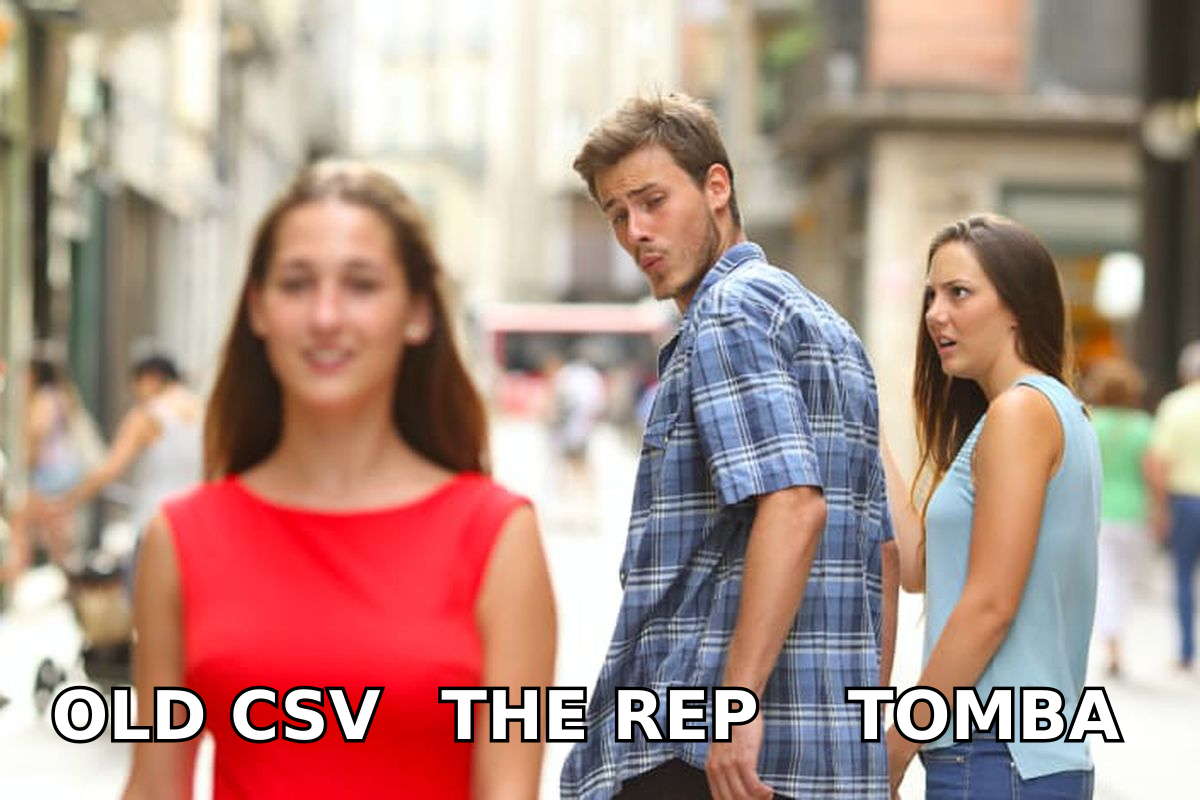
This is exactly why buying a raw CSV dump is the worst of both worlds — you pay once for data that's already aging and you own none of the refresh pipeline. A live, queryable database with verification baked in solves the decay problem structurally instead of forcing you to re-buy lists every quarter.
How do you build and maintain a B2B sales database?#
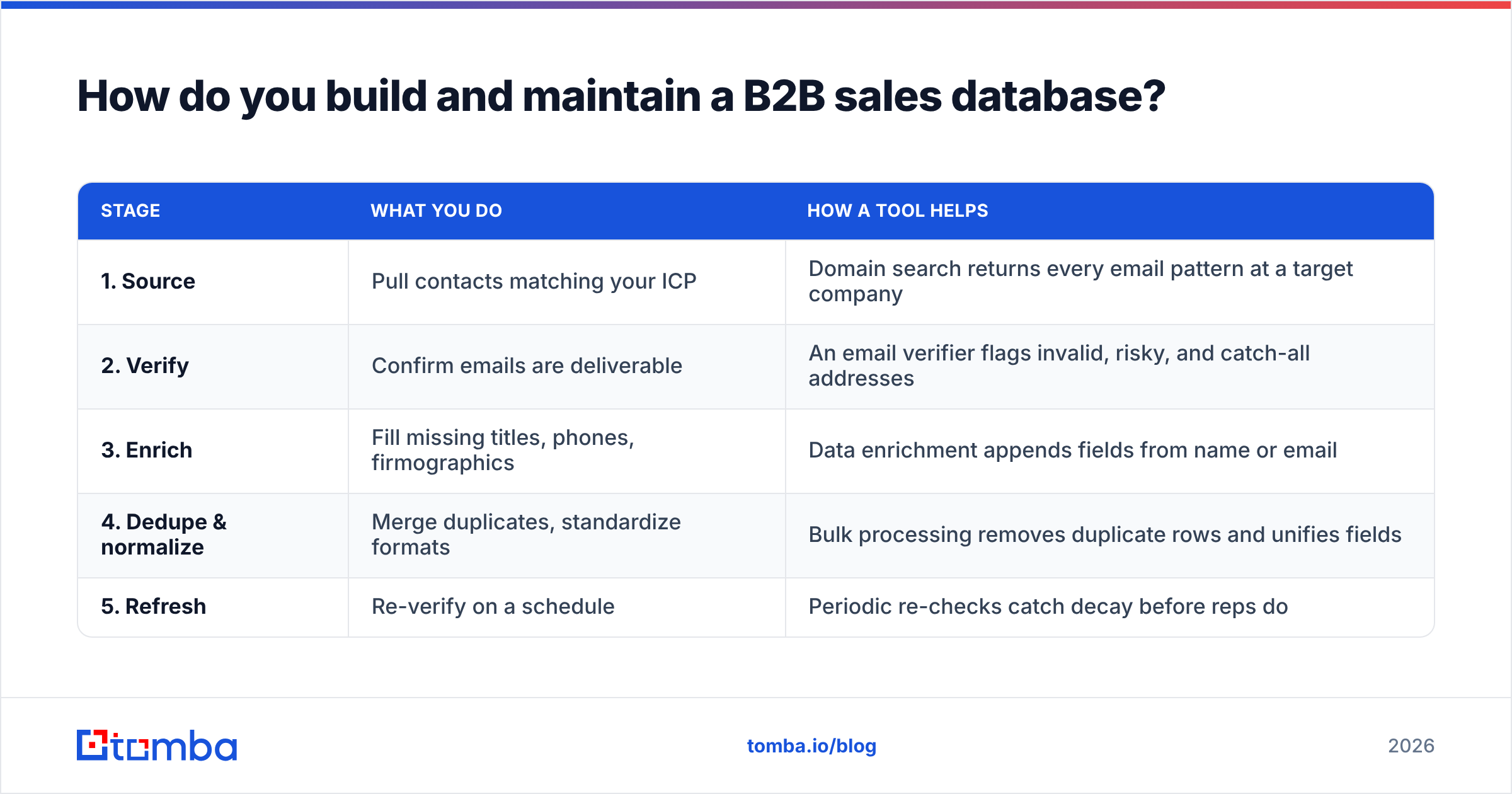
Treat it as a pipeline, not a purchase. The workflow that keeps a sales database healthy has five repeating stages, and you can run all of them with off-the-shelf tooling.
| Stage | What you do | How a tool helps |
|---|---|---|
| 1. Source | Pull contacts matching your ICP | Domain search returns every email pattern at a target company |
| 2. Verify | Confirm emails are deliverable | An email verifier flags invalid, risky, and catch-all addresses |
| 3. Enrich | Fill missing titles, phones, firmographics | Data enrichment appends fields from name or email |
| 4. Dedupe & normalize | Merge duplicates, standardize formats | Bulk processing removes duplicate rows and unifies fields |
| 5. Refresh | Re-verify on a schedule | Periodic re-checks catch decay before reps do |
A practical loop in plain terms:
- Start with the company, not the person. Run a domain search on your target accounts to surface the right people and the company's email format. This is faster and more accurate than guessing individual addresses.
- Find the specific contact. Use a Tomba Email Finder to resolve a known name at a known company into a verified work email.
- Verify before you load. Never import an address you haven't checked. Catch-all domains, role accounts (info@, sales@), and dead mailboxes all need flagging at intake.
- Enrich the thin records. A row with just a name and email is half a lead. Append title, seniority, company size, and a direct dial so routing and personalization actually work.
- Schedule re-verification. Re-check your active segments monthly. Records that fail get quarantined, not deleted, so you can re-enrich later.
If you'd rather not stitch this together by hand, most of it runs through a single Tomba API call per stage, or through the bulk email finder for list-scale work. The point is that maintenance is a recurring job — automate it or it won't happen.
How much should a B2B sales database cost?#
Pricing models split into three camps, and the right one depends on whether your usage is steady or spiky.
- Credit-based — you pay per record found or verified. Best for variable, project-based usage.
- Seat-based — flat fee per user with usage caps. Best for steady teams of reps prospecting daily.
- Flat database license — one price for bulk access or export. Best when you genuinely need everything and have the infra to process it.
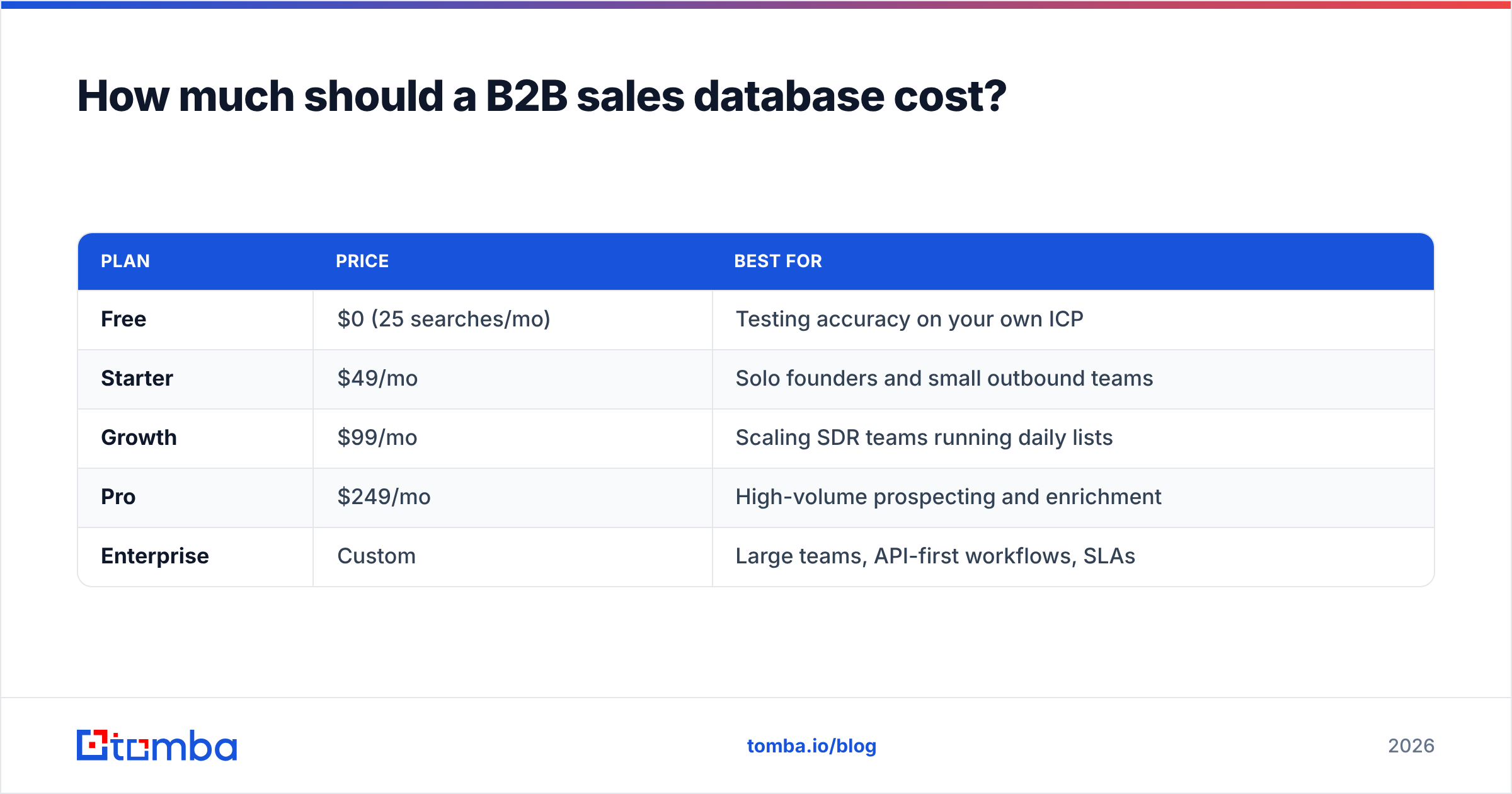
For context, here's how a usage-based provider like Tomba structures access. You can see full Tomba pricing for current limits.
| Plan | Price | Best for |
|---|---|---|
| Free | $0 (25 searches/mo) | Testing accuracy on your own ICP |
| Starter | $49/mo | Solo founders and small outbound teams |
| Growth | $99/mo | Scaling SDR teams running daily lists |
| Pro | $249/mo | High-volume prospecting and enrichment |
| Enterprise | Custom | Large teams, API-first workflows, SLAs |
The cost mistake teams make isn't paying too much per record — it's paying anything for records they never verify. A $99/month plan that feeds verified, enriched contacts into your CRM beats a $10,000 annual "unlimited" license that floods your pipeline with bounces and burns your domain reputation. Anchor your budget to deliverable records, not total volume.
Common mistakes to avoid#
- Buying on record count alone. "300M contacts" tells you nothing about your 4,000-account ICP. Demand coverage stats for your segment.
- Skipping verification to save credits. Every bounce damages email deliverability and compounds. Verification is cheaper than rebuilding sender reputation.
- Treating the database as set-and-forget. Without a refresh cadence, decay turns your asset into a liability within a year.
- Ignoring compliance. Source data lawfully and keep documentation. A cheap list with murky provenance is a legal and deliverability risk, not a bargain.
- Letting duplicates pile up. Duplicate records inflate your counts, confuse routing, and double-email prospects. Dedupe at intake, not after the damage.
Frequently asked questions#
What is the difference between a B2B sales database and a CRM? A CRM stores your relationships and deal history — accounts you already work. A B2B sales database is the external source you pull new prospects from before they ever enter the CRM. You enrich and verify in the database, then push clean records into Salesforce, HubSpot, or Pipedrive.
How accurate can a B2B sales database really be? Verified work-email accuracy in the low-to-mid 90s is realistic and good. Anything claiming higher without a stated verification method is marketing. Accuracy also depends on how recently each record was checked, which is why refresh cadence matters as much as the headline rate.
Can I build a free B2B sales database? Partly. You can seed one with free tiers — Tomba's free plan, a free email checker, and manual research — but compliant sourcing, verification infrastructure, and ongoing refresh are where "free" stops scaling. Free is great for validating your ICP before you commit to a paid pipeline.
How often should I clean my database? Re-verify active segments monthly and run a full audit quarterly. With 2-3% monthly decay, monthly cleaning keeps deliverability stable; anything less and bounces creep back in.
Build your B2B sales database on data you can trust#
A sales database is only worth what it can deliver — literally. The teams that win in 2026 aren't the ones with the biggest record count; they're the ones whose every contact is verified, enriched, and fresh enough to actually reach.
Start where it matters most: finding real, deliverable contacts for your exact ICP. The Tomba Email Finder lets you search by domain, name, or company, verifies each result before it hits your list, and plugs straight into your CRM through the Tomba API. Try it free with 25 searches a month, point it at your top accounts, and judge the accuracy on your own data before you scale. That's how you build a B2B sales database that drives pipeline instead of bounces.
// get started
Find, verify and enrich your first contacts today
Start on the free plan with 25 searches a month, then scale when your team is ready.
Free plan · No credit card required · GDPR & CCPA
// about the author