Best B2B Sales Prospecting Software in 2026: Tools & Pricing
A practical, vendor-neutral guide to B2B sales prospecting software in 2026: what each layer does, how the tools compare on price and accuracy, and how to assemble a stack that books meetings.
TL;DR
- B2B sales prospecting software is a stack, not a single app: data discovery, contact finding, verification, enrichment, and sequencing each do a distinct job.
- The biggest money leak is bad data. Tools that find emails but skip verification quietly burn your sending reputation and your reps' time.
- Pricing ranges from free tiers to $249+/mo. Match spend to the volume and accuracy you actually need, not the longest feature list.
- All-in-one platforms (Apollo, ZoomInfo) trade depth for convenience; specialist finders and verifiers win on accuracy and cost control.
- A lean, accurate stack beats an expensive bloated one. Start with a verified data layer, then add sequencing once your list is clean.
What is B2B sales prospecting software?#
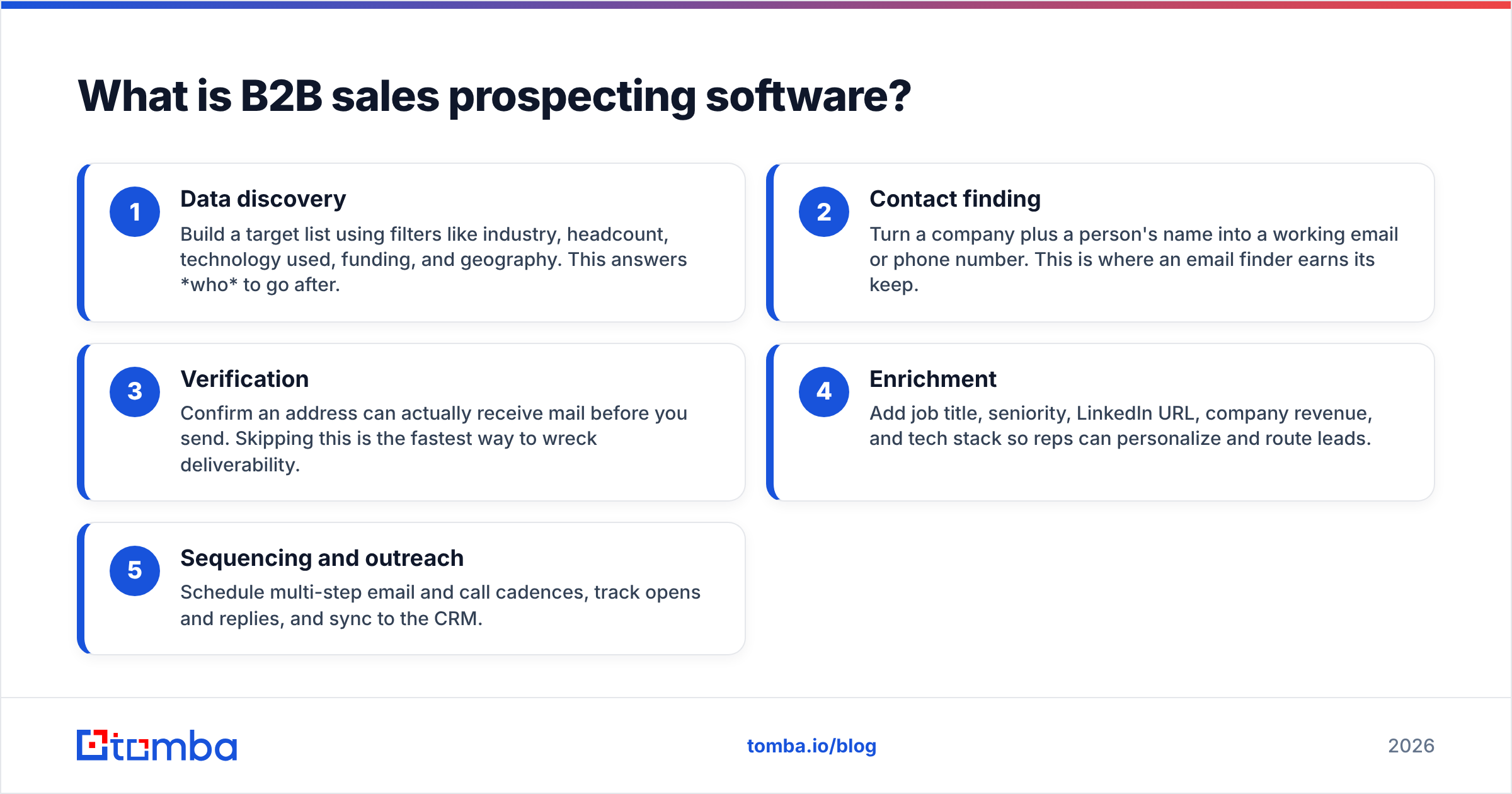
B2B sales prospecting software is the set of tools that turn "we want to sell to companies like X" into a list of real people you can actually email or call. Think of it like a kitchen: sourcing ingredients (finding companies), picking the right cuts (finding the right contacts), checking they aren't spoiled (verification), seasoning (enrichment), and finally cooking and serving (outreach sequencing). No single appliance does all of it well.
Most teams lump everything under "prospecting tools," but the category breaks into five clear layers. Knowing which layer a tool actually owns is the difference between a stack that compounds and one that overlaps, overcharges, and underperforms.
Here are the five layers, with what each one is responsible for:
- Data discovery — Build a target list using filters like industry, headcount, technology used, funding, and geography. This answers who to go after.
- Contact finding — Turn a company plus a person's name into a working email or phone number. This is where an email finder earns its keep.
- Verification — Confirm an address can actually receive mail before you send. Skipping this is the fastest way to wreck deliverability.
- Enrichment — Add job title, seniority, LinkedIn URL, company revenue, and tech stack so reps can personalize and route leads.
- Sequencing and outreach — Schedule multi-step email and call cadences, track opens and replies, and sync to the CRM.
The mistake most teams make is buying one heavy "all-in-one" and assuming it's best-in-class at all five. It almost never is. The discovery might be strong while the email accuracy is mediocre, or the sequencing slick while the data is two years stale.
Why does data accuracy matter more than features?#
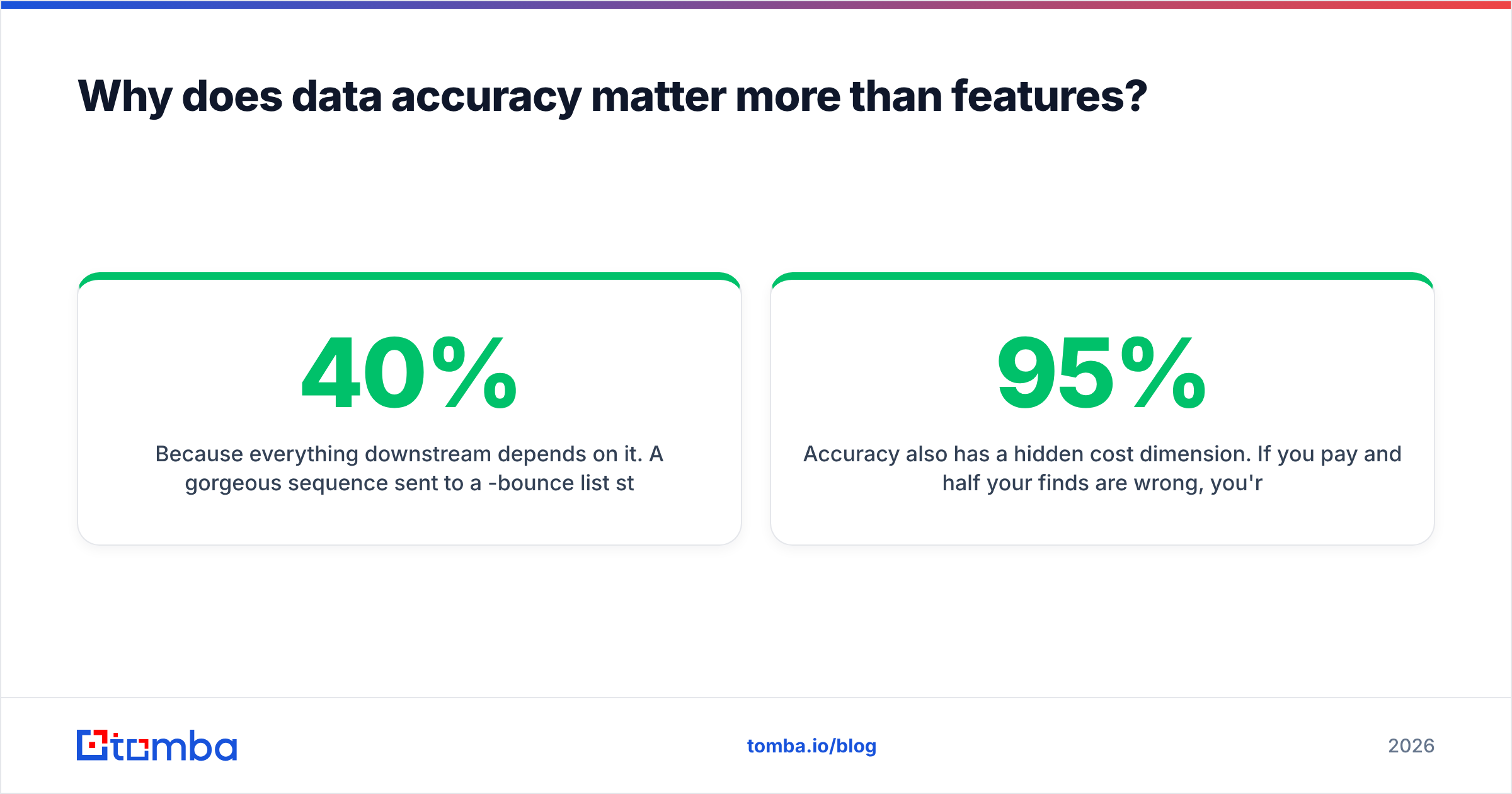
Because everything downstream depends on it. A gorgeous sequence sent to a 40%-bounce list still tanks. Mailbox providers read bounce rate as a spam signal, so bad data doesn't just waste sends — it drags down deliverability for the good addresses too. According to HubSpot's research on email marketing, inbox placement and list hygiene directly move reply rates, and that effect compounds across every campaign you run after.
This is why verification belongs in your core stack, not as an afterthought. Running addresses through an email verifier before a send keeps your bounce rate low and your sender reputation intact. The order matters: find, verify, then sequence. Teams that flip that order learn the expensive way.
Accuracy also has a hidden cost dimension. If you pay per credit and half your finds are wrong, you're effectively paying double. A tool that's 95% accurate at $0.02 a contact is cheaper in practice than one that's 70% accurate at $0.01, because the wasted credits, the rep hours, and the reputation damage all stack up.
How do the main B2B sales prospecting tools compare?#
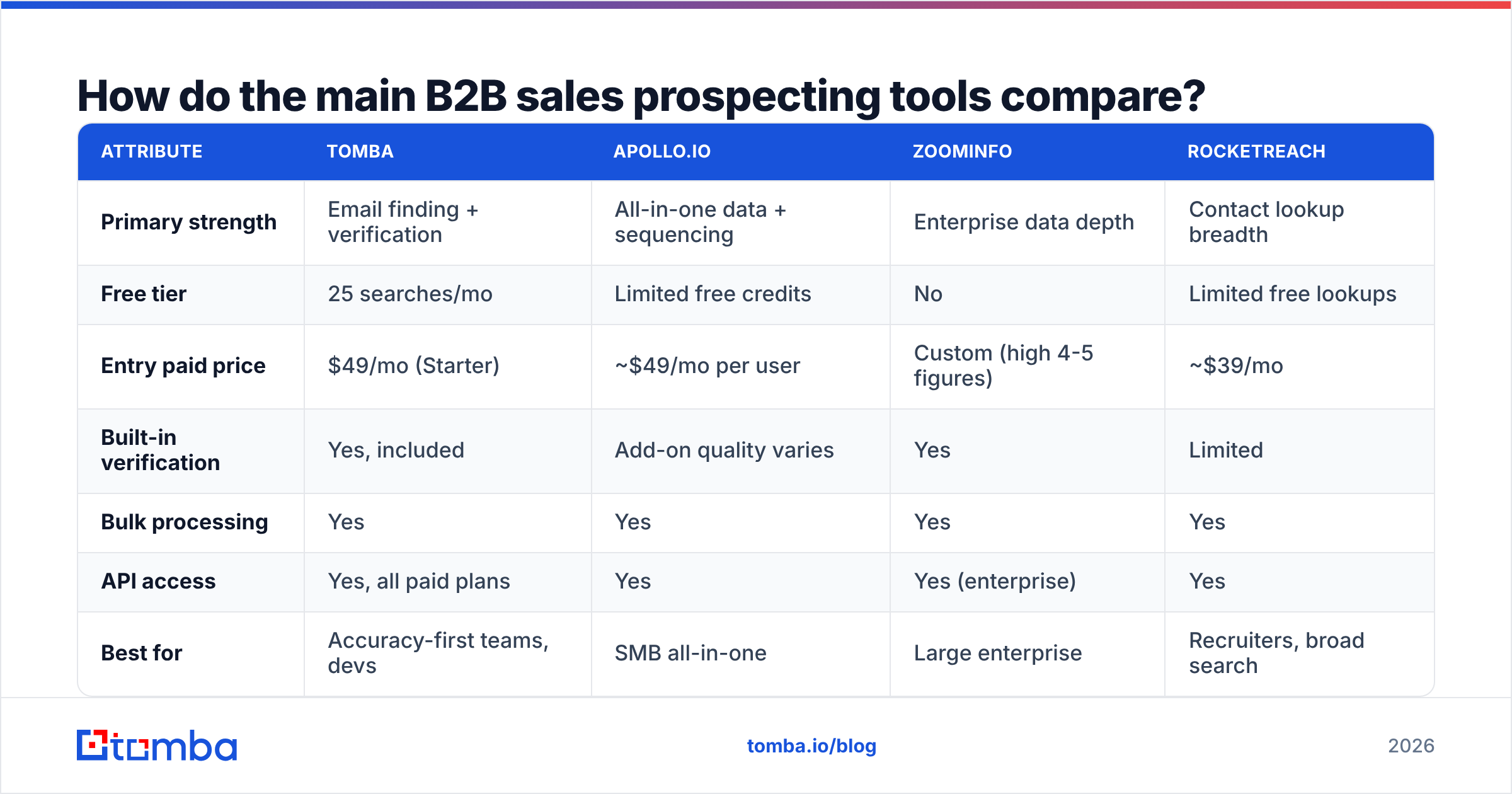
There's no single "best" tool — there's a best fit for your volume, budget, and how much you value accuracy over breadth. The table below compares common options across the attributes that actually change outcomes. Pricing reflects published entry tiers as of 2026; confirm current numbers on each vendor's site before you buy.
| Attribute | Tomba | Apollo.io | ZoomInfo | RocketReach |
|---|---|---|---|---|
| Primary strength | Email finding + verification | All-in-one data + sequencing | Enterprise data depth | Contact lookup breadth |
| Free tier | 25 searches/mo | Limited free credits | No | Limited free lookups |
| Entry paid price | $49/mo (Starter) | ~$49/mo per user | Custom (high 4-5 figures) | ~$39/mo |
| Built-in verification | Yes, included | Add-on quality varies | Yes | Limited |
| Bulk processing | Yes | Yes | Yes | Yes |
| API access | Yes, all paid plans | Yes | Yes (enterprise) | Yes |
| Best for | Accuracy-first teams, devs | SMB all-in-one | Large enterprise | Recruiters, broad search |
A few honest takeaways from that grid. Apollo is a reasonable default if you want discovery, finding, and sequencing under one login and can tolerate variable data quality. ZoomInfo has the deepest enterprise dataset but prices out most small teams and locks the good stuff behind annual contracts. RocketReach is broad and recruiter-friendly but thinner on verification. Tomba's lane is accuracy-first contact finding and verification, with a free email finder tier and an API on every paid plan — strong when clean data is the priority and you'd rather plug sequencing in separately. You can compare current tiers on the Tomba pricing page and cross-check peer reviews on G2.
Should you buy all-in-one or build a stack?#
It depends on team size and how much accuracy is worth to you. Here's the conclusion first: most teams under 20 reps do better with a lean specialist stack; large orgs with procurement leverage often justify an all-in-one.
The all-in-one case. One vendor, one bill, one login, native CRM sync. Onboarding is faster and there's no integration glue to maintain. The trade-off is that you're locked into that vendor's data quality everywhere, and you pay for modules you may barely use.
The build-a-stack case. You pick the best contact-finding and verification layer, the best sequencing layer, and wire them with native integrations or an API. You control cost per layer and can swap any piece that underperforms. The trade-off is more setup and a few more invoices.
For the stack approach, the data layer is where you should be pickiest. A bulk email finder plus verification handles list-building at volume, while data enrichment fills in the title, seniority, and company fields your reps need to personalize. Sequencing tools like Instantly, Smartlead, or Salesloft then sit on top of that clean foundation.
What features actually move reply rates?#
Not the ones in the marketing headlines. After stripping away the noise, these are the capabilities that correlate with booked meetings:
- Real-time verification at find time. Catching dead addresses before they enter your sequence protects deliverability and keeps bounce rate under the 2-3% danger zone.
- Catch-all handling. A huge share of B2B domains are catch-all, which standard verifiers mark "unknown." A dedicated catch-all verifier tells you which of those are safe to send, recovering contacts most tools discard.
- Enrichment that fills routing fields. Seniority and department let you auto-route leads and tailor messaging, which lifts replies more than any subject-line trick.
- API and integrations. If the tool can't push clean data into your CRM and sequencer automatically, your reps will do it by hand — and they won't.
- Bulk + single-lookup parity. You want the same accuracy whether you're enriching one LinkedIn profile or processing a 10,000-row CSV.
Notice what's not on that list: AI-written email "magic," fancy dashboards, and intent-data add-ons that sound impressive but rarely pay for themselves at SMB scale. Buy those later, once your fundamentals convert.
How much should B2B sales prospecting software cost?#
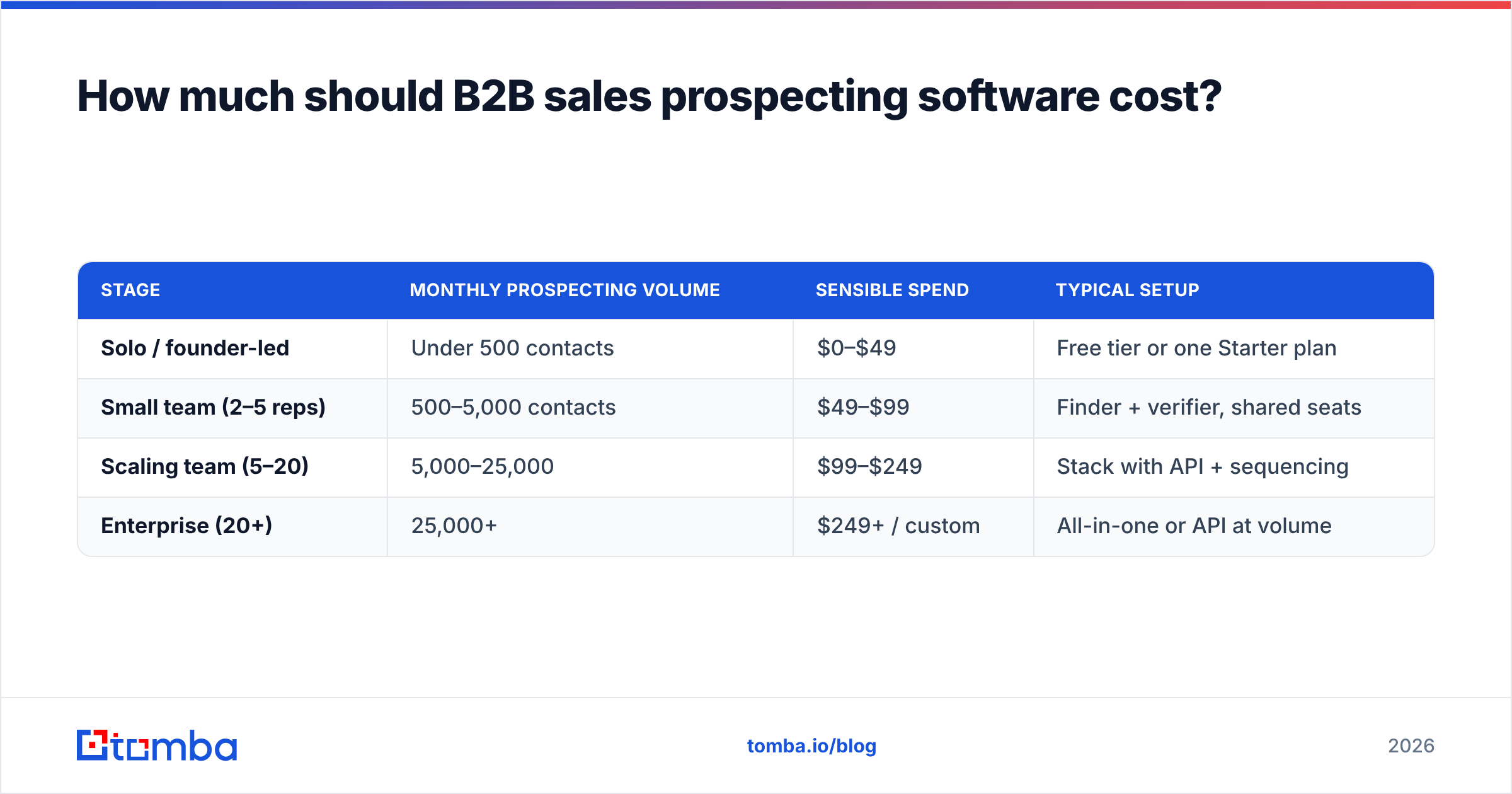
Budget to volume and accuracy, not to feature count. A useful rule: your data-and-finding layer should cost less than what one extra booked meeting per month is worth to you. For most B2B teams that's a low bar, which is why over-paying for enterprise data you don't use is the most common waste.
Here's a rough framing by team stage:
| Stage | Monthly prospecting volume | Sensible spend | Typical setup |
|---|---|---|---|
| Solo / founder-led | Under 500 contacts | $0–$49 | Free tier or one Starter plan |
| Small team (2–5 reps) | 500–5,000 contacts | $49–$99 | Finder + verifier, shared seats |
| Scaling team (5–20) | 5,000–25,000 | $99–$249 | Stack with API + sequencing |
| Enterprise (20+) | 25,000+ | $249+ / custom | All-in-one or API at volume |
Tomba's tiers map cleanly onto that: Free (25 searches/mo) to test fit, Starter at $49/mo, Growth at $99/mo, Pro at $249/mo, and custom Enterprise pricing for high-volume API use. The point isn't that one vendor wins every row — it's that you should know which row you're in before you talk to a sales rep, so you don't get upsold into the one above it.
One more cost lever: API-first tools let engineering automate prospecting inside your own workflows. If you're technical, the Tomba API (and similar) can replace a chunk of manual list-building entirely, which changes the math versus paying per seat. Salesforce's own guidance on sales productivity makes the same point from the other direction: automating the low-value steps is where reps reclaim selling time.
How do you build a prospecting stack that actually works?#
Start narrow and prove conversion before you expand. The sequence below is the one that fails least often:
- Define the ICP precisely. Industry, headcount band, region, and a trigger (hiring, funding, tech in use). A vague ICP makes every tool downstream look broken.
- Build the target company list from a discovery tool or your existing CRM.
- Find and verify contacts in one motion. Don't separate these steps — verify at find time so junk never enters your pipeline.
- Enrich with title, seniority, and LinkedIn so you can route and personalize.
- Load a small sequence (50–100 verified contacts), send, and measure reply rate before scaling.
- Scale what converts. Only after a segment proves out do you process it in bulk.
This order keeps your costs honest and your reputation clean. The teams that struggle almost always skip step 3, scale a dirty list in step 6, and then blame the sequencing tool.
Which tool is right for you?#
If you want one decision rule: pick for the layer you're weakest in. If your data is dirty, fix finding and verification first — that's the highest-ROI move and the one that quietly determines whether everything else works. If your data is already clean but your follow-up is chaotic, invest in sequencing instead.
For accuracy-first teams that want verified contacts without paying enterprise prices, the Tomba Email Finder is a strong starting point. It finds professional emails by domain, name, or company, verifies them in the same step, and gives you API access on every paid plan so you can automate the boring parts. Start on the free tier, run a real segment through it, and judge it on bounce rate and reply rate — the only metrics that matter. When the data layer is solid, every dollar you spend on outreach after that works harder.
// get started
Find, verify and enrich your first contacts today
Start on the free plan with 25 searches a month, then scale when your team is ready.
Free plan · No credit card required · GDPR & CCPA
// about the author