How to Build a Lean B2B Sales Stack in 2026 (Tools + Costs)
A bloated B2B sales stack burns budget and slows reps down. Here's a layer-by-layer blueprint for 2026 — the tools that matter, what they cost, and where to cut.
Most B2B sales teams don't have a tool problem. They have a too many tools problem. The average revenue team now juggles a dozen logins, three overlapping data sources, and a CRM nobody fully trusts. A good B2B sales stack isn't the one with the most logos — it's the one where data flows cleanly from "who should we call" to "closed-won" without a rep ever copy-pasting an email address.
This guide breaks the stack into layers, names the tools that earn their seat, shows real 2026 pricing, and tells you where you're almost certainly overspending.
TL;DR#
- A B2B sales stack has five layers: data/contact discovery, engagement/outreach, CRM/pipeline, intelligence/analytics, and enablement. Buy one strong tool per layer, not three weak ones.
- Data is the foundation. Bad contact data quietly wastes every dollar spent on the layers above it. Start with an accurate email finder and email verifier.
- You can run a competitive stack for under $300/mo per seat if you avoid duplicate point solutions and all-in-one platforms you only use 20% of.
- Integration beats features. A tool that syncs cleanly to your CRM is worth more than one with a longer feature list that lives on an island.
- Audit quarterly. Most teams pay for at least one tool nobody opened last month.
What is a B2B sales stack?#
A B2B sales stack is the connected set of software your revenue team uses to find buyers, reach them, manage deals, and measure what's working. Think of it like a kitchen: you need a way to source ingredients (data), a way to cook (outreach), a place to plate and serve (CRM), and a way to know which dishes sell (analytics). A great kitchen isn't the one with the most gadgets — it's the one where every tool gets used and nothing rots in the drawer.
The mistake most teams make is buying gadgets. They sign up for a prospecting platform, then a separate enrichment tool, then a third "AI" layer that does a slice of both — and now the same lead exists in three places with three different email addresses.
The fix is to think in layers, assign one primary tool per layer, and demand that each one talks to your CRM.
What are the layers of a modern sales stack?#
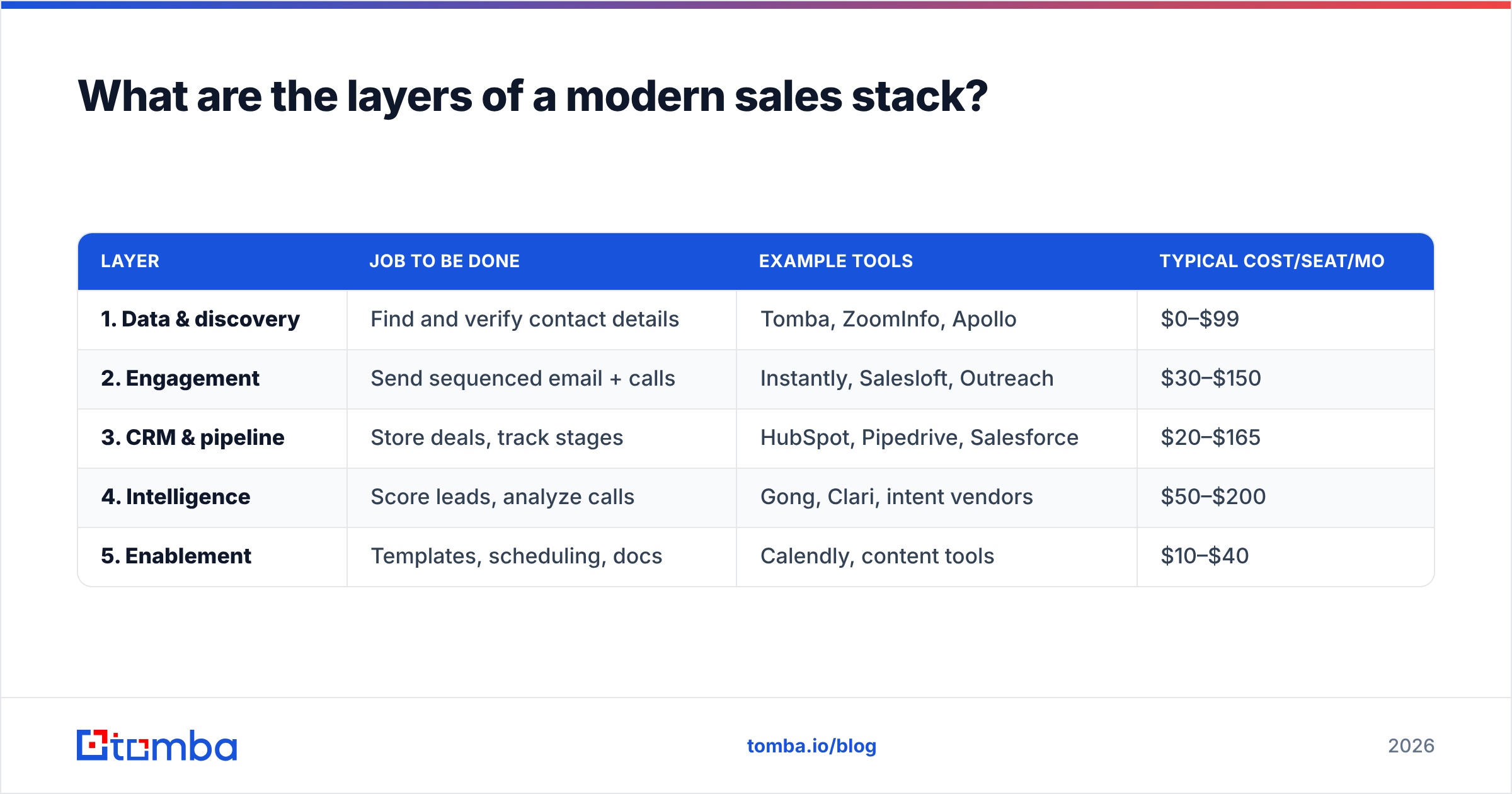
Here are the five layers every B2B sales stack needs, what each one does, and a representative cost range per seat in 2026:
| Layer | Job to be done | Example tools | Typical cost/seat/mo |
|---|---|---|---|
| 1. Data & discovery | Find and verify contact details | Tomba, ZoomInfo, Apollo | $0–$99 |
| 2. Engagement | Send sequenced email + calls | Instantly, Salesloft, Outreach | $30–$150 |
| 3. CRM & pipeline | Store deals, track stages | HubSpot, Pipedrive, Salesforce | $20–$165 |
| 4. Intelligence | Score leads, analyze calls | Gong, Clari, intent vendors | $50–$200 |
| 5. Enablement | Templates, scheduling, docs | Calendly, content tools | $10–$40 |
You don't need the most expensive option in every row. You need coverage — one tool that owns each job — and tight integration between them. A scrappy team can cover all five layers for the price of one enterprise seat.
Why does the data layer matter most?#
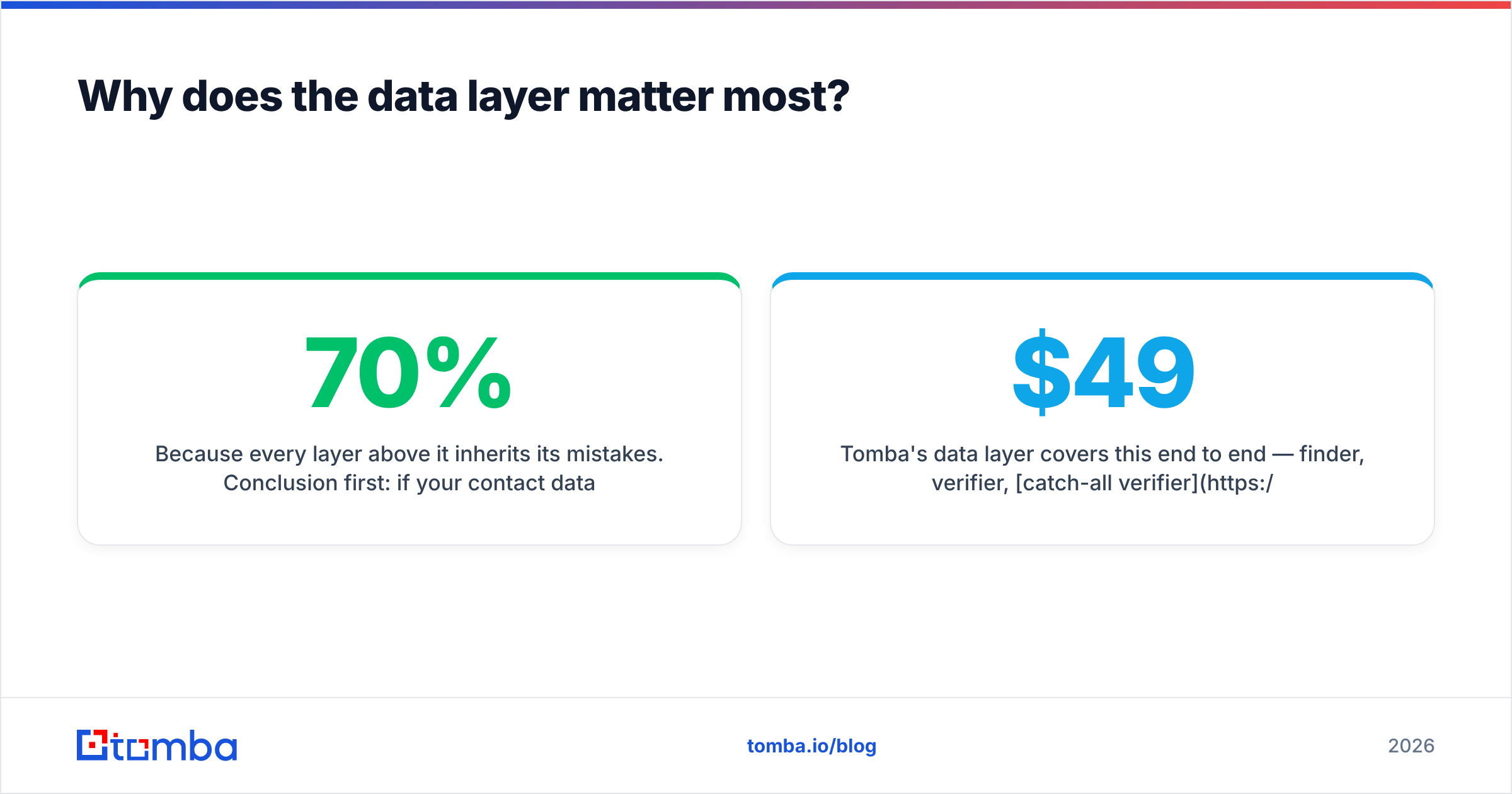
Because every layer above it inherits its mistakes. Conclusion first: if your contact data is 70% accurate, your outreach tool is 30% wasted, your CRM is 30% polluted, and your analytics are lying to you. Garbage in, garbage everywhere.
Here's the chain reaction of a bad email address:
- Bounce — your send hits a dead mailbox.
- Reputation damage — too many bounces and mailbox providers throttle your domain. Read up on email deliverability before you scale sends.
- Wasted rep time — an SDR chases a contact who left the company in 2024.
- Polluted CRM — the bad record now skews every report.
That's why the smart money starts at the bottom. Before you pay for a fancy engagement platform, make sure the contacts feeding it are real. Use a domain search to pull every verified address at a target company, then run new lists through verification so bounces never reach your sender reputation.
Tomba's data layer covers this end to end — finder, verifier, catch-all verifier, and data enrichment — on a free tier of 25 searches/month and paid plans starting at $49/mo. Compare that to enterprise data vendors that start in the four figures and lock you into annual contracts.
How do you choose tools for each layer?#
Use three filters, in this order: accuracy, integration, then price. Most buyers reverse that and regret it.
- Accuracy first. A cheap tool with bad data is the most expensive thing you can buy, because the cost shows up later as wasted sends and dead deals. Ask vendors for a bounce-rate guarantee and test on your own target list before committing.
- Integration second. A tool that doesn't sync to your CRM creates manual work that scales with your team. Check for native connectors to HubSpot, Salesforce, and Pipedrive, plus a Zapier integration for everything else.
- Price third. Once two tools clear the accuracy and integration bar, then compare price. Per-credit pricing rewards lean teams; flat enterprise seats reward heavy daily users.
That ordering protects you from the classic trap: buying the cheapest option, watching it underperform, and paying twice when you switch.
Build vs. buy: the all-in-one platform trap#
The biggest 2026 spending mistake is the all-in-one platform you use at 20%. These suites promise data + outreach + CRM in one bill, and on paper that's tidy. In practice you pay enterprise prices for a finder that's weaker than a dedicated one, an outreach engine that's clunkier than a focused one, and a CRM your team works around.
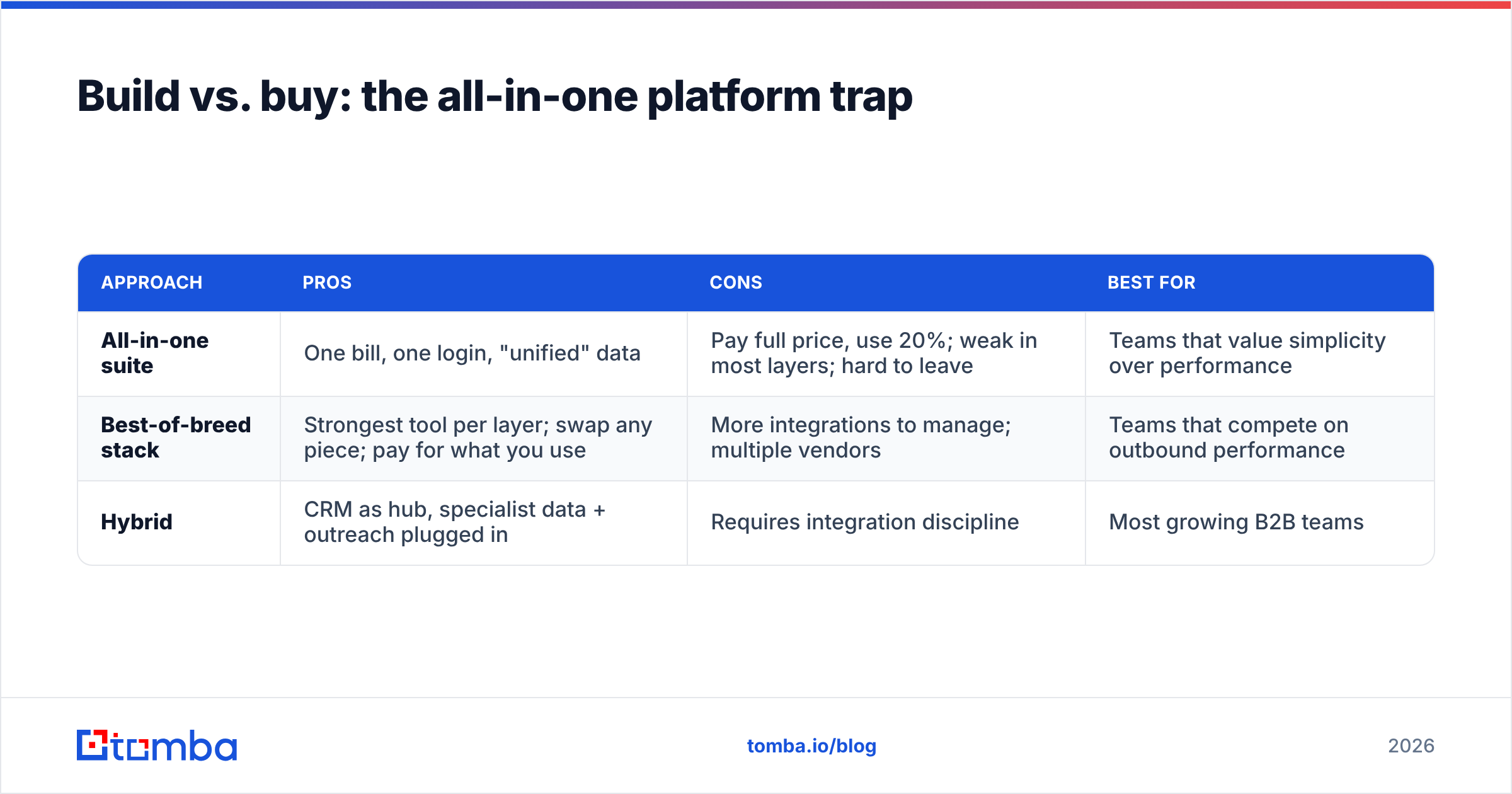
Here's the honest trade-off:
| Approach | Pros | Cons | Best for |
|---|---|---|---|
| All-in-one suite | One bill, one login, "unified" data | Pay full price, use 20%; weak in most layers; hard to leave | Teams that value simplicity over performance |
| Best-of-breed stack | Strongest tool per layer; swap any piece; pay for what you use | More integrations to manage; multiple vendors | Teams that compete on outbound performance |
| Hybrid | CRM as hub, specialist data + outreach plugged in | Requires integration discipline | Most growing B2B teams |
The hybrid model wins for most teams: keep a strong CRM as the hub, then plug in a specialist data layer and a specialist engagement layer that both sync into it. You get best-of-breed performance without ten disconnected dashboards.
What does a lean B2B sales stack cost in 2026?#
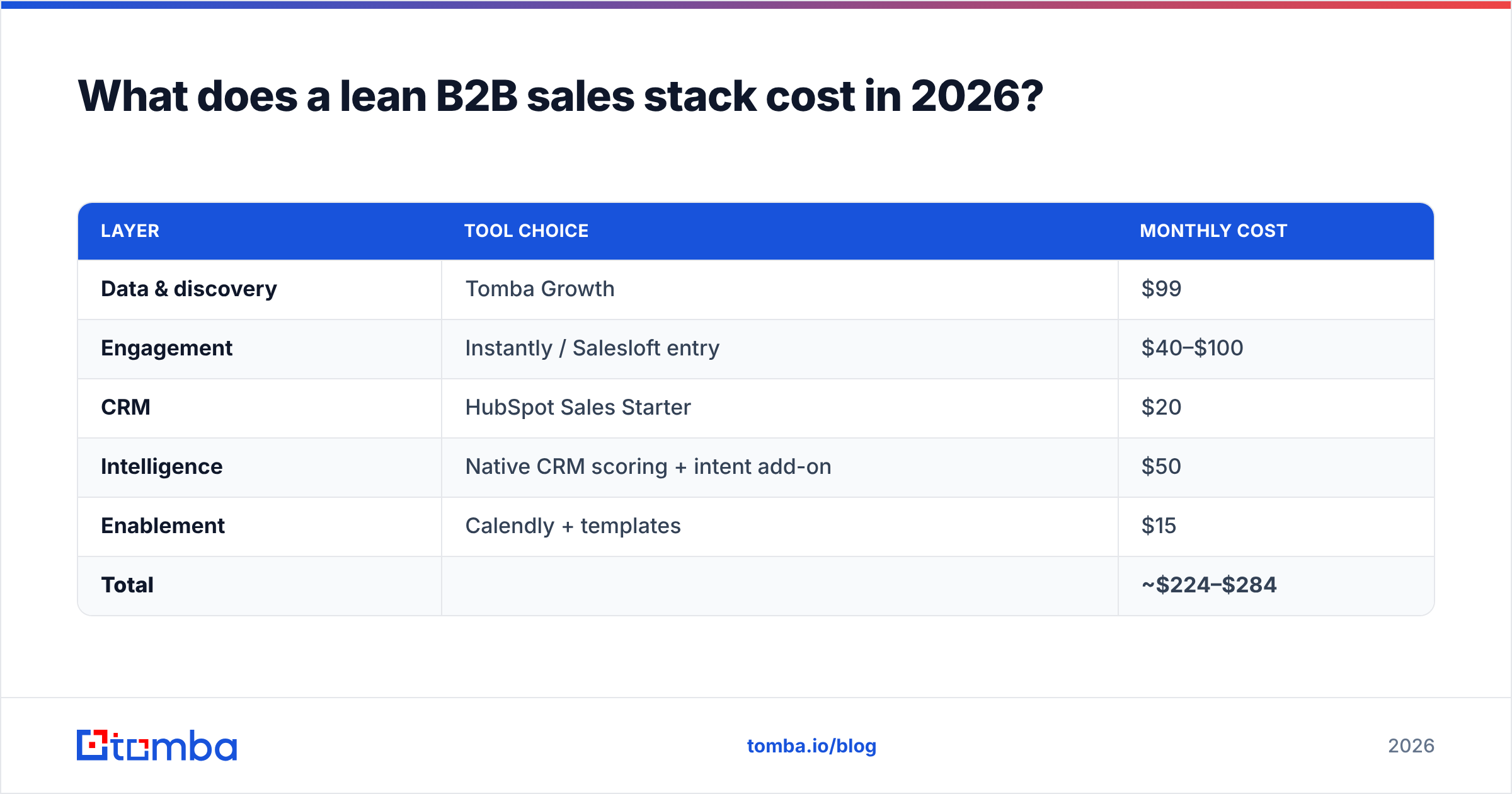
A complete, competitive stack runs roughly $200–$320 per seat per month if you choose deliberately. Here's a realistic mid-market build:
| Layer | Tool choice | Monthly cost |
|---|---|---|
| Data & discovery | Tomba Growth | $99 |
| Engagement | Instantly / Salesloft entry | $40–$100 |
| CRM | HubSpot Sales Starter | $20 |
| Intelligence | Native CRM scoring + intent add-on | $50 |
| Enablement | Calendly + templates | $15 |
| Total | ~$224–$284 |
Compare that to a single ZoomInfo + Outreach + Salesforce enterprise bundle, which can run $1,000+ per seat once you add the modules sales actually needs. The lean stack isn't about being cheap — it's about not paying for shelfware. See full Tomba pricing for how the data layer scales as you add seats or move to bulk lead generation.
According to G2's category data, sales-intelligence tools alone span dozens of overlapping products — which is exactly why a layer-based audit beats shopping by feature list.
How do you keep the stack from sprawling?#
Run a quarterly stack audit. It takes an hour and almost always pays for itself. For every tool, answer four questions:
- Who logged in last 30 days? If usage is under 40% of seats, you're overpaying or under-training. Cut or consolidate.
- Does it duplicate another tool? Two enrichment sources, two scheduling tools — pick one. Overlap is the silent budget killer.
- Does it sync to the CRM? If data lives in a tool but never reaches your pipeline, it's a silo. Either integrate it or drop it.
- Would the team revolt if we cancelled it? No reaction means no value. Cancel and see who notices.
Pair the audit with clean data hygiene: dedupe records, re-verify aging contacts, and enrich stale rows. A Tomba API call or a scheduled bulk verify keeps the CRM that everything else depends on from rotting. HubSpot's own sales tooling guidance makes the same point: the CRM is only as useful as the data quality flowing into it.
How should the tools actually connect?#
Make the CRM the single source of truth, then point everything at it. The healthy data flow looks like this:
- Discovery → CRM: New verified contacts from your finder land directly as CRM records, already enriched — no copy-paste.
- CRM → Engagement: Sequences pull contacts from CRM segments, so reps work from one list, not a spreadsheet.
- Engagement → CRM: Opens, replies, and meetings write back to the deal record automatically.
- CRM → Intelligence: Scoring and forecasting read from clean pipeline data, so the numbers are trustworthy.
When that loop is closed, a rep never leaves the CRM to do their job, and leadership never argues about whose numbers are right. When it's broken, you get the dozen-login chaos most teams live in — and the data drifts a little further out of sync every week.
If you're stitching this together yourself, lean on native connectors first and a Zapier integration or Make.com integration for the gaps. Avoid custom code until you've outgrown what off-the-shelf automation can do.
Common B2B sales stack mistakes to avoid#
- Buying outreach before data. A great sequence to a bad list is just faster failure.
- Stacking three data vendors "for coverage." Coverage comes from one accurate source plus verification, not three mediocre ones contradicting each other.
- Ignoring deliverability. No amount of stack sophistication helps if your domain is throttled. Verify before you send, every time.
- Letting reps pick their own tools. Shadow tools fragment your data and your spend. Standardize the stack, then train on it.
- Never re-evaluating. The tool that fit at 5 reps may be wrong at 25. Audit on a schedule, not a crisis.
Build the foundation first#
Your B2B sales stack is only as strong as the data underneath it. Before you add another engagement platform or AI layer, fix the foundation: accurate, verified, enriched contacts flowing straight into your CRM.
That's exactly what the Tomba Email Finder is built for — find professional email addresses by domain, name, or company, verify them so they never dent your sender reputation, and push clean records into the rest of your stack via native integrations or the API. Start free with 25 searches a month, then scale to Growth at $99/mo when your pipeline demands it. Build the data layer right, and every tool above it works harder for the same spend.
// get started
Find, verify and enrich your first contacts today
Start on the free plan with 25 searches a month, then scale when your team is ready.
Free plan · No credit card required · GDPR & CCPA
// about the author