B2B Sales Workflow Automation: The 2026 Playbook & Tools
Manual prospecting, data entry, and follow-up quietly drain your sales week. Here is how to automate the B2B sales workflow in 2026 without losing the human touch.
Your reps were hired to sell. So why do they spend more than half their week not selling?
Most B2B sales teams lose the bulk of their hours to research, data entry, list cleanup, and follow-up scheduling — the connective tissue between actual conversations. B2B sales workflow automation is the practice of handing that connective tissue to software so humans can focus on the parts machines are bad at: judgment, rapport, and closing.
This guide breaks down what's worth automating in 2026, the tool categories that matter, a side-by-side comparison, and a rollout plan you can run this quarter.
TL;DR#
- The problem: reps spend roughly 65–70% of their time on non-selling tasks. Automation reclaims most of it.
- Automate the repeatable, keep the relational. Lead sourcing, enrichment, data hygiene, sequencing, and CRM logging are prime candidates. Discovery calls and negotiation are not.
- Stack over single tool. A working setup chains a data layer (find + verify contacts), an engagement layer (sequences), and a system of record (CRM) through an automation bus like Zapier or Make.
- Start with one workflow. Pick the highest-friction step — usually prospect research and enrichment — prove ROI, then expand.
- Data quality is the ceiling. Automating outreach on top of bad emails just sends garbage faster. Verification is non-negotiable.
What is B2B sales workflow automation?#
B2B sales workflow automation is the use of software to execute repeatable steps in your sales process automatically, triggered by rules or events rather than a person clicking through them.
Think of it like a dishwasher for your pipeline. You still cook the meal (run the deal), but you stop hand-washing every plate (manually copying lead data between five tabs). The machine handles the predictable, high-volume drudgery on a schedule, and it does it the same way every time.
Technically, it spans a few layers: data automation (finding and enriching contacts), engagement automation (sending and sequencing outreach), process automation (moving deals through stages, assigning tasks), and reporting automation (dashboards that build themselves). Most teams confuse "sales automation" with just email blasting. It's much broader — and the unglamorous data layer is usually where the biggest time savings hide.
Which parts of the sales workflow should you automate?#
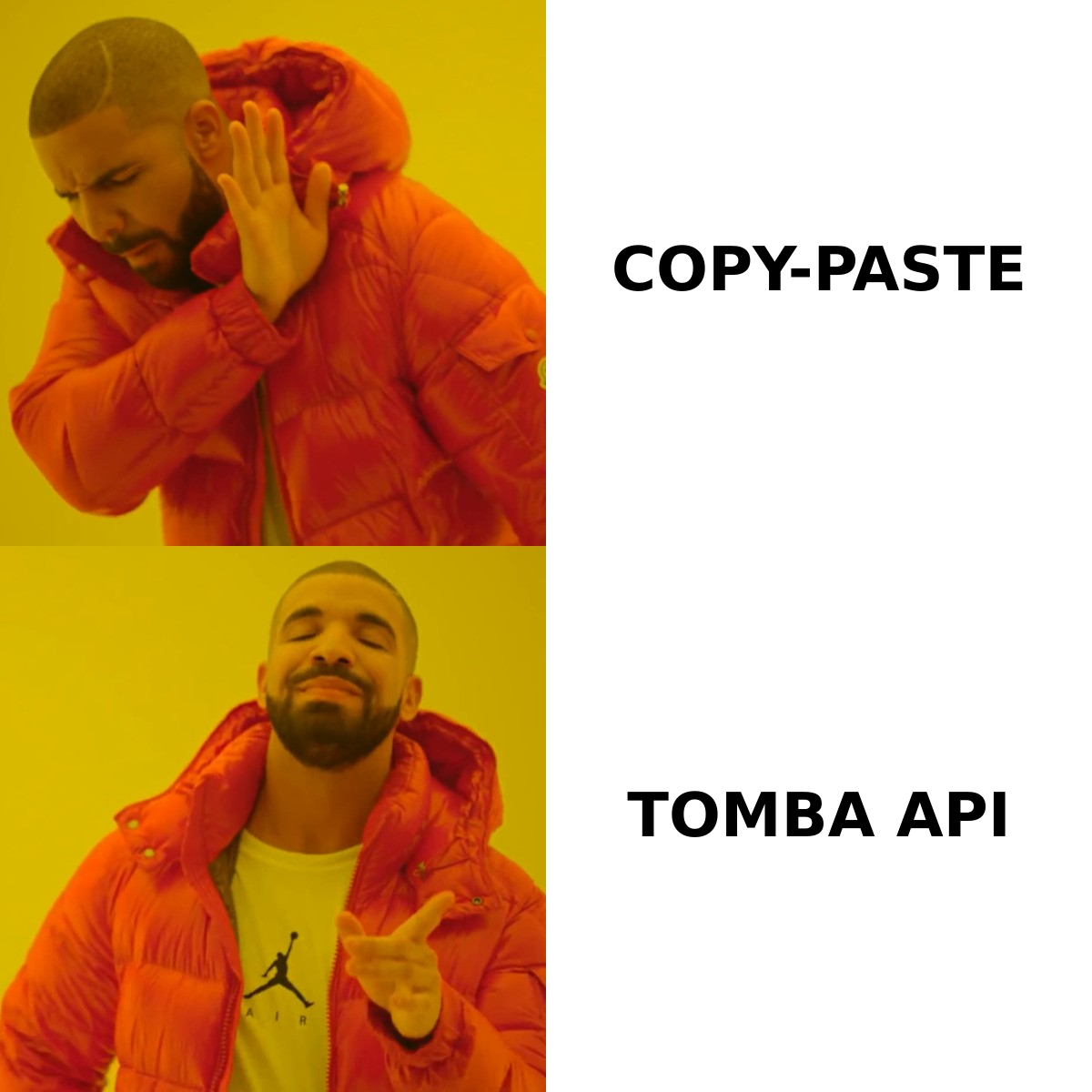
Not everything. The rule of thumb: automate what is repeatable and rules-based, keep human what is relational and judgment-heavy.
Here's how the typical B2B workflow splits:
| Workflow stage | Automate? | Why |
|---|---|---|
| Lead sourcing & list building | Yes | High volume, rules-based, error-prone by hand |
| Contact discovery (emails/phones) | Yes | A lookup problem software solves faster and more accurately |
| Data enrichment & verification | Yes | Mechanical, and quality drops fast when done manually |
| CRM data entry & logging | Yes | Pure busywork, biggest source of rep frustration |
| First-touch sequencing | Yes (with care) | Scales reach, but personalization tokens must be real |
| Lead routing & scoring | Yes | Rules-based, faster than a manager triaging inboxes |
| Discovery calls | No | Requires listening, adaptation, rapport |
| Objection handling & negotiation | No | Judgment, empathy, real-time strategy |
| Closing | No | Trust-based, relationship-dependent |
The pattern is clear: automate the top and middle of the funnel's mechanics, protect the human conversations that actually move revenue. A team that automates discovery calls with a chatbot is optimizing the wrong thing.
What does an automated B2B sales workflow look like end to end?#
Here's a concrete pipeline you can build in 2026. Each step hands off to the next without manual intervention:
- Trigger — a new account is added to a target list, or a visitor lands on your pricing page and gets identified.
- Find contacts — an email finder pulls the right decision-makers at that company by role, using domain and name inputs instead of a manual LinkedIn hunt.
- Verify — every address is checked against a real-time email verifier so you don't burn sender reputation on bounces.
- Enrich — job title, company size, tech stack, and phone numbers are appended via data enrichment so reps walk in informed.
- Route & score — the lead is scored against your ICP rules and assigned to the right rep automatically.
- Sequence — a personalized multi-step outreach cadence kicks off, pausing the moment the prospect replies.
- Log — every touch, open, and reply is written back to the CRM with zero manual entry.
The magic isn't any single step — it's the handoffs. When step 2 feeds step 3 feeds step 4 with no human in between, a rep's morning "build my list" ritual collapses from three hours to zero.
Which tools power B2B sales workflow automation in 2026?#
A functional automation stack has three layers plus a connector. You rarely buy one product that does all of it well; you assemble a stack.
The four building blocks:
- Data layer — finds and verifies contact data. This is the foundation; everything downstream depends on it. Tools like Tomba Email Finder, Apollo, and RocketReach live here. Tomba covers find, verify, domain search, and data enrichment in one API.
- Engagement layer — sequences and sends outreach. Instantly, Smartlead, Salesloft, and Outreach.io handle cadences and deliverability.
- System of record — your CRM. HubSpot, Salesforce, and Pipedrive store the truth and trigger stage-based automation.
- Automation bus — the glue. Zapier, Make, or native integrations pass data between the three layers on triggers.
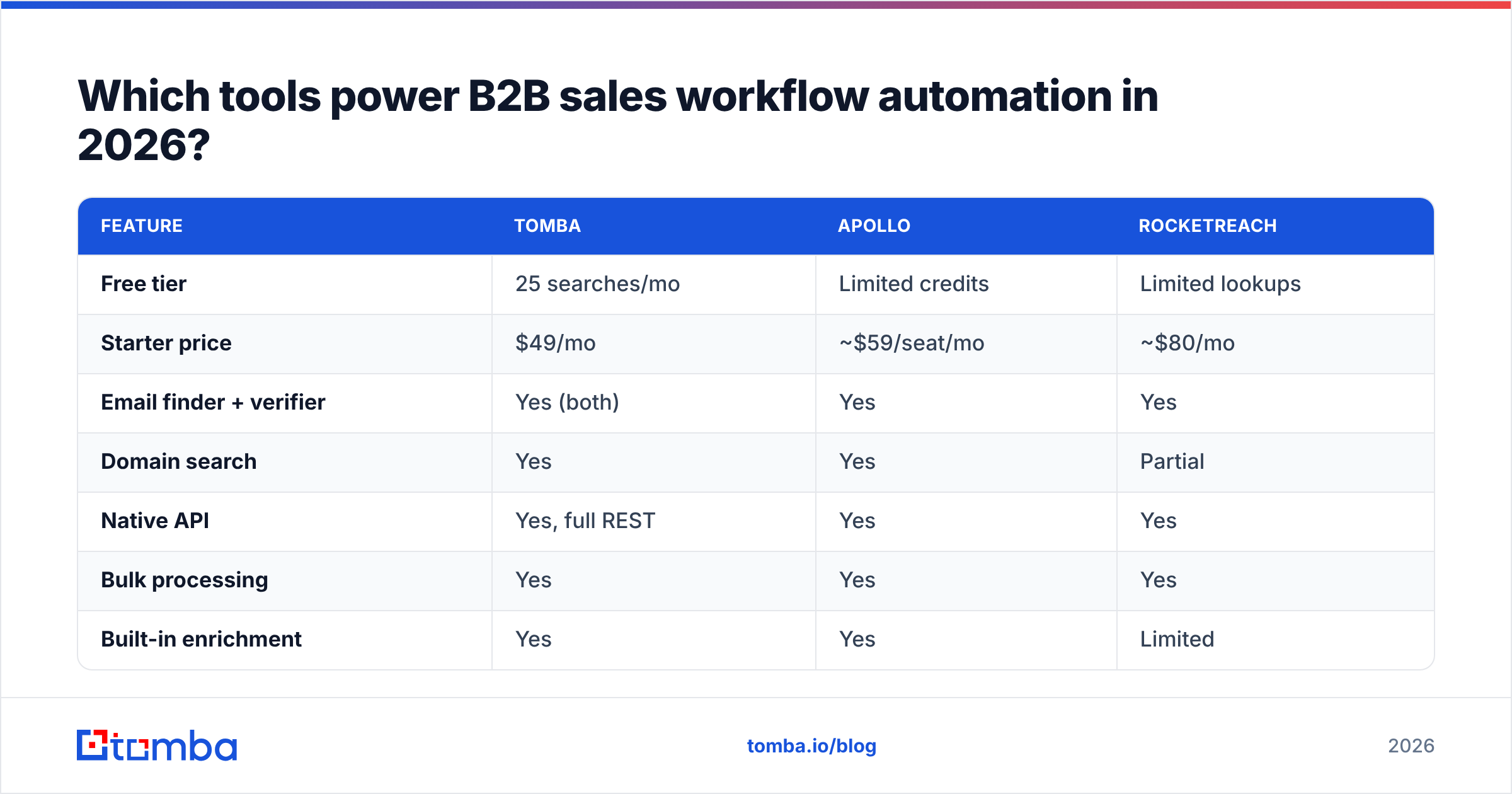
Here's how the data-layer options compare on the dimensions that matter for automation:
| Feature | Tomba | Apollo | RocketReach |
|---|---|---|---|
| Free tier | 25 searches/mo | Limited credits | Limited lookups |
| Starter price | $49/mo | ~$59/seat/mo | ~$80/mo |
| Email finder + verifier | Yes (both) | Yes | Yes |
| Domain search | Yes | Yes | Partial |
| Native API | Yes, full REST | Yes | Yes |
| Bulk processing | Yes | Yes | Yes |
| Built-in enrichment | Yes | Yes | Limited |
For pricing across every tier, see the full Tomba pricing breakdown — the Growth plan at $99/mo is the common sweet spot for a small team running daily automation.
How do you connect these tools into one workflow?#
Three integration patterns, from simplest to most powerful:
- Native integrations. The cleanest path. If your email finder writes directly to your CRM, you skip the middleware. Tomba ships native connectors for HubSpot, Salesforce, and Pipedrive, plus a Chrome extension and Google Sheets add-on for lighter workflows.
- No-code automation bus. When two tools don't talk natively, Zapier or Make sits between them. A typical Zap: "New row in Sheets → find email with Tomba → verify → create contact in HubSpot → start sequence." No code, runs 24/7.
- API-first. For volume or custom logic, hit the email finder API directly from your own backend. This is how RevOps teams build bespoke routing that no off-the-shelf tool supports.
Most teams start with native integrations, graduate to Zapier as workflows multiply, and only reach for the raw API when scale or custom rules demand it.
Why does data quality decide whether automation works?#
Because automation amplifies whatever you feed it. Automate outreach on a list of unverified emails and you don't get efficiency — you get a faster path to the spam folder.
This is the single biggest mistake teams make. They buy a slick sequencer, point it at a scraped list, and watch their sender reputation collapse. Two automated bounces in a row tell mailbox providers you're a low-quality sender, and your deliverability tanks for everyone on the domain.
The fix is to make verification a mandatory step, not an afterthought:
- Run every address through an email verifier before it enters a sequence.
- Use a catch-all verifier for domains that accept everything, since those are the silent reputation killers.
- Re-verify aging lists. B2B data decays at roughly 22–30% per year as people change jobs.
According to HubSpot's research on email marketing, list quality and engagement are now the dominant deliverability signals — provider algorithms reward senders who reach real, interested humans. Automation that skips verification works against that grain.
What ROI should you expect from sales workflow automation?#
The headline number is time. Industry analysts have long pegged the share of a seller's week spent not selling at well over half. Salesforce's own State of Sales research consistently finds reps spending the majority of their time on admin, prep, and data work rather than active selling.
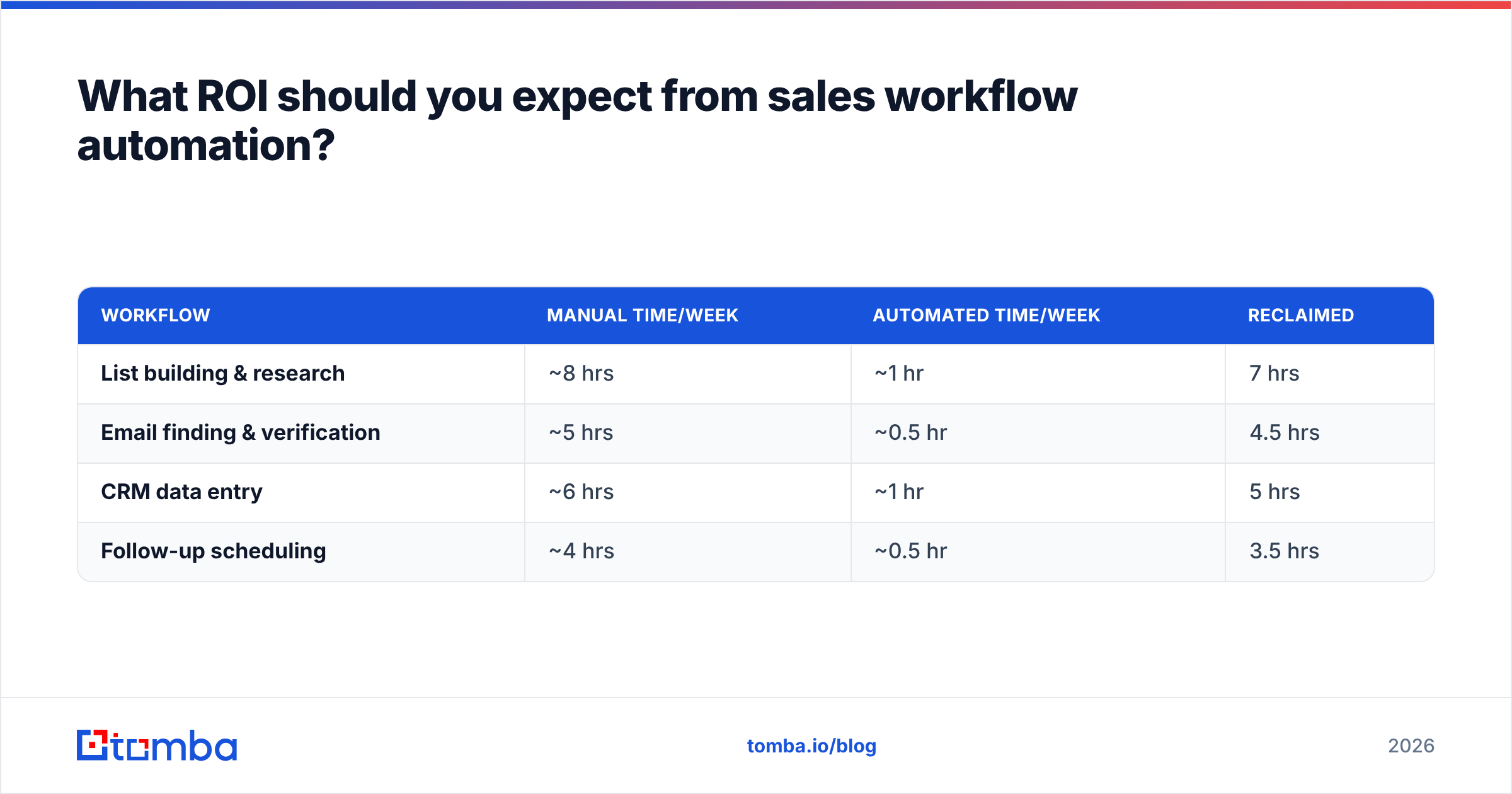
Automating the data and logging layers typically returns the largest, fastest gains:
| Workflow | Manual time/week | Automated time/week | Reclaimed |
|---|---|---|---|
| List building & research | ~8 hrs | ~1 hr | 7 hrs |
| Email finding & verification | ~5 hrs | ~0.5 hr | 4.5 hrs |
| CRM data entry | ~6 hrs | ~1 hr | 5 hrs |
| Follow-up scheduling | ~4 hrs | ~0.5 hr | 3.5 hrs |
That's roughly 20 hours a week per rep redirected from busywork to conversations — the equivalent of adding half a headcount without hiring. The second-order win is consistency: automated workflows don't forget the third follow-up or fat-finger a CRM field.
A word of caution: automation has diminishing returns and real failure modes. Over-automate personalization and your emails read like a mail-merge ransom note. Automate without monitoring and a broken Zap can silently drop leads for weeks. Treat automation as a system you maintain, not a switch you flip.
How do you roll out automation without breaking your process?#
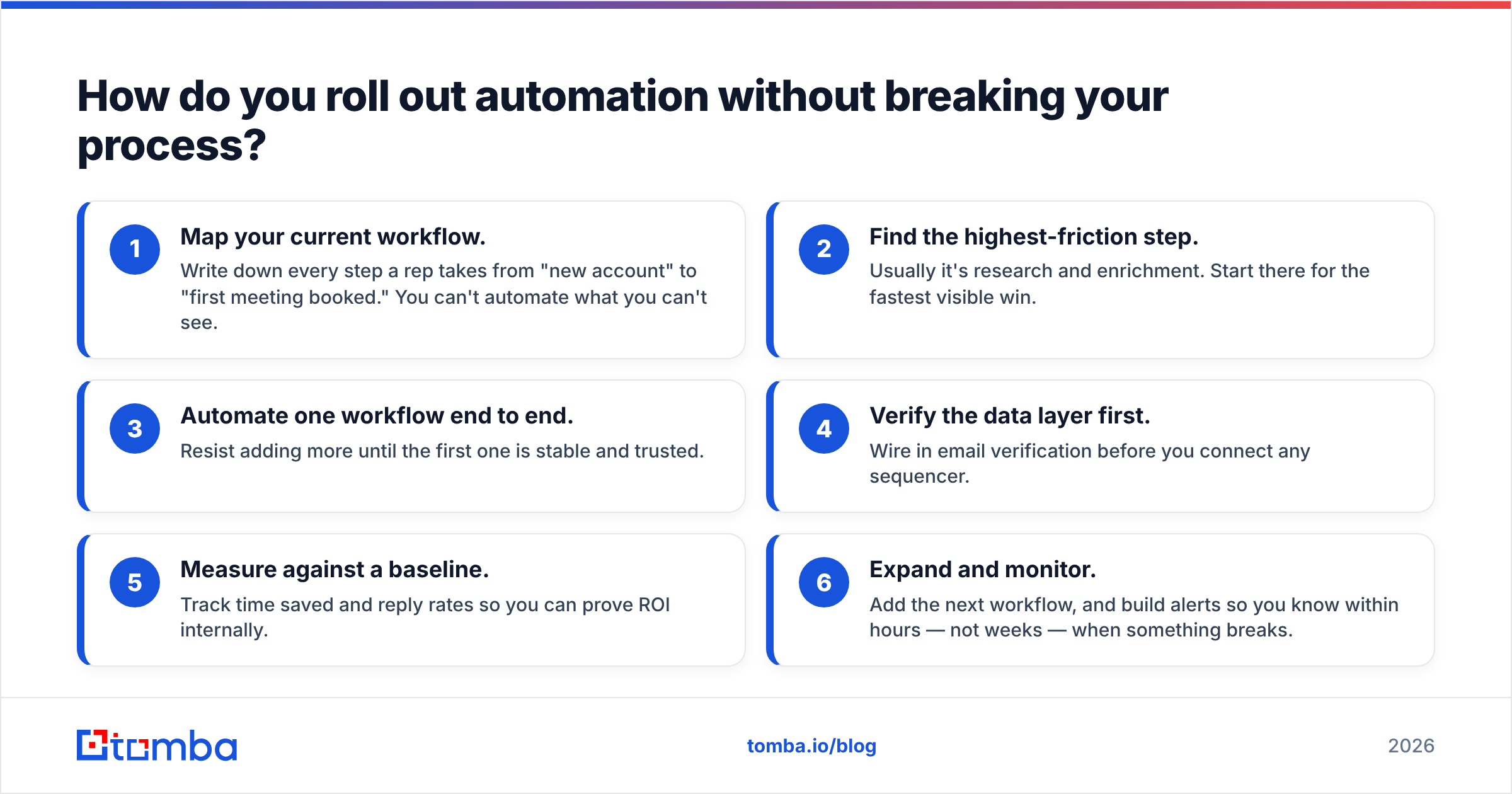
Don't boil the ocean. Run this sequence:
- Map your current workflow. Write down every step a rep takes from "new account" to "first meeting booked." You can't automate what you can't see.
- Find the highest-friction step. Usually it's research and enrichment. Start there for the fastest visible win.
- Automate one workflow end to end. Resist adding more until the first one is stable and trusted.
- Verify the data layer first. Wire in email verification before you connect any sequencer.
- Measure against a baseline. Track time saved and reply rates so you can prove ROI internally.
- Expand and monitor. Add the next workflow, and build alerts so you know within hours — not weeks — when something breaks.
The teams that win with automation treat it as an iterative program, not a one-time purchase. They automate one painful thing, prove it, and compound from there.
Should you build or buy your automation stack?#
Buy the components, lightly assemble the connections. Building a contact database, verification engine, or deliverability infrastructure from scratch is a multi-year project that vendors have already solved. Your edge isn't in rebuilding B2B data — it's in how you sequence and personalize the conversations on top of it.
Reserve custom engineering for the logic that's unique to your business: your ICP scoring rules, your routing, your hand-offs to customer success. Everything below that line — finding emails, verifying them, enriching records — should be bought and connected, not built.
Where to start#
If you take one action from this guide: fix and automate your data layer first. It's the foundation every other workflow stands on, and it's where automation pays back fastest.
Tomba's Email Finder is built for exactly this — find verified, accurate B2B emails by name, domain, or company, then push them straight into your CRM through native integrations or the API. Start free with 25 searches a month, automate your prospect research this week, and give your reps their selling time back. You can scale up through the Growth and Pro plans as your workflows multiply — without ever going back to copy-paste.
// get started
Find, verify and enrich your first contacts today
Start on the free plan with 25 searches a month, then scale when your team is ready.
Free plan · No credit card required · GDPR & CCPA
// about the author