Bardeen vs Zapier 2026: Which Automation Tool Wins?
Bardeen scrapes and automates from your browser; Zapier connects 6,000+ apps in the cloud. Here's which one fits your 2026 sales and data workflows.
TL;DR
- Bardeen is a browser-native automation and scraping tool — it lives as a Chrome extension, pulls data off live web pages (LinkedIn, directories, SERPs), and runs AI actions on what it finds.
- Zapier is a cloud workflow engine connecting 6,000+ apps. It never touches your browser; it moves data between SaaS tools on triggers and schedules.
- Pick Bardeen when your work starts on a web page and you need to scrape or enrich on the spot. Pick Zapier when you need reliable, server-side app-to-app automation that runs 24/7 without a browser open.
- Pricing diverges fast: Zapier scales by task volume, Bardeen by "credits" and AI actions. Heavy scraping favors Bardeen; high-volume backend sync favors Zapier.
- Neither tool finds or verifies B2B emails well on its own. Pair either with a dedicated email finder so the contacts you automate are actually deliverable.
What is the real difference between Bardeen and Zapier?#
The short answer: Bardeen automates the browser, Zapier automates the cloud.
Think of it like two different couriers. Bardeen is the runner who walks into the building, reads what's on the whiteboard, and copies it down — it works wherever you are looking, on the live page in front of you. Zapier is the postal network that moves sealed packages between warehouses on a schedule, never opening a browser, never seeing a screen.
That distinction drives every other decision. Bardeen is a Chrome extension first. Its superpower is "scraper" recipes that read structured data out of pages your account can already see — LinkedIn search results, Crunchbase profiles, Google Maps listings, e-commerce catalogs — then push that data into a sheet, CRM, or an AI step. Zapier has no eyes on the page. It listens for events from APIs (a new row, a new lead, a form submission) and routes them through multi-step "Zaps" that run on Zapier's servers.

If your task begins with "I'm on this web page and I need the data on it," that's Bardeen territory. If it begins with "when something happens in Tool A, do something in Tool B," that's Zapier.
How do Bardeen and Zapier compare at a glance?#
Here's the head-to-head on the attributes that actually change your buying decision.
| Attribute | Bardeen | Zapier |
|---|---|---|
| Core model | Browser extension + scraper | Cloud workflow engine |
| Runs without browser open | No (cloud runs limited) | Yes, fully server-side |
| Web scraping | Native, strong | None (needs add-ons) |
| App integrations | ~100+ | 6,000+ |
| AI actions | Built-in (GPT-based) | Via AI by Zapier / OpenAI steps |
| Best for | Prospecting, data pulls | Backend sync, ops automation |
| Free tier | Yes, limited credits | Yes, 100 tasks/mo |
| Paid entry price | ~$10/mo (annual) | ~$19.99/mo (annual) |
| Scheduling / triggers | Time + page triggers | Rich triggers, webhooks, filters |
| Learning curve | Low for scraping | Low-to-medium |
The pattern is clear. Bardeen wins on getting data out of the web; Zapier wins on breadth of connections and unattended reliability. They overlap in the middle — both can move a lead into HubSpot or Slack — but they get there from opposite directions.
When should you choose Bardeen?#
Choose Bardeen when the web page is your data source. It's the better tool the moment you need to collect information that lives in a browser session rather than behind a clean API.
Concrete cases where Bardeen pulls ahead:
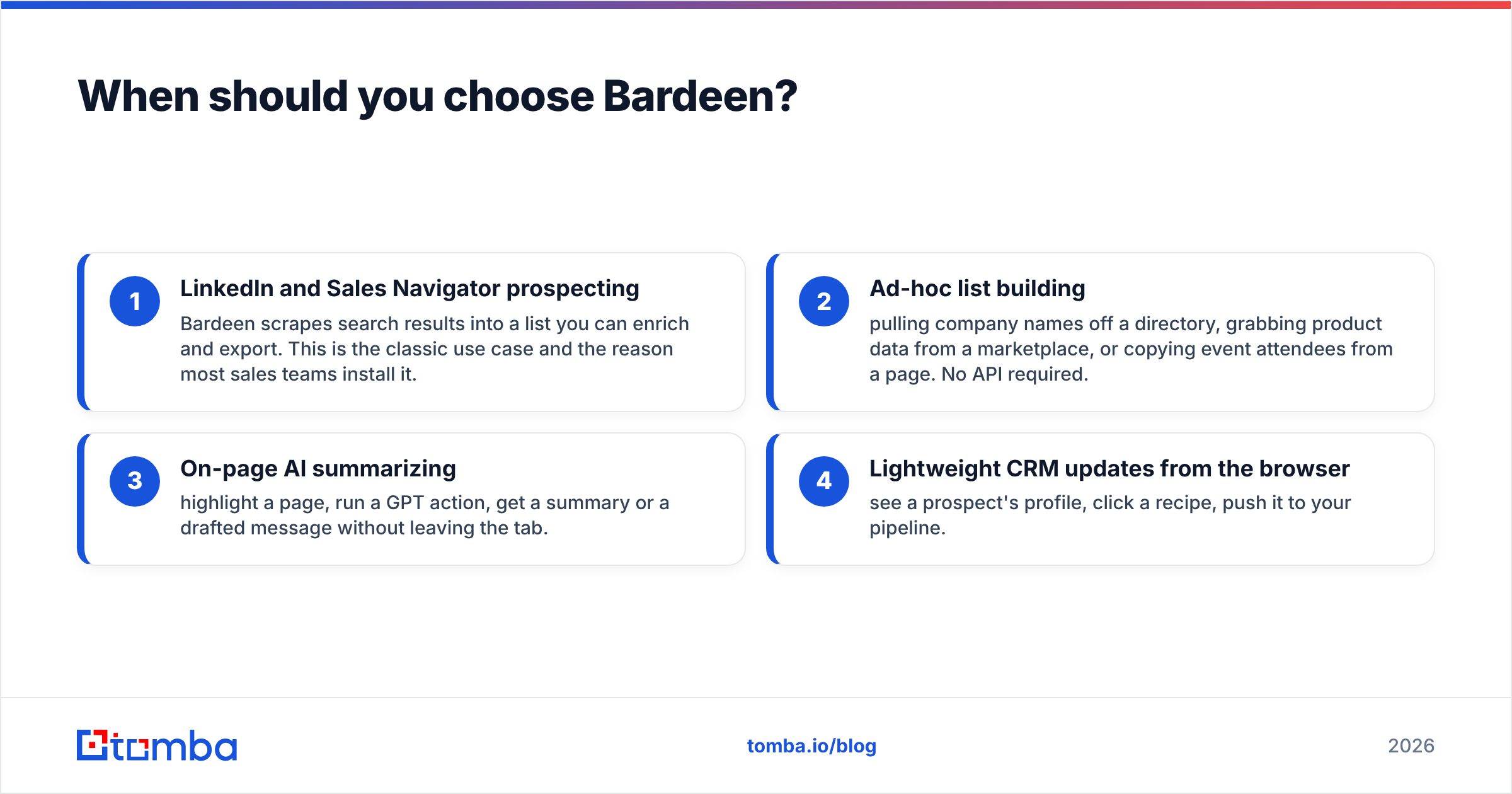
- LinkedIn and Sales Navigator prospecting — Bardeen scrapes search results into a list you can enrich and export. This is the classic use case and the reason most sales teams install it.
- Ad-hoc list building — pulling company names off a directory, grabbing product data from a marketplace, or copying event attendees from a page. No API required.
- On-page AI summarizing — highlight a page, run a GPT action, get a summary or a drafted message without leaving the tab.
- Lightweight CRM updates from the browser — see a prospect's profile, click a recipe, push it to your pipeline.
The catch: scraped data is raw. A name and a company are not a working email address, and LinkedIn rarely exposes one. That's where a domain search or email-finding layer matters — Bardeen gets you the who, but you still need the verified how to reach them. Bardeen's own enrichment is thin compared with a purpose-built data provider.
Bardeen also depends on your browser and your logged-in sessions. Aggressive scraping can trip platform limits, and recipes break when sites change their layout. It's powerful, but it's closer to a smart scraper than a hardened automation backbone.
When should you choose Zapier?#
Choose Zapier when reliability and integration breadth matter more than scraping. If your automation has to run at 3 a.m. with nobody's browser open, Zapier is the obvious answer.
Zapier's strengths:
- 6,000+ app connections — almost any SaaS tool you use is already supported, including Salesforce, HubSpot, Slack, Notion, and thousands more. Bardeen's integration count is a fraction of this.
- True server-side execution — Zaps run on Zapier's infrastructure. No tab, no extension, no dependency on your laptop being awake.
- Mature logic — filters, paths (branching), delays, formatters, and webhooks let you build genuinely complex flows.
- Stability — API-based triggers don't break the way page scrapers do when a website redesigns.
Zapier is the connective tissue of a RevOps stack. Lead comes in from a form, gets routed by territory, enriched, written to the CRM, and announced in Slack — all without a human. That's the kind of sales automation Zapier was built for.
Its weakness is the flip side of Bardeen's strength: Zapier cannot read a web page. It has no native scraping. To get data off a site into Zapier you need a separate scraper or a webhook source. And at high task volumes, the per-task pricing climbs.
Bardeen vs Zapier pricing in 2026: which is cheaper?#
It depends entirely on what you're counting — tasks or scrapes.
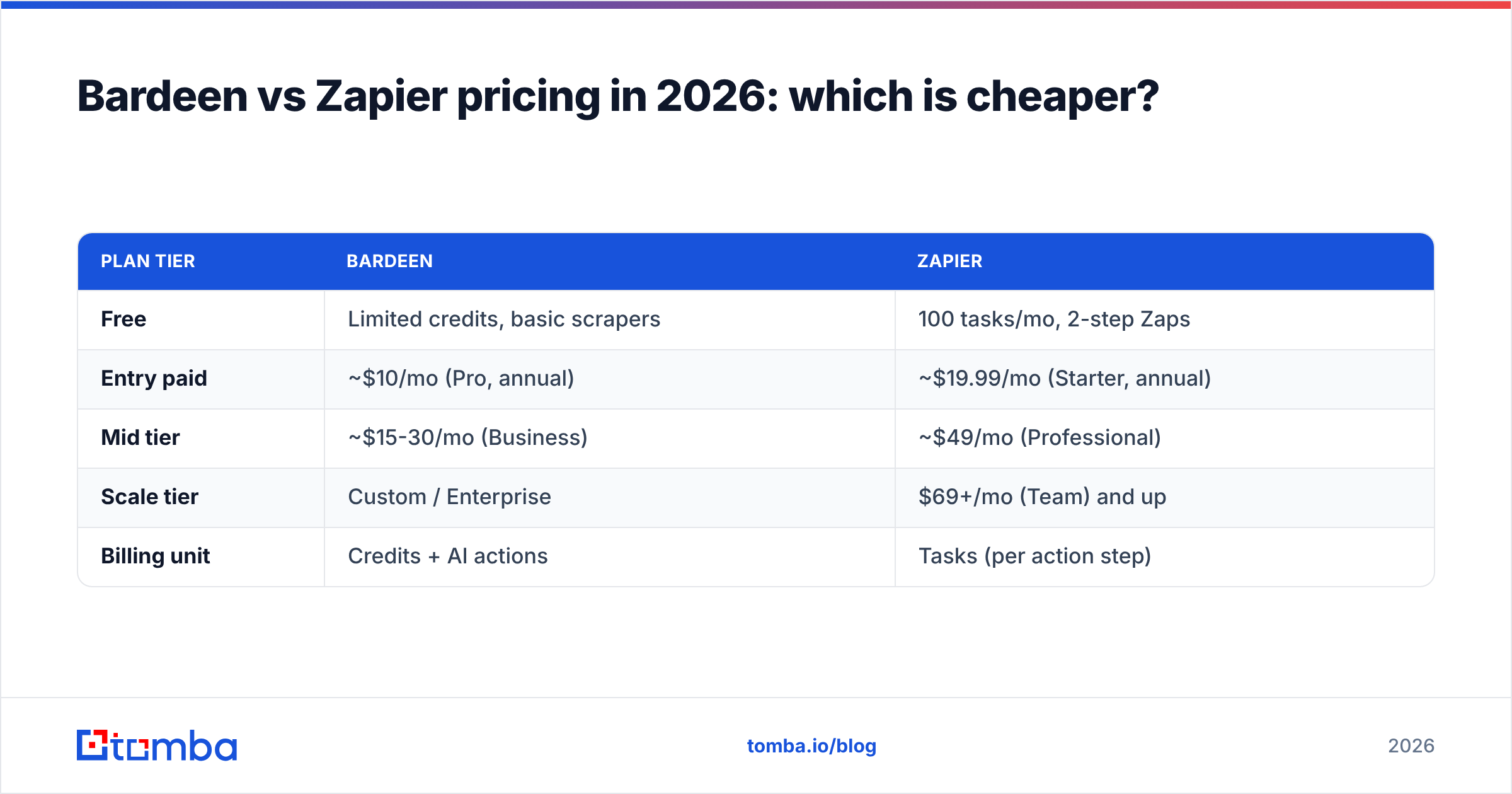
| Plan tier | Bardeen | Zapier |
|---|---|---|
| Free | Limited credits, basic scrapers | 100 tasks/mo, 2-step Zaps |
| Entry paid | ~$10/mo (Pro, annual) | ~$19.99/mo (Starter, annual) |
| Mid tier | ~$15-30/mo (Business) | ~$49/mo (Professional) |
| Scale tier | Custom / Enterprise | $69+/mo (Team) and up |
| Billing unit | Credits + AI actions | Tasks (per action step) |
The deciding factor is your unit of work. A Zapier "task" is one action step — a 5-step Zap firing 1,000 times burns 5,000 tasks. That adds up quickly for high-volume backend sync. Bardeen meters credits and AI actions, which is friendlier for scraping-heavy, lower-frequency work but can spike when you lean on AI steps.
Rough rule: high-frequency, many-step backend automation gets expensive on Zapier; heavy AI-enrichment scraping gets expensive on Bardeen. Map your actual volume before committing. Both publish current numbers on their sites — verify against Zapier's pricing page since tiers shift.

Can you use Bardeen and Zapier together?#
Yes — and for many teams that's the smartest setup. They're complementary, not mutually exclusive.
A common combined pattern:
- Bardeen scrapes a target list from LinkedIn or a directory into Google Sheets.
- A Zapier trigger watches that sheet for new rows.
- Zapier routes and syncs each row into your CRM, assigns an owner, and notifies the rep in Slack.
Bardeen handles the front-end data capture; Zapier handles the durable back-end plumbing. You get scraping power and server-side reliability without forcing one tool to do a job it's bad at.
But this stack has a quiet hole: data quality. Scraped rows are full of missing or stale emails, and routing bad contacts into your CRM just automates waste. Before Zapier writes anything to your pipeline, run the contacts through verification. You can drop a Tomba API call into the Zapier step — or use the HubSpot integration — to find and verify the email before it ever hits a rep's queue. Garbage in, garbage automated.
Which tool is better for sales prospecting specifically?#
For raw prospecting, Bardeen edges out Zapier — but neither is a complete prospecting stack.
Bardeen wins the first mile because prospecting starts on a web page. Scraping a Sales Navigator search or a list of conference exhibitors is exactly what it's built for, and Zapier simply can't do that natively.
But "I have 500 names and companies" is not a usable prospecting list. You need verified work emails, and ideally phone numbers, to actually run outreach. This is the gap both tools share:
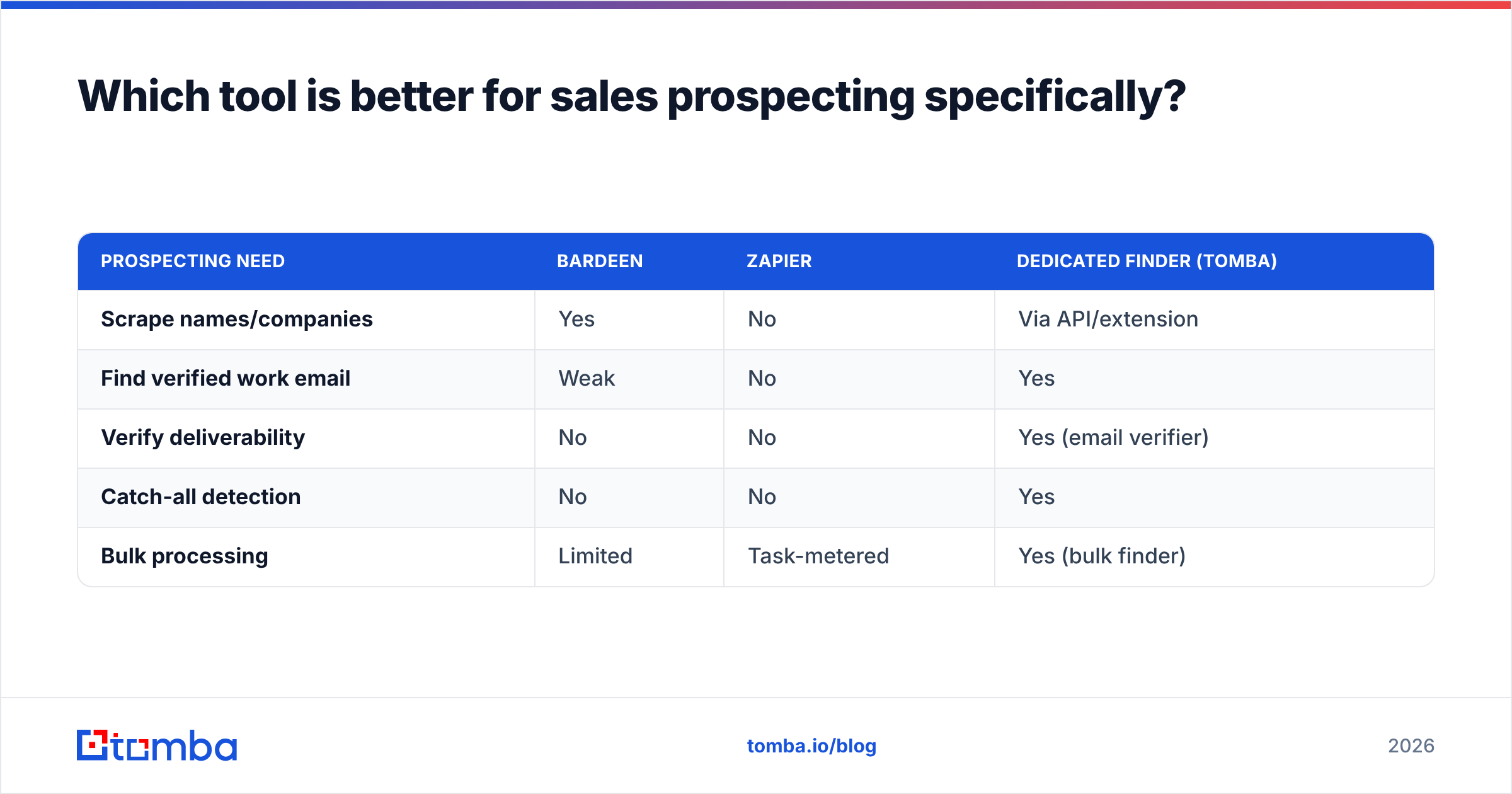
| Prospecting need | Bardeen | Zapier | Dedicated finder (Tomba) |
|---|---|---|---|
| Scrape names/companies | Yes | No | Via API/extension |
| Find verified work email | Weak | No | Yes |
| Verify deliverability | No | No | Yes (email verifier) |
| Catch-all detection | No | No | Yes |
| Bulk processing | Limited | Task-metered | Yes (bulk finder) |
The honest workflow: scrape with Bardeen, automate routing with Zapier, and find/verify the actual contact data with a specialized provider. Trying to make Bardeen's light enrichment carry a real outbound motion leads to bounce rates that hurt your sender reputation and tank deliverability.
What about AI features in 2026?#
Both have moved hard into AI, and this is where the 2026 comparison gets interesting.
Bardeen's AI is on-page and action-oriented — summarize this profile, draft this message, classify these rows, extract these fields from a scraped page. Because Bardeen already has the page content, its AI feels native to scraping workflows.
Zapier's AI is workflow-oriented — "AI by Zapier" steps, OpenAI/Anthropic integrations, and AI agents that can decide branching inside a Zap. It's about injecting intelligence into multi-app pipelines, not reading screens.
If you want AI that reasons over freshly scraped web data, Bardeen feels more direct. If you want AI embedded in a durable, cross-app process, Zapier's approach scales better. Either way, AI doesn't fix bad source data — an AI step that drafts a cold email to an invalid address is just faster failure. The data layer still has to be right first, which is why pairing these with verified data enrichment matters more, not less, as AI does more of the writing.
So which should you pick?#
Pick by where your work starts.
- Your work starts on a web page (LinkedIn, directories, SERPs, marketplaces) and you need that data out → Bardeen.
- Your work starts when an app event fires and you need it routed reliably across your stack → Zapier.
- You do both → run them together, Bardeen for capture and Zapier for plumbing.
- You need verified contact data either way → add a dedicated finder, because that's the one thing neither tool does well.
Bardeen is the better scraper and the better browser-native AI tool. Zapier is the better integration backbone and the more reliable unattended automation engine. They're not really competitors so much as two halves of a modern automation stack — and the missing third half is clean, deliverable B2B data.
Close the data gap in your automation stack#
Whichever tool you choose, your automations are only as good as the contacts flowing through them. Scraped names and guessed email patterns bounce, burn your domain reputation, and quietly sabotage every downstream Zap or recipe.
That's the job Tomba's Email Finder is built for. Feed it a name and company — or a whole domain — and get back verified, deliverable work emails you can pipe straight into Bardeen recipes or Zapier Zaps through the Tomba API. The free tier gives you 25 searches a month to test it, and paid plans start at $49/mo when you're ready to scale. Check the full Tomba pricing and stop automating bad data. Build the scraping and the plumbing with Bardeen and Zapier — then make sure what moves through them is real.
// get started
Find, verify and enrich your first contacts today
Start on the free plan with 25 searches a month, then scale when your team is ready.
Free plan · No credit card required · GDPR & CCPA
// about the author