BDR Tools in 2026: Build a High-Output Prospecting Stack
The BDR tech stack is bloated and expensive. Here's how to pick the BDR tools that actually move pipeline in 2026 — and the few you can cut.
Most BDR teams don't have a tooling problem. They have a too many tools problem. The average rep now juggles a data provider, an enrichment layer, a sequencer, a dialer, a signal tracker, a CRM, and three Chrome extensions that all claim to find the same email. The result is a stack that costs $1,200+ per seat per month and still leaves reps copy-pasting between tabs.
This guide cuts through that. We'll break down the categories of BDR tools that matter in 2026, compare the real options, and show you how to assemble a lean stack that books meetings instead of burning budget.
TL;DR#
- BDR tools fall into five categories: contact data, sequencing, signals/intent, calling, and CRM. You need one strong tool per category — not three.
- Data quality is the foundation. A great sequencer firing at bad emails just gets you blocked faster. Start with accurate contact data.
- Consolidation beats best-of-breed for most teams under 50 reps. Fewer integrations, fewer credits wasted, fewer broken handoffs.
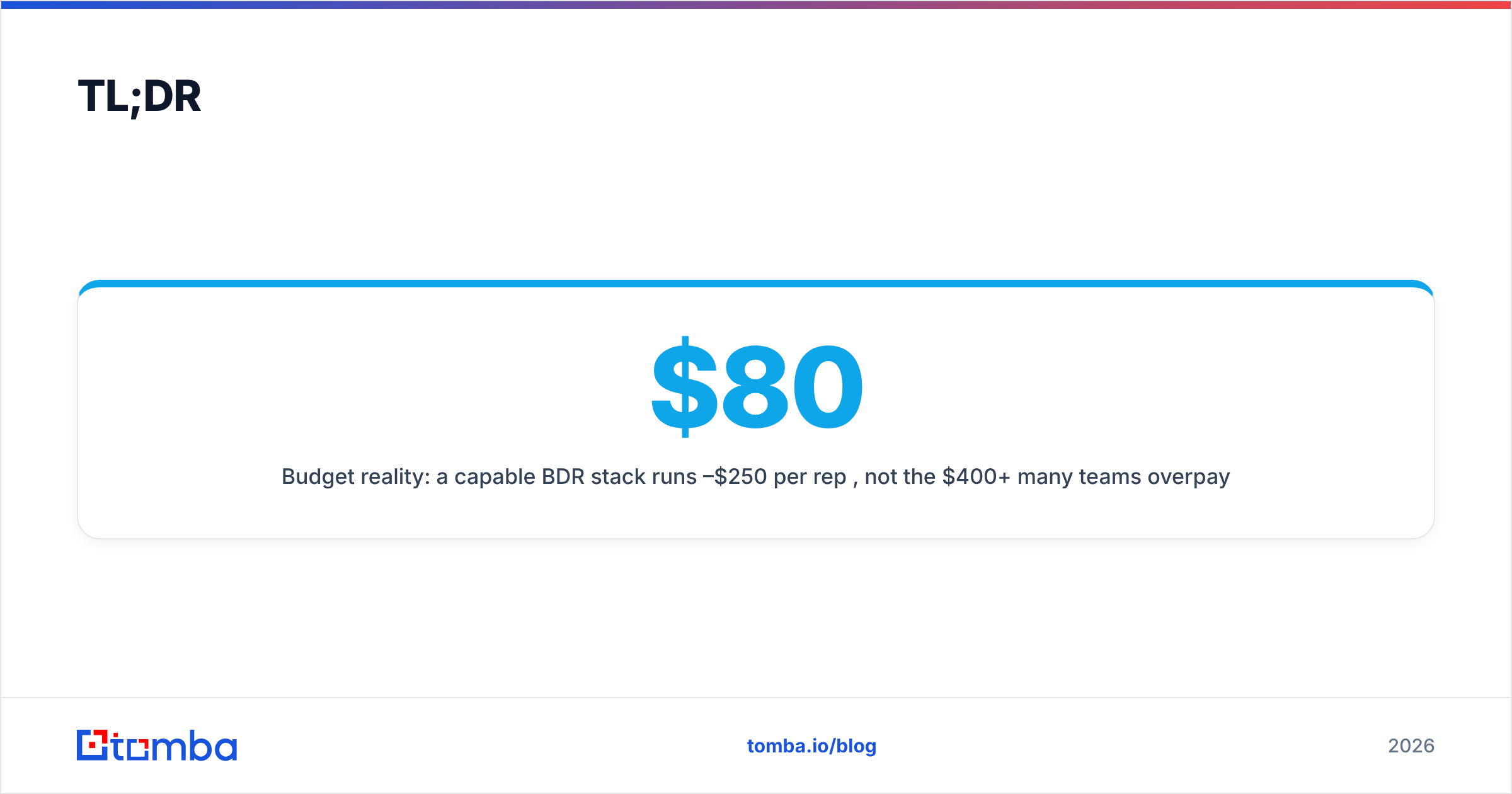
- Budget reality: a capable BDR stack runs $80–$250 per rep per month, not the $400+ many teams overpay.
- Tomba covers the data layer (email finder, verifier, enrichment, phone lookup) through one Tomba API, so you stop stacking redundant data vendors.
What are BDR tools, exactly?#
BDR tools are the software a Business Development Representative uses to find prospects, reach them, and track responses until a meeting is booked. Think of the stack like a kitchen: data is your ingredients, the sequencer is your stove, signals tell you when a dish is ready to plate, and the CRM is the pass where everything gets handed to account executives.
The mistake teams make is buying five stoves and forgetting the ingredients. Here's how the categories actually break down:
- Contact data & enrichment — finds verified emails, phone numbers, and firmographics. Without this, nothing downstream works. Tools: Tomba, Apollo, ZoomInfo, Clearbit.
- Sequencing & engagement — automates multi-step email/LinkedIn/call cadences. Tools: Outreach, Salesloft, Instantly, Smartlead.
- Signals & intent — surfaces when an account is in-market (job changes, funding, web visits). Tools: 6sense, Common Room, Clay.
- Calling & conversation — dialers and call recording for phone outreach. Tools: Aircall, Orum, Gong.
- CRM & pipeline — the system of record where meetings and deals live. Tools: HubSpot, Salesforce, Pipedrive.
You'll notice contact data sits at the top for a reason. Get it wrong and every other tool amplifies the error.
Which BDR tools matter most in 2026?#
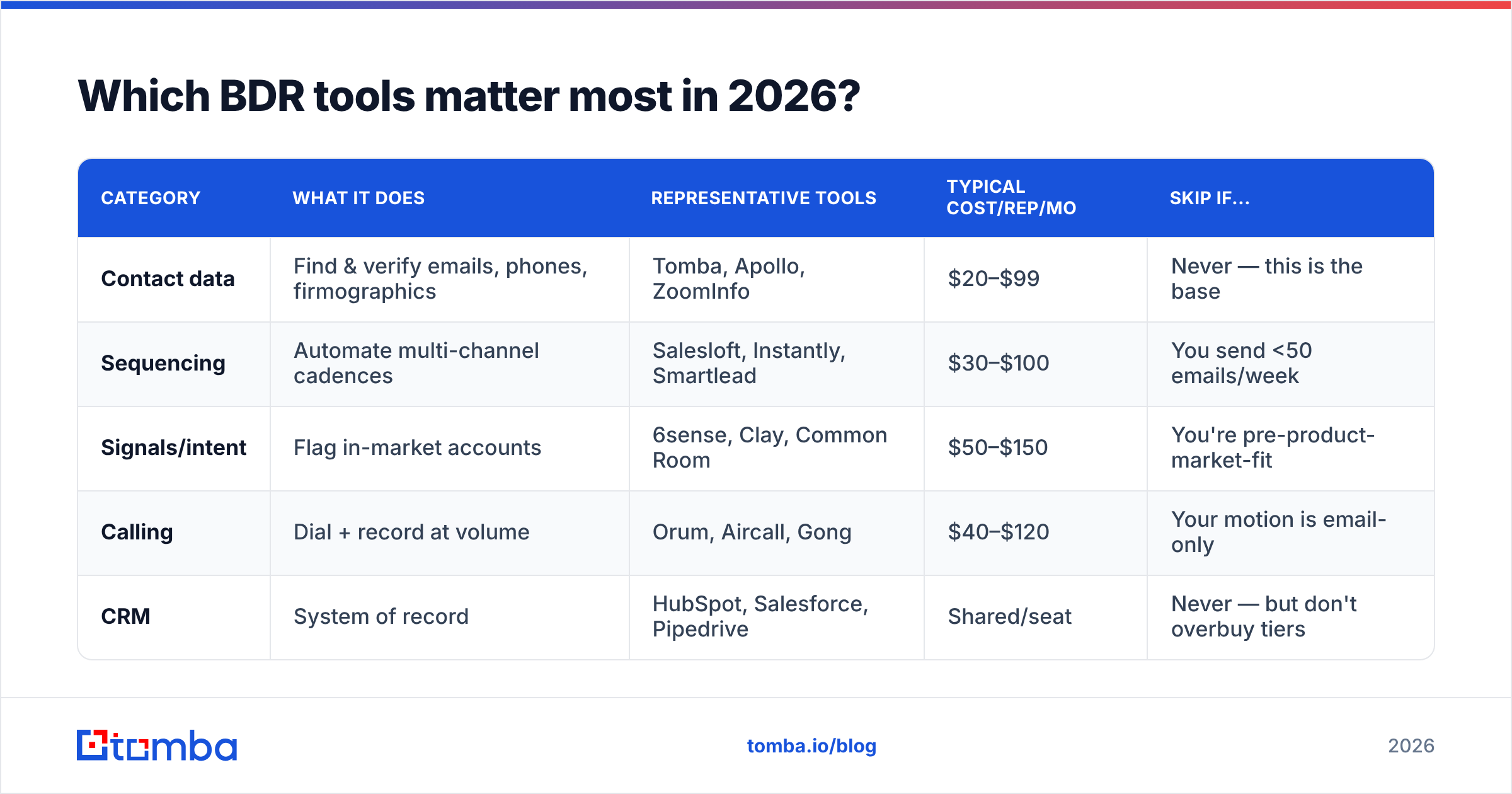
If you can only fund part of the stack, fund the data layer and the sequencer. Everything else is an optimization. Below is a side-by-side of the categories so you can see where dollars and effort go.
| Category | What it does | Representative tools | Typical cost/rep/mo | Skip if... |
|---|---|---|---|---|
| Contact data | Find & verify emails, phones, firmographics | Tomba, Apollo, ZoomInfo | $20–$99 | Never — this is the base |
| Sequencing | Automate multi-channel cadences | Salesloft, Instantly, Smartlead | $30–$100 | You send <50 emails/week |
| Signals/intent | Flag in-market accounts | 6sense, Clay, Common Room | $50–$150 | You're pre-product-market-fit |
| Calling | Dial + record at volume | Orum, Aircall, Gong | $40–$120 | Your motion is email-only |
| CRM | System of record | HubSpot, Salesforce, Pipedrive | Shared/seat | Never — but don't overbuy tiers |
The pattern: data and sequencing are non-negotiable, signals and calling depend on your motion, and the CRM is a sunk cost you should standardize on early.
A quick note on intent data — it's seductive but easy to over-rotate on. Layering data enrichment onto a clean contact list usually beats buying a separate six-figure intent platform when you're under 30 reps.
How do the contact-data tools compare?#
This is the category where teams waste the most money, because they buy overlapping vendors. ZoomInfo for firmographics, Apollo for emails, a verifier for cleanup — three bills for one job.
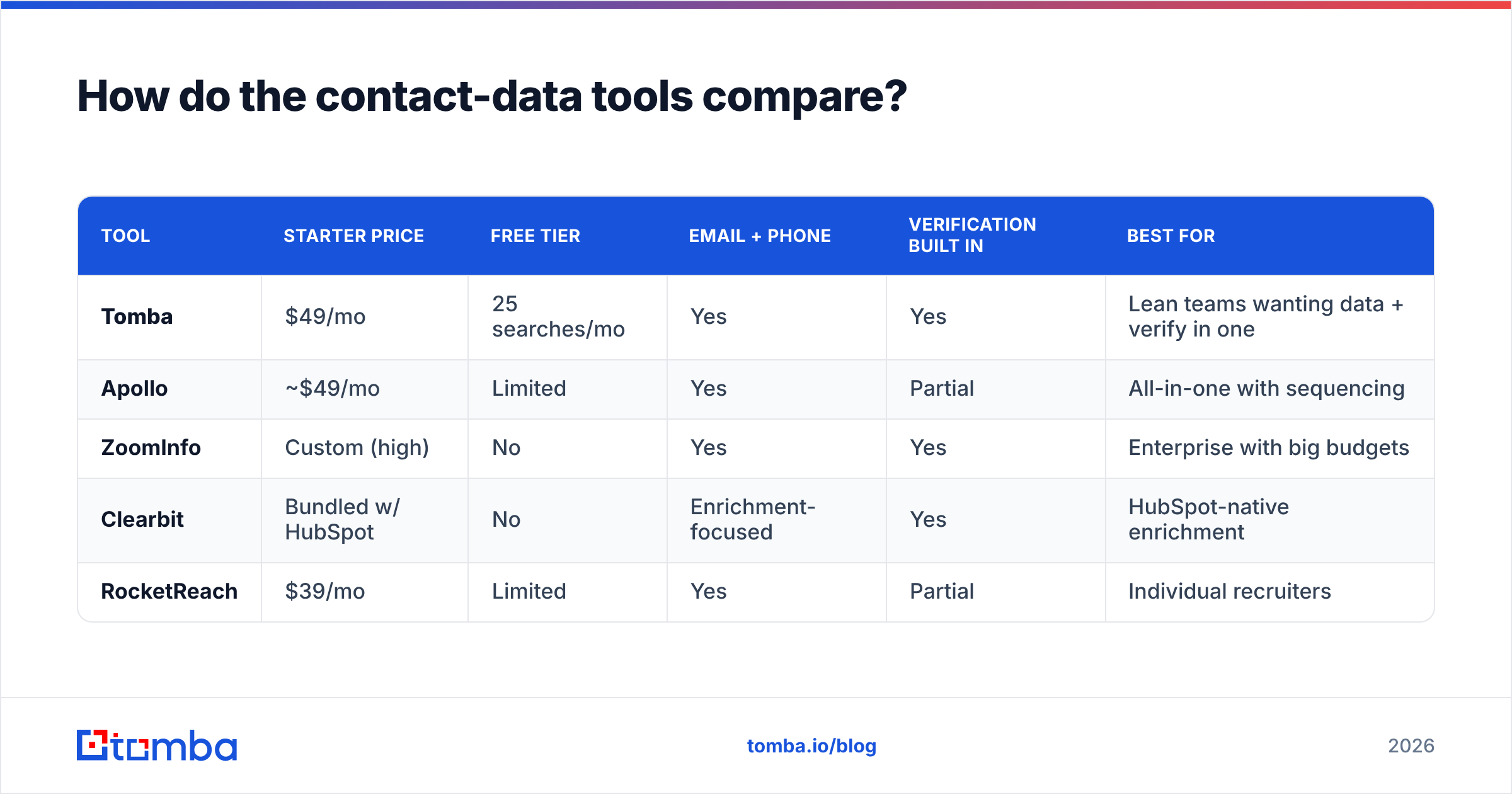
Here's how the main options stack up on the things BDRs actually care about: accuracy, coverage, and price.
| Tool | Starter price | Free tier | Email + phone | Verification built in | Best for |
|---|---|---|---|---|---|
| Tomba | $49/mo | 25 searches/mo | Yes | Yes | Lean teams wanting data + verify in one |
| Apollo | ~$49/mo | Limited | Yes | Partial | All-in-one with sequencing |
| ZoomInfo | Custom (high) | No | Yes | Yes | Enterprise with big budgets |
| Clearbit | Bundled w/ HubSpot | No | Enrichment-focused | Yes | HubSpot-native enrichment |
| RocketReach | $39/mo | Limited | Yes | Partial | Individual recruiters |
A few honest takeaways. ZoomInfo has the deepest database but prices out most growing teams and locks you into annual contracts. Apollo bundles sequencing, which is convenient but means your data and outreach live or die together. Tomba focuses on doing the data layer well — find email addresses, verify emails, run a domain search, and pull B2B phone numbers — at a price that doesn't require a procurement meeting. See full Tomba pricing for the Growth ($99/mo) and Pro ($249/mo) tiers if you're scaling bulk volume.
Whatever you choose, verify before you send. According to HubSpot's research on email marketing, list hygiene directly affects deliverability — and a bounced cold email damages your sending domain for weeks, not days.
Should you use an all-in-one or best-of-breed stack?#
Go all-in-one until you outgrow it, then specialize. That's the short answer.
For teams under ~20 BDRs, an all-in-one platform (or a tight 3-tool stack) wins because every integration you add is a place data leaks, breaks, or duplicates. The best-of-breed religion makes sense at scale, when each function is big enough to justify a specialist owner and the integration tax is worth paying.
All-in-one pros:
- One bill, one login, one support team to chase when something breaks.
- Native data flow — no Zapier glue holding your stack together.
- Faster onboarding for new reps who learn one interface.
Best-of-breed pros:
- Deeper features in each category for mature teams.
- No vendor lock-in — swap the weak link without rebuilding everything.
- Specialist ownership — your RevOps lead can optimize each tool.
The hybrid most growing teams land on: a strong data provider feeding a dedicated sequencer, with everything syncing to one CRM. Tomba's integrations cover HubSpot, Salesforce, and Pipedrive, so the data layer plugs into whatever system of record you already run.
How do you build a lean BDR stack without overpaying?#
Start from the meeting backward. Every tool in your stack should trace to "does this help book a qualified meeting?" If it doesn't, cut it. Here's a four-step build.
- Pick your CRM first and never fight it. Whether it's HubSpot, Salesforce, or Pipedrive, your CRM is gravity. Every other tool must sync cleanly to it. Don't pick data or sequencing tools that fight your CRM. G2's sales tech category data is a useful sanity check on integration reviews before you commit.
- Lock in accurate contact data. This is your foundation. Use a tool that finds and verifies in one motion so you're not paying two vendors and reconciling two credit pools. Run new lists through bulk email finding and verification before they ever hit a sequence.
- Add one sequencer, not three. Pick a sequencing tool that matches your channel mix. Email-heavy? A deliverability-focused sender. Multi-channel? Something with LinkedIn and call steps. Resist running parallel tools that fragment your reporting.
- Layer signals only when you can act on them. Intent data is worthless if reps can't reach the in-market account fast. Add it once your data + sequencing engine is humming and you have capacity to work the signals.
The teams that win aren't the ones with the most logos in their stack. They're the ones whose reps spend time talking to prospects instead of fixing broken syncs and cleaning bad lists.
What about Chrome extensions and workflow tools?#
Extensions are where stacks quietly bloat. Every rep installs their own favorite email-finder extension, and suddenly you're paying for four tools that do the same job. Standardize on one.
A single Chrome extension tied to your core data provider keeps credit usage centralized and reporting clean. Pair it with a Google Sheets add-on for list building and an Excel add-in for the analysts who live in spreadsheets, and you've covered 90% of ad-hoc prospecting without adding new vendors.
For developer-led teams, wiring contact lookups directly into your own tooling via the email finder API or Tomba CLI removes the extension layer entirely — your data enriches automatically as records enter the pipeline.
How do you measure if your BDR tools are working?#
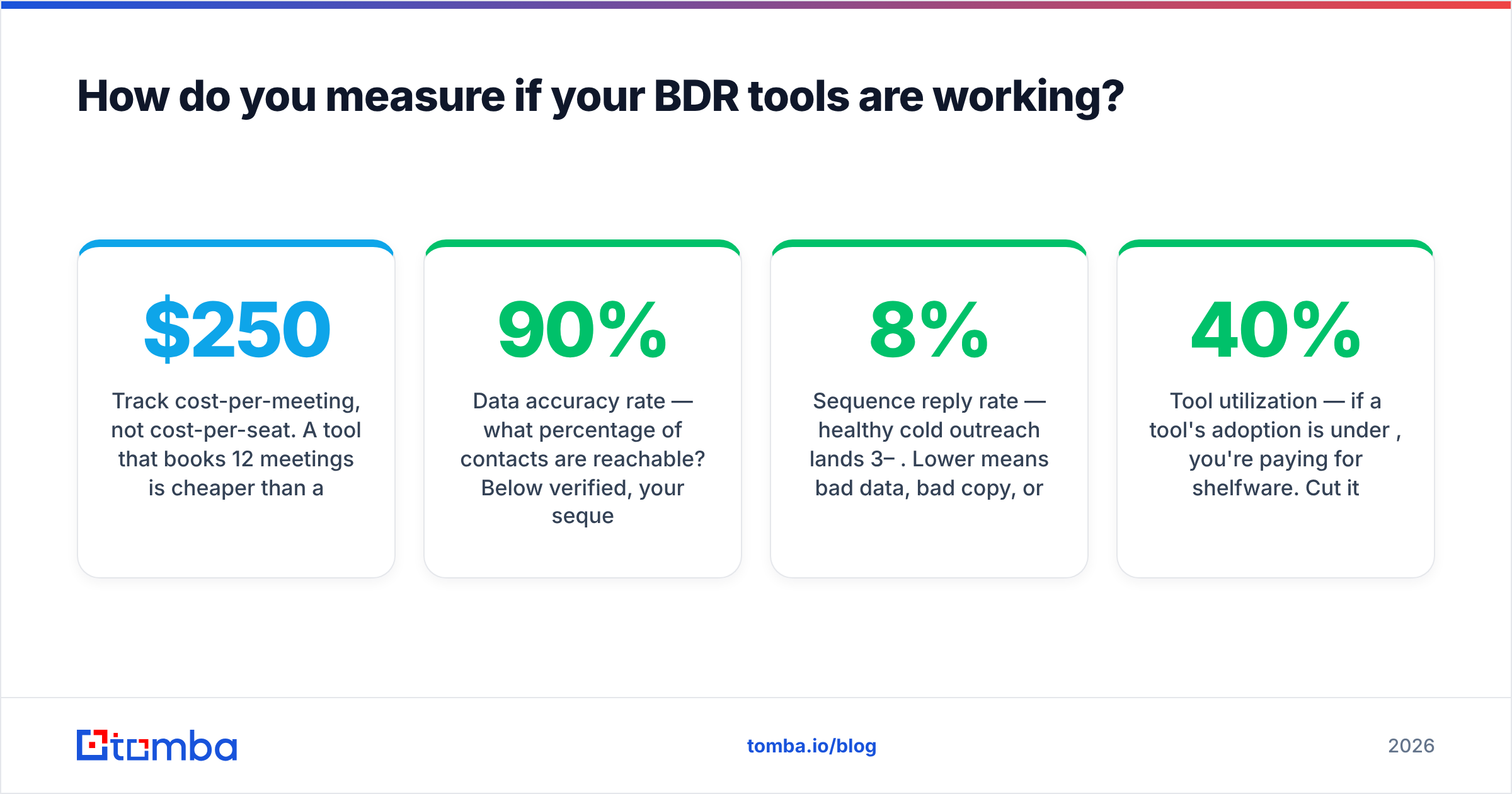
Track cost-per-meeting, not cost-per-seat. A $250/mo tool that books 12 meetings is cheaper than a $49/mo tool that books two. Here are the metrics that tell you whether your stack earns its keep:
- Data accuracy rate — what percentage of contacts are reachable? Below 90% verified, your sequencer is wasting sends. Track bounce rate as the inverse signal.
- Sequence reply rate — healthy cold outreach lands 3–8%. Lower means bad data, bad copy, or bad targeting (usually data).
- Meetings booked per rep per week — the only number leadership actually cares about.
- Tool utilization — if a tool's adoption is under 40%, you're paying for shelfware. Cut it.
Watch the deliverability metrics especially closely. Sender reputation is fragile, and clean data is the cheapest insurance you have — far cheaper than rebuilding a burned domain.
The bottom line#
The best BDR stack in 2026 is the smallest one that still books meetings. Five categories, one strong tool each, all feeding a CRM you've committed to. Spend your budget on accurate data and a focused sequencer; add signals and calling when your motion demands them.
If your stack has redundant data vendors — one for emails, one for phones, one for verification — that's the first place to consolidate. Tomba's Email Finder rolls finding, verification, enrichment, and phone lookup into one platform, starting free with 25 searches a month and scaling to bulk volume on the $49/mo Starter plan. Point it at your target accounts, verify on the way out, and let your reps get back to the part of the job software can't do: the conversation. Start free at tomba.io/email-finder.
Ready to find emails that actually work?
Join 150,000+ professionals who stopped guessing and started sending. Free credits on signup — no credit card required.
Get the Tomba newsletter
Practical outbound tactics and product updates — once every two weeks.
About the author