Benefits of Email Verification in 2026: The Complete Guide
Bounces wreck your sender reputation and burn budget. Here are the concrete benefits of email verification in 2026 — and how to bake it into your workflow.
Email verification is the unglamorous step that decides whether your campaigns land or die in spam. Skip it, and a few hundred bad addresses can quietly tank an otherwise great list. This guide breaks down the concrete benefits of email verification in 2026, why they compound over time, and how to fold verification into your day-to-day sending without slowing your team down.
TL;DR#
- Verification protects your sender reputation — the single biggest lever for whether you reach the inbox or the spam folder.
- Lower bounce rates mean lower costs — most email platforms charge per contact and penalize high-bounce senders.
- Cleaner data improves every downstream metric — open rates, reply rates, CRM hygiene, and forecasting accuracy all benefit.
- It reduces fraud and spam-trap exposure — verification filters disposable, role-based, and known trap addresses before you send.
- The ROI is asymmetric — verification costs cents per address but prevents reputation damage that can take months to repair.
What is email verification, and why does it matter?#
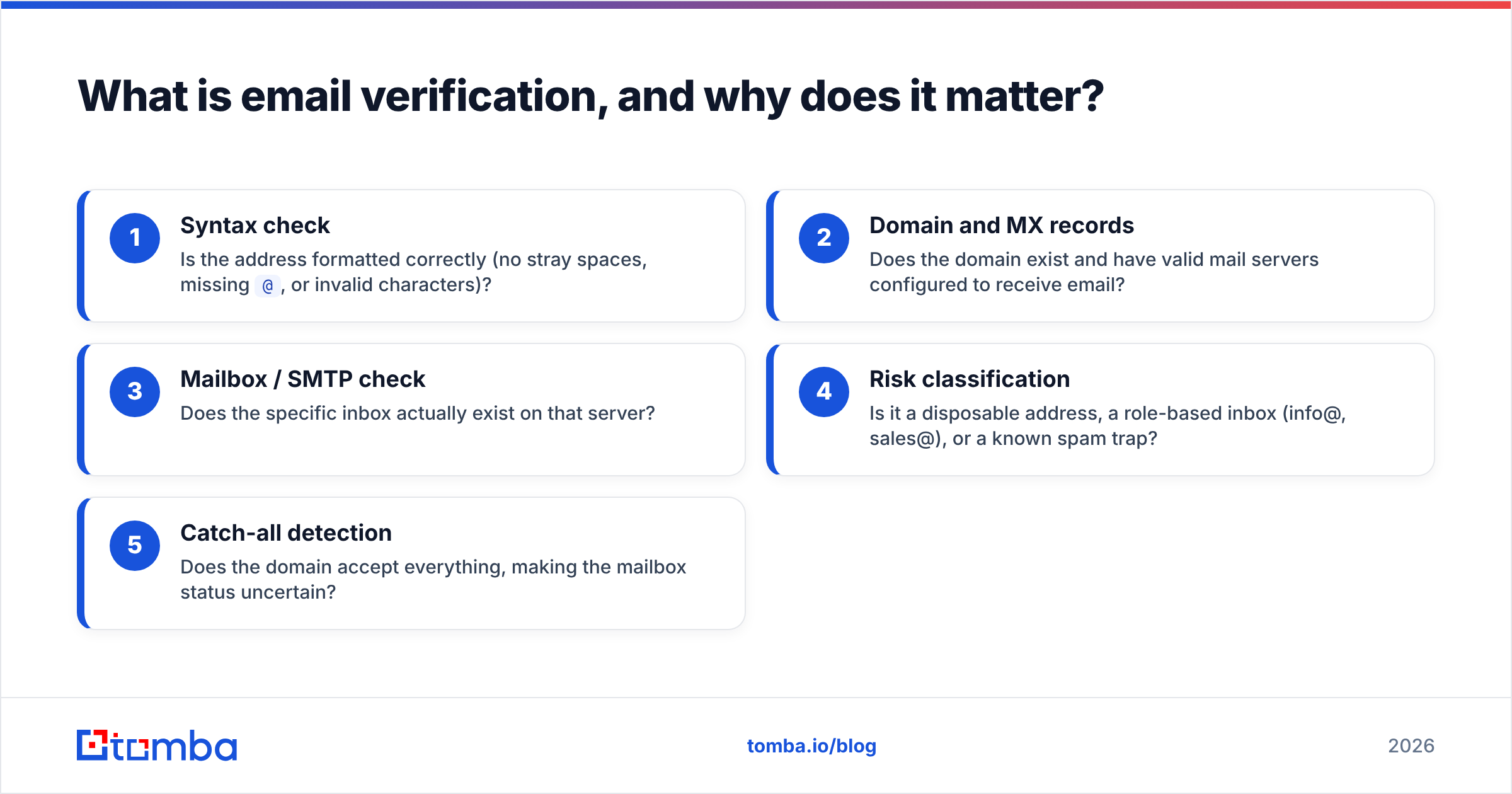
Email verification is the process of confirming that an address is real, deliverable, and safe to send to — before you hit send. Think of it like checking guests off a list at the door instead of letting everyone in and dealing with the chaos later. A verifier inspects each address through several layers: syntax, domain records, mailbox existence, and risk signals.
A good email verifier runs these checks in sequence:
- Syntax check — Is the address formatted correctly (no stray spaces, missing
@, or invalid characters)? - Domain and MX records — Does the domain exist and have valid mail servers configured to receive email?
- Mailbox / SMTP check — Does the specific inbox actually exist on that server?
- Risk classification — Is it a disposable address, a role-based inbox (info@, sales@), or a known spam trap?
- Catch-all detection — Does the domain accept everything, making the mailbox status uncertain?
The reason this matters in 2026 is simple: mailbox providers like Gmail and Outlook have made email deliverability increasingly reputation-driven. They watch how recipients react to your mail and how many of your sends bounce. Sending to dead addresses is one of the fastest ways to signal "low-quality sender."
What are the main benefits of email verification?#
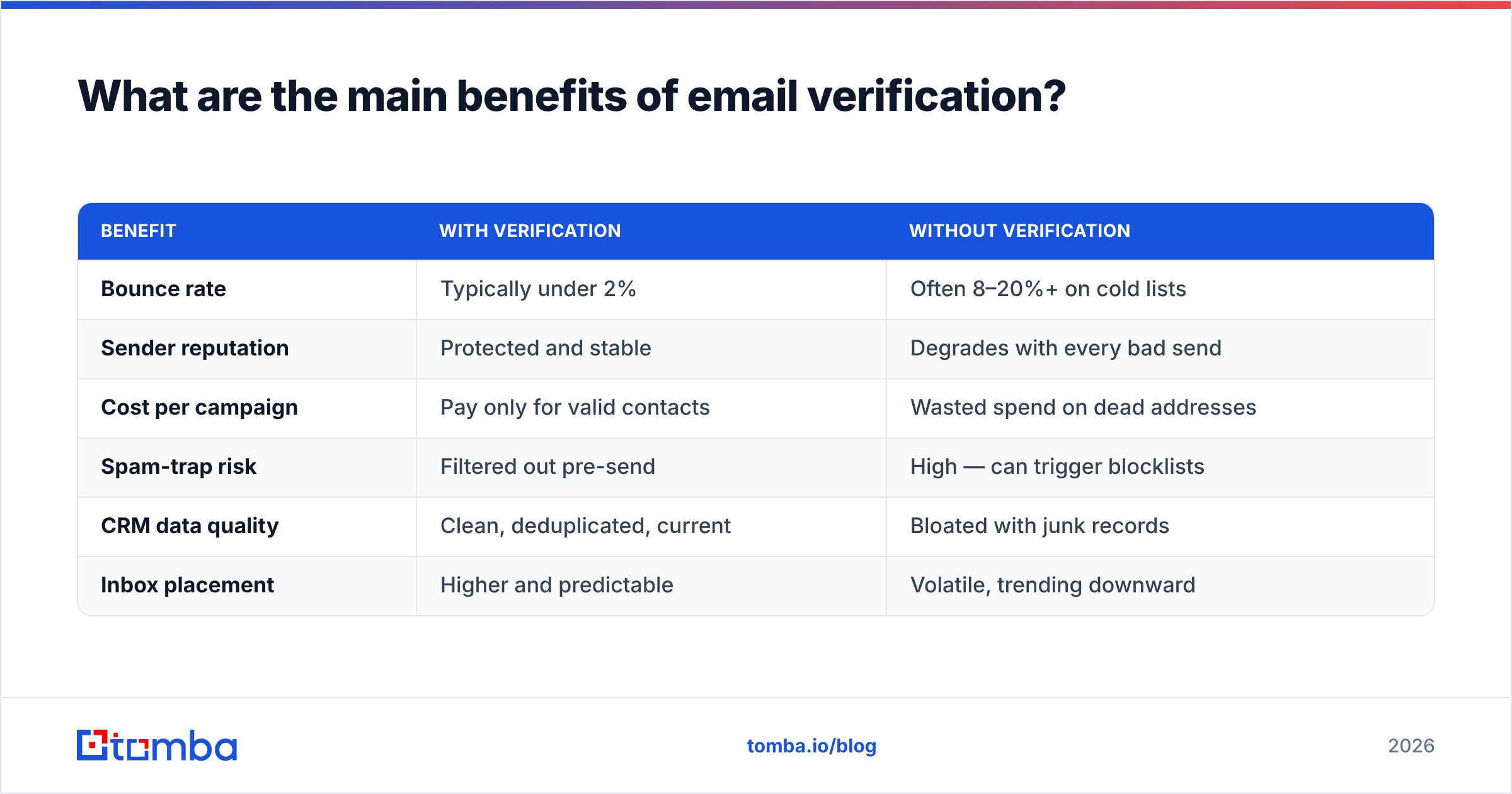
The benefits of email verification fall into four buckets: deliverability, cost, data quality, and security. Here is how they stack up against the alternative of sending to an unverified list.
| Benefit | With verification | Without verification |
|---|---|---|
| Bounce rate | Typically under 2% | Often 8–20%+ on cold lists |
| Sender reputation | Protected and stable | Degrades with every bad send |
| Cost per campaign | Pay only for valid contacts | Wasted spend on dead addresses |
| Spam-trap risk | Filtered out pre-send | High — can trigger blocklists |
| CRM data quality | Clean, deduplicated, current | Bloated with junk records |
| Inbox placement | Higher and predictable | Volatile, trending downward |
Each row above is a lever you control. Let's unpack the ones that move the needle most.
How does verification protect your sender reputation?#
Your sender reputation is your credit score for email — and bounces are missed payments. Mailbox providers track your bounce rate, spam complaints, and engagement. When too many messages hit invalid addresses, providers interpret it as a sign that you're working from a purchased or stale list, and they start routing your mail to spam — even for the recipients who do want to hear from you.
This is why sender reputation is the foundation of everything else. A few facts worth internalizing:
- A bounce rate above ~5% is enough for many providers to throttle or filter your mail.
- Reputation damage is sticky — recovering a burned domain can take weeks of careful, low-volume sending.
- Shared IPs mean one sloppy sender's behavior can affect everyone on the IP, so providers err on the side of caution.
Google's own Postmaster Tools documentation and sender guidelines make clear that low spam rates and clean lists are prerequisites for good placement. Verification is the cheapest insurance policy you can buy against falling out of favor.
Does email verification actually save money?#
Yes — and the math is more lopsided than most teams realize. Email service providers and outreach platforms almost always price by contact count or by send volume. Every dead address on your list is a line item you're paying for that returns nothing.
Consider a list of 50,000 contacts where 15% are invalid:
- That's 7,500 dead addresses you're storing, paying for, and sending to.
- On a platform charging by active contacts, you may be overpaying by 15% every single month.
- Worse, those bounces drag down placement for the remaining 42,500 good contacts, so the real cost is hidden engagement loss across the whole list.
Running the list through verification once costs a fraction of a cent per address. Cleaning out those 7,500 contacts pays for itself in the first billing cycle and keeps paying every month after. For high-volume senders, bulk verification turns this into a routine maintenance task rather than a crisis response.
How does it improve data quality and CRM hygiene?#
Email verification is the gatekeeper for clean data, and clean data is the difference between a CRM you trust and one your reps quietly ignore. When verification runs at the point of entry — form fills, imports, enrichment — bad records never make it in.
Here's what verification cleans up that compounds across your stack:
- Typos and formatting errors caught before a lead is created (jhon@ vs john@).
- Role-based addresses flagged so reps know they're emailing a shared inbox, not a person.
- Duplicate and stale records surfaced during bulk verify passes.
- Catch-all domains identified so you can apply extra scrutiny instead of assuming deliverability.
Better data flows downstream into better reporting. Sales forecasts built on a CRM full of junk contacts are forecasts built on sand. According to research summarized by platforms like HubSpot, database decay runs around 22–30% per year as people change jobs — meaning even a perfectly clean list degrades fast without ongoing verification.

What about catch-all domains and spam traps?#
These two edge cases trip up teams that think a basic syntax check is "good enough."
Catch-all domains accept mail to any address — valid@, invalid@, gibberish@ — so a standard SMTP check can't confirm whether a specific mailbox exists. A purpose-built catch-all verifier uses additional signals and pattern analysis to estimate deliverability instead of blindly marking everything "valid." This keeps you from over-trusting addresses that may quietly bounce.
Spam traps are addresses created or recycled specifically to catch senders using poor list practices. Hitting one is a direct signal to blocklist operators that you're not verifying. There are two flavors:
- Pristine traps — never used by a real person; appearing on this list almost always means scraped or purchased data.
- Recycled traps — formerly real addresses that providers reactivated as traps after a long dormancy.
Verification won't catch every trap (that's impossible by design), but it dramatically reduces exposure by filtering out the abandoned, invalid, and disposable addresses where traps concentrate.
How do verification tools compare?#
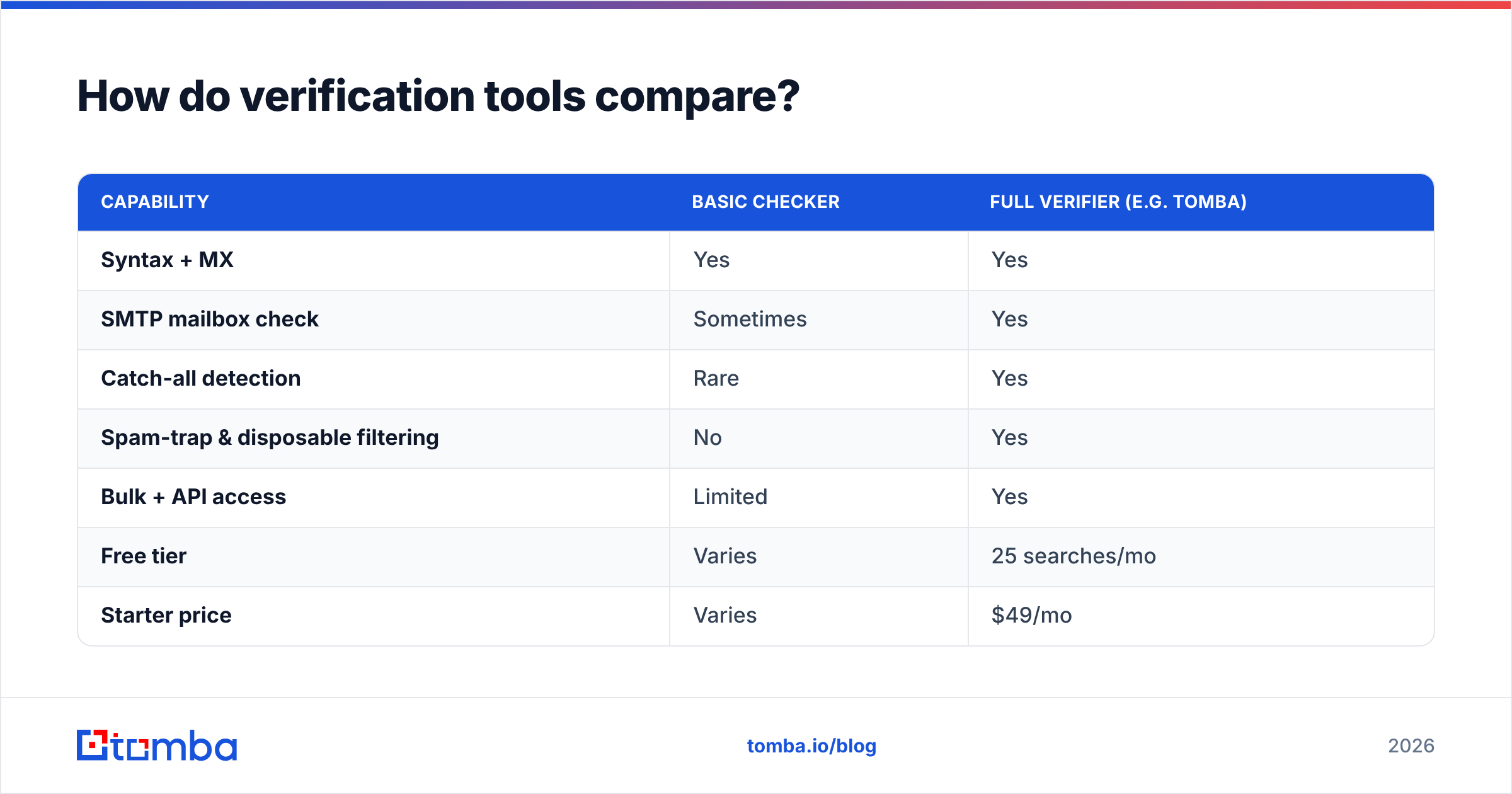
Not all verification is created equal. Some tools only check syntax and MX records; others go all the way to mailbox-level and risk scoring. When you're evaluating options, weigh accuracy, catch-all handling, integrations, and pricing together rather than chasing the cheapest per-credit rate. Independent reviews on sites like G2 are a useful sanity check on real-world accuracy claims.
| Capability | Basic checker | Full verifier (e.g. Tomba) |
|---|---|---|
| Syntax + MX | Yes | Yes |
| SMTP mailbox check | Sometimes | Yes |
| Catch-all detection | Rare | Yes |
| Spam-trap & disposable filtering | No | Yes |
| Bulk + API access | Limited | Yes |
| Free tier | Varies | 25 searches/mo |
| Starter price | Varies | $49/mo |
If you only need an occasional one-off check, a free email checker covers the basics. For ongoing campaigns, an API-driven verifier that plugs into your CRM and forms is what keeps quality high without manual work.
When should you verify emails?#
The short answer: at every point an address enters or leaves your system. The benefits of email verification multiply when it's continuous rather than a once-a-year cleanup.
- At capture — verify form submissions in real time so bad data never lands.
- At import — run any purchased, scraped, or event list through bulk verification before the first send.
- Before each campaign — re-verify addresses that have been dormant; decay is constant.
- At enrichment — when you append new contacts via tools like an email finder or data enrichment, verify the results before acting on them.
- Periodically — schedule a quarterly sweep of your full database to fight the ~25% annual decay.
Teams that wire verification into their Tomba API or CRM integration stop thinking about it entirely — it just happens in the background, and the list stays healthy.
What are the risks of skipping verification?#
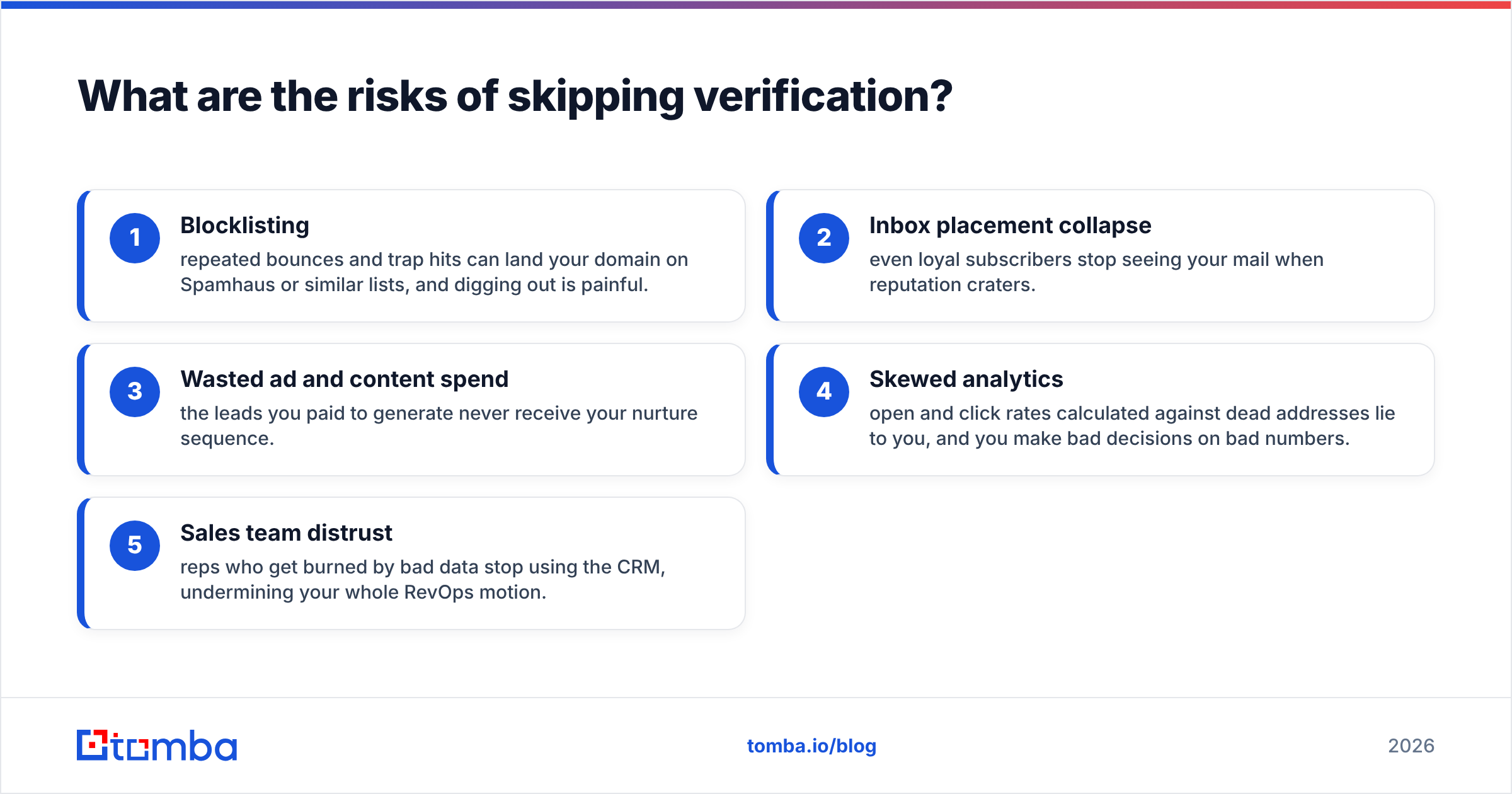
To make the benefits concrete, flip them around. Here's what skipping verification actually costs you:
- Blocklisting — repeated bounces and trap hits can land your domain on Spamhaus or similar lists, and digging out is painful.
- Inbox placement collapse — even loyal subscribers stop seeing your mail when reputation craters.
- Wasted ad and content spend — the leads you paid to generate never receive your nurture sequence.
- Skewed analytics — open and click rates calculated against dead addresses lie to you, and you make bad decisions on bad numbers.
- Sales team distrust — reps who get burned by bad data stop using the CRM, undermining your whole RevOps motion.
None of these show up on a single campaign report. They accumulate quietly, which is exactly why verification is easy to neglect and expensive to ignore.
How do you get started?#
Start small and prove the value: take your worst-performing list — the one with the scary bounce rate — and run it through a verifier. You'll typically see the bounce rate drop into the low single digits and inbox placement recover within a few sends. From there, automate it at your capture and import points so the problem never returns.
If you're building or cleaning lists at scale, Tomba's email verifier handles syntax, MX, SMTP, catch-all, and risk scoring in one pass, with bulk uploads and an API for automation. Pair it with the Tomba Email Finder to find and validate professional addresses in the same workflow — so every contact that enters your pipeline is real, reachable, and worth your team's time. Check the Tomba pricing plans, including a free tier with 25 searches a month, and start protecting your sender reputation today.
// get started
Find, verify and enrich your first contacts today
Start on the free plan with 25 searches a month, then scale when your team is ready.
Free plan · No credit card required · GDPR & CCPA
// about the author