Best AI Tools for Email Writing in 2026 (Tested & Ranked)
We tested the top AI email writing tools on speed, personalization, and reply rates. Here is the honest 2026 ranking, with pricing and the best fit for each use case.
TL;DR
- The best AI tools for email writing in 2026 are not the ones with the flashiest demos — they are the ones that learn your voice, personalize at scale, and produce email that actually gets replies.
- For cold outreach, pair an AI writer with accurate contact data. A perfect email sent to a bounced address still earns you nothing.
- ChatGPT and Claude are the strongest general-purpose drafters; Jasper and Copy.ai win on brand templates; Lavender wins on in-inbox coaching.
- Tomba's cold email AI is the most practical choice when you want writing and verified contact data in one workflow.
- Budget matters: free tiers handle hobby volume, but $20–$99/mo unlocks the personalization and scale that move reply rates.
What counts as an AI email writing tool in 2026?#
The short answer: any tool that turns a prompt, a few data points, or a CRM record into a ready-to-send email — and adapts the wording to the recipient.
Think of it like the difference between a vending machine and a barista. A template library is a vending machine: you get the same output every time. A modern AI email tool is a barista — it remembers how you like things, reads the room, and adjusts. Technically, these tools sit on large language models (OpenAI's GPT, Anthropic's Claude, or a vendor's fine-tuned variant) wrapped in a sales- or marketing-specific interface.
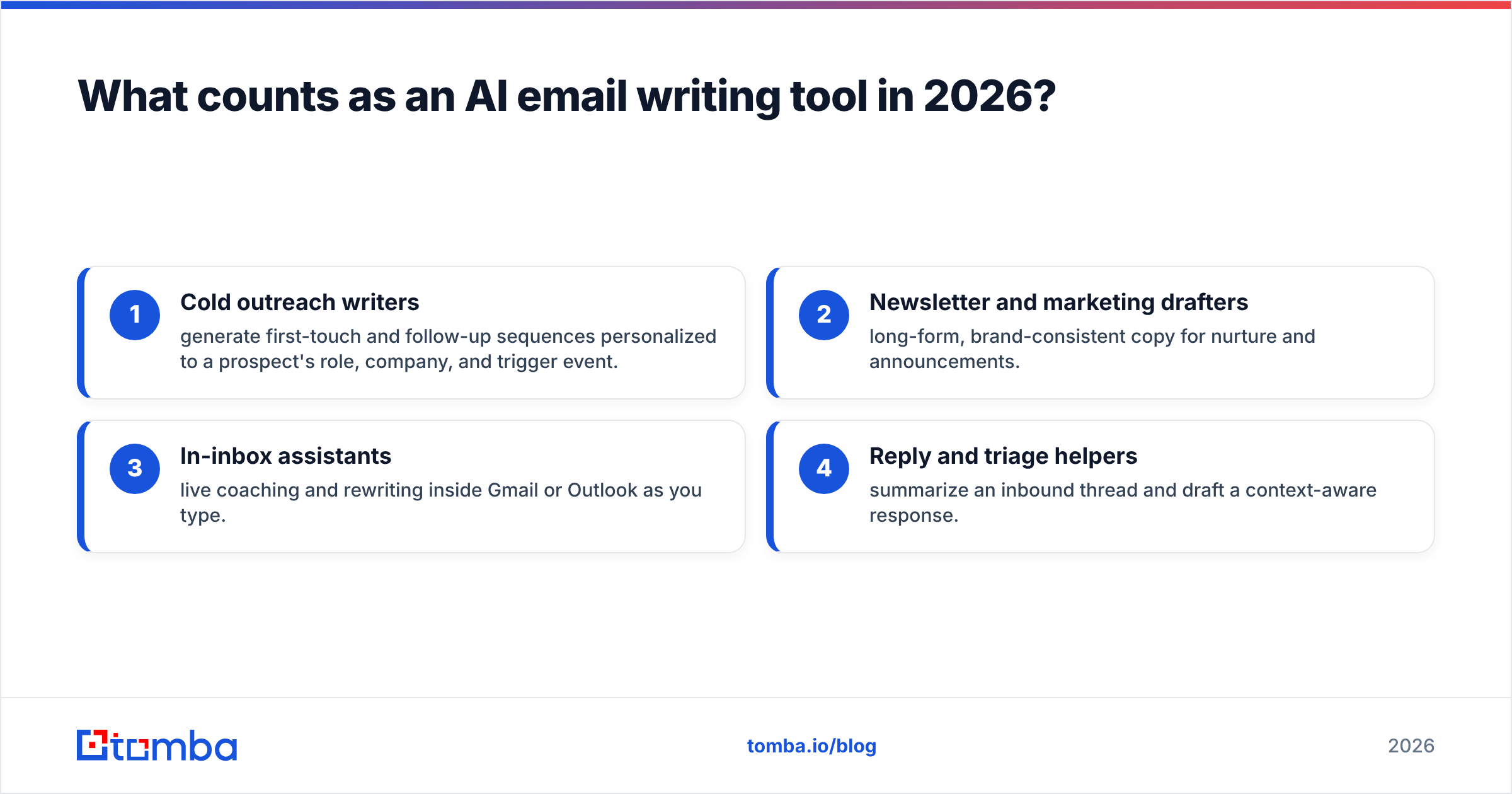
In 2026 the category has split into four clear jobs. Most teams need two or three of them, rarely all four:
- Cold outreach writers — generate first-touch and follow-up sequences personalized to a prospect's role, company, and trigger event.
- Newsletter and marketing drafters — long-form, brand-consistent copy for nurture and announcements.
- In-inbox assistants — live coaching and rewriting inside Gmail or Outlook as you type.
- Reply and triage helpers — summarize an inbound thread and draft a context-aware response.

The mistake most buyers make is treating these as interchangeable. A newsletter generator will happily write a cold email, but it will sound like a newsletter — warm, broad, and easy to ignore. Match the tool to the job.
How did we rank the best AI tools for email writing?#
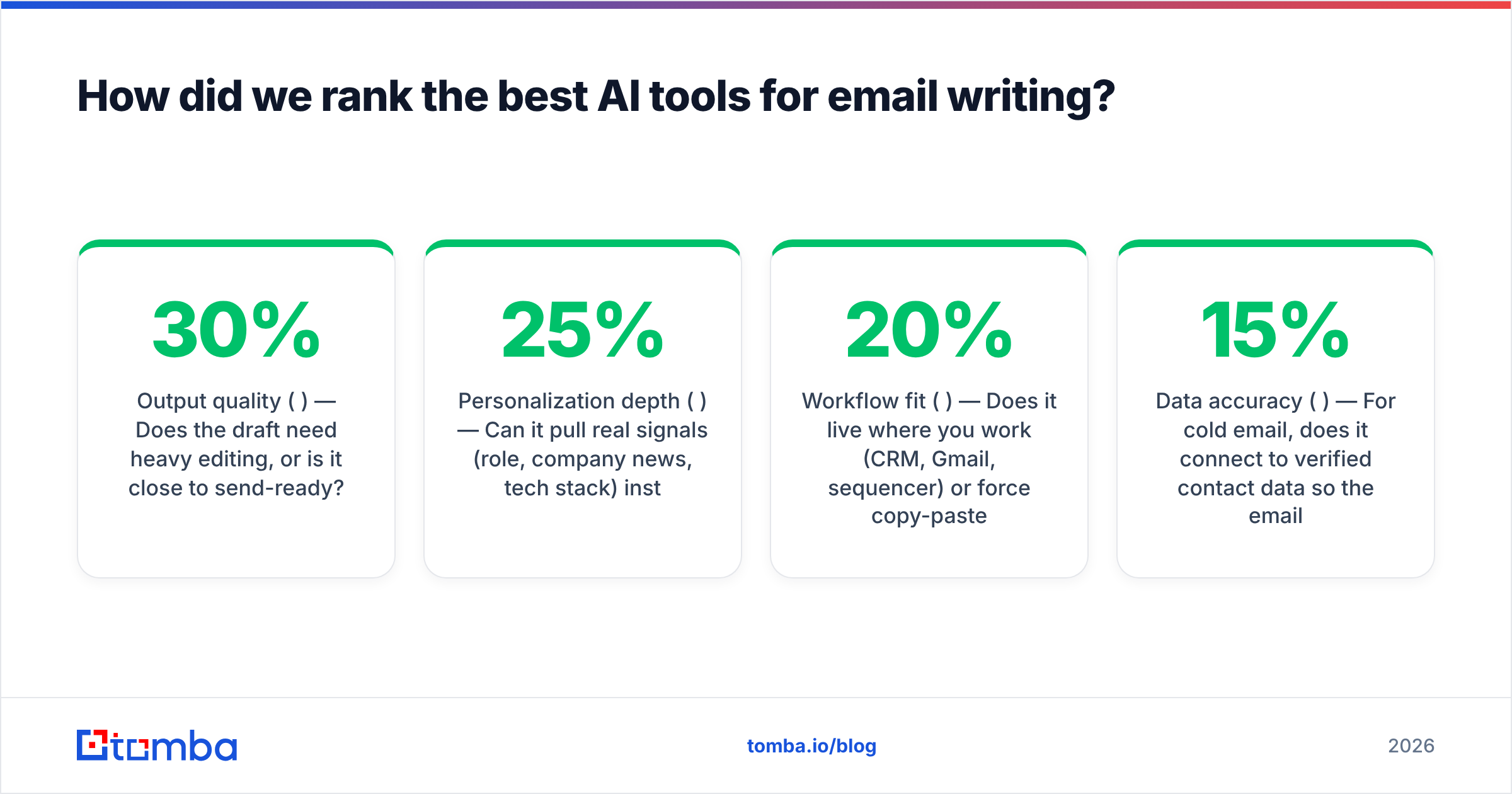
We scored every tool on five weighted criteria, because "it writes emails" is table stakes now. What separates winners is whether the output performs.
- Output quality (30%) — Does the draft need heavy editing, or is it close to send-ready?
- Personalization depth (25%) — Can it pull real signals (role, company news, tech stack) instead of mail-merge tokens?
- Workflow fit (20%) — Does it live where you work (CRM, Gmail, sequencer) or force copy-paste?
- Data accuracy (15%) — For cold email, does it connect to verified contact data so the email reaches a real inbox?
- Price-to-value (10%) — What you pay versus replies you earn.
That data-accuracy column is where a lot of "AI email" content quietly fails. According to HubSpot's research on email marketing, deliverability and list quality drive results as much as copy. You can verify that logic yourself: a brilliant email to a dead address converts at zero percent. That is why we weight contact data even in a writing roundup, and why tools that bundle an email verifier have a structural edge.
Which are the best AI tools for email writing? (Comparison table)#
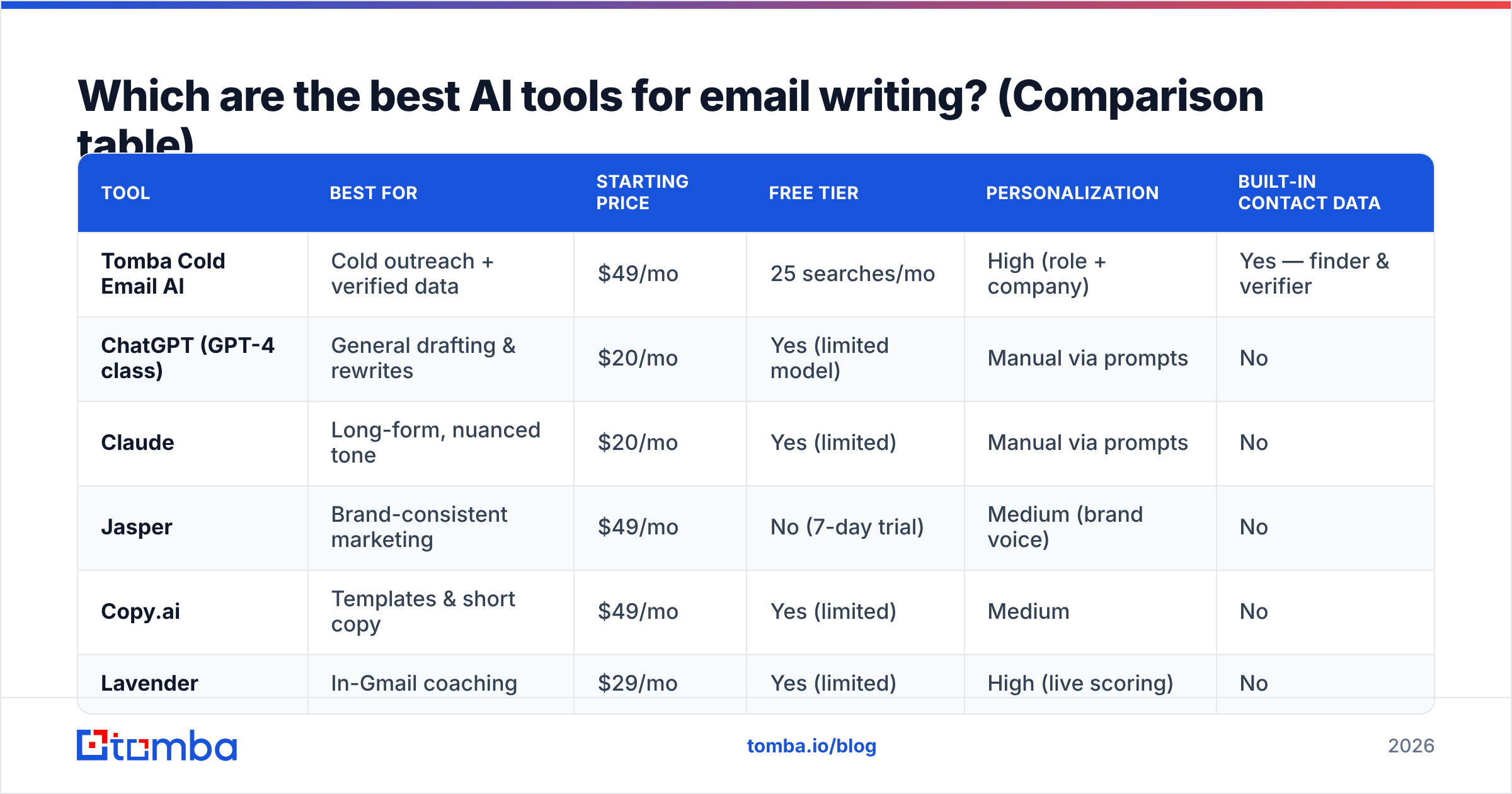
Here is the head-to-head. Prices are entry paid tiers as of mid-2026; check each vendor for current plans.
| Tool | Best for | Starting price | Free tier | Personalization | Built-in contact data |
|---|---|---|---|---|---|
| Tomba Cold Email AI | Cold outreach + verified data | $49/mo | 25 searches/mo | High (role + company) | Yes — finder & verifier |
| ChatGPT (GPT-4 class) | General drafting & rewrites | $20/mo | Yes (limited model) | Manual via prompts | No |
| Claude | Long-form, nuanced tone | $20/mo | Yes (limited) | Manual via prompts | No |
| Jasper | Brand-consistent marketing | $49/mo | No (7-day trial) | Medium (brand voice) | No |
| Copy.ai | Templates & short copy | $49/mo | Yes (limited) | Medium | No |
| Lavender | In-Gmail coaching | $29/mo | Yes (limited) | High (live scoring) | No |
A few honest notes on this table. ChatGPT and Claude are the cheapest and most flexible, but they are blank canvases — you supply the strategy, the data, and the editing. Jasper and Copy.ai shine for marketing teams that need on-brand volume but add little for one-to-one cold outreach. Lavender is excellent at making you a better writer rather than writing for you. And Tomba is the only option here that solves writing and the "who do I send this to, and is the address real?" problem in one place via its email finder.
Are general AI chatbots good enough for email writing?#
Yes for drafting, no for scaling. ChatGPT and Claude write genuinely good email when you prompt them well — give them the recipient's role, your offer, the desired tone, and a length cap, and you will get a usable first draft in seconds.
Where they fall down is repetition and data. Writing 200 personalized cold emails means 200 prompts, 200 copy-pastes, and zero knowledge of whether those addresses exist. They also have no memory of your brand rules across sessions unless you build a custom GPT or project, which most reps never do.
Use a general chatbot when:
- You write a handful of high-stakes emails — a board update, a partnership pitch, a tricky reply.
- You want to brainstorm angles — ask for ten subject lines, then pick.
- You need a rewrite — paste a clumsy draft and ask for three tighter versions.
Skip it as your primary engine when you are running outbound at volume. That is a job for a tool that connects writing to a B2B database and a sequencer.
For subject lines specifically, a dedicated helper often beats a general prompt because it is tuned on what actually opens. Tomba's free subject line generator is a fast way to A/B your hooks before you commit.
What about AI tools built specifically for cold email?#
This is where the category earns its keep — and where most teams should focus their budget.
Purpose-built cold email AI does three things general tools cannot. First, it ingests a prospect record and writes around real signals: job title, company size, recent funding, the tech they run. Second, it generates the whole sequence — opener plus follow-ups — with varied angles so you are not sending the same nudge three times. Third, the good ones validate the email address before you hit send.
That third point is the quiet differentiator. Reply rate is a fraction with two parts: how many emails land, and how many of those earn a response. AI copy improves the second number. Verified data protects the first. Tools like Tomba close the loop by pairing the cold email AI with a built-in verifier and domain search, so a generated email is checked against a deliverable address in the same flow. If you have ever watched a beautifully written campaign tank because a third of the list bounced, you understand why this matters more than another adjective generator.
If you already run a sequencer like Instantly or Smartlead, you do not have to rip it out — you can keep the sender and feed it verified, AI-drafted contacts. See how Tomba stacks up as an Instantly alternative for that exact pattern.
Can AI write newsletters and marketing emails too?#
It can, and this is the home turf of Jasper and Copy.ai. Both are built for brand-consistent, longer-form copy at marketing volume.
Jasper's strength is its brand voice engine — you train it once on your tone, and it stays on-key across campaigns. According to user reviews on G2, marketing teams rate it highly for consistency and template breadth, while noting the price climbs quickly with seats. Copy.ai is lighter and cheaper to start, with a strong template gallery for short promotional copy and social.
For most B2B teams, though, newsletters are not where AI delivers the biggest ROI. A monthly newsletter is one email written once; a cold campaign is hundreds written daily. Spend your automation budget where the volume is. Use a free email templates library plus a general chatbot for the occasional newsletter, and reserve the paid cold-email tooling for outbound.
When you do send marketing email, run it through a spam checker first. AI tends to overuse trigger words ("free", "guaranteed", "act now") that quietly hurt deliverability.
What features actually matter when choosing a tool?#
Strip away the marketing and four features predict whether a tool earns its subscription:
- Voice cloning that sticks — The tool should learn your tone from a few samples and hold it across drafts, not reset every session.
- Signal-based personalization — Real inputs (role, company, trigger event) beat
{{first_name}}tokens by a wide margin. - Native workflow integration — If it lives inside your CRM or Gmail, you will use it; if it requires copy-paste, you won't. Check the integrations before committing.
- Data hygiene built in — A finder and verifier in the same tool removes the biggest hidden failure point in cold email.
Two features are overrated: the raw number of templates (you will use five), and the number of supported languages (relevant only if you sell internationally). Do not pay extra for either unless you have a concrete need.
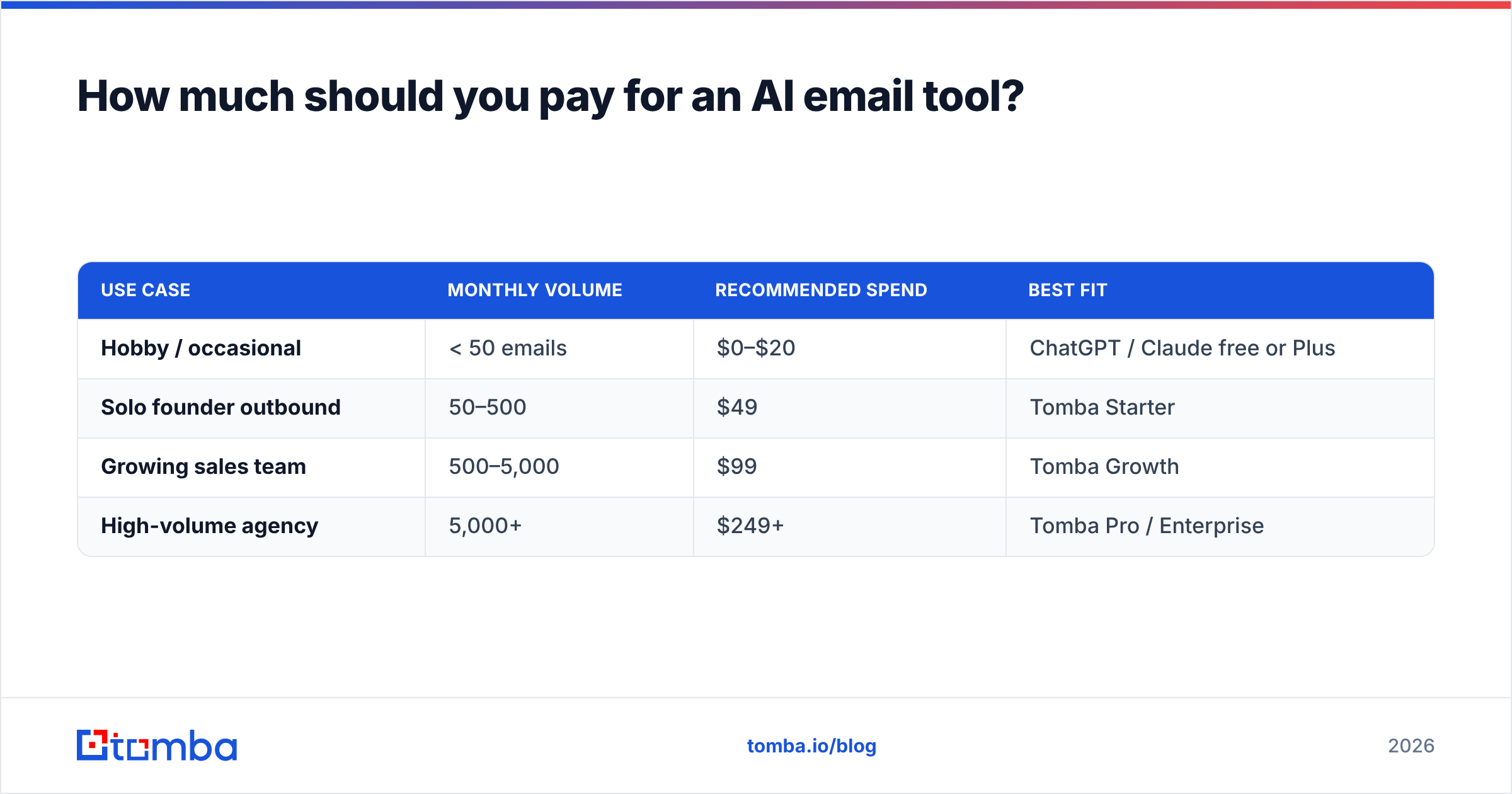
How much should you pay for an AI email tool?#
Match the plan to your volume, not to the feature list. Here is the practical breakdown:
| Use case | Monthly volume | Recommended spend | Best fit |
|---|---|---|---|
| Hobby / occasional | < 50 emails | $0–$20 | ChatGPT / Claude free or Plus |
| Solo founder outbound | 50–500 | $49 | Tomba Starter |
| Growing sales team | 500–5,000 | $99 | Tomba Growth |
| High-volume agency | 5,000+ | $249+ | Tomba Pro / Enterprise |
The common mistake is overpaying for a marketing-grade copy tool when you actually need outbound data and personalization. A $20 chatbot plus a data tool usually beats a $99 brand-copy platform for a sales team. You can review full Tomba pricing to see where the free tier (25 searches/mo) ends and paid scale begins — note the Starter plan is $49/mo, with Growth at $99/mo.
Whatever you pick, leave room in the budget for verification. Cleaning a list with an email verifier costs pennies per contact and routinely lifts deliverability by double digits.
Which AI email writing tool should you choose?#
Decide by your primary job, not by the longest feature list:
- You write occasional high-value emails → ChatGPT or Claude. Cheap, flexible, no setup.
- You produce on-brand marketing copy at volume → Jasper for consistency, Copy.ai for budget.
- You want to become a sharper writer → Lavender's in-inbox coaching.
- You run cold outreach and need it to land → Tomba, because writing without verified data is half a solution.
Most teams end up with a stack: a general chatbot for one-offs, plus a purpose-built outbound tool for the daily grind. That combination covers every job above without paying for overlap.
The bottom line#
The best AI tool for email writing is the one that closes the full loop — find the right person, confirm the address is real, write something they will actually answer, and follow up without sounding like a robot. Pure copy tools handle one slice of that. For B2B outbound, the missing slice is almost always data.
If your emails need to reach verified, real inboxes — and be written to convert — start with the Tomba Email Finder and pair it with the built-in cold email AI. You get accurate contact data and personalized copy in one workflow, on a free tier that lets you test before you pay. Stop guessing at addresses and adjectives; send email that lands and earns replies.
// get started
Find, verify and enrich your first contacts today
Start on the free plan with 25 searches a month, then scale when your team is ready.
Free plan · No credit card required · GDPR & CCPA
Get the Tomba newsletter
Product and data updates
// about the author