Best Contact Management Software in 2026: Top 10 Compared
A neutral, hands-on breakdown of the best contact management software in 2026 — pricing, features, and which tool fits your team without bloated CRM overhead.
Picking contact management software in 2026 is less about who has the longest feature list and more about which tool keeps your contact records accurate without forcing your team into a full CRM migration. This guide ranks ten options by what they actually do well, what they cost, and who should use them.
TL;DR#
- Best overall for SMBs: HubSpot — generous free tier, scales into a full CRM.
- Best lightweight contact manager: Pipedrive and Nimble — simple, fast, affordable.
- Best for big enterprises: Salesforce — powerful, but heavy and pricey.
- The hidden problem: every tool on this list is only as good as the data inside it. Roughly 25-30% of B2B contact data decays each year.
- The fix: pair your contact manager with a verification and enrichment layer like Tomba data enrichment so records stay current automatically.
What is contact management software?#
Contact management software is the digital address book your sales and marketing teams actually trust. Think of it like the contacts app on your phone, but built for a business: instead of just a name and number, each record holds email history, deal stage, company details, notes, and every touchpoint your team has logged.
Technically, a contact manager is a centralized database with a relational layer that links people to companies, deals, and activities. The lightest versions are barely more than a shared spreadsheet with reminders. The heaviest ones blur into full CRM platforms with automation, reporting, and forecasting baked in.
The distinction matters when you're buying. If you only need to organize who you know and when to follow up, a dedicated contact manager is faster and cheaper. If you need pipeline forecasting and revenue reporting, you're shopping for a CRM that happens to include contact management.
What makes the best contact management software?#
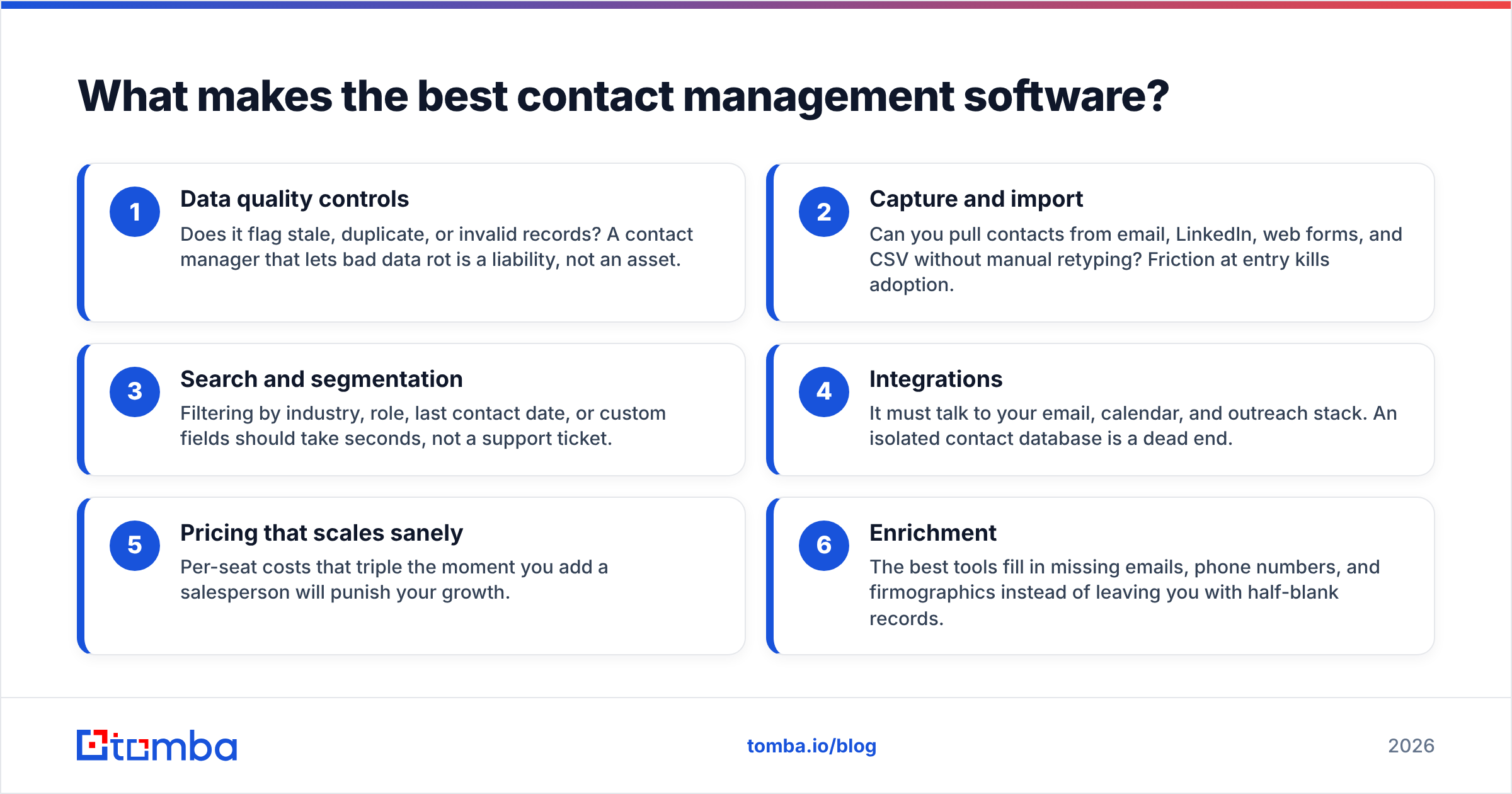
Before the rankings, here's the checklist that separates a tool you'll keep from one you'll abandon in three months:
- Data quality controls — Does it flag stale, duplicate, or invalid records? A contact manager that lets bad data rot is a liability, not an asset.
- Capture and import — Can you pull contacts from email, LinkedIn, web forms, and CSV without manual retyping? Friction at entry kills adoption.
- Search and segmentation — Filtering by industry, role, last contact date, or custom fields should take seconds, not a support ticket.
- Integrations — It must talk to your email, calendar, and outreach stack. An isolated contact database is a dead end.
- Pricing that scales sanely — Per-seat costs that triple the moment you add a salesperson will punish your growth.
- Enrichment — The best tools fill in missing emails, phone numbers, and firmographics instead of leaving you with half-blank records.
Which is the best contact management software in 2026?#
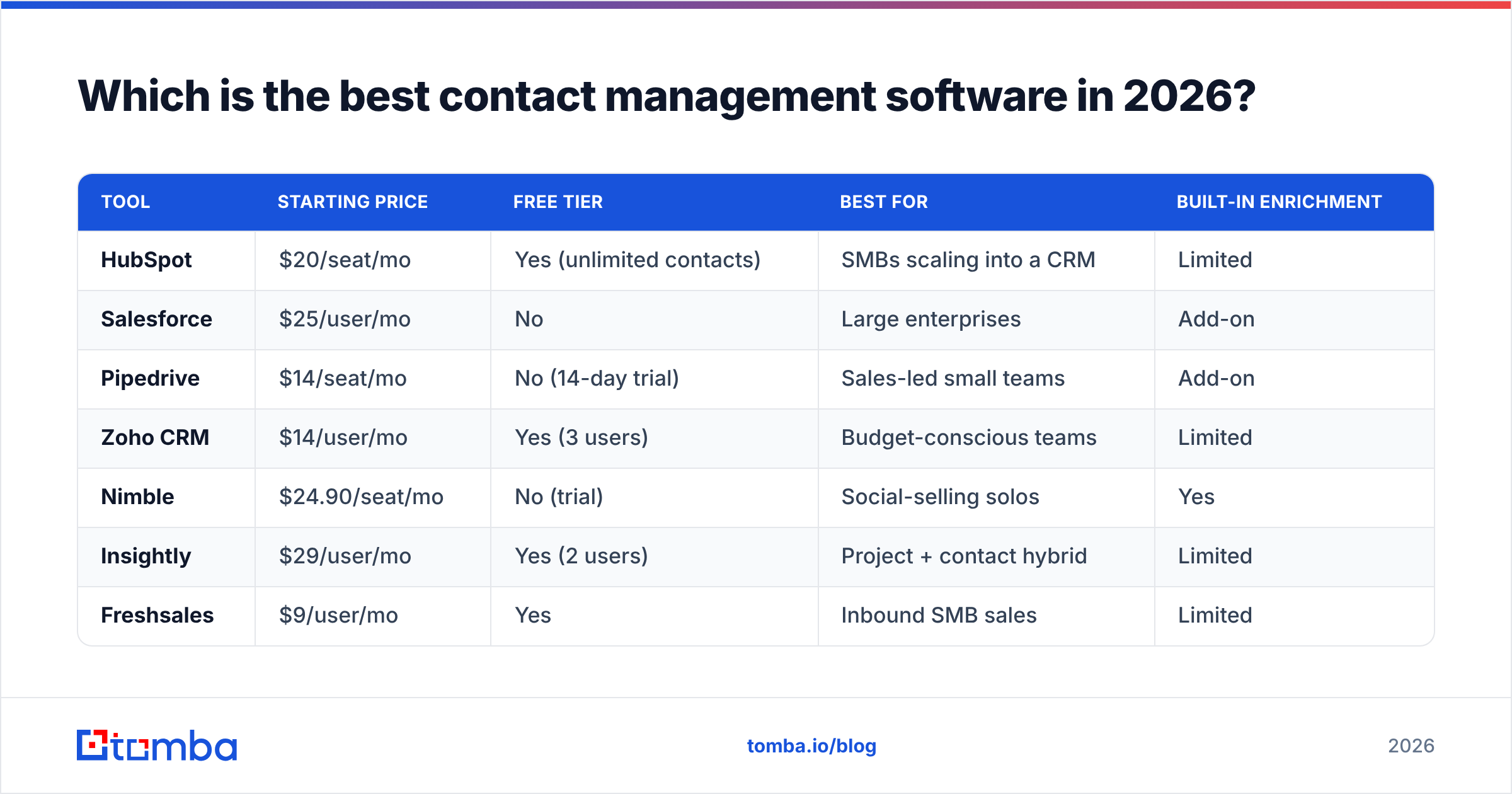
Here's the head-to-head. Prices are entry paid tiers as listed publicly; verify current numbers before you buy.
| Tool | Starting price | Free tier | Best for | Built-in enrichment |
|---|---|---|---|---|
| HubSpot | $20/seat/mo | Yes (unlimited contacts) | SMBs scaling into a CRM | Limited |
| Salesforce | $25/user/mo | No | Large enterprises | Add-on |
| Pipedrive | $14/seat/mo | No (14-day trial) | Sales-led small teams | Add-on |
| Zoho CRM | $14/user/mo | Yes (3 users) | Budget-conscious teams | Limited |
| Nimble | $24.90/seat/mo | No (trial) | Social-selling solos | Yes |
| Insightly | $29/user/mo | Yes (2 users) | Project + contact hybrid | Limited |
| Freshsales | $9/user/mo | Yes | Inbound SMB sales | Limited |
| Less Annoying CRM | $15/user/mo | No (30-day trial) | Solopreneurs | No |
| Capsule | $18/seat/mo | Yes (250 contacts) | Lean teams | Limited |
| Tomba (data layer) | $49/mo | Yes (25 searches) | Keeping any CRM clean | Yes (core) |
A quick read of that table: most contact managers are strong at storing contacts and weak at maintaining them. That gap is exactly where decay creeps in.
HubSpot — best overall for growing teams#
HubSpot earns the top spot for most small and mid-sized businesses because its free tier genuinely works for real teams, and it grows with you. You get contact records, email tracking, deal pipelines, and forms without paying a cent until you outgrow them. According to HubSpot's own product pages, the free CRM supports unlimited users and up to a million contacts.
The catch is upsell pressure. Useful automation, reporting, and higher sending limits sit behind paid Sales Hub tiers that climb quickly. If you connect it to your finder stack via the HubSpot integration, you can keep new contacts flowing in already verified.
Salesforce — best for enterprise scale#
Salesforce is the reference point every other tool gets compared to, and for good reason: at enterprise scale, its customization, reporting, and ecosystem are unmatched. You can read more on Salesforce's platform overview.
It's also overkill for most teams under 50 people. The setup demands an admin, the per-user cost adds up fast, and contact management is just one slice of a much larger machine. Buy it when you've outgrown simpler tools — not before.
Pipedrive, Zoho, and the lean middle#
Pipedrive, Zoho CRM, Freshsales, and Capsule occupy the practical middle: cheap enough for a startup, capable enough for a 10-person sales team. Pipedrive's visual pipeline is the cleanest in the category. Zoho is the value pick if you already use other Zoho apps. Freshsales has the lowest entry price on this list at $9/user/mo.
None of them solve data decay on their own. That's the recurring theme — and it's why the tool you pick for storage should be paired with a tool for accuracy.
Is a contact manager the same as a CRM?#
Not quite — and confusing the two is the most expensive mistake buyers make.
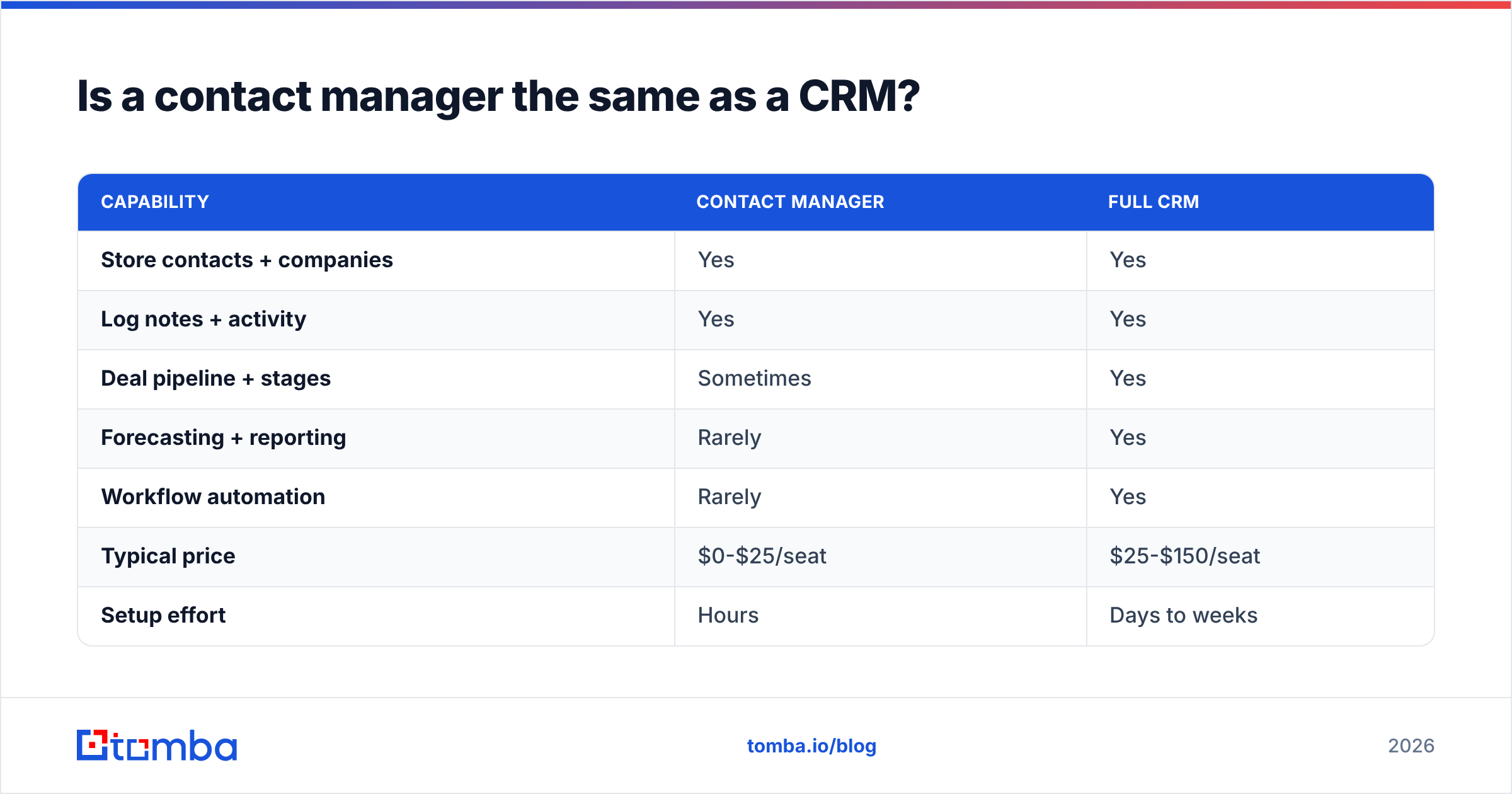
A contact manager is the address book. A CRM is the address book plus the sales process layered on top: pipelines, forecasting, automation, and revenue reporting. Every CRM contains contact management, but not every contact manager is a CRM.
| Capability | Contact manager | Full CRM |
|---|---|---|
| Store contacts + companies | Yes | Yes |
| Log notes + activity | Yes | Yes |
| Deal pipeline + stages | Sometimes | Yes |
| Forecasting + reporting | Rarely | Yes |
| Workflow automation | Rarely | Yes |
| Typical price | $0-$25/seat | $25-$150/seat |
| Setup effort | Hours | Days to weeks |
The honest guidance: if your team is under ten people and you mostly need to remember who to follow up with, a lightweight contact manager wins. If you're forecasting revenue and managing a multi-stage sales process, you need the CRM. Paying for a CRM you won't fully use is just expensive shelf-ware.
Why does contact data quality matter more than the tool?#
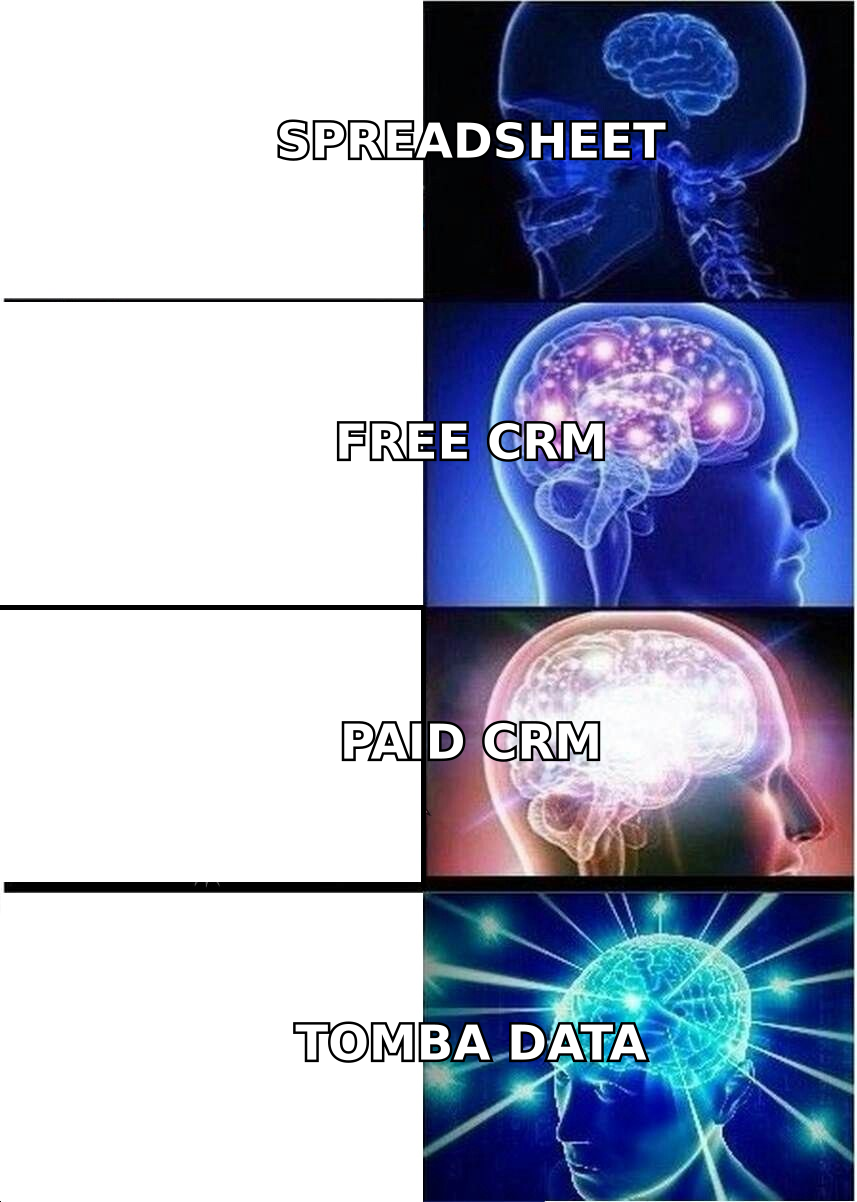
Here's the uncomfortable truth most vendor comparisons skip: the best contact management software in the world can't save you from bad data.
B2B contact data decays at roughly 25-30% per year. People change jobs, companies rebrand, email formats shift, and phone numbers get reassigned. A 10,000-contact database you imported clean in January is meaningfully wrong by December. The tool didn't fail — the data underneath it aged.
This is why your buying decision shouldn't stop at the contact manager. You need a maintenance layer that:
- Verifies email addresses before they bounce and damage your sender reputation. A quick pass through an email verifier catches dead addresses your CRM happily stored.
- Enriches thin records with missing job titles, company size, and direct dials.
- Flags duplicates and stale entries so reps aren't calling numbers that rang out two quarters ago.

The platforms that win in 2026 aren't the ones with the prettiest dashboards. They're the ones that treat contact data as a living asset to be maintained, not a static list to be stored.
How do you keep your contact database clean?#
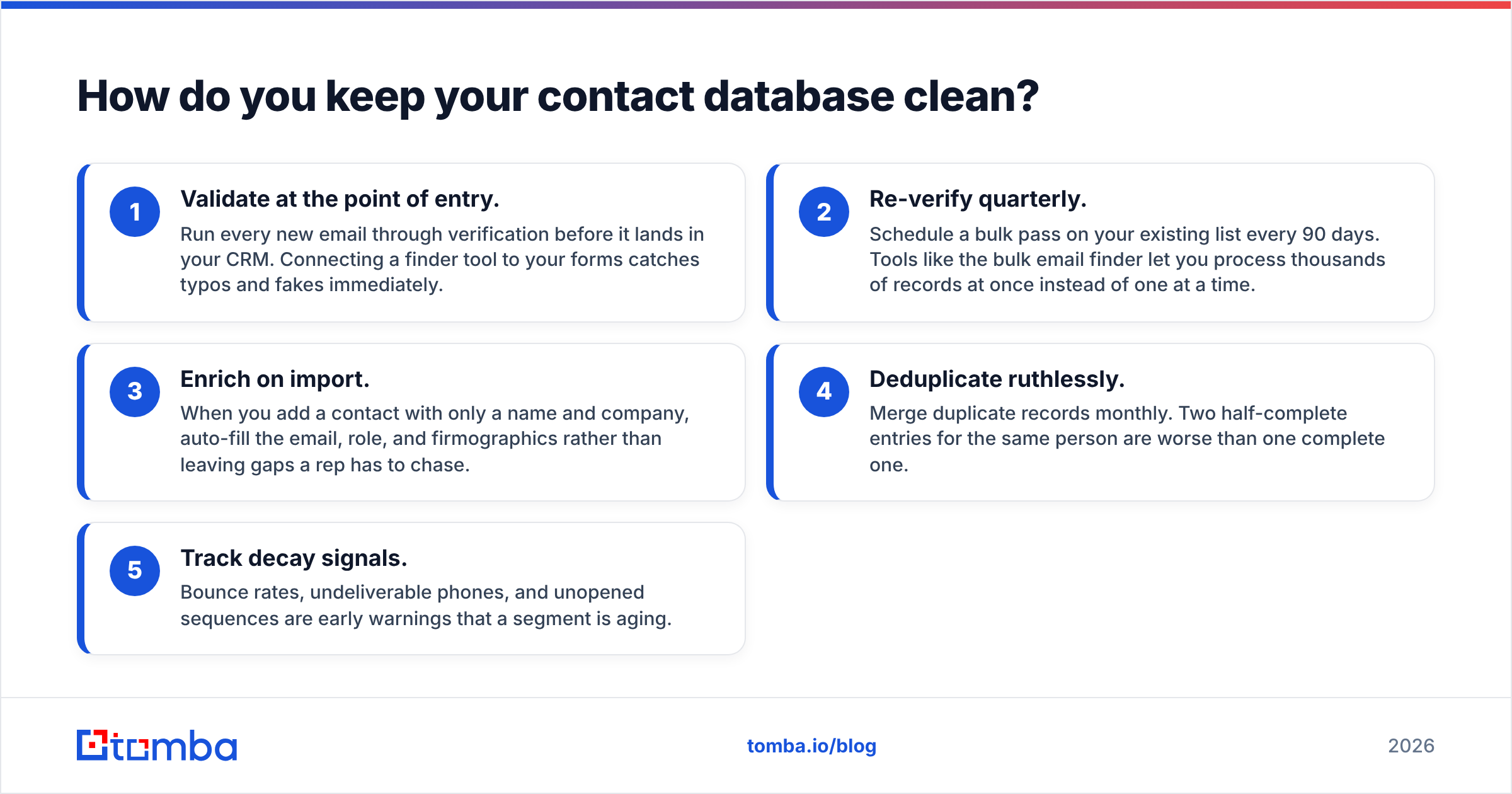
Clean data is a process, not a one-time purchase. Here's a workflow that holds up across any of the tools above:
- Validate at the point of entry. Run every new email through verification before it lands in your CRM. Connecting a finder tool to your forms catches typos and fakes immediately.
- Re-verify quarterly. Schedule a bulk pass on your existing list every 90 days. Tools like the bulk email finder let you process thousands of records at once instead of one at a time.
- Enrich on import. When you add a contact with only a name and company, auto-fill the email, role, and firmographics rather than leaving gaps a rep has to chase.
- Deduplicate ruthlessly. Merge duplicate records monthly. Two half-complete entries for the same person are worse than one complete one.
- Track decay signals. Bounce rates, undeliverable phones, and unopened sequences are early warnings that a segment is aging.
According to G2's contact management category, buyers consistently rank data accuracy among their top satisfaction drivers — above price and above UI. The lesson is clear: the database is only as valuable as the freshness of what's inside it.
Which contact management software should you choose?#
Match the tool to your actual situation rather than the longest feature list:
- Solo or under 5 people: Start with HubSpot's free tier or Freshsales. Don't overpay for capabilities you won't touch.
- Sales-led team of 5-25: Pipedrive or Zoho CRM give you pipeline visibility without enterprise complexity.
- Enterprise (50+): Salesforce, with a dedicated admin and a real implementation budget.
- Any size, serious about data: Whatever you store contacts in, add a verification and enrichment layer underneath it.
Whichever platform you land on, budget a few minutes to compare total cost honestly — seat counts and add-ons inflate the sticker price. The Tomba pricing page is a useful reference point for what a dedicated data layer costs versus bolting enrichment onto a CRM.
The bottom line#
The best contact management software in 2026 is the one your team will actually keep updated — and that depends as much on data hygiene as on the software brand. HubSpot wins for most growing teams, Salesforce for enterprises, and the lean middle (Pipedrive, Zoho, Freshsales) for budget-conscious sales teams. But none of them fix the 25-30% annual decay that quietly hollows out every contact database.
That's where a dedicated finder-and-verification layer pays for itself. Use the Tomba Email Finder to fill in missing addresses, verify them before they bounce, and enrich thin records — so whatever contact manager you choose stays accurate instead of rotting. Start free with 25 searches a month, plug it into your CRM, and let clean data do the heavy lifting. Your follow-ups, your sender reputation, and your reps will thank you.
// get started
Find, verify and enrich your first contacts today
Start on the free plan with 25 searches a month, then scale when your team is ready.
Free plan · No credit card required · GDPR & CCPA
// about the author