Best CRM for Business Development in 2026: Top 7 Compared
A neutral, hands-on breakdown of the best CRM for business development in 2026 — pricing, pipeline features, data quality, and which tool fits your BD motion.
Best CRM for Business Development in 2026: Top 7 Compared
Business development lives or dies by two things: a pipeline you can actually see, and contact data you can actually reach. The right CRM gives you both. The wrong one becomes an expensive contact graveyard your reps refuse to update.
This guide compares the seven CRMs that matter most for business development teams in 2026 — what each does well, where each falls short, and how to pick the one that fits your motion instead of the one with the loudest marketing.
TL;DR#
- Best all-around BD CRM: HubSpot — generous free tier, strong pipeline visibility, scales with you.
- Best for relationship-led BD: Pipedrive — the cleanest deal-stage UX on the market.
- Best for enterprise GTM: Salesforce — unmatched customization if you have admin resources.
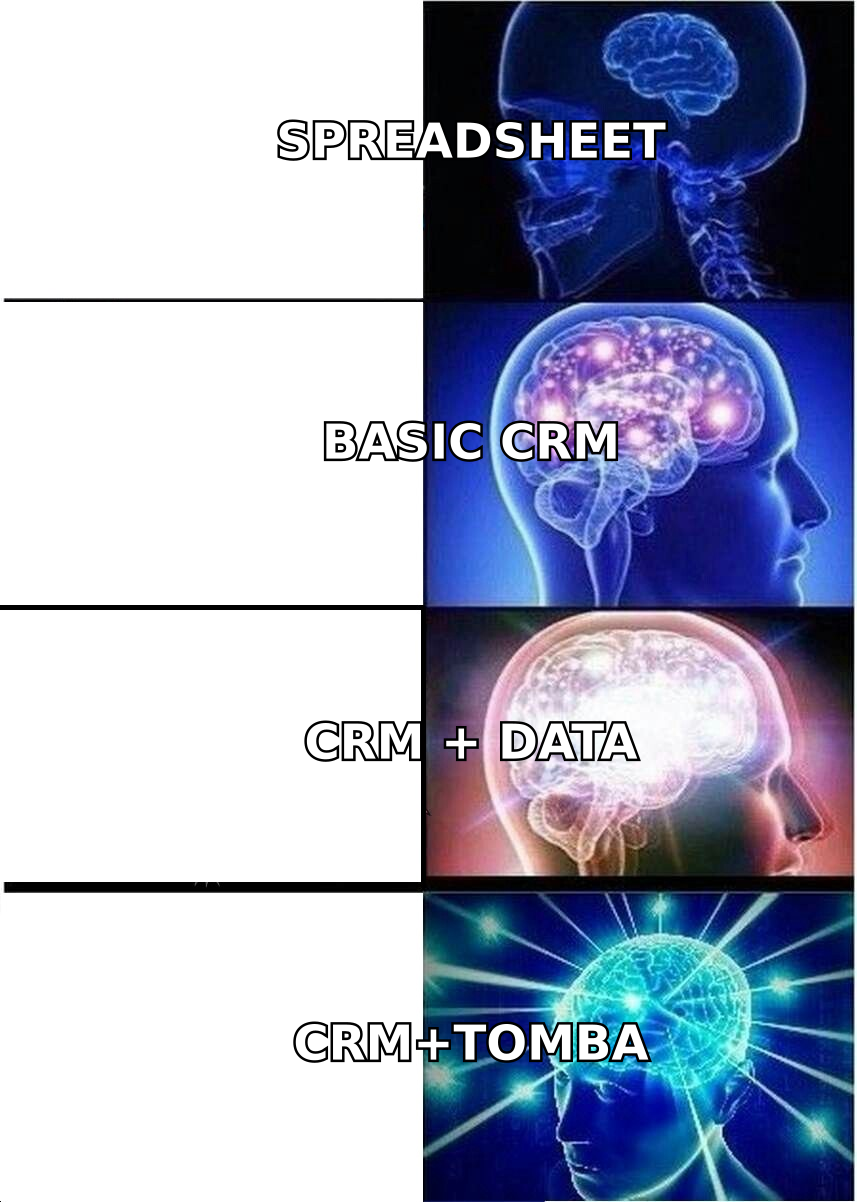
- The real bottleneck isn't the CRM — it's the data inside it. Pair any CRM with an email finder and data enrichment so records stay reachable.
- Skip the "free forever" trap. A CRM that nobody updates is worse than a spreadsheet. Adoption beats features.
What makes a CRM good for business development specifically?#
Business development is not the same as transactional sales. BD is longer-cycle, relationship-heavy, and often spans partnerships, channel deals, and net-new market entry. A CRM tuned for BD needs to handle that nuance.
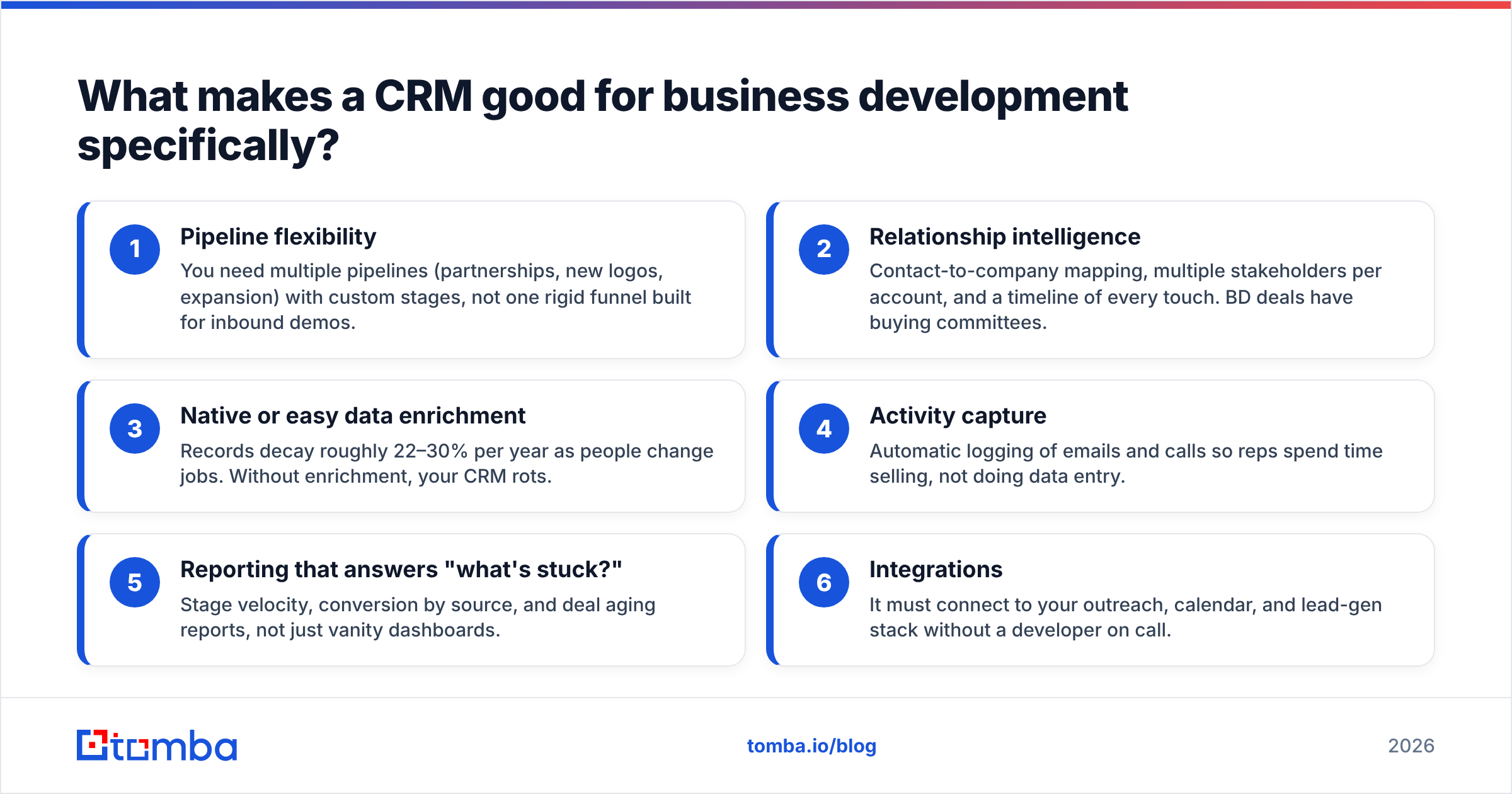
Here are the six capabilities that actually move the needle for a BD team:
- Pipeline flexibility — You need multiple pipelines (partnerships, new logos, expansion) with custom stages, not one rigid funnel built for inbound demos.
- Relationship intelligence — Contact-to-company mapping, multiple stakeholders per account, and a timeline of every touch. BD deals have buying committees.
- Native or easy data enrichment — Records decay roughly 22–30% per year as people change jobs. Without enrichment, your CRM rots.
- Activity capture — Automatic logging of emails and calls so reps spend time selling, not doing data entry.
- Reporting that answers "what's stuck?" — Stage velocity, conversion by source, and deal aging reports, not just vanity dashboards.
- Integrations — It must connect to your outreach, calendar, and lead-gen stack without a developer on call.
If a CRM nails these six, the rest is polish. According to G2's CRM category data, ease of use and adoption consistently outrank raw feature count in buyer satisfaction — which is exactly why "the most powerful CRM" is rarely the best BD choice.
Which is the best CRM for business development in 2026?#
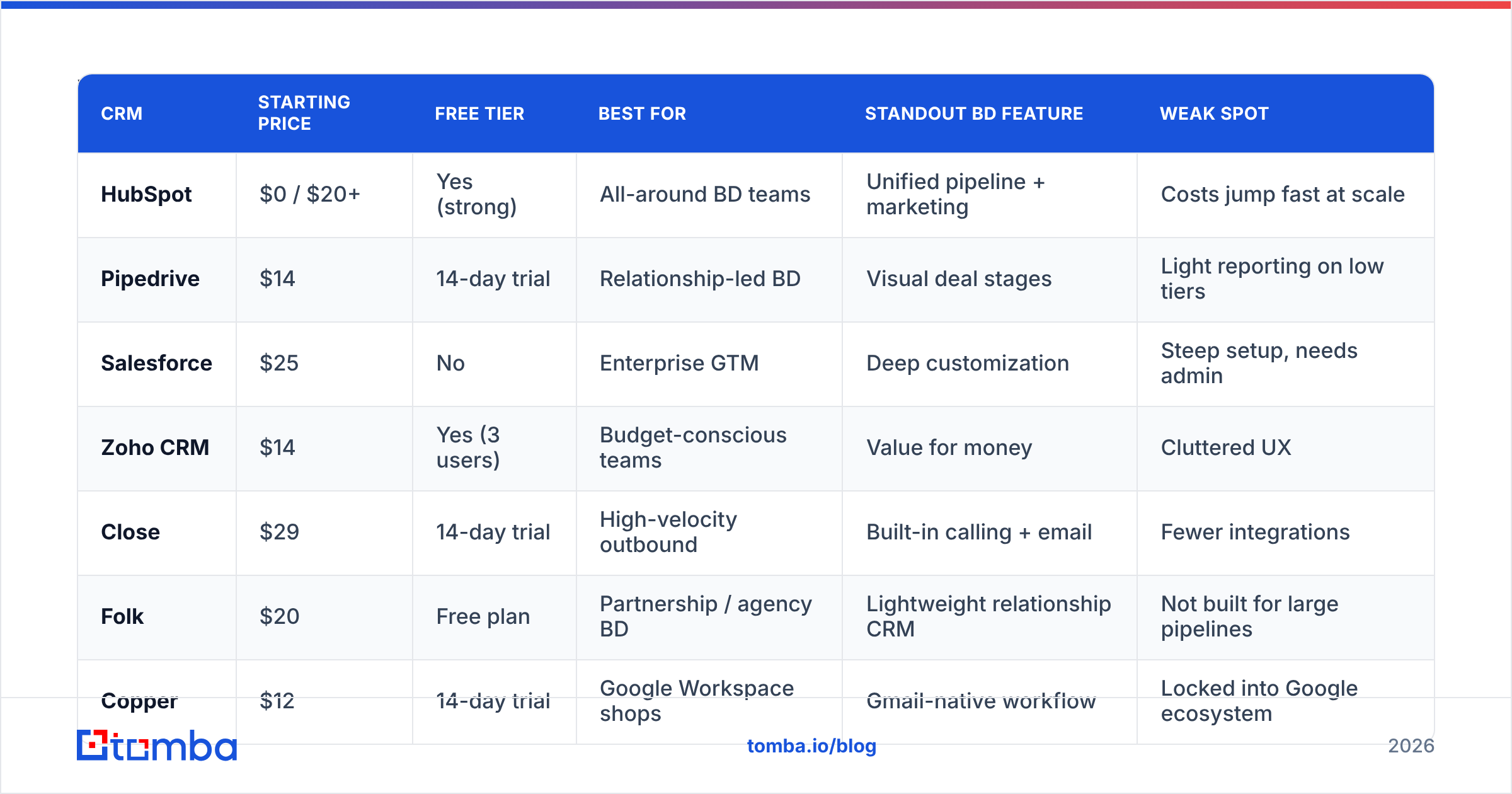
Here's the head-to-head. Prices reflect published list rates as of mid-2026 and are per user per month on annual billing unless noted.
| CRM | Starting price | Free tier | Best for | Standout BD feature | Weak spot |
|---|---|---|---|---|---|
| HubSpot | $0 / $20+ | Yes (strong) | All-around BD teams | Unified pipeline + marketing | Costs jump fast at scale |
| Pipedrive | $14 | 14-day trial | Relationship-led BD | Visual deal stages | Light reporting on low tiers |
| Salesforce | $25 | No | Enterprise GTM | Deep customization | Steep setup, needs admin |
| Zoho CRM | $14 | Yes (3 users) | Budget-conscious teams | Value for money | Cluttered UX |
| Close | $29 | 14-day trial | High-velocity outbound | Built-in calling + email | Fewer integrations |
| Folk | $20 | Free plan | Partnership / agency BD | Lightweight relationship CRM | Not built for large pipelines |
| Copper | $12 | 14-day trial | Google Workspace shops | Gmail-native workflow | Locked into Google ecosystem |
No single row wins every column — which is the point. The "best" CRM is the one whose standout feature maps to your BD motion and whose weak spot you can live with.
HubSpot — the safe default#
HubSpot earns the top all-around spot because it lowers the adoption barrier. The free CRM is genuinely usable, and paid Sales Hub tiers add sequences, deal automation, and forecasting. For a BD team that wants pipeline plus light marketing in one place, it's hard to beat. Watch the pricing curve: Professional and Enterprise tiers escalate quickly once you add seats and add-ons. See HubSpot's own pricing page for the current breakdown.
Pipedrive — the cleanest pipeline#
If your BD is relationship-led and you want reps to actually log activity, Pipedrive's drag-and-drop pipeline is the most intuitive on this list. It's purpose-built around deals, not marketing. The trade-off is thinner reporting and automation until you climb to higher tiers.
Salesforce — the customizable giant#
Salesforce is the right answer when you have complex, multi-team GTM and the admin resources to configure it. Custom objects, flows, and AppExchange make it endlessly extensible. For a lean BD team without a dedicated admin, that power becomes overhead.
How much should a business development CRM cost?#
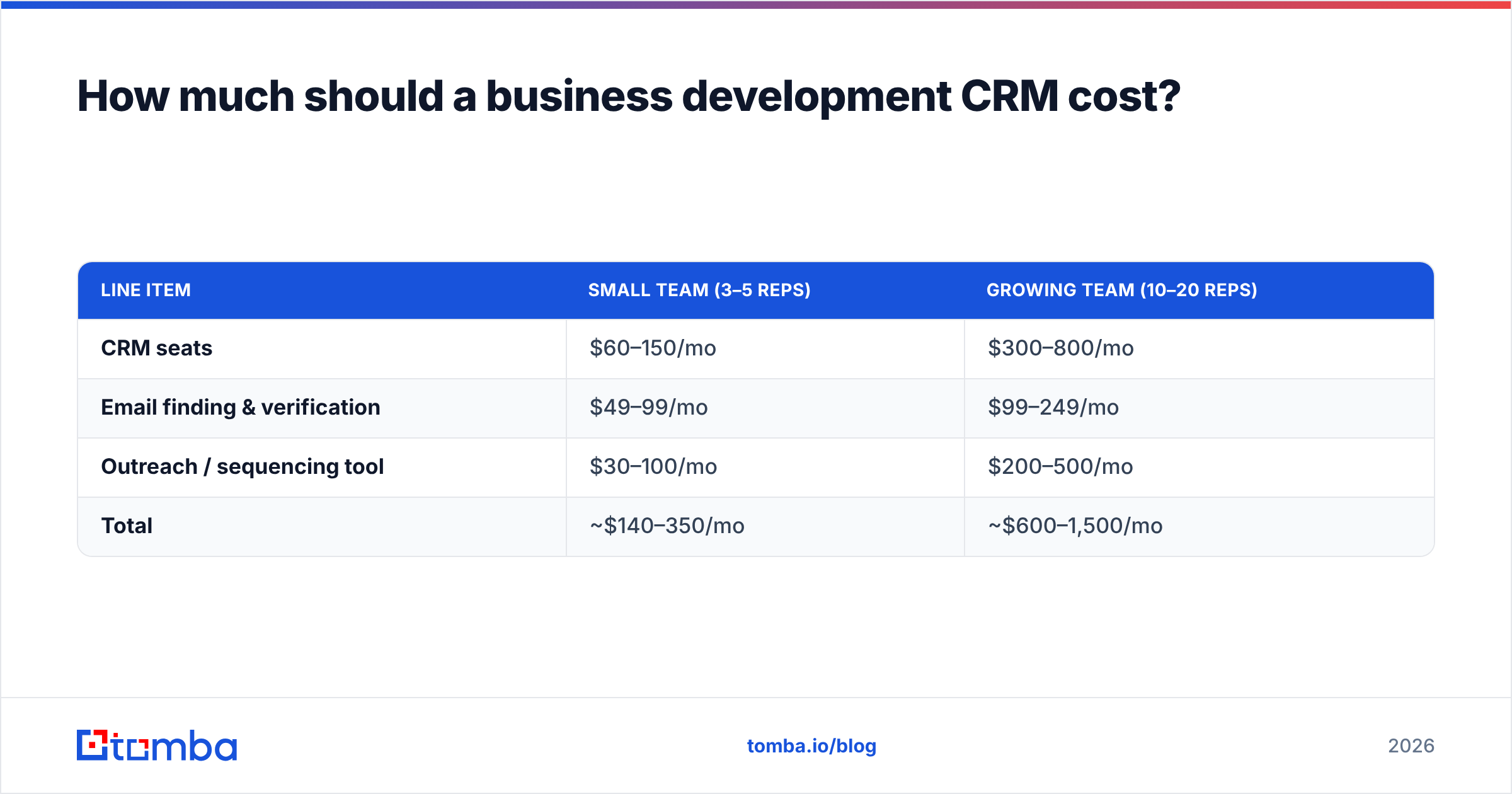
Conclusion first: budget for the CRM plus the data layer, not just the CRM seat. Most teams underestimate the second.
A typical BD stack cost looks like this:
| Line item | Small team (3–5 reps) | Growing team (10–20 reps) |
|---|---|---|
| CRM seats | $60–150/mo | $300–800/mo |
| Email finding & verification | $49–99/mo | $99–249/mo |
| Outreach / sequencing tool | $30–100/mo | $200–500/mo |
| Total | ~$140–350/mo | ~$600–1,500/mo |
The CRM is rarely the most expensive piece, and it's almost never the piece that determines results. Reachable, accurate contact data is. You can run an elite Salesforce instance and still miss quota if half your contact emails bounce.
That's where a dedicated data tool pays for itself. Tomba's pricing starts with a free tier of 25 searches per month, then Starter at $49/mo, Growth at $99/mo, and Pro at $249/mo — sized to slot into the "email finding & verification" line above without blowing up your budget.
Why does CRM data quality matter more than CRM features?#
Because a feature you don't use costs you nothing, but a wrong phone number or dead email costs you a deal.
Think of your CRM like a car. Every vendor sells you a faster engine, a slicker dashboard, more cup holders. But none of that matters if the fuel is contaminated. Contact data is the fuel. Pour in bad data and even a Ferrari stalls.
Here's what data decay does to an unmaintained BD pipeline over twelve months:
- ~30% of contacts change roles or companies, breaking your champion relationships silently.
- Bounce rates climb, which damages your sender reputation and drags down deliverability for the contacts who are still valid.
- Reps lose trust in the CRM and quietly drift back to personal spreadsheets — the death spiral of CRM adoption.
The fix is a maintenance loop, not a one-time import. Verify emails before outreach with an email verifier, enrich stale records on a schedule, and use domain search to map new stakeholders when your contact moves on. The CRM holds the relationship; the data layer keeps it reachable.
How do you actually choose between them?#
Match the tool to your motion. Use this decision shortcut:
- You're inbound-heavy and want marketing + sales in one place → HubSpot.
- You're outbound and relationship-led, and rep adoption is your #1 risk → Pipedrive.
- You're enterprise with complex GTM and have an admin → Salesforce.
- You're price-sensitive and want broad functionality → Zoho CRM.
- You're a high-velocity outbound shop that lives in calls and email → Close.
- You run partnership or agency BD with a small book of high-value relationships → Folk.
- Your whole company lives in Google Workspace → Copper.
Then pressure-test your shortlist with a 14-day pilot on real deals. Import a slice of live pipeline, not dummy data. Watch whether reps update it without being chased. Adoption is the only metric that predicts whether the CRM will pay off.
A practical pilot checklist:
- Migrate one real pipeline — not a sandbox.
- Connect your email and calendar to test activity capture.
- Run one enrichment pass so reps see clean, reachable records on day one.
- Pull a stage-velocity report after week two and ask "is anything stuck?"
- Survey the reps — would they keep using it if you stopped asking?
How do you keep the CRM clean once it's live?#
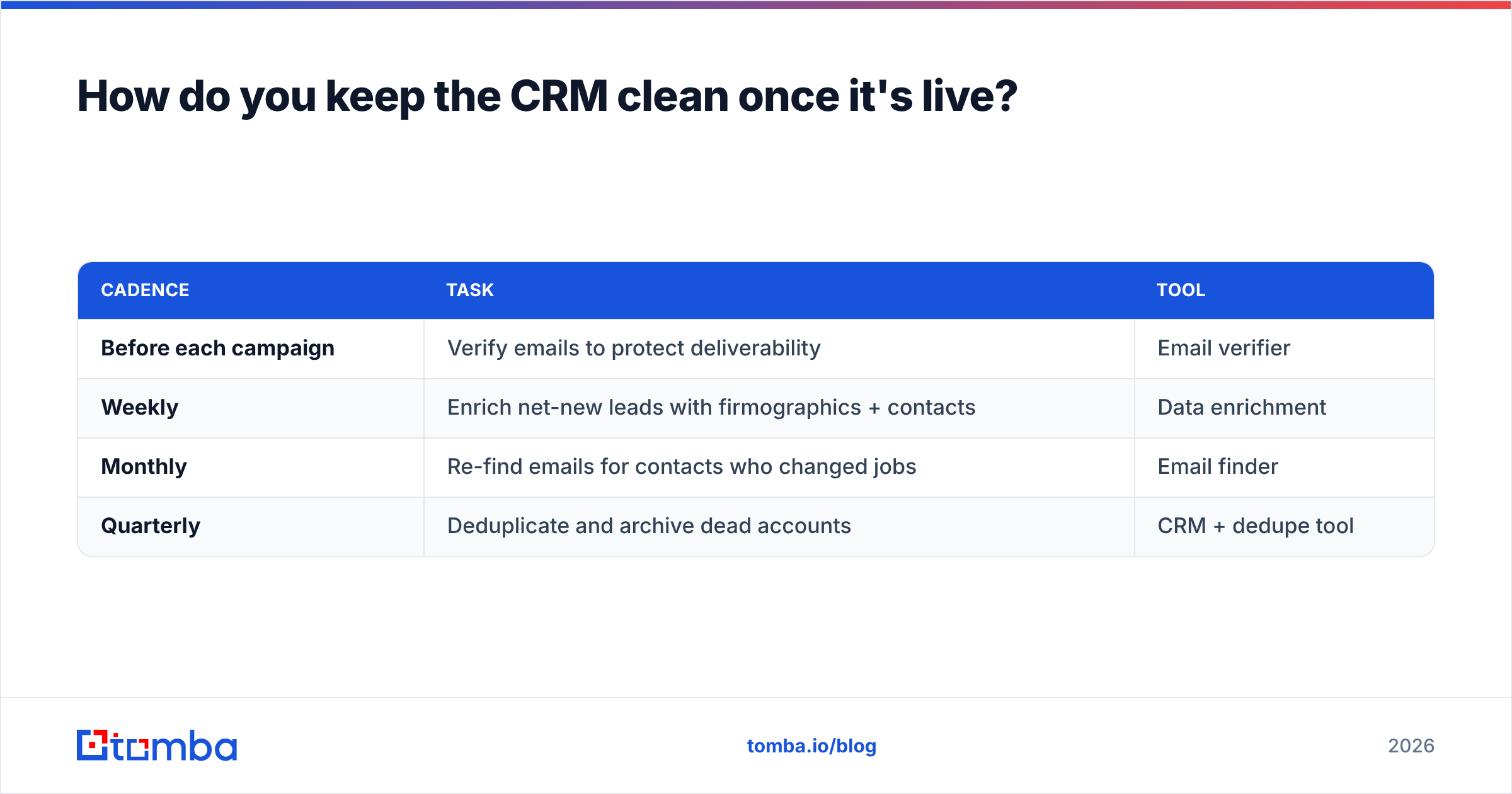
Treat data hygiene as a recurring operational task, the same way you treat pipeline review. Most teams that "fail at CRM" never had a hygiene cadence.
| Cadence | Task | Tool |
|---|---|---|
| Before each campaign | Verify emails to protect deliverability | Email verifier |
| Weekly | Enrich net-new leads with firmographics + contacts | Data enrichment |
| Monthly | Re-find emails for contacts who changed jobs | Email finder |
| Quarterly | Deduplicate and archive dead accounts | CRM + dedupe tool |
You can wire most of this into your CRM automatically. The Tomba API lets you enrich and verify records on write, so a new lead never lands in your pipeline without a validated email and company data attached. For no-code teams, native integrations with HubSpot, Salesforce, and Pipedrive push clean data straight into the records your reps already work.
Frequently asked questions#
Is a free CRM good enough for business development? For a team of one to three, yes — HubSpot or Zoho's free tier will hold a real pipeline. The constraint isn't the CRM software; it's the contact data. Pair the free CRM with a verification tool so you're not emailing dead addresses, and you'll outperform teams on pricier CRMs with dirty data.
What's the difference between a sales CRM and a BD CRM? Mostly configuration, not category. BD motions need multiple pipelines, stakeholder mapping, and longer activity timelines. Any CRM on this list can be set up for BD — the question is how much custom work it takes. Pipedrive and HubSpot need the least; Salesforce the most (but offers the most).
Do I need data enrichment if my CRM has it built in? Native enrichment is convenient but often shallow and capped. A dedicated provider gives you deeper coverage, catch-all handling, and verification you control. Many teams use both — native for quick fills, a specialist tool for accuracy-critical outreach.
How often does CRM data go stale? Plan for 22–30% of B2B contact records to decay annually as people change jobs. That's why a monthly re-find and verification pass matters more than any single feature comparison.
The verdict#
There's no universally "best" CRM for business development — there's the best fit for your motion, your budget, and your appetite for setup. HubSpot is the safest default, Pipedrive the cleanest for relationship-led BD, and Salesforce the most powerful if you can staff it.
But whichever you choose, remember the part the CRM vendors won't emphasize: the software is only as good as the data inside it. A pristine pipeline full of unreachable contacts is just an expensive list.
Before you migrate a single deal, make sure every record is reachable. Use the Tomba Email Finder to find and verify professional emails by name, company, or domain, then push clean, enriched contacts straight into the CRM you picked. Start free with 25 searches a month — and let your reps trust the pipeline again.
// get started
Find, verify and enrich your first contacts today
Start on the free plan with 25 searches a month, then scale when your team is ready.
Free plan · No credit card required · GDPR & CCPA
// about the author