Best CRM for Cold Calling in 2026: 7 Tools Ranked
The best CRM for cold calling isn't the one with the most features — it's the one that gets reps dialing faster. Here's how 7 top platforms compare in 2026.
Cold calling lives or dies on two things: how fast a rep can move from one conversation to the next, and how good the number they're dialing actually is. A CRM that buries the dial button under five clicks, or that feeds reps stale phone data, will quietly tank your connect rate no matter how good your pitch is.
This guide ranks the best CRM for cold calling in 2026 on the metrics that matter for phone teams — dialing speed, automatic call logging, local presence, pipeline visibility, and the quality of the contact data feeding the queue.
TL;DR#
- The best CRM for cold calling is the one with the fastest path from "open record" to "phone ringing" — power dialers and click-to-call beat manual entry every time.
- HubSpot and Salesforce win on pipeline depth; Close and Kixie win on raw dialing speed. Pick based on whether your team is call-first or process-first.
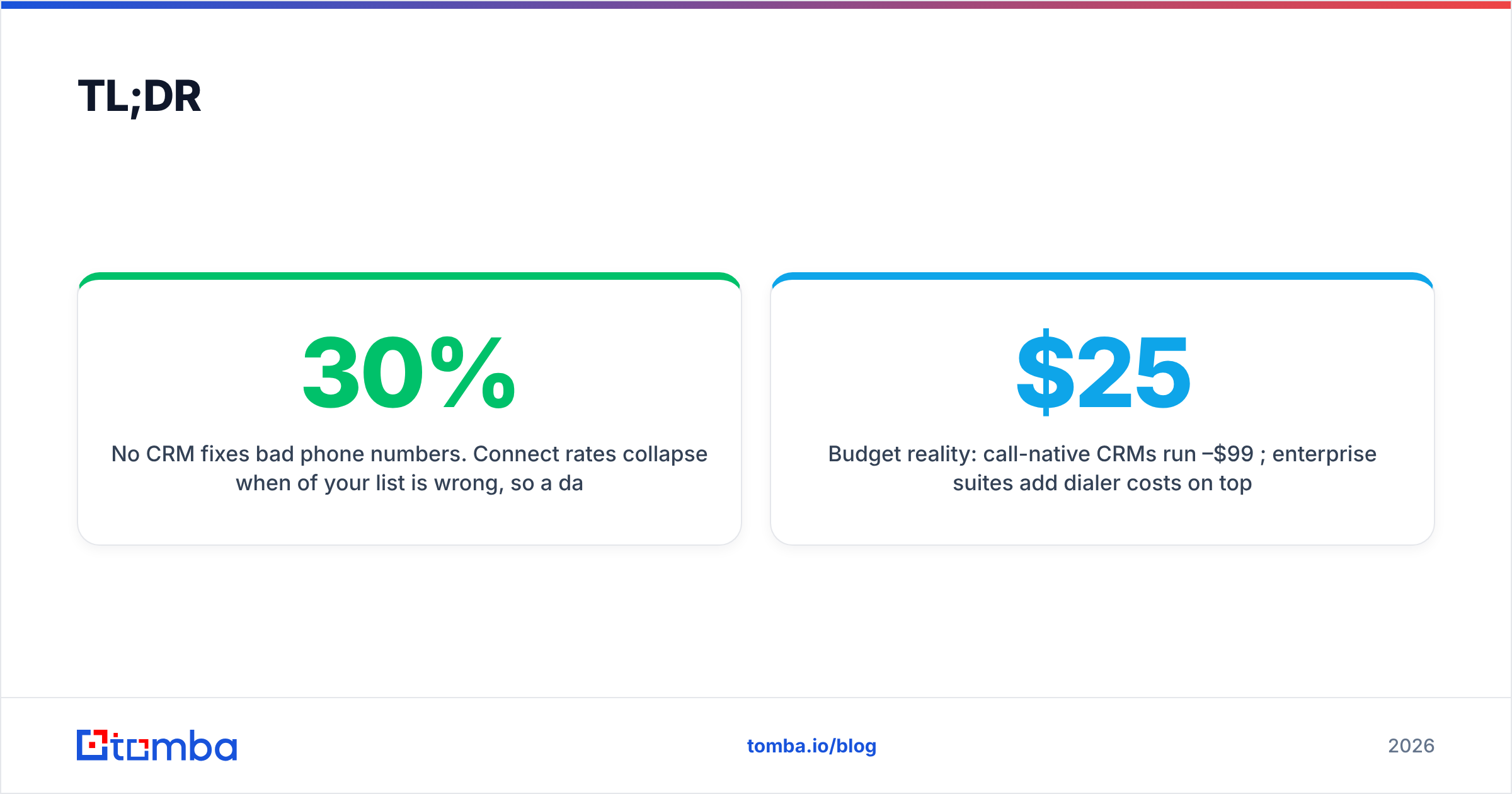
- No CRM fixes bad phone numbers. Connect rates collapse when 30% of your list is wrong, so a data layer like a dedicated phone finder matters more than the dialer brand.
- Budget reality: call-native CRMs run $25–$99 per user/month; enterprise suites add dialer costs on top.
- Enrich and validate before you dial — clean data is the cheapest connect-rate boost you'll ever buy.
What makes a CRM good for cold calling?#
A CRM built for cold calling is less about storing contacts and more about removing friction between dials. The everyday version: it's the difference between a kitchen where every tool is within arm's reach and one where you walk to the pantry for each ingredient. Reps who lose three seconds per dial lose dozens of conversations a day.
Five features separate a calling CRM from a generic one:
- Built-in or power dialer — click-to-call at minimum, predictive/parallel dialing for high-volume teams. This is the single biggest lever on dials-per-hour.
- Automatic call logging and recording — every call attached to the record with no manual data entry, so reps stay on the phone instead of typing.
- Local presence and number management — dialing from an area code that matches the prospect lifts answer rates measurably.
- Pipeline and disposition tracking — fast call outcomes (no answer, callback, booked) that update stage and trigger the next task.
- Clean, enriched contact data — direct dials and mobile numbers that are actually current, ideally refreshed through data enrichment so reps aren't dialing dead lines.
Miss any of these and your reps compensate with manual work, which is exactly the time they should be spending in conversations.
Which is the best CRM for cold calling in 2026?#
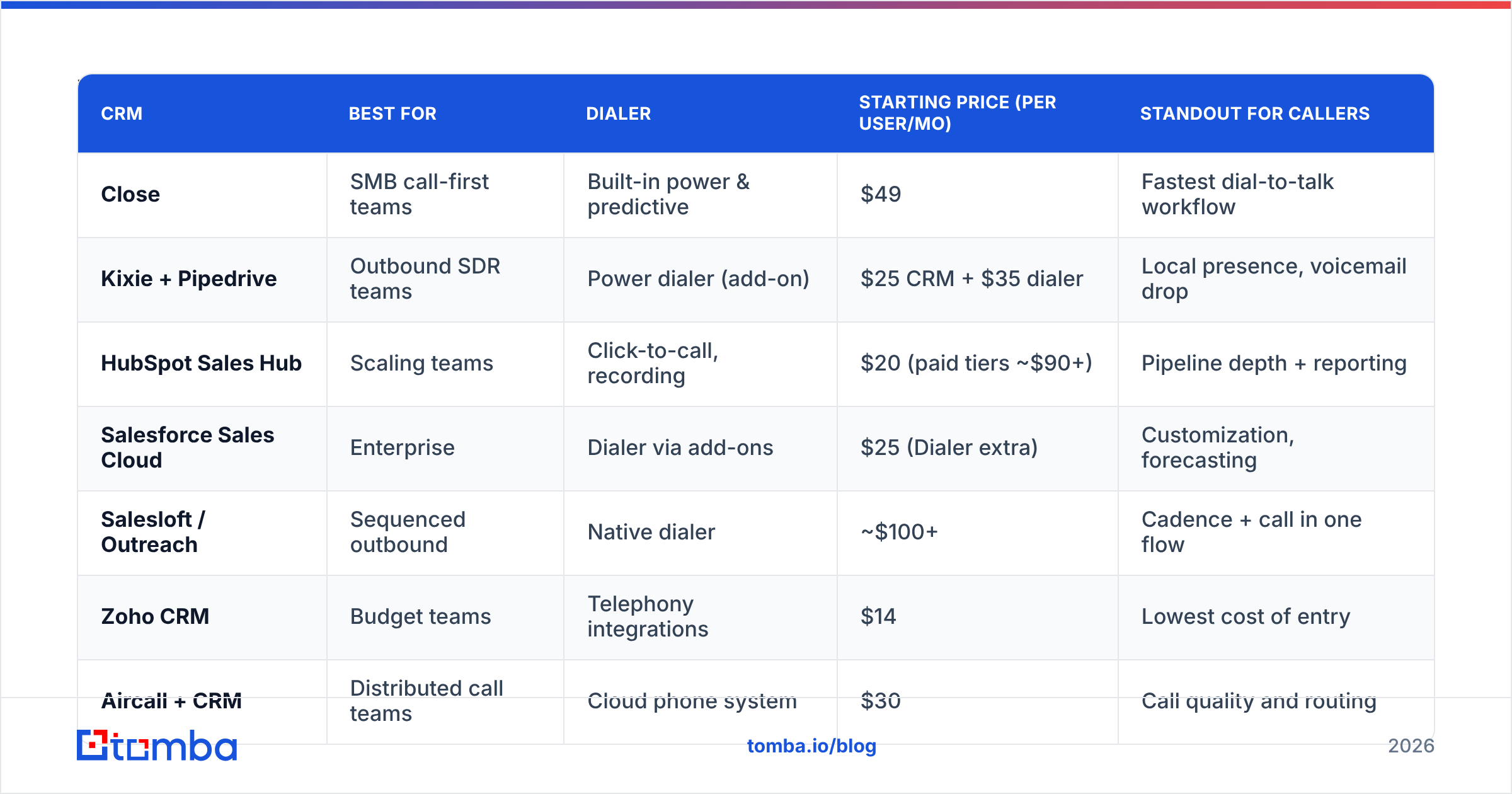
There's no single winner — the best CRM for cold calling depends on whether your team is call-first (volume, speed, dispositions) or process-first (long cycles, multi-touch, forecasting). Here's how seven leading platforms stack up.
| CRM | Best for | Dialer | Starting price (per user/mo) | Standout for callers |
|---|---|---|---|---|
| Close | SMB call-first teams | Built-in power & predictive | $49 | Fastest dial-to-talk workflow |
| Kixie + Pipedrive | Outbound SDR teams | Power dialer (add-on) | $25 CRM + $35 dialer | Local presence, voicemail drop |
| HubSpot Sales Hub | Scaling teams | Click-to-call, recording | $20 (paid tiers ~$90+) | Pipeline depth + reporting |
| Salesforce Sales Cloud | Enterprise | Dialer via add-ons | $25 (Dialer extra) | Customization, forecasting |
| Salesloft / Outreach | Sequenced outbound | Native dialer | ~$100+ | Cadence + call in one flow |
| Zoho CRM | Budget teams | Telephony integrations | $14 | Lowest cost of entry |
| Aircall + CRM | Distributed call teams | Cloud phone system | $30 | Call quality and routing |
Close is the most call-native of the group — power and predictive dialing ship in the box, and the UI is built so reps move record-to-record without leaving the calling view. For pure cold-call volume in an SMB, it's hard to beat.
HubSpot is the better choice when calling is one channel among several. Its click-to-call and recording live inside a fuller pipeline, and the reporting tells you which scripts and segments actually convert. See current Tomba pricing if you're stacking a data layer on top of any of these.
Salesforce wins on customization and forecasting at the enterprise tier but charges separately for dialing — budget for a dialer add-on or an integration like Aircall or Kixie.
Is a dedicated dialer better than an all-in-one CRM?#
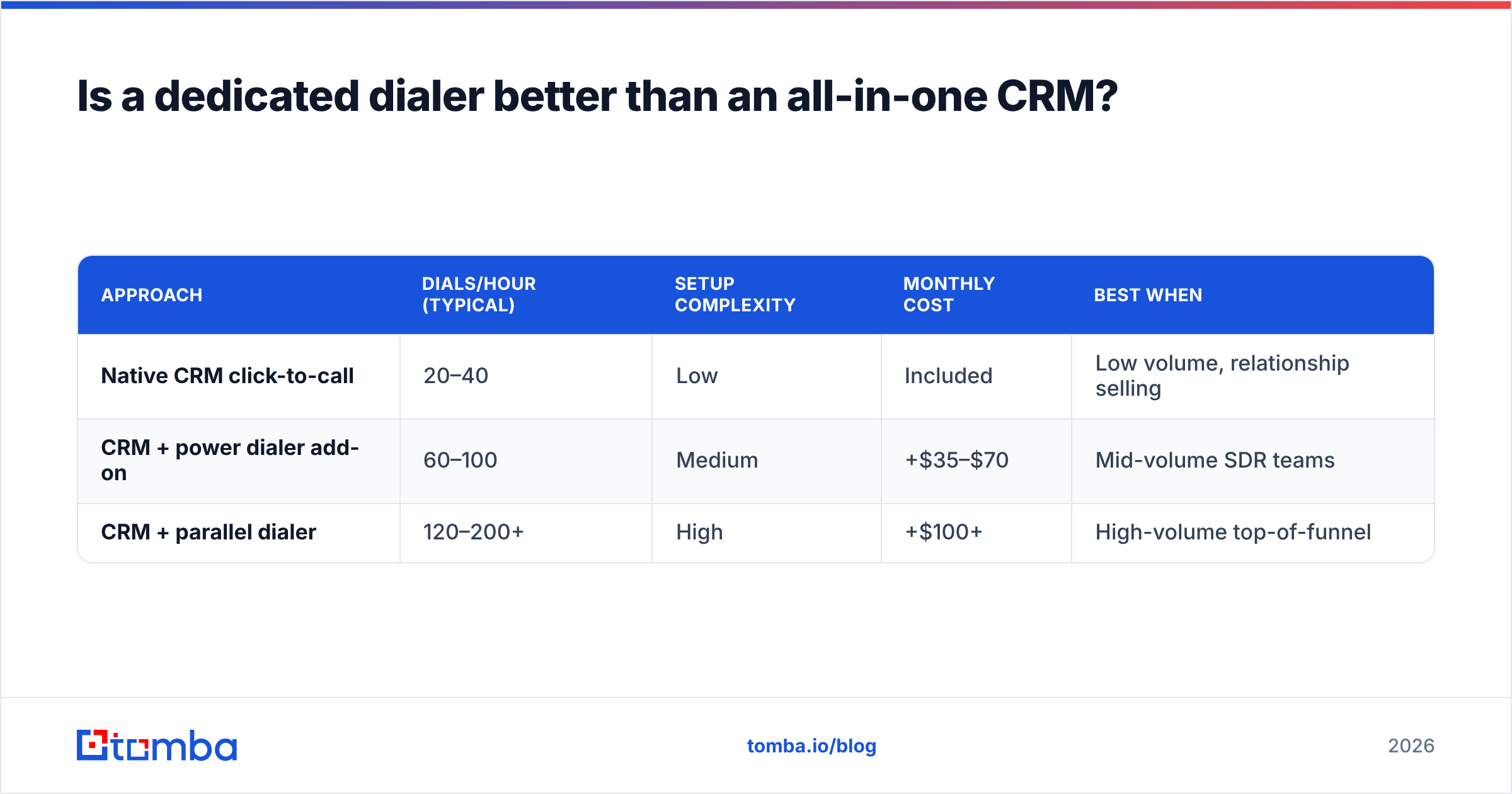
Short answer: for high-volume cold calling, a dedicated dialer layered onto a solid CRM usually beats an all-in-one — but it adds cost and setup. The trade-off is speed versus simplicity.
A standalone power dialer (Kixie, Aircall, Orum) can push a rep from ~40 manual dials a day to 150+ by auto-dialing the next number the instant a call ends. Parallel dialers go further, ringing several lines at once and connecting the rep only when a human answers. That throughput is transformative for SDR teams — but only if the underlying numbers are accurate. Dial four wrong numbers in parallel and you've just automated your way to a worse day.
| Approach | Dials/hour (typical) | Setup complexity | Monthly cost | Best when |
|---|---|---|---|---|
| Native CRM click-to-call | 20–40 | Low | Included | Low volume, relationship selling |
| CRM + power dialer add-on | 60–100 | Medium | +$35–$70 | Mid-volume SDR teams |
| CRM + parallel dialer | 120–200+ | High | +$100+ | High-volume top-of-funnel |
The pattern most teams settle on: keep the CRM as the system of record, bolt on a dialer matched to call volume, and — critically — feed both with verified contact data. A phone validator run before the list ever hits the dialer strips out disconnected and invalid numbers so your expensive dialing minutes land on real lines.
How much does data quality affect cold-call results?#
More than the dialer brand, the script, or the CRM. If a third of your numbers are wrong, a faster dialer just helps you reach voicemail faster.
Connect rate is a simple equation: valid numbers × answer rate × right-person rate. CRMs improve the second and third terms with local presence and timing; they do nothing for the first. That's a data problem, and it's where most cold-calling programs silently leak performance. Industry reviews on G2 consistently show that teams blame their dialer or cadence when the real culprit is the list.
Three habits keep the data layer healthy:
- Enrich on import. Pull direct dials and mobile numbers, not just the main switchboard. Tools like find phone numbers by name and company close the gap between a generic office line and the prospect's actual cell.
- Validate before you dial. A pre-call validation pass removes dead numbers so reps don't burn dials. Pair it with an email verifier so your multi-channel follow-up doesn't bounce either.
- Refresh quarterly. People change jobs; numbers go stale. A standing enrichment job keeps the CRM from rotting between campaigns, and tying it into your CRM integrations means it happens automatically.
The CRMs above assume you bring good data. None of them generate it. That's the layer worth investing in first, because it multiplies the return on every other tool in the stack.
What's the best CRM for cold calling by team type?#
Match the tool to your motion, not to a feature checklist. The "best" CRM for a two-person startup is rarely the best for a 50-rep outbound floor.
- Solo founder / early startup: Zoho CRM or HubSpot's free tier plus a click-to-call extension. Keep cost near zero, add a dialer only when call volume justifies it.
- SMB call-first team (2–15 reps): Close. The built-in dialer and disposition flow get reps to talk-time fastest with the least admin overhead.
- Outbound SDR team (10–50 reps): Pipedrive or HubSpot paired with Kixie or a power dialer. Centralize pipeline in the CRM, push throughput with the dialer, and connect to Pipedrive or HubSpot for enrichment.
- Sequenced outbound (call + email + social): Salesloft or Outreach, where the cadence and the dialer live in one flow.
- Enterprise: Salesforce Sales Cloud with a dialer add-on, for customization and forecasting at scale.
Whichever tier you land in, the enrichment and validation layer stays constant. The CRM organizes the work; the data decides whether the work pays off.
Comparison: call-first vs process-first CRMs#
| Dimension | Call-first (Close, Kixie) | Process-first (Salesforce, HubSpot) |
|---|---|---|
| Time to first dial | Seconds | More clicks, more fields |
| Dials per rep per day | High (100–200+) | Moderate (40–80) |
| Pipeline forecasting | Basic | Advanced |
| Multi-channel cadence | Limited | Strong |
| Customization | Lower | Very high |
| Price point | $$ | $$$ |
| Ideal team size | 2–30 | 25+ |
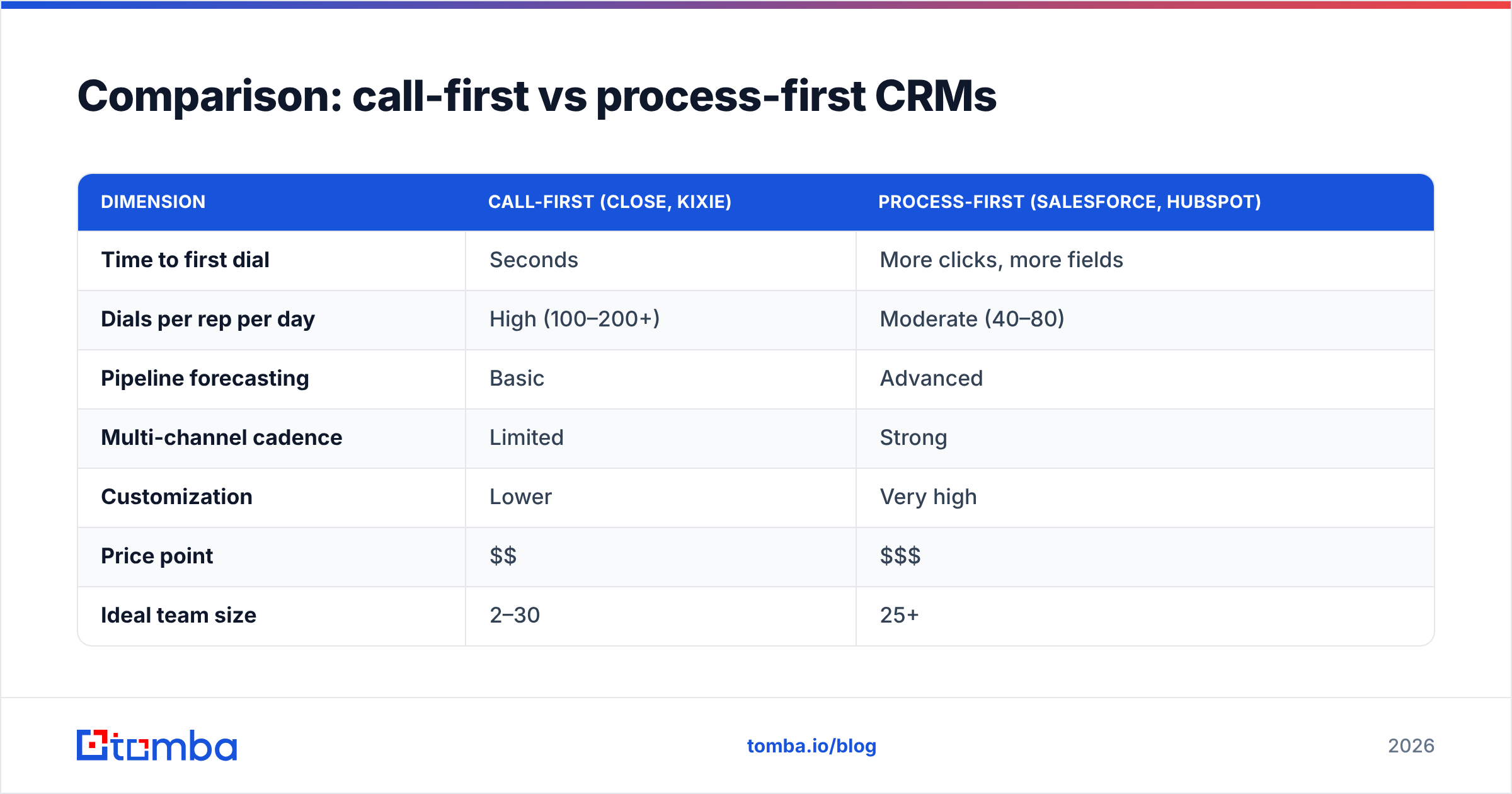
Call-first tools optimize for the next conversation. Process-first tools optimize for the whole revenue motion. Heavy cold-call teams lean left; teams where calling is one touch in a longer cycle lean right. Plenty of organizations run both — a call-first CRM for the SDR floor feeding qualified accounts into a process-first CRM for AEs.
Frequently asked questions#
What is the best CRM for cold calling for a small team? For a small, call-heavy team, Close offers the fastest dialing workflow out of the box. If budget is the priority, Zoho CRM or HubSpot's free tier with a click-to-call add-on gets you started for almost nothing.
Do I need a separate dialer if my CRM has click-to-call? Not at low volume. Once reps are making 60+ dials a day, a power or parallel dialer pays for itself in talk-time. Below that, native click-to-call is enough.
Why are my connect rates low even with a good CRM? Almost always data. Disconnected, wrong, or main-line numbers cap your connect rate regardless of dialer speed. Validate and enrich your list before blaming the tool.
Does local presence really improve answer rates? Yes — dialing from a matching area code measurably lifts pickups. Most call-first CRMs and dialers include local presence number provisioning.
Get your dialing list right before you pick a CRM#
The CRM decision matters, but it's the second decision. The first is making sure every number your reps dial is real, current, and belongs to the person you actually want to reach. That's what turns a fast dialer into a productive one.
Start by enriching and verifying your prospect list with Tomba's phone finder and data tools — pull direct dials, strip out dead numbers, and feed your CRM a queue worth dialing. Whether you land on Close, HubSpot, or Salesforce, clean data is the input that makes the best CRM for cold calling actually live up to the name. Try it free at the Free tier (25 searches/month) and watch your connect rate move before you spend a dollar on a new dialer.
// get started
Find, verify and enrich your first contacts today
Start on the free plan with 25 searches a month, then scale when your team is ready.
Free plan · No credit card required · GDPR & CCPA
// about the author