Best CRM for Sales Pipeline in 2026: Top 7 Compared
A neutral, hands-on comparison of the best CRM for sales pipeline management in 2026 — pricing, pipeline features, automation, and where each one actually fits.
Picking a CRM is easy. Picking the one that actually moves deals through your pipeline — without drowning reps in data entry — is the hard part. This guide compares the best CRM for sales pipeline management in 2026 the way a sales ops lead would: by how each tool models stages, forecasts revenue, and automates the busywork.
TL;DR — Which CRM Wins for Pipeline?#
- Best overall pipeline CRM: HubSpot — clean stage management, strong free tier, scales into automation.
- Best for visual deal flow: Pipedrive — the drag-and-drop pipeline is still the benchmark.
- Best for enterprise forecasting: Salesforce — unmatched depth, but heavy and pricey.
- Best budget pick: Zoho CRM — 80% of the features at a fraction of the cost.
- The real differentiator isn't the CRM — it's the quality of the contact data you feed it. A pretty pipeline full of bounced emails forecasts nothing.
What Makes a CRM "Good" for Sales Pipeline Management?#
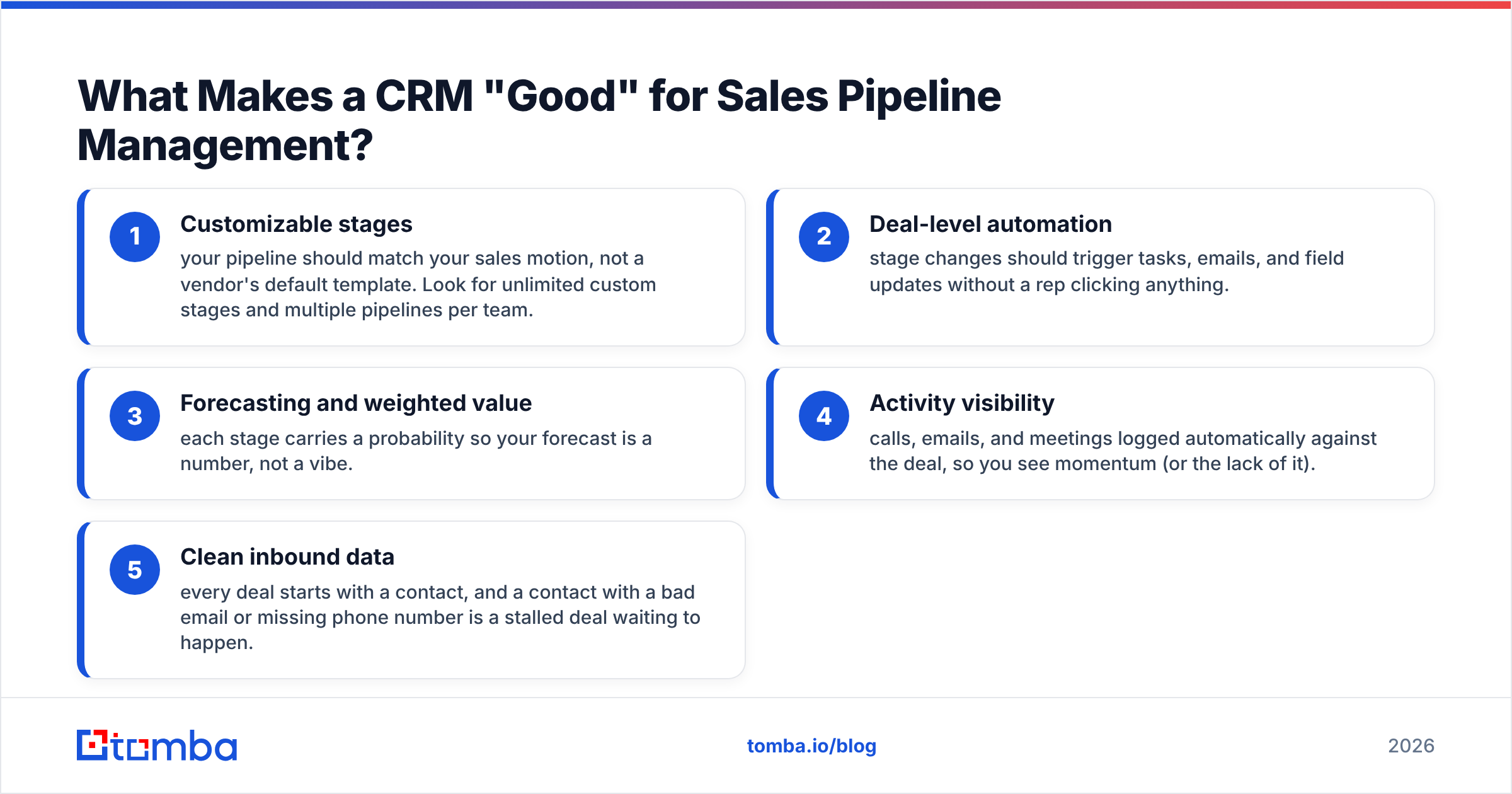
A CRM is like a kitchen. Every brand sells you knives, a stove, and counter space — but the one that makes you a faster cook is the one whose layout matches how you actually move. For pipeline work, "layout" comes down to five things.
- Customizable stages — your pipeline should match your sales motion, not a vendor's default template. Look for unlimited custom stages and multiple pipelines per team.
- Deal-level automation — stage changes should trigger tasks, emails, and field updates without a rep clicking anything.
- Forecasting and weighted value — each stage carries a probability so your forecast is a number, not a vibe.
- Activity visibility — calls, emails, and meetings logged automatically against the deal, so you see momentum (or the lack of it).
- Clean inbound data — every deal starts with a contact, and a contact with a bad email or missing phone number is a stalled deal waiting to happen.
That last point is where most pipeline reviews go quiet. We'll come back to it, because it's the part you control regardless of which CRM you choose.
Which Is the Best CRM for Sales Pipeline in 2026?#
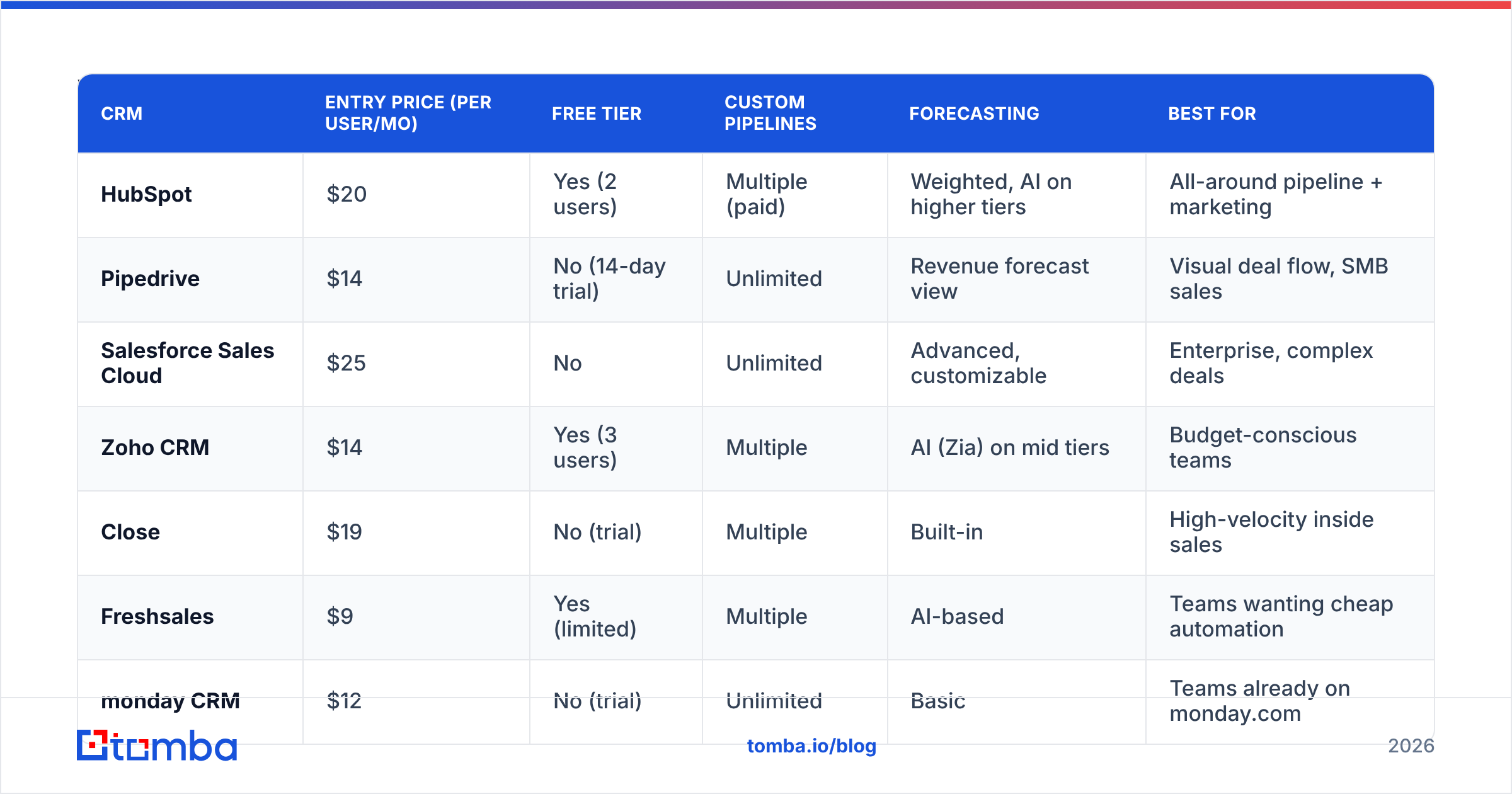
Here's the head-to-head. Prices are entry paid tiers billed annually per user; pipeline depth reflects the lowest tier where the feature is genuinely usable.
| CRM | Entry price (per user/mo) | Free tier | Custom pipelines | Forecasting | Best for |
|---|---|---|---|---|---|
| HubSpot | $20 | Yes (2 users) | Multiple (paid) | Weighted, AI on higher tiers | All-around pipeline + marketing |
| Pipedrive | $14 | No (14-day trial) | Unlimited | Revenue forecast view | Visual deal flow, SMB sales |
| Salesforce Sales Cloud | $25 | No | Unlimited | Advanced, customizable | Enterprise, complex deals |
| Zoho CRM | $14 | Yes (3 users) | Multiple | AI (Zia) on mid tiers | Budget-conscious teams |
| Close | $19 | No (trial) | Multiple | Built-in | High-velocity inside sales |
| Freshsales | $9 | Yes (limited) | Multiple | AI-based | Teams wanting cheap automation |
| monday CRM | $12 | No (trial) | Unlimited | Basic | Teams already on monday.com |
A few honest notes on the table:
- HubSpot's free tier is the most generous starting point, but the jump to multiple pipelines and serious automation lands you in the Professional tier, which is a real budget step.
- Pipedrive wins on pure pipeline UX. If your team thinks in "drag the card to the next column," nothing feels more natural. It's lighter on marketing and support features.
- Salesforce does everything — and you'll pay for it in dollars and admin time. It's the right call when deals are complex, multi-stakeholder, and worth six figures.
- Zoho and Freshsales are the value plays. You give up some polish and ecosystem depth, but the core pipeline mechanics are all there.
For a broader look at where pipeline tools sit in the stack, our rundown of B2B sales tools covers the adjacent automation layer.
How Should You Match a CRM to Your Sales Motion?#
Conclusion first: match the CRM to how fast and how complex your deals are, not to a feature checklist.
- High-velocity inside sales (many small deals, fast cycle): Close or Pipedrive. You want speed, a clean board, and a built-in dialer. Heavy enterprise config slows you down.
- Mid-market with marketing handoffs: HubSpot. The pipeline plus lifecycle stages and marketing automation under one roof reduces the "lead fell through the cracks" problem. Understanding what counts as a marketing qualified lead matters more here than raw pipeline features.
- Enterprise, multi-stakeholder deals: Salesforce. Custom objects, territory management, and forecasting depth justify the cost when a single deal funds the seat for years.
- Bootstrapped or cost-sensitive: Zoho or Freshsales. Don't over-buy. A $14 seat that your team actually uses beats a $150 seat half-configured.
A useful gut check: if your reps spend more than 10 minutes a day on data entry, your CRM is fighting your motion. The fix is rarely a different CRM — it's better automation and cleaner inbound data.
Why Does Pipeline Data Quality Beat CRM Features?#
Because a forecast is only as good as the contacts behind it. This is the part nobody puts in the comparison chart.
Picture two identical Pipedrive instances. Team A imports 500 leads from a scraped list — 22% of the emails bounce, half the phone numbers are wrong. Team B enriches the same 500 leads first, so every record has a verified email and a direct dial. Same CRM, same stages, same reps. Team B's pipeline is real; Team A's is fiction with a nice UI.

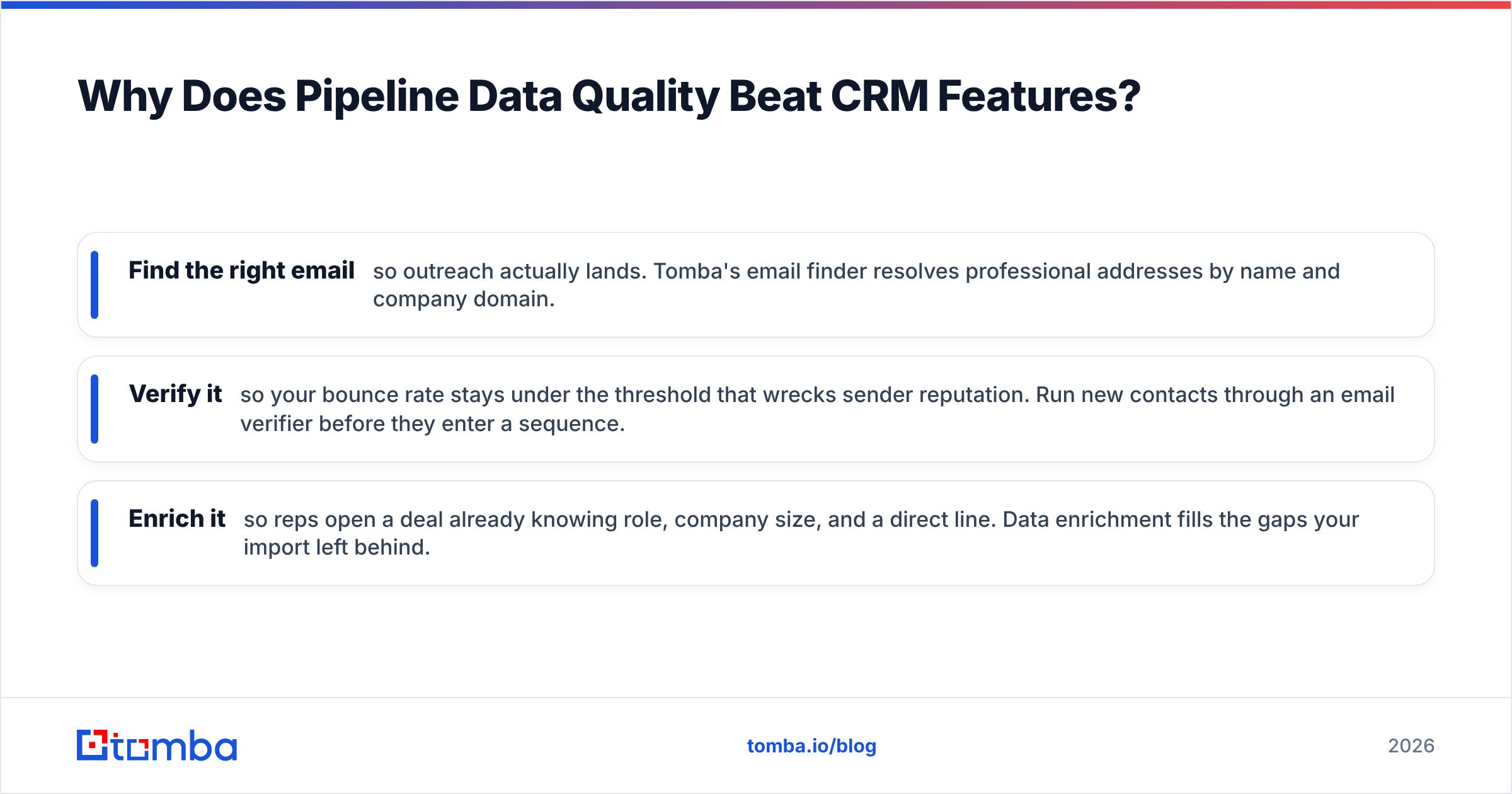
This is where a dedicated data layer earns its keep. Before a contact ever hits a deal stage, you want to:
- Find the right email so outreach actually lands. Tomba's email finder resolves professional addresses by name and company domain.
- Verify it so your bounce rate stays under the threshold that wrecks sender reputation. Run new contacts through an email verifier before they enter a sequence.
- Enrich it so reps open a deal already knowing role, company size, and a direct line. Data enrichment fills the gaps your import left behind.
Most leading CRMs plug into this directly. Tomba's HubSpot integration and Salesforce integration let you find and verify contacts without leaving the deal record, so the clean-data step happens inline instead of as a separate chore.
How Do CRM Pricing Tiers Actually Compare?#
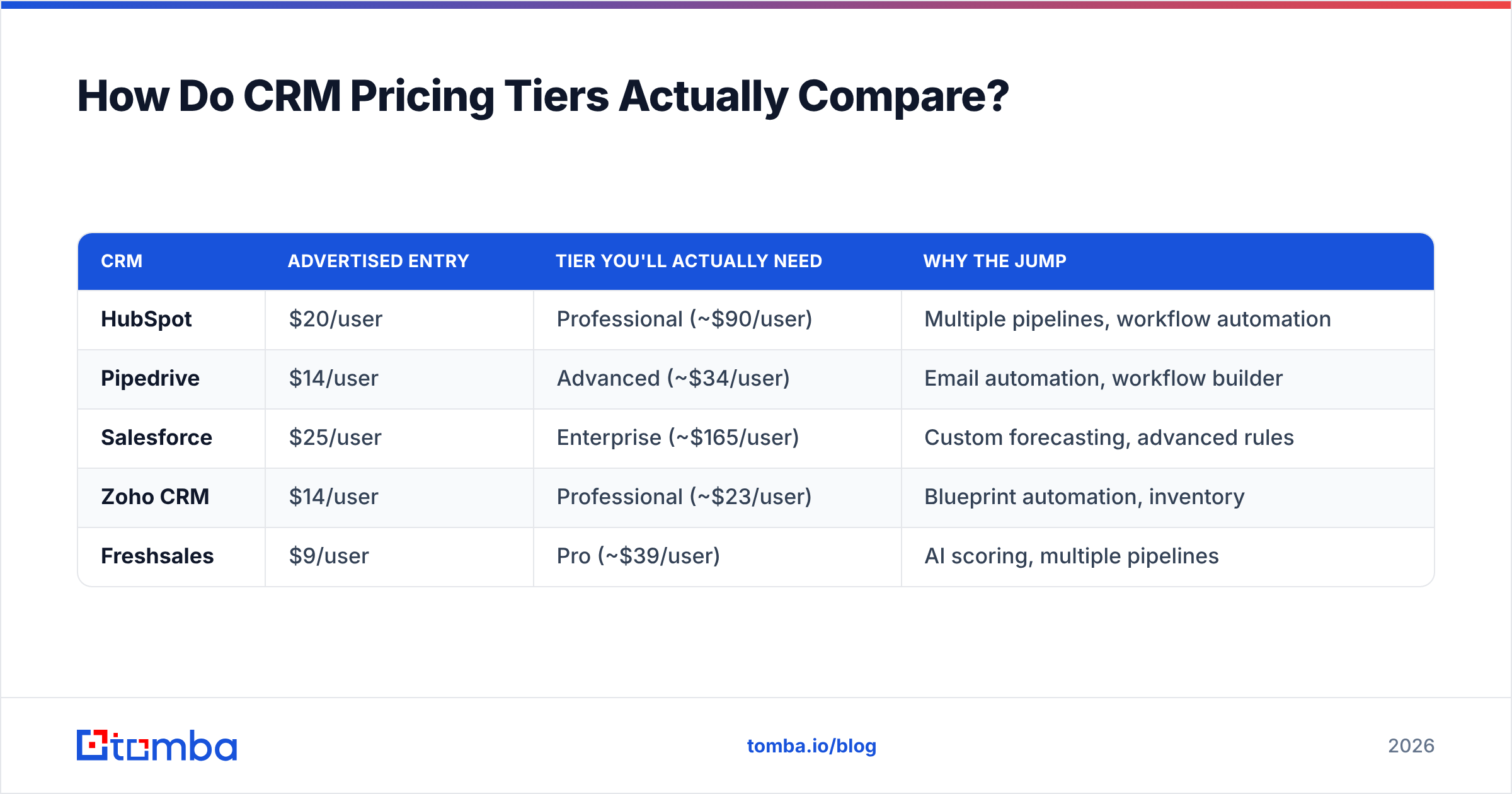
Pricing pages bury the number that matters: the tier where pipeline automation becomes usable. Sticker price and "real" price are rarely the same.
| CRM | Advertised entry | Tier you'll actually need | Why the jump |
|---|---|---|---|
| HubSpot | $20/user | Professional (~$90/user) | Multiple pipelines, workflow automation |
| Pipedrive | $14/user | Advanced (~$34/user) | Email automation, workflow builder |
| Salesforce | $25/user | Enterprise (~$165/user) | Custom forecasting, advanced rules |
| Zoho CRM | $14/user | Professional (~$23/user) | Blueprint automation, inventory |
| Freshsales | $9/user | Pro (~$39/user) | AI scoring, multiple pipelines |
The lesson: budget for the tier two steps above the headline, because that's where pipeline automation lives. And factor in the data layer separately — enriching and verifying contacts is a per-record cost that's independent of seats. Tomba's pricing starts free (25 searches/month) and scales from the $49/mo Starter plan, so you can attach clean-data coverage to any CRM without committing to an enterprise contract.
What About Free CRMs for Pipeline Management?#
Free CRMs are a genuinely good starting point for small teams — with one caveat. HubSpot's free tier, Zoho's three-user free plan, and Freshsales' limited free version all give you a working single pipeline.
What you give up for free is almost always:
- Multiple pipelines — fine until you sell more than one thing or run inbound and outbound separately.
- Automation — you'll log activities and move cards by hand, which works up to roughly five reps.
- Reporting depth — basic dashboards only; no weighted forecasting.
The smart play: start free, instrument your real workflow, and upgrade only the constraint that's actually biting. Don't pay for forecasting you won't read.
How Do You Set Up a Pipeline That Forecasts Accurately?#
Three rules, in order of impact:
- Define stages by buyer action, not your internal feeling. "Demo scheduled" is observable; "interested" is not. Observable stages produce honest forecasts.
- Assign a real probability to each stage based on your historical conversion, then let the CRM compute weighted value. Revisit the percentages quarterly. A rising win rate means your probabilities need a bump.
- Keep every contact verified and enriched at entry. A deal with a dead email isn't stage-one — it's a phantom that inflates your forecast and wastes rep time.
Do these three and a $14 Pipedrive seat forecasts more accurately than a misconfigured Salesforce org. Tooling helps; discipline decides.
The Bottom Line#
The best CRM for sales pipeline in 2026 depends on your motion: HubSpot for all-around fit, Pipedrive for visual deal flow, Salesforce for enterprise depth, and Zoho or Freshsales when budget leads. But the CRM is only half the system. Every deal starts as a contact, and a contact with a wrong email or missing number is a leak in your pipeline no dashboard can patch.
Feed your CRM clean, verified, enriched data from the start. Use the Tomba Email Finder to source accurate professional emails, verify them before they enter a sequence, and push them straight into HubSpot, Salesforce, or Pipedrive through Tomba's native integrations. Start free with 25 searches a month — your forecast will finally reflect deals that are actually real.
Sources:
// get started
Find, verify and enrich your first contacts today
Start on the free plan with 25 searches a month, then scale when your team is ready.
Free plan · No credit card required · GDPR & CCPA
// about the author