Best Email Extractor Extension for Chrome (2026 Guide)
We tested the top Chrome email extractor extensions on accuracy, bulk limits, and price. Here's which one actually pulls verified B2B emails in 2026 — and which waste your credits.

TL;DR
- The best email extractor extension for Chrome isn't the one that scrapes the most strings — it's the one that returns verified, deliverable addresses you can actually email.
- Free "page scraper" extensions grab whatever text looks like an email. They miss role-based traps, catch-all domains, and stale contacts, which torches your sender reputation.
- For B2B work, pick an extension backed by a real data engine and an email verifier — not a regex bookmarklet.
- We compared the leading 2026 options on accuracy, bulk export, verification, and price below.
- Our pick for most teams: the Tomba Chrome extension — accuracy-first, verification built in, and a free tier to test before you pay.
What is a Chrome email extractor extension?#
A Chrome email extractor extension is a browser add-on that pulls email addresses out of the page you're looking at — a company website, a LinkedIn profile, a SERP, or a list of search results — and lets you export them. Think of it like a metal detector for contacts: instead of manually reading every "Contact Us" page, the extension sweeps the page and surfaces what's buried.
But there's a catch most buyers learn the hard way. There are two very different kinds of "extractor," and they produce wildly different results:
- Regex scrapers — These read the visible text and grab anything matching the
name@domain.compattern. Fast, free, and dumb. They'll happily returnnoreply@,abuse@, an image filename that looks like an email, or an address that bounced two years ago. - Data-backed finders — These take the name and company on the page and resolve a likely professional email from a contact database plus pattern inference, then verify it against the mail server before handing it to you.
The difference matters because the cost of a bad email isn't zero. Every hard bounce dings your sender reputation, and enough of them get your domain throttled or blacklisted. A scraper that gives you 500 "emails" with a 40% bounce rate is more expensive than a finder that gives you 200 verified ones.

How do you judge the best email extractor extension for Chrome?#
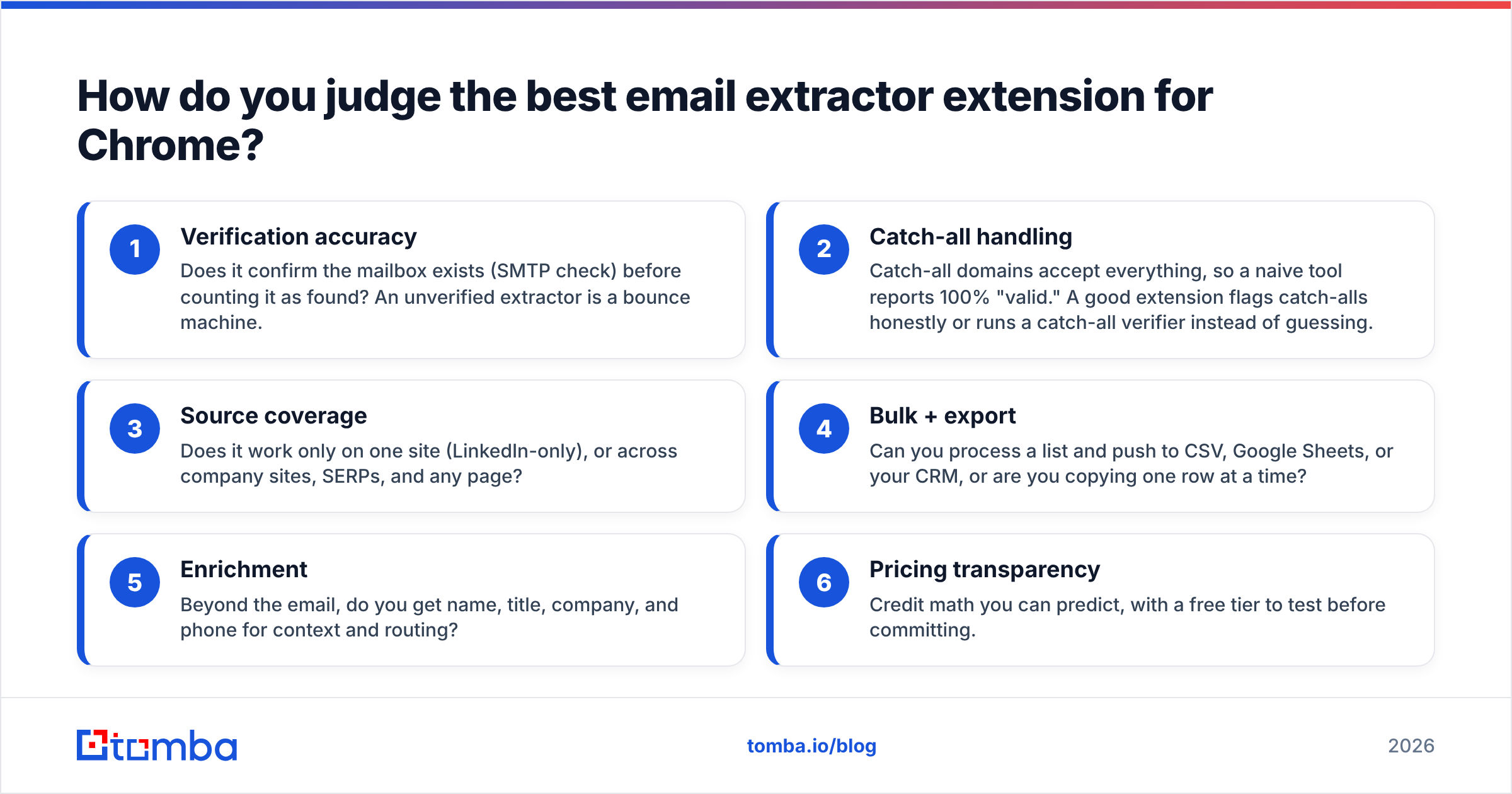
Don't start with "how many emails does it grab." Start with what happens after you hit export. Here's the scorecard we used, in priority order:
- Verification accuracy — Does it confirm the mailbox exists (SMTP check) before counting it as found? An unverified extractor is a bounce machine.
- Catch-all handling — Catch-all domains accept everything, so a naive tool reports 100% "valid." A good extension flags catch-alls honestly or runs a catch-all verifier instead of guessing.
- Source coverage — Does it work only on one site (LinkedIn-only), or across company sites, SERPs, and any page?
- Bulk + export — Can you process a list and push to CSV, Google Sheets, or your CRM, or are you copying one row at a time?
- Enrichment — Beyond the email, do you get name, title, company, and phone for context and routing?
- Pricing transparency — Credit math you can predict, with a free tier to test before committing.
A tool can be excellent at #3 and a disaster at #1. The "most emails extracted" winner is usually the worst on deliverability. Keep that scorecard in mind as you read vendor marketing — almost everyone claims "high accuracy," and almost no one publishes the methodology.
Which Chrome email extractor extensions are worth comparing in 2026?#
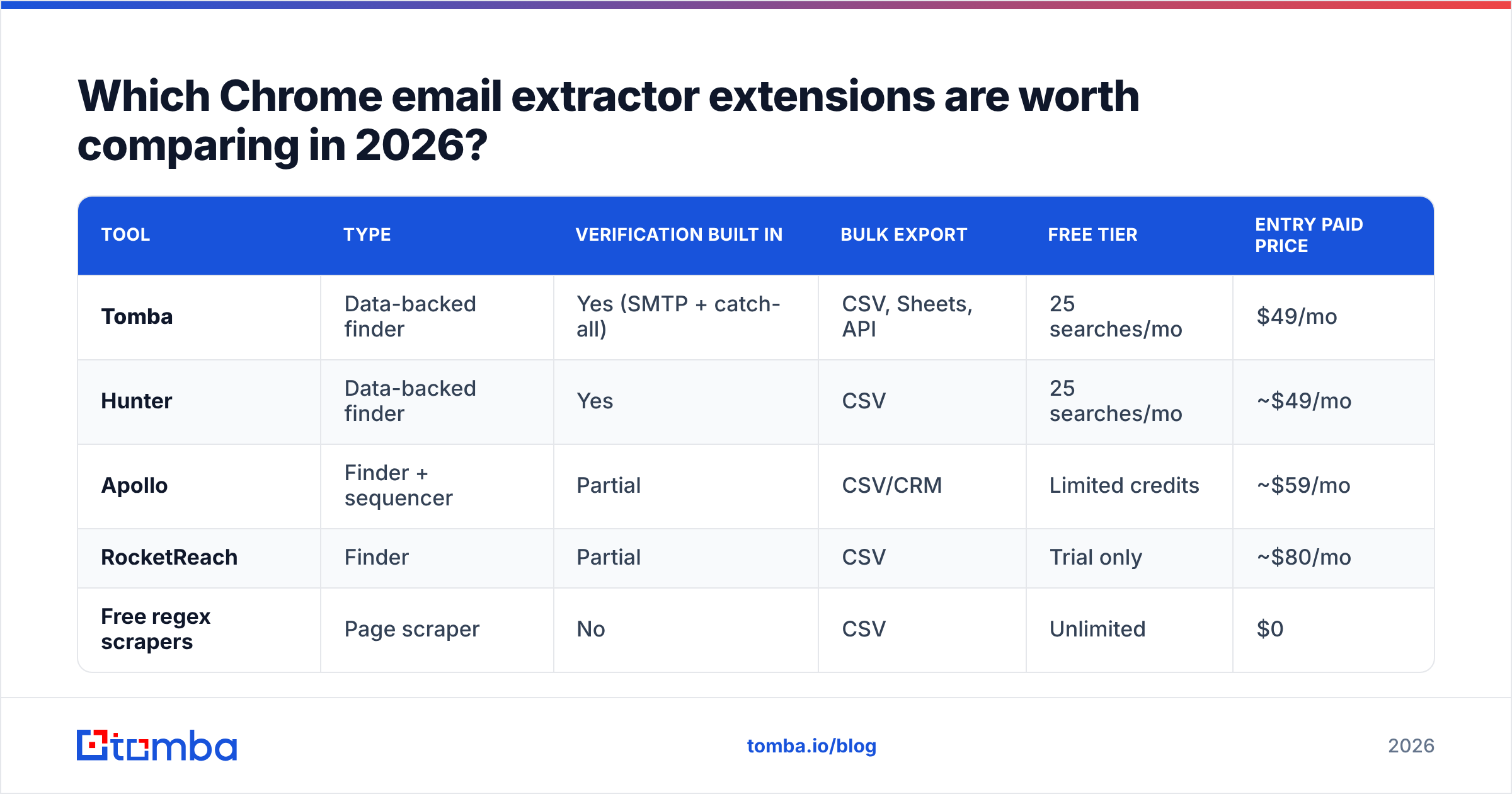
Here's how the main categories stack up. Prices reflect entry paid tiers as of 2026; always check the vendor's current page before buying.
| Tool | Type | Verification built in | Bulk export | Free tier | Entry paid price |
|---|---|---|---|---|---|
| Tomba | Data-backed finder | Yes (SMTP + catch-all) | CSV, Sheets, API | 25 searches/mo | $49/mo |
| Hunter | Data-backed finder | Yes | CSV | 25 searches/mo | ~$49/mo |
| Apollo | Finder + sequencer | Partial | CSV/CRM | Limited credits | ~$59/mo |
| RocketReach | Finder | Partial | CSV | Trial only | ~$80/mo |
| Free regex scrapers | Page scraper | No | CSV | Unlimited | $0 |
A few honest takeaways from the table:
- Free scrapers win on price and lose everywhere that matters. No verification means you inherit the bounce risk. Fine for grabbing a single visible address; dangerous for building a send list.
- Hunter and Tomba sit closest on the finder side — both verify, both offer a real free tier, both price entry plans around the same point. The differentiators are data coverage and the breadth of supporting tools (catch-all, phone, enrichment).
- Apollo and RocketReach bundle the extractor into a bigger sales-engagement suite. Great if you want one platform for finding and sequencing; overkill (and pricier) if you just need clean emails for an existing stack.
If your primary topic is choosing a finder, study the accuracy data rather than feature checklists — accuracy is the variable that actually changes your reply rate.

Is a free email extractor extension good enough?#
Short answer: for one-off lookups, yes; for building outreach lists, no.
A free regex extension is genuinely useful when you're on a company's team page and want the three visible addresses. It's a faster copy-paste. The problem starts the moment you treat scraped strings as a list to email.
Here's what free scrapers can't do, and why it costs you:
- They can't tell a live mailbox from a dead one. No SMTP handshake means no proof the address accepts mail. You find out it's dead when it bounces.
- They can't detect catch-all domains. A catch-all accepts
anything@company.com, so the address "validates" but may route nowhere. You need a dedicated catch-all finder to handle these. - They grab role-based and junk addresses.
info@,sales@,noreply@, and webmaster aliases pollute your list and lower engagement. - They don't enrich. You get an address with no name, title, or company — useless for personalization, which is what actually drives response rate.
The math is unforgiving. If a free tool hands you 1,000 scraped emails and 35% bounce, you've not only wasted the send — you've signaled to inbox providers that you don't maintain list hygiene. That reputation hit suppresses deliverability for the good addresses too. This is why deliverability-conscious teams run everything through an email verifier before the first send.
How does Tomba's Chrome extension compare on accuracy?#
Tomba is built finder-first, which means the extension is a front end on a verification-backed data engine — not a regex sweep of the visible DOM.
When you're on a company website, the Tomba Chrome extension runs a domain search and returns the known email patterns, named contacts, and their titles for that domain. On a person's profile, it resolves the likely professional address from name + company and verifies it before showing you a confidence score. That's the workflow that keeps bounce rates low.
What you get with each result:
- Verification status — valid, invalid, or catch-all, from a live SMTP check, not a guess.
- Confidence score — so you can prioritize high-certainty contacts and skip the risky ones.
- Enrichment — name, role, company, and where available a phone number via the phone finder.
- Source transparency — Tomba documents where its data comes from, which matters for compliance and for trusting the result.
For volume work, you're not limited to the extension. The same engine powers a bulk email finder for list processing, a Google Sheets add-on for spreadsheet-native workflows, and the Tomba API for engineering teams wiring extraction into their own product. The extension is the manual, in-the-moment tool; the rest of the suite handles scale.
On the comparison table below, the pattern holds: tools that lead with verification and documented data sources outperform pure scrapers on deliverability, even when the scraper "found" more raw strings.

What's the right extractor for each use case?#
The "best" extension depends on what you're doing. Match the job to the tool:
- Single contact, right now (researcher, recruiter, founder): A finder extension like Tomba or Hunter. You want one verified address fast, with the person's title for context. Free tiers cover low volume.
- Building a targeted outreach list (SDR, growth): A finder with bulk export and verification. Skip pure scrapers — list hygiene is the whole game. Tomba's bulk tools plus the extension cover both manual and batch.
- All-in-one prospect-to-sequence (full-cycle AE): Apollo or a finder paired with a sequencer. You trade some accuracy control for workflow convenience. If you already run a separate sending tool, a dedicated finder keeps your data cleaner.
- Engineering / product integration: An API-first vendor. The extension is irrelevant; you want documented endpoints, predictable credits, and an email verification API.
- Spreadsheet-driven ops team: A finder with a native Sheets integration or an Excel add-in so the data lands where you already work.
Notice that only the first use case is well served by a free scraper. Every workflow that ends in a send needs verification baked in — which is exactly where a data-backed extension earns its price.
How do you avoid getting burned by a Chrome email extractor?#
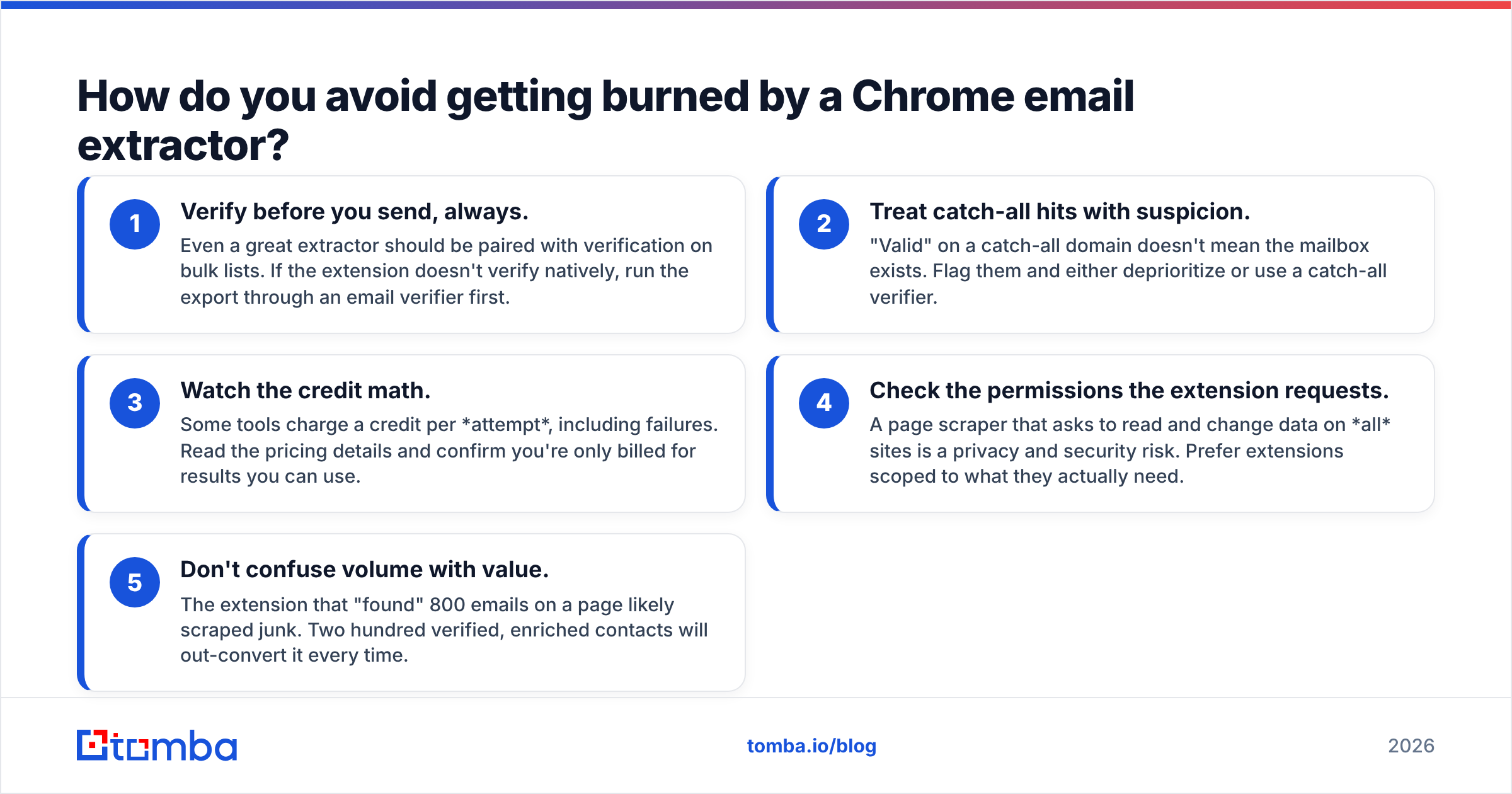
A few rules that save you from the common traps:
- Verify before you send, always. Even a great extractor should be paired with verification on bulk lists. If the extension doesn't verify natively, run the export through an email verifier first.
- Treat catch-all hits with suspicion. "Valid" on a catch-all domain doesn't mean the mailbox exists. Flag them and either deprioritize or use a catch-all verifier.
- Watch the credit math. Some tools charge a credit per attempt, including failures. Read the pricing details and confirm you're only billed for results you can use.
- Check the permissions the extension requests. A page scraper that asks to read and change data on all sites is a privacy and security risk. Prefer extensions scoped to what they actually need.
- Don't confuse volume with value. The extension that "found" 800 emails on a page likely scraped junk. Two hundred verified, enriched contacts will out-convert it every time.
For broader context on inbox placement, the basics of email deliverability explain why list quality — not list size — determines whether your messages land. Industry resources like G2's email-finder category and vendor docs such as Hunter's site are useful for cross-checking claims, and the general mechanics of email address syntax help you understand why naive regex matching fails.
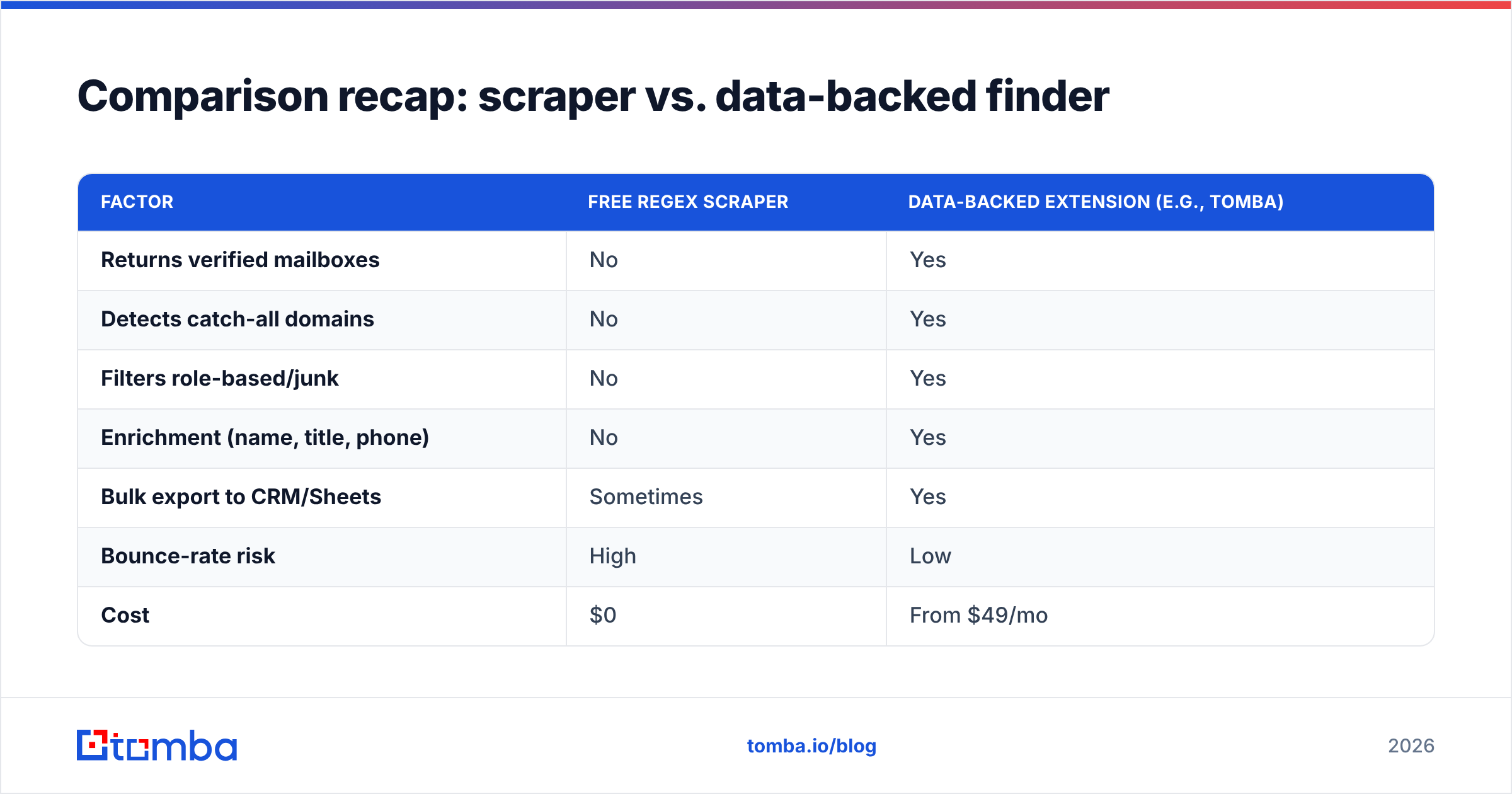
Comparison recap: scraper vs. data-backed finder#
| Factor | Free regex scraper | Data-backed extension (e.g., Tomba) |
|---|---|---|
| Returns verified mailboxes | No | Yes |
| Detects catch-all domains | No | Yes |
| Filters role-based/junk | No | Yes |
| Enrichment (name, title, phone) | No | Yes |
| Bulk export to CRM/Sheets | Sometimes | Yes |
| Bounce-rate risk | High | Low |
| Cost | $0 | From $49/mo |
| Best for | One-off visible emails | Outreach at scale |
The recap makes the trade-off obvious: free scrapers minimize cost per extraction and maximize cost per actual reply. A finder inverts that. If your emails are part of a revenue motion, the finder wins on the only metric that matters — meetings booked per hour of prospecting.
Final recommendation#
Choose the extension that protects your deliverability, not the one that brags about volume. For one-off grabs of visible addresses, a free scraper is fine. For anything that ends in an outbound campaign, you want a data-backed finder with verification, catch-all detection, and enrichment built in — because a clean list of 200 beats a dirty list of 2,000.
If you want a single extension that covers manual lookups today and scales to bulk and API tomorrow, start with the Tomba Email Finder and its Chrome extension. The free tier gives you 25 searches a month to test accuracy on your own target accounts before you pay a cent, and the paid plans start at $49/mo when you're ready to scale. Install it, run it against five domains you already know, and check the verified results against reality — that quick test will tell you everything the marketing pages won't.
Ready to find emails that actually work?
Join 150,000+ professionals who stopped guessing and started sending. Free credits on signup — no credit card required.
Get the Tomba newsletter
Practical outbound tactics and product updates — once every two weeks.
About the author