Best Email List Cleaning Service in 2026: Top 7 Compared
Dirty lists kill deliverability and waste send budget. Here's how the best email list cleaning services compare on accuracy, price, and catch-all handling in 2026.
TL;DR
- The best email list cleaning service is the one that removes hard bounces and risky addresses without nuking deliverable contacts — accuracy and catch-all handling matter more than headline price.
- Expect to pay roughly $0.0005–$0.007 per email depending on volume; most vendors discount heavily above 100k.
- Catch-all (accept-all) domains are where cheap tools fall apart. The right service flags risk honestly instead of guessing "valid."
- For teams that find and clean contacts in one place, Tomba's email verifier and finder run on the same data layer, so you skip the export-import shuffle.
- Run a free test batch of 500–1,000 known addresses against any tool before you buy. Vendor accuracy claims are marketing; your bounce rate is truth.
What is an email list cleaning service?#
An email list cleaning service is a tool that checks every address on your list and tells you which ones are safe to email. Think of it like airport security for your contact database: each address walks through a scanner, and the ones carrying problems — typos, dead mailboxes, spam traps, role accounts — get pulled aside before they reach the gate (your email service provider).
Technically, the service runs a chain of checks: syntax validation, domain and MX-record lookups, and an SMTP handshake that asks the receiving mail server whether a mailbox exists — without actually sending anything. The output is a status per address: valid, invalid, catch-all/accept-all, role-based, disposable, or unknown.
Why bother? Because mailbox providers like Gmail and Outlook treat your bounce rate as a reputation signal. Send to a list full of dead addresses and your sender reputation drops, which drags down inbox placement for the good contacts too. Cleaning is the cheapest deliverability insurance you can buy.
Why does a dirty list hurt deliverability so much?#
Most marketers blame their copy when open rates tank. Usually it's the list. Mailbox providers score senders on engagement and complaints, and nothing tanks both faster than a database stuffed with addresses that no longer exist.
Here's the chain reaction:
- Hard bounces spike. Anything over ~2% bounce rate flags you as a careless sender.
- Spam traps fire. Recycled or pristine traps sit on old lists; hitting one can blacklist your domain outright.
- Engagement craters. Dead addresses never open, dragging your aggregate open rate below the threshold providers reward.
- Inbox placement drops for everyone — even contacts who want your email now land in spam.
A good clean breaks the chain before step one. If you want the deeper mechanics, Tomba's glossary entry on email deliverability covers the reputation math in plain English.
How do the best email list cleaning services compare in 2026?#
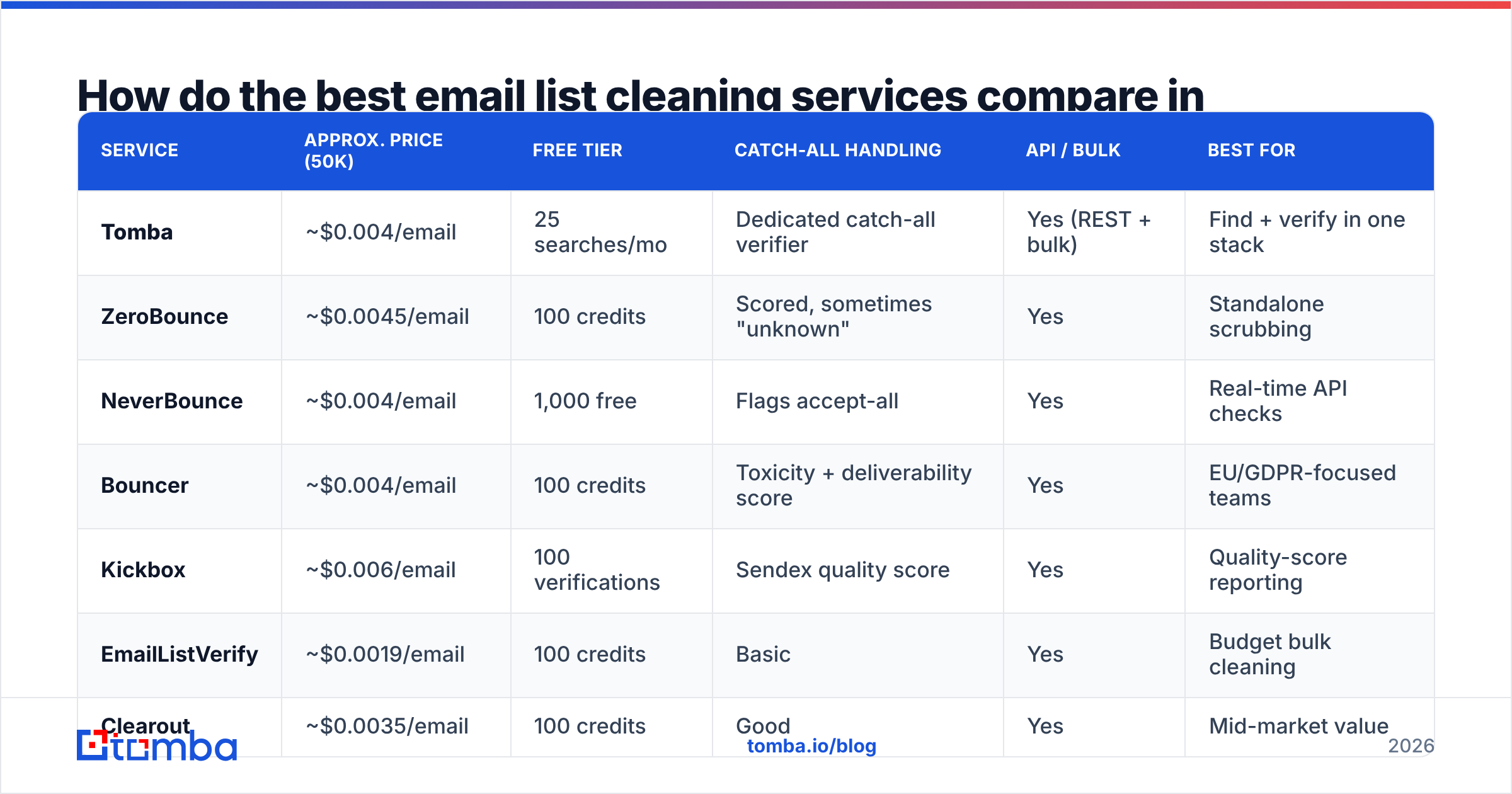
Below is a side-by-side of the services people actually evaluate this year. Prices are approximate per-email rates at the ~50k tier and move with volume — always check current Tomba pricing and each vendor's live page before committing.
| Service | Approx. price (50k) | Free tier | Catch-all handling | API / bulk | Best for |
|---|---|---|---|---|---|
| Tomba | ~$0.004/email | 25 searches/mo | Dedicated catch-all verifier | Yes (REST + bulk) | Find + verify in one stack |
| ZeroBounce | ~$0.0045/email | 100 credits | Scored, sometimes "unknown" | Yes | Standalone scrubbing |
| NeverBounce | ~$0.004/email | 1,000 free | Flags accept-all | Yes | Real-time API checks |
| Bouncer | ~$0.004/email | 100 credits | Toxicity + deliverability score | Yes | EU/GDPR-focused teams |
| Kickbox | ~$0.006/email | 100 verifications | Sendex quality score | Yes | Quality-score reporting |
| EmailListVerify | ~$0.0019/email | 100 credits | Basic | Yes | Budget bulk cleaning |
| Clearout | ~$0.0035/email | 100 credits | Good | Yes | Mid-market value |
Two things to notice. First, the per-email spread is wide — EmailListVerify undercuts Kickbox by roughly 3x — but cheap-per-email means nothing if the tool returns "unknown" on a quarter of your list. Second, the column that separates winners from also-rans is catch-all handling, covered next.
If your shortlist is specifically the budget scrubbers, Tomba publishes head-to-head breakdowns like its ZeroBounce alternative and EmailListVerify alternative pages worth skimming.
What separates a great cleaner from a cheap one?#
Catch-all accuracy. Accept-all domains respond "yes" to every mailbox query, so weak tools either mark everything valid (you bounce later) or everything unknown (you delete good leads). The best services run extra signals to score these. Tomba ships a separate catch-all finder precisely because this case needs its own logic.
Honest "unknown" rates. A tool that confidently labels every address either valid or invalid is lying to you. Real mail servers are sometimes unreachable. A low, honest unknown rate beats a fake-perfect one.
Spam-trap and disposable detection. Removing temporary inboxes (mailinator-style) and known traps is table stakes — but not every budget tool actually does it.
Speed and API access. Cleaning 200k addresses overnight, or verifying at signup in real time, needs a real email verification API. Batch-only tools force you to wait.
Data provenance. A cleaner backed by a live email-finding dataset corrects faster than one working from a static blocklist. That's the structural edge of running verification on the same source as discovery.

How do you actually clean a list the right way?#
Conclusion first: clean before every major send, not once a year. Lists decay about 22–30% annually as people change jobs, so a database is never "done."
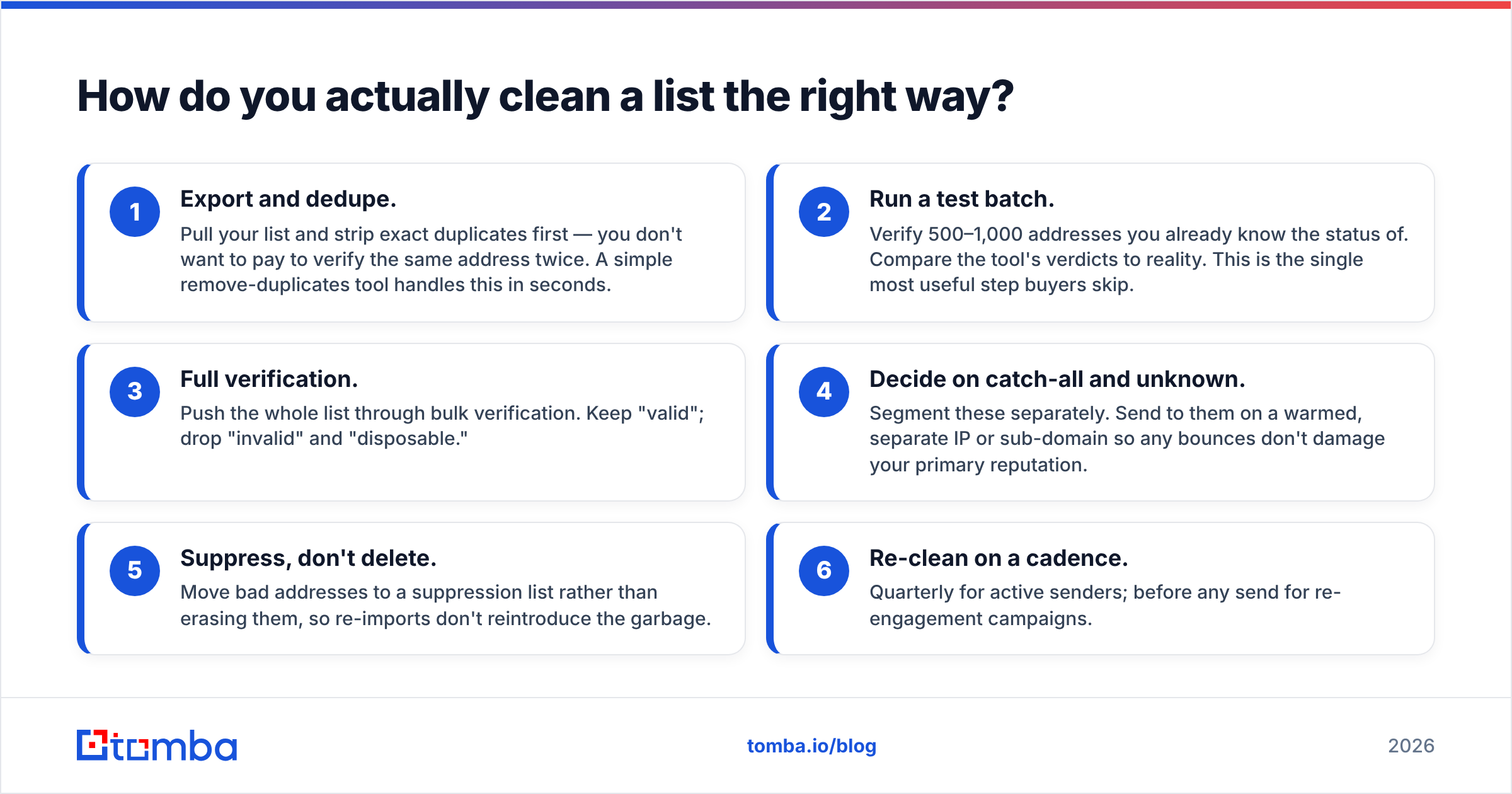
A repeatable workflow:
- Export and dedupe. Pull your list and strip exact duplicates first — you don't want to pay to verify the same address twice. A simple remove-duplicates tool handles this in seconds.
- Run a test batch. Verify 500–1,000 addresses you already know the status of. Compare the tool's verdicts to reality. This is the single most useful step buyers skip.
- Full verification. Push the whole list through bulk verification. Keep "valid"; drop "invalid" and "disposable."
- Decide on catch-all and unknown. Segment these separately. Send to them on a warmed, separate IP or sub-domain so any bounces don't damage your primary reputation.
- Suppress, don't delete. Move bad addresses to a suppression list rather than erasing them, so re-imports don't reintroduce the garbage.
- Re-clean on a cadence. Quarterly for active senders; before any send for re-engagement campaigns.
For ongoing hygiene, verify at the point of capture — validate emails on your signup forms via API so junk never enters the database in the first place. Prevention is cheaper than cleanup.
Is a free email checker good enough?#
For a handful of addresses, yes. For a real list, no.
A free single-address tool like Tomba's email checker is perfect when a rep wants to confirm one prospect before a personalized send. It runs the same core checks — syntax, MX, SMTP — and costs nothing.
Where free breaks down is volume, catch-all scoring, suppression management, and API automation. Free tools also rarely maintain fresh spam-trap intelligence. So use the free checker for spot checks and one-off confirmations; use a paid service when the list size, deliverability stakes, or automation needs cross the line. The rule of thumb: if a bad send could damage your sending reputation, pay for the clean.
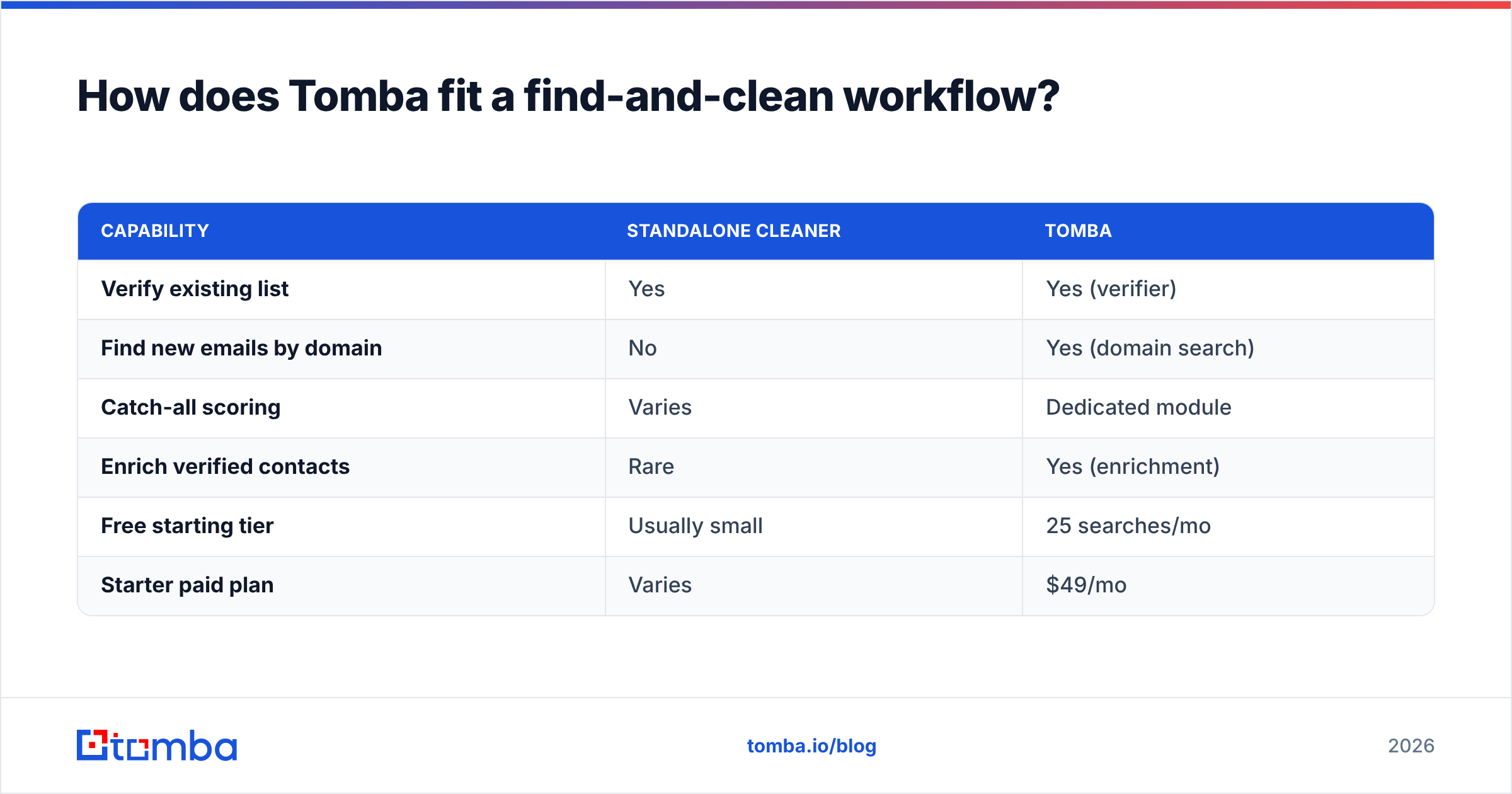
How does Tomba fit a find-and-clean workflow?#
Tomba's angle is consolidation. Most teams stitch together one tool to find contacts and another to clean them, then babysit CSV exports between the two. Tomba runs both on one dataset.
| Capability | Standalone cleaner | Tomba |
|---|---|---|
| Verify existing list | Yes | Yes (verifier) |
| Find new emails by domain | No | Yes (domain search) |
| Catch-all scoring | Varies | Dedicated module |
| Enrich verified contacts | Rare | Yes (enrichment) |
| Free starting tier | Usually small | 25 searches/mo |
| Starter paid plan | Varies | $49/mo |
Pricing is transparent: a Free tier (25 searches/mo), Starter at $49/mo, Growth at $99/mo, Pro at $249/mo, and custom Enterprise. That Starter price is the real entry point — no $39 teaser that balloons at checkout.
The practical win: when verification and discovery share a source, a "catch-all" verdict can often be resolved into a confirmed deliverable address instead of a dead-end "unknown." A standalone cleaner can only score what you hand it.
For independent context on how buyers rate these tools, cross-reference verified reviews on G2 and the deliverability guidance Google publishes in its Postmaster/sender guidelines. And for the why-bounces-matter background, Wikipedia's bounce message entry is a clean primer.
What does the best email list cleaning service cost you to skip?#
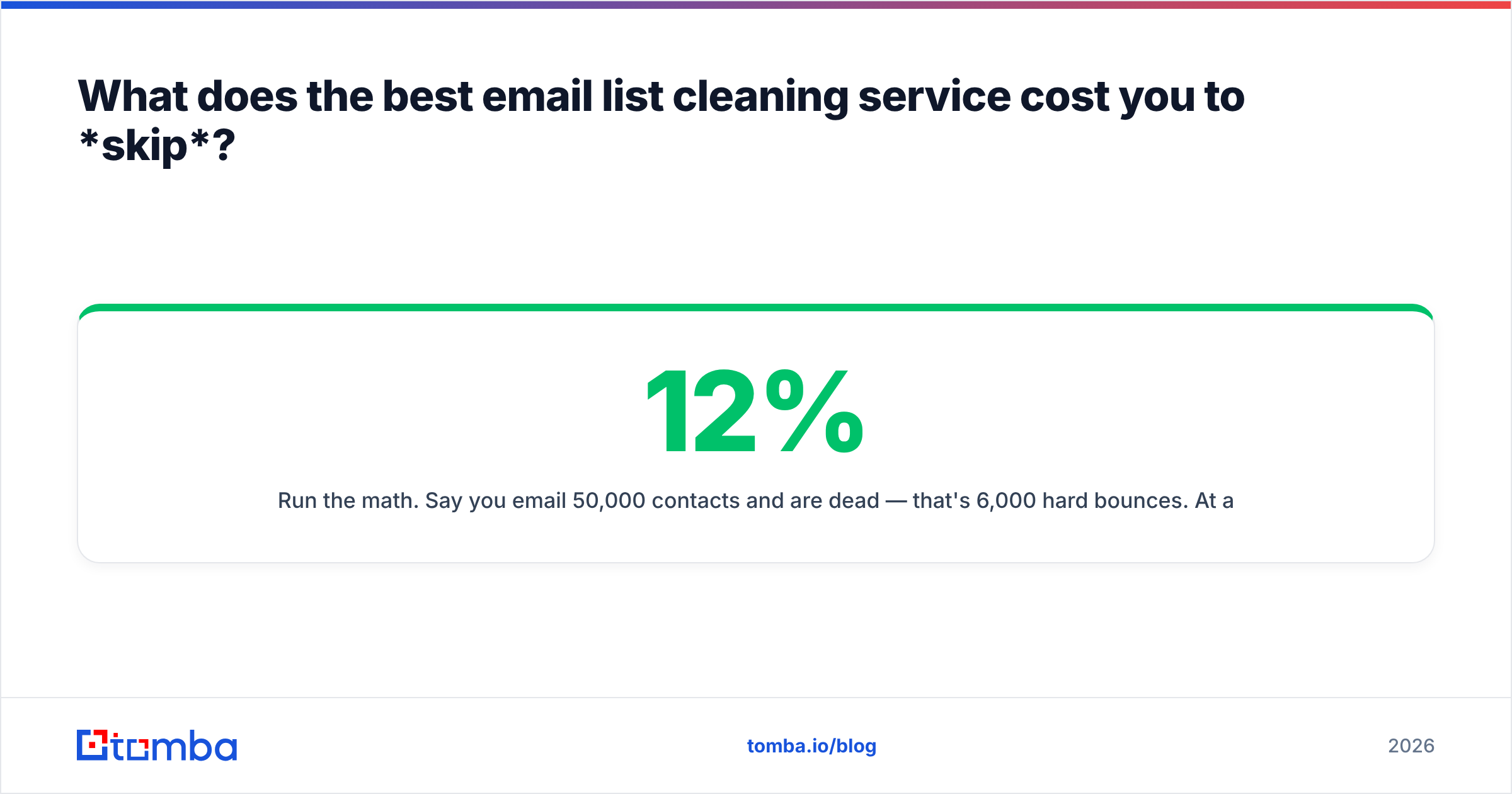
Run the math. Say you email 50,000 contacts and 12% are dead — that's 6,000 hard bounces. At a typical ESP, that one send can push your bounce rate past 10%, trip provider throttling, and degrade placement for weeks. The cleaning cost? Roughly $200 at $0.004/email. The cost of not cleaning is measured in lost inbox placement across every future campaign — far more than $200.
That asymmetry is the entire argument. Cleaning is cheap; reputation damage compounds.
Final recommendation#
Pick the cleaner that's honest about catch-all and unknown statuses, gives you API access, and proves itself on your test batch — not its own marketing numbers. Among standalone tools, ZeroBounce, NeverBounce, and Bouncer are all defensible. If you also need to find contacts, not just scrub them, consolidating on one platform removes a whole category of export busywork.
That's where Tomba earns the look. Start free, verify a real batch, and check the bounce rate yourself. Spin up the Tomba Email Finder and pair it with the built-in email verifier — find, clean, and enrich on one dataset, then watch your bounces drop on the next send. Your sender reputation is the asset; protect it before you press send.
// get started
Find, verify and enrich your first contacts today
Start on the free plan with 25 searches a month, then scale when your team is ready.
Free plan · No credit card required · GDPR & CCPA
// about the author