Best Email Scraper in 2026: Top Tools Compared & Ranked
Looking for the best email scraper in 2026? We compared accuracy, pricing, compliance, and verification across the top tools so you can pick the right one fast.
TL;DR
- The "best email scraper" in 2026 is the one that pairs high extraction coverage with built-in verification — raw scraping without verification just fills your CRM with bounces.
- For most B2B teams, Tomba offers the best balance of accuracy, compliance, and price (free tier with 25 searches/mo, paid from $49/mo).
- Browser-extension scrapers are fastest for one-off prospecting; API-based tools win for scale and automation.
- Always check compliance: GDPR and CAN-SPAM apply to scraped data, and not every tool sources data legitimately.
- Verify before you send. A scraper that hands you unverified addresses costs you sender reputation, not just credits.
What is an email scraper, and how does it actually work?#
An email scraper is a tool that extracts email addresses from web pages, company domains, social profiles, or documents — think of it as a metal detector for contact data buried across the internet. You point it at a domain, a LinkedIn page, or a block of text, and it returns the addresses it can find.
Under the hood, scrapers use one of three approaches. Pattern matching reads visible text and pulls anything shaped like name@domain.com. Domain-pattern inference figures out a company's email format (for example, first.last@company.com) and generates likely addresses. And database lookup matches a name and company against a pre-indexed store of known contacts. The best email scraper tools combine all three, then run each candidate through verification before handing it to you.
That last step matters more than the scraping itself. Raw extraction is cheap; clean, deliverable data is the hard part. A modern email finder does both in one pass, which is why the line between "scraper," "finder," and "enrichment tool" has mostly disappeared.
)
The four scraper types you'll run into#
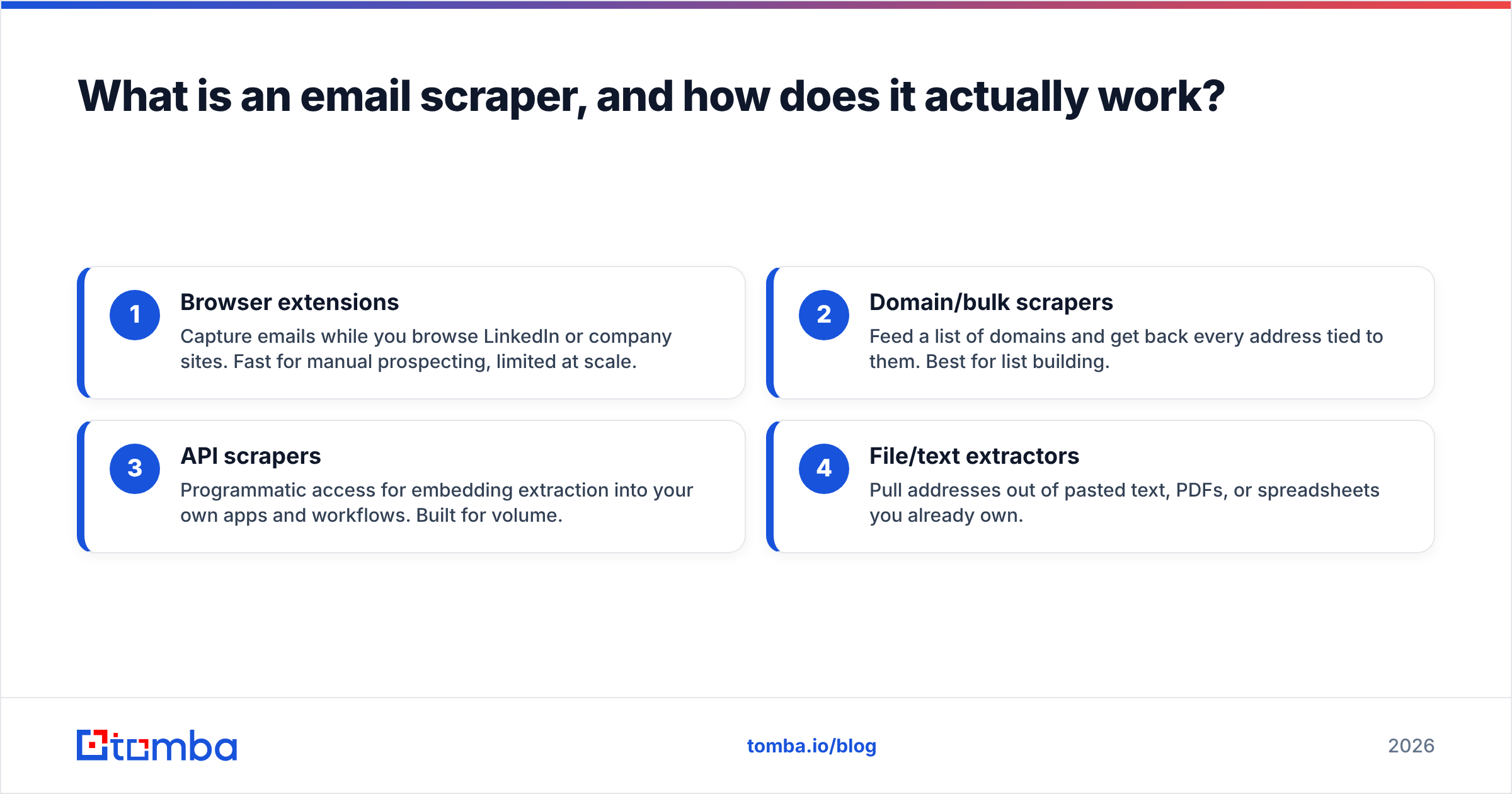
- Browser extensions — Capture emails while you browse LinkedIn or company sites. Fast for manual prospecting, limited at scale.
- Domain/bulk scrapers — Feed a list of domains and get back every address tied to them. Best for list building.
- API scrapers — Programmatic access for embedding extraction into your own apps and workflows. Built for volume.
- File/text extractors — Pull addresses out of pasted text, PDFs, or spreadsheets you already own.
Most teams need two of these: a quick extension for ad-hoc work and an API or bulk tool for repeatable campaigns.
What makes the best email scraper in 2026?#
The best email scraper is the one that maximizes deliverable contacts per dollar — not raw extraction volume. Five factors decide that.
- Accuracy and verification. Coverage is meaningless if half the addresses bounce. Look for real-time SMTP checks and a clear, published accuracy figure, not vague "high accuracy" marketing.
- Catch-all handling. Many corporate domains accept every address, which fools naive scrapers. A proper catch-all verifier distinguishes real mailboxes from accept-all noise.
- Compliance. Where does the data come from? Tools that scrape gated networks against their terms expose you to legal and deliverability risk. Check the vendor's data sources before you commit.
- Integrations. A scraper that drops into your CRM, Google Sheets, or pipeline tooling saves hours of CSV wrangling.
- Pricing transparency. Per-credit math should be obvious. Hidden overage fees are the usual trap.
Keep these in mind as we compare the tools, because the marketing pages rarely tell you which ones a vendor actually nails.

Which is the best email scraper? Top tools compared#
Here's a side-by-side look at the leading options in 2026. Pricing reflects published entry tiers at the time of writing; always confirm current rates on each vendor's site.
| Tool | Starter price | Free tier | Built-in verification | Best for |
|---|---|---|---|---|
| Tomba | $49/mo | 25 searches/mo | Yes (real-time + catch-all) | B2B teams wanting accuracy + compliance |
| Hunter | $49/mo | 25 searches/mo | Yes | Domain-based list building |
| Apollo | $49/mo (billed annually) | Limited credits | Partial | All-in-one prospecting + sequencing |
| RocketReach | ~$80/mo | Trial lookups | Partial | Personal email + phone coverage |
| Skrapp | ~$49/mo | 100/mo trial | Basic | LinkedIn-focused scraping |
A few honest takeaways. Tomba and Hunter sit at the same entry price with the same free-tier size, so the deciding factor is data freshness, catch-all handling, and how the API is priced at scale. Apollo bundles scraping into a broader sales platform, which is great if you want sequencing in the same tool but heavier than you need if you only want clean emails. RocketReach leans into personal contact data and phone numbers, which raises the compliance bar you have to clear yourself.
If your primary job is turning company domains into verified, send-ready contacts, a focused finder plus verifier beats a sprawling suite you'll use 20% of.
Where Tomba fits#
Tomba's core is the email finder, backed by domain search for bulk discovery and an email verifier that runs on every result. It also exposes a clean email finder API for teams embedding extraction into their own systems, plus a bulk email finder for large lists. Pricing is straightforward: free for 25 searches/mo, then Starter $49/mo, Growth $99/mo, Pro $249/mo. Full Tomba pricing is public, with no surprise overage gotchas on the published tiers.

Is a free email scraper good enough?#
For occasional, low-volume work, yes — and most serious tools include a free tier so you can test before paying. Tomba's free plan covers 25 searches a month, which is plenty to validate accuracy on your own target accounts before you commit a budget.
Free tools fall short in three predictable ways. They cap volume quickly, they often skip verification (handing you addresses that bounce), and the truly "free" scrapers — the ones with no account and no limits — usually source data in ways that create compliance exposure. If a tool can't tell you where its data comes from, treat its output as a liability, not an asset.
A practical middle path: use a free email checker or email extractor for one-off tasks, and reserve a paid plan for repeatable campaigns where deliverability is revenue. The cost of a paid tier is trivial next to the cost of a burned sending domain.
)
How do I scrape emails without hurting deliverability?#
Scrape less, verify more. The single biggest mistake teams make is treating extraction volume as the goal, then blasting the raw list — which tanks sender reputation and lands future mail in spam. Protect deliverability with a short discipline:
- Verify every address before import. Run the list through an email verifier and drop anything that fails or is risky.
- Handle catch-all domains separately. Don't assume an accept-all domain means a valid mailbox; segment and test those with a catch-all finder.
- Remove duplicates and role accounts. Dedupe the list and strip
info@/sales@style addresses that drag down engagement. - Warm up before volume. Ramp sending gradually so a fresh list doesn't trigger filters.
Verification is the difference between a scraper that grows pipeline and one that quietly destroys your domain. Treat it as non-negotiable, not optional polish.
A quick workflow that works#
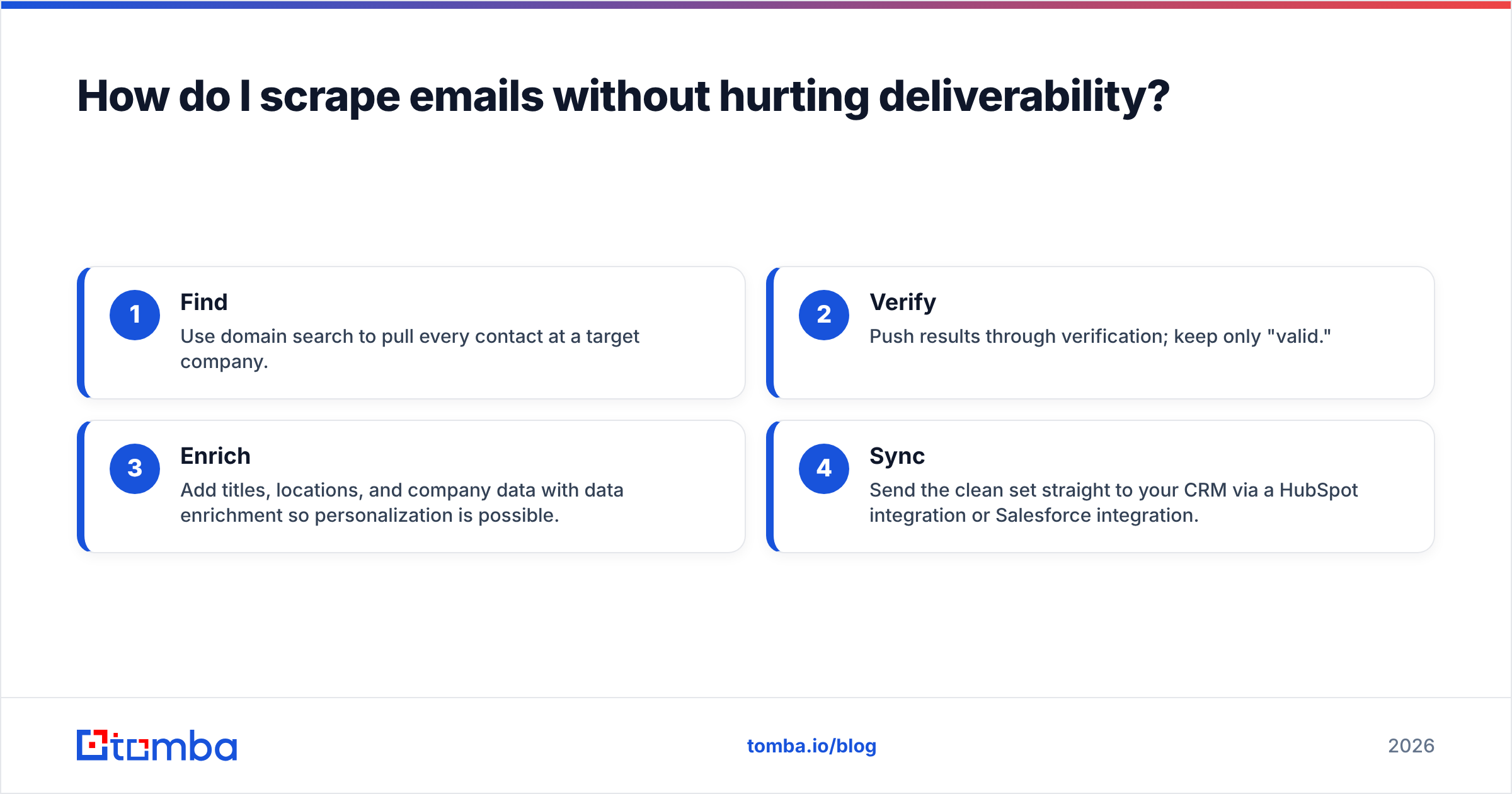
- Find — Use domain search to pull every contact at a target company.
- Verify — Push results through verification; keep only "valid."
- Enrich — Add titles, locations, and company data with data enrichment so personalization is possible.
- Sync — Send the clean set straight to your CRM via a HubSpot integration or Salesforce integration.
This four-step loop is boring on purpose. Boring is what keeps you out of the spam folder.
Is scraping emails legal and GDPR-compliant?#
Scraping public business emails is generally permissible, but how you collect and use them is what regulators care about. This isn't legal advice — confirm with counsel for your jurisdiction — but the principles are consistent across major frameworks.
Under GDPR, business contact data still counts as personal data, so you need a lawful basis (usually legitimate interest for B2B outreach), you must honor opt-outs, and you should be able to show where the data came from. In the US, CAN-SPAM requires accurate headers, a real physical address, and a working unsubscribe in every commercial email.
The compliance shortcut: pick a tool that sources data transparently and respects platform terms. Vendors that scrape gated networks against their rules push the risk onto you. Reputable platforms publish their data practices — Tomba documents its data sources openly, which is exactly the kind of transparency you want on record. You can cross-check any vendor's reputation on independent directories like G2 before buying.
Email scraper vs. email finder vs. enrichment: what's the difference?#
They overlap, and in 2026 the best tools do all three — but the emphasis differs.
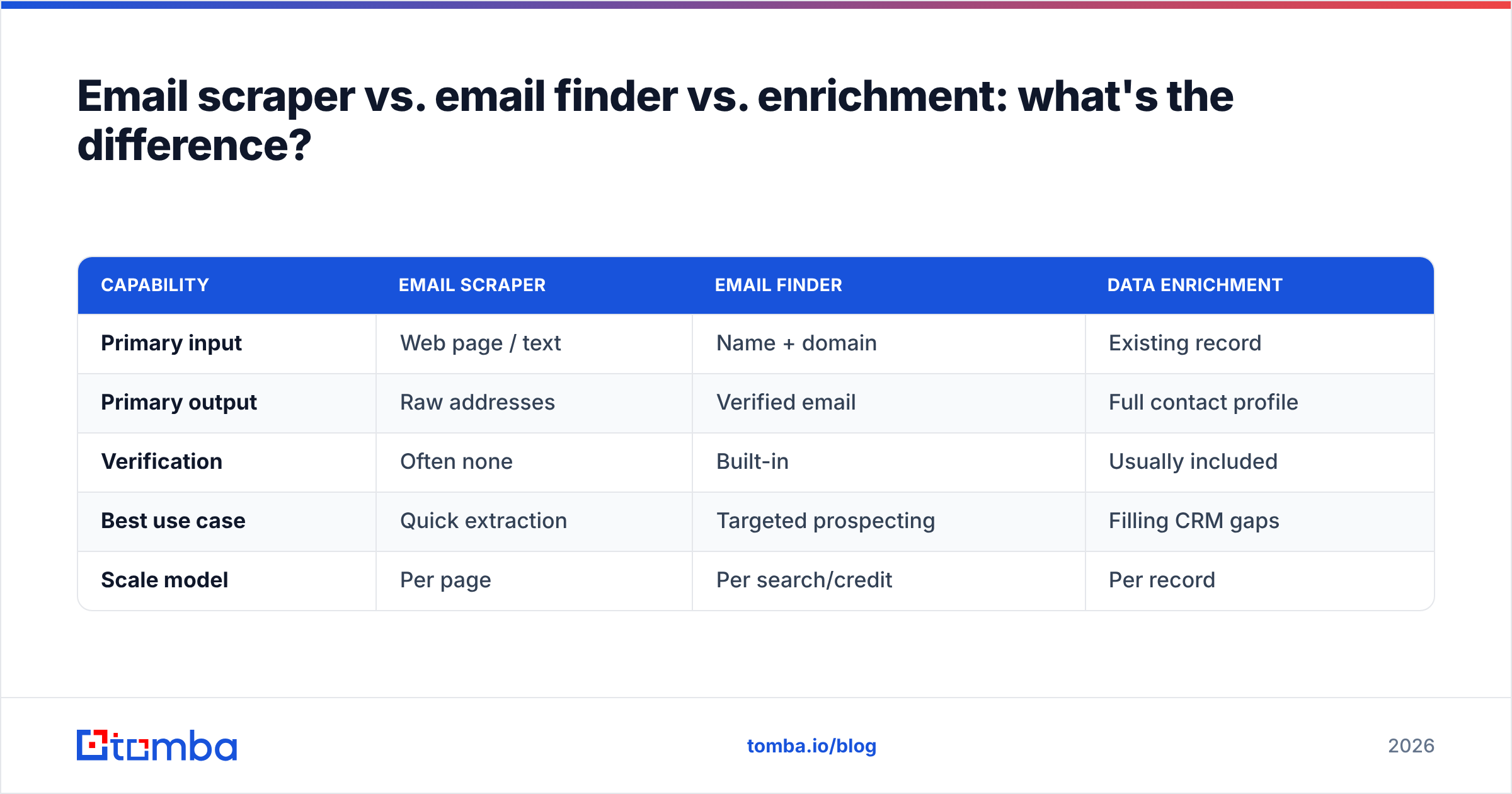
| Capability | Email scraper | Email finder | Data enrichment |
|---|---|---|---|
| Primary input | Web page / text | Name + domain | Existing record |
| Primary output | Raw addresses | Verified email | Full contact profile |
| Verification | Often none | Built-in | Usually included |
| Best use case | Quick extraction | Targeted prospecting | Filling CRM gaps |
| Scale model | Per page | Per search/credit | Per record |
A pure scraper grabs whatever's visible. A finder takes a known person and returns their verified work email. Enrichment starts from a partial record — say, an email — and fills in title, company, and phone via tools like a reverse email lookup or phone finder.
For most go-to-market teams, the finder-plus-verification model is the sweet spot: it gives you targeted, deliverable contacts instead of a noisy dump you still have to clean. That's why "best email scraper" searches increasingly point people toward proper email finders.
How do I pick the right tool for my use case?#
Match the tool to the job, not to the longest feature list.
- Solo founder doing manual prospecting — A browser extension plus a free tier. Try the Tomba Chrome extension for in-page capture.
- SDR team building lists — Bulk domain search plus verification, synced to your CRM. Look at the bulk email finder.
- Developers automating workflows — An email finder API with predictable per-call pricing.
- Marketers in spreadsheets — A Google Sheets add-on so extraction lives where your list already does.
- RevOps standardizing data — Data enrichment plus deduplication across the whole pipeline.
If you're unsure, start on a free tier and measure two numbers: how many addresses come back, and what percentage actually verify as valid. The tool with the best verified yield — not the highest raw count — is the best email scraper for you.
The bottom line#
The best email scraper in 2026 isn't the one that extracts the most addresses; it's the one that hands you the most deliverable ones, legally, at a price that scales. For the majority of B2B teams, that means a focused email finder with built-in verification rather than a raw scraper or a bloated suite.
Want to test it on your own target accounts? Start free with the Tomba Email Finder — 25 searches a month, real-time verification, transparent data sourcing, and paid plans from $49/mo when you're ready to scale. Find clean, send-ready emails today, then verify and enrich them in the same workflow so your next campaign lands in the inbox instead of the spam folder.
// get started
Find, verify and enrich your first contacts today
Start on the free plan with 25 searches a month, then scale when your team is ready.
Free plan · No credit card required · GDPR & CCPA
// about the author