Best Email Warmup Tools in 2026: Ranked and Tested
The best email warmup tools in 2026, compared on price, deliverability lift, and inbox network size — plus how to know when warmup actually helps and when it can't.
Best Email Warmup Tools in 2026: Ranked and Tested
You can have the best copy in the world, but if your emails land in spam, none of it matters. Email warmup tools exist to fix that one problem: building enough sender trust that mailbox providers route your messages to the primary inbox instead of the junk folder.
This guide ranks the best email warmup tools in 2026, compares them on the things that actually move the needle, and — just as important — tells you when warmup is the wrong fix entirely.
TL;DR#
- Email warmup tools automatically send, open, and reply to messages between real inboxes to build a positive sending reputation before you scale cold outreach.
- The best email warmup tools in 2026 are Instantly, Warmup Inbox, Mailwarm, Lemwarm (lemlist), and Mailreach — each fits a different budget and stack.
- Network size and reply realism matter more than raw email volume; a small spammy network can hurt you.
- Warmup cannot fix a bad list. Bounces from invalid addresses crush reputation faster than warmup can rebuild it — clean data first.
- Plan on 2–4 weeks of warmup for a fresh domain before sending real campaigns at volume.
What is an email warmup tool?#
An email warmup tool is software that gradually builds your sending reputation by automatically exchanging emails with a network of other real inboxes. Think of it like a new gym membership: you don't load the bar with 300 pounds on day one. You start light, add weight steadily, and your body adapts. Warmup does the same for your domain — it ramps sending slowly so mailbox providers learn to trust you.
Technically, the tool connects to your inbox (Google Workspace, Microsoft 365, or SMTP) and joins a pool of seed accounts. Each day it sends a controlled number of messages to that pool, then those recipients open the emails, mark them as important, move them out of spam, and reply. Those positive engagement signals teach Gmail, Outlook, and Yahoo that your mail is wanted.
The reason this works comes down to sender reputation. Mailbox providers score every sending domain and IP on engagement, complaint rates, and bounce rates. Warmup manufactures the early positive signals a brand-new domain would otherwise lack.

The signals warmup tools influence#
- Inbox placement rate — the share of your mail landing in the primary tab versus spam or promotions.
- Engagement rate — opens, replies, and "mark as important" actions that providers read as trust.
- Spam-recovery rate — how often seed accounts rescue your mail from the junk folder, a strong positive signal.
- Complaint rate — kept near zero because the network never marks warmup mail as spam.
- Bounce rate — warmup mail goes to valid seed inboxes, so it stays clean; your real list is where bounces appear.
Why does email warmup matter in 2026?#
Warmup matters because mailbox providers got stricter, not looser. In 2024 Google and Yahoo rolled out bulk-sender requirements — mandatory SPF, DKIM, and DMARC authentication, easy one-click unsubscribe, and a hard spam-complaint ceiling of 0.3%. Those rules are now table stakes, and they punish unestablished senders hardest.
A cold domain with no history that suddenly blasts 500 emails a day looks exactly like a spammer. Warmup is how you avoid that profile. It's the difference between a slow, credible ramp and a reputation faceplant you spend months digging out of.
That said, warmup is one lever, not the whole machine. Strong email deliverability also depends on proper DNS authentication, a clean list, sane sending volume, and content that doesn't trip spam filters. Treat warmup as the foundation, not the entire house.
What are the best email warmup tools in 2026?#
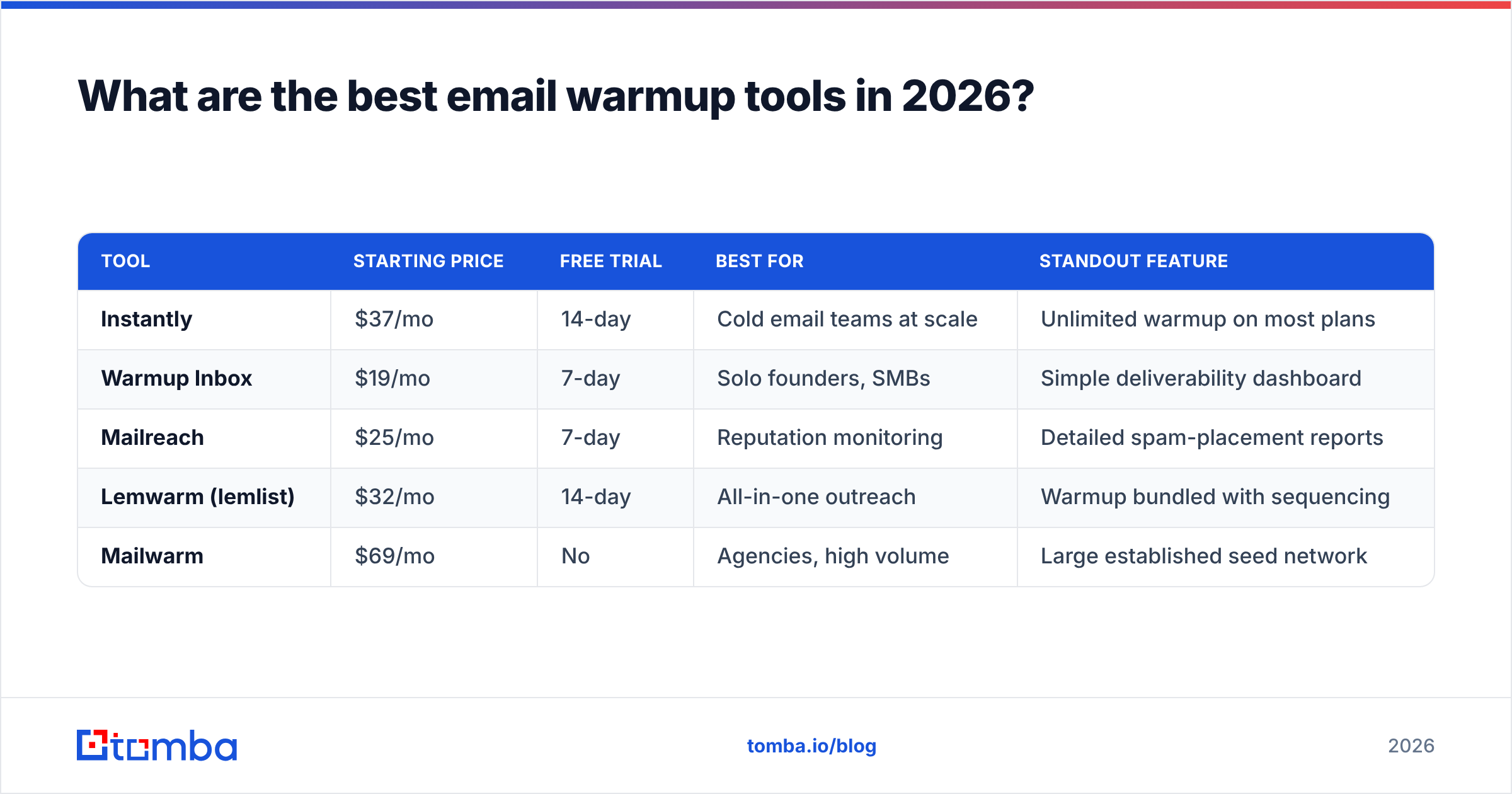
The best email warmup tools in 2026 balance network quality, deliverability reporting, and price. Here's how the leading options compare.
| Tool | Starting price | Free trial | Best for | Standout feature |
|---|---|---|---|---|
| Instantly | $37/mo | 14-day | Cold email teams at scale | Unlimited warmup on most plans |
| Warmup Inbox | $19/mo | 7-day | Solo founders, SMBs | Simple deliverability dashboard |
| Mailreach | $25/mo | 7-day | Reputation monitoring | Detailed spam-placement reports |
| Lemwarm (lemlist) | $32/mo | 14-day | All-in-one outreach | Warmup bundled with sequencing |
| Mailwarm | $69/mo | No | Agencies, high volume | Large established seed network |
A few honest notes on this table. Prices shift and most vendors gate "unlimited" warmup behind higher tiers, so confirm on the vendor's pricing page before you commit. Independent reviews on G2 are the fastest way to sanity-check current network quality and support responsiveness.
How to choose between them#
- Pick Instantly if you're already running cold campaigns and want warmup, sending, and inbox rotation in one place.
- Pick Warmup Inbox if you manage one or two inboxes and want the cheapest credible option.
- Pick Mailreach if you care most about measuring placement and catching reputation drops early.
- Pick Lemwarm if you live inside lemlist's sequencing already.
- Pick Mailwarm if you're an agency warming many domains and need a large, mature seed pool.
How do email warmup tools actually work?#
Warmup tools run a daily, automated loop between your inbox and a pool of cooperating accounts. The mechanics are consistent across vendors even if the dashboards differ.
- Connect and authenticate. You link your mailbox via OAuth or SMTP. The tool verifies SPF, DKIM, and DMARC are in place — if they aren't, warmup is wasted effort.
- Join the seed network. Your inbox enters a pool of other warmup users' inboxes that agree to exchange mail.
- Ramp sending. Day one might be 4–10 emails. The tool increases volume on a curve, often 30–40 per day at peak, mimicking organic growth.
- Generate engagement. Recipients in the network open your mail, reply, mark it important, and pull it out of spam.
- Report and adjust. You get a placement dashboard showing inbox-vs-spam ratios, and the tool throttles up or down based on results.
The quality of step two is everything. A network full of fresh, low-reputation Gmail accounts passes weak signals. A mature network of aged, well-regarded inboxes passes strong ones. This is why two tools with identical "emails per day" settings can produce very different deliverability outcomes.
A realistic warmup timeline#
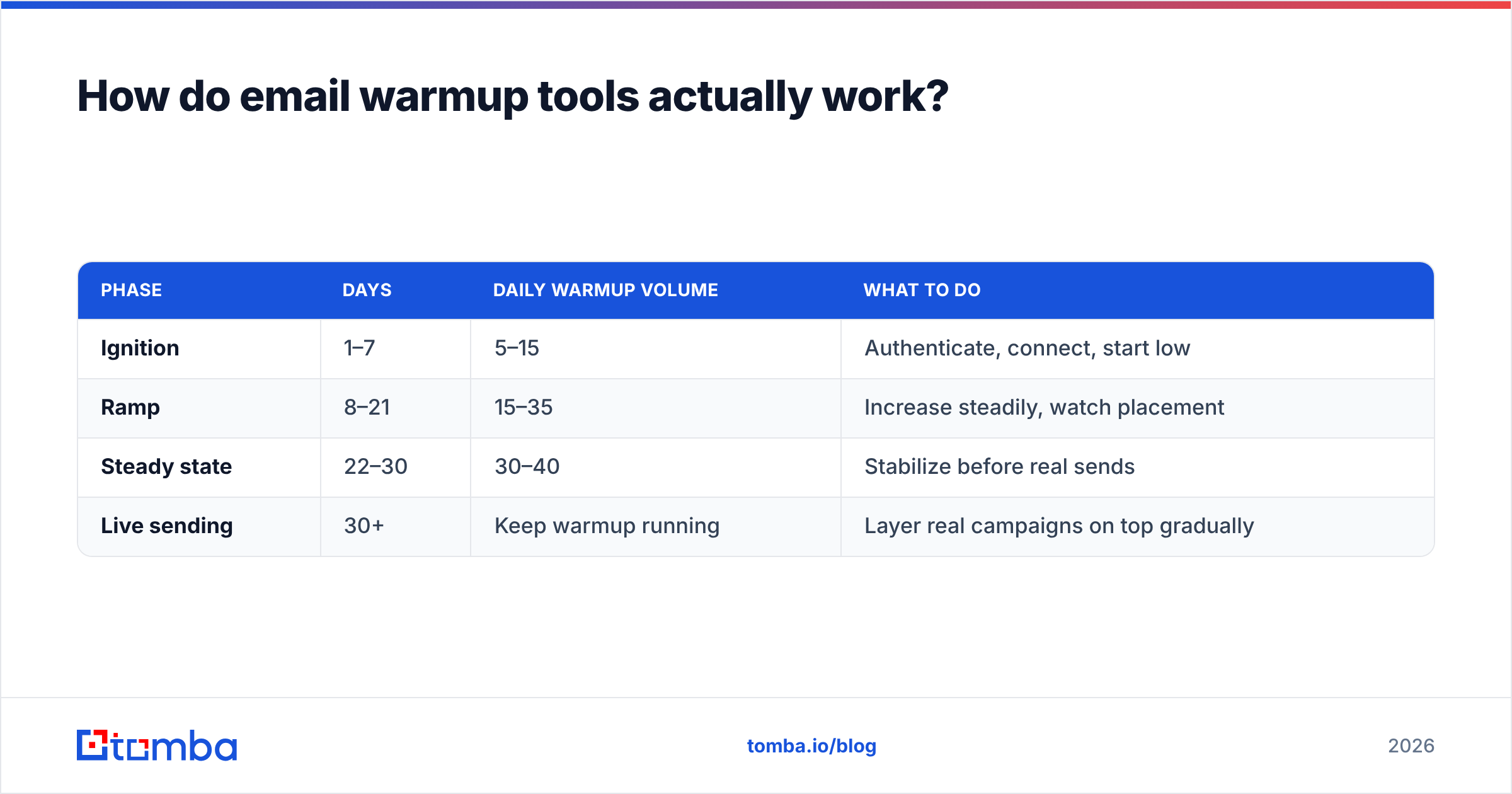
| Phase | Days | Daily warmup volume | What to do |
|---|---|---|---|
| Ignition | 1–7 | 5–15 | Authenticate, connect, start low |
| Ramp | 8–21 | 15–35 | Increase steadily, watch placement |
| Steady state | 22–30 | 30–40 | Stabilize before real sends |
| Live sending | 30+ | Keep warmup running | Layer real campaigns on top gradually |
Want a precise per-day schedule for your situation? Run the numbers through Tomba's email warmup calculator before you start, so your ramp matches your target volume instead of guessing.
Is an email warmup tool enough on its own?#
No — and this is the most expensive misconception in cold email. Warmup builds reputation, but it cannot repair the two things that destroy deliverability fastest: bad data and broken authentication.
Here's the trap. You warm a domain for a month, placement looks great, then you upload a 5,000-contact list you scraped or bought. Twenty percent of those addresses are invalid. The bounces spike, complaints follow, and your hard-won reputation collapses in days. Warmup didn't fail — your list did.

That's why the senders with the best inbox rates pair warmup with disciplined list hygiene. Before any campaign, run your list through an email verifier to strip invalid, role-based, and risky addresses. Verification keeps your bounce rate under the threshold that triggers filtering, which protects everything warmup built.
The deliverability stack that actually works#
- Authentication — SPF, DKIM, and DMARC configured correctly, verified before warmup starts.
- Warmup — 2–4 weeks of ramped sending to build reputation.
- List verification — every list cleaned so bounce rate stays under 2%.
- Volume control — gradual scaling of real sends, never a cliff jump.
- Monitoring — Google's Postmaster Tools to watch domain reputation and spam rate in real time.
Skip any layer and the others can't compensate. Warmup without verification is the most common failure, because the tool's dashboard looks healthy right up until your real list torches it.
How much do email warmup tools cost?#
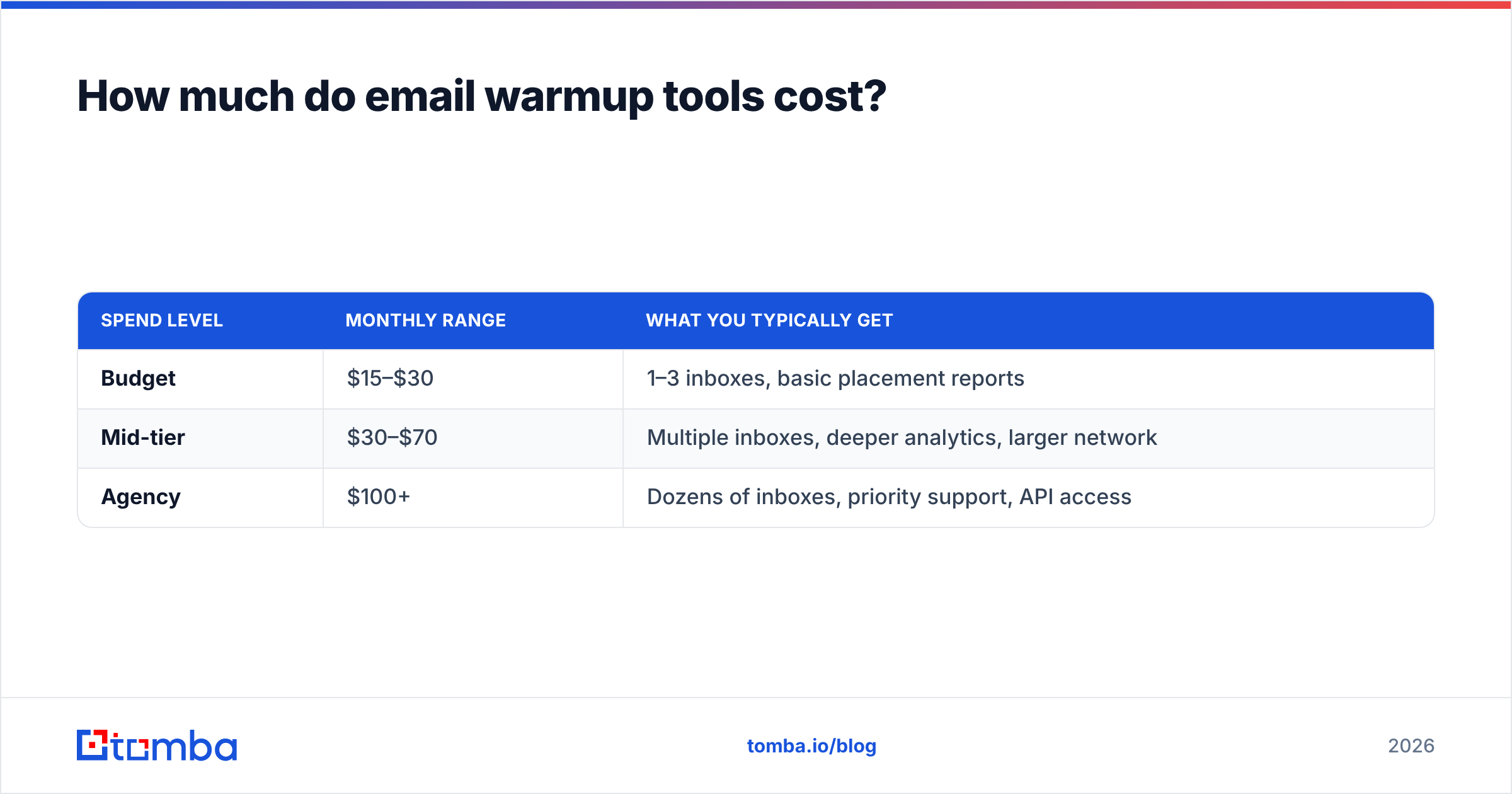
Most email warmup tools run between $19 and $69 per month per workspace, with per-inbox add-ons as you scale. Standalone warmup is cheap; the cost climbs when you bundle it with sending platforms or warm many inboxes at once.
| Spend level | Monthly range | What you typically get |
|---|---|---|
| Budget | $15–$30 | 1–3 inboxes, basic placement reports |
| Mid-tier | $30–$70 | Multiple inboxes, deeper analytics, larger network |
| Agency | $100+ | Dozens of inboxes, priority support, API access |
Compare that to the cost of a blacklisted domain. If your primary domain gets flagged, you're buying new domains, re-authenticating, and warming from zero — weeks of lost pipeline. At $20–$70 a month, warmup is insurance, not a luxury. The expensive mistake is skipping it, not paying for it.
How do you measure whether warmup is working?#
Measure warmup by inbox placement rate and domain reputation, not by how busy the dashboard looks. Three numbers tell you the truth.
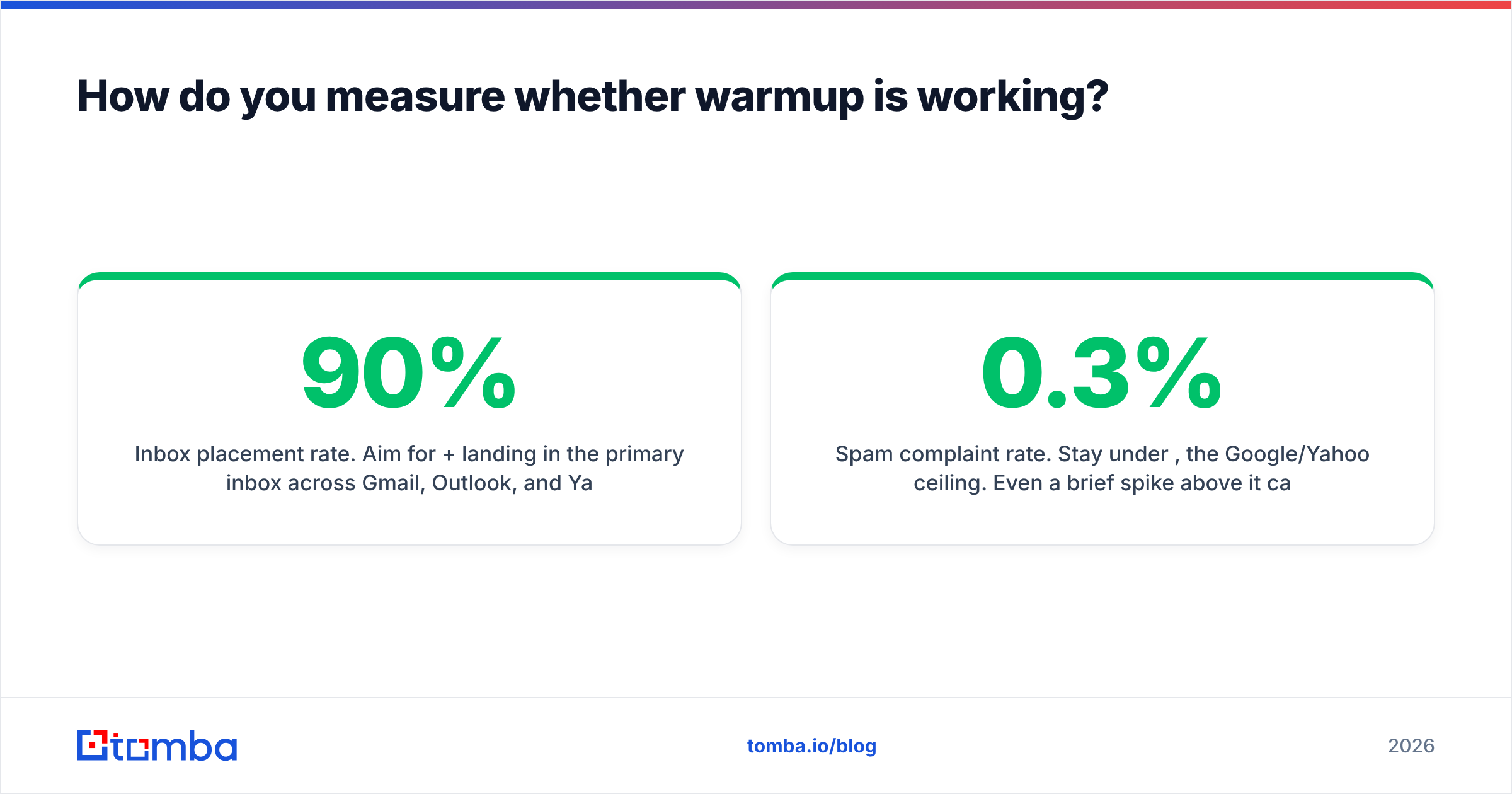
- Inbox placement rate. Aim for 90%+ landing in the primary inbox across Gmail, Outlook, and Yahoo seed tests. Below 80% means keep warming or fix authentication.
- Domain reputation in Postmaster Tools. Google grades you High, Medium, Low, or Bad. You want High or Medium before scaling real sends.
- Spam complaint rate. Stay under 0.3%, the Google/Yahoo ceiling. Even a brief spike above it can get you filtered.
Run a manual seed test too: send a real message to a spread of your own Gmail, Outlook, and Yahoo accounts and check which tab it lands in. Dashboards can lag; your own eyes don't. A quick spam checker pass on your actual campaign content closes the loop, catching trigger words and formatting issues warmup alone won't surface.
Frequently asked questions#
How long should I warm up a new email domain? Plan on 2–4 weeks for a fresh domain before sending real campaigns at volume. Keep warmup running in the background even after you go live, at a lower volume, to maintain reputation.
Can email warmup get my domain banned? Legitimate warmup tools using real seed inboxes are low-risk. The risk comes from tools using fake or bot accounts, which providers increasingly detect. Stick to vendors with transparent, real-inbox networks.
Do I still need warmup if I use a subdomain for cold outreach? Yes. Subdomains inherit some reputation from the root domain but still need their own warmup. The upside is that if a subdomain gets damaged, your primary domain stays protected.
Is warmup necessary for transactional or newsletter email? For high-volume marketing and transactional mail, a gradual ramp still helps, but the bigger levers are authentication and list quality. Pure cold outreach benefits most from dedicated warmup tools.
The bottom line#
The best email warmup tools in 2026 — Instantly, Warmup Inbox, Mailreach, Lemwarm, and Mailwarm — all do the core job well: they build sender reputation so your mail reaches the inbox. Choose based on network quality, reporting depth, and how warmup fits your existing stack, not on marketing claims about daily volume.
But remember the order of operations. Warmup is the second step, not the first. The first is sending to real, valid people. The cleanest reputation in the world means nothing if you're emailing addresses that don't exist — those bounces undo a month of warmup overnight.
That's where your data foundation comes in. Before you warm a single inbox, build your outreach lists with verified, deliverable contacts using the Tomba Email Finder. Find accurate professional emails by name, company, or domain, get them verified at the source, and feed your warmed inboxes a list that protects the reputation you worked to build. Start free with 25 searches, and scale on a plan that fits — Starter is $49/mo when you're ready to go bigger. Warm the inbox, but win with the data.
// get started
Find, verify and enrich your first contacts today
Start on the free plan with 25 searches a month, then scale when your team is ready.
Free plan · No credit card required · GDPR & CCPA
// about the author