Best Follow Up Tool in 2026: 7 Picks Compared for Sales Teams
Most deals die in the follow-up, not the first email. Here are the best follow-up tools of 2026, how they compare on price, automation, and data, and how to pick one.
Best Follow Up Tool in 2026: 7 Picks Compared for Sales Teams
Most replies you will ever get come from a follow-up, not the first touch. Yet the first email is where reps spend almost all their effort. The right tool fixes that imbalance by making the second, third, and fourth message automatic, timely, and personalized — without you babysitting a spreadsheet.
This guide ranks the best follow-up tools of 2026, shows you exactly where each one wins, and explains the one variable almost every "best tool" list ignores: the quality of the contact data feeding your sequences.
TL;DR#
- The "best follow up tool" depends on your motion. Cold outbound, warm inbound, and account-based all need different feature sets.
- Instantly and Saleshandy lead on pure cold-email follow-up; Outreach and Salesloft win for enterprise multichannel; HubSpot wins if you already live in its CRM.
- A follow-up tool is only as good as the data it sends to. Bouncing on touch #1 kills every later touch — verify and enrich before you sequence.
- Pair any sequencer with a real data layer. Tomba's email finder and email verifier keep your follow-up list deliverable so sequences actually land.
- Budget reality: good follow-up automation runs $30–$150/user/mo; data tooling like Tomba pricing starts free and scales to $49/mo.
What is a follow-up tool, and why does it matter?#
A follow-up tool is software that automatically sends your next message when a prospect goes quiet. Think of it like a thermostat for your pipeline: you set the rules once — "if no reply in 3 days, send touch two" — and it keeps the temperature steady without you checking every hour.
Technically, these tools combine a sequencer (a timed series of steps), reply detection (so an answered prospect stops getting chased), and channel delivery (email, LinkedIn, calls, SMS). The good ones add deliverability features like inbox rotation, warmup, and spintax so volume sending does not torch your sender reputation.
Why it matters: industry data on cold outreach consistently shows the majority of positive replies arrive on the second through fifth message. If you stop at one, you are leaving most of your potential pipeline on the table. A follow-up tool makes persistence cheap and consistent.
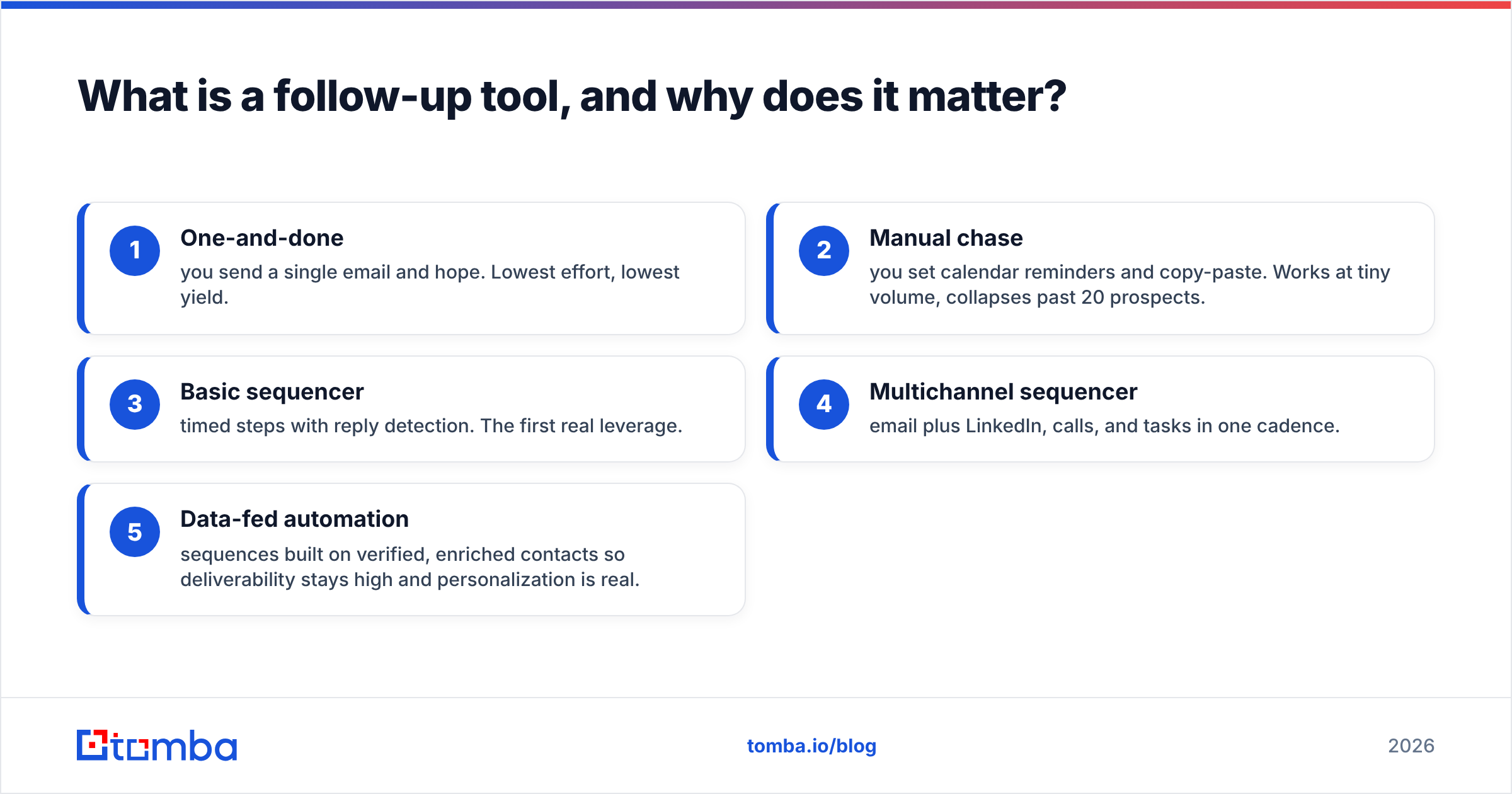
The follow-up sophistication ladder looks like this:
- One-and-done — you send a single email and hope. Lowest effort, lowest yield.
- Manual chase — you set calendar reminders and copy-paste. Works at tiny volume, collapses past 20 prospects.
- Basic sequencer — timed steps with reply detection. The first real leverage.
- Multichannel sequencer — email plus LinkedIn, calls, and tasks in one cadence.
- Data-fed automation — sequences built on verified, enriched contacts so deliverability stays high and personalization is real.
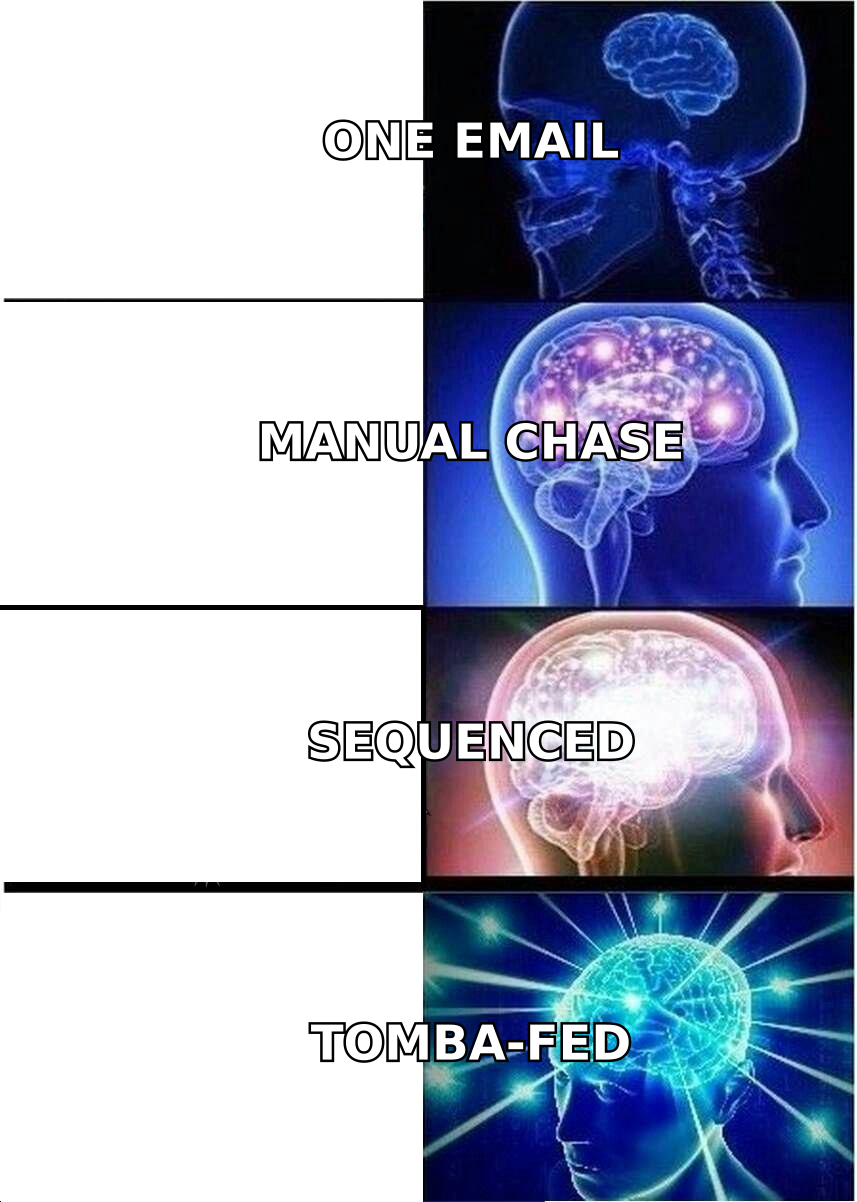
Most teams plateau at level 3. The jump from 3 to 5 — adding clean data underneath the automation — is usually where reply rates double.
What makes the best follow up tool? (The criteria)#
Before the rankings, here is what actually separates a great follow-up platform from a glorified mail-merge.
- Reply and bounce detection. The tool must pull people out of a sequence the second they respond or hard-bounce. Sequencing a dead inbox burns your domain.
- Deliverability features. Inbox rotation, built-in warmup, and sending limits keep you out of spam. Read Google's own sender guidelines — they are non-negotiable in 2026.
- Personalization at scale. Merge fields are table stakes; the best tools support conditional logic and spintax so 500 emails do not look identical.
- Channel coverage. Email-only is fine for SMB cold outbound. Enterprise needs LinkedIn, phone, and task steps in one cadence.
- CRM sync. Two-way sync with your CRM prevents the "who already replied?" chaos.
- Data quality input. This is the silent killer. Even the best sequencer fails if 30% of your addresses bounce. Garbage in, spam folder out.
That last point is why this list treats data tooling as part of the follow-up stack, not a separate purchase.
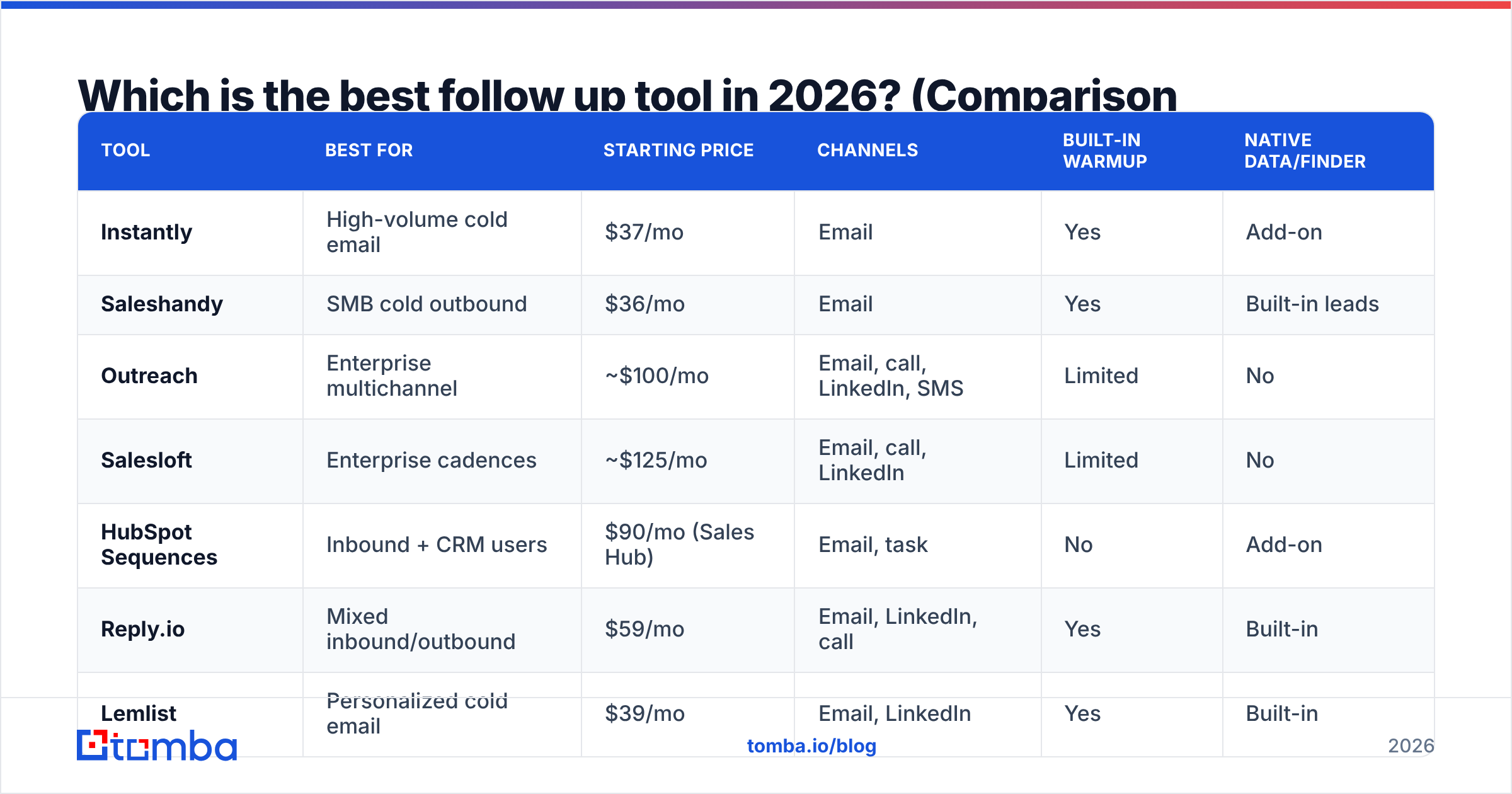
Which is the best follow up tool in 2026? (Comparison table)#
Here is how the leading platforms stack up. Prices are per user per month on annual billing and reflect public pricing as of mid-2026; confirm on each vendor's site before buying.
| Tool | Best for | Starting price | Channels | Built-in warmup | Native data/finder |
|---|---|---|---|---|---|
| Instantly | High-volume cold email | $37/mo | Yes | Add-on | |
| Saleshandy | SMB cold outbound | $36/mo | Yes | Built-in leads | |
| Outreach | Enterprise multichannel | ~$100/mo | Email, call, LinkedIn, SMS | Limited | No |
| Salesloft | Enterprise cadences | ~$125/mo | Email, call, LinkedIn | Limited | No |
| HubSpot Sequences | Inbound + CRM users | $90/mo (Sales Hub) | Email, task | No | Add-on |
| Reply.io | Mixed inbound/outbound | $59/mo | Email, LinkedIn, call | Yes | Built-in |
| Lemlist | Personalized cold email | $39/mo | Email, LinkedIn | Yes | Built-in |
A few honest takeaways from this table:
- Cheapest is not weakest. Instantly and Saleshandy punch well above their price for pure email follow-up because they were built for it.
- Enterprise tools cost 3x for a reason — multichannel orchestration, forecasting, and conversation intelligence — but most SMB teams never use those features.
- Almost none of them solve data quality for you. The "built-in leads" databases vary wildly in accuracy, which is why a dedicated finder/verifier matters.
If you want to swap one of these out, Tomba maintains side-by-side breakdowns like its Instantly alternative, Outreach alternative, Salesloft alternative, and Reply.io alternative pages.
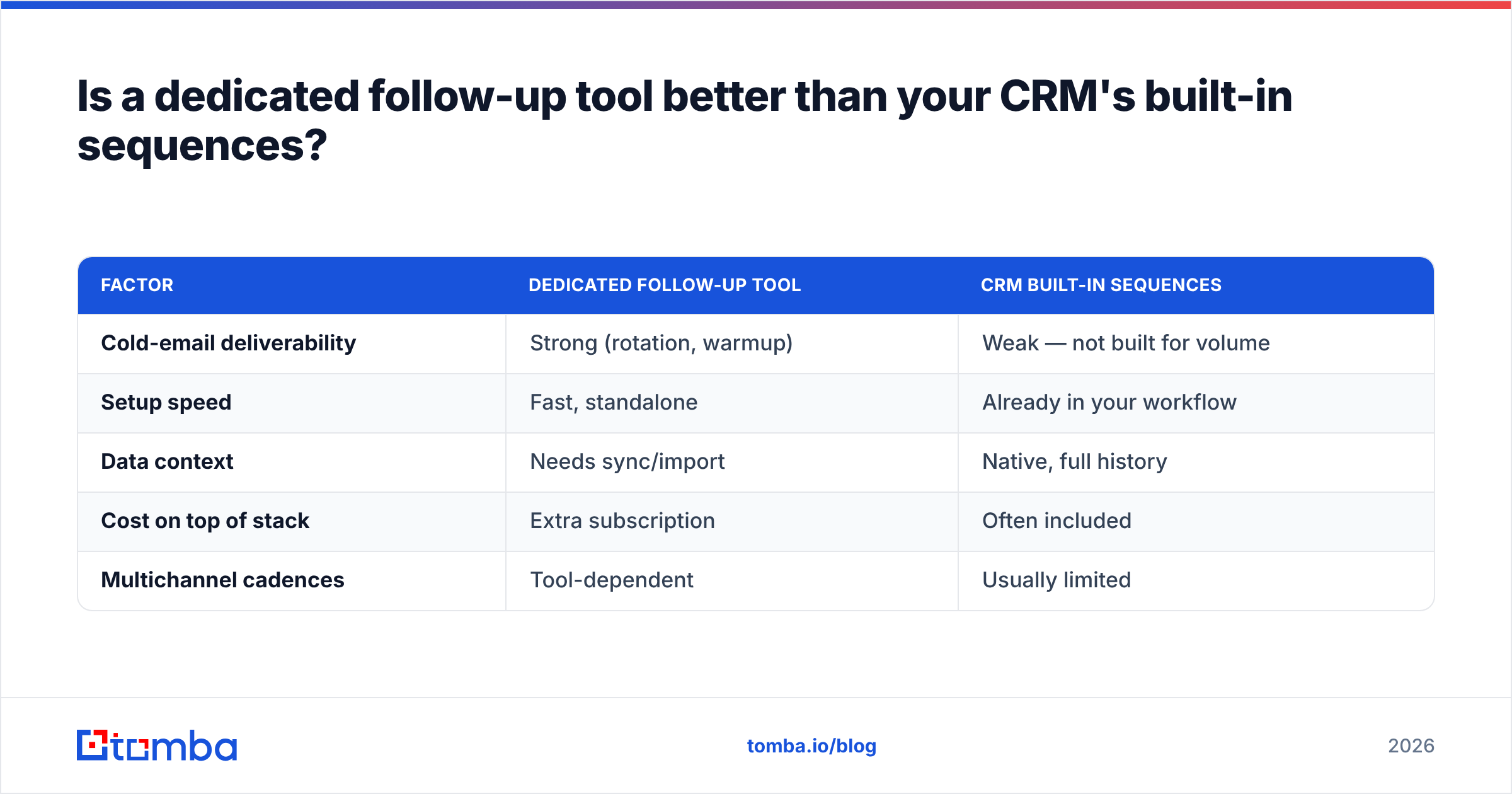
Is a dedicated follow-up tool better than your CRM's built-in sequences?#
It depends on volume and motion. For most outbound teams sending 100+ cold emails a day, a dedicated tool beats a CRM's native sequencer. For inbound and warm follow-up inside an existing pipeline, the CRM usually wins because the data already lives there.
Here is the trade-off, laid out plainly.
| Factor | Dedicated follow-up tool | CRM built-in sequences |
|---|---|---|
| Cold-email deliverability | Strong (rotation, warmup) | Weak — not built for volume |
| Setup speed | Fast, standalone | Already in your workflow |
| Data context | Needs sync/import | Native, full history |
| Cost on top of stack | Extra subscription | Often included |
| Multichannel cadences | Tool-dependent | Usually limited |
The pattern most efficient teams land on: use a dedicated cold-email tool for net-new outbound, and let the CRM handle warm follow-up once a prospect is engaged. Tools like HubSpot Sequences are excellent for the second job, weak for the first.
How do you actually pick the right one?#
Match the tool to your motion, not to a review-site star rating. Work through these in order:
- Define your primary motion. Cold outbound at volume → Instantly or Saleshandy. Warm inbound → HubSpot or your CRM. Enterprise ABM → Outreach or Salesloft.
- Count your sending volume. Under 50/day, almost anything works. Over 200/day, deliverability features become the deciding factor.
- Audit your channels. Email-only? Skip the expensive multichannel suites. Selling to execs who ignore email? You need LinkedIn and phone steps.
- Check the data pipeline. Where do contacts come from, and are they verified? This decides your bounce rate before a single email sends.
- Test reply detection on a small batch. Run 25 prospects through and confirm replies and bounces exit the sequence cleanly.
- Calculate total cost. Add the sequencer, the data/enrichment layer, and any warmup tool. The sticker price is rarely the real price.
Notice that two of six steps are about data, not the sequencer itself. That is intentional.
Why does data quality decide your follow-up results?#
Because every follow-up after a bounce is wasted, and bounces wreck your sender reputation. You can buy the best sequencer on earth and still land in spam if a third of your list is invalid.
It always has been about the data underneath.

Walk through the math. Say you load 1,000 contacts into a top-tier follow-up tool with a four-touch sequence. If 25% of those addresses are bad, that is 250 hard bounces on touch one. Mailbox providers read a high bounce rate as a spam signal and start filtering your good emails too. Now your 750 valid contacts also see worse inbox placement across all four touches. One dirty list just degraded the entire campaign.
The fix is a verification and enrichment step before sequencing:
- Find the right address. Use a domain search to pull verified contacts at a target company, or an email finder to get a specific person's work email.
- Verify before you send. Run the list through an email verifier to strip invalids and catch-alls.
- Enrich for personalization. Pull title, company, and other fields with data enrichment so your follow-ups reference something real.
This is the level-5 "data-fed automation" rung from earlier. The sequencer handles timing; the data layer handles whether anyone receives the message at all. For more on the deliverability side, the glossary entry on sender reputation is a useful primer, and G2's sales engagement category is a good place to cross-check tool reviews.
What does a high-converting follow-up cadence look like?#
A good cadence is short, varied, and value-led. The goal is not to nag — it is to give the prospect a new reason to reply each time. Here is a proven four-touch email skeleton you can run in any of the tools above:
- Day 0 — The opener. One specific, relevant hook tied to the prospect's company. No "just checking in."
- Day 3 — The angle shift. Reframe the value around a different pain point. Reference a customer result.
- Day 7 — The resource. Send something useful — a teardown, a benchmark, a short Loom — with no ask attached.
- Day 12 — The breakup. A short, polite "should I close the file?" Breakup emails reliably pull the highest reply rate of the sequence.
Two rules make or break this:
- Vary the value, not just the wording. Reps think rewriting "circling back" five ways is follow-up. It is not. Each touch needs a new reason to care.
- Keep touches tied to the same thread or a tight cluster so the prospect has context.
If writing four distinct angles sounds like work, that is where data enrichment earns its keep — the more you know about a prospect, the easier each new angle becomes.
Frequently asked questions#
What is the best follow up tool for a small sales team? For most small teams running cold outbound, Saleshandy or Instantly give the best value — strong deliverability features at SMB pricing. Pair either with a bulk email finder and verifier so your lists stay clean.
Do I need a separate tool, or is my CRM enough? If you mainly do warm, inbound follow-up, your CRM's sequences are usually enough. If you do cold outbound at volume, a dedicated tool with inbox rotation and warmup will protect your deliverability far better.
How many follow-ups should a sequence have? Three to five touches is the sweet spot for cold email. Most positive replies land between touch two and touch four; beyond five you see diminishing returns and rising spam complaints.
Will follow-up automation hurt my deliverability? Only if you send to bad data or skip warmup. Verify your list, warm your domain, and respect daily sending limits, and automation actually improves consistency versus manual sending.
Can I find and verify contacts inside my follow-up tool? Some include basic databases, but accuracy varies. A dedicated finder and verifier — like Tomba's — generally produces lower bounce rates than bundled lead databases.
The bottom line: pair the right sequencer with the right data#
The best follow-up tool for you is the one that matches your motion — Instantly or Saleshandy for lean cold outbound, Outreach or Salesloft for enterprise multichannel, your CRM for warm inbound. But whichever sequencer you pick, it can only mail the addresses you give it.
That is the part you control before you ever choose a tool. Feed your sequences verified, enriched contacts and your reply rates climb on every platform in this guide. Start by building a clean, deliverable list with the Tomba Email Finder — find professional emails by name, company, or domain, verify them in the same workflow, and hand your follow-up tool a list that actually lands. The free tier gives you 25 searches a month to test it, and paid plans start at $49/mo. Your follow-ups are only as good as the inboxes they reach.
// get started
Find, verify and enrich your first contacts today
Start on the free plan with 25 searches a month, then scale when your team is ready.
Free plan · No credit card required · GDPR & CCPA
// about the author