Best Predictive Dialer in 2026: Top 7 Tools Compared
Predictive dialers can triple talk time — or torch your connect rate if the data is bad. Here's how the top 7 dialers compare in 2026, and what actually moves the needle.
Picking the best predictive dialer is less about the dialer and more about what you feed it. The fastest auto-dialer in the world still dials dead numbers if your list is junk. So before you sign a per-seat contract, get clear on what these tools actually do, where they differ, and which one fits the way your team sells.
TL;DR#
- A predictive dialer uses pacing algorithms to call multiple numbers per agent and connect reps only to live answers — maximizing talk time at the cost of compliance and connect-quality risk.
- The "best" choice depends on team size, regulatory exposure, and CRM stack — not on raw dial speed. Five Wins for big call centers; Kixie and PhoneBurner suit lean SMB teams.
- Predictive dialing only pays off above roughly 8–10 agents; below that, a power or preview dialer usually beats it.
- Expect $100–$200+ per seat per month once you add compliance, local presence, and CRM integration.
- The single biggest lever on connect rate is phone-number accuracy — clean, validated data beats a faster dialer every time.
What is a predictive dialer?#
A predictive dialer is software that dials several phone numbers at once on behalf of each available agent, predicting when a rep will free up and pacing calls so a human picks up right as the agent becomes available. Think of it like a restaurant host seating tables before guests reach the door — timed right, nobody waits; timed wrong, people get bounced.
That pacing is the whole game. The algorithm watches average call length, agent count, and historical answer rates, then dials ahead of capacity. When it works, agents skip busy signals, voicemails, and dead air entirely. When it overshoots, a prospect answers with no agent free — an "abandoned call" that annoys buyers and, in regulated markets, breaks the law.
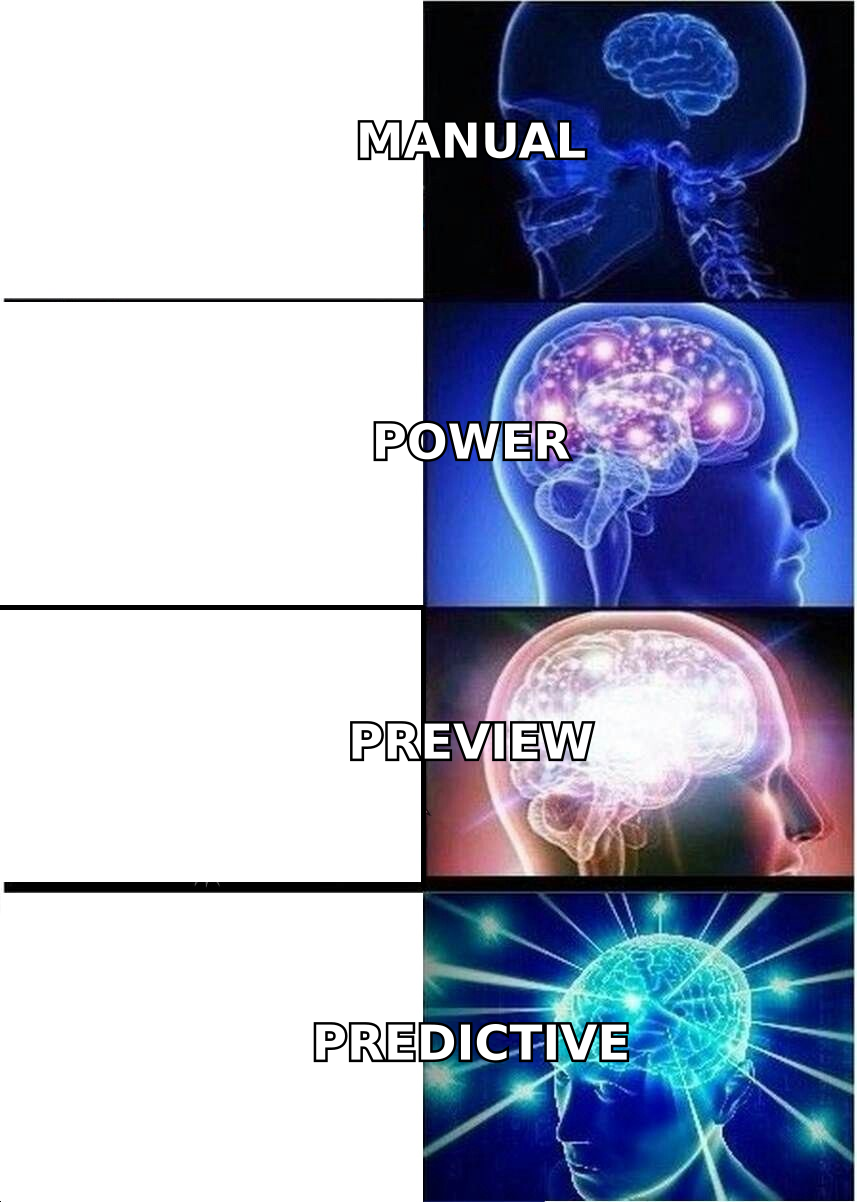
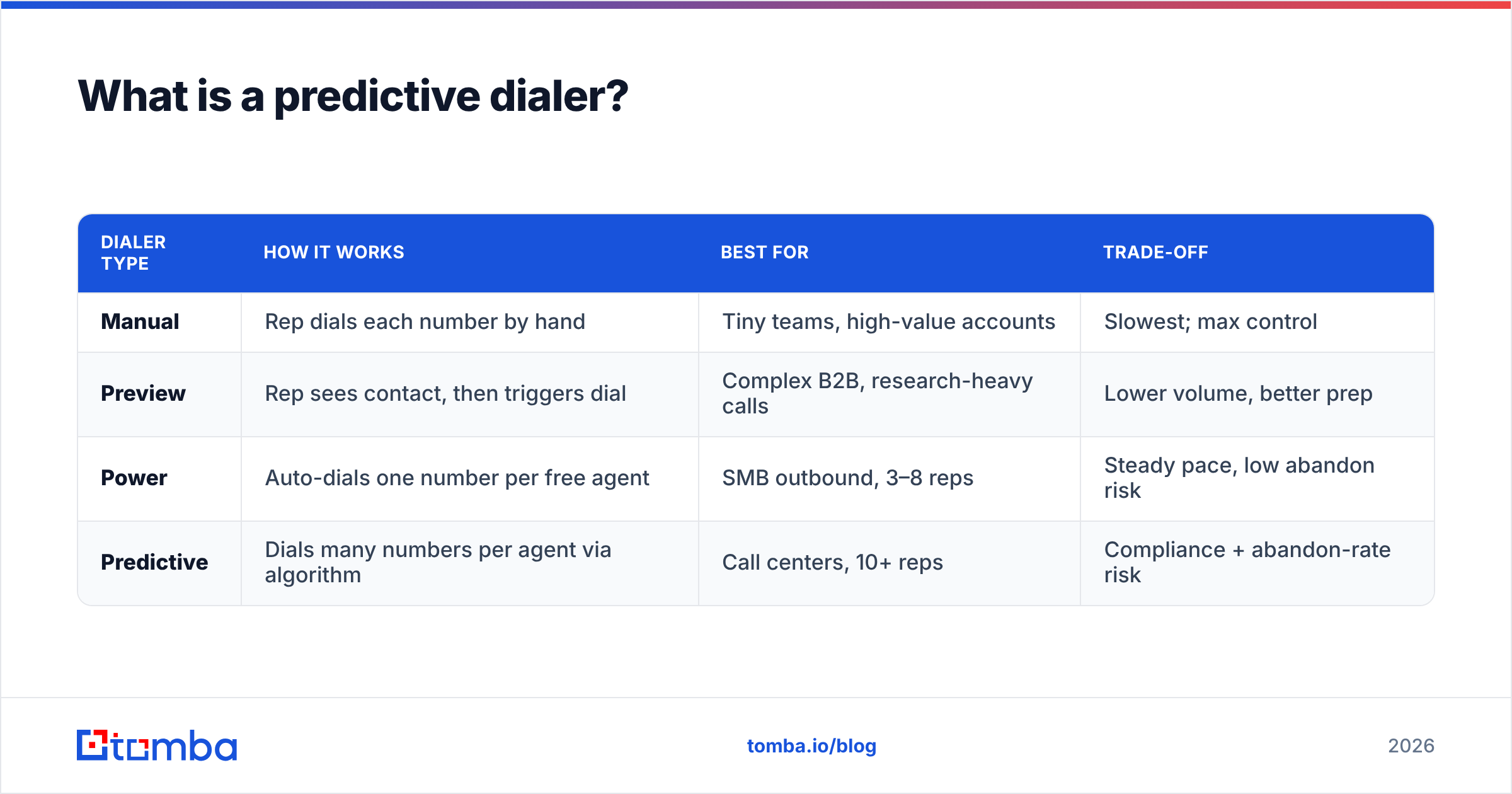
Predictive dialers sit at the aggressive end of a spectrum. Here's how the common modes compare:
| Dialer type | How it works | Best for | Trade-off |
|---|---|---|---|
| Manual | Rep dials each number by hand | Tiny teams, high-value accounts | Slowest; max control |
| Preview | Rep sees contact, then triggers dial | Complex B2B, research-heavy calls | Lower volume, better prep |
| Power | Auto-dials one number per free agent | SMB outbound, 3–8 reps | Steady pace, low abandon risk |
| Predictive | Dials many numbers per agent via algorithm | Call centers, 10+ reps | Compliance + abandon-rate risk |
How does a predictive dialer actually boost talk time?#
The honest answer: by eliminating the dead time between conversations. In manual dialing, a rep might spend 70% of an hour listening to ringing, leaving voicemails, and logging no-answers. A tuned predictive dialer can flip that ratio, pushing agents to 40–50 minutes of live talk per hour.
But that lift is conditional on three things:
- Agent volume. Predictive math needs enough simultaneous reps to spread risk. With two or three agents, the algorithm can't predict accurately and you'll either starve reps or abandon calls. Most teams see real gains starting around 8–10 seats.
- List size and quality. The dialer needs a deep, accurate pool to pace against. Feed it disconnected or wrong numbers and your connect rate collapses no matter how smart the pacing is.
- Answer-rate consistency. Predictive models assume stable answer patterns. Wildly variable lists (mixed mobiles, landlines, stale data) make pacing erratic.
This is why data quality keeps surfacing in every dialer review. You can buy the best engine on the market, but if 30% of your numbers are bad, you've bought a faster way to reach voicemail. Pairing your dialer with a reliable phone finder and a phone validator step does more for connect rate than upgrading dialer tiers.
Which is the best predictive dialer in 2026?#
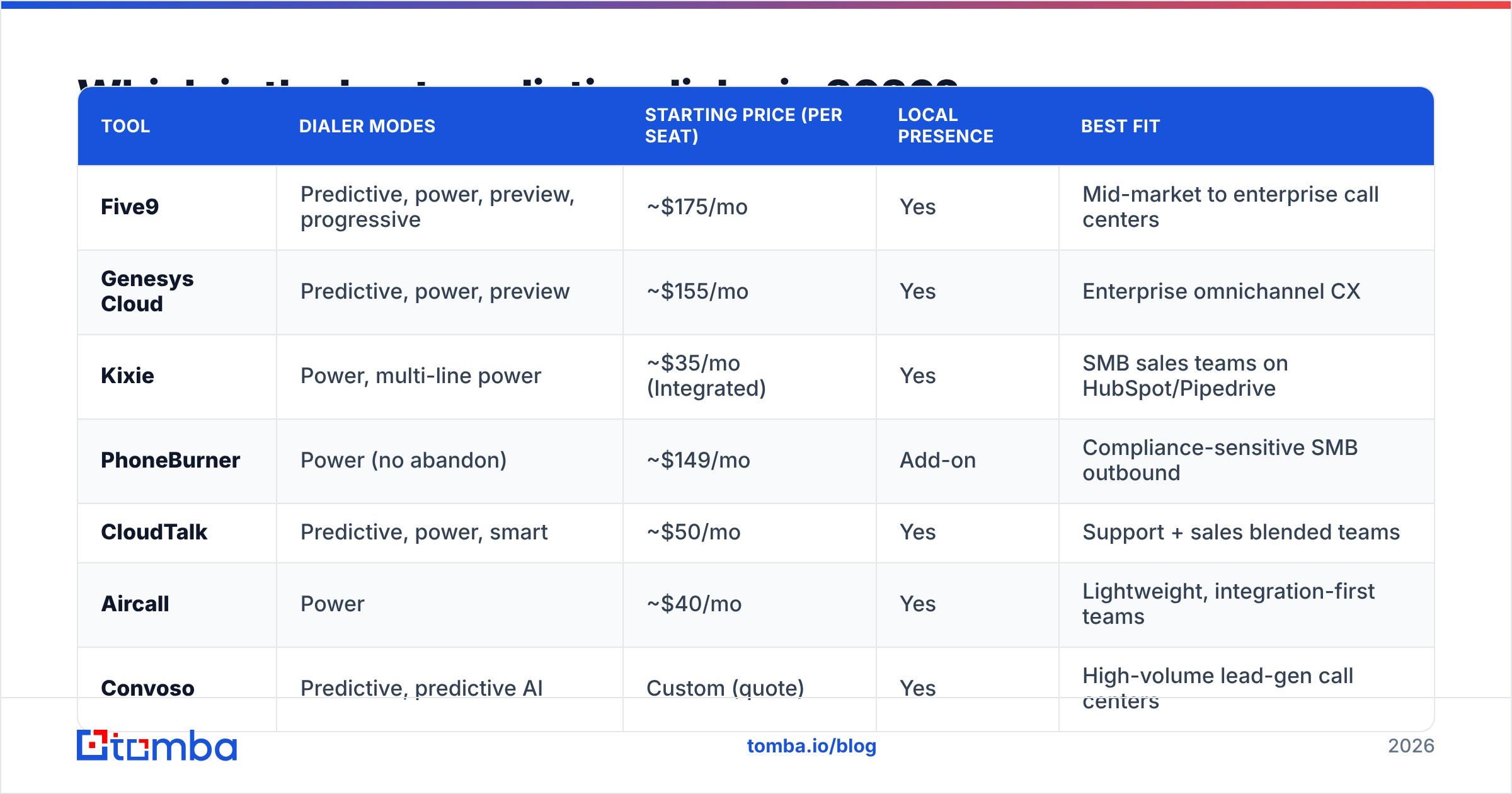
There's no single winner — there's a best fit per team profile. Below is a side-by-side of seven widely used platforms, drawn from public pricing pages and review aggregators like G2 and Capterra. Prices are per user, per month, and shift with contract terms, so treat them as directional.
| Tool | Dialer modes | Starting price (per seat) | Local presence | Best fit |
|---|---|---|---|---|
| Five9 | Predictive, power, preview, progressive | ~$175/mo | Yes | Mid-market to enterprise call centers |
| Genesys Cloud | Predictive, power, preview | ~$155/mo | Yes | Enterprise omnichannel CX |
| Kixie | Power, multi-line power | ~$35/mo (Integrated) | Yes | SMB sales teams on HubSpot/Pipedrive |
| PhoneBurner | Power (no abandon) | ~$149/mo | Add-on | Compliance-sensitive SMB outbound |
| CloudTalk | Predictive, power, smart | ~$50/mo | Yes | Support + sales blended teams |
| Aircall | Power | ~$40/mo | Yes | Lightweight, integration-first teams |
| Convoso | Predictive, predictive AI | Custom (quote) | Yes | High-volume lead-gen call centers |
A few takeaways from the table:
- Five9 and Genesys are the heavyweight predictive platforms — robust pacing, deep reporting, full compliance tooling, and price tags to match. They earn their keep at scale.
- Kixie, Aircall, and CloudTalk lean toward power dialing with tight CRM integration. They're cheaper and faster to deploy, which is why lean SMB teams pick them.
- PhoneBurner deliberately avoids true predictive dialing to sidestep abandon-rate risk — a smart choice if your market is heavily regulated.
- Convoso targets high-volume lead generation with AI-driven pacing, but pricing is quote-only, so budget for a sales conversation.
If you're a five-rep startup, do not buy Five9. If you're running a 60-seat outbound floor, Kixie's power dialer will leave talk time on the table. Match the engine to your headcount.
Is a predictive dialer worth it for small teams?#
Usually not — and that surprises people. Below ~8 agents, the predictive algorithm lacks the volume to pace safely, so you face one of two bad outcomes: reps sitting idle while the model plays it safe, or abandoned calls when it overshoots. A power dialer (one line per free agent, zero abandon risk) typically delivers better economics and a cleaner buyer experience for small teams.
Here's the decision shortcut:
- 1–3 reps, high-ticket deals: Use a preview dialer. Research matters more than volume.
- 3–8 reps, standard outbound: Use a power dialer. Steady pace, no compliance landmines.
- 8–15 reps, volume outbound: Predictive starts to pay off if your data is clean.
- 15+ reps, lead-gen floor: Predictive (or AI-predictive) is the default.
Whatever the size, the dialer is downstream of your list. A team of four with surgically accurate numbers will out-connect a team of twelve dialing a bloated, stale list. That's why we treat data enrichment as part of the dialer stack, not a separate line item.
What features actually matter when choosing a dialer?#
Vendors love to bury you in feature checklists. Most of it is noise. These are the attributes that change outcomes:
- Abandon-rate controls. Look for configurable pacing and a hard abandon-rate cap (regulators in many regions enforce a 3% ceiling). This is non-negotiable for predictive mode.
- Local presence / caller ID management. Matching the area code of the number you're calling lifts answer rates measurably. Confirm it's included, not an upsell.
- CRM integration depth. Two-way sync with your CRM (HubSpot, Salesforce, Pipedrive) so call outcomes, recordings, and dispositions land where reps already work. Shallow "Zapier-only" integrations create data debt.
- Answering-machine detection (AMD). Good AMD skips voicemails automatically; bad AMD clips the first two seconds of live calls. Test it before committing.
- Compliance tooling. DNC scrubbing, time-zone-aware dialing windows, and consent tracking. The U.S. TCPA and equivalents elsewhere carry real penalties.
- Real-time analytics. Connect rate, talk time, and disposition dashboards you can act on mid-shift, not export at month-end.
Notice what's missing from that list: "most dials per hour." Raw dial volume is a vanity metric. A dialer that makes 400 calls to wrong numbers loses to one that makes 120 to verified decision-makers.

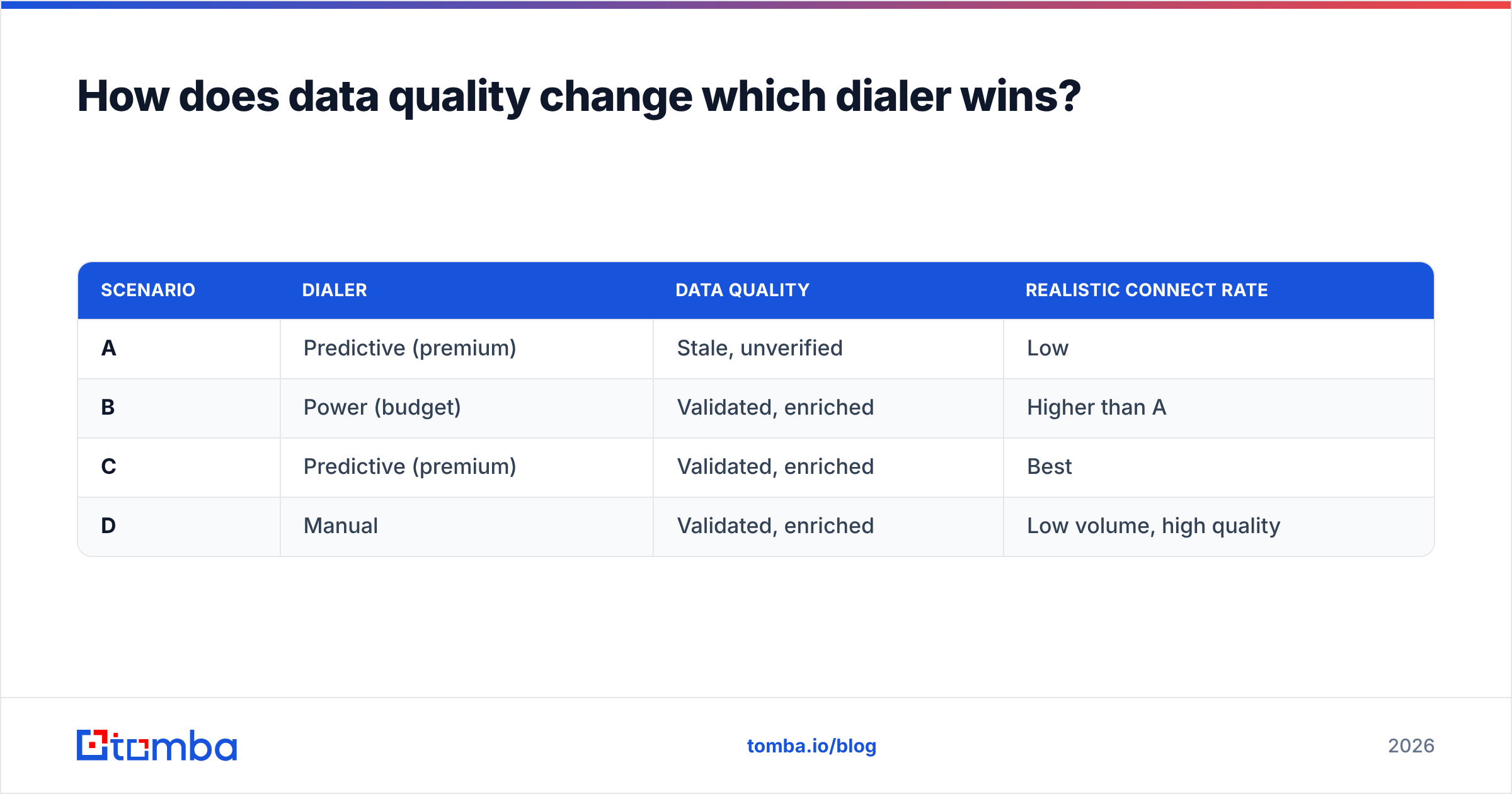
How does data quality change which dialer wins?#
It changes everything, because every dialer's performance is capped by its input. Run the same predictive engine on two lists — one validated, one scraped-and-stale — and you'll see connect-rate gaps of 2–3x. The software didn't change; the fuel did.
Concretely, bad data hurts predictive dialers worse than other modes:
- The pacing algorithm trains on answer rates. Garbage numbers depress those rates, so the model dials more aggressively to compensate — which spikes your abandon rate and compliance exposure.
- Disconnected numbers waste "dial slots" the algorithm reserved, starving agents of live connects.
- Wrong-person matches burn rep time on disqualified conversations that never had a chance.
The fix is a data layer in front of the dialer. Before a number ever enters a campaign, it should be (1) sourced from a current provider, (2) validated as active, and (3) matched to the right person and company. Tomba's phone validator handles the validation step, while contact enrichment fills the gaps and confirms you're calling the right title at the right account. For multichannel teams, pairing dial lists with verified email via the email finder lets you follow a no-answer with a same-day email touch — the combination outperforms either channel alone.
| Scenario | Dialer | Data quality | Realistic connect rate |
|---|---|---|---|
| A | Predictive (premium) | Stale, unverified | Low |
| B | Power (budget) | Validated, enriched | Higher than A |
| C | Predictive (premium) | Validated, enriched | Best |
| D | Manual | Validated, enriched | Low volume, high quality |
The pattern is blunt: clean data on a cheap dialer beats dirty data on an expensive one. Scenario C wins, but Scenario B beating A is the lesson most buyers miss.
What does a predictive dialer cost in 2026?#
Budget for more than the sticker price. The per-seat license is the start; the real total includes the layers that make dialing effective and legal.
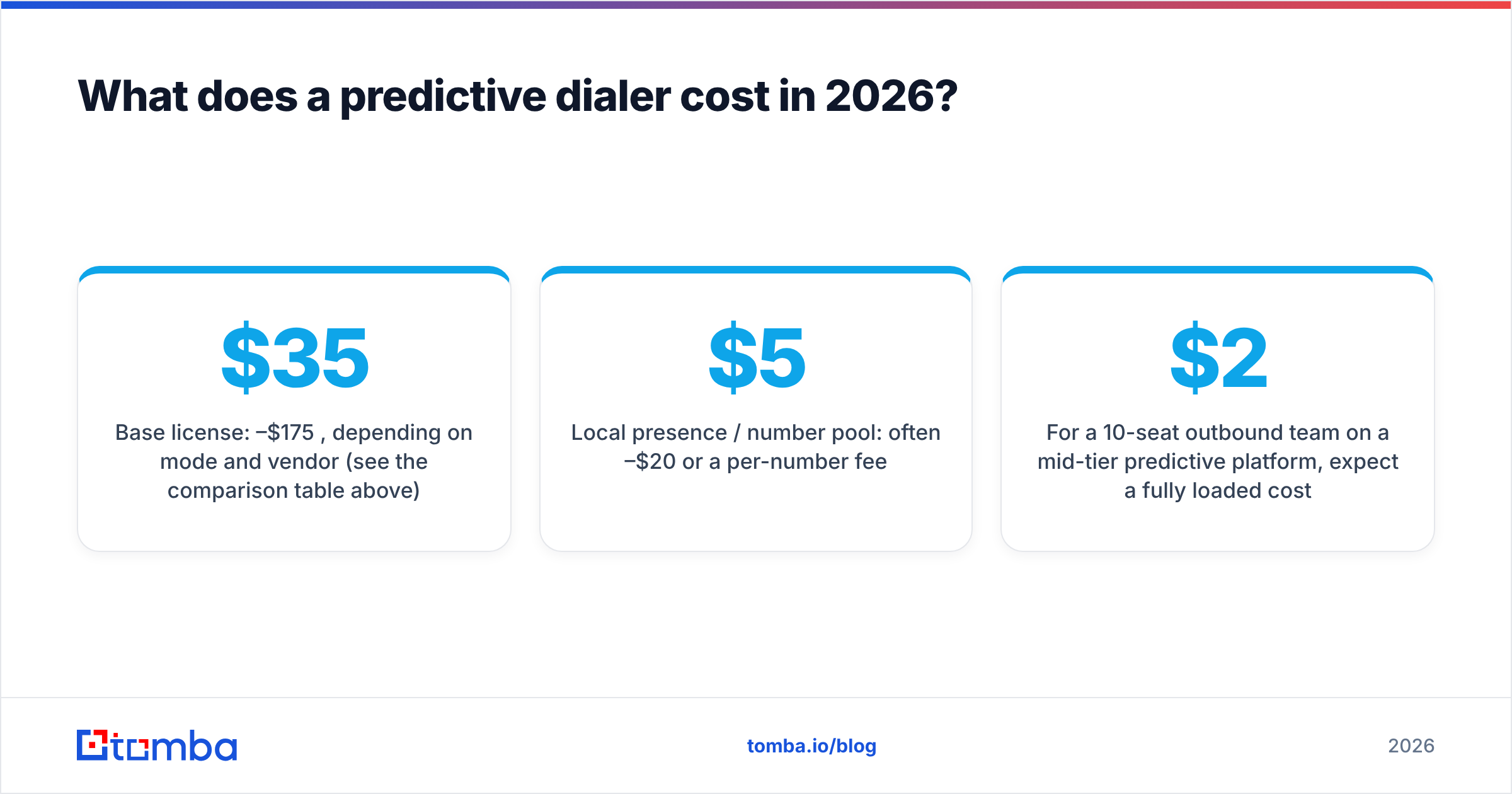
- Base license: $35–$175 per seat per month, depending on mode and vendor (see the comparison table above).
- Local presence / number pool: often $5–$20 per seat or a per-number fee.
- Compliance add-ons: DNC scrubbing and consent tracking may be tiered upgrades.
- Data layer: validation and enrichment of your calling lists — variable, but the highest-ROI line item.
- Onboarding / minimums: enterprise platforms (Five9, Genesys, Convoso) frequently carry seat minimums and annual terms.
For a 10-seat outbound team on a mid-tier predictive platform, expect a fully loaded cost north of $2,000/month before data. That's exactly why squeezing more connects out of each dial — through better lists — has such strong returns. You're paying for talk time; don't waste it on bad numbers.
Frequently asked questions#
Is a predictive dialer legal? Yes, when configured correctly. You must respect abandon-rate caps, DNC lists, calling-hour windows, and consent requirements like those under the TCPA in the U.S. Misconfiguration — not the technology itself — is what draws penalties.
Predictive vs. power dialer — which should I start with? Start with a power dialer unless you're running 8+ agents on high-volume outbound. Power dialing has no abandon-rate risk and is simpler to run compliantly, making it the safer default for most SMB teams.
Will a dialer fix my low connect rate? No. A dialer changes how fast you reach numbers, not whether those numbers are good. If connect rates are low, audit your list accuracy first — validate and enrich before you blame the engine.
Can I use a predictive dialer with my CRM? Most leading dialers offer native or near-native sync with major CRMs. Confirm two-way sync (not just one-way logging) and check whether call recordings and dispositions map to your fields before buying.
The bottom line#
The best predictive dialer for your team is the one matched to your headcount, compliance exposure, and CRM — but its ceiling is set by the quality of the numbers you load into it. Five9 and Genesys win at enterprise scale; Kixie, CloudTalk, and Aircall win for lean teams; PhoneBurner wins where compliance is paramount. Yet in every scenario, validated, enriched data is what separates a dialer that prints conversations from one that prints voicemails.
Before you upgrade dialer tiers, upgrade your list. Use the Tomba Email Finder and phone finder to build accurate, decision-maker-level contact lists, then validate every number with the phone validator so your dialer spends its dials on people who actually pick up. Start free with 25 searches a month, and see Tomba pricing when you're ready to scale — because the fastest path to more talk time isn't a faster dialer, it's better data feeding the one you already have.
// get started
Find, verify and enrich your first contacts today
Start on the free plan with 25 searches a month, then scale when your team is ready.
Free plan · No credit card required · GDPR & CCPA
// about the author