Best Search Engine for Email Addresses: 7 Top Picks for 2026
Looking for the best search engine for email addresses? Compare 7 email-search tools on accuracy, coverage, and price to find the right one for 2026.

TL;DR
- A "search engine for email addresses" isn't Google — it's a specialized tool that takes a name, domain, or company and returns a verified work email.
- The best search engine for email addresses is the one with the highest verified match rate for your target market, not the one with the biggest raw database.
- Accuracy, deliverability data, and compliance matter more than headline contact counts. A 50M-row database that's 60% stale loses to a 10M-row database that's 95% deliverable.
- For most B2B teams, Tomba Email Finder hits the sweet spot of accuracy, domain coverage, and price (free tier, then $49/mo).
- Always pair any finder with an email verifier before you send — even the best source needs a real-time SMTP check.
What is a search engine for email addresses?#
A search engine for email addresses is a lookup tool that resolves a person or company into a working email — the way a phone book resolves a name into a number. You feed it an input (a full name plus a domain, a LinkedIn URL, or just a company website), and it returns the most likely professional email along with a confidence score and verification status.
This is different from typing "john smith acme email" into Google. General web search indexes pages; an email search engine indexes contact data — billions of email-to-identity pairs collected from public web crawling, domain pattern analysis, and SMTP validation. The good ones don't just guess firstname.lastname@domain.com; they confirm the address actually accepts mail.
Three building blocks separate a real email search engine from a glorified guesser:
- Pattern detection — it learns that Acme uses
f.last@acme.comwhile Globex usesfirstlast@globex.com, then applies that pattern per company. - Source breadth — public crawls, data partnerships, and contributed records widen coverage so obscure domains still return hits.
- Real-time verification — an SMTP handshake (or catch-all detection) tells you whether the address is deliverable today, not whenever the database was last refreshed.
Miss any one of these and you get bounces, spam complaints, and a tanked sender reputation.

How do email search engines actually find addresses?#
Most tools blend four techniques. Understanding the mix tells you why two products with similar marketing produce wildly different results.
- Domain search: Give the tool a company domain and it returns every public email tied to it, grouped by department. This is the backbone of bulk prospecting — see how domain search works in practice.
- Permutation + verification: The engine generates likely formats, then SMTP-pings each to find the live one. Speed and accuracy here depend entirely on the verification infrastructure.
- Crawled + contributed data: Public pages, press releases, author bylines, and opt-in contributions feed a contact graph. This is how niche roles (not just
info@) surface. - Catch-all handling: Some domains accept all mail, so a basic verifier returns a false "valid." A proper catch-all verifier flags these so you don't trust a green checkmark blindly.
The takeaway: raw database size is a vanity metric. What you actually want is a high verified match rate on the domains you sell into. A finance-heavy ICP and a dev-tools ICP will rank these tools differently.
Which is the best search engine for email addresses in 2026?#
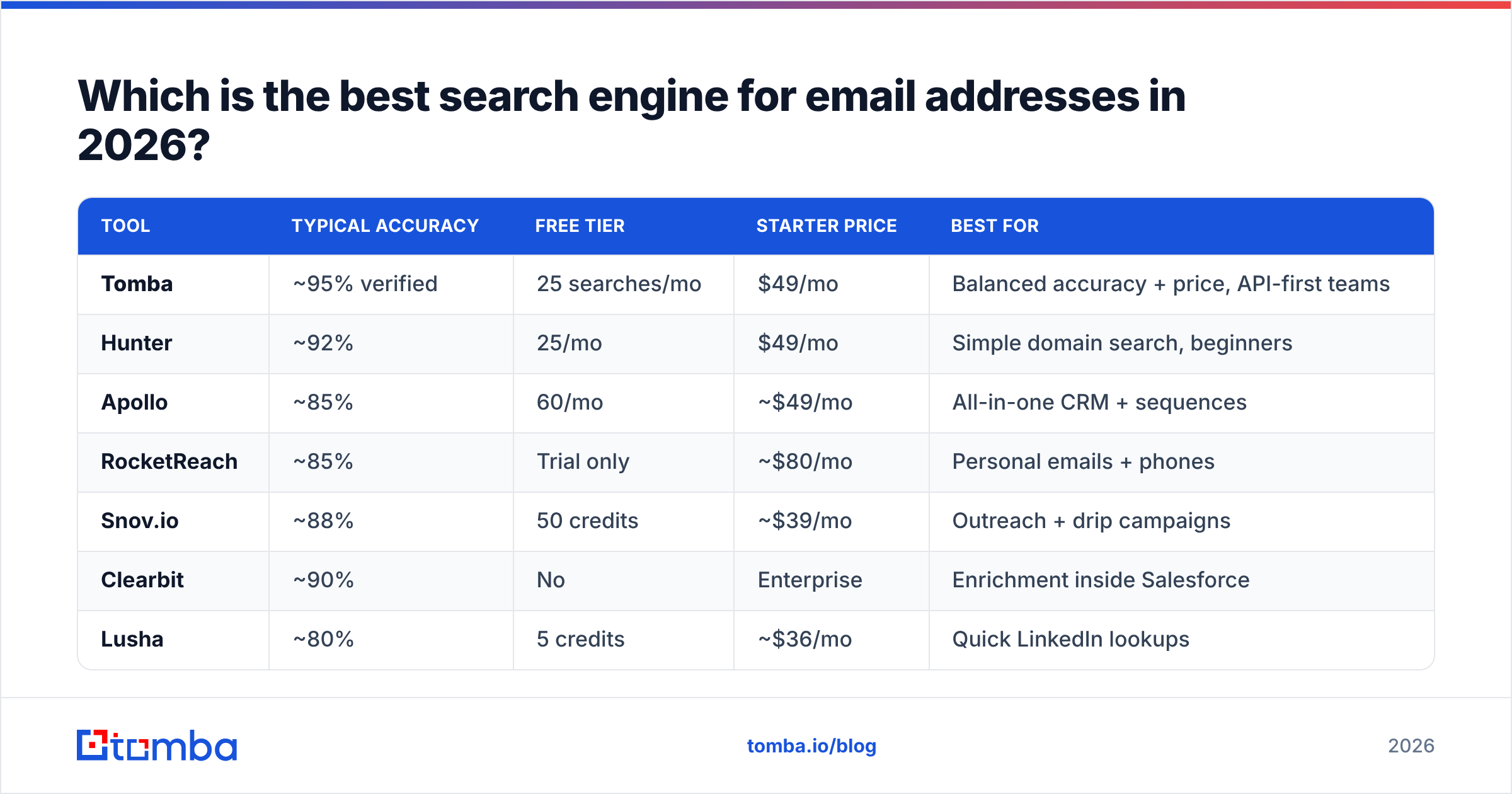
Here's a side-by-side of seven widely used email-search tools, scored on the attributes that move the needle: match accuracy, free tier, entry price, and standout strength. Prices are entry/starter tiers as published by each vendor at time of writing — always confirm on their pricing pages.
| Tool | Typical accuracy | Free tier | Starter price | Best for |
|---|---|---|---|---|
| Tomba | ~95% verified | 25 searches/mo | $49/mo | Balanced accuracy + price, API-first teams |
| Hunter | ~92% | 25/mo | $49/mo | Simple domain search, beginners |
| Apollo | ~85% | 60/mo | ~$49/mo | All-in-one CRM + sequences |
| RocketReach | ~85% | Trial only | ~$80/mo | Personal emails + phones |
| Snov.io | ~88% | 50 credits | ~$39/mo | Outreach + drip campaigns |
| Clearbit | ~90% | No | Enterprise | Enrichment inside Salesforce |
| Lusha | ~80% | 5 credits | ~$36/mo | Quick LinkedIn lookups |
A few honest notes on this table:
- Accuracy figures are directional, not lab-controlled — every vendor measures differently, and your real number depends on your ICP. Run a free-tier test on 50 of your own target domains before committing.
- "All-in-one" tools like Apollo trade finder precision for breadth (sequencing, dialer, CRM). If email accuracy is your single most important metric, dedicated finders usually win.
- Personal-email tools (RocketReach) shine for recruiting but raise compliance questions for cold B2B outreach.

For a deeper accuracy breakdown across providers, the chart above shows how verified match rates diverge once you move past the easy, well-known domains. The gap widens exactly where prospecting gets hard — mid-market companies with non-obvious email patterns.
What makes one email search engine more accurate than another?#
Accuracy comes down to verification depth, data freshness, and catch-all intelligence — in that order.
Verification depth. A finder that returns an address without a live SMTP check is handing you a guess wrapped in a confidence score. The best tools verify at query time and expose the result: valid, invalid, accept-all, or unknown. That's why pairing your finder with email verification is non-negotiable, even when the finder claims high accuracy.
Data freshness. People change jobs every 2–3 years on average, so a contact record decays fast. According to Gartner and most data-quality research, B2B databases degrade roughly 20–30% per year through job changes alone. A tool that re-verifies continuously beats one that bought a list in 2023 and never refreshed it.
Catch-all intelligence. Roughly 20–30% of business domains are catch-all, meaning they accept any address at the SMTP layer. Naive verifiers mark every catch-all guess as "valid," inflating their accuracy stats while quietly setting you up to bounce. Tools that isolate and risk-score catch-alls give you a truthful picture.
The marketing-vs-reality gap here is real, which makes independent benchmarks worth more than vendor claims.

How much should you pay for email search?#
Pay for verified results, not raw credits. The honest way to compare cost is price per deliverable email, not price per search.
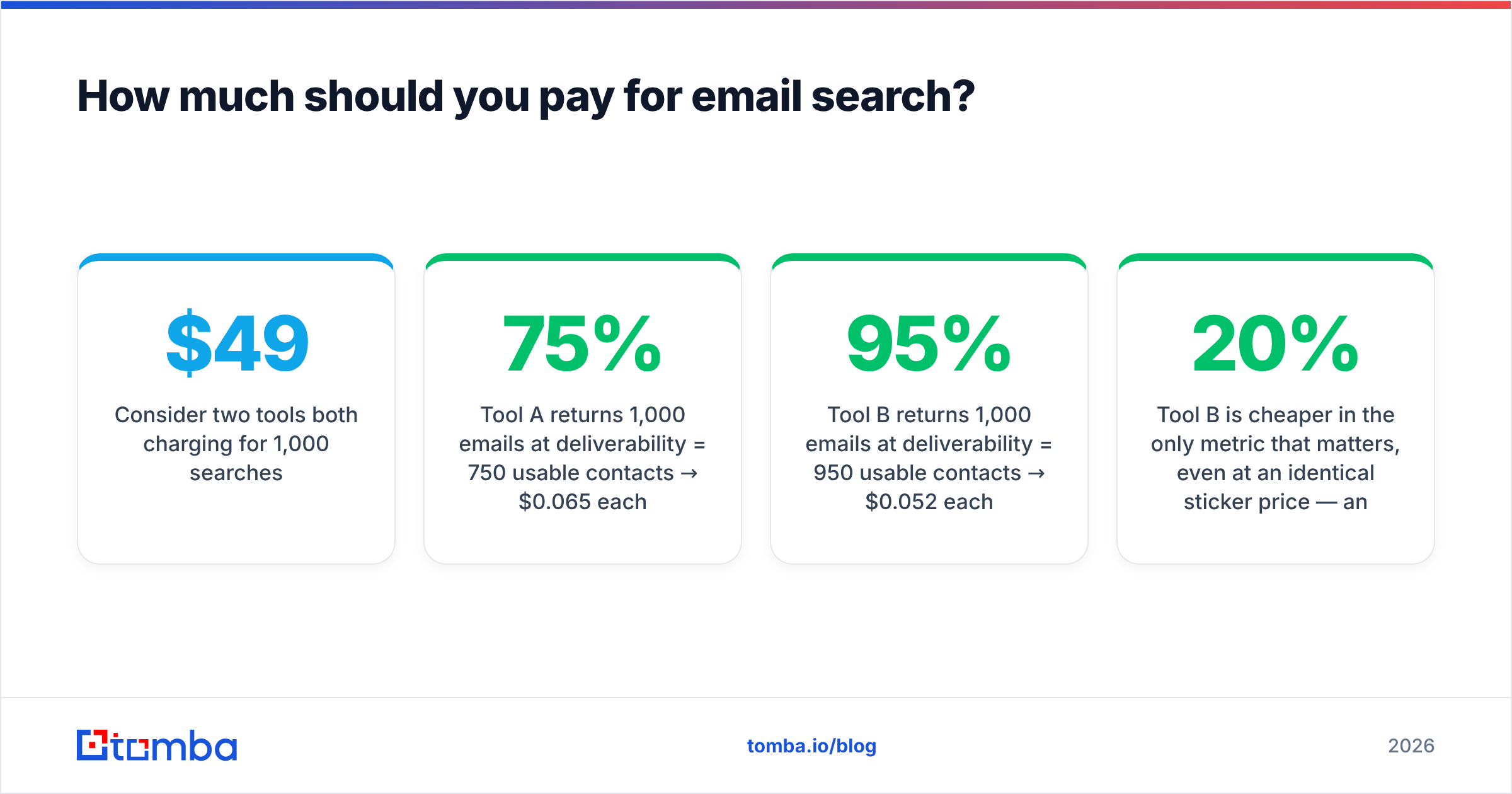
Consider two tools both charging $49/mo for 1,000 searches:
- Tool A returns 1,000 emails at 75% deliverability = 750 usable contacts → $0.065 each
- Tool B returns 1,000 emails at 95% deliverability = 950 usable contacts → $0.052 each
Tool B is 20% cheaper in the only metric that matters, even at an identical sticker price — and you save the downstream cost of bounces dragging your domain reputation down.
Most credible providers cluster around the same entry point. Tomba's pricing runs a free tier (25 searches/mo), Starter at $49/mo, Growth at $99/mo, Pro at $249/mo, and custom Enterprise — so you can validate accuracy on the free tier before spending a cent. When you scale, bulk email finding and the email finder API keep the per-lookup cost low for programmatic workflows.
A simple budgeting rule:
- Solo / early outbound: free tier or $49/mo is plenty.
- Small team, steady prospecting: $99/mo range with bulk processing.
- RevOps / enrichment at scale: API + enrichment plan, priced on volume.
Is a dedicated email finder better than LinkedIn or Google?#
Yes — for B2B email discovery at any real volume, a dedicated finder wins decisively on speed, accuracy, and compliance.
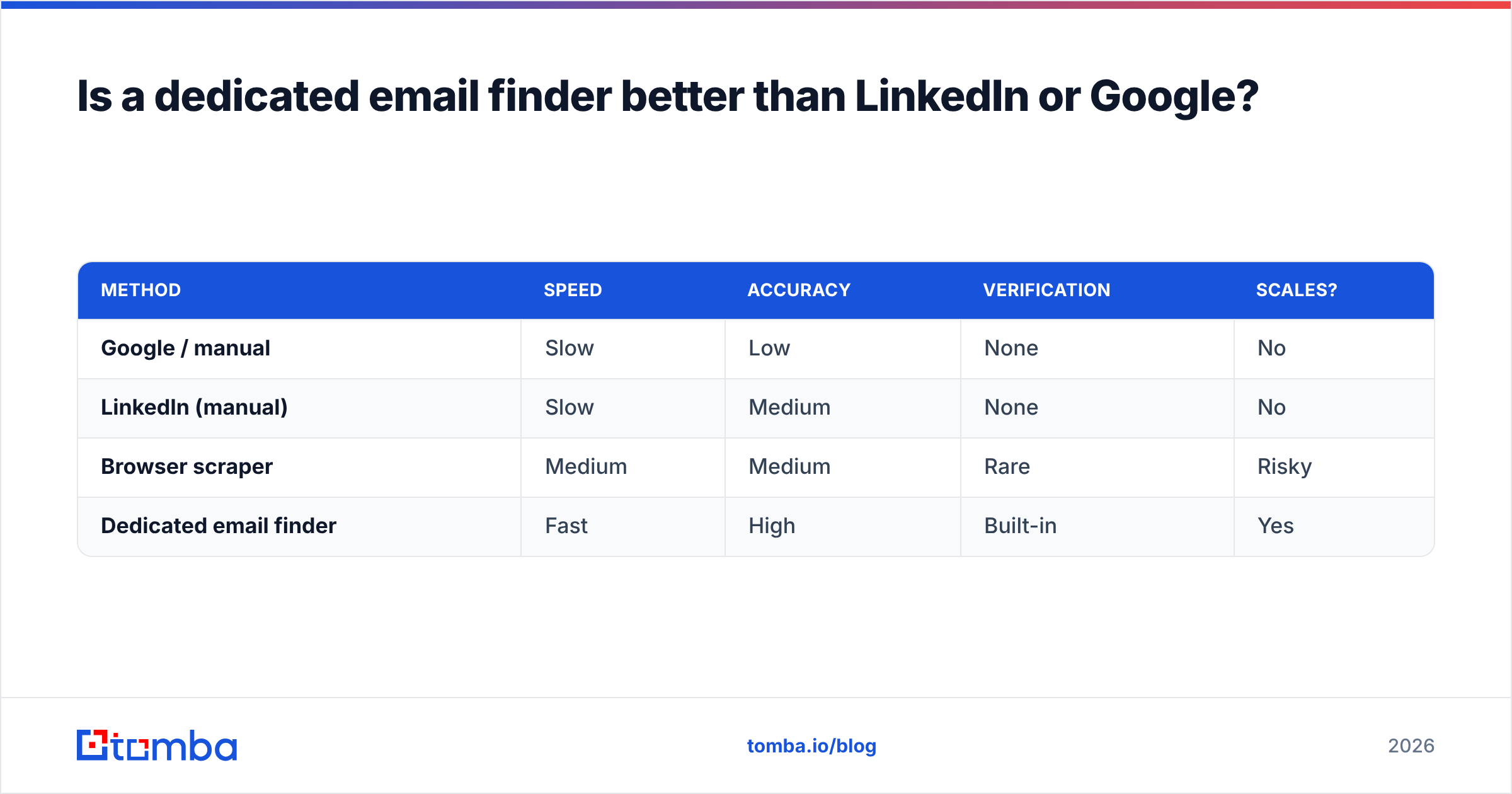
Manually piecing together emails from LinkedIn, company About pages, and Google dorking works for a handful of contacts. It collapses the moment you need 200 verified emails this week. Here's the trade-off laid out:
| Method | Speed | Accuracy | Verification | Scales? |
|---|---|---|---|---|
| Google / manual | Slow | Low | None | No |
| LinkedIn (manual) | Slow | Medium | None | No |
| Browser scraper | Medium | Medium | Rare | Risky |
| Dedicated email finder | Fast | High | Built-in | Yes |
A LinkedIn email finder bridges the two worlds: you work where your prospects already are, but get a verified work email instead of an unconfirmed guess. That beats raw scraping, which is brittle, often violates platform terms, and skips verification entirely.

The comparison view above reinforces the pattern: purpose-built finders consistently out-deliver manual and scraper-based methods because verification is baked into the workflow, not bolted on afterward.
What features should the best email search engine have?#
Beyond accuracy and price, these capabilities separate a tool you'll outgrow in a month from one that scales with you:
- Bulk processing — upload a CSV of names/domains and get verified emails back. Essential past the first 50 leads. Tomba's bulk tools handle thousands per job.
- Native integrations — push contacts straight into your CRM. Look for HubSpot, Salesforce, and Pipedrive connectors rather than manual exports.
- API access — for RevOps teams enriching records programmatically, an email finder API with predictable rate limits is the difference between a toy and infrastructure.
- Verification built in — finding and verifying in one pass saves a tool switch and a billing relationship.
- Enrichment — turn an email into a full profile (title, company, location) with data enrichment so reps personalize without manual research.
- Compliance posture — GDPR/CCPA-aware sourcing and clear opt-out handling. This protects your domain and your legal exposure.
Cross-reference any shortlist against independent reviews on G2 before you buy — vendor self-reported accuracy and real-user deliverability don't always match.
How do you test an email search engine before committing?#
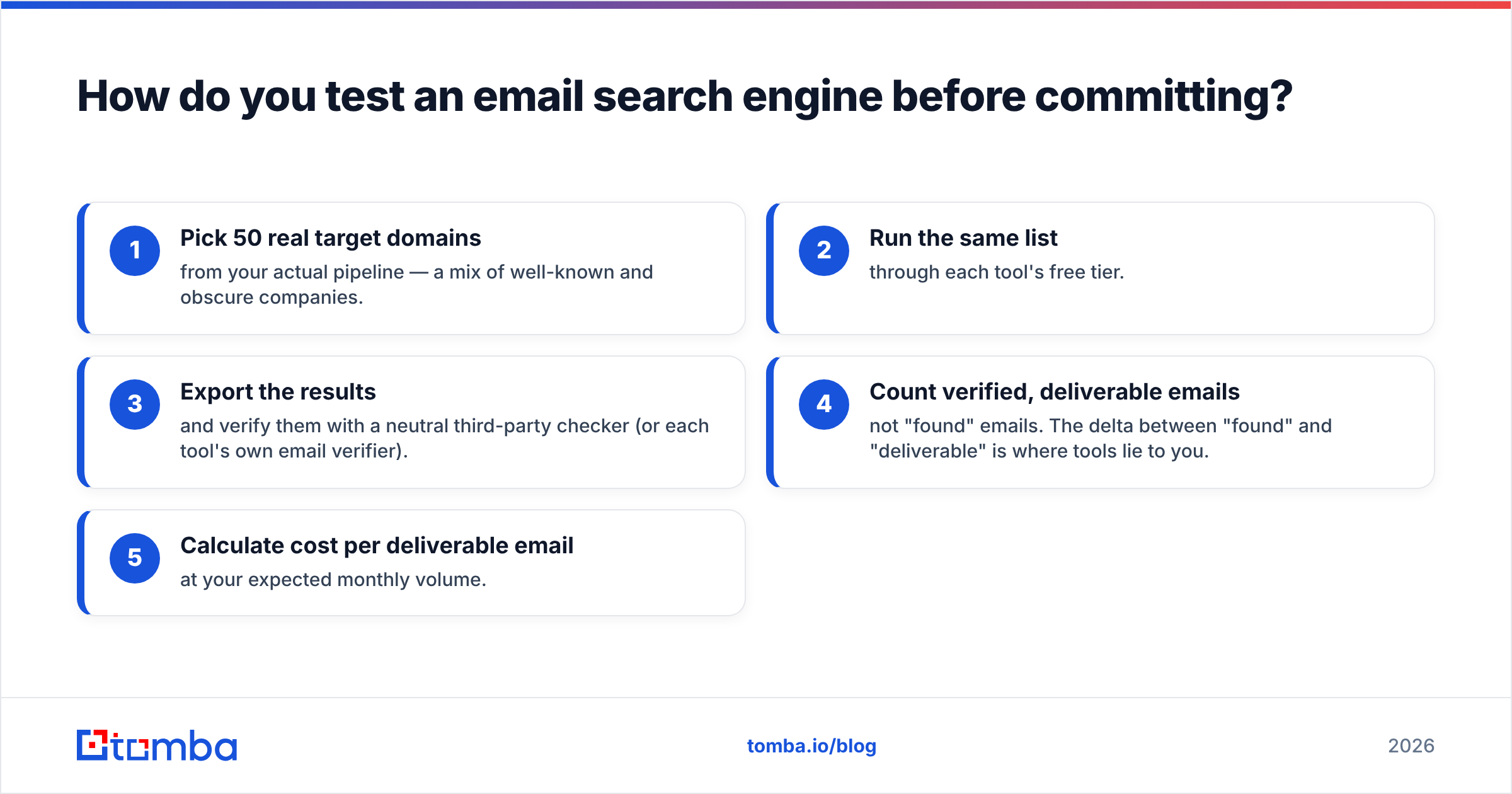
Run a 30-minute, apples-to-apples bake-off. Don't trust marketing numbers; trust your own ICP.
- Pick 50 real target domains from your actual pipeline — a mix of well-known and obscure companies.
- Run the same list through each tool's free tier.
- Export the results and verify them with a neutral third-party checker (or each tool's own email verifier).
- Count verified, deliverable emails — not "found" emails. The delta between "found" and "deliverable" is where tools lie to you.
- Calculate cost per deliverable email at your expected monthly volume.
Whichever tool returns the most deliverable contacts on your domains is, by definition, the best search engine for email addresses for your business. There's no universal winner — there's a winner for your ICP.
The verdict: which should you choose?#
For most B2B teams in 2026, Tomba is the strongest all-around pick: ~95% verified accuracy, a genuine free tier to test risk-free, transparent $49/mo entry pricing, and a full stack — finder, verifier, domain search, phone finder, enrichment, and API — under one roof. If you live inside Salesforce, Clearbit's enrichment is worth a look; if you need an all-in-one sequencer and can accept lower finder precision, Apollo earns a spot. But on the metric that actually drives revenue — verified, deliverable emails per dollar — a dedicated finder wins.
Start with Tomba Email Finder free: 25 searches a month, no card required. Run it against your own target list, verify the results, and let the deliverability numbers — not the marketing — make the call. When the accuracy holds up on your domains, scale into a paid plan and wire it into your CRM. Stop guessing emails; start finding the ones that actually land.
// get started
Find, verify and enrich your first contacts today
Start on the free plan with 25 searches a month, then scale when your team is ready.
Free plan · No credit card required · GDPR & CCPA
// about the author