Best Website for Lead Generation in 2026: 12 Top Picks
Looking for the best website for lead generation in 2026? We rank 12 platforms by data accuracy, price, and use case—so you stop guessing and start booking meetings.
Best Website for Lead Generation in 2026: 12 Top Picks
TL;DR
- The "best website for lead generation" depends on your motion: prospecting databases, intent platforms, and email-finding tools solve different problems.
- For most B2B teams, a precise contact-data source beats a giant-but-stale database—you pay per usable record, not per row.
- Tomba leads on email accuracy and verification at a fair price (free tier, then $49/mo), which is why it anchors our list.
- Buy on verified-data quality and per-lead cost, not raw database size or flashy AI features you won't use.
- We compare 12 platforms below across price, data type, and best-fit use case so you can shortlist in five minutes.
What counts as a "lead generation website"?#
A lead generation website is any platform that helps you find, enrich, or capture contacts you can sell to. That sounds broad because it is—three very different tools all wear the label, and picking the wrong category wastes budget.
Think of it like a kitchen. A prospecting database is your pantry (raw ingredients in bulk). An email finder is your knife (precision on a single target). An intent platform is the smoke alarm (it tells you when something's heating up). You don't replace a knife with a pantry.
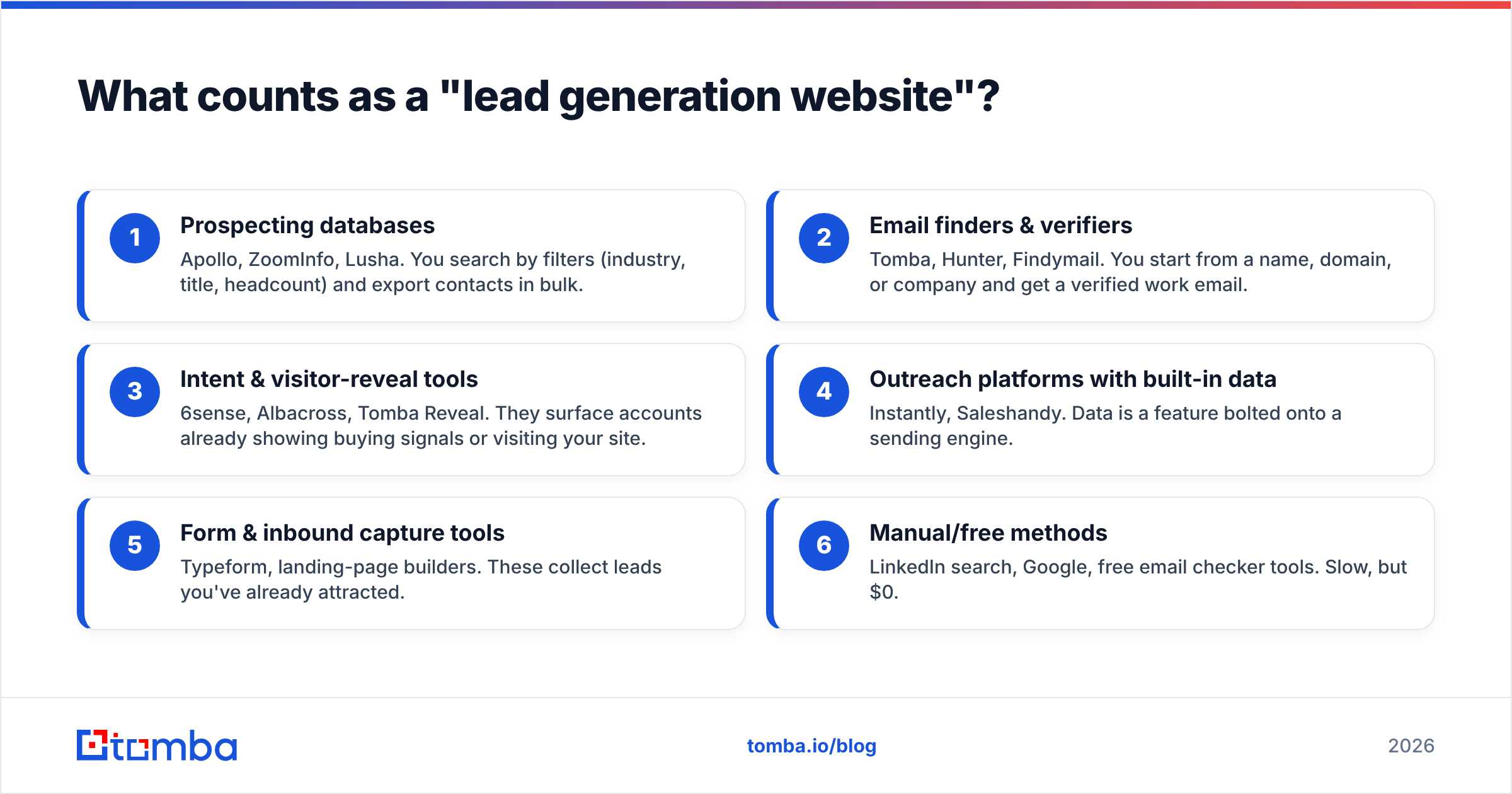
Here's how the categories break down:
- Prospecting databases — Apollo, ZoomInfo, Lusha. You search by filters (industry, title, headcount) and export contacts in bulk.
- Email finders & verifiers — Tomba, Hunter, Findymail. You start from a name, domain, or company and get a verified work email.
- Intent & visitor-reveal tools — 6sense, Albacross, Tomba Reveal. They surface accounts already showing buying signals or visiting your site.
- Outreach platforms with built-in data — Instantly, Saleshandy. Data is a feature bolted onto a sending engine.
- Form & inbound capture tools — Typeform, landing-page builders. These collect leads you've already attracted.
- Manual/free methods — LinkedIn search, Google, free email checker tools. Slow, but $0.
Most teams need one from category 1 or 2 plus one from category 3. Trying to make a single platform do everything is how you end up overpaying for seats you never log into.
What makes the best website for lead generation?#
The best website for lead generation is the one with the highest ratio of verified, reachable contacts to dollars spent. Database size is a vanity metric—a 200-million-record database is worthless if a third of those emails bounce.
Score any platform on these five factors:
- Data accuracy & freshness. Bounced emails wreck your sender reputation and burn your domain. Look for published accuracy rates and built-in verification.
- Verification depth. Can the tool handle catch-all domains, role accounts, and SMTP checks? A raw email without a verification status is a liability.
- Coverage for your ICP. A platform strong in US tech may be thin on EU manufacturing. Test on your own target list before committing.
- Pricing model. Per-credit, per-seat, or per-export changes the math enormously. Pay for usable leads, not access.
- Workflow fit. API, Chrome extension, CRM sync, and bulk processing determine whether the tool lives in your stack or gathers dust.
According to G2 category reviews, the platforms that retain customers longest aren't the biggest—they're the ones whose data holds up after the trial. That tracks with what we see: accuracy compounds, hype doesn't.
Which lead generation websites are best in 2026?#
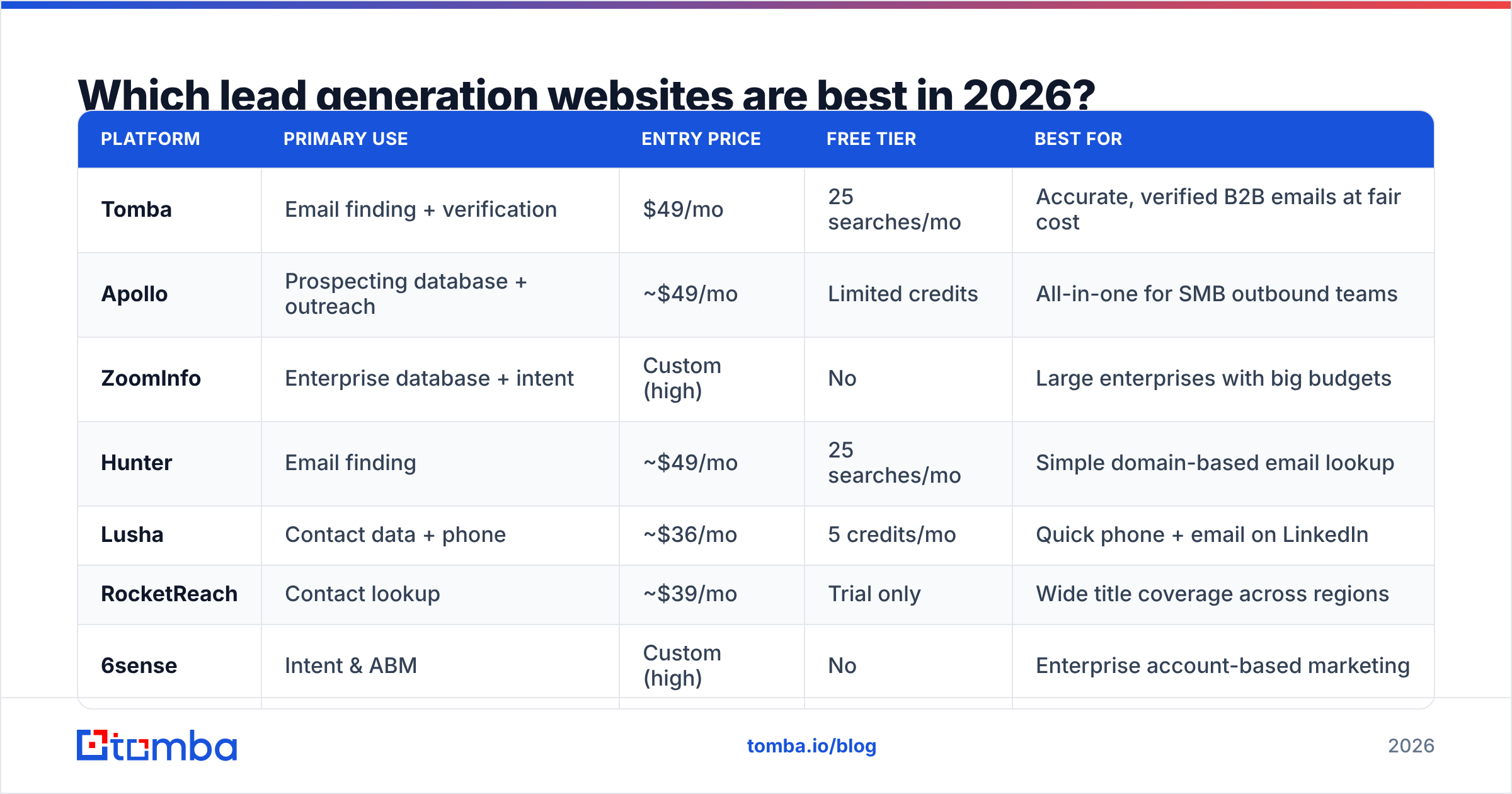
Below is a head-to-head of the 12 platforms we shortlist most often, grouped by what they're actually good at. Prices are entry paid tiers as of 2026 and move around, so confirm before buying.
| Platform | Primary use | Entry price | Free tier | Best for |
|---|---|---|---|---|
| Tomba | Email finding + verification | $49/mo | 25 searches/mo | Accurate, verified B2B emails at fair cost |
| Apollo | Prospecting database + outreach | ~$49/mo | Limited credits | All-in-one for SMB outbound teams |
| ZoomInfo | Enterprise database + intent | Custom (high) | No | Large enterprises with big budgets |
| Hunter | Email finding | ~$49/mo | 25 searches/mo | Simple domain-based email lookup |
| Lusha | Contact data + phone | ~$36/mo | 5 credits/mo | Quick phone + email on LinkedIn |
| RocketReach | Contact lookup | ~$39/mo | Trial only | Wide title coverage across regions |
| 6sense | Intent & ABM | Custom (high) | No | Enterprise account-based marketing |
| Instantly | Outreach + lead lists | ~$37/mo | No | High-volume cold email senders |
| Findymail | Email finding | ~$49/mo | Trial | Sales reps wanting verified emails |
| Clearbit | Enrichment | Custom | No | Real-time enrichment inside apps |
| Albacross | Visitor identification | ~$79/mo | Trial | Identifying anonymous site traffic |
| LinkedIn Sales Navigator | Prospect research | ~$99/mo | Trial | Manual research + social selling |
A few patterns jump out. Enterprise tools (ZoomInfo, 6sense) hide pricing because it's high and contract-locked—great if you have the budget and a clear ABM motion, overkill otherwise. The mid-market email finders cluster around $39–$49, so the differentiator there is accuracy and verification, not price. That's exactly where Tomba wins: a real free tier plus verified data, instead of charging you for emails you can't trust.
If you're replacing a specific incumbent, Tomba publishes side-by-side breakdowns like its Apollo alternative and RocketReach alternative pages worth skimming before you renew.
Is a free lead generation website worth it?#
Yes—for testing and low volume. No—as your only data source at scale.
Free tiers are how you validate coverage on your ICP without spending a dollar. Tomba's free plan gives you 25 searches a month, Hunter offers the same, and Lusha hands out a few credits. That's enough to run a real test: pull 20 contacts you can independently verify and check the bounce rate.
The honest tradeoff: free tiers cap volume and often strip verification, API access, and bulk export. Once you're sending hundreds of emails a week, the math flips—paying for verified data is cheaper than the deliverability damage from a bad list. One spam-trap hit can tank a domain you spent months warming.
A smart free stack for early-stage teams:
- Find emails with a free email-finder tier or the email permutator for guessing formats.
- Verify before sending using a free email checker so you don't blast unverified addresses.
- Check your sender health with an email reputation checker and an SPF lookup.
Free works as a starting point. Just don't confuse "free to access" with "free to send"—the cost of bad data shows up in your reply rate, not your invoice.
How does Tomba compare to Apollo, Hunter, and ZoomInfo?#
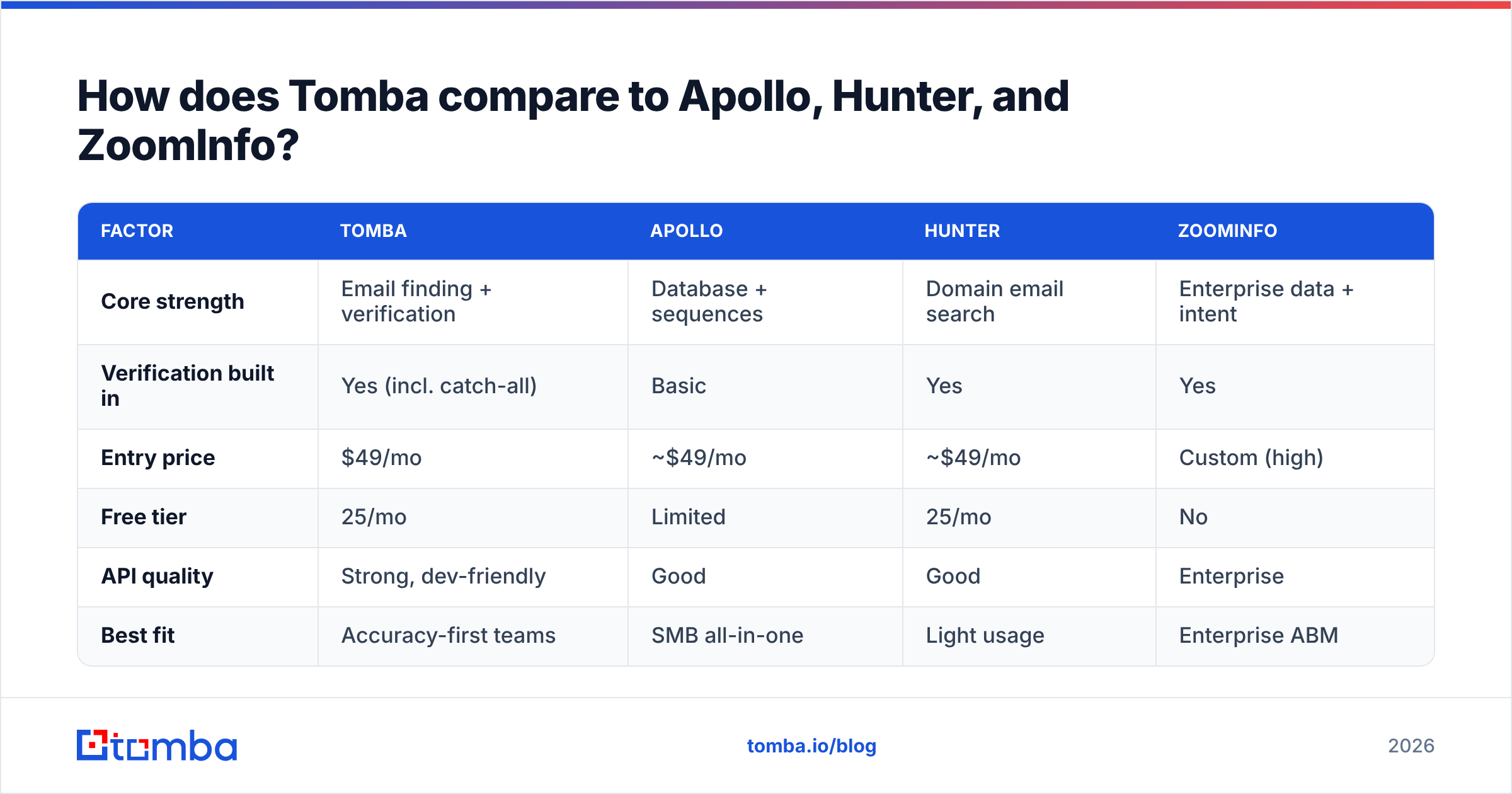
Tomba competes on the metric that actually matters for outbound: verified email accuracy at a price that doesn't require an enterprise contract. Apollo wins on all-in-one breadth, ZoomInfo on enterprise depth, and Hunter on simplicity—but each has a clear tradeoff.
| Factor | Tomba | Apollo | Hunter | ZoomInfo |
|---|---|---|---|---|
| Core strength | Email finding + verification | Database + sequences | Domain email search | Enterprise data + intent |
| Verification built in | Yes (incl. catch-all) | Basic | Yes | Yes |
| Entry price | $49/mo | ~$49/mo | ~$49/mo | Custom (high) |
| Free tier | 25/mo | Limited | 25/mo | No |
| API quality | Strong, dev-friendly | Good | Good | Enterprise |
| Best fit | Accuracy-first teams | SMB all-in-one | Light usage | Enterprise ABM |
Where Tomba pulls ahead is the verification layer. Its email verifier and dedicated catch-all verifier handle the messy cases—catch-all domains and role accounts—that quietly inflate other tools' bounce rates. Pair that with domain search to pull every contact at a target company, and you've got a focused, accurate pipeline without paying ZoomInfo money.
Apollo is the better pick if you want database, dialer, and sequencer in one login and can accept softer data quality. ZoomInfo makes sense when you're running enterprise ABM with a six-figure budget. Hunter is fine for occasional lookups. But if your KPI is "verified emails that land," accuracy-first is the right altitude.

What about phone numbers and intent data?#
Email is the backbone, but multichannel outreach needs phone and signal data too—and most teams underbuy here.
For phone, the spread in quality is wide. Lusha and ZoomInfo are known for direct dials; Tomba's phone finder and phone validator cover B2B numbers with validation so you're not burning dials on dead lines. Cold calling still converts when the number is right, per HubSpot sales research—but only when the data is accurate.
For intent and visitor data, the question is whether you can act on it. Albacross and 6sense identify accounts showing buying signals, and Tomba Reveal de-anonymizes the companies already visiting your site. That's some of the warmest pipeline you'll find—people researching you now—but it only pays off if your reps follow up fast. Buying intent data you can't operationalize is a common, expensive mistake.
The practical move: start with verified email + phone, add visitor reveal once your follow-up process is tight, and only layer in full ABM intent when you have an account-based motion to feed it.
How should I build my lead generation stack?#
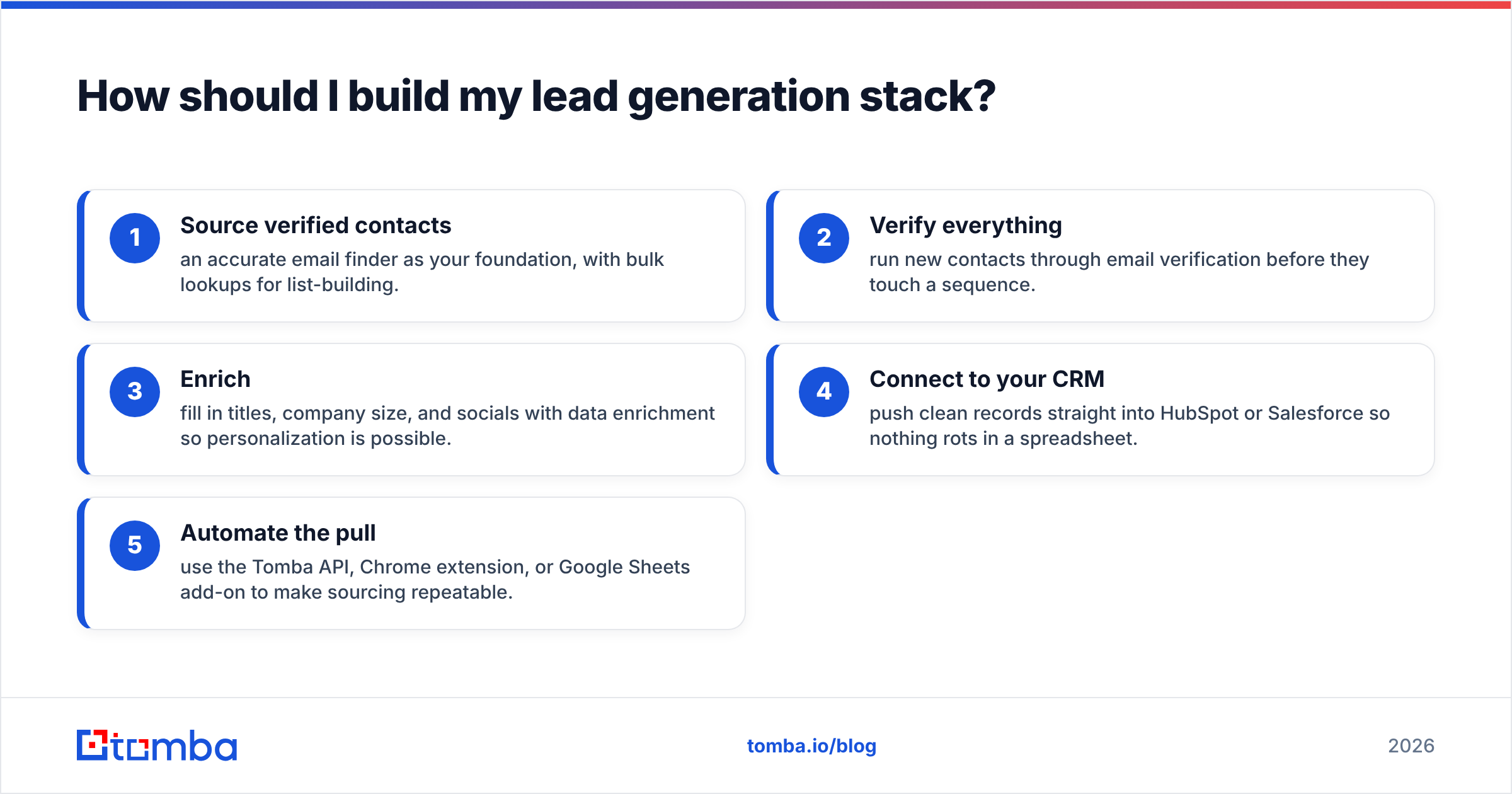
Match the tool to the stage, then connect them—don't buy a megasuite to avoid integrating two focused tools.
A lean, effective 2026 stack looks like this:
- Source verified contacts — an accurate email finder as your foundation, with bulk lookups for list-building.
- Verify everything — run new contacts through email verification before they touch a sequence.
- Enrich — fill in titles, company size, and socials with data enrichment so personalization is possible.
- Connect to your CRM — push clean records straight into HubSpot or Salesforce so nothing rots in a spreadsheet.
- Automate the pull — use the Tomba API, Chrome extension, or Google Sheets add-on to make sourcing repeatable.
This beats the all-in-one approach for most teams because you can swap any layer without re-platforming. If your email finder underperforms, you replace one component—not your entire workflow. Tools like Zapier and Make stitch the layers together with no code.
The throughline across every great stack: clean, verified data in, clean pipeline out. Garbage data corrupts every downstream step, so spend your first dollar where it compounds—on accuracy.
The bottom line#
There's no single "best website for lead generation," but there is a best starting point: an accurate, verified contact-data source you can trust at scale. Get that right and the rest of your stack—sequencer, CRM, dialer—actually works. Get it wrong and you're optimizing outreach to addresses that bounce.
If verified B2B emails are your priority, start with the Tomba Email Finder. The free tier gives you 25 searches to test accuracy on your own ICP, and paid plans start at $49/mo with verification, domain search, and a developer-friendly API baked in. Run a 20-contact test against your current source this week—let the bounce rate pick the winner.
// get started
Find, verify and enrich your first contacts today
Start on the free plan with 25 searches a month, then scale when your team is ready.
Free plan · No credit card required · GDPR & CCPA
// about the author