BigContacts Pricing, Reviews, Pros and Cons (2026 Guide)
A no-spin breakdown of BigContacts pricing, real user reviews, and the honest pros and cons — plus where it fits (and where it falls short) for B2B teams in 2026.
TL;DR
- BigContacts is an affordable, contact-centric CRM built for small teams that want simple pipeline tracking and email marketing in one place — not an enterprise sales engine.
- BigContacts pricing starts around $5–$15 per user/month on annual billing, with most teams landing on the Big or Bigger tiers; there is no perpetual free plan, only a free trial.
- Reviewers praise the gentle learning curve, contact history, and pricing; they complain about a dated interface, limited native integrations, and weak reporting.
- The CRM stores contacts well but does not find or verify them — you still need a dedicated data layer for clean, deliverable email addresses.
- If your bottleneck is finding accurate B2B contacts, pair any CRM with Tomba's email finder instead of paying for bloated all-in-one suites.
What is BigContacts?#
BigContacts is a contact-management CRM aimed at small businesses, solopreneurs, and lean sales teams. Think of it as a well-organized digital Rolodex with a pipeline bolted on: every contact gets a timeline of emails, notes, tasks, and files, and you move deals through stages without needing a RevOps team to configure it.
Owned by ProProfs, BigContacts leans into simplicity. It is not trying to be Salesforce. The pitch is "set it up in an afternoon, train your team in an hour, and stop losing track of follow-ups." For a five-person agency or a regional B2B distributor, that pitch is genuinely attractive.
But "simple CRM" is a crowded category in 2026, and the questions that matter are concrete: what does it cost, what do real users say, and where does it quietly fail? Let's go through each.
How much does BigContacts cost in 2026?#
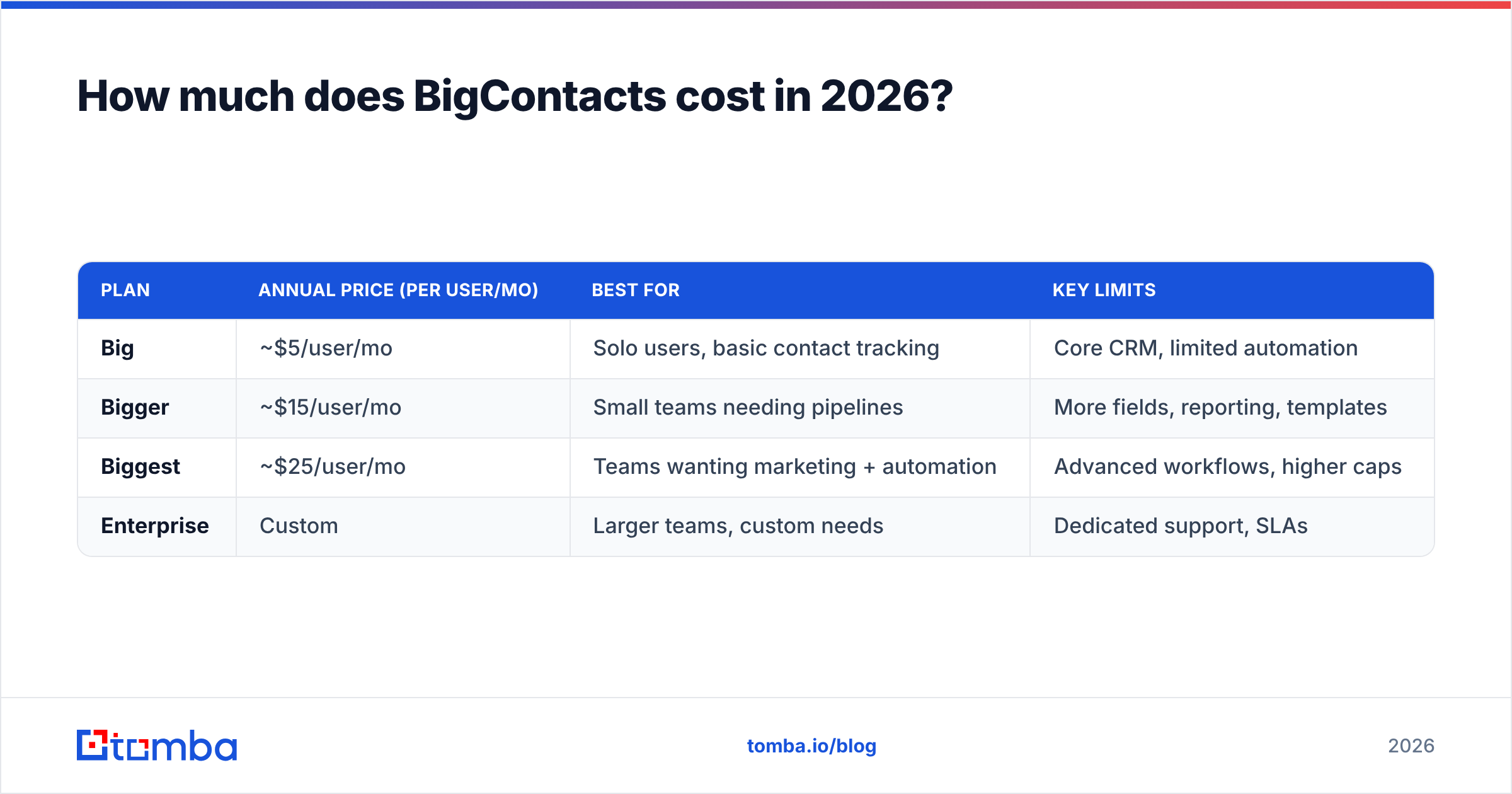
BigContacts pricing is tiered by feature depth and billed per user, with a meaningful discount for annual commitment. The plans below reflect the structure published on the official BigContacts site at the time of writing — always confirm current numbers before you buy, since CRM vendors adjust pricing frequently.
| Plan | Annual price (per user/mo) | Best for | Key limits |
|---|---|---|---|
| Big | ~$5/user/mo | Solo users, basic contact tracking | Core CRM, limited automation |
| Bigger | ~$15/user/mo | Small teams needing pipelines | More fields, reporting, templates |
| Biggest | ~$25/user/mo | Teams wanting marketing + automation | Advanced workflows, higher caps |
| Enterprise | Custom | Larger teams, custom needs | Dedicated support, SLAs |
A few things to flag on BigContacts pricing:
- No free-forever tier. You get a free trial (typically 15–30 days), not a permanent free plan. If a no-cost CRM is a hard requirement, this isn't it.
- Annual billing is where the value sits. Month-to-month rates are higher; the headline "$5" numbers assume you commit for a year.
- Per-user math adds up. A five-seat team on the Bigger tier is roughly $75/month — cheap versus HubSpot, but not free.
- Email marketing is bundled. Unlike many CRMs that charge extra for campaigns, BigContacts folds basic email marketing and automation into higher tiers.
Compared with enterprise platforms, this is budget-friendly. Compared with the genuinely free CRMs on the market, you are paying for the contact-timeline polish and the bundled email tools. For a fuller picture of how usage-based tools price by volume, our breakdown of Tomba pricing shows the credit model many data tools now use instead of flat per-seat fees.
What do BigContacts reviews actually say?#
Across G2 and Capterra, BigContacts holds solid but not spectacular ratings — generally in the 4.2–4.5 range. The sentiment is consistent enough to summarize honestly.
What reviewers like:
- Ease of use. This is the single most repeated compliment. Non-technical users get productive fast, and onboarding a new rep doesn't require a consultant.
- Contact history in one view. Every interaction — emails, calls, notes, attachments — lives on the contact record. Reps stop digging through inboxes.
- Price-to-value. For teams priced out of HubSpot's paid tiers, BigContacts delivers a usable CRM at a fraction of the cost.
- Responsive support. Several reviews call out helpful, human support during setup.
What reviewers criticize:
- Dated interface. The UI feels older than newer competitors. It works, but it doesn't delight.
- Limited native integrations. You'll lean on Zapier for many connections that rivals offer natively. If your stack is broad, this friction is real.
- Thin reporting. Forecasting and analytics are basic. Revenue-ops-minded teams outgrow it.
- Mobile app gaps. The mobile experience trails the desktop one.
The pattern is clear: BigContacts is loved for what it is (a simple, affordable contact CRM) and criticized for what it isn't (a deep, modern, deeply-integrated sales platform). That's a fair trade if you know which side of the line you're on.
What are the pros and cons of BigContacts?#
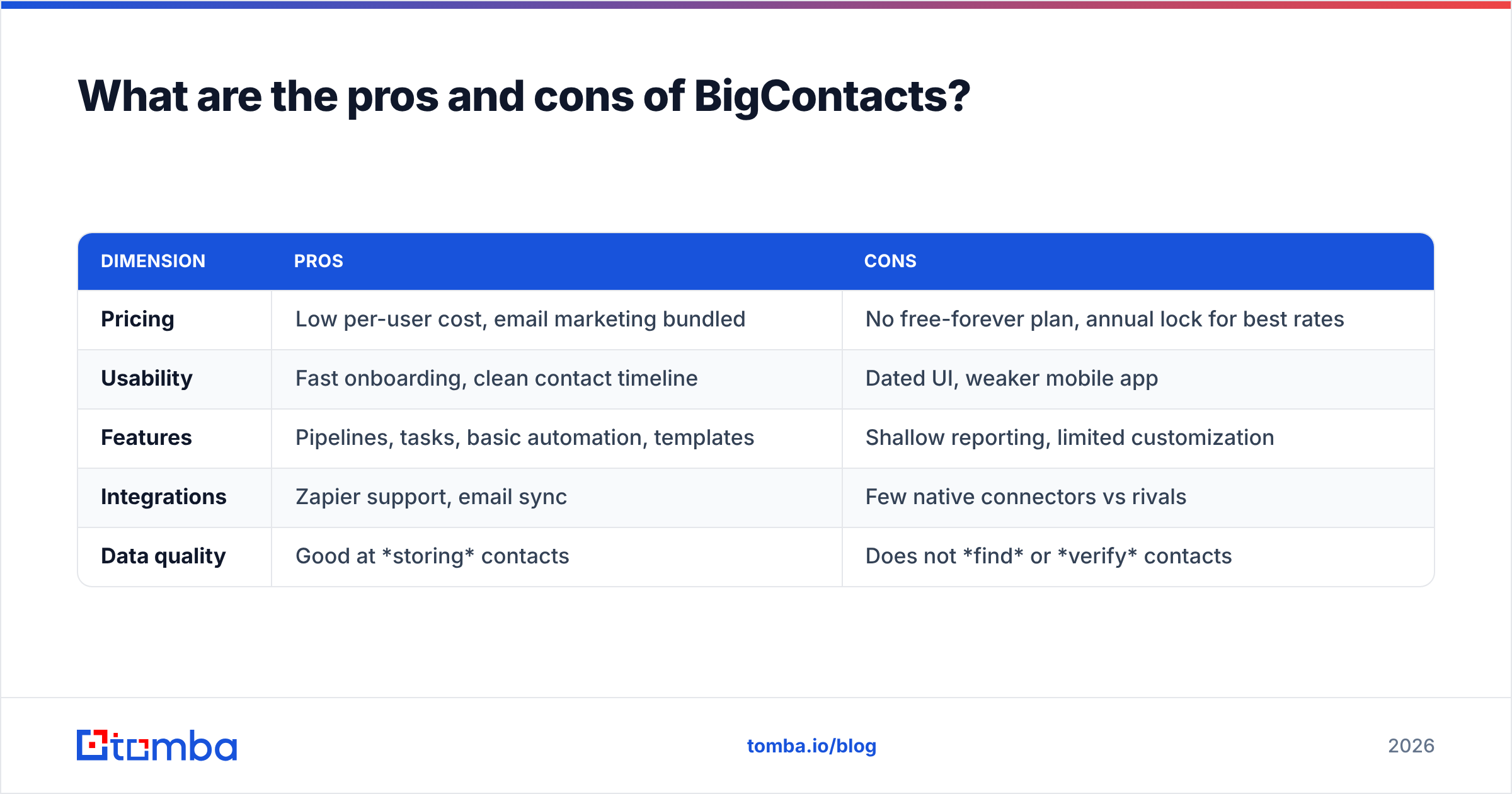
Here's the honest scorecard.
| Dimension | Pros | Cons |
|---|---|---|
| Pricing | Low per-user cost, email marketing bundled | No free-forever plan, annual lock for best rates |
| Usability | Fast onboarding, clean contact timeline | Dated UI, weaker mobile app |
| Features | Pipelines, tasks, basic automation, templates | Shallow reporting, limited customization |
| Integrations | Zapier support, email sync | Few native connectors vs rivals |
| Data quality | Good at storing contacts | Does not find or verify contacts |
That last row is the one most buyers underestimate. A CRM is a filing cabinet — an excellent one stores what you put in it, but it cannot improve the quality of the data you feed it. If half your contact records have guessed or stale email addresses, BigContacts will faithfully store those bad addresses and faithfully bounce your campaigns. The fix lives upstream, in your data enrichment and verification layer, not in the CRM itself.
Who should use BigContacts — and who shouldn't?#
Good fit:
- Small B2B teams (1–15 seats) that want one tool for contacts, pipeline, and light email marketing.
- Non-technical owners who value simplicity over configurability.
- Budget-conscious teams replacing spreadsheets, not replacing Salesforce.
Poor fit:
- High-volume outbound teams that need deep sequencing, dialer integration, and advanced analytics — look at tools in our Outreach alternative and Apollo alternative breakdowns instead.
- RevOps-heavy organizations that live in dashboards and custom objects.
- Anyone whose core problem is getting accurate contact data rather than storing it.
If you recognize your team in that second list, the CRM choice is secondary. Your real constraint is the quality and freshness of the contacts flowing in.
How does BigContacts compare to other CRMs and data tools?#
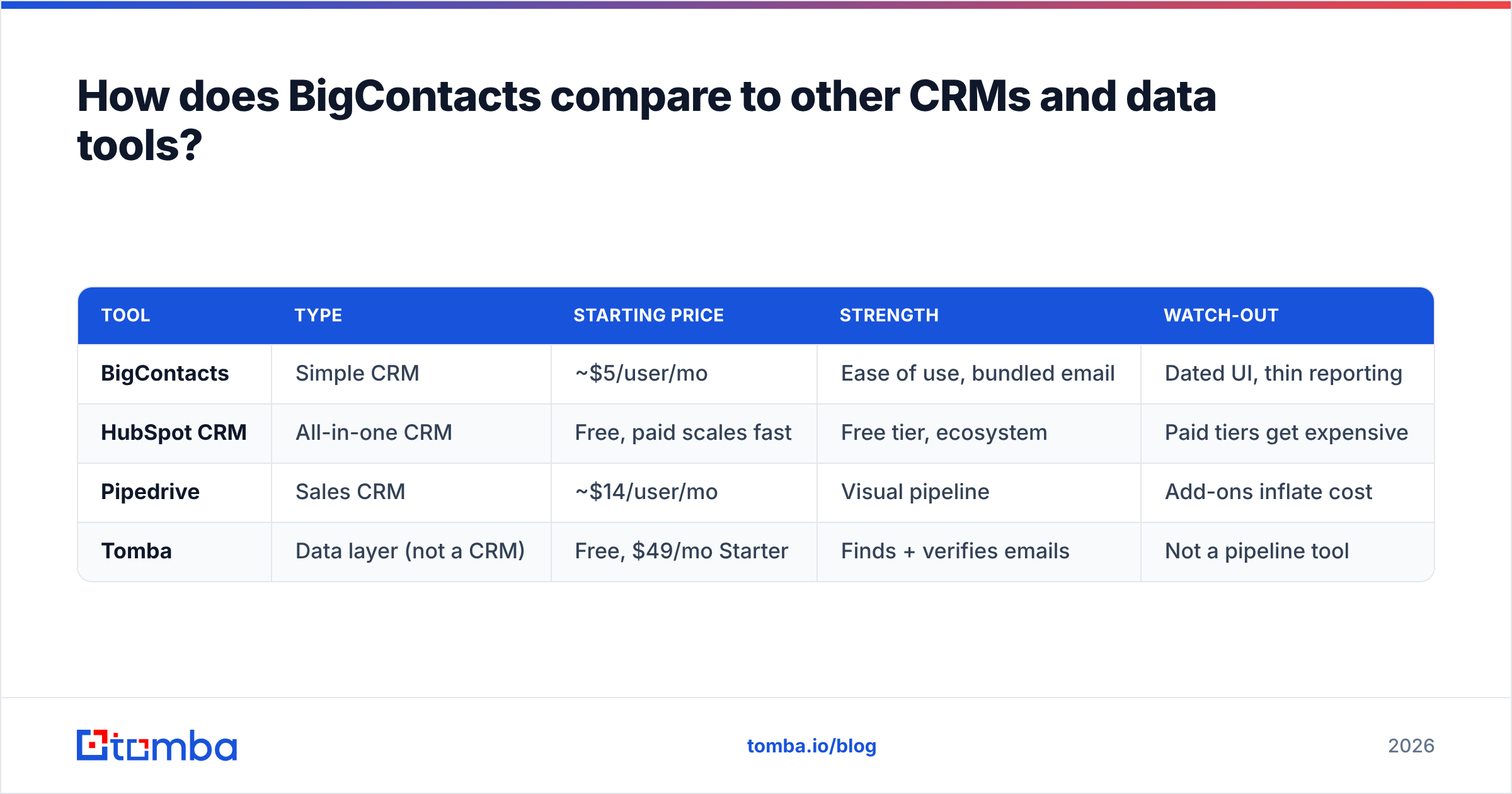
BigContacts competes in two overlapping arenas: simple CRMs and the broader "manage your pipeline" category. Here's a quick orientation.
| Tool | Type | Starting price | Strength | Watch-out |
|---|---|---|---|---|
| BigContacts | Simple CRM | ~$5/user/mo | Ease of use, bundled email | Dated UI, thin reporting |
| HubSpot CRM | All-in-one CRM | Free, paid scales fast | Free tier, ecosystem | Paid tiers get expensive |
| Pipedrive | Sales CRM | ~$14/user/mo | Visual pipeline | Add-ons inflate cost |
| Tomba | Data layer (not a CRM) | Free, $49/mo Starter | Finds + verifies emails | Not a pipeline tool |
This table makes the key distinction visible: a CRM and a contact-data tool are not substitutes — they are partners. BigContacts (or HubSpot, or Pipedrive) is where deals live. A tool like Tomba is where clean, verified contacts come from. You can read more about how a CRM fits into the wider go-to-market stack in our glossary.
If you do want BigContacts inside a HubSpot-centric workflow later, note that Tomba also offers a native HubSpot integration so enriched contacts flow straight into your records without manual CSV juggling.
Why your CRM choice matters less than your data quality#
Here's the uncomfortable truth that vendor comparison posts skip: the CRM you pick has a smaller impact on revenue than the quality of the data inside it.
Picture two teams. Team A runs a beautiful, expensive CRM stuffed with contacts scraped two years ago — wrong job titles, dead email addresses, no phone numbers. Team B runs plain old BigContacts but feeds it freshly verified emails and enriched company data every week. Team B wins, every quarter, because outreach lands in real inboxes and reps talk to real decision-makers.
This is why the "best CRM" debate is often a distraction. Before you agonize over BigContacts versus the next tool, ask: where are my contacts coming from, and how do I know the email addresses are deliverable? That's a job for a dedicated finder-and-verifier, not a CRM.
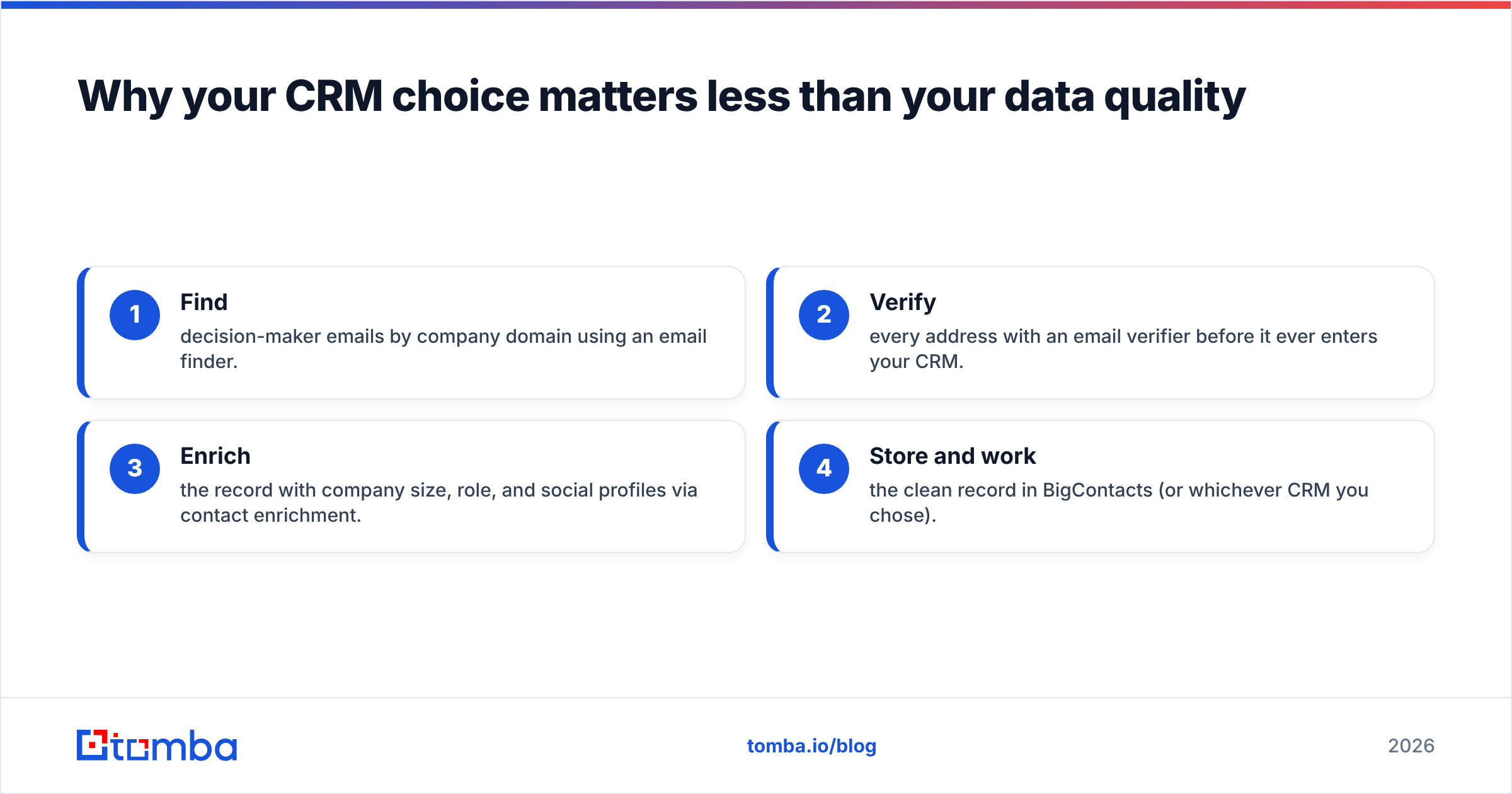
A practical workflow looks like this:
- Find decision-maker emails by company domain using an email finder.
- Verify every address with an email verifier before it ever enters your CRM.
- Enrich the record with company size, role, and social profiles via contact enrichment.
- Store and work the clean record in BigContacts (or whichever CRM you chose).
Do this and a $5/user CRM outperforms a $150/user CRM running on garbage data. The tool is the cheap part; the data discipline is the moat.
Is BigContacts worth it in 2026?#
Yes — for the right team. If you're a small B2B operation that wants an affordable, easy CRM with bundled email marketing, BigContacts pricing is hard to argue with and the reviews back up its core promise. You'll trade away a modern interface, deep integrations, and serious reporting, but if you don't need those, you won't miss them.
It is not worth it if you're a high-volume outbound team, a data-driven RevOps shop, or anyone whose actual bottleneck is sourcing accurate contacts. No CRM solves a data-quality problem, and paying more for a fancier filing cabinet won't fix bounced emails.
Score it this way: BigContacts is a solid B+ simple CRM. The grade that actually moves your pipeline is the quality of the contacts you put in it — and that's a separate purchase decision entirely.
The bottom line: fix the data, then pick the CRM#
BigContacts is a capable, budget-friendly contact CRM with real strengths and honest limitations. Choose it if simplicity and price beat depth and integrations for your team. But don't let the CRM debate distract you from the higher-leverage move.
Your reps can only sell to contacts they can actually reach. Before you funnel leads into any CRM, make sure each email address is real, current, and verified. Tomba's Email Finder locates professional emails by name, domain, or company and verifies them in the same step — so BigContacts (or any CRM) fills up with contacts that convert instead of bounce. Start free with 25 searches a month, then scale on the $49/mo Starter plan when your pipeline demands it. Pick the CRM you like; feed it data you can trust.
// get started
Find, verify and enrich your first contacts today
Start on the free plan with 25 searches a month, then scale when your team is ready.
Free plan · No credit card required · GDPR & CCPA
// about the author