Bigin by Zoho Pricing, Reviews, Pros and Cons (2026 Guide)
A no-fluff breakdown of Bigin by Zoho: real pricing tiers, what users actually rate it, and the honest pros and cons before you commit your pipeline to it.
TL;DR
- Bigin by Zoho is a pipeline-first CRM built for small teams and solopreneurs who find Zoho CRM (or HubSpot) too heavy. It starts free and tops out around $15/user/month.
- Pricing is its strongest card: the paid tiers (Express and Premier) undercut almost every mainstream CRM, and the free plan is genuinely usable for one person.
- Reviews are strong — roughly 4.6–4.7 stars on G2 and Capterra — with praise for ease of setup and value, and complaints about reporting depth, integration gaps, and support response times.
- Pros: fast onboarding, clean mobile app, multiple pipelines, native telephony and email. Cons: thin automation on lower tiers, limited customization vs. full Zoho CRM, and a ceiling you can hit as you scale.
- The data gap: Bigin manages deals well but doesn't find contact data. Pair it with an email finder so your pipeline starts with real, reachable contacts instead of blanks.
What is Bigin by Zoho?#
Bigin is the "starter CRM" in the Zoho family — think of it as the bicycle to Zoho CRM's delivery truck. It's designed for businesses that have outgrown spreadsheets but don't want the configuration overhead of an enterprise CRM. The whole product is organized around pipelines: visual, drag-and-drop stages where each deal moves left to right until it closes.
Zoho launched Bigin to win the segment that HubSpot Starter and Pipedrive fight over — micro-businesses, freelancers, agencies, and small sales teams of 1–10 people. The pitch is simple: a working CRM in under 30 minutes, on mobile or desktop, for the price of a couple of coffees per user.
If you're evaluating Bigin pricing, reviews, pros and cons before migrating your contacts, this guide gives you the honest version — including where it quietly falls short.
How much does Bigin cost in 2026?#
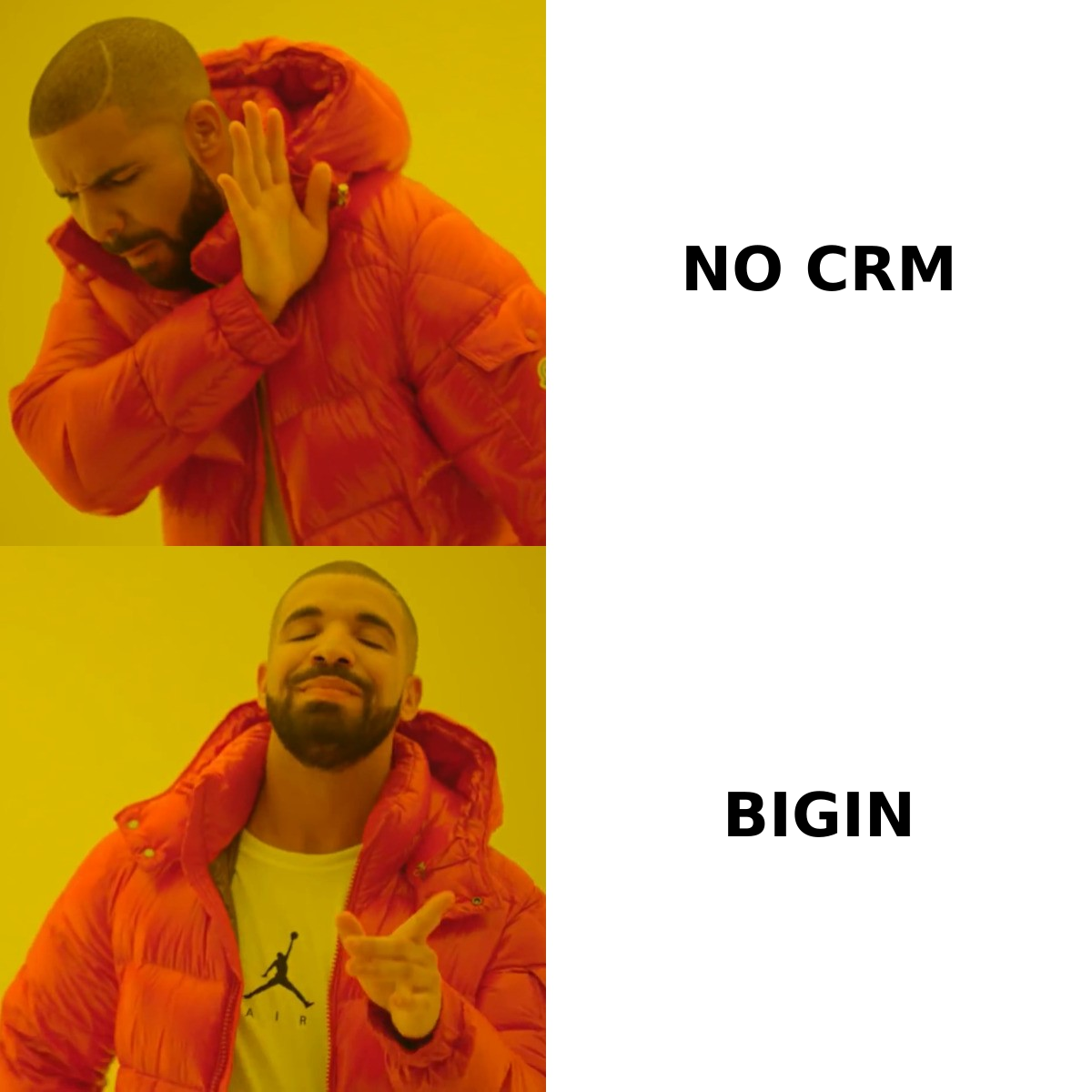
Bigin keeps its pricing deliberately flat: a free plan plus two paid tiers, billed per user. The headline is that even the top tier costs less than most competitors' entry tier. Pricing below is the standard annual-billing rate; monthly billing runs higher, and exact numbers should always be confirmed on the official Bigin pricing page.
| Plan | Price (annual) | Best for | Key limits |
|---|---|---|---|
| Free | $0 | One solo user | 1 pipeline, 500 records, single user |
| Express | ~$9/user/mo | Small teams starting out | 5 pipelines, workflow automation, email |
| Premier | ~$15/user/mo | Teams needing automation + telephony | Unlimited pipelines, advanced workflows, BiginAI |
| Bigin 360 (bundle) | ~$21/user/mo | Teams wanting marketing + support add-ons | Bundled Zoho tools, higher record caps |
A few things stand out when you map this against the market:
- The free plan is real, not a trial. One user gets a working single-pipeline CRM indefinitely — rare at this price point.
- Express is the value sweet spot. Around $9/user/month buys multiple pipelines and basic automation, which is where most small teams live.
- Premier unlocks telephony and AI. Built-in calling and Zoho's AI assistant ("Bigin AI") appear here, closing the gap with pricier tools.
- There are no hidden seat minimums. Unlike some enterprise CRMs, you can buy a single Premier seat.
- Add-ons cost extra. Extra storage, additional record capacity, and the Bigin 360 marketing/support modules are billed on top.
The takeaway: on raw price-per-feature, Bigin is one of the cheapest credible CRMs you can buy in 2026.
What do Bigin reviews actually say?#
Bigin scores well — consistently in the 4.6 to 4.7 star range on both G2 and Capterra, across thousands of reviews. But star averages hide the texture, so here's what reviewers repeat.
What users love:
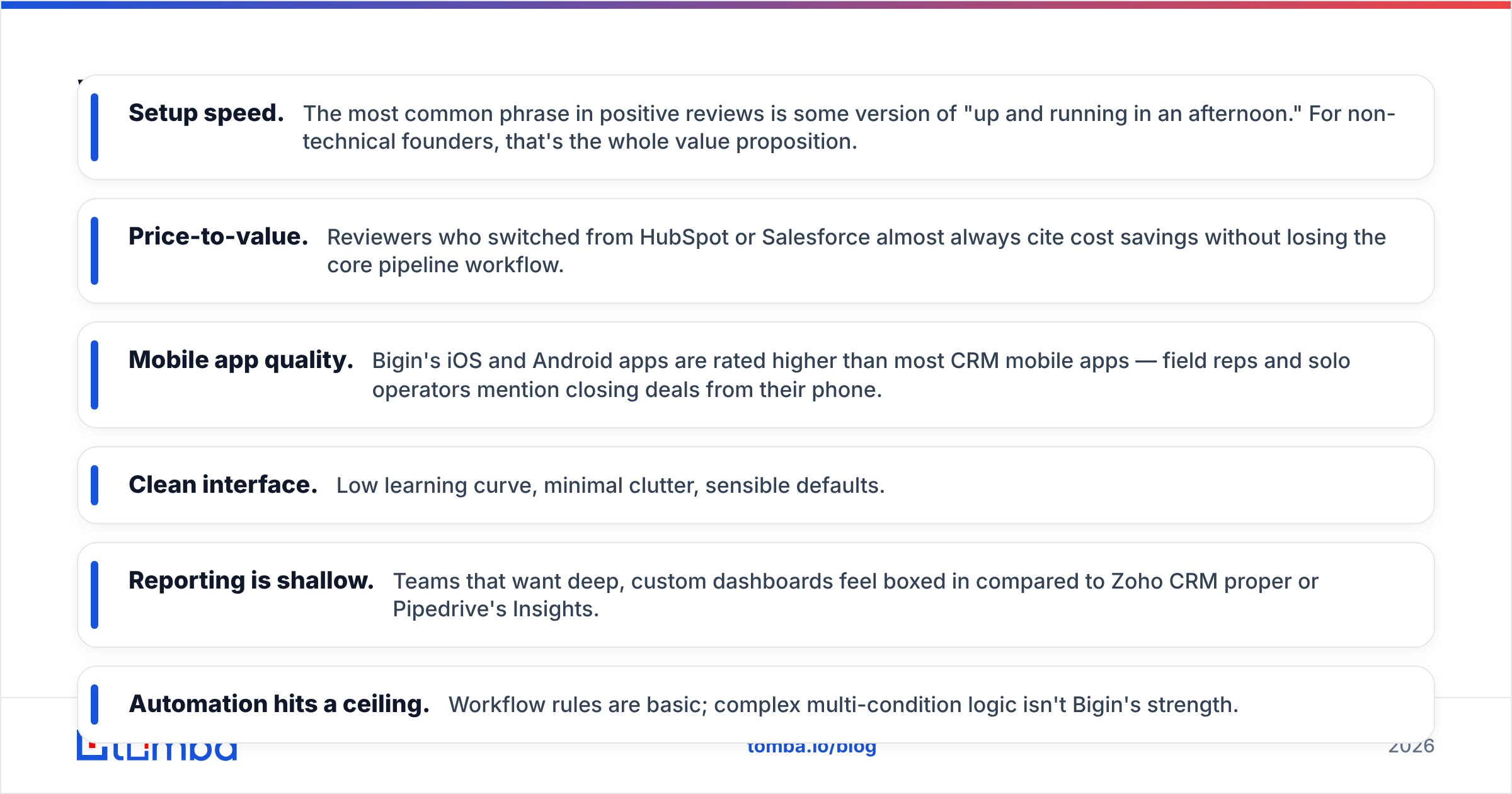
- Setup speed. The most common phrase in positive reviews is some version of "up and running in an afternoon." For non-technical founders, that's the whole value proposition.
- Price-to-value. Reviewers who switched from HubSpot or Salesforce almost always cite cost savings without losing the core pipeline workflow.
- Mobile app quality. Bigin's iOS and Android apps are rated higher than most CRM mobile apps — field reps and solo operators mention closing deals from their phone.
- Clean interface. Low learning curve, minimal clutter, sensible defaults.
What users complain about:
- Reporting is shallow. Teams that want deep, custom dashboards feel boxed in compared to Zoho CRM proper or Pipedrive's Insights.
- Automation hits a ceiling. Workflow rules are basic; complex multi-condition logic isn't Bigin's strength.
- Integration gaps. The native marketplace is smaller than HubSpot's or Salesforce's. Many users route around it with Zapier-style connectors.
- Support latency. Some reviewers report slow responses on lower tiers — a recurring footnote rather than a dealbreaker.
Net read: people who buy Bigin for what it is (a lightweight pipeline CRM) stay happy. People who expect it to grow into an enterprise platform get frustrated.
What are the pros and cons of Bigin?#
Here's the honest balance sheet. No CRM is universally "best" — the question is whether Bigin's trade-offs match your stage.
| Pros | Cons |
|---|---|
| Genuinely free single-user tier | Limited reporting/dashboard depth |
| Lowest paid pricing in its class | Automation thins out below Premier |
| Multiple pipelines + sub-pipelines | Smaller integration marketplace |
| Strong, well-rated mobile apps | Customization ceiling vs. full Zoho CRM |
| Built-in telephony & email (Premier) | Support can be slow on lower tiers |
| Fast, no-code onboarding | Scaling teams often outgrow it |
The strategic con most people miss: Bigin is a management tool, not an acquisition tool. It organizes the leads you already have. It does nothing to fill the pipeline with new, verified contacts — and an empty CRM is just a tidy spreadsheet. That's where a separate data layer matters, which we'll get to.
How does Bigin compare to other small-business CRMs?#
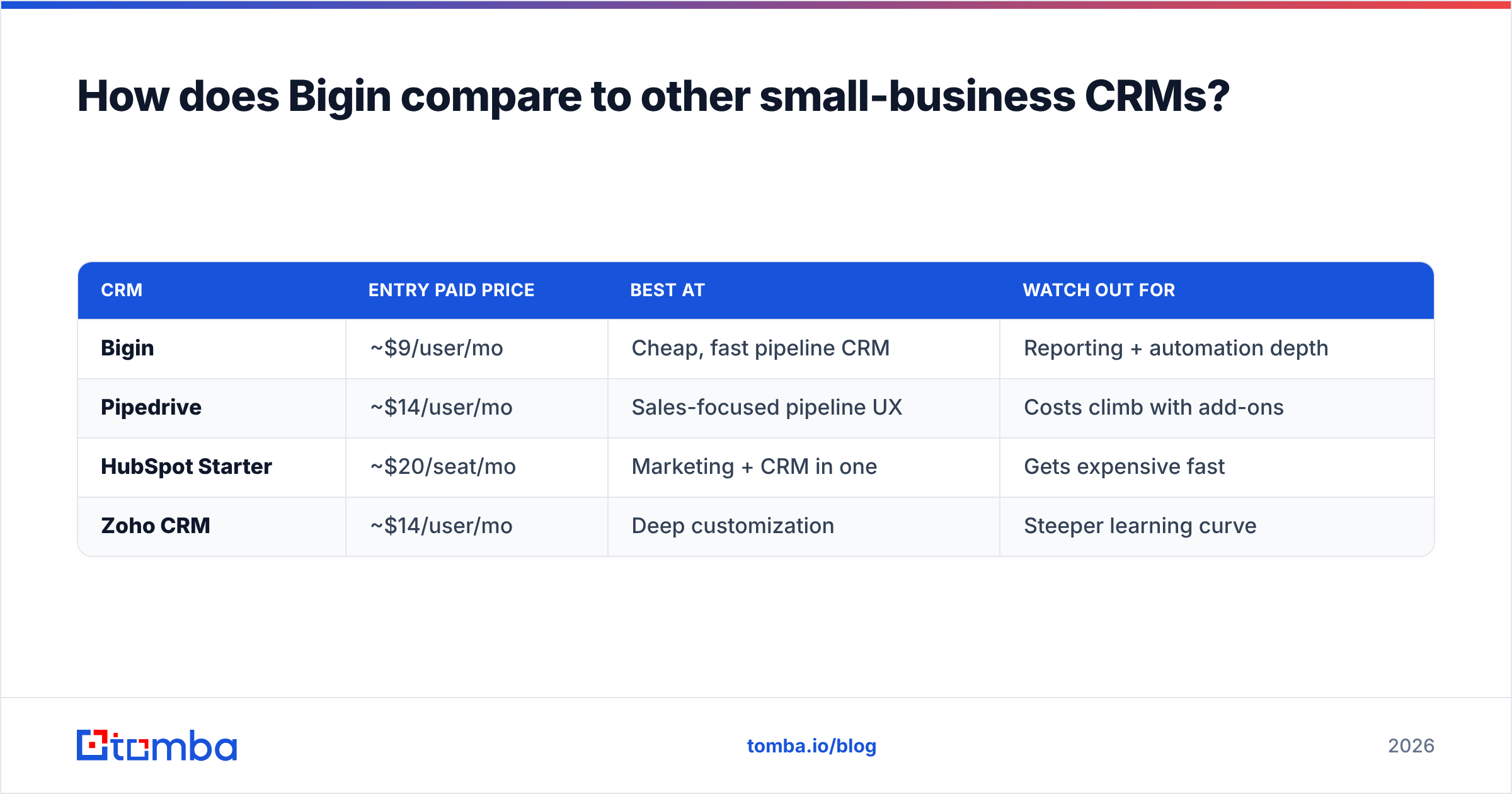
The three names that come up in every Bigin evaluation are Pipedrive, HubSpot, and Zoho CRM (its bigger sibling). Quick orientation:
| CRM | Entry paid price | Best at | Watch out for |
|---|---|---|---|
| Bigin | ~$9/user/mo | Cheap, fast pipeline CRM | Reporting + automation depth |
| Pipedrive | ~$14/user/mo | Sales-focused pipeline UX | Costs climb with add-ons |
| HubSpot Starter | ~$20/seat/mo | Marketing + CRM in one | Gets expensive fast |
| Zoho CRM | ~$14/user/mo | Deep customization | Steeper learning curve |
If you want the lowest cost and fastest start, Bigin wins. If you need heavy automation or marketing built in, you'll lean toward HubSpot. If you're already deep in the Zoho ecosystem and expect to scale customization, the upgrade path to Zoho CRM is frictionless — which is part of Bigin's quiet strategy: get you in cheap, grow you up later. If you're weighing alternatives more broadly, our Pipedrive integration notes and CRM comparisons are a useful next read.
Who should actually use Bigin?#
Bigin is the right call if you are:
- A solo founder, freelancer, or consultant who needs structure without overhead.
- A small team (1–10) that lives in pipelines and hates configuration.
- An existing Zoho user who wants a lighter front door than Zoho CRM.
- Budget-sensitive and unwilling to pay HubSpot/Salesforce prices for features you won't use.
Look elsewhere if you are:
- A team that needs deep custom reporting and BI dashboards.
- A marketing-led org wanting native email campaigns, landing pages, and lead scoring in one tool.
- A fast-scaling company that will need enterprise automation within 12 months — you'll migrate anyway, so consider starting on the platform you'll end on.
What's the one thing Bigin won't do for you?#
Bigin won't find your contacts' email addresses or phone numbers. This is the gap nobody mentions in pricing comparisons, and it's the difference between a CRM that works and one that sits empty.
Here's the everyday analogy: Bigin is a beautifully organized kitchen. But a kitchen with no ingredients doesn't feed anyone. Your "ingredients" are accurate contact data — work emails, direct dials, enriched company info — and Bigin assumes you'll bring those yourself.
That's exactly the job a dedicated data tool does. Before a lead ever lands in a Bigin pipeline stage, you need to:
- Find the right contact's email by name and company domain.
- Verify it's deliverable so you don't burn your sender reputation on bounces.
- Enrich the record with role, company size, and social profiles.
- Push it into Bigin clean and ready to work.
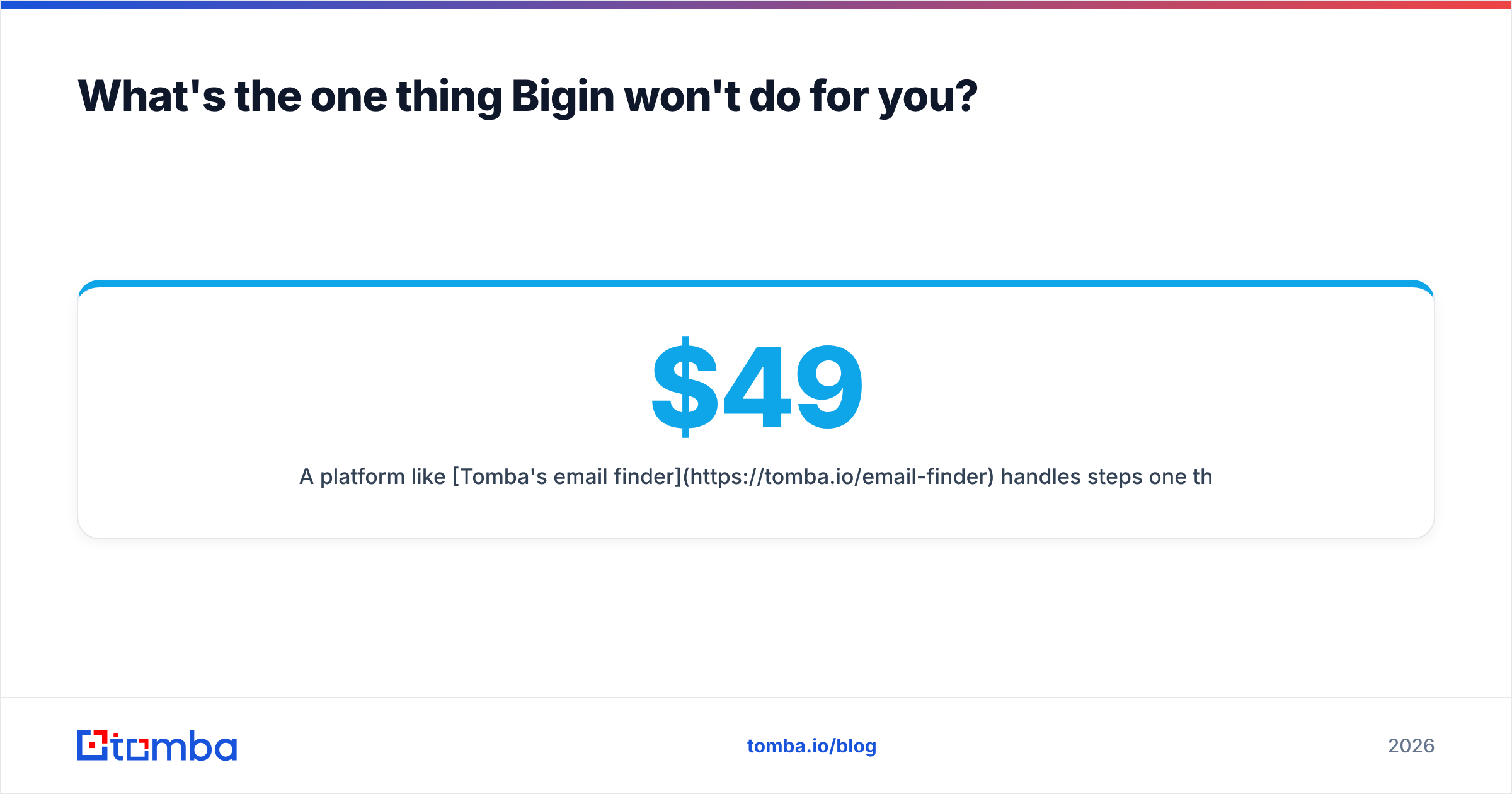
A platform like Tomba's email finder handles steps one through three, and an email verifier keeps your list deliverable. For pulling entire account lists, domain search returns every public email pattern for a company, and data enrichment fills the fields Bigin leaves blank. You can review Tomba's own pricing — a free tier, then Starter at $49/mo and Growth at $99/mo — to see how the data layer sits alongside a $9/user CRM without breaking the budget.
Is Bigin worth it in 2026?#
Yes — for the right buyer. If you're a small team that wants a clean, cheap, fast pipeline CRM and you're realistic about its reporting and automation ceiling, Bigin is one of the best-value tools on the market. The free plan lets you test it with zero risk, and the upgrade path to the wider Zoho ecosystem is there when you need it.
The honest caveat: Bigin is a great organizer of deals and a poor generator of them. Its low price reflects a narrow, well-executed scope. Treat it as the pipeline layer, not the whole revenue stack.
So pair it deliberately. Let Bigin run your stages and reminders, and let a dedicated data tool feed it. Start with the Tomba Email Finder to turn names and domains into verified, ready-to-work contacts — then drop them straight into your Bigin pipeline so every deal you manage started as a real, reachable person. A tidy CRM is only as valuable as the data inside it.
// get started
Find, verify and enrich your first contacts today
Start on the free plan with 25 searches a month, then scale when your team is ready.
Free plan · No credit card required · GDPR & CCPA
// about the author