BigLittle AI Pricing, Reviews, Pros and Cons (2026 Guide)
An honest, vendor-neutral breakdown of BigLittle AI pricing, real user reviews, and the pros and cons of its demand-conversion platform — plus where it fits in your 2026 GTM stack.
TL;DR
- BigLittle AI is a demand-conversion / RevOps platform that captures buying signals, deduplicates inbound, and routes leads to the right rep faster — it is not an email finder or a data provider.
- Pricing is quote-based (demo-gated, no public price card), which makes it hard to budget and pushes it toward mid-market and enterprise teams rather than small startups.
- Strengths: speed-to-lead, signal aggregation, and routing logic that sits on top of your CRM. Weaknesses: opaque pricing, a learning curve, and reliance on the quality of the contact data you already have.
- BigLittle improves how you act on records; it does not create accurate records. You still need a clean data layer underneath it.
- If your real bottleneck is missing or stale contact data, a verified email finder and data enrichment layer fixes more pipeline problems, faster and cheaper.
What is BigLittle AI?#
BigLittle AI positions itself as a demand-conversion platform for revenue teams. In plain terms: it watches the signals your buyers throw off — form fills, website visits, intent data, product activity — then matches them to the right account, removes duplicates, and pushes the lead to the correct rep before it goes cold. Think of it as the air-traffic controller for your inbound: it does not generate the planes, but it stops them from circling or crashing into each other.
That places BigLittle squarely in the revenue operations and GTM-orchestration category, next to lead-routing and signal tools rather than next to prospecting databases. Its pitch is that most B2B teams already have demand — they just lose it to slow follow-up, bad routing, and leaky handoffs between marketing and sales.
Before you weigh BigLittle AI pricing or reviews, it helps to separate the three jobs in any modern pipeline:
- Find the data — get accurate emails, phones, and firmographics for the people who matter.
- Enrich and verify — fill gaps, confirm records are deliverable, and keep them fresh.
- Act on the data — route, score, sequence, and respond fast.
BigLittle AI lives almost entirely in box three. It is an action layer. That distinction matters because no routing engine can rescue a lead whose email bounces or whose company field is blank.
What does BigLittle AI actually do?#
Here are the capabilities BigLittle and similar demand-conversion tools typically emphasize. Treat this as the feature surface to validate during a demo, not a guaranteed spec sheet:
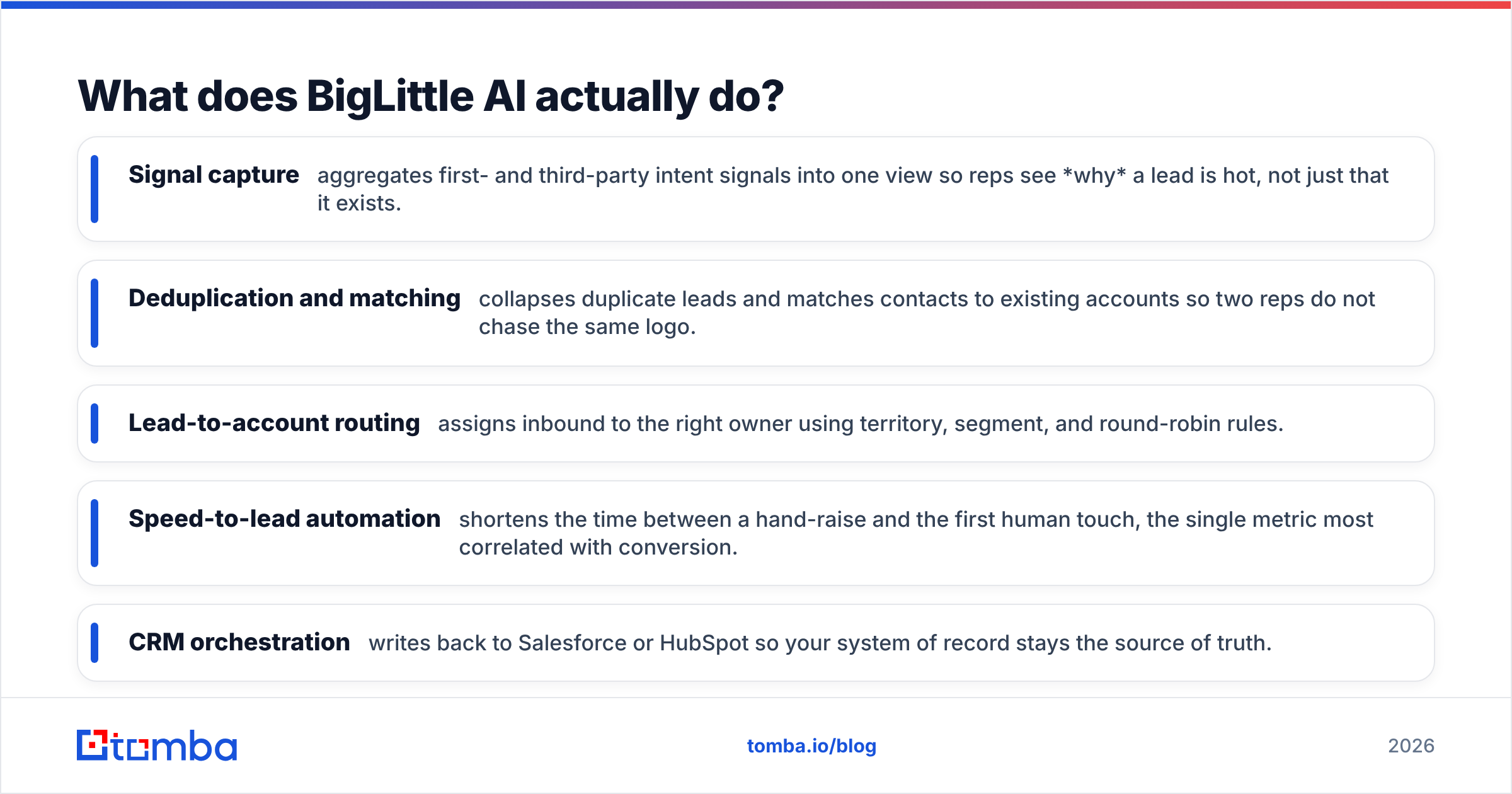
- Signal capture — aggregates first- and third-party intent signals into one view so reps see why a lead is hot, not just that it exists.
- Deduplication and matching — collapses duplicate leads and matches contacts to existing accounts so two reps do not chase the same logo.
- Lead-to-account routing — assigns inbound to the right owner using territory, segment, and round-robin rules.
- Speed-to-lead automation — shortens the time between a hand-raise and the first human touch, the single metric most correlated with conversion.
- CRM orchestration — writes back to Salesforce or HubSpot so your system of record stays the source of truth.
The value is real when your problem is orchestration. If marketing generates plenty of MQLs but sales complains about slow, messy, or misrouted handoffs, this is the kind of tool that helps.
How much does BigLittle AI cost?#
Short answer: BigLittle AI does not publish a public price card — pricing is custom and demo-gated. You book a call, they scope your CRM, seat count, and data volume, then quote you. This is standard for RevOps orchestration vendors, but it has consequences for buyers:
- You cannot self-serve or trial-and-scale the way you can with a transparent SaaS tool.
- Budgeting requires a sales cycle before you know if it is even affordable.
- Smaller teams often discover the entry point is built for mid-market and up.
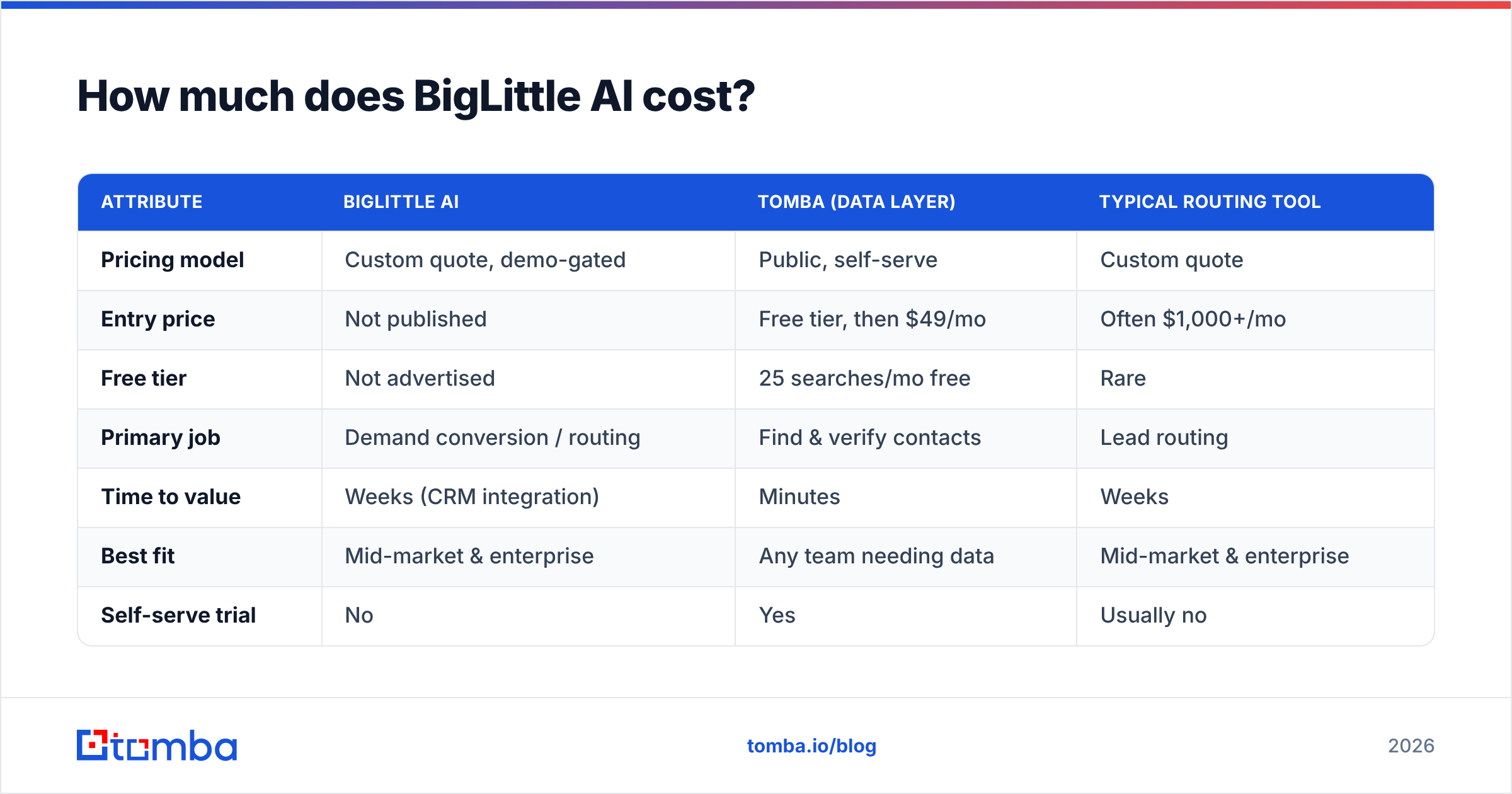
Because BigLittle's own pricing is quote-based, the table below compares it on the dimensions that actually drive total cost of ownership against two reference points: a transparent data layer (Tomba) and a typical routing competitor. Verify exact figures directly with each vendor.
| Attribute | BigLittle AI | Tomba (data layer) | Typical routing tool |
|---|---|---|---|
| Pricing model | Custom quote, demo-gated | Public, self-serve | Custom quote |
| Entry price | Not published | Free tier, then $49/mo | Often $1,000+/mo |
| Free tier | Not advertised | 25 searches/mo free | Rare |
| Primary job | Demand conversion / routing | Find & verify contacts | Lead routing |
| Time to value | Weeks (CRM integration) | Minutes | Weeks |
| Best fit | Mid-market & enterprise | Any team needing data | Mid-market & enterprise |
| Self-serve trial | No | Yes | Usually no |
The honest read: BigLittle and routing competitors compete on orchestration sophistication, and their custom pricing reflects an enterprise sales motion. Tomba sits in a different box — the data layer — with transparent, self-serve pricing starting free and moving to $49/mo. They are complements more than direct rivals, but if your budget is finite, knowing which layer your bottleneck lives in tells you where the money should go first.
What do BigLittle AI reviews say?#
Public review coverage for BigLittle AI is thinner than for incumbents like LeanData or Chili Piper, so weigh sentiment accordingly and check current listings on G2 and analyst notes from Gartner before committing. Synthesizing the themes that recur across demand-conversion tooling in this category:
What reviewers tend to praise:
- Faster, cleaner inbound handoffs once it is configured.
- A single pane of glass for buying signals that previously lived in five tools.
- Measurable lift in speed-to-lead, which downstream improves win rate.
What reviewers tend to flag:
- Setup and integration take real RevOps effort — it is not plug-and-play.
- Pricing opacity makes procurement and renewal harder to plan.
- Outcomes depend heavily on the quality of upstream data; garbage in, garbage routed.
That last point is the one most buyers underestimate. A routing engine is only as good as the records it routes.
What are the pros and cons of BigLittle AI?#
Here is the balanced ledger.
Pros
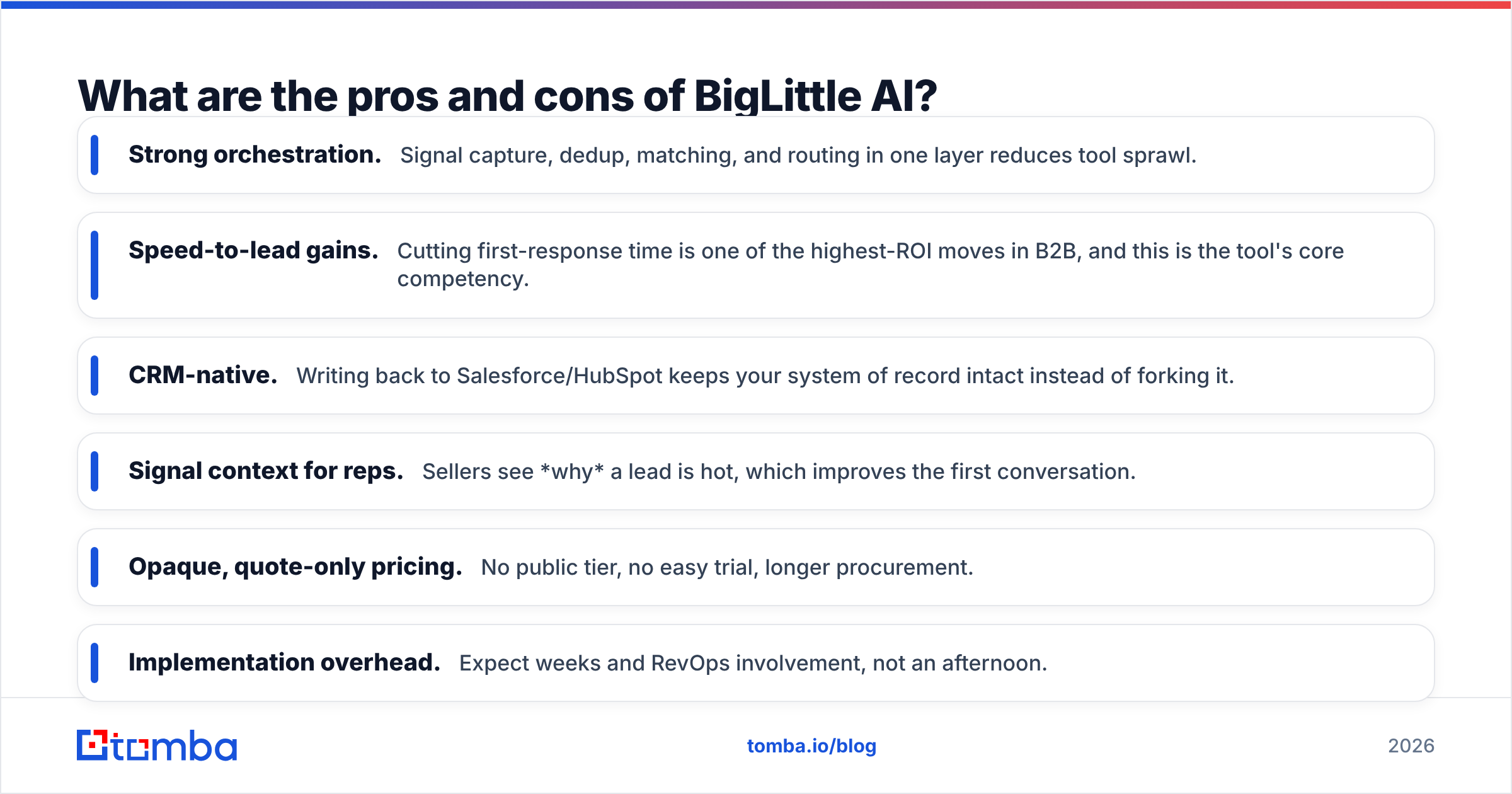
- Strong orchestration. Signal capture, dedup, matching, and routing in one layer reduces tool sprawl.
- Speed-to-lead gains. Cutting first-response time is one of the highest-ROI moves in B2B, and this is the tool's core competency.
- CRM-native. Writing back to Salesforce/HubSpot keeps your system of record intact instead of forking it.
- Signal context for reps. Sellers see why a lead is hot, which improves the first conversation.
Cons
- Opaque, quote-only pricing. No public tier, no easy trial, longer procurement.
- Implementation overhead. Expect weeks and RevOps involvement, not an afternoon.
- Data dependency. It acts on records; it cannot fix missing emails, dead phones, or blank firmographics.
- Mid-market-and-up bias. Small teams may find it heavier and pricier than their stage warrants.
Is BigLittle AI worth it, or do you need something else?#
It depends on which problem is actually costing you pipeline. Run this quick diagnostic:
- Do you have plenty of inbound but lose it to slow or messy handoffs? → An orchestration tool like BigLittle AI is a fair fit.
- Are your reps fast but constantly hitting bounced emails, wrong numbers, or unknown accounts? → Your bottleneck is data, not routing. Fix the data layer first.
- Are you early-stage with a tight budget? → Quote-based enterprise tooling is probably premature; invest in transparent, self-serve tools you can scale on demand.
The most common mistake is buying a sophisticated action layer to compensate for a weak data layer. Routing a record with no valid email faster just gets you to the bounce faster. Before — or alongside — any demand-conversion platform, make sure every contact you route is real, verified, and complete.
That is where a dedicated data stack earns its keep:
- Use an email verifier so reps never burn a touch on a dead address.
- Use domain search to find the right people at target accounts before they ever fill a form.
- Use data enrichment to fill the firmographic gaps that routing rules depend on.
BigLittle AI vs. fixing your data first: which comes first?#
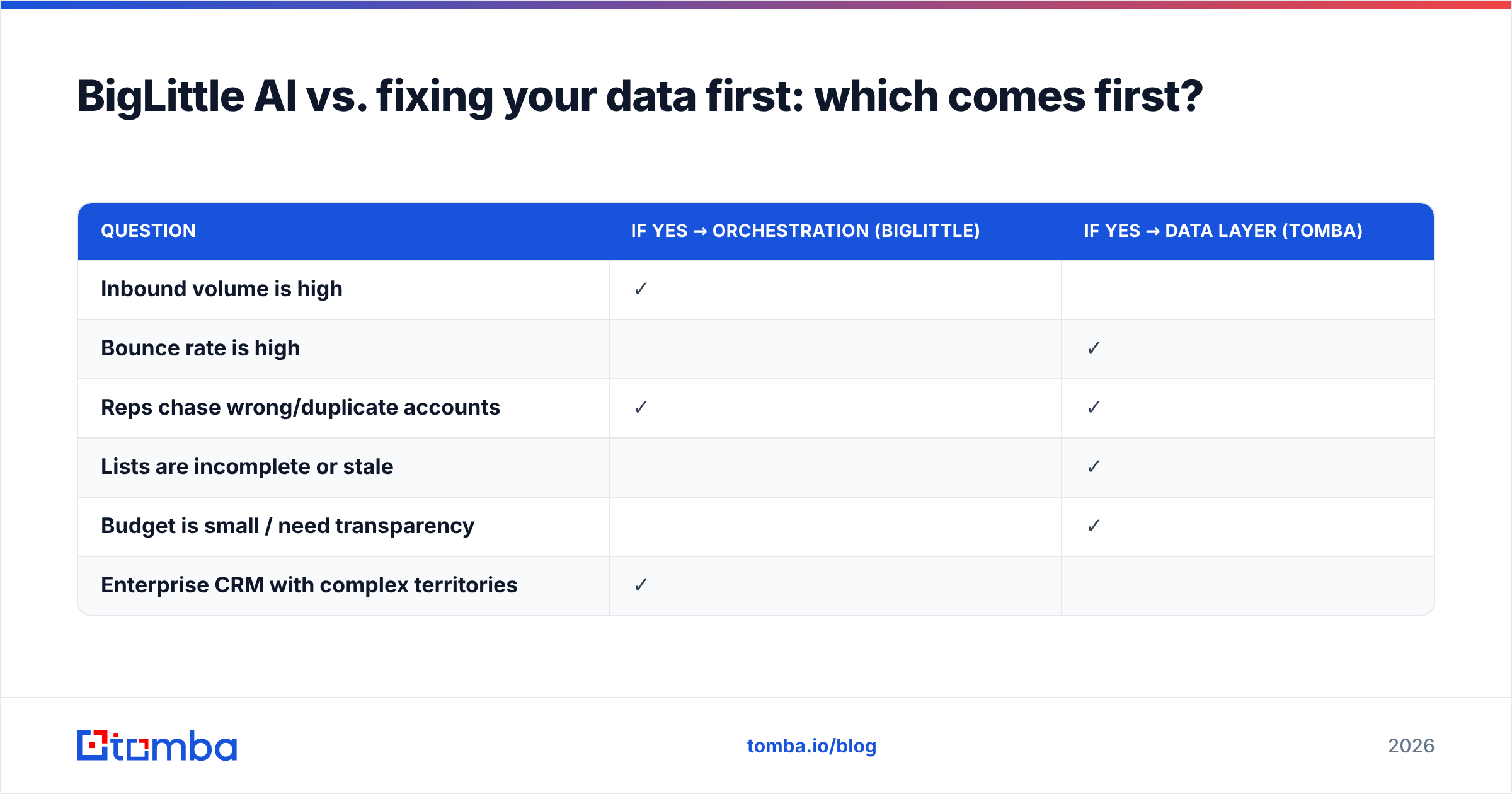
If you can only fund one layer this quarter, sequence it correctly. Orchestration multiplies the value of good data — and multiplies the waste from bad data. A 10x faster route on a list that is 30% invalid still wastes 30% of rep time, just sooner.
| Question | If yes → orchestration (BigLittle) | If yes → data layer (Tomba) |
|---|---|---|
| Inbound volume is high | ✓ | |
| Bounce rate is high | ✓ | |
| Reps chase wrong/duplicate accounts | ✓ | ✓ |
| Lists are incomplete or stale | ✓ | |
| Budget is small / need transparency | ✓ | |
| Enterprise CRM with complex territories | ✓ |
For most teams under a few hundred reps, the data layer delivers faster, cheaper, measurable returns — and it makes any future BigLittle deployment work better. The two are not either/or in the long run; they are a sequence.
The bottom line on BigLittle AI#
BigLittle AI is a credible demand-conversion and routing platform that can meaningfully lift speed-to-lead for mid-market and enterprise teams with high inbound volume and complex handoffs. Its weaknesses are opaque, quote-only pricing, real implementation overhead, and total dependence on the quality of the data flowing into it. It is an action layer, not a data source.
If your pipeline pain is orchestration, book the demo and pressure-test the pricing. If your pain is missing or unreliable contact data — which it is for most teams — solve that first, because no router can fix a bounced email.
Start with the data layer. Tomba's email finder gives you verified professional emails by name, company, or domain, backed by a free tier and transparent plans from $49/mo — so every lead you eventually route through any orchestration tool is real, deliverable, and complete. Try the Tomba Email Finder free, then layer on automation once your foundation is clean.
Ready to find emails that actually work?
Join 150,000+ professionals who stopped guessing and started sending. Free credits on signup — no credit card required.
Get the Tomba newsletter
Practical outbound tactics and product updates — once every two weeks.
About the author