BIMI DNS Record: How to Set Up Email Logos in 2026
A BIMI DNS record puts your verified brand logo in the inbox — but only if DMARC, DNS, and a VMC line up. Here's the full 2026 setup, with a copy-paste record and a provider support table.
BIMI DNS Record: How to Set Up Email Logos in 2026
A BIMI DNS record is a single TXT entry that tells inbox providers where to find your brand's logo so it shows up next to your messages. But the record itself is the easy part — it only works once DMARC is enforced and, for most providers, a Verified Mark Certificate is in place. This guide walks the full chain, in order, so you don't waste a day publishing a record that silently does nothing.
TL;DR#
- A BIMI DNS record is a
default._bimiTXT record that points to an SVG logo (and usually a VMC) so verified senders display a brand logo in the inbox. - DMARC at enforcement (
p=quarantineorp=reject) is a hard prerequisite. No DMARC, no BIMI — the record will be ignored. - Gmail, Apple Mail, and Yahoo require a Verified Mark Certificate (VMC) or a Common Mark Certificate (CMC) before they render your logo. The certificate costs money and takes weeks.
- The logo must be a specific SVG profile (SVG Tiny 1.2, Portable/Secure), square, and hosted over HTTPS.
- Budget 4–8 weeks end to end — most of that is DMARC enforcement runway and certificate vetting, not the DNS edit itself.
What is a BIMI DNS record?#
A BIMI DNS record is the public signpost that connects your domain to your brand logo. BIMI stands for Brand Indicators for Message Identification — think of it like the verified checkmark on a social profile, except it lives in your email and is anchored to DNS authentication instead of a platform's database.
When a mailbox provider receives a message from your domain, it checks three things in sequence: did the message pass authentication, is DMARC enforced, and is there a default._bimi TXT record telling it where the logo lives. If all three line up, your logo appears beside the sender name in the inbox list and the open view.
The record itself is short. A typical published BIMI DNS record looks like this:
default._bimi.yourdomain.com IN TXT "v=BIMI1; l=https://yourdomain.com/bimi/logo.svg; a=https://yourdomain.com/bimi/vmc.pem"Three tags do the work:
v=BIMI1— the version. Always first, always exactly this.l=— the HTTPS URL of your SVG logo file.a=— the HTTPS URL of your Verified Mark Certificate (the.pemfile). Optional in the spec, mandatory in practice for the big inbox providers.
That's the whole record. The reason BIMI feels hard is everything that has to be true before a provider will trust it.
Why does BIMI depend on DMARC and email authentication?#
Because BIMI is a reward for proving you are who you say you are. A logo in the inbox is a trust signal, and providers will not hand out trust signals to domains that can be spoofed. So BIMI sits on top of the authentication stack you should already have.
Here's the dependency chain, bottom to top:
- SPF authorizes which servers may send for your domain. Check yours with an SPF checker before you go further, and read the basics of an SPF record if you're starting cold.
- DKIM cryptographically signs each message so receivers can confirm it wasn't altered.
- DMARC ties SPF and DKIM to your visible From domain and tells receivers what to do with failures. This is the gate. BIMI requires DMARC at
p=quarantine(with a meaningful percentage) orp=reject. A policy ofp=nonedoes not qualify. - BIMI reads all of the above and, if satisfied, renders the logo.
If your DMARC is still at p=none, fixing that is the real project — and it improves your email deliverability and protects your sender reputation whether or not you ever turn on BIMI. The logo is the cherry; enforcement is the cake.
What do you need before publishing a BIMI DNS record?#
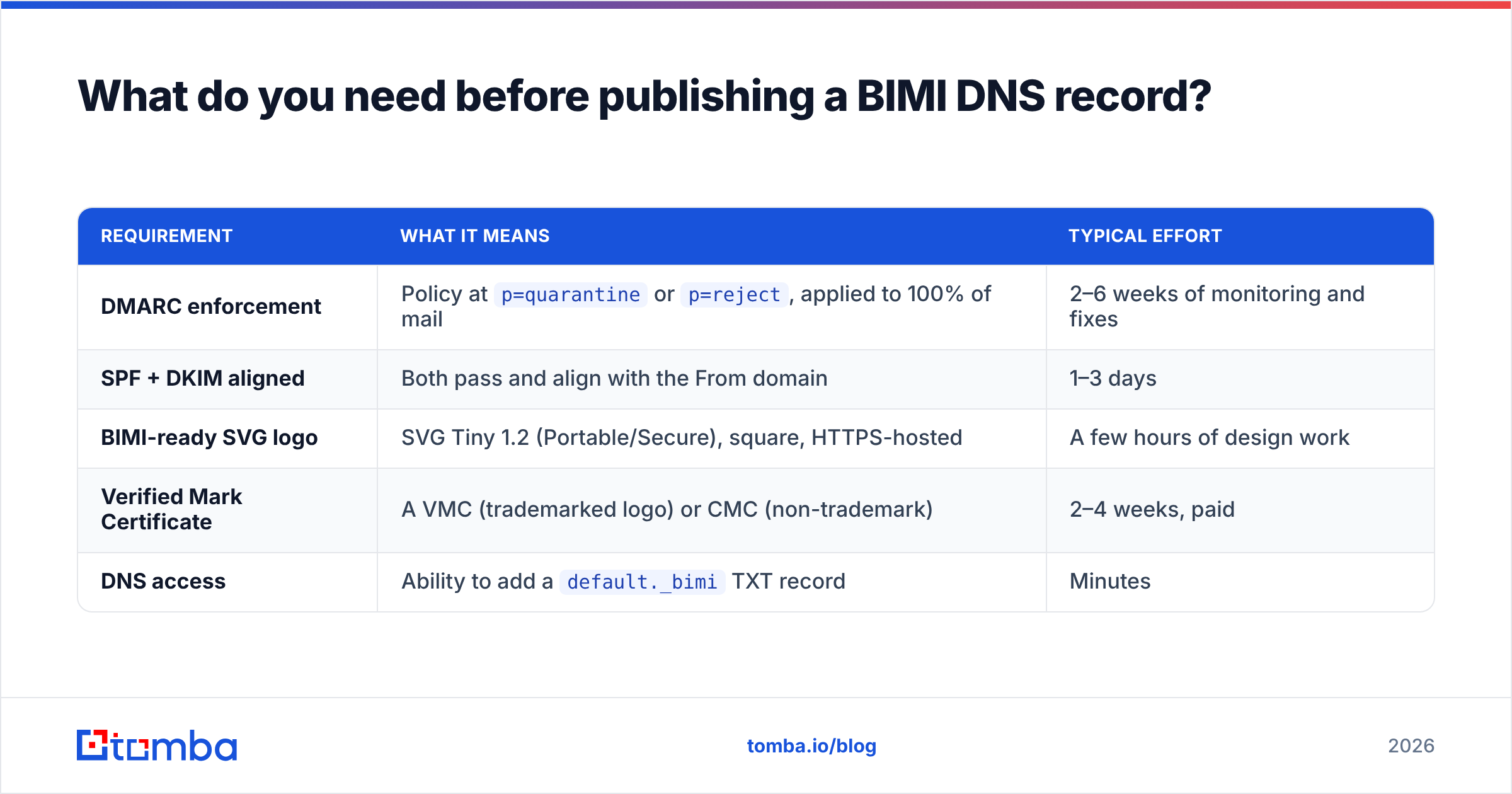
You need five things lined up. Skip any one and the logo simply won't show, with no error message to tell you why.
| Requirement | What it means | Typical effort |
|---|---|---|
| DMARC enforcement | Policy at p=quarantine or p=reject, applied to 100% of mail |
2–6 weeks of monitoring and fixes |
| SPF + DKIM aligned | Both pass and align with the From domain | 1–3 days |
| BIMI-ready SVG logo | SVG Tiny 1.2 (Portable/Secure), square, HTTPS-hosted | A few hours of design work |
| Verified Mark Certificate | A VMC (trademarked logo) or CMC (non-trademark) | 2–4 weeks, paid |
| DNS access | Ability to add a default._bimi TXT record |
Minutes |
The two slow items are DMARC enforcement and the certificate. Start both early. The DNS record at the end takes five minutes.
How do you create a BIMI-compliant logo file?#
Your logo has to be a very specific flavor of SVG, not just any vector file your designer exports. Inbox providers reject anything that doesn't match the SVG Tiny 1.2 Portable/Secure (SVG P/S) profile, and there are no second chances — a malformed file means a blank slot.
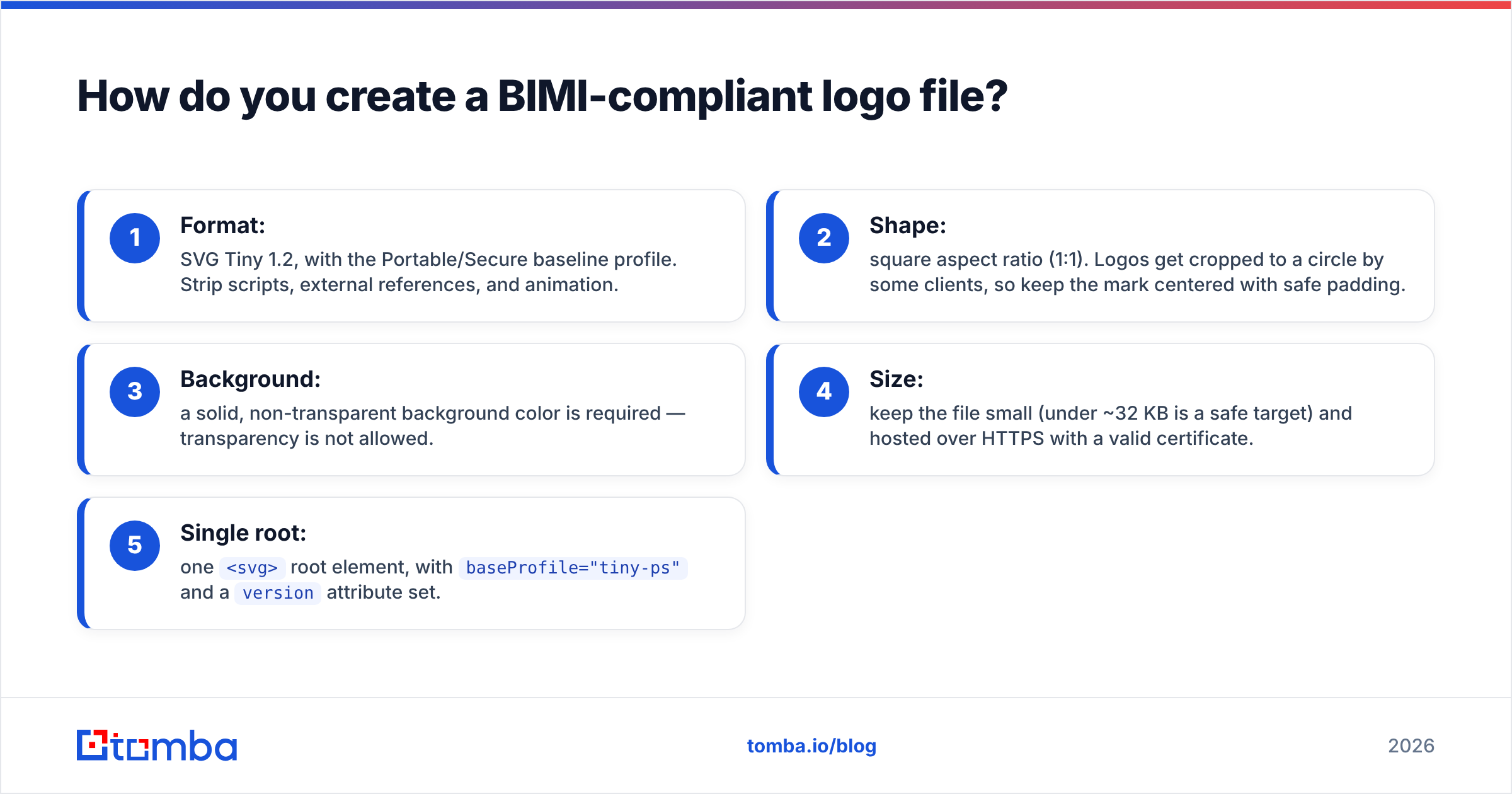
The non-negotiable rules:
- Format: SVG Tiny 1.2, with the Portable/Secure baseline profile. Strip scripts, external references, and animation.
- Shape: square aspect ratio (1:1). Logos get cropped to a circle by some clients, so keep the mark centered with safe padding.
- Background: a solid, non-transparent background color is required — transparency is not allowed.
- Size: keep the file small (under ~32 KB is a safe target) and hosted over HTTPS with a valid certificate.
- Single root: one
<svg>root element, withbaseProfile="tiny-ps"and aversionattribute set.
The BIMI Group publishes the canonical SVG conversion guidance and validation tooling, and most VMC issuers will validate the file as part of certificate issuance. Convert once, validate, then host it at a stable URL you won't rotate.
Do you really need a Verified Mark Certificate?#
Yes, for the inbox providers that matter most. A Verified Mark Certificate (VMC) is a digital certificate from an authorized issuer that proves your organization legally owns the logo — usually via a registered trademark. The a= tag in your BIMI DNS record points to it.
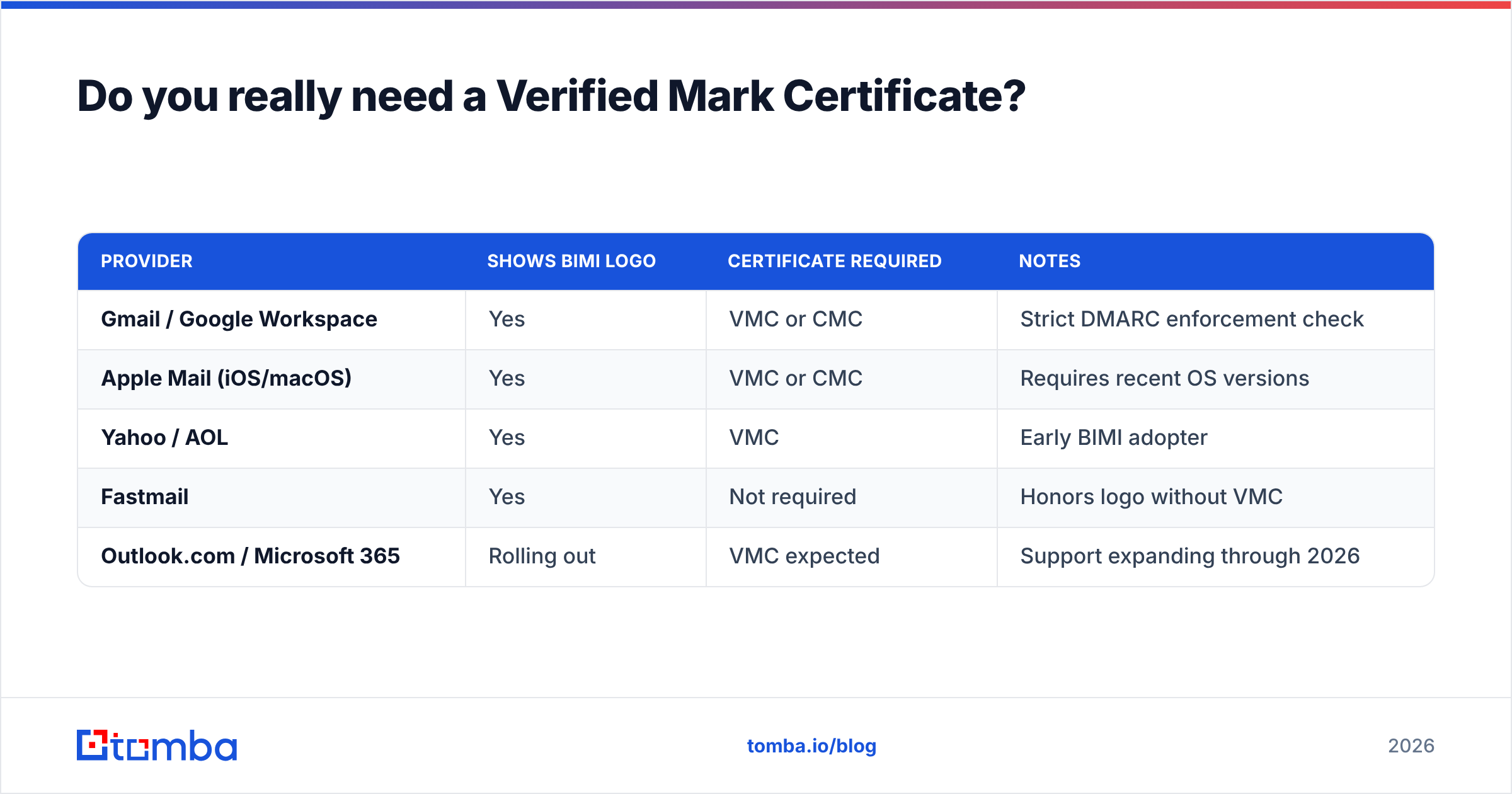
As of 2026, Gmail, Apple Mail, and Yahoo all require either a VMC (for trademarked logos) or a Common Mark Certificate (CMC, for logos that aren't trademarked but have established use). Without the certificate, these providers treat your BIMI record as incomplete and show nothing.
| Provider | Shows BIMI logo | Certificate required | Notes |
|---|---|---|---|
| Gmail / Google Workspace | Yes | VMC or CMC | Strict DMARC enforcement check |
| Apple Mail (iOS/macOS) | Yes | VMC or CMC | Requires recent OS versions |
| Yahoo / AOL | Yes | VMC | Early BIMI adopter |
| Fastmail | Yes | Not required | Honors logo without VMC |
| Outlook.com / Microsoft 365 | Rolling out | VMC expected | Support expanding through 2026 |
Two certificate-authority brands dominate issuance, and pricing runs in the hundreds-to-low-thousands per year depending on validity term. The vetting process checks your trademark registration and organization identity, so it takes a couple of weeks. Don't order it until your DMARC is already at enforcement — issuers and providers both check.

How do you publish and test the BIMI DNS record?#
Once DMARC is enforced, the SVG is validated, and the VMC is issued, publishing is a two-minute DNS edit. Then you verify — because BIMI fails quietly.
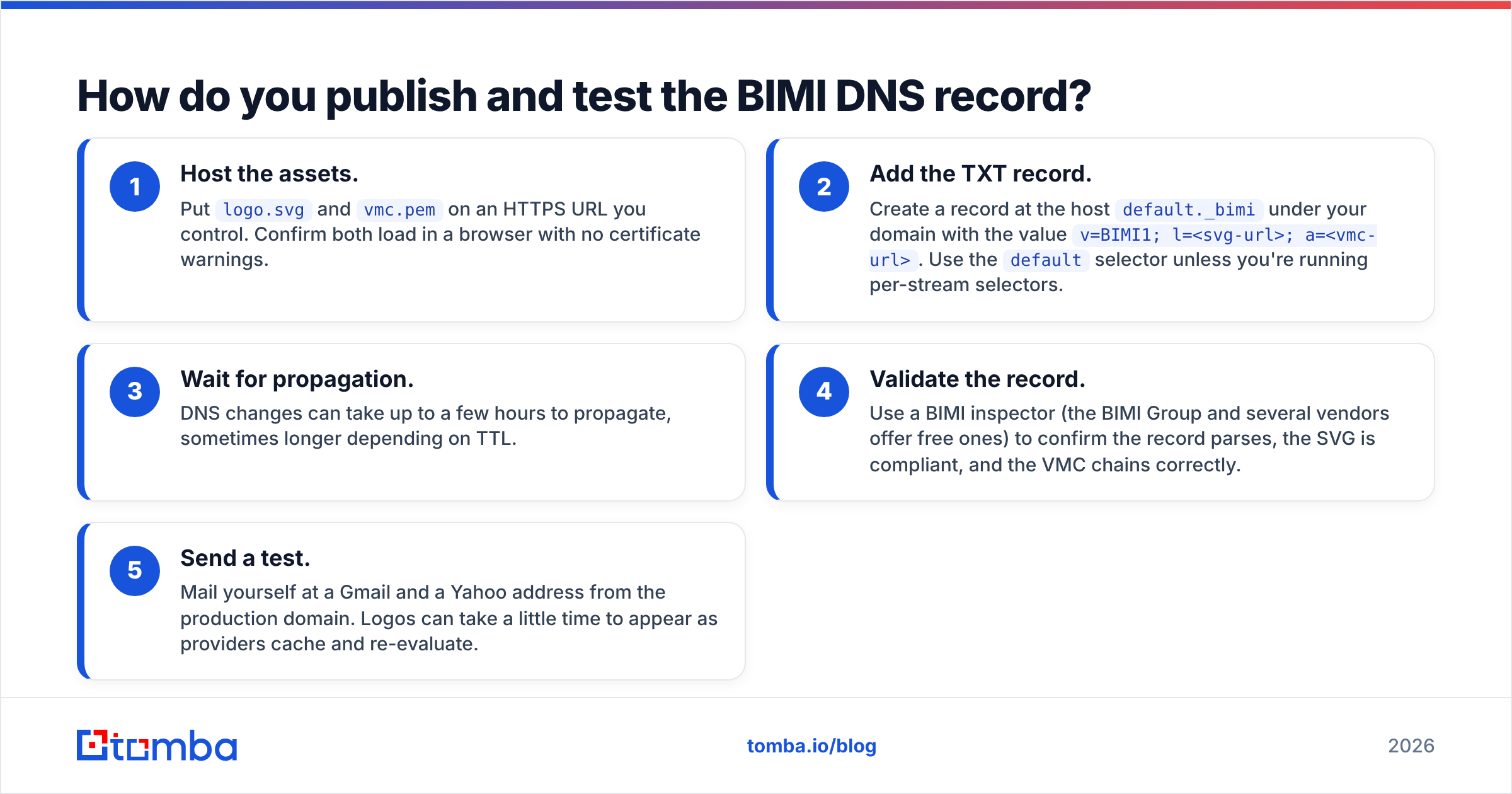
Step by step:
- Host the assets. Put
logo.svgandvmc.pemon an HTTPS URL you control. Confirm both load in a browser with no certificate warnings. - Add the TXT record. Create a record at the host
default._bimiunder your domain with the valuev=BIMI1; l=<svg-url>; a=<vmc-url>. Use thedefaultselector unless you're running per-stream selectors. - Wait for propagation. DNS changes can take up to a few hours to propagate, sometimes longer depending on TTL.
- Validate the record. Use a BIMI inspector (the BIMI Group and several vendors offer free ones) to confirm the record parses, the SVG is compliant, and the VMC chains correctly.
- Send a test. Mail yourself at a Gmail and a Yahoo address from the production domain. Logos can take a little time to appear as providers cache and re-evaluate.
If the logo doesn't show, the cause is almost always one of: DMARC not actually at enforcement for that mail stream, an SVG that fails the P/S profile, a VMC URL that 404s, or a selector mismatch. Validate each link in the chain independently rather than re-editing the TXT record blindly.
What does BIMI actually do for your email program?#
BIMI does not directly boost deliverability — it won't move a message from spam to inbox on its own. What it does is increase brand recognition and trust at the moment of the open decision, which is where most of your sending value is won or lost.
The honest framing:
- It rewards good authentication. The DMARC enforcement BIMI forces is the part that genuinely protects deliverability and blocks spoofing.
- It lifts recognition and open rates. Mailbox-provider and vendor studies consistently report higher open and engagement rates when a verified logo is present, because recipients recognize the brand faster.
- It hardens you against impersonation. A logo anchored to a VMC is far harder to fake than a display name, which raises the cost of phishing your customers.
- It signals legitimacy at scale. For cold and lifecycle programs alike, looking verified in a crowded inbox is a quiet conversion lever.
If you're running outbound, the logo only matters once your messages are landing and your contact data is clean. There's no point earning a verified mark for emails that bounce off dead addresses — pair BIMI with disciplined list hygiene through an email verifier so your enforcement reports stay clean and your reputation stays intact.
BIMI DNS record: common mistakes to avoid#
Most BIMI failures are self-inflicted and predictable. Watch for these:
- Publishing the record at
p=none. The single most common mistake. Enforce DMARC first. - Partial DMARC coverage. A
pct=20policy means 80% of mail isn't enforced, and providers may withhold the logo. Move to full coverage. - A PNG or non-P/S SVG. Standard SVG exports include scripts and metadata that the P/S profile forbids. Always convert and validate.
- Transparent background. Allowed in design tools, rejected by BIMI. Use a solid fill.
- Skipping the VMC for Gmail/Apple/Yahoo. Fastmail will show a logo without one; the providers most of your audience uses will not.
- Rotating asset URLs. If you change the SVG or VMC URL without updating the record, the logo vanishes. Treat the URLs as permanent.
Before you start, monitor your DMARC aggregate reports for a few weeks to make sure enforcement won't break a forgotten mail stream (your CRM, billing system, or a third-party sender). A clean enforcement rollout is the foundation everything else stands on.
Frequently asked questions#
Is a BIMI DNS record free? The record and the SVG are free to create. The Verified Mark Certificate is not — it's an annual paid certificate, and it's required by the major inbox providers. Budget for it.
Can I use BIMI without a trademark? Yes, through a Common Mark Certificate (CMC), which covers logos that aren't trademark-registered but have demonstrable prior use. A VMC still gives the strongest coverage.
How long until my logo appears? After everything is in place, allow several hours to a few days. Providers re-evaluate and cache on their own schedules, so it isn't instant.
Does BIMI work on every email client? No. Gmail, Apple Mail, Yahoo, and Fastmail lead; Microsoft is expanding support through 2026. Plenty of clients still show nothing — see Wikipedia's BIMI overview and your provider's admin docs, such as Google Workspace's BIMI help, for current coverage.
Get your sending foundation right first#
A verified logo is worth chasing — but it's the last 10% of an email program, not the first. The work that actually moves revenue is reaching the right people with clean, deliverable data. Before you invest weeks in a VMC, make sure every address you're sending to is real, current, and tied to a decision-maker.
Start by building accurate, verified contact lists with the Tomba Email Finder — find professional email addresses by domain, name, or company, then verify them so your enforced DMARC reports stay clean and your sender reputation keeps climbing. Compare Tomba pricing (a free tier with 25 searches a month, paid plans from $49/mo) and get your data foundation solid first. The inbox logo is a great finish line — clean, deliverable email is how you get there.
// get started
Find, verify and enrich your first contacts today
Start on the free plan with 25 searches a month, then scale when your team is ready.
Free plan · No credit card required · GDPR & CCPA
// about the author