Bitrix24 Pricing, Reviews, Pros and Cons (2026 Guide)
A no-spin look at Bitrix24 pricing tiers, real user reviews, and the honest pros and cons before you commit your sales team to it in 2026.
Bitrix24 markets itself as an all-in-one suite: CRM, projects, telephony, website builder, and HR in a single login. That breadth is exactly why teams either love it or quietly abandon it after three months. This guide gives you the unspun version of Bitrix24 pricing, reviews, pros and cons so you can decide before you migrate your pipeline into it.
TL;DR#
- Pricing: Free plan for unlimited users (heavily capped features), then flat-rate paid tiers — Basic, Standard, Professional, Enterprise — billed per organization, not per seat.
- Reviews: ~4.1–4.2 stars across G2 and Capterra. Praise for value and feature density; complaints about a steep learning curve and a cluttered interface.
- Best for: Small-to-mid teams that want CRM + project management + collaboration in one bill and will invest time in setup.
- Worst for: Teams that want a clean, focused sales CRM out of the box, or that need top-tier support without paying up.
- The data gap: Bitrix24 stores contacts well but does not find or verify them. You still need a dedicated source like the Tomba Email Finder to fill it with reachable leads.
What is Bitrix24 and who is it for?#
Bitrix24 is a business operations platform, not just a CRM. Think of it as an office building where sales, project management, internal chat, and a phone system all share one lobby. The upside of one building is one keycard. The downside is that you walk past forty doors to reach the one you need.
It targets small and mid-sized businesses that want to consolidate tools and cut per-seat SaaS spend. Because most paid plans charge a flat fee for a user band rather than per head, a 40-person team can land on a predictable monthly bill — which is genuinely rare in this category. If you want a refresher on the category itself, Tomba's glossary entry on CRM is a quick primer.
The catch: that consolidation only pays off if your team actually adopts the modules. Buy it as a "cheap CRM" and you inherit a sprawling suite you will never fully use.
How much does Bitrix24 cost in 2026?#
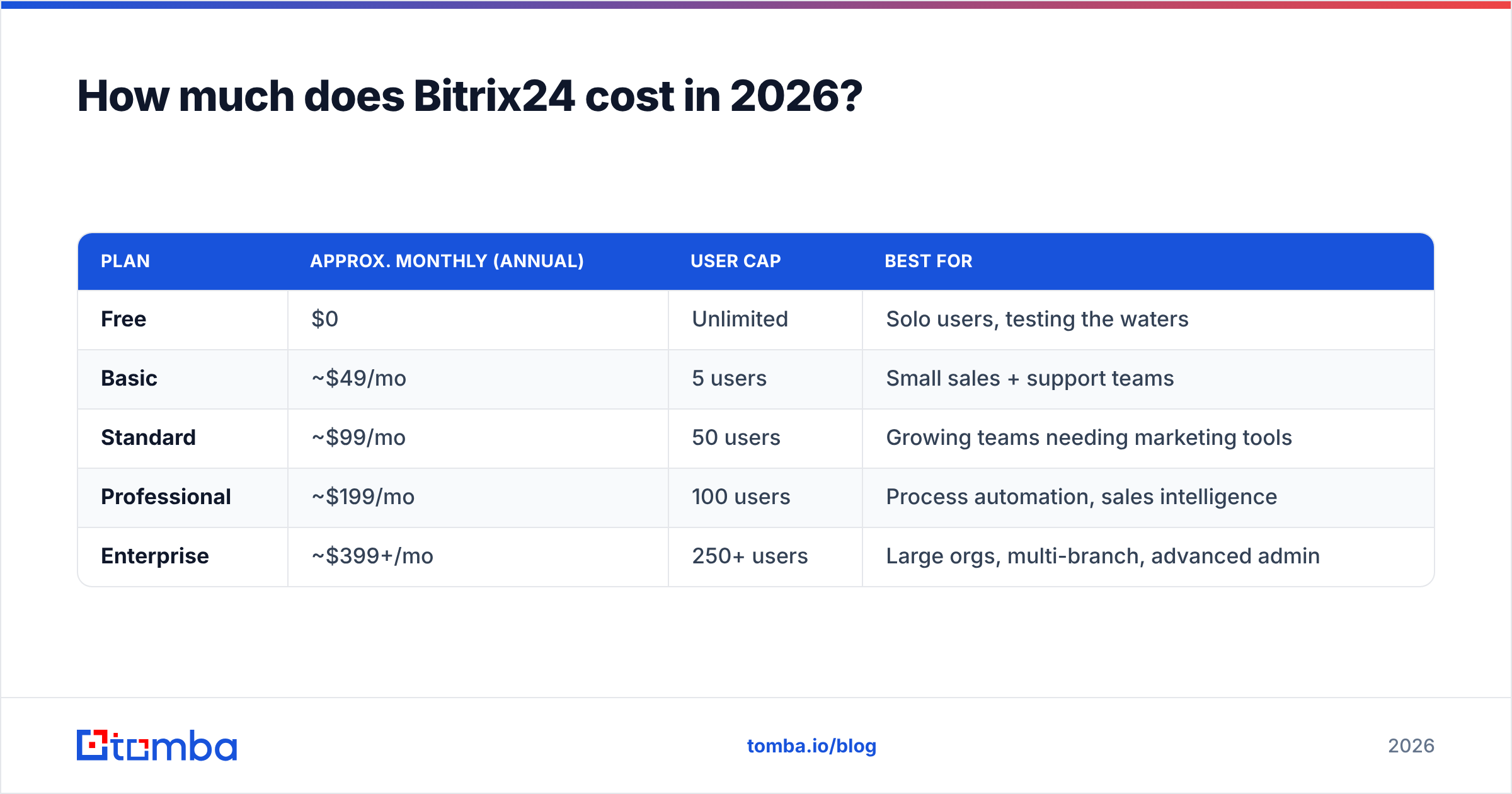
Bitrix24 uses flat-rate tiers capped by user count and storage, billed per organization. The numbers below reflect cloud pricing on an annual commitment; month-to-month is meaningfully higher, and prices shift by region, so confirm on the official Bitrix24 pricing page before you buy.
| Plan | Approx. monthly (annual) | User cap | Best for |
|---|---|---|---|
| Free | $0 | Unlimited | Solo users, testing the waters |
| Basic | ~$49/mo | 5 users | Small sales + support teams |
| Standard | ~$99/mo | 50 users | Growing teams needing marketing tools |
| Professional | ~$199/mo | 100 users | Process automation, sales intelligence |
| Enterprise | ~$399+/mo | 250+ users | Large orgs, multi-branch, advanced admin |
A few things the pricing table never tells you up front:
- Storage is a real lever. Lower tiers cap online storage hard, and document-heavy teams hit the ceiling faster than expected.
- Automation lives upstairs. The CRM rules and triggers that make the platform worthwhile are gated to Standard and above.
- Self-hosted is a different product. Bitrix24 On-Premise is a one-time license with its own price list — powerful, but it's a server project, not a signup.
- Per-organization, not per-seat. This is the headline value. If you're at 45 users, Standard's flat fee can undercut a per-seat rival by thousands a year.
/blog/generated/memes/2026-06-19/bitrix24-pricing-reviews-pros-and-cons-meme-1.png
Is Bitrix24 actually good? What the reviews say#
Across G2 and Capterra, Bitrix24 sits around 4.1–4.2 stars from thousands of reviews — a solid-but-divided score. The pattern in the written feedback is more useful than the average.
What reviewers consistently praise:
- Value for money. The recurring phrase is "you get an enormous amount for the price," especially on the free and Basic tiers.
- Feature breadth. CRM, tasks, Kanban, telephony, and a website builder under one login removes several subscriptions.
- Customization. Custom fields, pipelines, and automation rules flex to odd workflows.
What reviewers consistently criticize:
- Learning curve. The most common complaint by far. New users describe the interface as overwhelming and the menu structure as deep.
- UI clutter. So many modules compete for screen space that the core CRM can feel buried.
- Support friction. Free and lower-tier users report slow responses; faster help effectively requires a higher plan or a partner.
- Performance. Occasional lag on large accounts and during heavy automation.
The honest read: people who invest a week in configuration tend to stay and rate it highly. People who expected a plug-and-play sales CRM tend to churn and rate it low. Your onboarding appetite is the single best predictor of which camp you land in.
What are the main pros and cons of Bitrix24?#
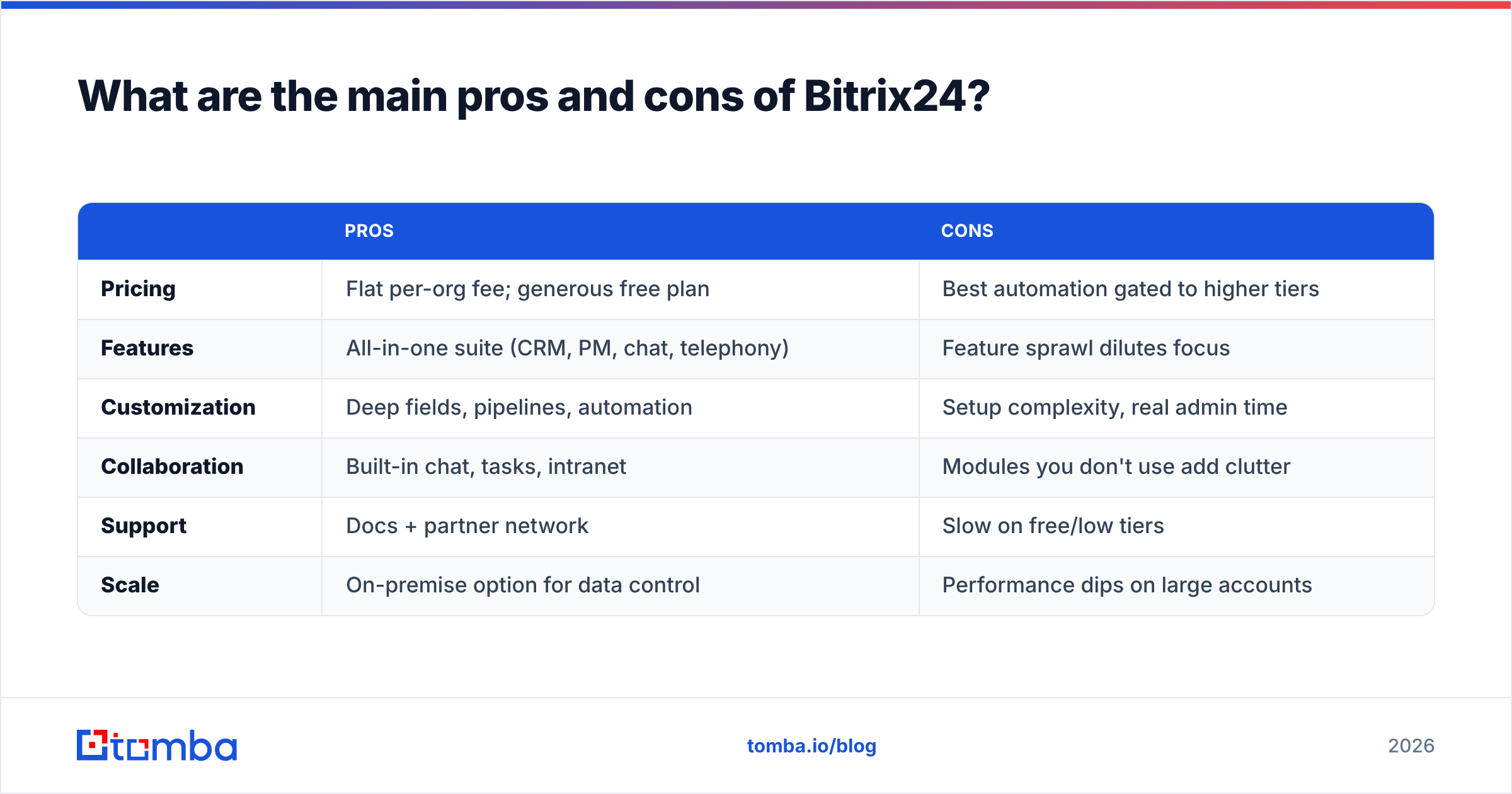
Here's the balanced ledger most comparison posts skip.
| Pros | Cons | |
|---|---|---|
| Pricing | Flat per-org fee; generous free plan | Best automation gated to higher tiers |
| Features | All-in-one suite (CRM, PM, chat, telephony) | Feature sprawl dilutes focus |
| Customization | Deep fields, pipelines, automation | Setup complexity, real admin time |
| Collaboration | Built-in chat, tasks, intranet | Modules you don't use add clutter |
| Support | Docs + partner network | Slow on free/low tiers |
| Scale | On-premise option for data control | Performance dips on large accounts |
The throughline: every Bitrix24 strength has a matching tax. Breadth costs focus. Low price costs polish. Customization costs setup time. None of these are dealbreakers — they're trade-offs you should price in deliberately rather than discover in month two.
How does Bitrix24 compare to other CRMs?#
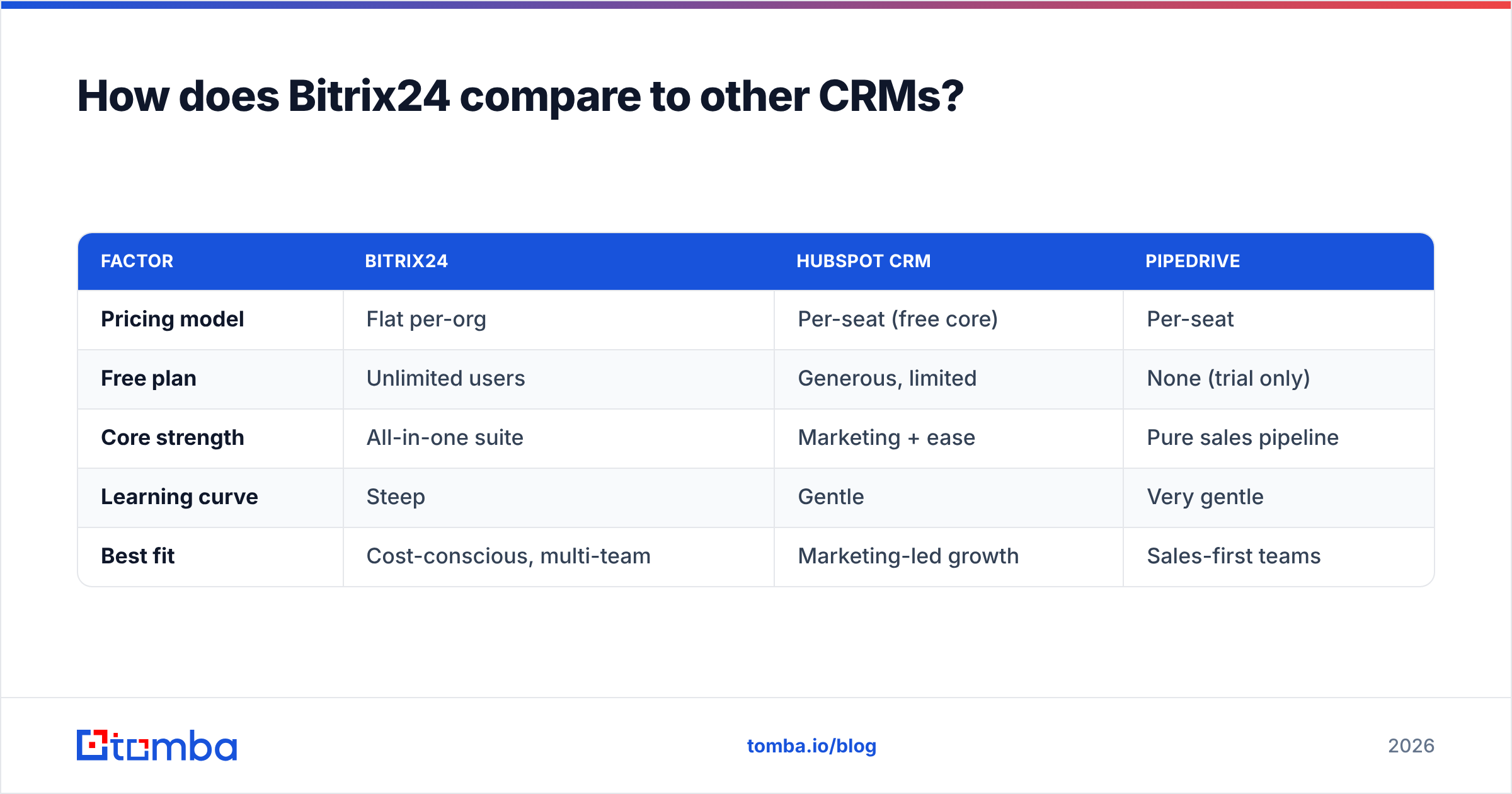
Bitrix24's pitch only makes sense against alternatives. Here's where it lands versus two common comparisons.
| Factor | Bitrix24 | HubSpot CRM | Pipedrive |
|---|---|---|---|
| Pricing model | Flat per-org | Per-seat (free core) | Per-seat |
| Free plan | Unlimited users | Generous, limited | None (trial only) |
| Core strength | All-in-one suite | Marketing + ease | Pure sales pipeline |
| Learning curve | Steep | Gentle | Very gentle |
| Best fit | Cost-conscious, multi-team | Marketing-led growth | Sales-first teams |
If your priority is a focused, fast-to-learn pipeline, Pipedrive or HubSpot will feel lighter. If your priority is consolidating five tools into one flat bill and you can absorb the setup, Bitrix24 wins on raw value. Tomba connects to all three — see the Pipedrive integration and HubSpot integration if you're weighing the ecosystem fit.
/blog/generated/memes/2026-06-19/bitrix24-pricing-reviews-pros-and-cons-meme-2.png
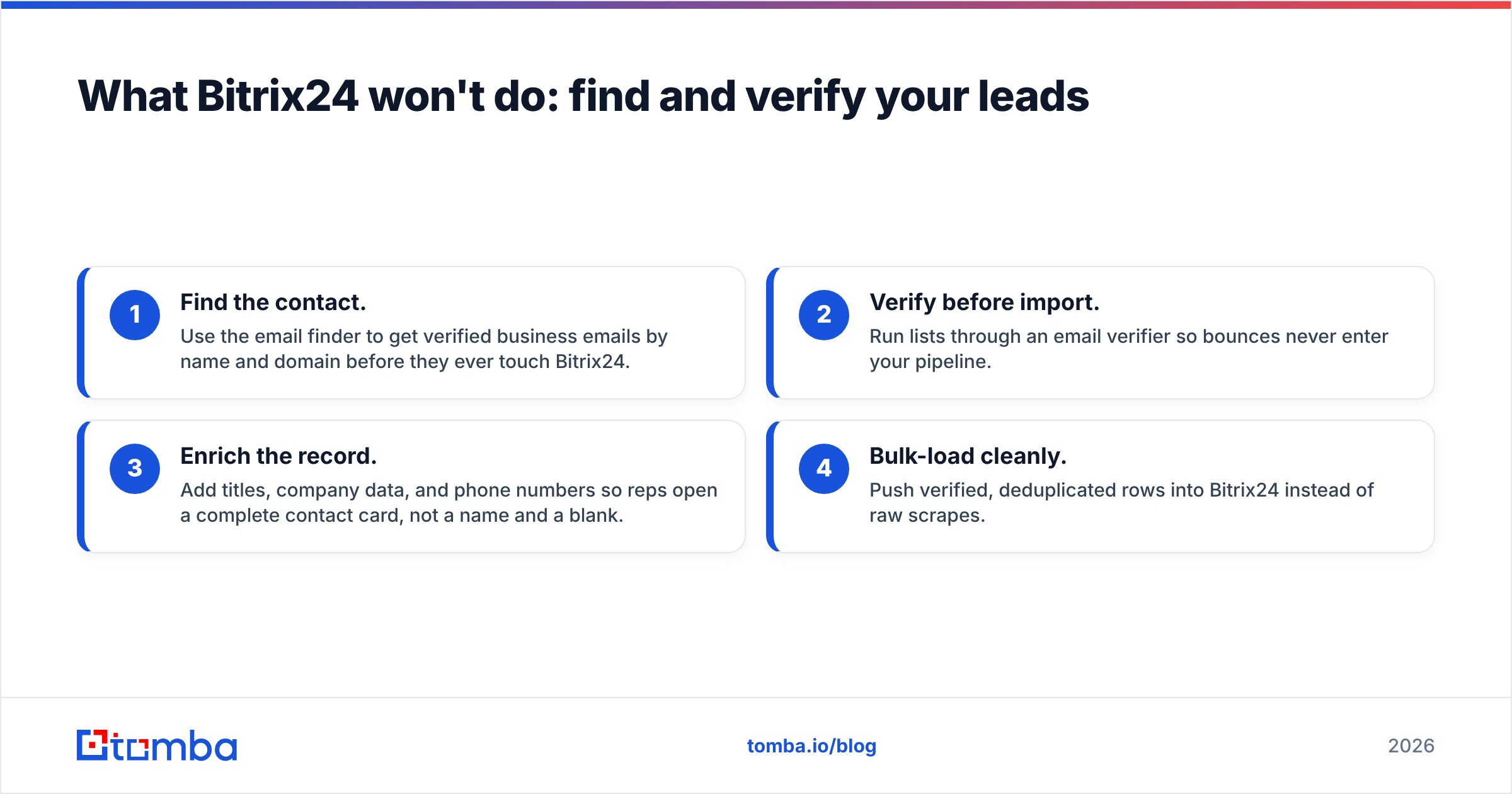
What Bitrix24 won't do: find and verify your leads#
Here's the gap that catches new buyers off guard. A CRM — Bitrix24 included — is a container. It organizes contacts you already have; it does not go out and find new, accurate ones. Garbage in, garbage out: a flawless pipeline built on stale or guessed email addresses still bounces and still tanks your sender reputation.
That's where a dedicated data layer sits in front of the CRM:
- Find the contact. Use the email finder to get verified business emails by name and domain before they ever touch Bitrix24.
- Verify before import. Run lists through an email verifier so bounces never enter your pipeline.
- Enrich the record. Add titles, company data, and phone numbers so reps open a complete contact card, not a name and a blank.
- Bulk-load cleanly. Push verified, deduplicated rows into Bitrix24 instead of raw scrapes.
Treat Bitrix24 as the system of record and a tool like Tomba as the supply line that keeps it stocked with reachable people. The CRM you pay for is only as valuable as the data inside it.
Frequently asked questions#
Is Bitrix24 really free? Yes — the free plan supports unlimited users and core CRM, but caps storage, automation, and advanced features. It's a genuine starting point, not a crippled trial.
Why do reviews complain about the learning curve? Because Bitrix24 bundles many modules into one interface. The power is real, but the menu depth overwhelms users expecting a single-purpose sales CRM. Budget onboarding time.
Is Bitrix24 cheaper than per-seat CRMs? Often, yes — for mid-sized teams. Flat per-organization pricing means a 40-person team pays one Standard fee instead of 40 seats. For tiny teams, the math is less dramatic.
Does Bitrix24 find email addresses for me? No. It stores and manages contacts but does not source or verify them. Pair it with a dedicated finder and verifier to keep the data clean.
Verdict: should you choose Bitrix24?#
Choose Bitrix24 if you want maximum features per dollar, you're consolidating several tools, and your team will invest real time in setup. Skip it if you want a clean, focused sales CRM that works on day one with minimal training.
Either way, the CRM is only half the equation. Before your reps work a single deal, make sure the contacts inside are real and reachable. Start free with the Tomba Email Finder to source verified business emails by name or domain, run them through verification, and feed your Bitrix24 pipeline with data that actually converts. Compare Tomba pricing — Free, Starter at $49/mo, and up — against what a single month of bounced outreach already costs you.
// get started
Find, verify and enrich your first contacts today
Start on the free plan with 25 searches a month, then scale when your team is ready.
Free plan · No credit card required · GDPR & CCPA
// about the author