Blacklist Alert 2026: How to Detect and Fix Email Blacklisting
A blacklist alert can torch your deliverability overnight. Here's how to detect listings, find the root cause, and get delisted fast in 2026.
A blacklist alert is the email equivalent of a smoke detector going off at 2 a.m. — annoying, urgent, and impossible to ignore. The moment your sending IP or domain lands on a major blocklist, your carefully written campaigns start bouncing, your open rates crater, and your sales pipeline goes quiet. This guide explains exactly what triggers a blacklist alert, how to confirm a listing, and the fastest path back to the inbox.
TL;DR#
- A blacklist alert means your IP or domain has been added to a DNS-based blocklist (DNSBL) that mailbox providers consult before accepting mail.
- The most damaging lists are Spamhaus (SBL/XBL/PBL), Barracuda, and SpamCop — a single Spamhaus listing can block delivery to a huge share of inboxes.
- Common causes: spam-trap hits, high complaint rates, poor list hygiene, compromised accounts, and missing authentication (SPF/DKIM/DMARC).
- Fix it by finding the listing source, pausing sends, cleaning your list, fixing authentication, and submitting a delisting request with evidence.
- Prevention beats cure: verify every address before you send and monitor your reputation continuously.
What is a blacklist alert?#
A blacklist alert is a notification — from a monitoring tool, your ESP, or a manual check — that one of your sending identities appears on an email blocklist. Think of a blocklist as a bouncer's "do not admit" list at a club: when a mailbox provider like Gmail or Outlook receives your message, it quietly checks whether your IP or domain is on that list before deciding whether to let you in, send you to spam, or reject you outright.
Technically, most blocklists are DNSBLs (DNS-based blocklists). Your receiving server performs a fast DNS lookup against the list operator. If your IP returns a "listed" response, the receiver applies a penalty that ranges from a spam-folder placement to a hard rejection at the SMTP level.
There are two flavors of listing you need to separate immediately:
- IP-based listings — your sending IP address (shared or dedicated) is flagged.
- Domain-based listings — your sending domain, or the domains in your links, are flagged (often via Spamhaus DBL or SURBL).
Knowing which one fired your blacklist alert changes the whole remediation plan. An IP listing on a shared pool may be someone else's fault; a domain listing is almost always about your own sending behavior.
Why does a blacklist alert matter so much?#
Because deliverability is binary at the gate. You can write the best cold email on earth, but if your domain is on Spamhaus DBL, most of it never reaches a human. A blacklist alert directly attacks three things:
- Inbox placement — listed senders get filtered to spam or rejected.
- Sender reputation — repeated listings compound and lower your long-term sender reputation, which is hard to rebuild.
- Revenue — for outbound teams, blocked mail means dead pipeline. A week on a major list can erase a month of prospecting.
The cruel part is timing. By the time you get a blacklist alert, damage is already underway — bounces are climbing and the receiving providers are learning to distrust you. Speed of response is everything.
What are the major email blacklists in 2026?#
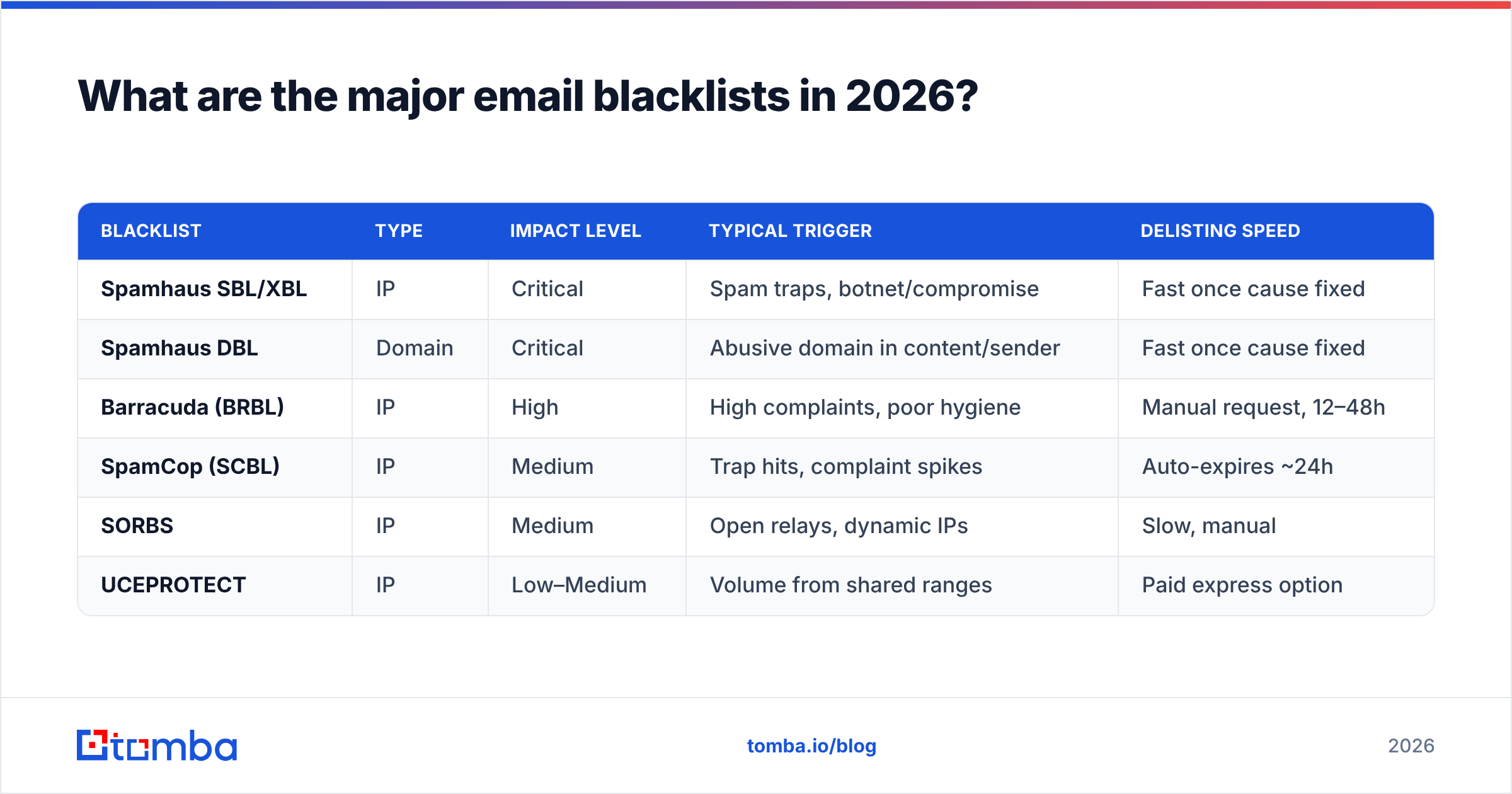
Not all lists carry the same weight. Getting flagged by an obscure regional DNSBL is a shrug; getting flagged by Spamhaus is a fire drill. Here's how the major players compare.
| Blacklist | Type | Impact level | Typical trigger | Delisting speed |
|---|---|---|---|---|
| Spamhaus SBL/XBL | IP | Critical | Spam traps, botnet/compromise | Fast once cause fixed |
| Spamhaus DBL | Domain | Critical | Abusive domain in content/sender | Fast once cause fixed |
| Barracuda (BRBL) | IP | High | High complaints, poor hygiene | Manual request, 12–48h |
| SpamCop (SCBL) | IP | Medium | Trap hits, complaint spikes | Auto-expires ~24h |
| SORBS | IP | Medium | Open relays, dynamic IPs | Slow, manual |
| UCEPROTECT | IP | Low–Medium | Volume from shared ranges | Paid express option |
A quick rule of thumb: if your blacklist alert names Spamhaus or Barracuda, drop everything. If it names UCEPROTECT Level 2/3, investigate but don't panic — those lists are noisy and many providers ignore them.
You can verify which lists you're on with a blacklist checker that queries dozens of DNSBLs at once instead of checking them one by one.
How do you confirm and diagnose a blacklist alert?#
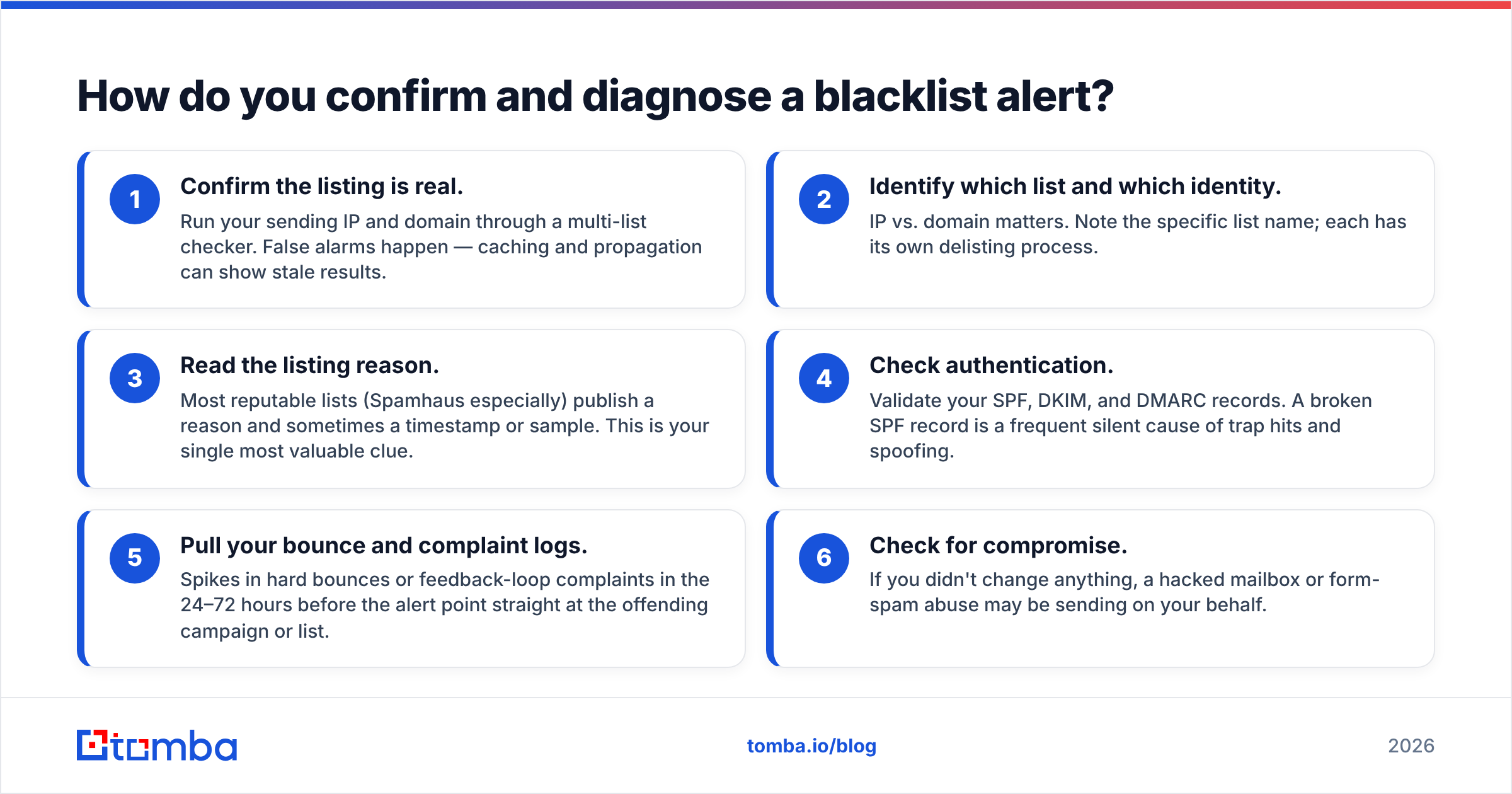
Conclusion first: confirm the listing, identify the exact list, then trace the cause before you touch anything else. Follow this sequence.
- Confirm the listing is real. Run your sending IP and domain through a multi-list checker. False alarms happen — caching and propagation can show stale results.
- Identify which list and which identity. IP vs. domain matters. Note the specific list name; each has its own delisting process.
- Read the listing reason. Most reputable lists (Spamhaus especially) publish a reason and sometimes a timestamp or sample. This is your single most valuable clue.
- Check authentication. Validate your SPF, DKIM, and DMARC records. A broken SPF record is a frequent silent cause of trap hits and spoofing.
- Pull your bounce and complaint logs. Spikes in hard bounces or feedback-loop complaints in the 24–72 hours before the alert point straight at the offending campaign or list.
- Check for compromise. If you didn't change anything, a hacked mailbox or form-spam abuse may be sending on your behalf.
Document what you find. When you submit a delisting request, list operators want evidence that you understood and fixed the root cause — not a "please remove me" plea.
What causes a blacklist alert in the first place?#
Most listings trace back to a handful of repeat offenders. Match your symptoms to the cause:
- Spam-trap hits. You emailed a recycled or pristine trap address. This is the number-one Spamhaus trigger and almost always a list-hygiene failure.
- High complaint rates. Recipients hit "report spam." Anything above ~0.3% complaints is a danger zone for Gmail and Yahoo.
- Stale or purchased lists. Old data decays ~22–30% per year; purchased lists are trap minefields.
- Authentication gaps. Missing or misaligned SPF/DKIM/DMARC makes you look like a spoofer.
- Sudden volume spikes. Going from 200 to 20,000 emails a day on a cold IP screams "spammer."
- Compromised accounts. A phished login or an insecure web form turns your domain into a spam cannon.

The thread connecting most of these is dirty data. If you send to addresses you never verified, you are gambling that none of them are traps, typos, or complainers — and that bet loses often enough to keep you on blocklists. This is why an email verifier is the cheapest insurance you can buy against a blacklist alert.
How do you get delisted fast?#
You will not be removed while the bad behavior continues. Fix first, then request removal. Here is the proven order of operations.
- Pause all sending from the affected IP or domain. Continuing to send while listed deepens the hole.
- Quarantine the bad data. Remove hard bounces, role accounts, and anything you can't verify. Re-verify the rest.
- Fix authentication. Publish or repair SPF, DKIM, and DMARC. Confirm alignment.
- Close the breach if a compromise caused it — reset credentials, lock down forms, enable 2FA.
- Submit the delisting request on the specific list's site, citing the cause and the fix you applied.
- Warm back up slowly. Resume at low volume to your most engaged recipients and ramp over 1–2 weeks.
Delisting timelines vary. SpamCop often auto-expires within a day once trap hits stop. Spamhaus removes quickly once the underlying issue is genuinely resolved, but relists fast if you repeat the behavior. Barracuda requires a manual form and human review.
Self-service vs. tool-assisted delisting#
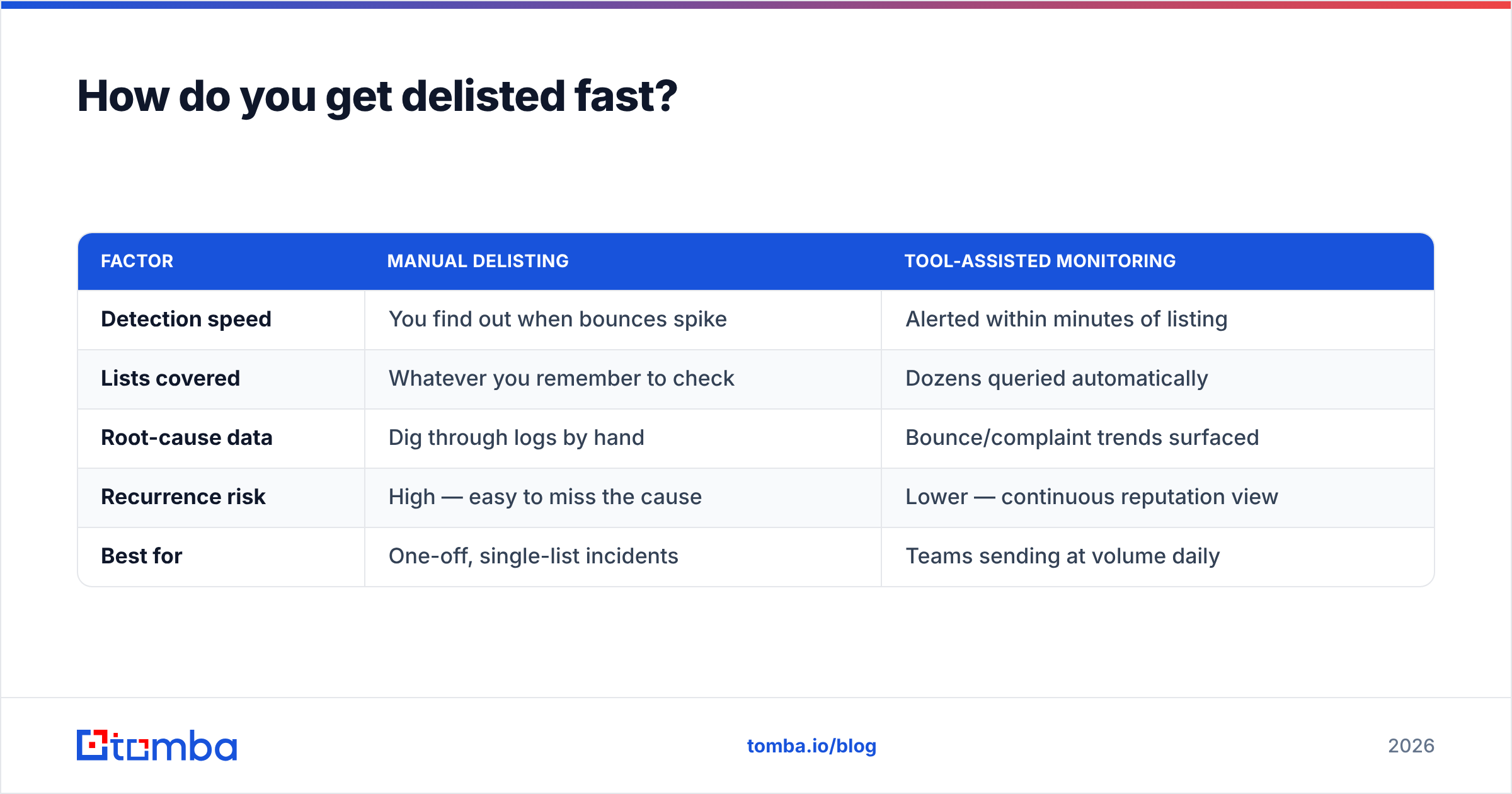
| Factor | Manual delisting | Tool-assisted monitoring |
|---|---|---|
| Detection speed | You find out when bounces spike | Alerted within minutes of listing |
| Lists covered | Whatever you remember to check | Dozens queried automatically |
| Root-cause data | Dig through logs by hand | Bounce/complaint trends surfaced |
| Recurrence risk | High — easy to miss the cause | Lower — continuous reputation view |
| Best for | One-off, single-list incidents | Teams sending at volume daily |
For one accidental listing, manual cleanup is fine. If you send outbound at scale, continuous monitoring with an email reputation checker pays for itself the first time it catches a problem before a provider does.
How do you prevent the next blacklist alert?#
Prevention is almost entirely about data quality and consistency. The senders who never see a blacklist alert tend to do the same boring things every single time.
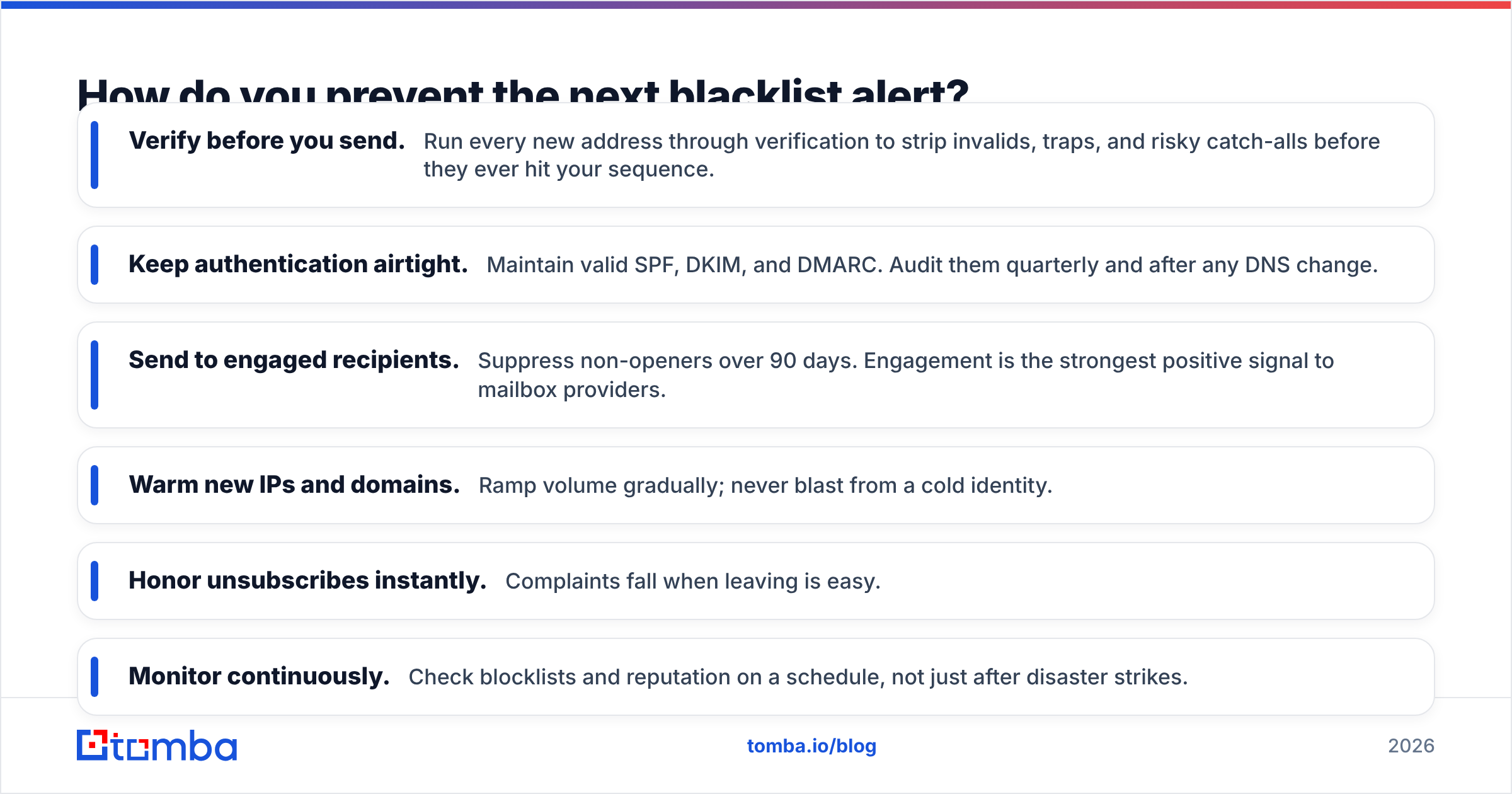
- Verify before you send. Run every new address through verification to strip invalids, traps, and risky catch-alls before they ever hit your sequence.
- Keep authentication airtight. Maintain valid SPF, DKIM, and DMARC. Audit them quarterly and after any DNS change.
- Send to engaged recipients. Suppress non-openers over 90 days. Engagement is the strongest positive signal to mailbox providers.
- Warm new IPs and domains. Ramp volume gradually; never blast from a cold identity.
- Honor unsubscribes instantly. Complaints fall when leaving is easy.
- Monitor continuously. Check blocklists and reputation on a schedule, not just after disaster strikes.
For the authoritative reference on how listings work and how to request removal, see the Spamhaus blocklist documentation. If you send to Gmail, Google Postmaster Tools gives you direct visibility into your domain reputation, spam rate, and authentication status. And for background on how DNSBLs function under the hood, the DNSBL Wikipedia entry is a solid primer.
Strong email deliverability is a system, not a one-time fix. Build verification and monitoring into your workflow and a blacklist alert becomes a rare, quickly-handled event instead of a recurring catastrophe.
Frequently asked questions#
How long does a blacklist alert last? It depends on the list and the cause. SpamCop listings often auto-expire in about 24 hours once trap hits stop. Spamhaus and Barracuda remove you once you fix the root cause and submit a request, usually within 12–48 hours — but they relist quickly if the behavior repeats.
Can one bad campaign get me blacklisted? Yes. A single send to a list full of spam traps or one campaign that triggers a complaint spike is enough for a major listing. That's why verifying before each send matters more than any single campaign's copy.
Is a shared IP or dedicated IP safer? A dedicated IP gives you full control over your reputation but requires consistent volume to stay warm. A shared IP can be blacklisted because of another sender's behavior — convenient for low volume, riskier for your reputation.
Does verifying emails actually prevent blacklisting? It removes the single biggest cause: invalid addresses and spam traps. Verification won't fix bad content or missing authentication, but it eliminates the data-quality failures behind most listings.
Build clean lists before they ever trigger a blacklist alert#
The cheapest blacklist alert is the one you never receive. Most listings start with bad data — addresses you never confirmed were real. Tomba's Email Finder helps you build accurate, deliverable lists from the start by sourcing professional email addresses by name, company, or domain, so you're prospecting verified contacts instead of guessing at addresses that turn into bounces and trap hits. Pair it with verification, keep your authentication clean, and monitor your reputation — and the next time a blacklist alert fires, it'll be someone else's problem, not yours. See Tomba pricing to start free with 25 searches a month.
// get started
Find, verify and enrich your first contacts today
Start on the free plan with 25 searches a month, then scale when your team is ready.
Free plan · No credit card required · GDPR & CCPA
// about the author