Blacklist Monitoring in 2026: A Complete Deliverability Guide
Getting blacklisted can wipe out your cold email program overnight. Here's how blacklist monitoring works in 2026, which lists matter, and how to recover fast.
You can do everything right in cold email — clean copy, a warmed-up domain, verified lists — and still watch your reply rate fall off a cliff overnight. The usual culprit is invisible: your sending IP or domain landed on a blacklist, and mailbox providers quietly started routing you to spam. Blacklist monitoring is the early-warning system that tells you the moment it happens, instead of three weeks and 40,000 wasted sends later.
This guide breaks down what blacklist monitoring actually is, which lists are worth watching in 2026, how monitoring tools work, and the exact steps to delist when you do get flagged.
TL;DR#
- Blacklists (DNSBLs) are databases of IPs and domains flagged for spammy behavior; landing on a major one can cut inbox placement by 20–80%.
- Blacklist monitoring is continuous automated checking of your sending IPs and domains against dozens of these lists, with alerts the moment you appear.
- Only a handful of lists matter — Spamhaus, Barracuda, SpamCop, and a few others drive the majority of real-world deliverability damage.
- Monitoring is preventive, not curative — it buys you hours instead of weeks to fix the root cause and request delisting.
- Clean data is the cheapest prevention — high bounce rates and spam-trap hits are the fastest way onto a blacklist, so verification upstream matters more than monitoring downstream.
What is blacklist monitoring?#
Blacklist monitoring is the practice of automatically and repeatedly checking whether your sending infrastructure — your IP addresses and your sending domains — appears on any known email blacklist, then alerting you when it does.
Think of it like a credit-monitoring service, but for your email reputation. You don't refresh your credit report by hand every morning; a service watches it and pings you when something changes. Blacklist monitoring does the same job against 50–100+ DNS-based blocklists (DNSBLs), so a new listing surfaces in minutes rather than whenever you happen to notice replies have dried up.
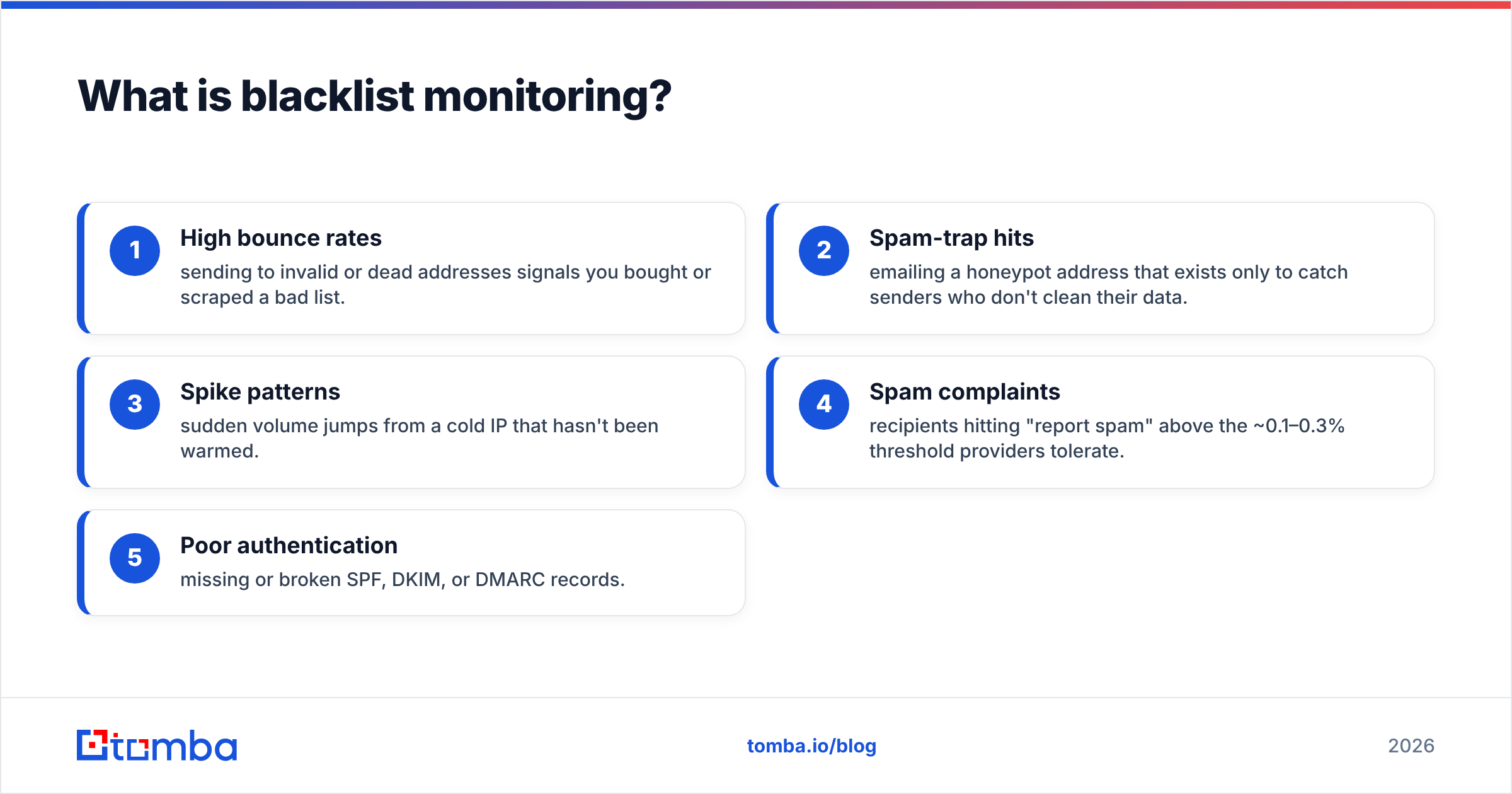
A blacklist itself is a published database of senders that operators have flagged for spam-like activity. When a receiving mail server gets a message, it can query these lists in real time. If your IP or domain is listed, the server may reject the message outright, throttle it, or drop it into the spam folder. The listing is usually a symptom of one of a few behaviors:
- High bounce rates — sending to invalid or dead addresses signals you bought or scraped a bad list.
- Spam-trap hits — emailing a honeypot address that exists only to catch senders who don't clean their data.
- Spike patterns — sudden volume jumps from a cold IP that hasn't been warmed.
- Spam complaints — recipients hitting "report spam" above the ~0.1–0.3% threshold providers tolerate.
- Poor authentication — missing or broken SPF, DKIM, or DMARC records.
Monitoring doesn't fix any of these. What it does is collapse the time between "you got listed" and "you found out," which is the single biggest factor in how much damage a listing does.
Which blacklists actually matter in 2026?#
Not all of the 100+ public blocklists carry the same weight. Most mailbox providers lean on a short list of reputable, well-maintained DNSBLs. Getting listed on an obscure regional blocklist might cost you nothing; getting listed on Spamhaus can take your domain off the grid for major inbox providers.
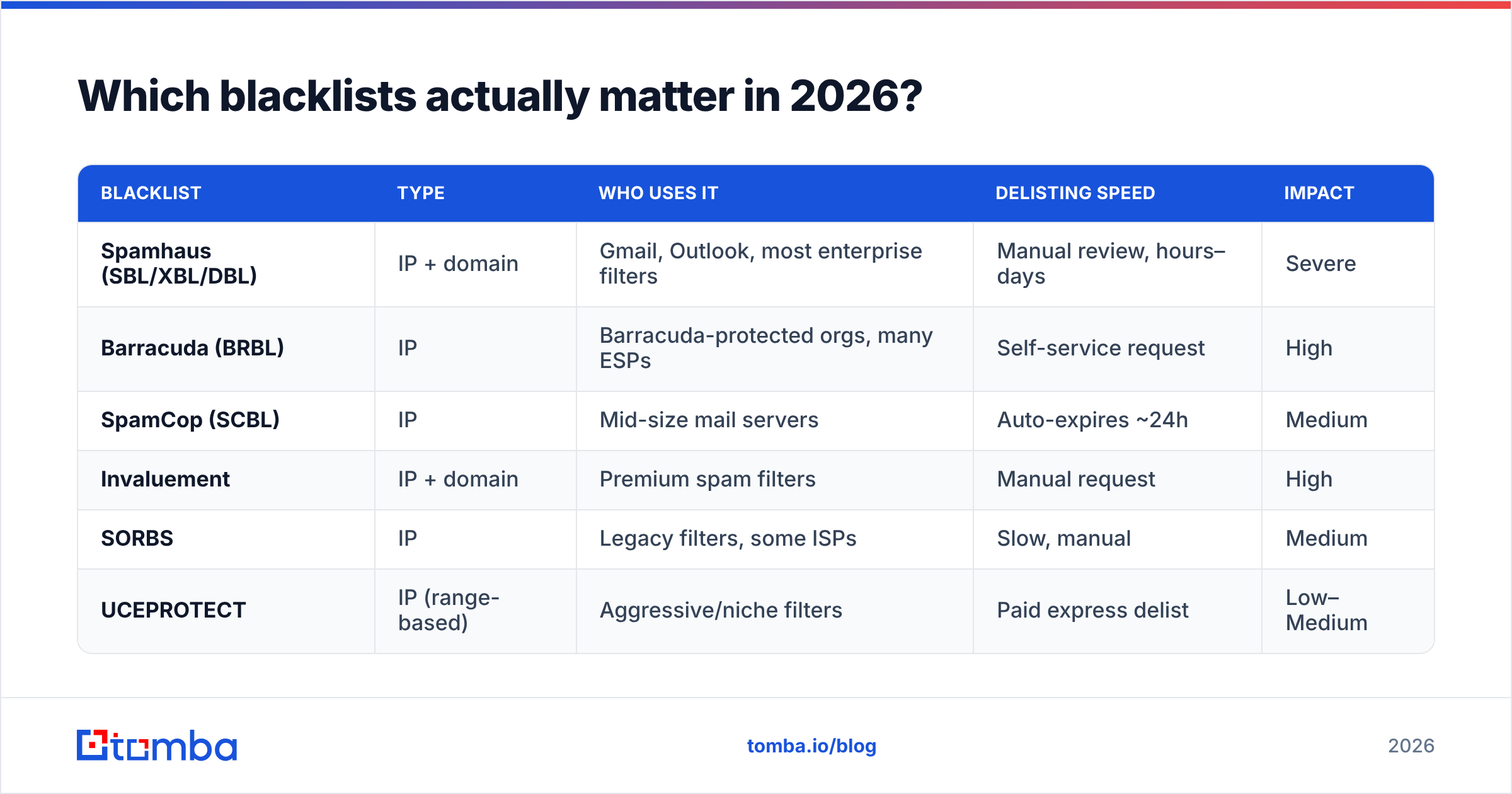
Here's how the heavy-hitters compare:
| Blacklist | Type | Who uses it | Delisting speed | Impact |
|---|---|---|---|---|
| Spamhaus (SBL/XBL/DBL) | IP + domain | Gmail, Outlook, most enterprise filters | Manual review, hours–days | Severe |
| Barracuda (BRBL) | IP | Barracuda-protected orgs, many ESPs | Self-service request | High |
| SpamCop (SCBL) | IP | Mid-size mail servers | Auto-expires ~24h | Medium |
| Invaluement | IP + domain | Premium spam filters | Manual request | High |
| SORBS | IP | Legacy filters, some ISPs | Slow, manual | Medium |
| UCEPROTECT | IP (range-based) | Aggressive/niche filters | Paid express delist | Low–Medium |
A practical rule: prioritize the lists your actual recipients' providers trust. If you sell into enterprises running Microsoft 365, Spamhaus and Barracuda listings will hurt far more than a UCEPROTECT Level 3 listing that flags an entire IP range you happen to share. You can sanity-check any single IP or domain against the big lists with a free blacklist checker before you invest in continuous monitoring.
For the authoritative source on how listings and removals work, Spamhaus publishes its own policies — worth reading once so you understand what triggers a listing in the first place.
How does blacklist monitoring work?#
Under the hood, a blacklist monitor performs a DNS query against each blocklist for every IP and domain you've registered. A DNSBL is structured so that a lookup of your reversed IP against the list's zone returns a "listed" response code if you're on it. The monitor runs these lookups on a schedule — every few minutes for premium tools, hourly or daily for lighter ones — and diffs the results against the last check.
When a new listing appears, three things should happen:
- Alert — email, Slack, or webhook notification with the list name and the affected asset.
- Context — which IP/domain, when it was first seen, and ideally the listing reason or reference URL.
- History — a timeline so you can correlate the listing with a campaign, a volume spike, or a list you imported.
The best monitoring setups don't stop at detection. They tie the listing back to a probable cause. If you got listed on a domain blocklist the same day you launched a campaign to a freshly imported list, the root cause is almost always data quality — invalid addresses bouncing and spam traps firing. That's why deliverability teams pair monitoring with upstream email verification: you stop most listings before they happen by never sending to the addresses that cause them.
Monitoring vs. manual checking: the trade-offs#
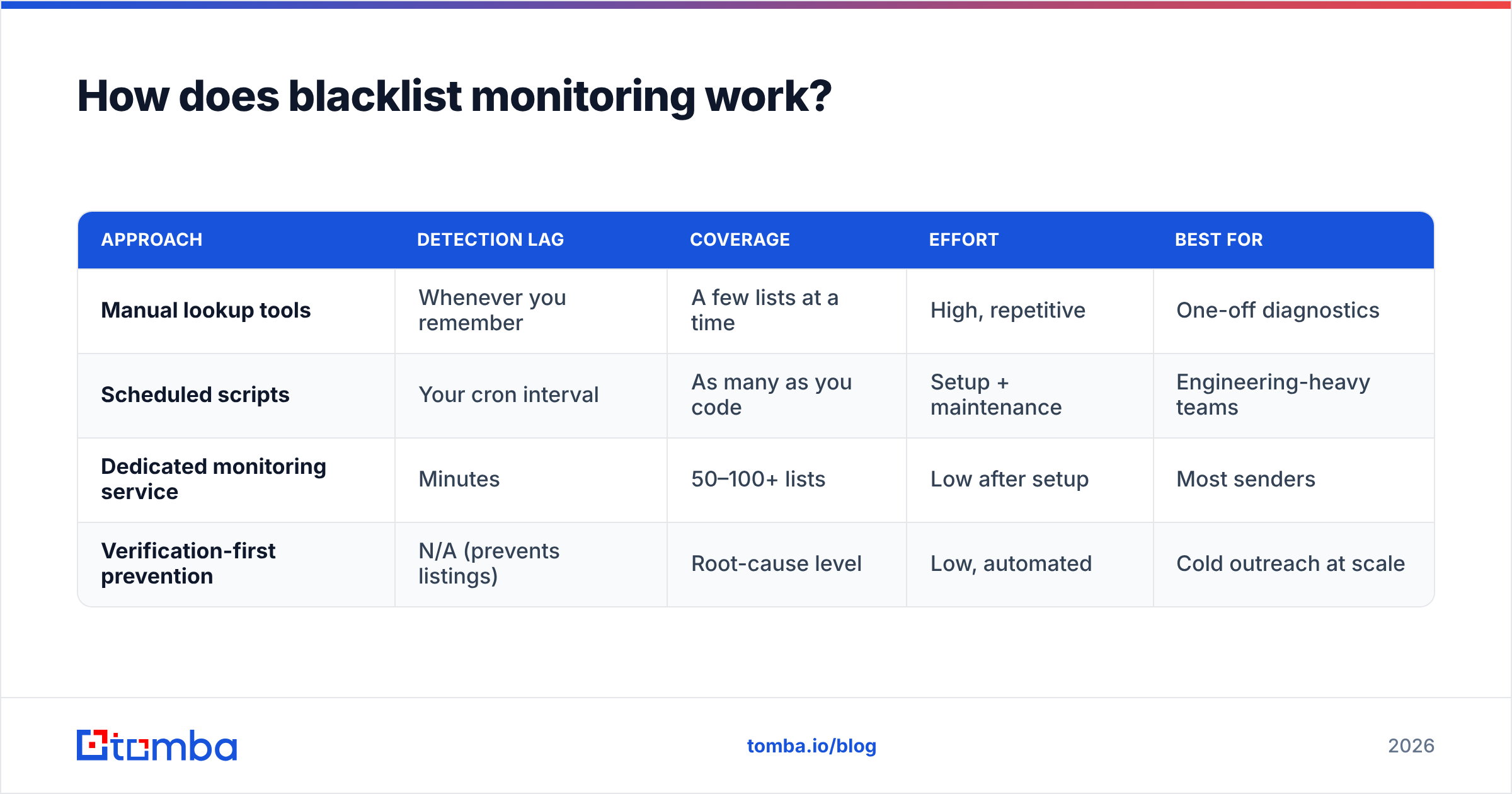
You can check blacklists by hand. The question is whether the latency is acceptable.
| Approach | Detection lag | Coverage | Effort | Best for |
|---|---|---|---|---|
| Manual lookup tools | Whenever you remember | A few lists at a time | High, repetitive | One-off diagnostics |
| Scheduled scripts | Your cron interval | As many as you code | Setup + maintenance | Engineering-heavy teams |
| Dedicated monitoring service | Minutes | 50–100+ lists | Low after setup | Most senders |
| Verification-first prevention | N/A (prevents listings) | Root-cause level | Low, automated | Cold outreach at scale |
Manual checking is fine when you're diagnosing a single known problem. It falls apart as a continuous safeguard, because the cost of a missed listing scales with your send volume — and you can't watch dozens of lists around the clock by hand.
What's the connection between blacklists and deliverability?#
A blacklist is one input into the larger system of email deliverability, and it's often the most binary one. Most reputation signals are gradients — your sender reputation nudges placement up or down. A blacklist listing is closer to a switch: listed or not, and when you're listed on a major one, the gradient stops mattering because messages get blocked before any softer scoring applies.
That's what makes blacklists dangerous. A slowly declining sender score gives you weeks of warning signs — rising spam-folder rates, slipping open rates. A blacklist listing gives you none. One day you're in the inbox; the next, an entire provider is bouncing you with a 5xx error referencing Spamhaus.
The reputation factors that feed both your gradual score and your blacklist risk overlap heavily:
- Bounce rate — keep it under 2–3%; verify before you send.
- Spam complaint rate — stay below 0.1% by targeting people who actually fit your offer.
- Authentication — valid SPF record, DKIM signing, and a DMARC policy.
- Sending consistency — warm new IPs and domains; avoid volume cliffs.
- List hygiene — no purchased lists, no scraped junk, regular re-verification.
Notice that four of those five are about who you send to and how, not about monitoring. Monitoring is your smoke detector. List hygiene is not leaving the stove on. You want both, but if you only invest in one, invest in prevention.
How do you get off a blacklist?#
Delisting follows a consistent pattern across the major lists, even though the specific forms differ.
Step 1 — Confirm the listing and the list. Use a blacklist checker or your monitoring dashboard to identify exactly which IP/domain is on which list. Don't start a delisting request before you know this.
Step 2 — Find and fix the root cause. Delisting without fixing the cause gets you re-listed within days and can flag you as a repeat offender, which slows future removals. Common fixes: purge invalid addresses, pause the offending campaign, tighten your complaint handling, repair authentication records.
Step 3 — Submit the removal request. Most lists offer a self-service form. Spamhaus requires you to log into its removal center; SpamCop largely auto-expires once the spam reports stop; Barracuda has a removal request page. Be honest about what happened and what you changed.
Step 4 — Wait and re-verify. Removal can take minutes (auto-expiring lists) to several days (manual-review lists). Don't resume full-volume sending immediately — ramp back up.
Step 5 — Prevent recurrence. This is where monitoring plus verification pays off. Set up continuous monitoring so the next listing surfaces instantly, and verify every list before import so the next one is far less likely.
For a vendor's-eye view of how this fits into broader sender practices, HubSpot's deliverability documentation and Google's Postmaster Tools are both solid, free references for diagnosing reputation problems alongside your blacklist data.
How does clean data prevent blacklisting in the first place?#
The cheapest blacklist listing is the one you never get. And the most common path onto a blacklist for cold outreach teams runs straight through bad data: you import a list, a chunk of it is invalid or contains spam traps, those addresses bounce or trigger honeypots, and your domain gets flagged.
Break that chain at the source and most listings disappear:
- Find verified addresses, not guesses. Sourcing real, deliverable contacts up front means fewer bounces feeding your reputation. A purpose-built email finder returns addresses tied to real people and domains rather than permutated guesses that bounce.
- Verify before every send. Run new lists through email verification to strip invalids, role accounts, and obvious traps. This is the single highest-leverage thing you can do to stay off blacklists.
- Handle catch-all domains deliberately. Catch-all servers accept everything, which hides bad addresses. A catch-all verifier helps you decide which catch-all contacts are safe to mail.
- Re-verify aging lists. Email decays ~2% per month as people change jobs. Lists you verified a year ago are now partly invalid.
Do this consistently and your bounce rate stays low, your spam-trap exposure drops near zero, and the behaviors that trigger blacklistings largely don't occur. Monitoring then becomes a true safety net — catching the rare edge case — rather than a fire alarm that's constantly going off.
What should your blacklist monitoring stack look like?#
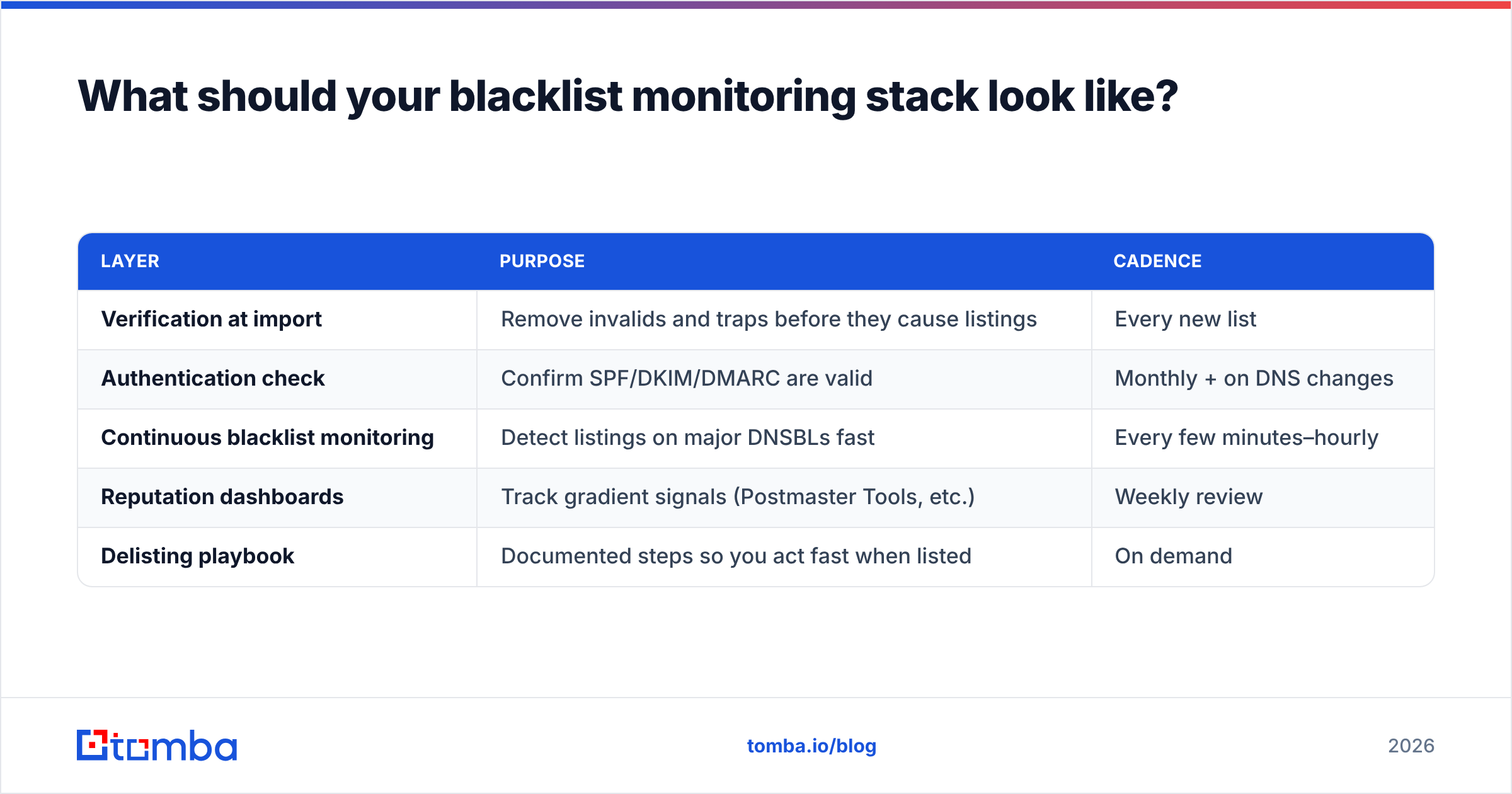
For most B2B senders in 2026, a practical, layered setup looks like this:
| Layer | Purpose | Cadence |
|---|---|---|
| Verification at import | Remove invalids and traps before they cause listings | Every new list |
| Authentication check | Confirm SPF/DKIM/DMARC are valid | Monthly + on DNS changes |
| Continuous blacklist monitoring | Detect listings on major DNSBLs fast | Every few minutes–hourly |
| Reputation dashboards | Track gradient signals (Postmaster Tools, etc.) | Weekly review |
| Delisting playbook | Documented steps so you act fast when listed | On demand |
The order matters. Verification sits first because it prevents the largest share of problems. Monitoring sits in the middle as detection. The delisting playbook sits last as recovery. Skipping the first layer and over-investing in the third is the most common mistake — it's like buying a top-tier smoke detector while leaving grease on every burner.
You can compare monitoring and verification options against your budget on the Tomba pricing page, where verification and finding share the same credit pool as the rest of the data stack.
The bottom line#
Blacklist monitoring is essential, but it's the second half of the job. It tells you when your reputation breaks; it doesn't stop the break. The senders who almost never get listed aren't the ones with the fanciest monitoring — they're the ones who verify their data before every send, authenticate properly, and warm their infrastructure. Monitoring catches the rare miss; clean data prevents the common one.
If your blacklist problems trace back to bouncing, scraped, or stale lists — and for cold outreach teams they almost always do — start upstream. Use the Tomba Email Finder to source real, deliverable contacts tied to verified domains, pair it with the built-in verifier to scrub every list before it goes out, and you'll cut off the bounce-and-trap behavior that feeds blacklists in the first place. Start free with 25 searches a month, then scale on the $49/mo Starter plan once your pipeline depends on it. Protect your deliverability where it actually breaks: at the data.
// get started
Find, verify and enrich your first contacts today
Start on the free plan with 25 searches a month, then scale when your team is ready.
Free plan · No credit card required · GDPR & CCPA
// about the author