Book a Demo: The B2B Playbook to Fill Your Pipeline in 2026
A "book a demo" button is not a strategy. Here's the 2026 playbook for turning demo requests into booked, qualified, show-up sales calls.
TL;DR
- "Book a demo" is a conversion funnel, not a button. The page, the form, the qualification, the scheduling, and the follow-up each leak pipeline if you ignore them.
- The biggest killer of demo volume is friction: long forms, manual scheduling, and slow speed-to-lead. Cut all three and bookings climb without more traffic.
- Qualify before the calendar, not on the call. A short routing form plus enriched firmographic data keeps your reps' time on deals that can actually close.
- No-shows are a data problem as much as a reminder problem. Accurate contact details and instant routing are what get prospects into the room.
- Tools like a fast email finder and contact enrichment feed your demo pipeline with reach-ready, verified contacts so the "book a demo" CTA has someone to talk to.
What does "book a demo" actually mean in B2B?#
A demo booking is the moment a prospect agrees to give you 30 minutes of attention on a calendar. That's it — and that's everything. Every dollar of ad spend, every cold email, every webinar exists to produce that one event: a qualified buyer, on a call, ready to see your product.
Think of "book a demo" like the front door of a restaurant. You can have the best kitchen in the city, but if the door sticks, the host is rude, and there's no table ready when guests arrive, they leave hungry and you blame the food. Most B2B teams obsess over the kitchen (the product) and ignore the door (the booking experience).
In 2026, buyers expect the door to open instantly. According to Gartner research on B2B buying, buyers spend only about 17% of their journey actually meeting with sales reps — and they split that time across every vendor in the deal. If your booking flow wastes even part of that sliver, a competitor with a smoother door wins the meeting.
So "book a demo" is not a button label. It's a chain: traffic → page → form → qualification → scheduling → confirmation → show-up → handoff. Break any link and the whole chain drops pipeline.
Why do most "book a demo" requests never convert?#
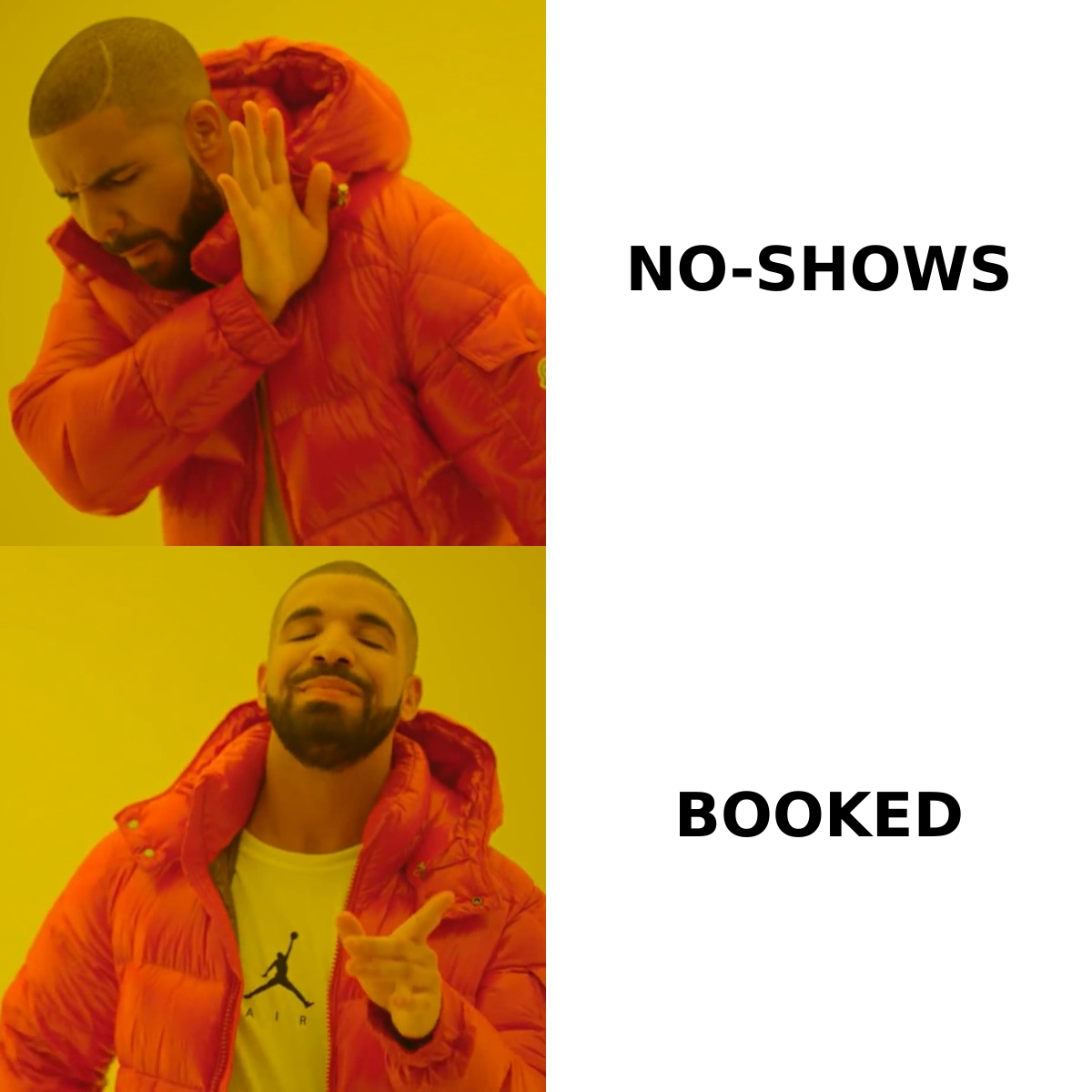
Most demo requests die from friction, slow follow-up, or bad fit — usually all three. Here's where the leaks are, ranked by how much pipeline they quietly cost you:
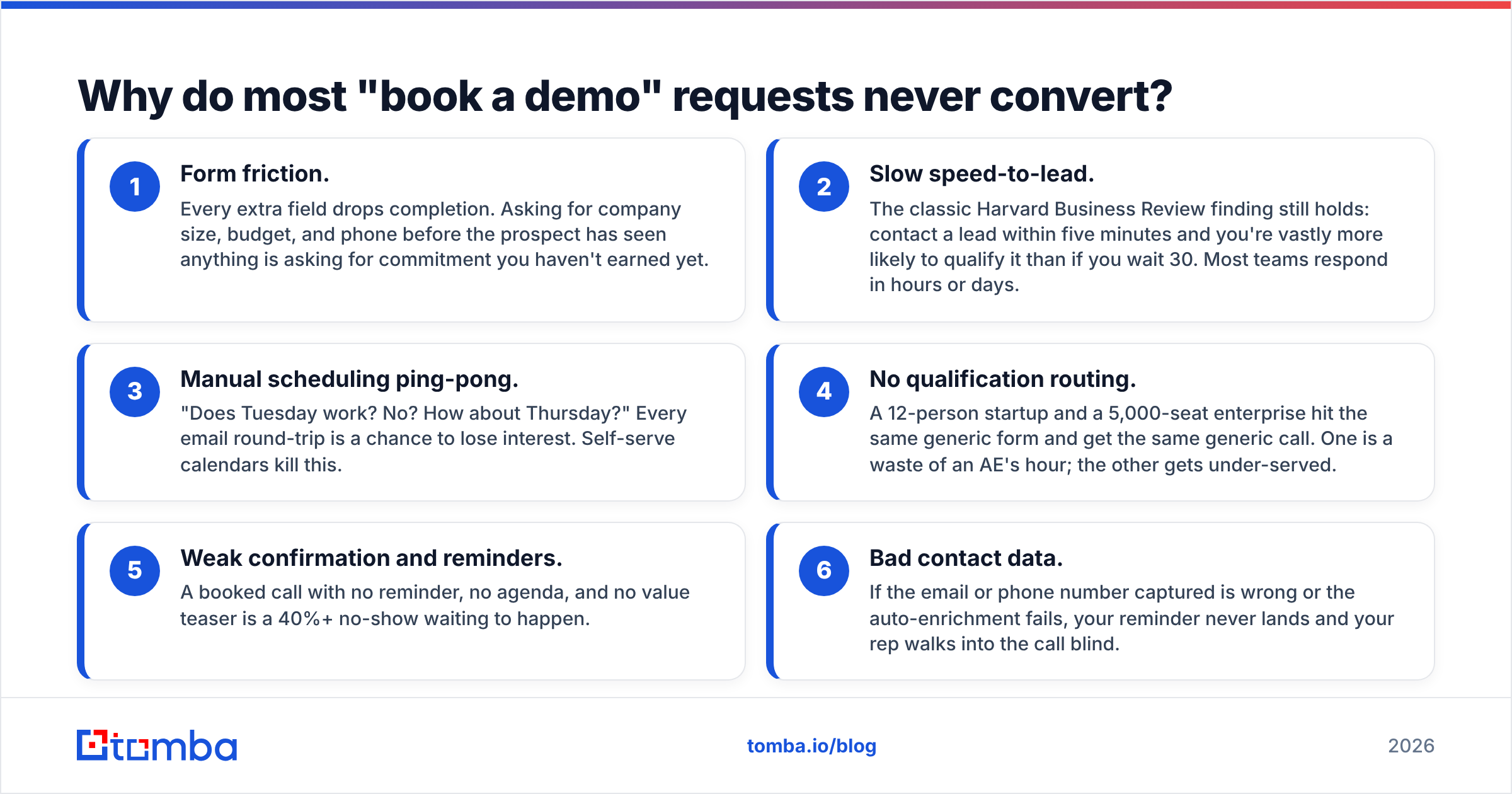
- Form friction. Every extra field drops completion. Asking for company size, budget, and phone before the prospect has seen anything is asking for commitment you haven't earned yet.
- Slow speed-to-lead. The classic Harvard Business Review finding still holds: contact a lead within five minutes and you're vastly more likely to qualify it than if you wait 30. Most teams respond in hours or days.
- Manual scheduling ping-pong. "Does Tuesday work? No? How about Thursday?" Every email round-trip is a chance to lose interest. Self-serve calendars kill this.
- No qualification routing. A 12-person startup and a 5,000-seat enterprise hit the same generic form and get the same generic call. One is a waste of an AE's hour; the other gets under-served.
- Weak confirmation and reminders. A booked call with no reminder, no agenda, and no value teaser is a 40%+ no-show waiting to happen.
- Bad contact data. If the email or phone number captured is wrong or the auto-enrichment fails, your reminder never lands and your rep walks into the call blind.
Notice how many of these are operational, not creative. You don't need a better headline as much as you need a faster, smarter pipe. That's good news — operations are fixable this quarter.
How do you design a "book a demo" page that converts?#
Lead with proof, strip the form to the essentials, and put the calendar on the page itself. A high-converting demo page does four jobs in order: build trust, reduce risk, qualify lightly, and book instantly.
Here's a field-tested structure:
- Headline that names the outcome, not the feature. "See how to fill your pipeline in 20 minutes" beats "Request a product demonstration."
- Social proof above the fold — logos, a one-line stat, or a short customer quote. Buyers want to know peers already trust you.
- A short form — name, work email, and company is often enough. Use enrichment to backfill the rest silently.
- Embedded scheduler so the prospect picks a slot without a second page load.
- A risk-reducer line — "No prep needed. 20 minutes. We'll tailor it to your use case."
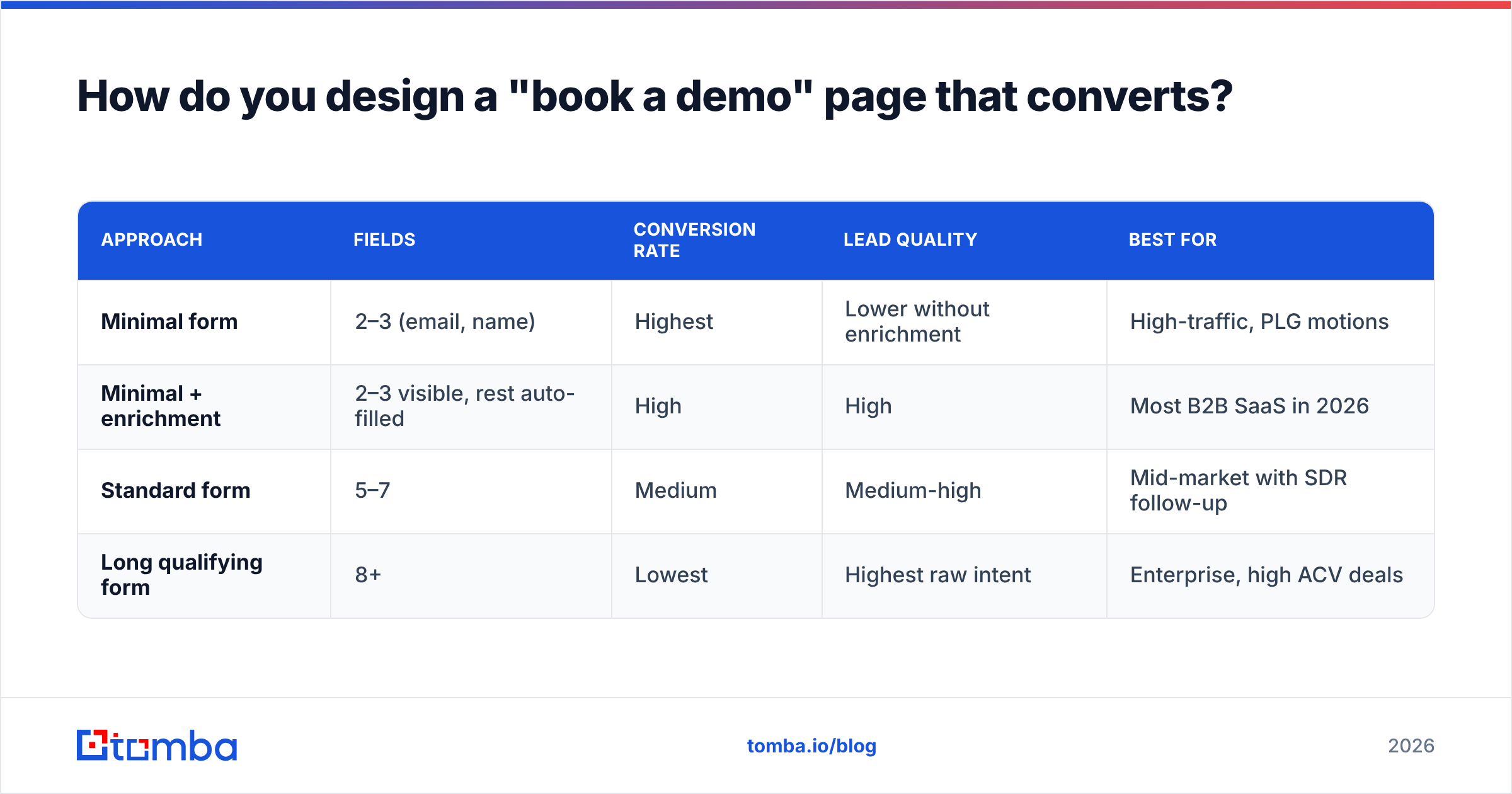
The form-length tradeoff is the decision most teams get wrong. Here's the honest comparison:
| Approach | Fields | Conversion rate | Lead quality | Best for |
|---|---|---|---|---|
| Minimal form | 2–3 (email, name) | Highest | Lower without enrichment | High-traffic, PLG motions |
| Minimal + enrichment | 2–3 visible, rest auto-filled | High | High | Most B2B SaaS in 2026 |
| Standard form | 5–7 | Medium | Medium-high | Mid-market with SDR follow-up |
| Long qualifying form | 8+ | Lowest | Highest raw intent | Enterprise, high ACV deals |
The winning pattern for most teams is row two: ask for almost nothing, then use data enrichment to append company size, industry, tech stack, and role behind the scenes. The prospect feels zero friction; your rep still gets a full profile before the call. You can append a verified phone number with a phone finder so confirmation texts and call reminders actually reach the buyer.
How should you qualify before the call, not on it?#
Qualify with routing logic and enriched data so unqualified bookings never reach an AE's calendar in the first place. Burning a senior rep's hour on a prospect who can't buy is the most expensive mistake in the funnel.
Build qualification in three silent layers:
- Routing question (1 field). A single dropdown like "What's your team size?" or "What are you trying to solve?" routes the booking to the right calendar — self-serve trial, SDR, or AE.
- Enrichment on submit. The moment the form posts, enrich the record. Company headcount, revenue band, industry, and funding tell you the deal's ceiling before anyone says hello.
- Disqualify gracefully. If the fit is wrong, route to a self-serve tour or a help doc instead of a live call. You keep the relationship without wasting a slot.
This is where clean data earns its keep. If your enrichment matches against stale records, you route a real enterprise buyer into a self-serve bucket and lose a six-figure deal. Verifying contact details with an email verifier before they hit your CRM keeps routing decisions based on facts, not typos.
What's the fastest way to schedule and confirm demos?#
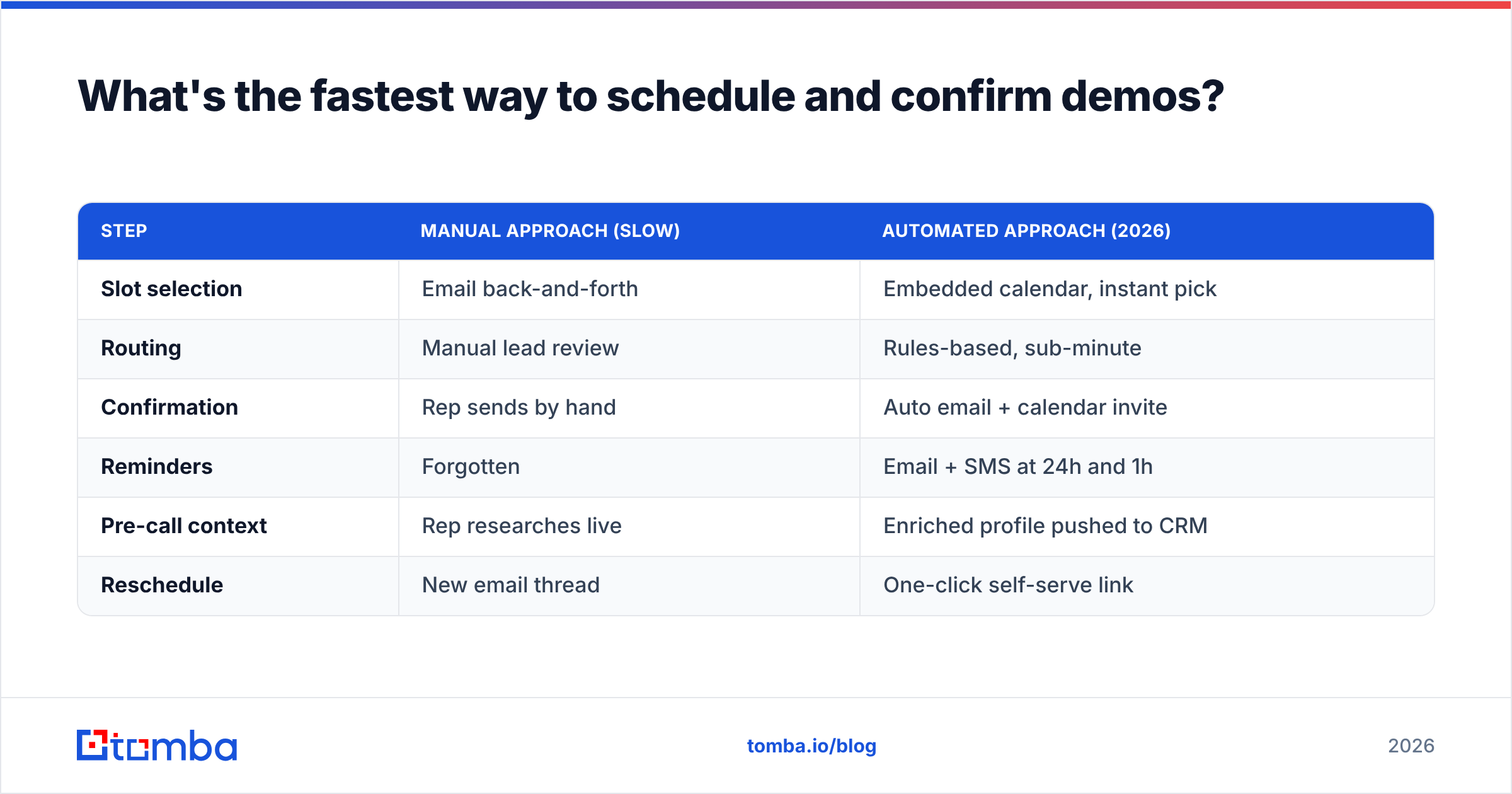
Embed a self-serve calendar, trigger instant routing, and automate a confirmation sequence — speed and certainty are what get prospects into the room. The scheduling step is pure operations, and it's where the easiest wins live.
A modern booking stack does this automatically the second someone clicks "book a demo":
| Step | Manual approach (slow) | Automated approach (2026) |
|---|---|---|
| Slot selection | Email back-and-forth | Embedded calendar, instant pick |
| Routing | Manual lead review | Rules-based, sub-minute |
| Confirmation | Rep sends by hand | Auto email + calendar invite |
| Reminders | Forgotten | Email + SMS at 24h and 1h |
| Pre-call context | Rep researches live | Enriched profile pushed to CRM |
| Reschedule | New email thread | One-click self-serve link |
The two highest-leverage upgrades are the embedded calendar and the reminder sequence. The calendar removes the scheduling friction entirely; the reminders attack no-shows. A confirmation flow with a 24-hour and a 1-hour nudge — sent to a verified address and phone — routinely cuts no-show rates by a third or more.
Connecting this to your CRM matters too. When a demo books, the enriched contact should flow straight into your pipeline so the rep opens the call with full context. A native HubSpot integration or your CRM's equivalent removes the copy-paste step that delays follow-up and corrupts data.
How do you reduce no-shows after the demo is booked?#
Treat the gap between booking and call as an active campaign, not dead time. A booked demo is a promise, and promises decay. Keep the prospect warm with a short, value-led sequence:
- Immediate confirmation with a calendar invite and a one-line agenda so they know what they'll get.
- A pre-call value teaser — a 90-second video or a one-pager tied to their use case. This raises perceived value and lowers cancellation.
- A 24-hour reminder by email and SMS, with an easy reschedule link (rescheduling beats no-showing).
- A 1-hour reminder with the join link front and center.
- A "running late?" fallback so a missed slot becomes a reschedule, not a lost lead.
The data layer underneath all of this is non-negotiable. If the email bounces or the phone number is wrong, none of these touches land, and your carefully booked demo evaporates. This is why teams that take sales pipeline hygiene seriously verify and enrich contact data before the reminder sequence runs, not after the no-show.
How do you fill the top of the demo funnel in the first place?#
All of the above optimizes conversion of existing demand. To grow demo volume, you also have to create new demand — and that starts with reaching the right people with accurate contact data.
Outbound still feeds a huge share of B2B demos. A typical motion looks like this: build a target account list, find the decision-makers, verify their emails, run a relevant sequence, and drive replies to your booking page. Each step depends on data quality. Per G2's category data on lead intelligence tools, the platforms buyers rate highest all compete on coverage and accuracy — because a sequence sent to a wrong or guessed address never produces a demo.
This is the unglamorous engine behind the "book a demo" button. The page can be perfect, but if no qualified person ever lands on it, conversion rate is a vanity metric. Pairing strong outbound with a frictionless booking flow is what compounds. You can compare plan tiers and credit volumes on the Tomba pricing page to size the data layer against your demo targets.
What does a complete "book a demo" system look like?#
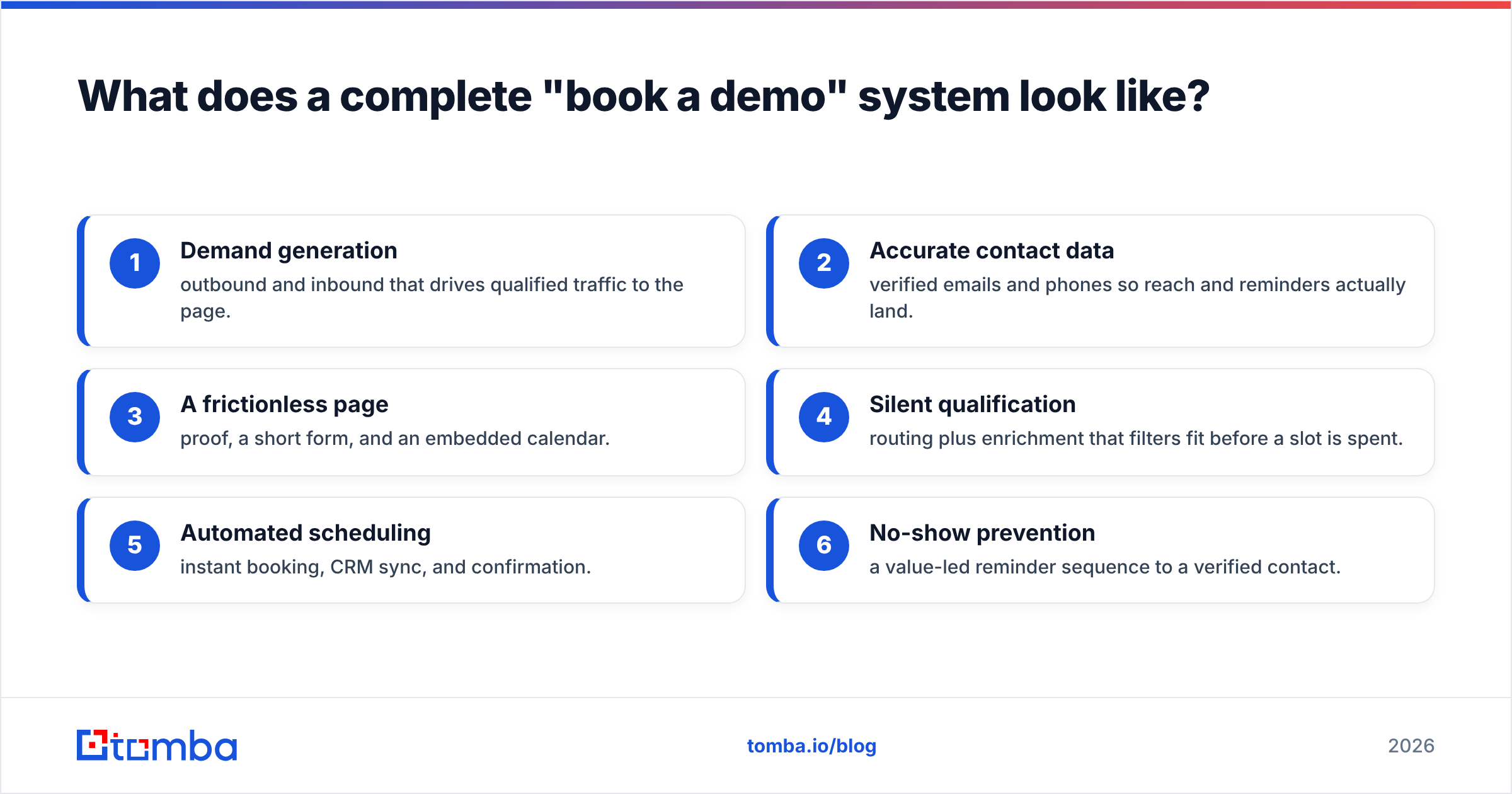
Put together, a 2026 demo engine has six moving parts working as one:
- Demand generation — outbound and inbound that drives qualified traffic to the page.
- Accurate contact data — verified emails and phones so reach and reminders actually land.
- A frictionless page — proof, a short form, and an embedded calendar.
- Silent qualification — routing plus enrichment that filters fit before a slot is spent.
- Automated scheduling — instant booking, CRM sync, and confirmation.
- No-show prevention — a value-led reminder sequence to a verified contact.
Audit your own funnel against those six. Most teams find two or three weak links — usually data quality, qualification, or reminders — and fixing them lifts booked, show-up demos without spending a cent more on traffic.
Final takeaway: your demo button is only as good as your data#
Conclusion first: the "book a demo" CTA converts when the entire chain behind it is fast, qualified, and built on accurate contact data. Polish the page all you want — if the email bounces, the routing misfires, or no qualified buyer ever arrives, the button is decorative.
Start with the data layer, because everything downstream depends on it. Tomba's Email Finder helps you find and verify the professional email addresses of the decision-makers you want in your demos, so your outbound reaches real inboxes and your booking flow has qualified people to talk to. Plug it into your enrichment and CRM, then turn your attention to the page, the scheduler, and the reminders — and watch your booked-and-showed demo rate climb. Try the free tier (25 searches a month) and feed your "book a demo" funnel with contacts who actually exist.
// get started
Find, verify and enrich your first contacts today
Start on the free plan with 25 searches a month, then scale when your team is ready.
Free plan · No credit card required · GDPR & CCPA
// about the author