Boomerang vs Calendly 2026: Which Scheduling Tool Wins?
Boomerang lives inside your inbox; Calendly removes the back-and-forth entirely. Here is how the two scheduling tools compare on features, pricing, and fit in 2026.
TL;DR
- Boomerang is an email productivity layer for Gmail and Outlook: send-later scheduling, follow-up reminders, read tracking, and AI-assisted writing — all inside your inbox.
- Calendly is a standalone booking tool: you share a link, the recipient picks a slot, and the meeting lands on both calendars without a single "does Tuesday work?" email.
- They solve different halves of the same problem. Boomerang controls when your message goes out and comes back; Calendly controls when the meeting happens.
- For most B2B sales teams the honest answer is "both" — but if you only buy one, your decision hinges on whether your bottleneck is follow-up discipline or meeting friction.
- Neither tool finds the prospect in the first place. That step belongs to an email finder, and it is where most outreach actually breaks.
What is Boomerang and what does it actually do?#
Boomerang is a browser extension and add-in that bolts scheduling and reminder features onto Gmail and Outlook. You write an email like normal, then choose to send it later, ask Boomerang to remind you if nobody replies, or pause your inbox to stay focused.
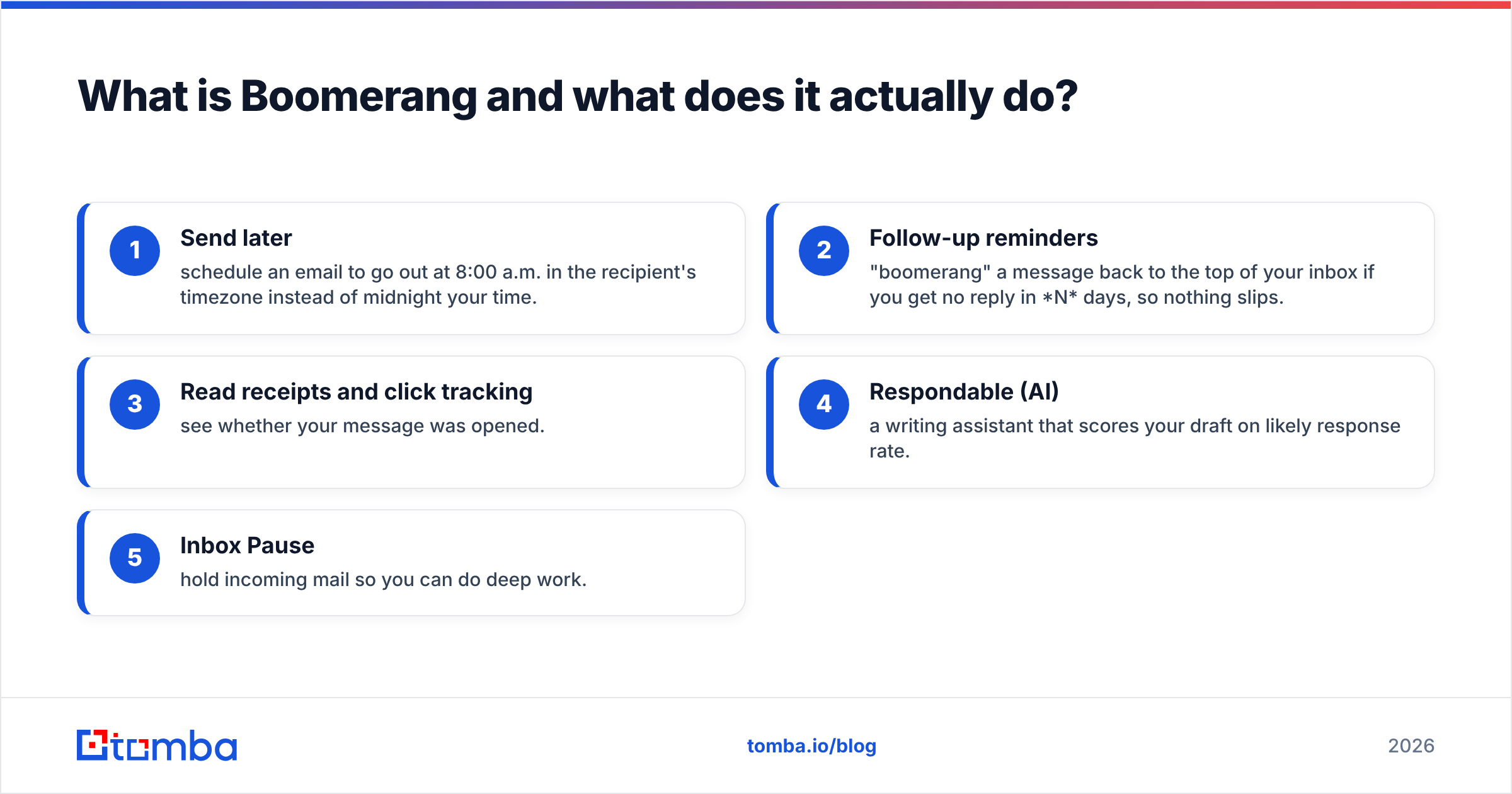
The core jobs Boomerang handles:
- Send later — schedule an email to go out at 8:00 a.m. in the recipient's timezone instead of midnight your time.
- Follow-up reminders — "boomerang" a message back to the top of your inbox if you get no reply in N days, so nothing slips.
- Read receipts and click tracking — see whether your message was opened.
- Respondable (AI) — a writing assistant that scores your draft on likely response rate.
- Inbox Pause — hold incoming mail so you can do deep work.
Boomerang's whole philosophy is don't make me leave my inbox. It is a follow-up and timing tool first. It does not host a booking page, and it does not manage your availability.

What is Calendly and what does it actually do?#
Calendly removes the scheduling conversation entirely. Instead of trading times over email, you publish a link tied to your real-time availability. The recipient opens it, sees only open slots, books one, and both calendars update automatically with a video link attached.
Calendly's core jobs:
- Booking links and pages — one link per meeting type (15-min intro, 30-min demo, 60-min strategy call).
- Availability rules — buffers, daily caps, minimum notice, working hours across timezones.
- Round-robin and collective scheduling — route bookings across a team or require multiple hosts.
- Workflows — automated reminder and follow-up emails/SMS around each booking.
- Integrations — calendars, Zoom/Teams/Meet, CRMs, Stripe for paid bookings.
Where Boomerang optimizes the email, Calendly eliminates the email. That is the cleanest way to hold the two in your head.
Boomerang vs Calendly: side-by-side comparison#
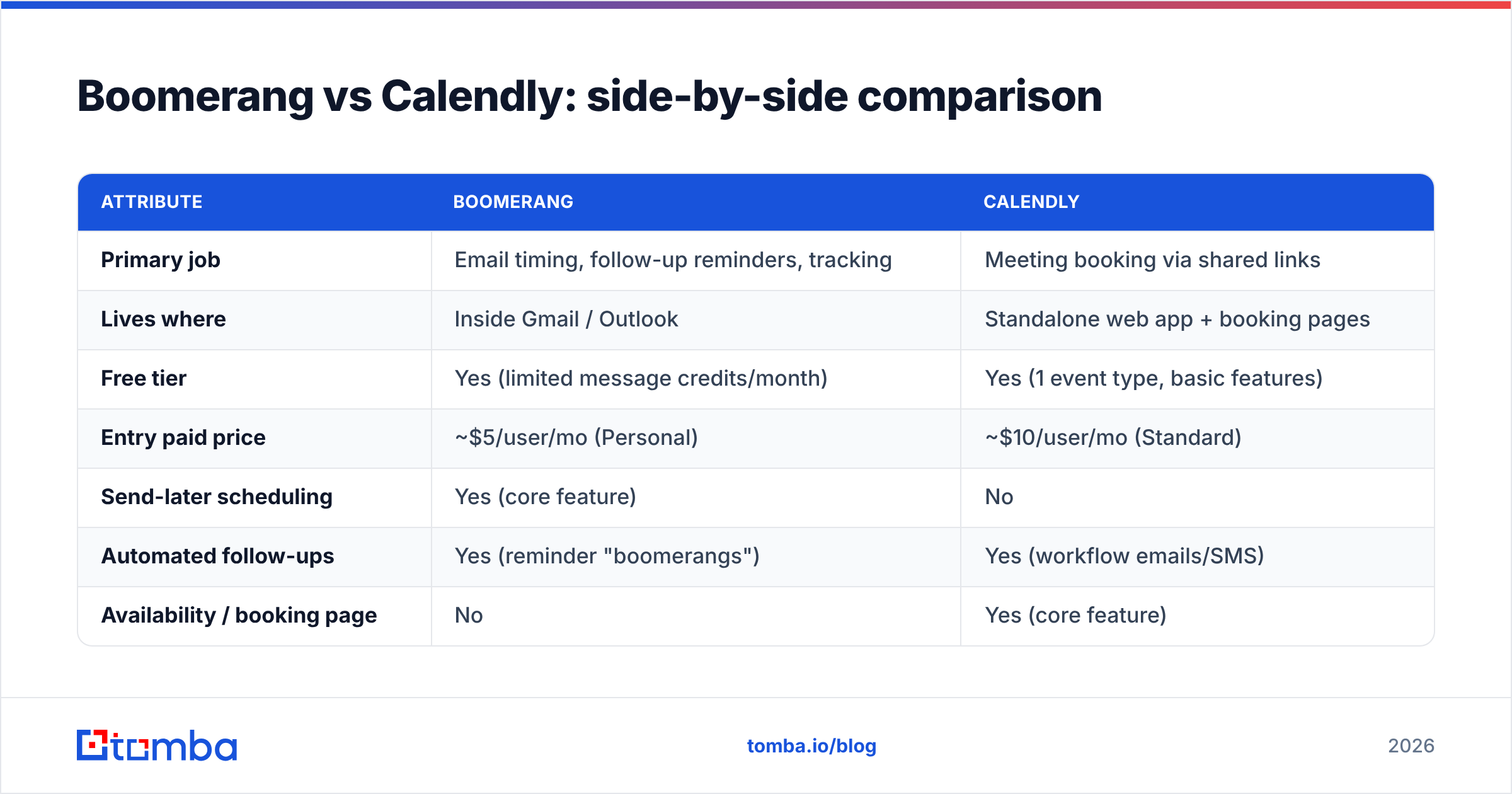
| Attribute | Boomerang | Calendly |
|---|---|---|
| Primary job | Email timing, follow-up reminders, tracking | Meeting booking via shared links |
| Lives where | Inside Gmail / Outlook | Standalone web app + booking pages |
| Free tier | Yes (limited message credits/month) | Yes (1 event type, basic features) |
| Entry paid price | ~$5/user/mo (Personal) | ~$10/user/mo (Standard) |
| Send-later scheduling | Yes (core feature) | No |
| Automated follow-ups | Yes (reminder "boomerangs") | Yes (workflow emails/SMS) |
| Availability / booking page | No | Yes (core feature) |
| Read / open tracking | Yes | No |
| Team routing (round-robin) | No | Yes |
| AI writing help | Yes (Respondable) | No |
| Best for | Reps who live in the inbox and miss follow-ups | Teams drowning in "what time works?" |
The table makes the overlap look smaller than the marketing does. They share the word "scheduling" and almost nothing else. Boomerang schedules emails; Calendly schedules meetings.
Is Boomerang better than Calendly for sales outreach?#
It depends on where your deals stall — but for cold, top-of-funnel outreach, Boomerang's follow-up muscle usually matters more than a booking link.
Here is the logic. Cold prospects are not ready to book a meeting on touch one. They need three to seven touches before they reply at all. Studies on outbound consistently show the majority of replies come after the first message, which is exactly the gap Boomerang's reminder loop closes. If your problem is "I send one email and never follow up," Boomerang fixes that directly.
Calendly shines after interest exists. Once a prospect says "sure, let's talk," dropping a Calendly link is dramatically smoother than proposing three times and getting none of them. So the sequence is usually: Boomerang-style discipline to earn the reply, Calendly to convert the reply into a booked call.
If you run cold email at volume, pair either tool with a healthy sender setup. No scheduler saves a message that lands in spam — track your sender reputation and warm the domain before you scale.

How do Boomerang and Calendly handle pricing in 2026?#
Both use freemium tiers that get you started and paywall the features teams actually need.
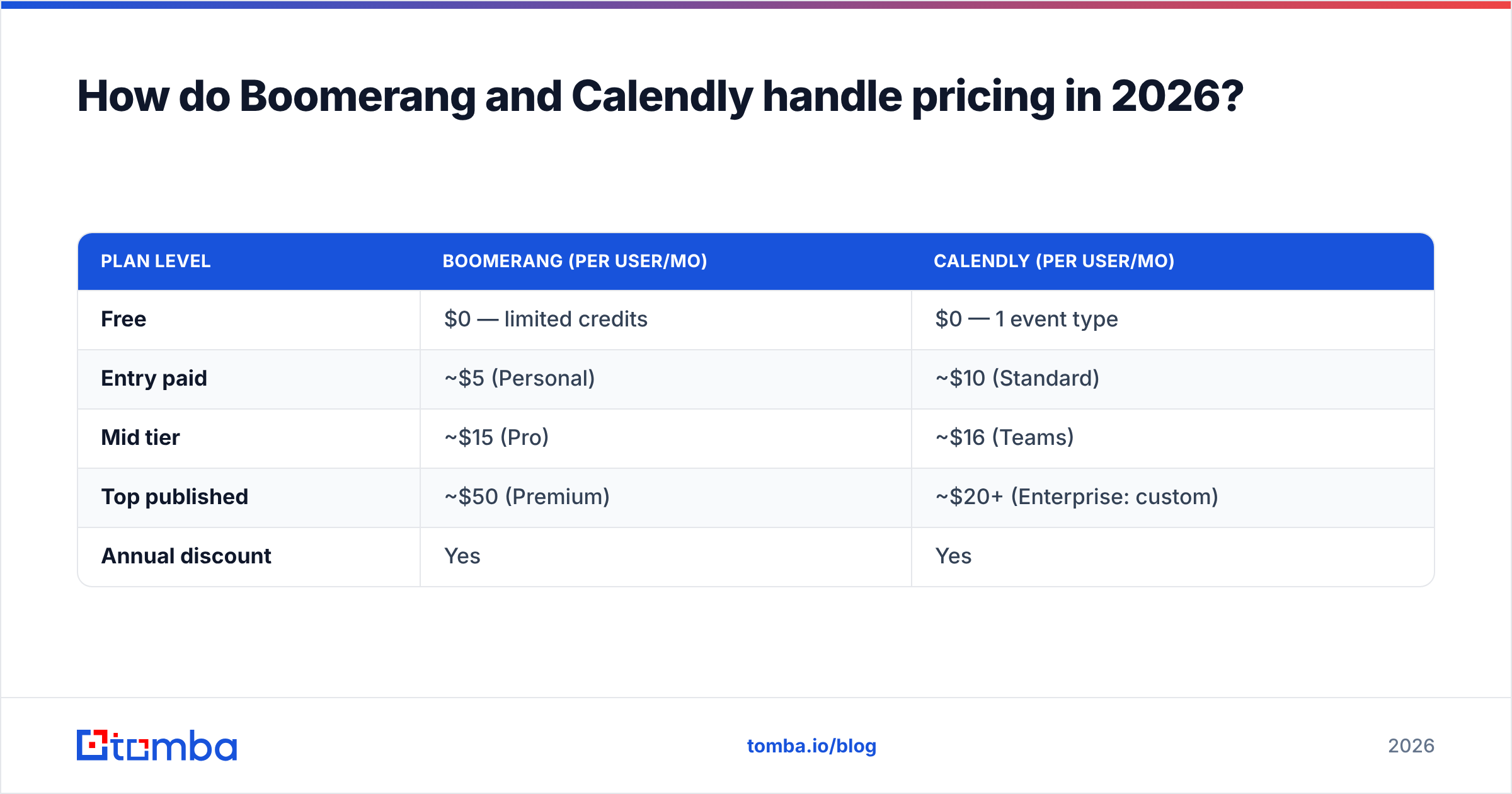
| Plan level | Boomerang (per user/mo) | Calendly (per user/mo) |
|---|---|---|
| Free | $0 — limited credits | $0 — 1 event type |
| Entry paid | ~$5 (Personal) | ~$10 (Standard) |
| Mid tier | ~$15 (Pro) | ~$16 (Teams) |
| Top published | ~$50 (Premium) | ~$20+ (Enterprise: custom) |
| Annual discount | Yes | Yes |
Two practical notes. Boomerang's free plan is genuinely usable for a solo rep who just needs send-later and a handful of reminders. Calendly's free plan is more of a trial — one event type is too tight for anyone juggling intro calls, demos, and onboarding, so teams almost always jump to a paid seat fast.
For exact, current numbers always check the vendors directly: Calendly pricing and the official Boomerang site. Plan names and caps shift, and you do not want to quote a stale tier in a deal.
Which tool fits which team?#
Match the tool to your actual bottleneck instead of the feature list.
- Solo SDR / founder doing cold email — Boomerang. Your enemy is forgotten follow-ups, and the send-later + reminder combo is the cheapest fix on the market.
- AE running demos and discovery calls — Calendly. Your enemy is scheduling ping-pong; a booking link reclaims hours a week.
- Customer success / onboarding — Calendly with workflows. Recurring, multi-stakeholder meetings need round-robin and reminders.
- Recruiter screening candidates — Calendly. High volume of one-to-one slots is exactly its sweet spot.
- Anyone living in Gmail who hates leaving it — Boomerang. The "never open another tab" promise is real.
- Full-cycle B2B team — both, plus a data source. The tools are cheap; the expensive gap is who you contact.
That sixth point is the one most comparison posts skip. Boomerang and Calendly assume you already have the right person's email or that a qualified lead already found your booking page. Getting to that verified contact is a separate, upstream job.
Where do Boomerang and Calendly fall short?#
Both tools are excellent at their narrow job and silent about everything before it.
- Neither finds contacts. Boomerang schedules to an address you already have. Calendly waits for someone to click. If your list is thin or wrong, both tools just help you fail faster.
- Neither verifies emails. Send-later to a dead mailbox is a bounce, and bounces wreck email deliverability. Run addresses through an email verifier before any sequence.
- Boomerang has no booking page. If you need self-serve scheduling, you will bolt on Calendly anyway.
- Calendly has no inbox tracking or send-later. It assumes the conversation already exists.
- Read receipts are imperfect. Boomerang's open tracking relies on pixel loads, which privacy settings increasingly block — treat it as a signal, not truth.
The pattern is clear: these are mid-funnel tools. The top of the funnel — finding and validating the contact — is upstream of both, and it is where pipeline is actually won or lost.
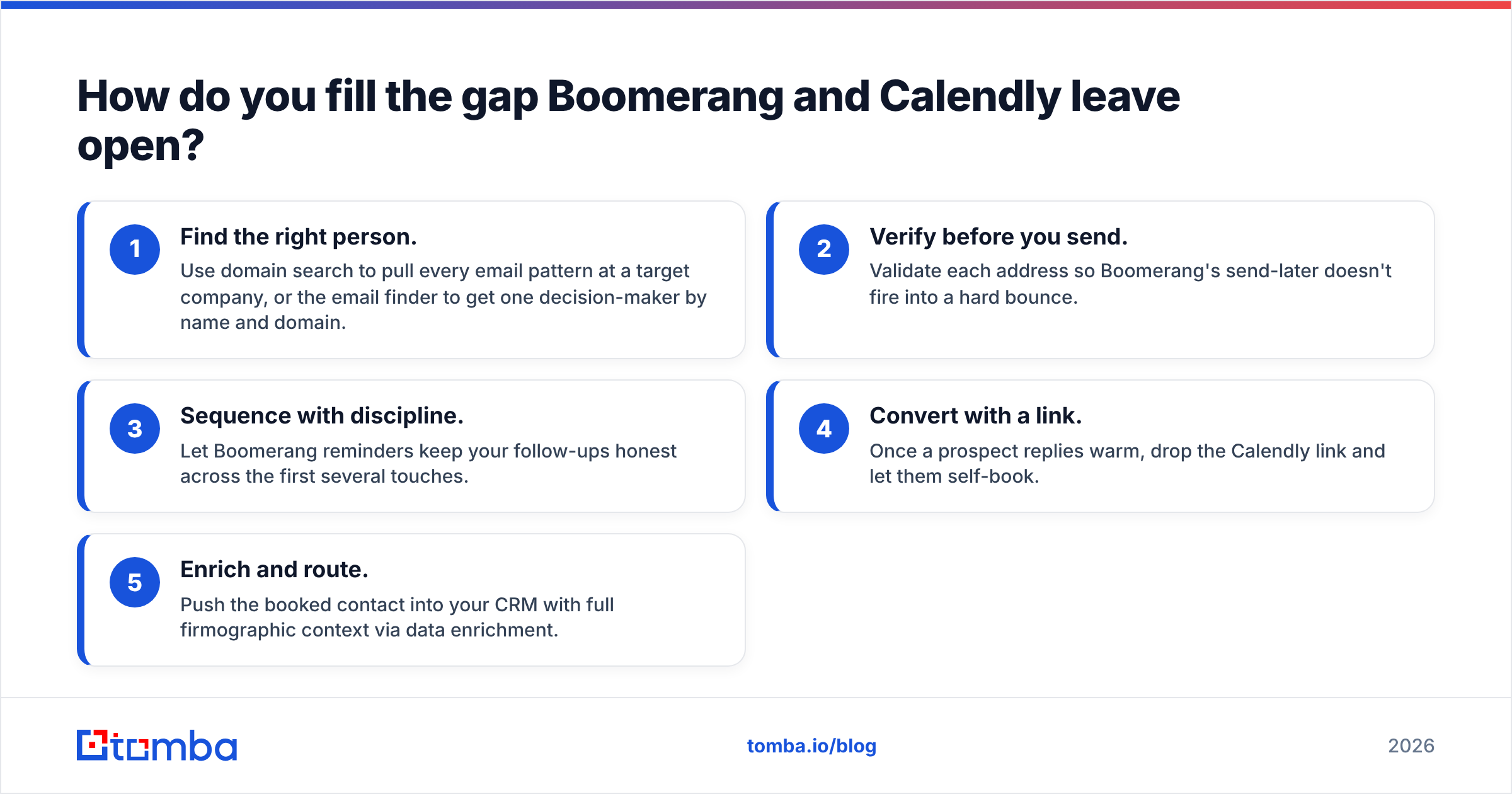
How do you fill the gap Boomerang and Calendly leave open?#
Feed both tools verified, accurate contacts so the timing and booking features have something real to act on.
The workflow that actually converts looks like this:
- Find the right person. Use domain search to pull every email pattern at a target company, or the email finder to get one decision-maker by name and domain.
- Verify before you send. Validate each address so Boomerang's send-later doesn't fire into a hard bounce.
- Sequence with discipline. Let Boomerang reminders keep your follow-ups honest across the first several touches.
- Convert with a link. Once a prospect replies warm, drop the Calendly link and let them self-book.
- Enrich and route. Push the booked contact into your CRM with full firmographic context via data enrichment.
Compare any of these tools yourself on a neutral source like G2 before committing budget — but recognize that the scheduling layer is the easy 20%. The data layer underneath it is the 80% that determines whether your perfectly timed email reaches a real, interested human.
Verdict: Boomerang or Calendly?#
Buy Boomerang if your problem is follow-up; buy Calendly if your problem is scheduling; buy both if you run a real sales motion. They are complementary, not competitive, and the "vs" framing oversells a rivalry that barely exists. Boomerang owns the outbound email cadence. Calendly owns the inbound meeting handoff. A serious team running outbound will likely want one of each.
But before either tool earns its seat, ask the harder question: are you even emailing the right, verified person? A flawless send-later schedule and a beautiful booking page are worthless if the address bounces or the lead was never qualified. That is the step both tools quietly depend on and neither provides.
That is where Tomba fits. Start with the Tomba Email Finder to source decision-maker emails by name, company, or domain, verify them in the same workflow, and hand Boomerang and Calendly a list worth scheduling against. Tomba's Free tier gives you 25 searches a month to test it, with Starter at $49/mo when you're ready to scale. Fix the top of the funnel first — then let your scheduling tools do what they do best.
Ready to find emails that actually work?
Join 150,000+ professionals who stopped guessing and started sending. Free credits on signup — no credit card required.
Get the Tomba newsletter
Practical outbound tactics and product updates — once every two weeks.
About the author