Boomerang vs Mixmax 2026: Gmail Scheduling & Sequences
Boomerang vs Mixmax in 2026: which Gmail tool actually fits sales teams? A neutral breakdown of scheduling, tracking, sequences, pricing, and where each one breaks down.
TL;DR
- Boomerang is a focused email-productivity add-on: schedule send, inbox pause, follow-up reminders, and read tracking inside Gmail and Outlook. It does one job well and stays cheap.
- Mixmax is a full sales-engagement layer for Gmail: sequences, templates, calendar booking, CRM sync, and team analytics. It does far more and costs far more.
- Pick Boomerang if you want lightweight scheduling and reminders for a few inboxes. Pick Mixmax if you run multi-step outbound and need sequences, reporting, and team rules.
- Neither finds or verifies the email addresses you send to — that gap is where a dedicated data tool like Tomba sits upstream of both.
- This guide compares them on features, pricing, deliverability impact, and team fit so you can choose without a 14-day trial detour.
What is the real difference between Boomerang and Mixmax?#
Boomerang is a scheduling utility; Mixmax is a sales-engagement platform. That single distinction explains almost every pricing, feature, and workflow difference below.
Think of it like the difference between a programmable thermostat and a full building-management system. Boomerang lets you set when a message goes out and nudges you when nobody replies — clean, narrow, reliable. Mixmax runs the whole outreach engine: it sequences dozens of touches, tracks every open and click, books meetings, and reports on what the team is doing.
Both live inside Gmail as extensions, so they feel similar on day one. The divergence shows up the moment you try to scale. Boomerang has no concept of a multi-step campaign across a list of 500 contacts. Mixmax was built for exactly that — and you pay for the machinery whether you use all of it or not.
If your job is "send this later and remind me if they ghost me," Boomerang is almost certainly enough. If your job is "run outbound to a named-account list and prove pipeline influence," you've outgrown Boomerang before you've finished reading this sentence.

How do Boomerang and Mixmax compare feature by feature?#
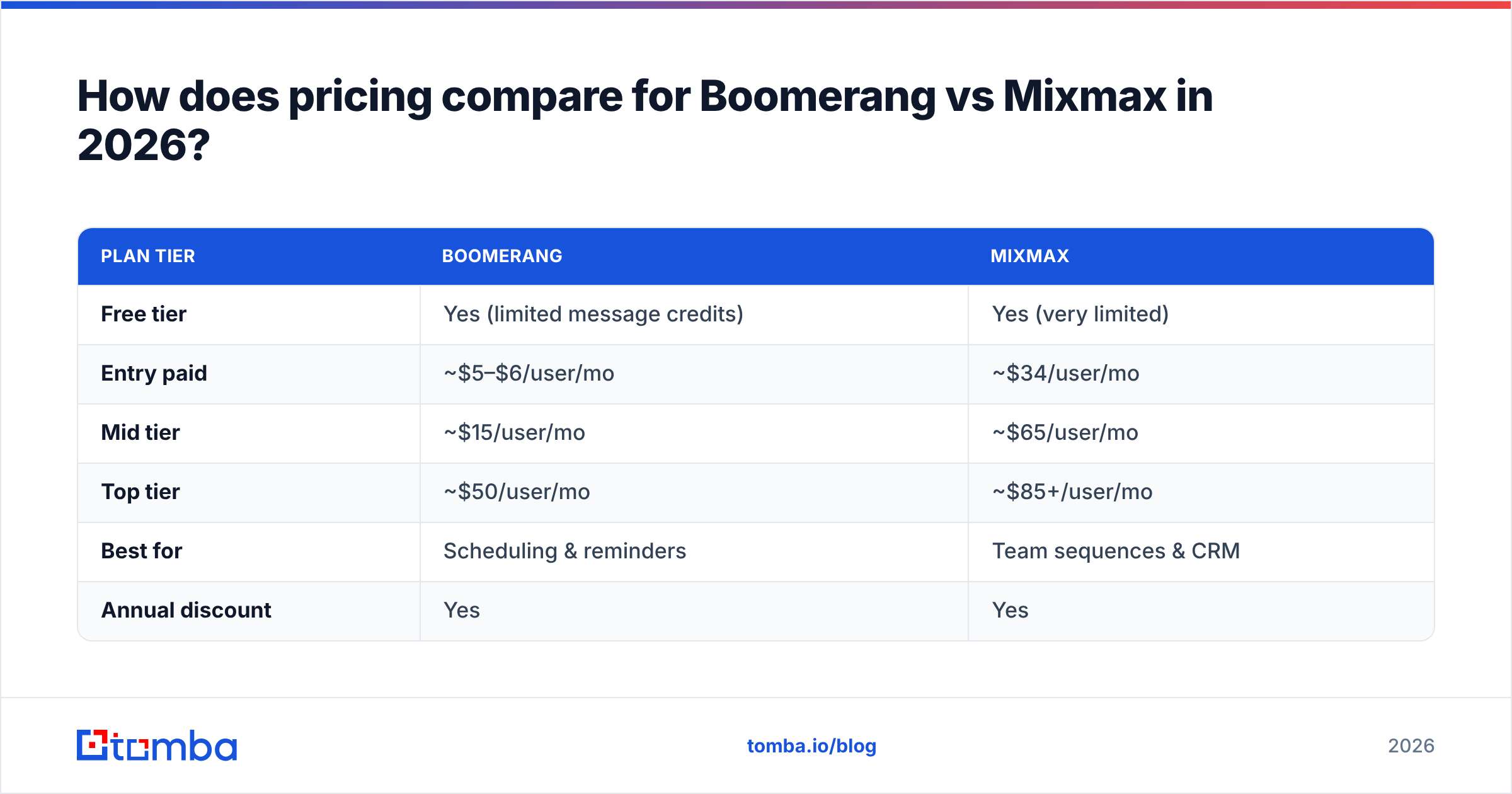
Here's the head-to-head on the capabilities that actually drive a buying decision.
| Feature | Boomerang | Mixmax |
|---|---|---|
| Schedule send | Yes | Yes |
| Follow-up reminders | Yes (core strength) | Yes |
| Read/open tracking | Yes | Yes |
| Click tracking | Limited | Yes |
| Multi-step sequences | No | Yes (core strength) |
| Templates & snippets | Basic | Advanced, shared |
| Calendar booking | Add-on | Built-in |
| CRM sync (Salesforce/HubSpot) | No | Yes (higher tiers) |
| Team analytics | No | Yes |
| AI writing assist | Yes (Respondable) | Yes |
| Outlook support | Yes | Gmail-first |
The pattern is clear. Boomerang wins on single-user discipline — scheduling, the "Inbox Pause" focus feature, and its Respondable AI that scores whether a draft is likely to get a reply. Those are genuinely useful and not gimmicks.
Mixmax wins on team outbound mechanics — sequences, shared templates, booking links embedded in the email body, and analytics that roll up to a manager. If you've ever wanted to see which rep's template gets the best reply rate, that data only exists on the Mixmax side of this table.
One thing neither tool does: tell you whether the address you're emailing is real. Both assume you already have a clean, deliverable list. Sending sequences to bad addresses through Mixmax just lets you burn your domain reputation faster and with better dashboards. That's why teams pair either tool with an email verifier before the first send.
Is Boomerang or Mixmax better for cold outreach?#
Mixmax is better for cold outreach; Boomerang isn't built for it. If outbound at volume is your goal, this isn't a close call.
Cold outreach needs three things Boomerang lacks: sequences that auto-advance until someone replies, per-step analytics so you can kill weak messaging, and bulk personalization. Mixmax has all three. You can build a five-touch sequence, enroll a list, and let it run with reply detection pausing anyone who responds.
Boomerang's follow-up reminders are a manual substitute. They nudge you to send the next message — they don't send it. For a rep working 20 accounts that's fine and arguably healthier. For a rep working 400 accounts it's unworkable.
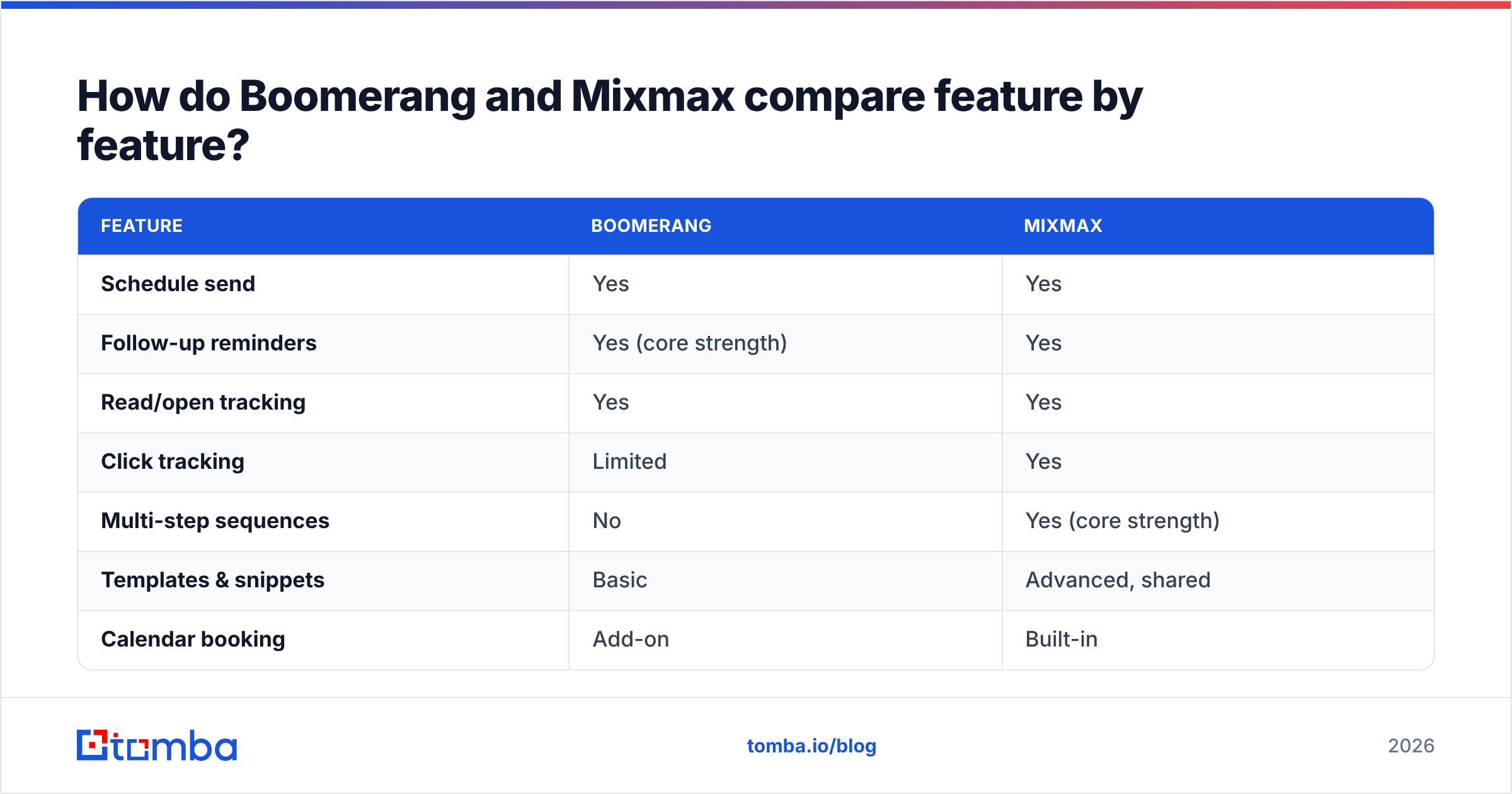
That said, "better for cold outreach" comes with a warning: deliverability is a function of list quality and sending behavior, not the tool. A few guardrails apply to both:
- Verify before you send. Catch-all domains and dead mailboxes inflate bounce rates and wreck sender reputation. Run lists through verification first.
- Warm the domain. New sending domains need ramp-up regardless of which extension you use.
- Cap daily volume. Mixmax makes it easy to send a lot; that's a liability if your domain is young.
- Personalize the first line. Both tools support variables — generic merge fields still read as spam.
- Watch your tracking pixel. Open tracking can trip spam filters; test with it off if reply rates dip.
Mixmax gives you more rope. Whether that rope pulls you up or hangs you depends on the data feeding it.
How does pricing compare for Boomerang vs Mixmax in 2026?#
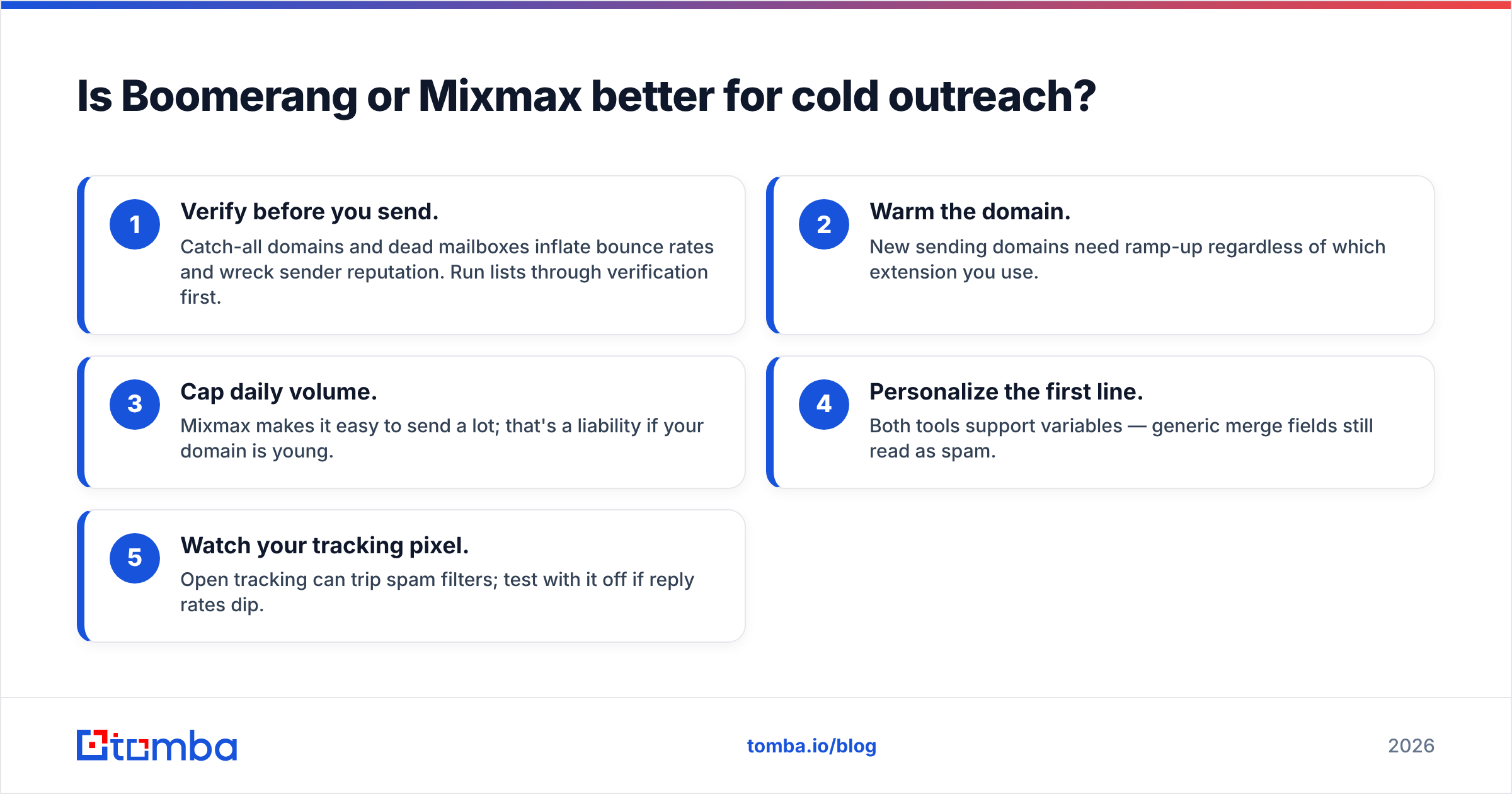
Boomerang is dramatically cheaper because it does dramatically less. Below are representative public list prices — always confirm current numbers on each vendor's site, since tiers shift.
| Plan tier | Boomerang | Mixmax |
|---|---|---|
| Free tier | Yes (limited message credits) | Yes (very limited) |
| Entry paid | ~$5–$6/user/mo | ~$34/user/mo |
| Mid tier | ~$15/user/mo | ~$65/user/mo |
| Top tier | ~$50/user/mo | ~$85+/user/mo |
| Best for | Scheduling & reminders | Team sequences & CRM |
| Annual discount | Yes | Yes |
The takeaway: an individual who wants schedule-send and reminders can run Boomerang for the price of a coffee. A sales team that needs sequences, booking, and Salesforce sync will land on a Mixmax mid or top tier, and the per-seat cost adds up fast across a 20-rep team.
Neither price includes the data layer. If you're budgeting a real outbound stack, the honest line items are: a data/email-finding tool, a verification tool, and a sending tool. Mixmax is only the third of those. Compare that against a focused data spend — Tomba pricing starts free at 25 searches and runs to $49/mo Starter — and you'll see the engagement tool is rarely your biggest or most important cost. The list is.
For reference on how buyers rate each platform's value, the user reviews on G2 are a useful neutral signal, especially the "ease of setup" and "quality of support" breakdowns.
Which tool is easier to set up and live with?#
Boomerang is easier; Mixmax is more powerful but heavier. Both install as a browser extension in a couple of minutes, but the day-two experience differs.
Boomerang gets out of your way. It adds a few buttons to the Gmail compose window and a reminders panel. There's almost nothing to configure, no team admin, and no onboarding call. A non-technical user is productive in five minutes.
Mixmax is closer to deploying a mini-CRM. Sequences, shared template libraries, calendar rules, CRM field mapping, and team permissions all need setup. The payoff is real for a team that uses them, but a solo user often finds 70% of the product sitting unused — while still paying for it. That's the classic "I just wanted to schedule an email" regret.
A quick gut check: count how many people need to see each other's data. Zero or one? Boomerang. Several reps and a manager who wants reporting? Mixmax.

What do Boomerang and Mixmax both miss?#
Both tools manage sending — neither solves who to send to. This is the quietest but most expensive gap in either product.
Every sequence, reminder, and tracking pixel assumes you already have an accurate contact list. In practice, that's where outbound actually breaks. Stale or guessed email addresses bounce, drag your domain reputation down, and make your beautiful Mixmax analytics measure the wrong thing. Garbage in, dashboards out.
This is the upstream layer worth getting right before you spend on either engagement tool:
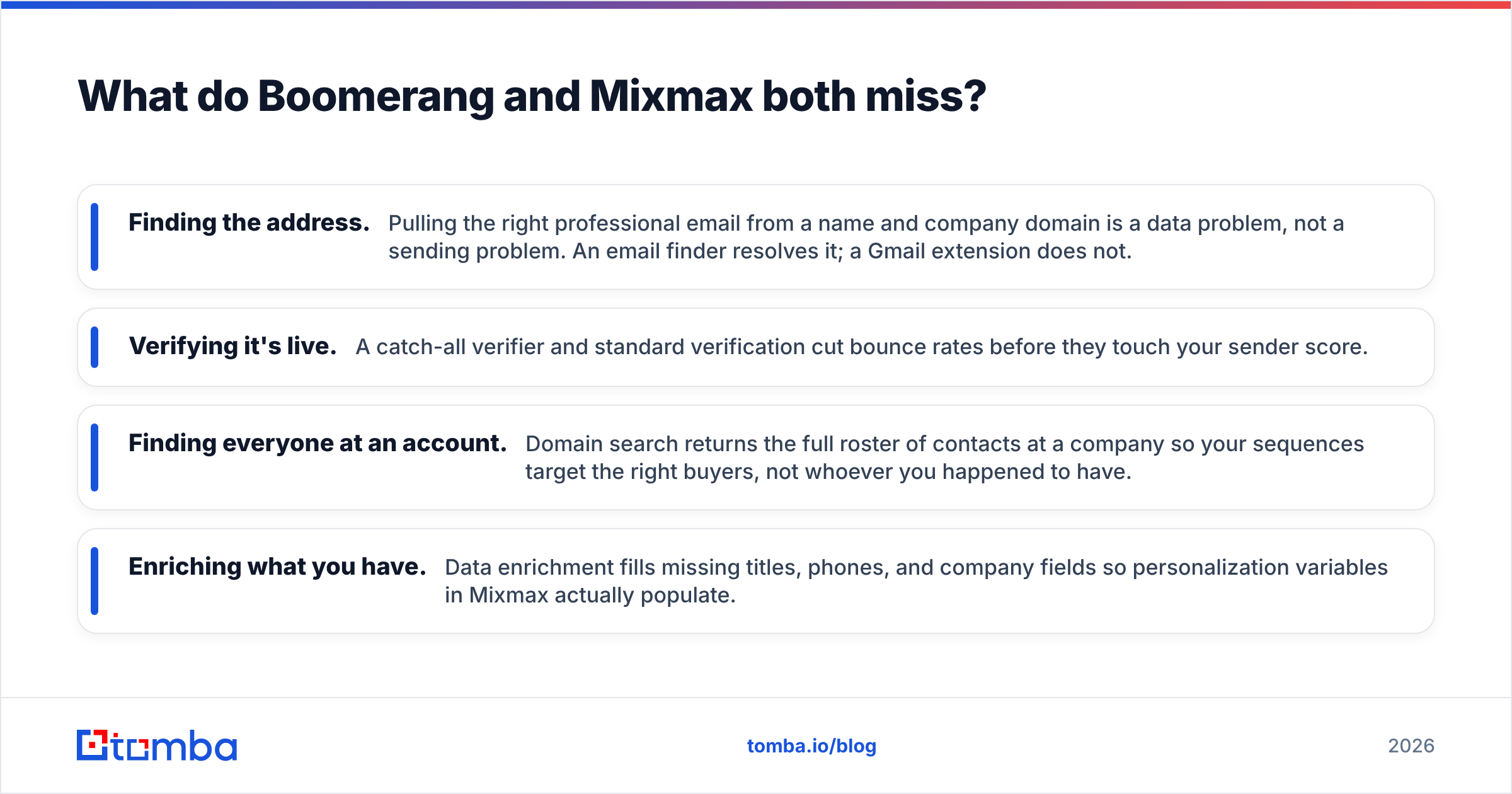
- Finding the address. Pulling the right professional email from a name and company domain is a data problem, not a sending problem. An email finder resolves it; a Gmail extension does not.
- Verifying it's live. A catch-all verifier and standard verification cut bounce rates before they touch your sender score.
- Finding everyone at an account. Domain search returns the full roster of contacts at a company so your sequences target the right buyers, not whoever you happened to have.
- Enriching what you have. Data enrichment fills missing titles, phones, and company fields so personalization variables in Mixmax actually populate.
You can wire this in cleanly: build and verify the list with a data tool, push it into your CRM, then let Boomerang or Mixmax handle the touches. Tomba's HubSpot integration and Salesforce integration make that hand-off a sync rather than a CSV chore.
The point isn't that Boomerang or Mixmax are weak. It's that they sit at the end of the pipeline. Optimizing the send while ignoring the list is like buying a faster car and never checking the road you're driving on.
When should you pick Boomerang over Mixmax (and vice versa)?#
Match the tool to the job, not the brand. Here's the decision in plain terms.
Choose Boomerang if:
- You're a solo user, founder, or small team that sends thoughtful one-to-one email.
- Your main needs are schedule-send, inbox focus, and follow-up reminders.
- You use Outlook as well as Gmail.
- Budget matters and you don't need team reporting.
Choose Mixmax if:
- You run structured outbound with multi-step sequences.
- You need shared templates, embedded booking links, and click analytics.
- A manager wants visibility into rep activity and reply rates.
- You sync engagement data into Salesforce or HubSpot.
Choose neither (yet) if:
- Your contact list is unverified or built on guesses. Fix the data first, or both tools will just help you fail faster.
There's also a middle path many teams miss: use Boomerang for personal follow-up discipline and a real data tool for list building, skipping the full sales-engagement spend until volume justifies it. Not every team that thinks it needs Mixmax actually does. Run /simplify on your own stack before adding a seat.
Boomerang vs Mixmax: the verdict#
Boomerang is the better utility; Mixmax is the better platform. They're not really competing for the same job — they only look similar because both live in Gmail.
If you want to send later and never forget a follow-up, Boomerang is cheaper, simpler, and entirely sufficient. If you run a team doing real outbound and need sequences plus reporting, Mixmax earns its higher price — provided you actually use the team features you're paying for.
But whichever you choose, remember the layer neither one covers. The fastest way to lift reply rates isn't a better send button — it's a cleaner, more complete contact list reaching the right people at each account. That's the upstream work that makes everything downstream perform.
Start there. Use the Tomba Email Finder to build accurate, verified lists by name, company, or domain — then plug them into Boomerang or Mixmax and let your sending tool do what it's actually good at. Free tier is 25 searches a month, no card required, and it sits in front of whichever engagement tool you pick.
Ready to find emails that actually work?
Join 150,000+ professionals who stopped guessing and started sending. Free credits on signup — no credit card required.
Get the Tomba newsletter
Practical outbound tactics and product updates — once every two weeks.
About the author