Boost Inbox Pricing Reviews Pros and Cons: 2026 Guide
An honest 2026 breakdown of Boost Inbox pricing, real user reviews, and the pros and cons that decide whether this warmup tool fits your cold email stack.

You are about to spend money on an email warmup tool. Before your card gets charged, you want to know if Boost Inbox is the right pick. This is your complete Boost Inbox pricing reviews pros and cons guide. It gives you the real numbers, honest user feedback, and the trade-offs — without pretending warmup alone fixes deliverability.
TL;DR#
- Boost Inbox is a warmup and deliverability tool that sends automated, human-like emails between seed inboxes to build sender reputation before you run cold campaigns.
- Pricing starts low (single-inbox plans in the low double digits per month) and scales per connected inbox, which gets expensive fast if you run dozens of sending accounts.
- Pros: simple setup, multi-provider support (Google, Microsoft, SMTP), spam-placement reporting, and a gentle learning curve.
- Cons: warmup is only half the battle — it can't fix bad list data, weak DNS records, or a sloppy offer.
- The smarter sequence: verify and enrich your list with a tool like Tomba first, fix authentication, then warm up. Warming a list full of invalid addresses just trains spam filters against you faster.
What is Boost Inbox?#
Boost Inbox is an email warmup service. Think of it like breaking in a new pair of running shoes before a marathon — you don't go from zero to 26 miles on day one. A brand-new sending inbox has no reputation, so mailbox providers treat its messages with suspicion. Warmup tools simulate organic activity. They send small volumes of email from your inbox to a network of other inboxes, open those messages, mark them as important, and rescue any that land in spam. Over a few weeks, providers learn your domain sends wanted mail.
Technically, Boost Inbox connects to your sending account — Gmail/Google Workspace, Outlook/Microsoft 365, or any SMTP/IMAP provider. It then runs a daily, gradually increasing schedule of these interactions. It reports where your test sends land — inbox, promotions, or spam — so you can see the reputation trend over time.
It competes in the same space as Instantly, Warmup Inbox, Mailwarm, Lemwarm, and the warmup features baked into larger sequencing platforms. Where it differentiates is price-point and a stripped-down, beginner-friendly interface.

How much does Boost Inbox cost?#
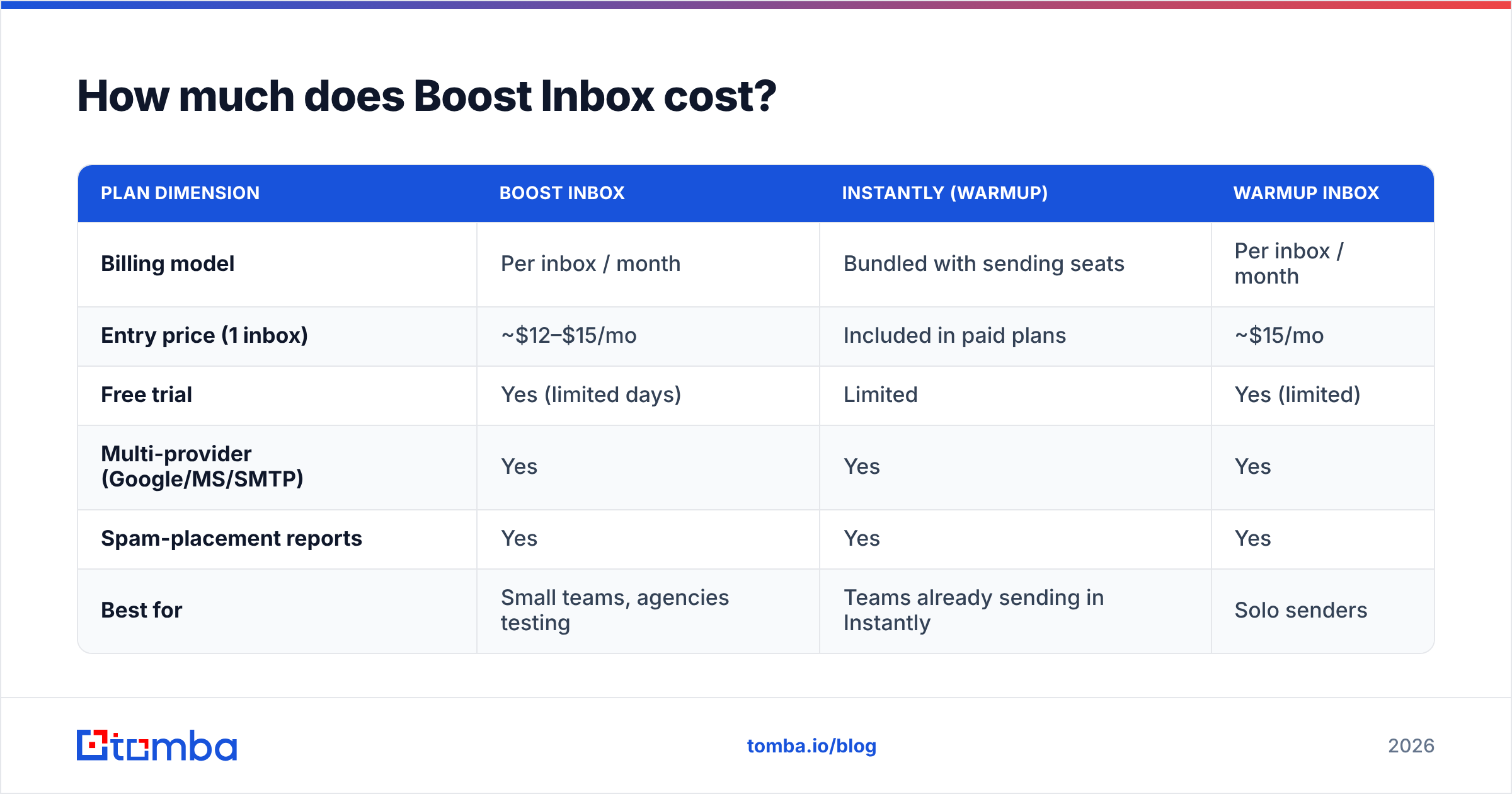
Boost Inbox uses per-inbox pricing — you pay based on how many sending accounts you connect, not a flat platform fee. As of 2026, entry plans for a single inbox sit in the low-double-digit range per month, with volume discounts as you add inboxes. Annual billing typically shaves off a couple of months versus monthly.
Always confirm the live number on the vendor's own pricing page before you buy — warmup vendors change tiers often. Here's how the model generally breaks down and how it compares to common alternatives:
| Plan dimension | Boost Inbox | Instantly (warmup) | Warmup Inbox |
|---|---|---|---|
| Billing model | Per inbox / month | Bundled with sending seats | Per inbox / month |
| Entry price (1 inbox) | ~$12–$15/mo | Included in paid plans | ~$15/mo |
| Free trial | Yes (limited days) | Limited | Yes (limited) |
| Multi-provider (Google/MS/SMTP) | Yes | Yes | Yes |
| Spam-placement reports | Yes | Yes | Yes |
| Best for | Small teams, agencies testing | Teams already sending in Instantly | Solo senders |
The math matters most at scale. One inbox is cheap. But cold email at volume often means 10, 20, or 50 inboxes across multiple domains — and per-inbox pricing multiplies. At 30 inboxes, a "$12/mo" tool is a $360/mo line item. Model your real inbox count before judging Boost Inbox as cheap or expensive.
For context on how warmup spend fits a wider stack, compare it against the data-side tooling you also need — see Tomba pricing for where list quality budget lands.
What do Boost Inbox reviews say?#
Pulling from public review platforms like G2 and Capterra, the sentiment clusters into a few repeatable themes. Treat any single review as one data point, not gospel — warmup results depend heavily on the sender's own setup.
What reviewers praise:
- Fast setup — most users connect an inbox and start warming within minutes, no DNS gymnastics required to begin.
- Clear reporting — the inbox-vs-spam placement view is easy to read for non-technical founders.
- Responsive support — smaller vendors often out-support the giants, and reviewers note quick replies.
- Price transparency — no surprise enterprise-only gates for basic warmup.
What reviewers criticize:
- Warmup ≠ magic — users who expected warmup alone to rescue a cold-bought list were disappointed (this is a user-expectation problem, not strictly a product flaw).
- Per-inbox cost creep — agencies managing many accounts feel the per-inbox model.
- Network quality questions — the value of any warmup pool depends on the reputation of the other inboxes in it, which users can't fully audit.
- Overlap with platforms they already pay for — if you already use a sequencer with built-in warmup, a standalone tool can feel redundant.
What are the pros and cons of Boost Inbox?#
Here's the honest ledger. No warmup tool is a silver bullet, and pretending otherwise sets you up for a deliverability cliff.
| Pros | Cons |
|---|---|
| Beginner-friendly, minimal learning curve | Doesn't fix list quality or invalid emails |
| Supports Google, Microsoft, and SMTP | Per-inbox pricing scales steeply |
| Spam-placement visibility | Warmup pool quality is opaque |
| Affordable entry point | Redundant if your sequencer warms inboxes |
| Gradual, human-like ramp | No control over recipient-side filtering rules |
The core limitation applies to every warmup tool, not just Boost Inbox. Warmup builds reputation, but that reputation is undermined the moment you send to addresses that bounce or hit spam traps. A high bounce rate signals to providers that you don't manage your list. That single signal can erase weeks of careful warming. This is why email deliverability is a chain, and warmup is only one link.

Does warmup fix deliverability on its own?#
No — and this is the single most important thing to understand before paying for Boost Inbox or any competitor. Warmup raises a ceiling; it does not patch a leaking floor. Picture your reputation as a bank account. Warmup makes steady small deposits, but sending to dead addresses makes large withdrawals. If the withdrawals outpace the deposits, you go bankrupt — no matter how good your warmup vendor is.
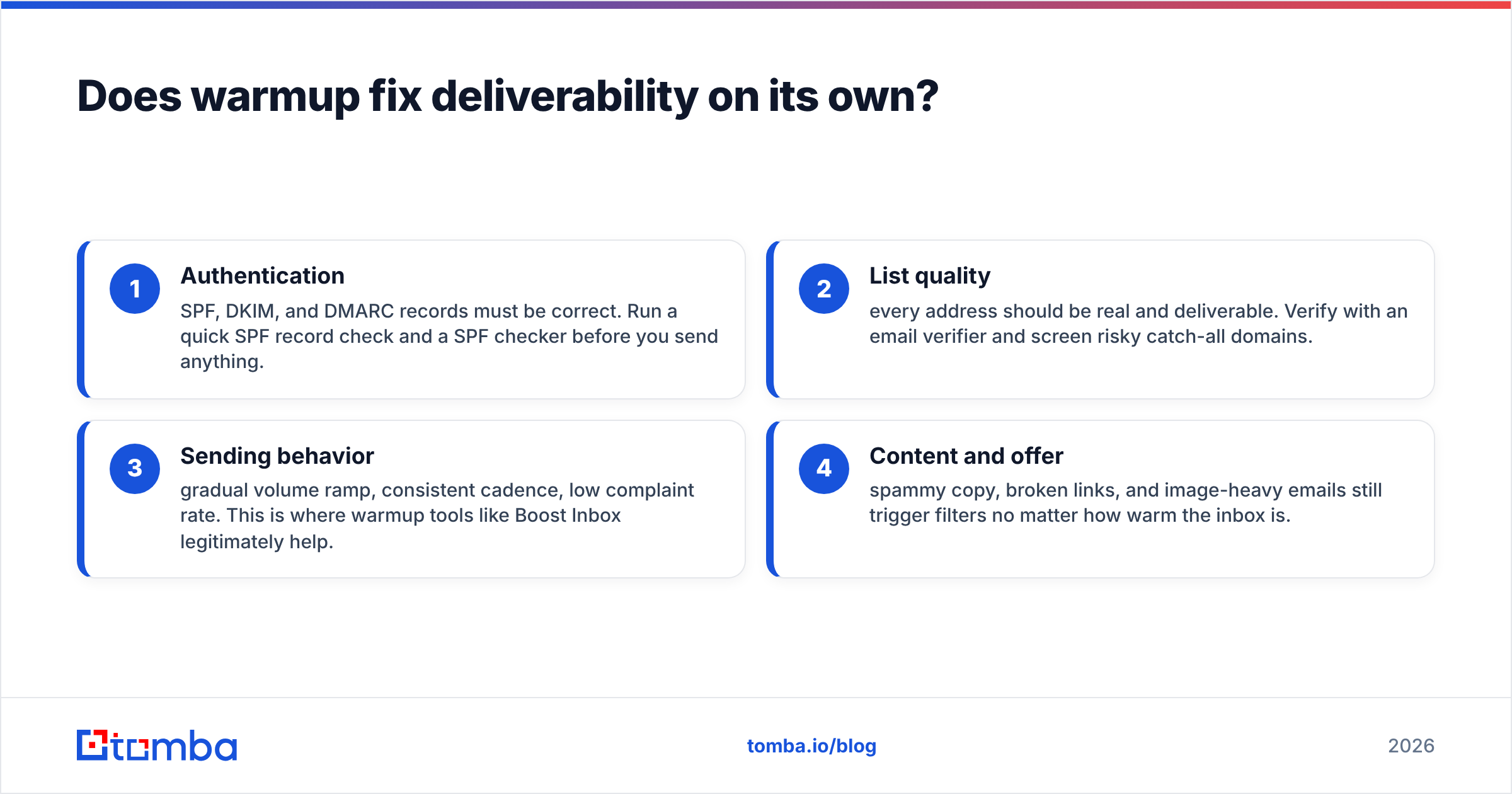
Deliverability depends on four pillars working together:
- Authentication — SPF, DKIM, and DMARC records must be correct. Run a quick SPF record check and a SPF checker before you send anything.
- List quality — every address should be real and deliverable. Verify with an email verifier and screen risky catch-all domains.
- Sending behavior — gradual volume ramp, consistent cadence, low complaint rate. This is where warmup tools like Boost Inbox legitimately help.
- Content and offer — spammy copy, broken links, and image-heavy emails still trigger filters no matter how warm the inbox is.
Boost Inbox owns pillar three and reports on outcomes. It cannot fix pillars one, two, or four. If you only fix warming and ignore the rest, you have addressed roughly a quarter of the problem.
Is Boost Inbox worth it, and who should use it?#
Boost Inbox is worth it if you've already cleaned the rest of your funnel and need a no-fuss, affordable warmup layer. It is a poor purchase if you think it will rescue a low-quality list or compensate for missing DNS records.
| Buyer profile | Is Boost Inbox a fit? |
|---|---|
| Solo founder sending from 1–2 inboxes | Strong fit — cheap, simple |
| Agency running 30+ inboxes | Maybe — model the per-inbox cost vs bundled platforms |
| Team already on Instantly/Smartlead | Often redundant — use built-in warmup |
| Anyone with an unverified list | Fix the list first, then revisit |
A practical sequence beats any single tool. First, build a clean, accurate list — use a domain search to find the right contacts and an email finder to source verified addresses by name and company. Second, verify and remove bounces. Third, set up authentication. Fourth, warm up with Boost Inbox or an alternative. Fifth, send. Skip step one or two and warmup becomes lipstick on a deliverability problem.
What are the best Boost Inbox alternatives?#
If Boost Inbox doesn't fit, the alternatives split into two camps: standalone warmup tools and all-in-one platforms with warmup included.
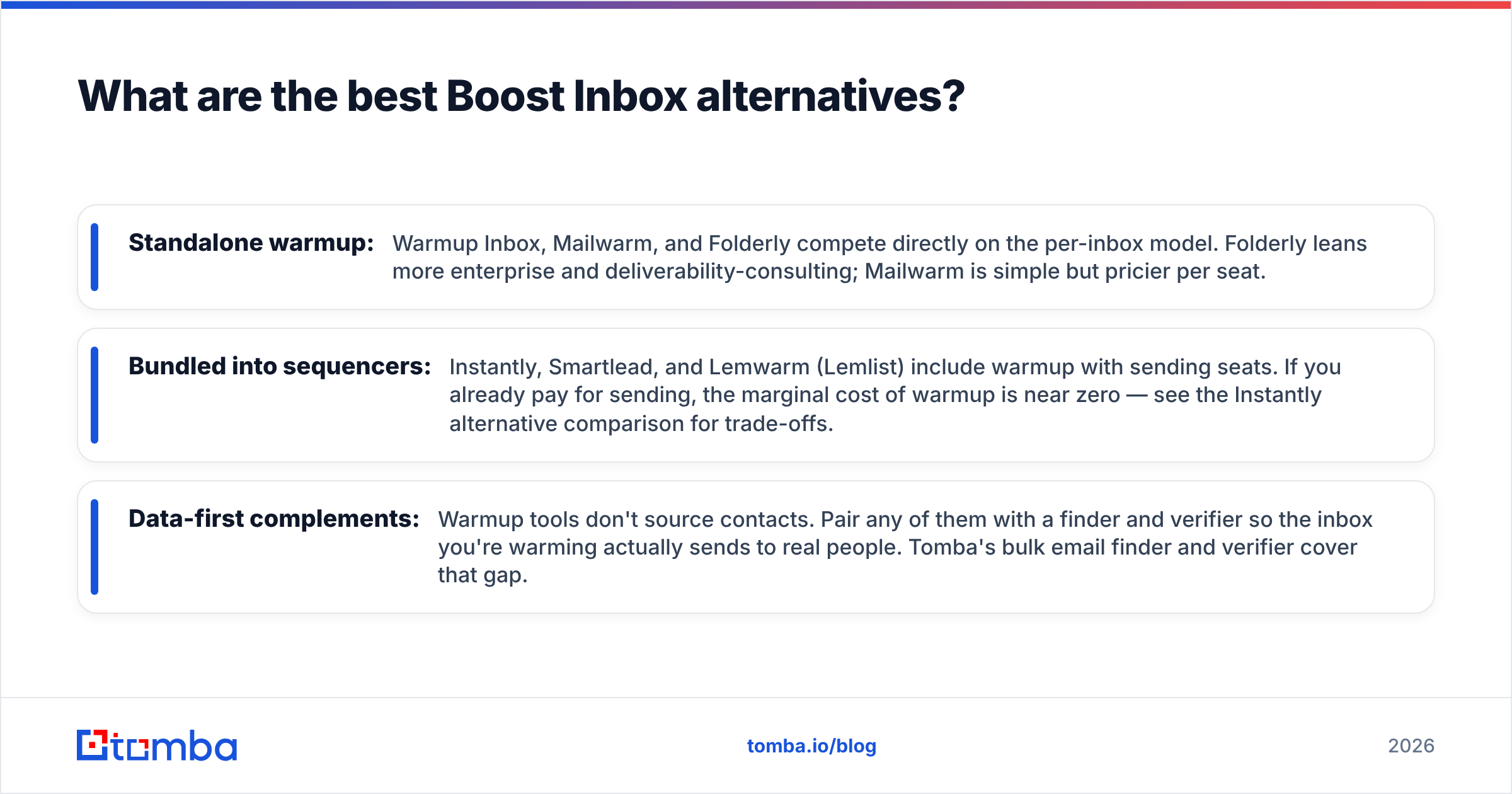
- Standalone warmup: Warmup Inbox, Mailwarm, and Folderly compete directly on the per-inbox model. Folderly leans more enterprise and deliverability-consulting; Mailwarm is simple but pricier per seat.
- Bundled into sequencers: Instantly, Smartlead, and Lemwarm (Lemlist) include warmup with sending seats. If you already pay for sending, the marginal cost of warmup is near zero — see the Instantly alternative comparison for trade-offs.
- Data-first complements: Warmup tools don't source contacts. Pair any of them with a finder and verifier so the inbox you're warming actually sends to real people. Tomba's bulk email finder and verifier cover that gap.
The decision usually comes down to inbox count and whether you already own a sequencer. One inbox and no platform? A cheap standalone like Boost Inbox is reasonable. Many inboxes inside an existing platform? Use the bundled warmup and spend the saved budget on list quality.
How should you set up Boost Inbox correctly?#
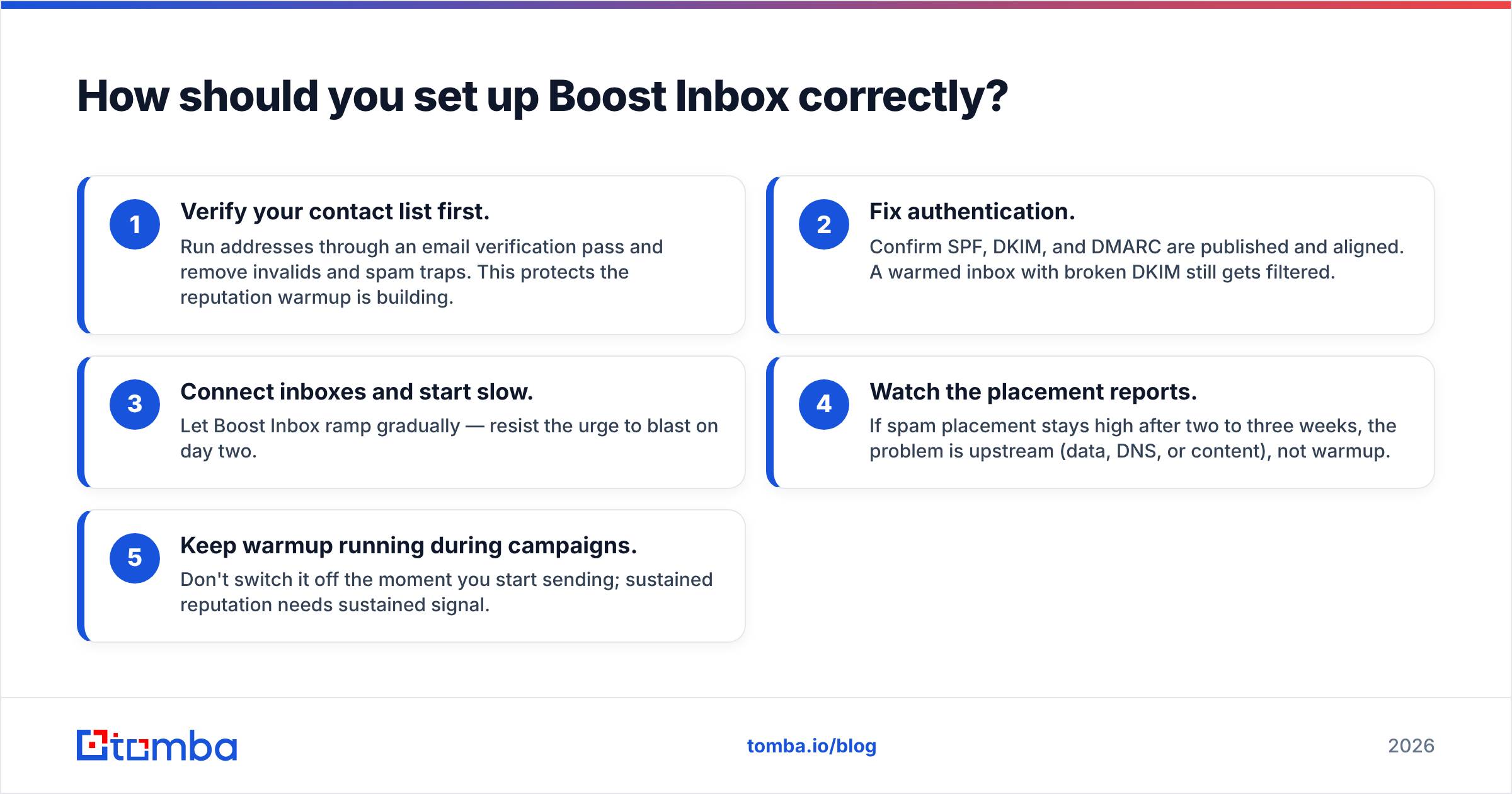
If you decide to buy, do it in the right order so you actually get value:
- Verify your contact list first. Run addresses through an email verification pass and remove invalids and spam traps. This protects the reputation warmup is building.
- Fix authentication. Confirm SPF, DKIM, and DMARC are published and aligned. A warmed inbox with broken DKIM still gets filtered.
- Connect inboxes and start slow. Let Boost Inbox ramp gradually — resist the urge to blast on day two.
- Watch the placement reports. If spam placement stays high after two to three weeks, the problem is upstream (data, DNS, or content), not warmup.
- Keep warmup running during campaigns. Don't switch it off the moment you start sending; sustained reputation needs sustained signal.
Monitor your sender reputation throughout. Warmup is a maintenance activity, not a one-time switch you flip and forget.
Boost Inbox pricing reviews pros and cons: the bottom line#
Here is the verdict in one line. Boost Inbox is a competent, affordable, beginner-friendly warmup tool. It has transparent pricing and the usual per-inbox cost ceiling at scale. The reviews are broadly positive, with one consistent caveat: warmup cannot fix what happens before the email leaves your outbox. Its pros — simplicity, multi-provider support, clear reporting — are real. Its cons — cost creep and the hard limit of what warmup can do — are equally real.
The biggest mistake is buying warmup to compensate for a dirty list. Warming inboxes that send to invalid addresses just teaches spam filters to distrust you faster. Get the data right first.
Start where deliverability actually begins: with accurate contacts. Use the Tomba Email Finder to source verified, professional email addresses by name, company, or domain — then verify them, fix your authentication, and only then warm up. Tomba's free tier gives you 25 searches a month to test it, with paid plans from $49/mo when you scale. Build the clean list first; let the warmup tool do the one job it's good at.
// get started
Find, verify and enrich your first contacts today
Start on the free plan with 25 searches a month, then scale when your team is ready.
Free plan · No credit card required · GDPR & CCPA
// about the author