Bounce Back Email Message Example: 2026 Guide & Fixes
See real bounce back email message examples, decode every SMTP error code, and learn the exact steps to stop hard and soft bounces from wrecking your sender reputation in 2026.
You sent the email. Seconds later, a reply lands in your inbox — but it is not from your prospect. It is from a mail server, and it starts with "Delivery has failed to these recipients." That is a bounce back email message, and what it says next decides whether you have a quick fix or a reputation problem.
TL;DR#
- A bounce back email message is the automated non-delivery report (NDR) a mail server sends when your message can't reach the recipient.
- Hard bounces mean the address is permanently invalid — remove these immediately. Soft bounces are temporary (full mailbox, server down) and may clear on a retry.
- Every bounce includes an SMTP status code (like
550 5.1.1) that tells you the exact cause — this guide decodes the common ones with real examples. - A bounce rate above 2% drags down sender reputation and can land you in spam folders or on blocklists.
- The single best prevention is verifying addresses before you send — clean lists bounce less than 1%.
What is a bounce back email message?#
A bounce back email message is your mail server's way of saying "I tried to deliver this, and here's why I couldn't." Think of it like a returned physical letter stamped "Return to Sender" with a reason scribbled on the envelope — wrong address, no such person, mailbox overflowing. The postal worker doesn't keep your letter; they hand it back with a note.
Technically, this note is called a Non-Delivery Report (NDR) or Delivery Status Notification (DSN). It is generated by a Mail Transfer Agent (MTA) — the software running mail servers like Gmail, Outlook, or a company's own Postfix instance. When the receiving server rejects your message, or your own server gives up trying, it packages the failure details and emails them back to the address in your "From" or "Return-Path" header.
Understanding these messages matters because they are diagnostic gold. Most senders glance at "delivery failed," sigh, and move on. The pros read the SMTP code, classify the bounce, and act — because a misread bounce quietly erodes email deliverability one campaign at a time.
What does a bounce back email message look like? (Real examples)#
Here are anonymized, real-world bounce back email message examples you'll actually encounter. The structure is consistent: a human-readable explanation, the original recipient, and the raw SMTP response.
Example 1 — Hard bounce, invalid address (Gmail):
Delivery to the following recipient failed permanently:
    jane.doe@examplecorp.com

The error that the other server returned was:
550 5.1.1 The email account that you tried to reach does not exist.
Please try double-checking the recipient's email address for typos.
Example 2 — Soft bounce, mailbox full (Outlook/Exchange):
Your message couldn't be delivered to the recipient because their
mailbox is full.
    Recipient: m.singh@clientco.com
Remote server returned: 452 4.2.2 Mailbox size limit exceeded
Example 3 — Hard bounce, domain doesn't exist:
Sorry, we were unable to deliver your message to the following address.
    sales@nonexistentdomain.io
Reason: 550 5.1.2 Recipient address rejected: Domain not found
Example 4 — Soft bounce, greylisted / try again:
Delivery temporarily suspended.
    Recipient: ceo@targetfirm.com
421 4.7.0 Try again later — message deferred due to greylisting
Notice the pattern. The three-digit code and the dotted enhanced status code (the 5.x.x or 4.x.x) are the part that matters. A code starting with 5 is permanent (hard); a code starting with 4 is temporary (soft).
How do you read SMTP bounce codes?#
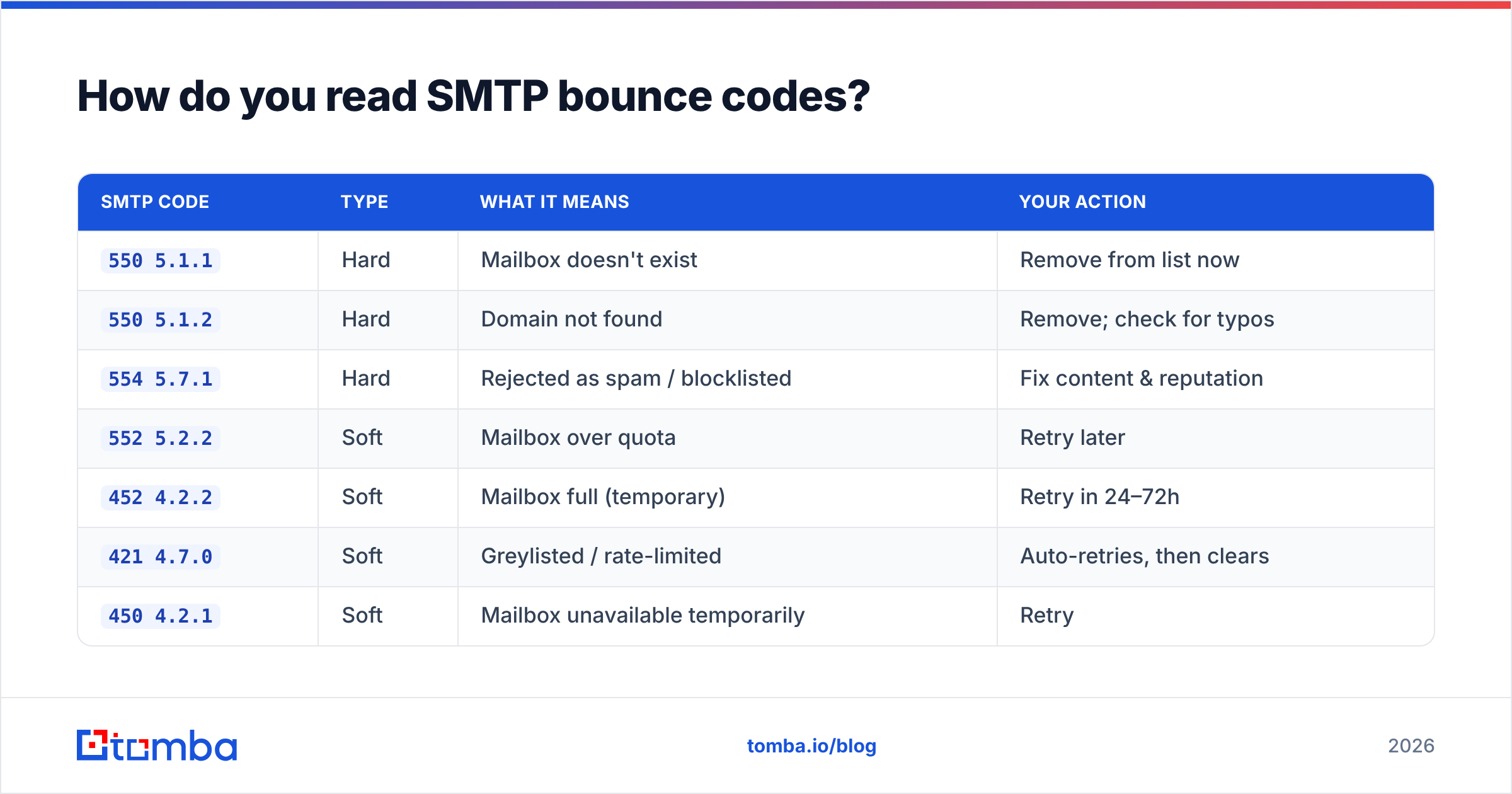
The numbers aren't random. SMTP reply codes follow a structure defined in the original mail RFCs, and the enhanced status codes (RFC 3463) add precision. Here's how the most common ones map to plain English.
| SMTP code | Type | What it means | Your action |
|---|---|---|---|
550 5.1.1 |
Hard | Mailbox doesn't exist | Remove from list now |
550 5.1.2 |
Hard | Domain not found | Remove; check for typos |
554 5.7.1 |
Hard | Rejected as spam / blocklisted | Fix content & reputation |
552 5.2.2 |
Soft | Mailbox over quota | Retry later |
452 4.2.2 |
Soft | Mailbox full (temporary) | Retry in 24–72h |
421 4.7.0 |
Soft | Greylisted / rate-limited | Auto-retries, then clears |
450 4.2.1 |
Soft | Mailbox unavailable temporarily | Retry |
A quick way to remember it: 5 = "stop," 4 = "wait." The second and third digits narrow the cause down. 5.1.x is almost always about the recipient address itself; 5.7.x is about policy, security, or reputation — meaning the receiving server doesn't like you, not the address.
When you see clusters of 5.7.1 rejections, that is your early-warning siren that your sending domain or IP is on a blocklist. Run a quick check with a blacklist checker before you send another campaign.
What's the difference between a hard bounce and a soft bounce?#
Hard bounces are permanent; soft bounces are temporary. That one distinction drives every decision you make about list hygiene.
- Hard bounce — The address is invalid, the domain is dead, or the recipient is rejecting you outright. The mailbox will never accept this message. Action: remove immediately. Re-sending to hard bounces is the fastest way to torch your sender reputation.
- Soft bounce — A temporary obstacle: the inbox is full, the server is briefly down, the message is too large, or you've been greylisted. Action: let your sending tool retry, usually over 24–72 hours. If it keeps soft-bouncing for a week, treat it as a hard bounce.
- Why mailbox providers care — Gmail and Microsoft track your bounce rate as a trust signal. A list that bounces heavily looks like a list bought from a shady vendor, not one built from real opt-ins.
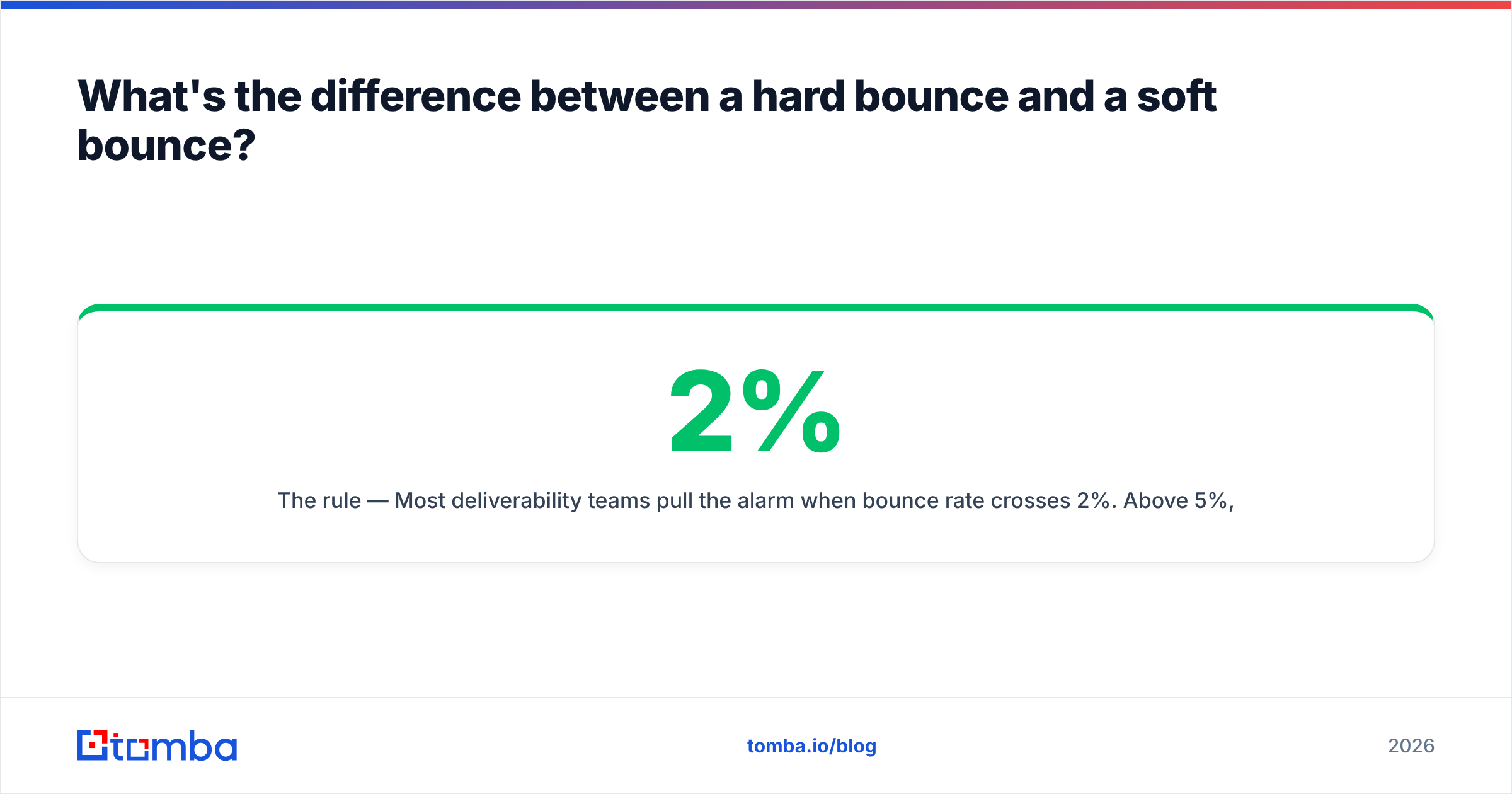
- The 2% rule — Most deliverability teams pull the alarm when bounce rate crosses 2%. Above 5%, providers may start throttling or junking your mail wholesale.
Here's the trap many senders fall into: they keep mailing soft bounces forever and never prune hard bounces. Within a few campaigns, their bounce rate compounds, their reputation slides, and even valid recipients stop seeing their mail in the inbox.

How do you write a good auto-reply (when YOU are the one bouncing)?#
There's a second meaning to "bounce back email message" worth covering: the intentional auto-responder you set up when you're out of office or an address is being retired. This is a message you control, and a sloppy one costs you leads.
A strong auto-reply does three things: sets expectations, routes the request, and stays human. Here's a clean template you can adapt:
Subject: Out of office — back June 30

Hi there,

Thanks for your email. I'm out of office until June 30 with limited
access to email.

For anything urgent, please contact Maria Lopez (maria@yourco.com),
who can help right away.

I'll respond to your message as soon as I'm back.

Best,
Alex Rivera
Keep it short. Always give an alternate contact for time-sensitive deals — a prospect who hits a dead-end auto-reply with no next step often just moves on to a competitor. If you need more polished wording fast, a tool like the cold email AI writer can draft variations in seconds, and you can browse ready-made email templates for other scenarios.
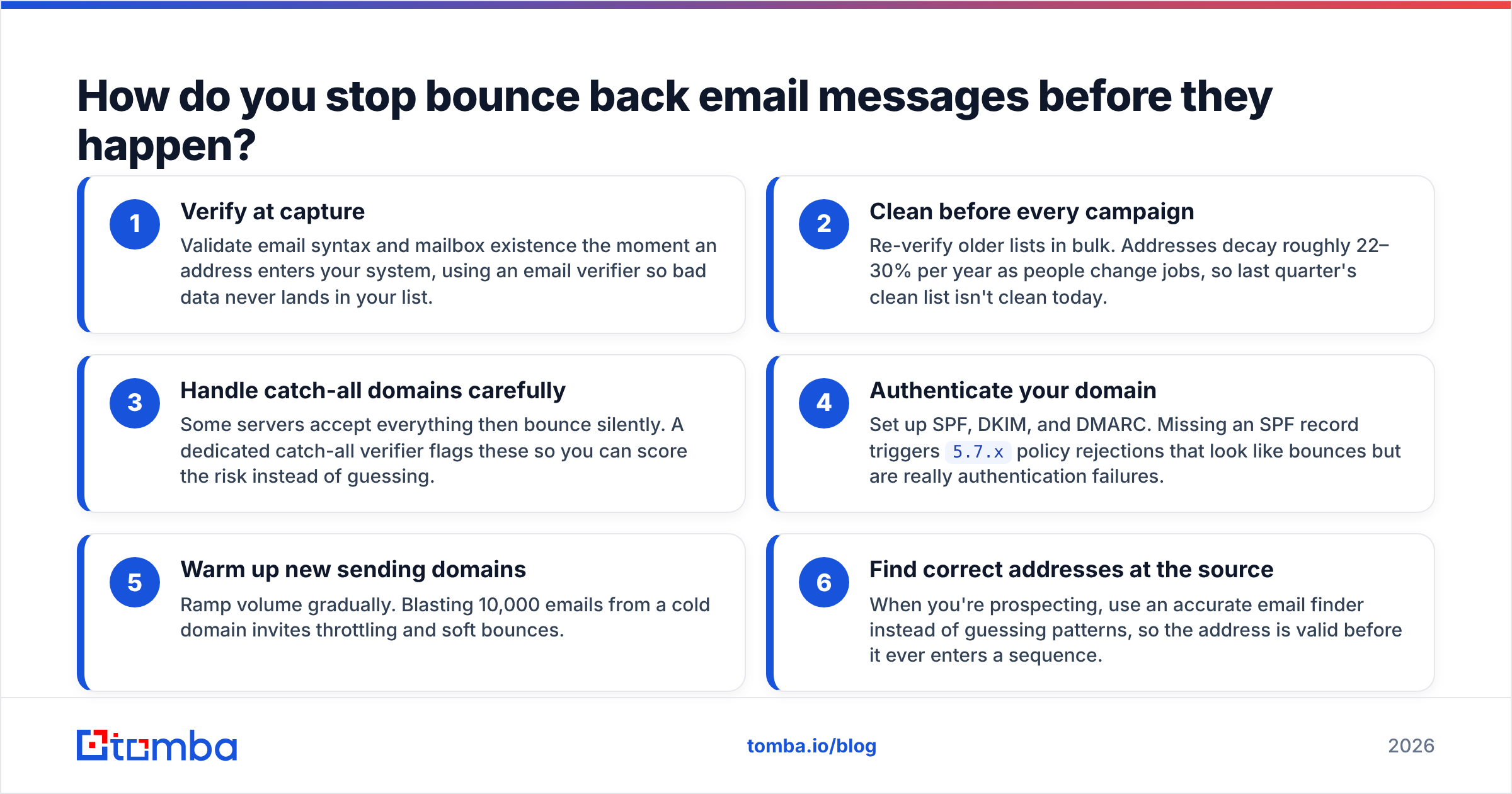
How do you stop bounce back email messages before they happen?#
Verify addresses before you hit send. That single habit prevents the overwhelming majority of hard bounces, and it's far cheaper than repairing a damaged reputation.
Here's the layered prevention stack that high-deliverability teams run:
- Verify at capture — Validate email syntax and mailbox existence the moment an address enters your system, using an email verifier so bad data never lands in your list.
- Clean before every campaign — Re-verify older lists in bulk. Addresses decay roughly 22–30% per year as people change jobs, so last quarter's clean list isn't clean today.
- Handle catch-all domains carefully — Some servers accept everything then bounce silently. A dedicated catch-all verifier flags these so you can score the risk instead of guessing.
- Authenticate your domain — Set up SPF, DKIM, and DMARC. Missing an SPF record triggers
5.7.xpolicy rejections that look like bounces but are really authentication failures. - Warm up new sending domains — Ramp volume gradually. Blasting 10,000 emails from a cold domain invites throttling and soft bounces.
- Find correct addresses at the source — When you're prospecting, use an accurate email finder instead of guessing patterns, so the address is valid before it ever enters a sequence.
The economics are simple. Verifying a list costs a fraction of a cent per address. A high bounce rate costs you blocklisting, throttling, and weeks of reputation rehab — plus every real prospect who never sees your message because you're stuck in spam.
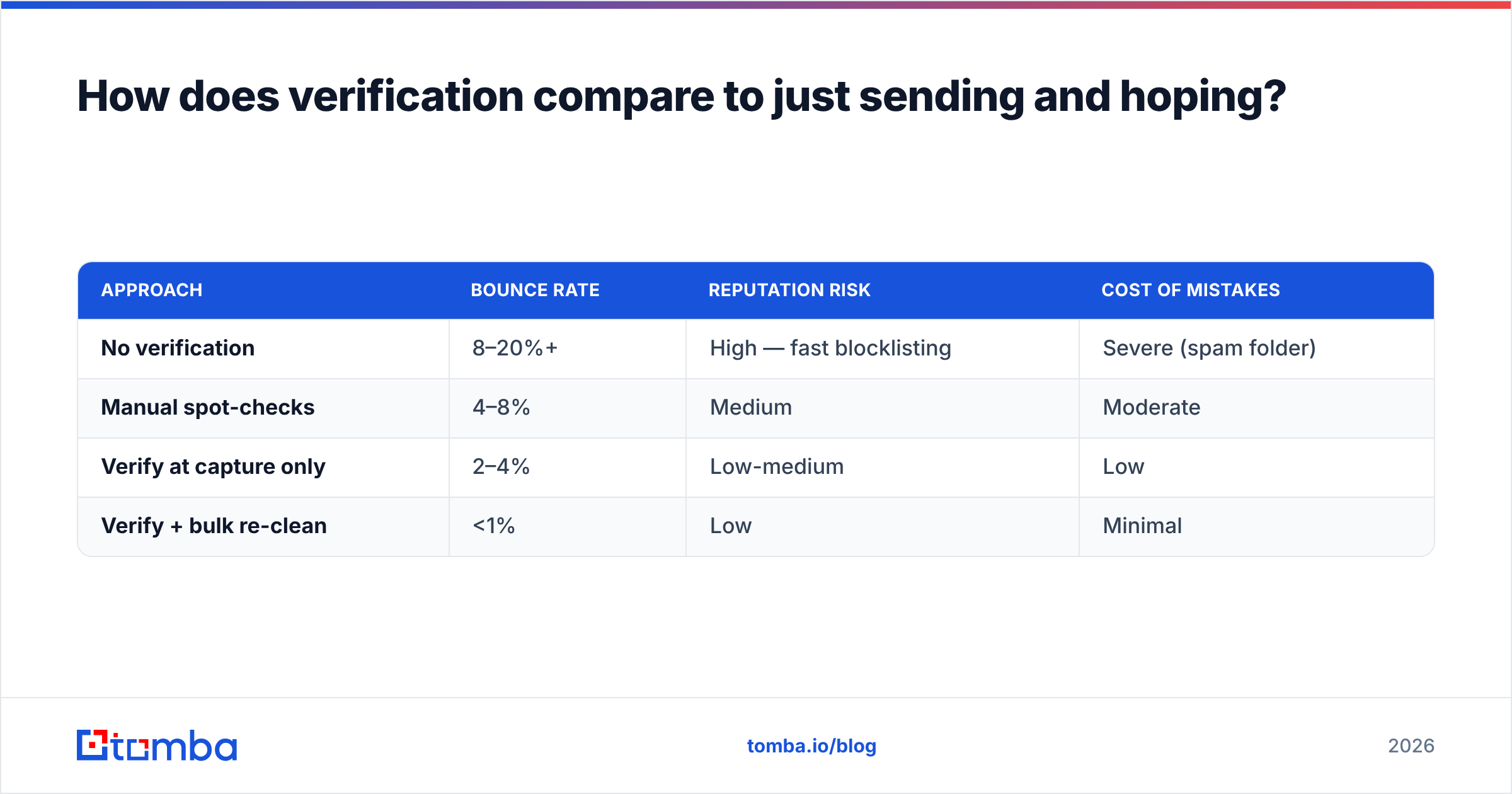
How does verification compare to just sending and hoping?#
| Approach | Bounce rate | Reputation risk | Cost of mistakes |
|---|---|---|---|
| No verification | 8–20%+ | High — fast blocklisting | Severe (spam folder) |
| Manual spot-checks | 4–8% | Medium | Moderate |
| Verify at capture only | 2–4% | Low-medium | Low |
| Verify + bulk re-clean | <1% | Low | Minimal |
The bottom row is where you want to live. Pairing capture-time validation with periodic bulk cleaning keeps bounce rates under 1% — comfortably inside what Gmail and Microsoft reward with inbox placement. You can process whole lists at once with a bulk verify job before any major send.
For authority on the wider deliverability picture, Google's own guidance in the Gmail Postmaster Tools help center spells out the sender best practices that mailbox providers enforce, and review sites like G2 compare verification vendors if you're weighing options.
When should you remove an address versus retry?#
Remove on hard bounces, retry on soft bounces — then convert stubborn soft bounces to removals after a defined window. Concretely:
- Immediate removal: any
5.x.xcode, especially5.1.1,5.1.2, and5.7.1. - Retry automatically: any
4.x.xcode. Most email platforms retry for 24–72 hours by default. - Convert and remove: if an address soft-bounces on three consecutive sends or for more than 7 days, treat it as dead.
- Suppress permanently: maintain a suppression list so removed addresses never re-enter your sends through a future import. Pair this with data enrichment to replace a bounced contact with a current, valid one at the same company.
This discipline is what separates senders who maintain 99% inbox placement from those who wonder why their open rates keep falling. The bounce back email message isn't an annoyance — it's free, precise feedback about your list quality.
The bottom line#
A bounce back email message is a diagnosis, not just a rejection. Read the SMTP code, classify the bounce as hard or soft, remove the dead addresses, and — most importantly — verify before you send so the bounce never happens in the first place. Do that consistently and your bounce rate stays under 1%, your sender reputation stays strong, and your messages keep landing where they belong: the inbox.
Ready to stop bounces at the source? Start with the Tomba Email Finder to source verified, deliverable addresses — and pair it with the built-in verifier so every contact is checked before it ever enters a campaign. The free tier gives you 25 searches a month to test it, and paid Tomba plans start at $49/mo when you're ready to scale clean outreach.
// get started
Find, verify and enrich your first contacts today
Start on the free plan with 25 searches a month, then scale when your team is ready.
Free plan · No credit card required · GDPR & CCPA
// about the author