Bounce Checker: How to Cut Email Bounce Rates in 2026
A bounce checker catches dead, risky, and catch-all addresses before you send. Here's how to test a list, read the results, and protect your sender reputation in 2026.

TL;DR
- A bounce checker tests email addresses before you send, flagging invalid mailboxes, risky catch-alls, and dead domains so messages don't bounce.
- Keeping your bounce rate under 2% is the single fastest way to protect sender reputation and inbox placement.
- The best checkers verify syntax, DNS/MX records, and run a live SMTP handshake — not just a regex pattern match.
- Catch-all domains are the hard part; you need a tool that scores them instead of guessing.
- Run a free spot-check first, then verify in bulk before any campaign. Tomba's email verifier handles both.
What is a bounce checker?#
A bounce checker is a tool that tells you whether an email address will accept mail before you send anything to it. Think of it like a bouncer at a club checking IDs at the door — it stops the addresses that don't belong from getting in and causing trouble inside. Technically, it queries the receiving mail server and predicts whether a message would be delivered, deferred, or rejected.
There are two ways people use the term. The first is pre-send verification: you upload a list, the checker validates each address, and you remove the bad ones before launching. The second is post-send bounce analysis: you read the bounce-back messages your mail server already received and categorize them. This guide focuses on the first — catching bounces before they happen, because that's where you actually save your reputation.
Every bounce falls into one of two buckets:
- Hard bounce — a permanent failure. The mailbox doesn't exist, the domain is dead, or the server flat-out rejects you. These are the dangerous ones.
- Soft bounce — a temporary failure. The inbox is full, the message is too large, or the server is briefly down. These usually resolve on their own.
A good bounce checker is built to predict hard bounces, because those are what mailbox providers like Google and Microsoft watch when they decide whether your future mail lands in the inbox or the spam folder.
)
Why do email bounces hurt your sender reputation?#
Bounces hurt because mailbox providers read them as a signal that you don't know who you're emailing. A high bounce rate looks exactly like a spammer scraping random addresses, and the algorithms treat you accordingly.
Here's the chain reaction. When you send to a dead address, the receiving server logs a rejection against your sending domain and IP. Do that a few times and it's noise. Do it across thousands of addresses in one campaign and your sender reputation drops. Once that happens, even your valid recipients start seeing your mail in spam — so a dirty list doesn't just waste the bad addresses, it poisons the good ones.
The industry benchmark is to keep your bounce rate below 2%. According to email marketers tracked by platforms like HubSpot, campaigns that cross 5% routinely get throttled or blocked outright. A bounce checker is the cheapest insurance against that, usually costing a fraction of a cent per address.
There's a deliverability term worth knowing here: email deliverability is the percentage of your sent mail that actually reaches an inbox. Bounce rate and deliverability move in opposite directions — every bounce you prevent nudges deliverability up.
How does a bounce checker actually work?#
A real bounce checker runs four layers of validation, each one catching problems the previous layer missed. Cheap tools stop at layer one; the good ones go all the way through.
- Syntax check — Confirms the address is formatted correctly (no missing
@, no illegal characters, nojohn@gmail,comtypos). This is instant and free, but it only catches the obvious garbage. - Domain and MX record check — Queries DNS to confirm the domain exists and actually has mail-exchange (MX) records. A domain with no MX record can't receive email, period — so the address is dead no matter how it's spelled.
- SMTP handshake — Opens a connection to the receiving mail server and asks, in effect, "would you accept mail for this person?" without sending anything. The server's response reveals whether the mailbox exists. This is the step that separates real verifiers from regex toys.
- Catch-all and role detection — Flags domains that accept all mail (catch-alls) and role-based addresses like
info@orsales@that tend to bounce or go unread. These get scored as "risky" rather than valid or invalid.
The output you want is a clear status per address: valid, invalid, catch-all/accept-all, role, disposable, or unknown. Anything that just returns "valid/invalid" with no middle category is hiding its uncertainty from you.
What's the difference between a free bounce checker and a paid one?#
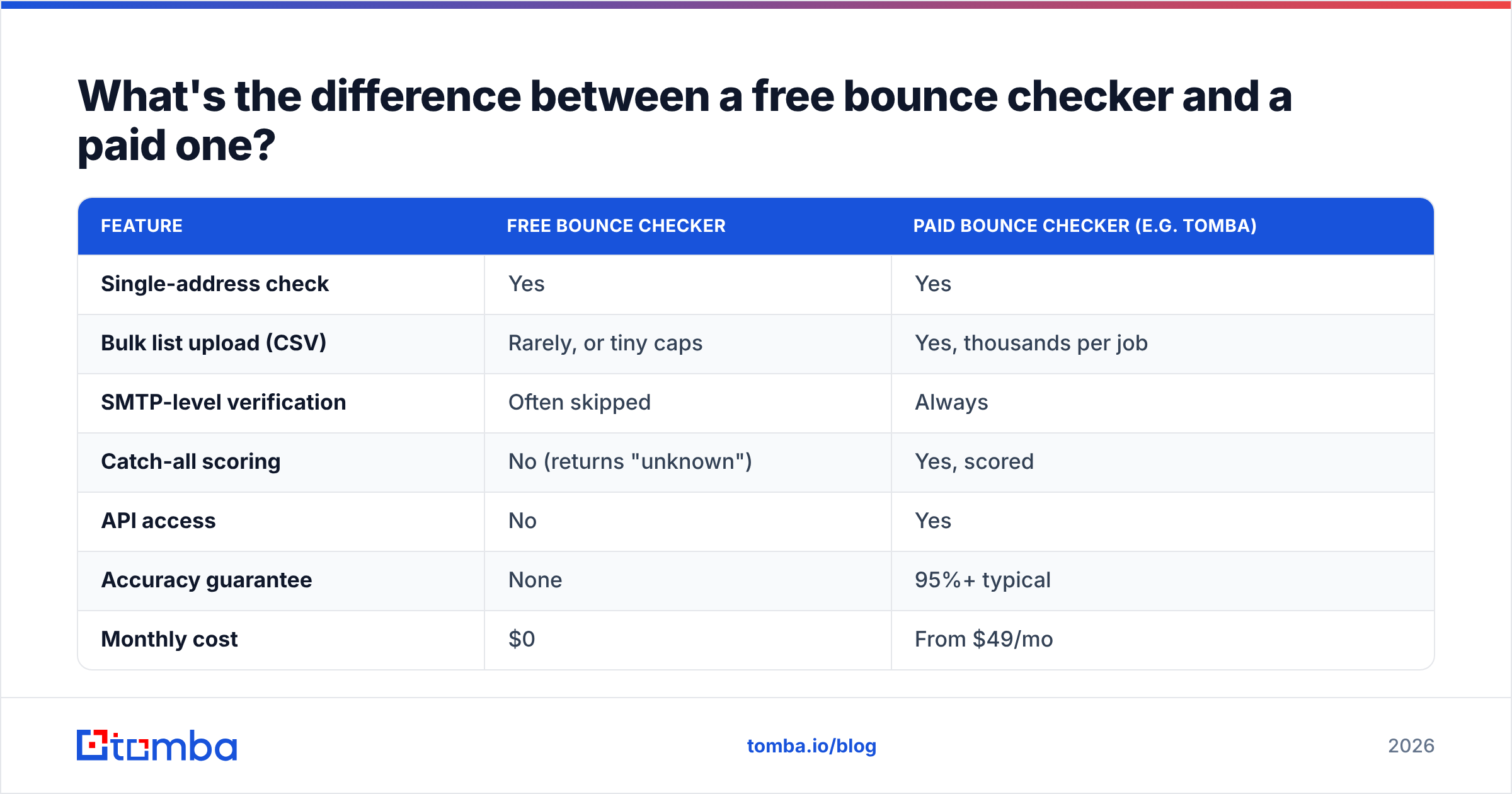
The short answer: free tools are fine for spot-checking one address, paid tools are what you need before sending to a list. The gap shows up in catch-all handling, bulk throughput, and accuracy guarantees.
| Feature | Free bounce checker | Paid bounce checker (e.g. Tomba) |
|---|---|---|
| Single-address check | Yes | Yes |
| Bulk list upload (CSV) | Rarely, or tiny caps | Yes, thousands per job |
| SMTP-level verification | Often skipped | Always |
| Catch-all scoring | No (returns "unknown") | Yes, scored |
| API access | No | Yes |
| Accuracy guarantee | None | 95%+ typical |
| Monthly cost | $0 | From $49/mo |
The most important row is catch-all scoring. A free checker hits a catch-all domain, can't get a definitive answer from the SMTP handshake, and just shrugs — it returns "unknown" and leaves the decision to you. A paid catch-all verifier uses historical send data and pattern analysis to score whether that catch-all address is likely real, which is the difference between mailing it and skipping it.
For a quick one-off, Tomba's free email checker does the job in your browser. For a campaign list, you want bulk verification with an accuracy guarantee behind it.
How do you check bounces in bulk before a campaign?#
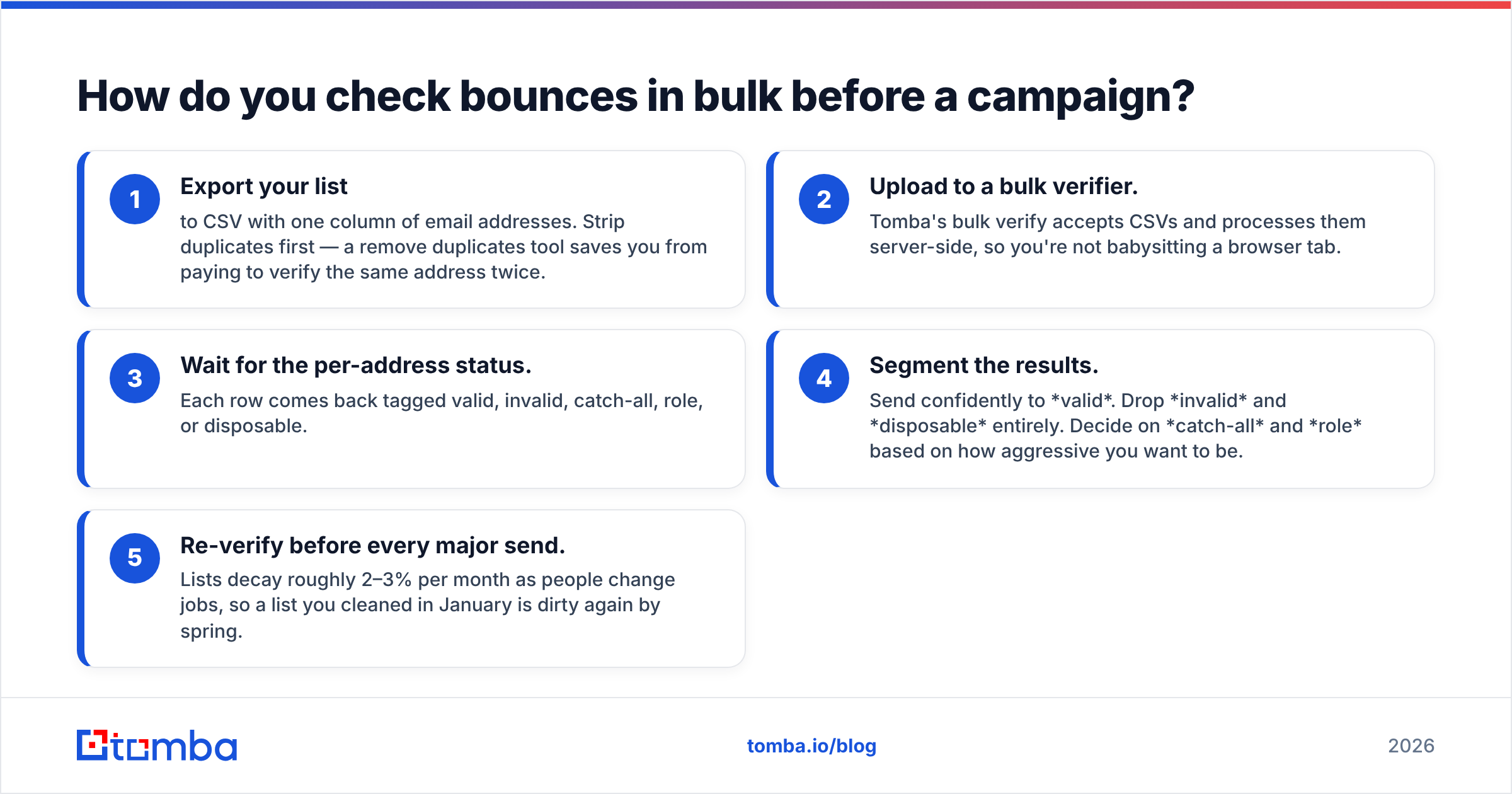
Run the whole list through a bulk verifier, then segment by status and only send to the clean tier. The workflow is the same whether you have 500 addresses or 500,000.
- Export your list to CSV with one column of email addresses. Strip duplicates first — a remove duplicates tool saves you from paying to verify the same address twice.
- Upload to a bulk verifier. Tomba's bulk verify accepts CSVs and processes them server-side, so you're not babysitting a browser tab.
- Wait for the per-address status. Each row comes back tagged valid, invalid, catch-all, role, or disposable.
- Segment the results. Send confidently to valid. Drop invalid and disposable entirely. Decide on catch-all and role based on how aggressive you want to be.
- Re-verify before every major send. Lists decay roughly 2–3% per month as people change jobs, so a list you cleaned in January is dirty again by spring.
That last point is what most teams miss. Verification isn't a one-time chore — it's hygiene you repeat. B2B addresses rot fastest because people switch companies, which is also why pairing verification with fresh data from an email finder keeps your pipeline both clean and full.
)
How do you read bounce checker results without guessing?#
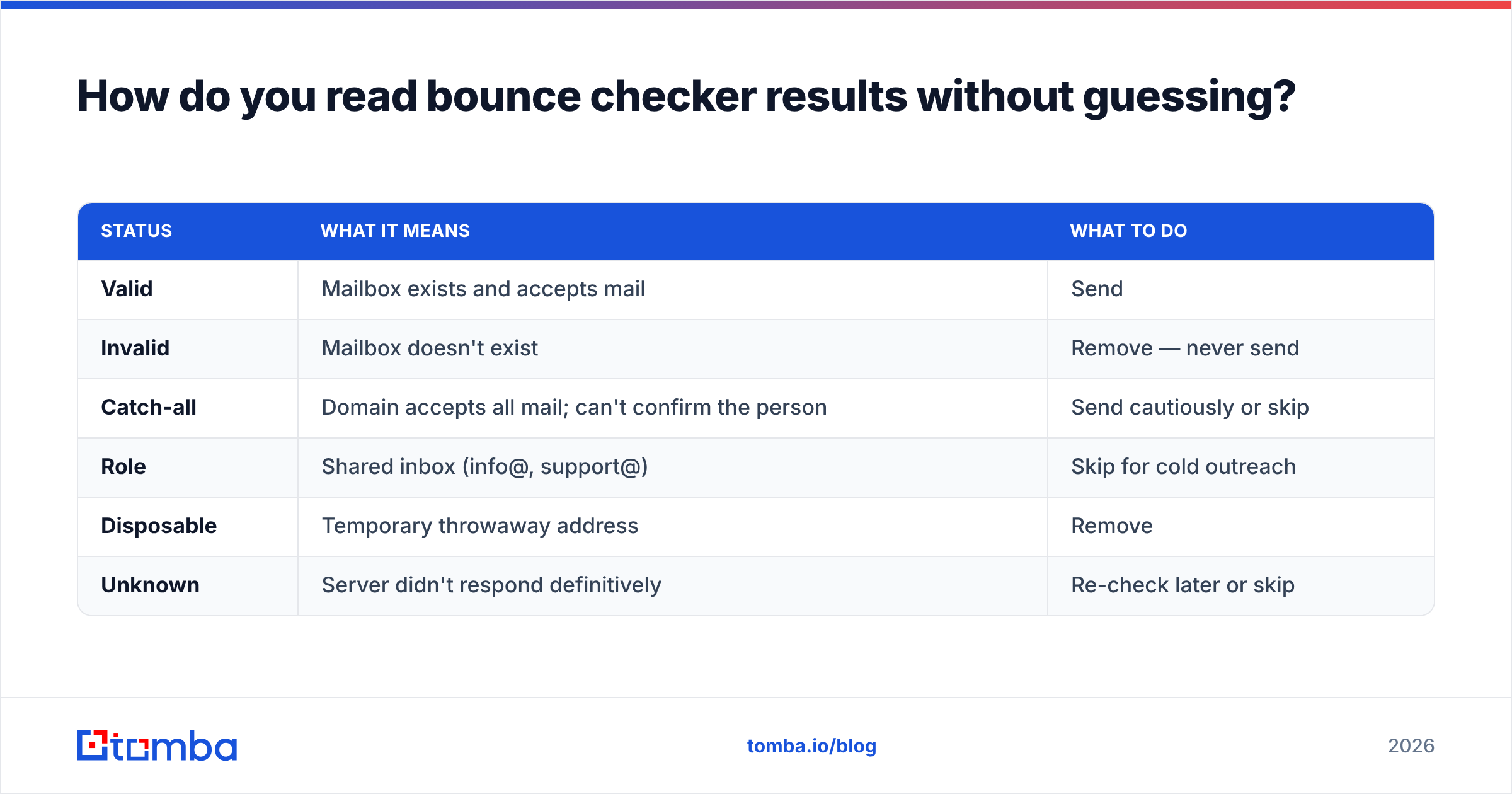
Treat each status as an instruction, not a suggestion. The whole point of running the check is to act on it, and the most common mistake is mailing addresses the tool already warned you about.
| Status | What it means | What to do |
|---|---|---|
| Valid | Mailbox exists and accepts mail | Send |
| Invalid | Mailbox doesn't exist | Remove — never send |
| Catch-all | Domain accepts all mail; can't confirm the person | Send cautiously or skip |
| Role | Shared inbox (info@, support@) | Skip for cold outreach |
| Disposable | Temporary throwaway address | Remove |
| Unknown | Server didn't respond definitively | Re-check later or skip |
The two that trip people up are catch-all and unknown. A catch-all isn't a green light — the server said "sure, I'll take mail for anyone @thisdomain," which tells you nothing about whether this specific person exists. Score it, and if your tool can't, lean toward skipping. Unknown usually means a greylisting server delayed the handshake; re-run those addresses a few hours later rather than guessing.
If you're working at scale and want this logic baked into your own systems, the Tomba API returns these statuses as structured JSON so you can auto-route addresses without a human reading a spreadsheet.
Bounce checker vs. email verifier — are they the same thing?#
Mostly yes, with a nuance. "Bounce checker" emphasizes the outcome you're trying to prevent (a bounce), while "email verifier" emphasizes the method (verifying the address). In practice the same tool does both, and good ones go further by enriching the data they verify.
Where they differ is scope. A pure bounce checker answers one question: will this bounce? A full verification platform also tells you whether the address is a role account, whether it's disposable, whether the domain is a catch-all, and — in Tomba's case — connects to a wider toolkit:
- Email verifier — the core bounce-prevention engine with SMTP-level checks.
- Catch-all verifier — scoring for the addresses that defeat standard checks.
- Domain search — find and verify every address at a company in one pass.
- Data enrichment — fill in names, titles, and companies behind verified addresses.
You can compare verification vendors on neutral ground at G2 before committing — but make sure whichever you pick does a live SMTP handshake and scores catch-alls, because those two features are what actually move your bounce rate.
How much should a bounce checker cost?#
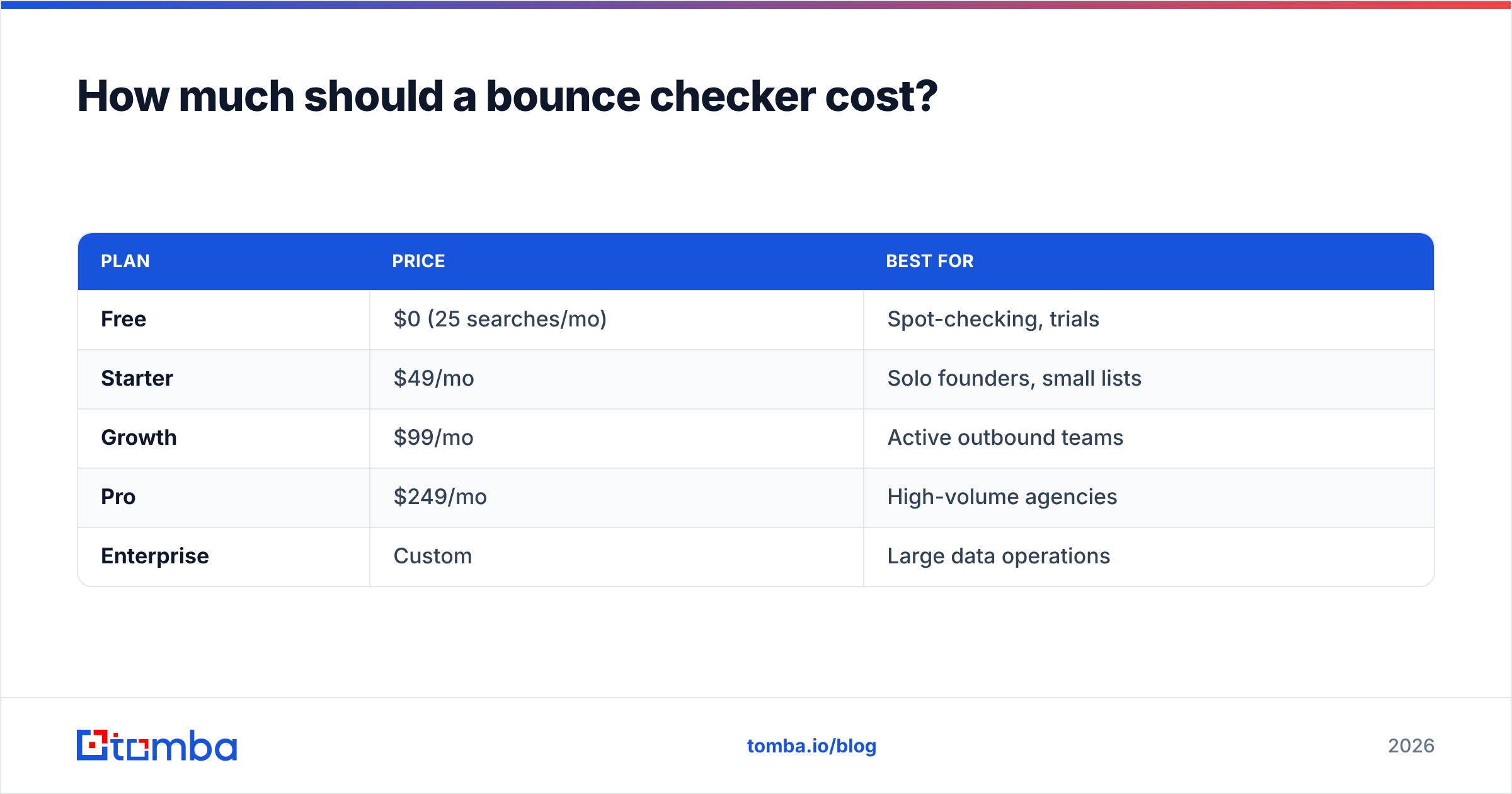
You should pay per verification volume, not per seat, and a free tier should exist for testing. That's the pattern across honest vendors, and it's how Tomba structures its plans.
| Plan | Price | Best for |
|---|---|---|
| Free | $0 (25 searches/mo) | Spot-checking, trials |
| Starter | $49/mo | Solo founders, small lists |
| Growth | $99/mo | Active outbound teams |
| Pro | $249/mo | High-volume agencies |
| Enterprise | Custom | Large data operations |
Full Tomba pricing bundles the verifier with the email finder, domain search, and enrichment, so you're not stitching together three subscriptions to clean and build a list. For most teams running regular campaigns, Growth at $99/mo is the sweet spot — enough volume to verify before every send without overbuying.
Whatever you choose, the math almost always favors verifying. A bounce that lands you in spam can cost an entire campaign's worth of valid recipients. Spending a cent an address to prevent that isn't an expense, it's the cheapest line item in your funnel.
The bottom line#
A bounce checker is the difference between a campaign that reaches inboxes and one that quietly dies in spam folders. Verify before you send, read the statuses as instructions rather than hints, score your catch-alls instead of guessing, and re-clean your list every month. Do those four things and your bounce rate stays under 2% — which keeps every mailbox provider on your side.
Ready to stop bouncing? Run your list through the Tomba Email Verifier for SMTP-level checks and scored catch-alls, or pair it with the Tomba Email Finder to build a clean, verified pipeline from the start. Start free with 25 searches a month and upgrade only when your volume demands it.
// get started
Find, verify and enrich your first contacts today
Start on the free plan with 25 searches a month, then scale when your team is ready.
Free plan · No credit card required · GDPR & CCPA
// about the author