Bounce Rate Calculator: Measure & Fix Email Bounces in 2026
Use a bounce rate calculator to measure hard and soft bounces, benchmark against 2026 standards, and protect your sender reputation before it tanks.
TL;DR
- A bounce rate calculator divides bounced emails by total emails sent, then multiplies by 100 — but the number only matters once you split hard from soft bounces.
- Keep your total bounce rate under 2%. Above 5% and mailbox providers start throttling or blocking you.
- Hard bounces (dead addresses) hurt your sender reputation far more than soft bounces (full inbox, server timeout).
- The fix is upstream: verify addresses before you send, not after they bounce.
- Cleaning a list with an email verifier typically drops bounce rates from 8–12% down to under 1%.
What is a bounce rate calculator?#
A bounce rate calculator is a simple tool that turns raw send data into a percentage you can act on. You feed it two numbers — emails sent and emails bounced — and it returns your bounce rate.
Think of it like a smoke detector for your email program. The detector doesn't put out the fire, but it tells you there's smoke before the house is gone. A bounce rate calculator does the same: it surfaces a deliverability problem while you can still fix it, instead of after a mailbox provider has already throttled your domain.
The formula itself is trivial:
Bounce rate = (Bounced emails ÷ Emails sent) × 100
Send 1,000 emails, have 30 come back, and your bounce rate is 3%. The math is easy. The hard part is knowing what counts as a bounce, which bounces actually matter, and what to do when the number climbs.
How do you calculate email bounce rate?#
Run the calculation in three steps:
- Count total emails sent. Use the number your email service provider (ESP) actually attempted to deliver, not the size of your contact list. These differ if you suppressed some addresses.
- Count total bounces. Your ESP reports this. Crucially, separate it into hard bounces and soft bounces — most dashboards label them.
- Apply the formula. Divide bounces by sent, multiply by 100. Then calculate the hard-bounce rate separately, because that's the figure mailbox providers judge you on.
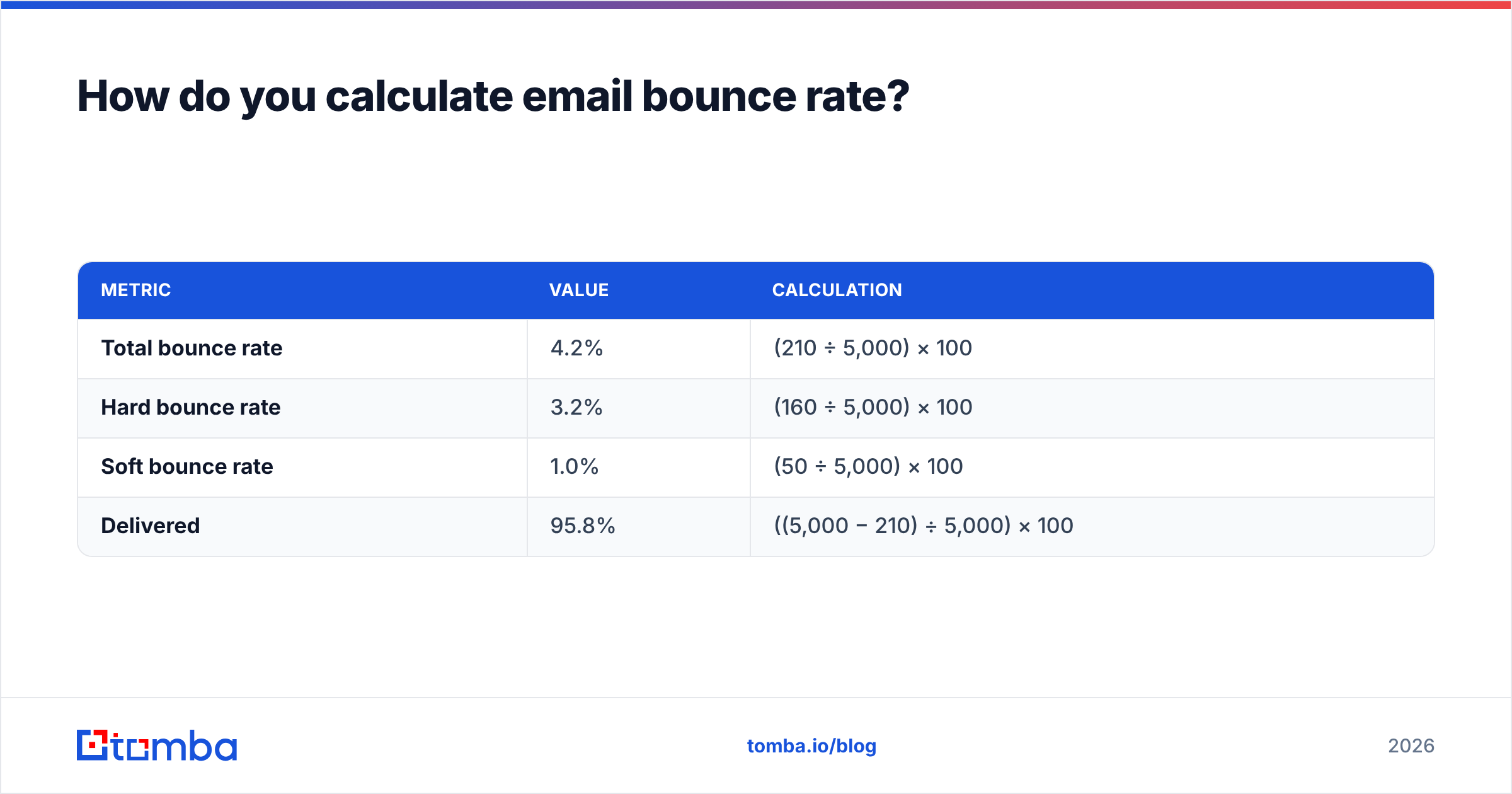
Here's a worked example. You send a campaign to 5,000 recipients. You get 210 bounces back — 160 hard, 50 soft.
| Metric | Value | Calculation |
|---|---|---|
| Total bounce rate | 4.2% | (210 ÷ 5,000) × 100 |
| Hard bounce rate | 3.2% | (160 ÷ 5,000) × 100 |
| Soft bounce rate | 1.0% | (50 ÷ 5,000) × 100 |
| Delivered | 95.8% | ((5,000 − 210) ÷ 5,000) × 100 |
That 3.2% hard bounce rate is the alarm. It's well above the 2% ceiling and signals your list is full of dead addresses — the single fastest way to damage sender reputation.
Wait — that image should render as a meme. Here it is:
What's the difference between hard and soft bounces?#
This distinction is the whole game. Treating both bounces the same is the most common mistake in email programs.
A hard bounce is permanent. The address doesn't exist, the domain is invalid, or the server has flatly refused delivery. These never recover. Every hard bounce tells the receiving provider "this sender doesn't know who they're emailing," and those signals stack against your domain.
A soft bounce is temporary. The mailbox is full, the message is too large, or the server timed out. Soft bounces often resolve on a retry, and most ESPs retry automatically for 24–72 hours before reclassifying.
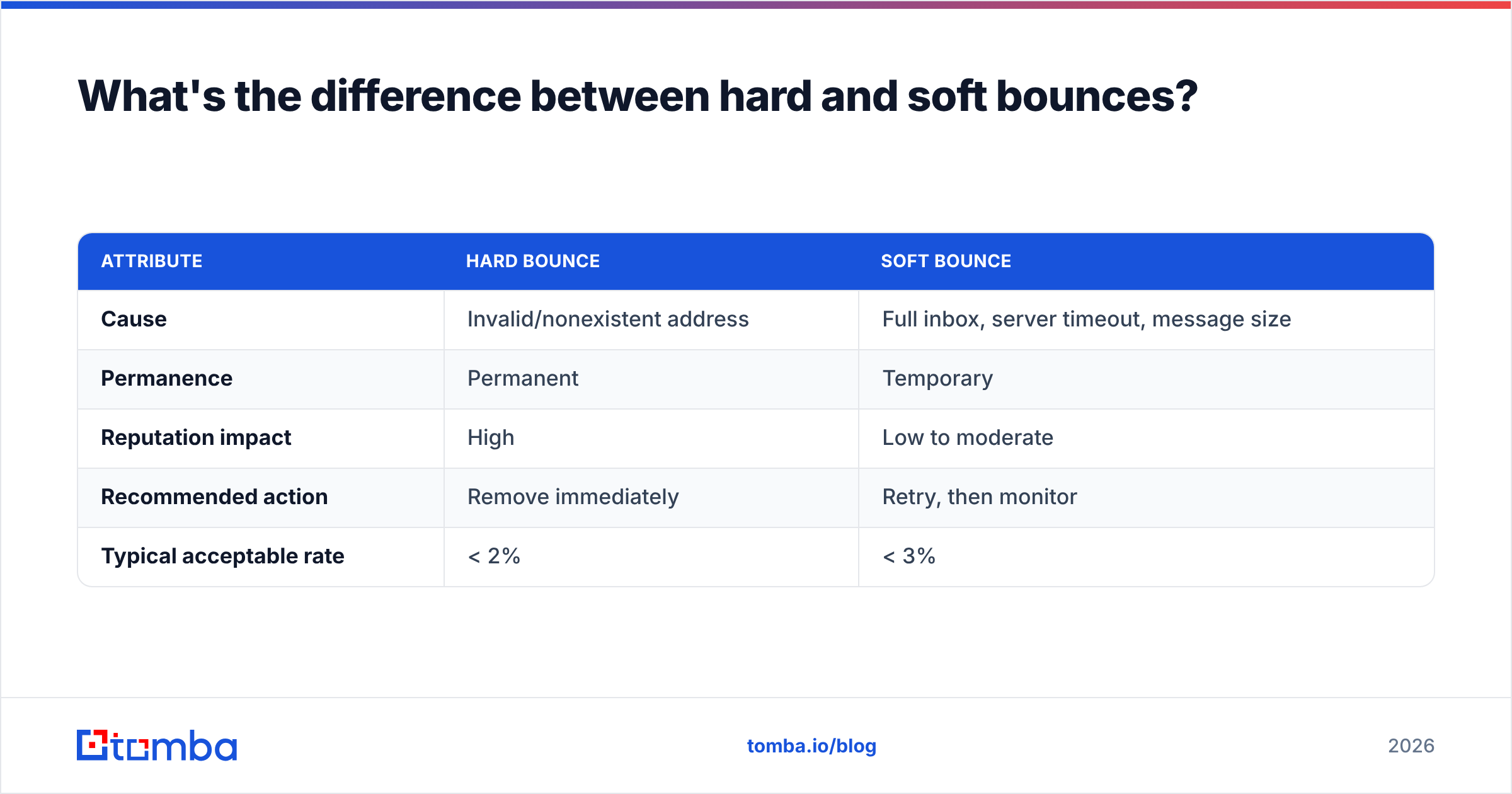
| Attribute | Hard bounce | Soft bounce |
|---|---|---|
| Cause | Invalid/nonexistent address | Full inbox, server timeout, message size |
| Permanence | Permanent | Temporary |
| Reputation impact | High | Low to moderate |
| Recommended action | Remove immediately | Retry, then monitor |
| Typical acceptable rate | < 2% | < 3% |
The practical rule: purge hard bounces from your list the moment they appear. Letting a hard-bounced address sit in your sends and fire again is how a 3% problem becomes a 10% crisis.
What is a good email bounce rate in 2026?#
Aim for a total bounce rate under 2%, with hard bounces under 1%. Mailbox providers tightened their thresholds after the 2024 Gmail and Yahoo sender requirements, and that pressure has only increased.
Here's how to read your number:
- Under 2% — healthy. Keep verifying and you're fine.
- 2% to 5% — warning zone. Your list hygiene is slipping. Clean it now.
- Above 5% — danger. Expect throttling, spam-folder placement, and possible blocks. Stop sending to unverified addresses until you've scrubbed the list.
These aren't arbitrary. Industry benchmarks from providers like Mailchimp consistently place average bounce rates in the 0.5–1% range across B2B sectors. If you're sitting at 4%, you're not "a little high" — you're triple the norm, and algorithms notice.
A bounce rate calculator gives you the number. The benchmark tells you whether that number is a shrug or a fire drill.
Why does bounce rate wreck deliverability?#
Because mailbox providers use bounce rate as a proxy for list quality, and list quality as a proxy for whether you're a spammer.
Here's the everyday analogy: imagine you keep mailing letters to addresses that come back marked "no such person." The post office starts wondering whether you're a legitimate business or running a scam with a scraped phone book. Eventually they stop delivering your mail at all. Gmail, Outlook, and Yahoo run the same logic, automatically, at scale.
High bounce rates trigger a chain reaction:
- Reputation drops. Each hard bounce is a black mark against your sending domain and IP.
- Inbox placement falls. Even your valid recipients start landing in spam.
- Throttling kicks in. Providers slow how many of your messages they'll accept per hour.
- Blocks follow. At the extreme, your domain gets rejected outright.
This is why email deliverability experts obsess over bounce rate even when open rates look fine. A clean bounce rate is the foundation everything else sits on. You can write the perfect cold email, but if 8% of it bounces, the campaign was sabotaged before the first word was read.

How do you lower your bounce rate?#
Fix the input, not the output. Bounces are a symptom of sending to addresses you never validated. Here are the highest-leverage moves, in order:
- Verify before you send. Run every address through an email verifier before it enters a campaign. This is the single biggest lever — it catches dead addresses before they can bounce.
- Remove hard bounces instantly. Set your ESP to auto-suppress hard bounces. Never re-send to them.
- Clean your list on a schedule. B2B data decays roughly 2–3% per month as people change jobs. A list that was clean in January is dirty by June. Re-verify quarterly.
- Use double opt-in for signups. It guarantees the address is real and the person typed it correctly.
- Avoid risky catch-all domains. Catch-all servers accept everything, so they hide invalid addresses until they silently bounce. Screen them with a catch-all verifier.
- Validate at the point of capture. Use a free email checker on web forms so bad addresses never make it into your database.
The pattern across all six: stop bad data from entering, and remove it the instant it's flagged.
Should you verify in bulk or in real time?#
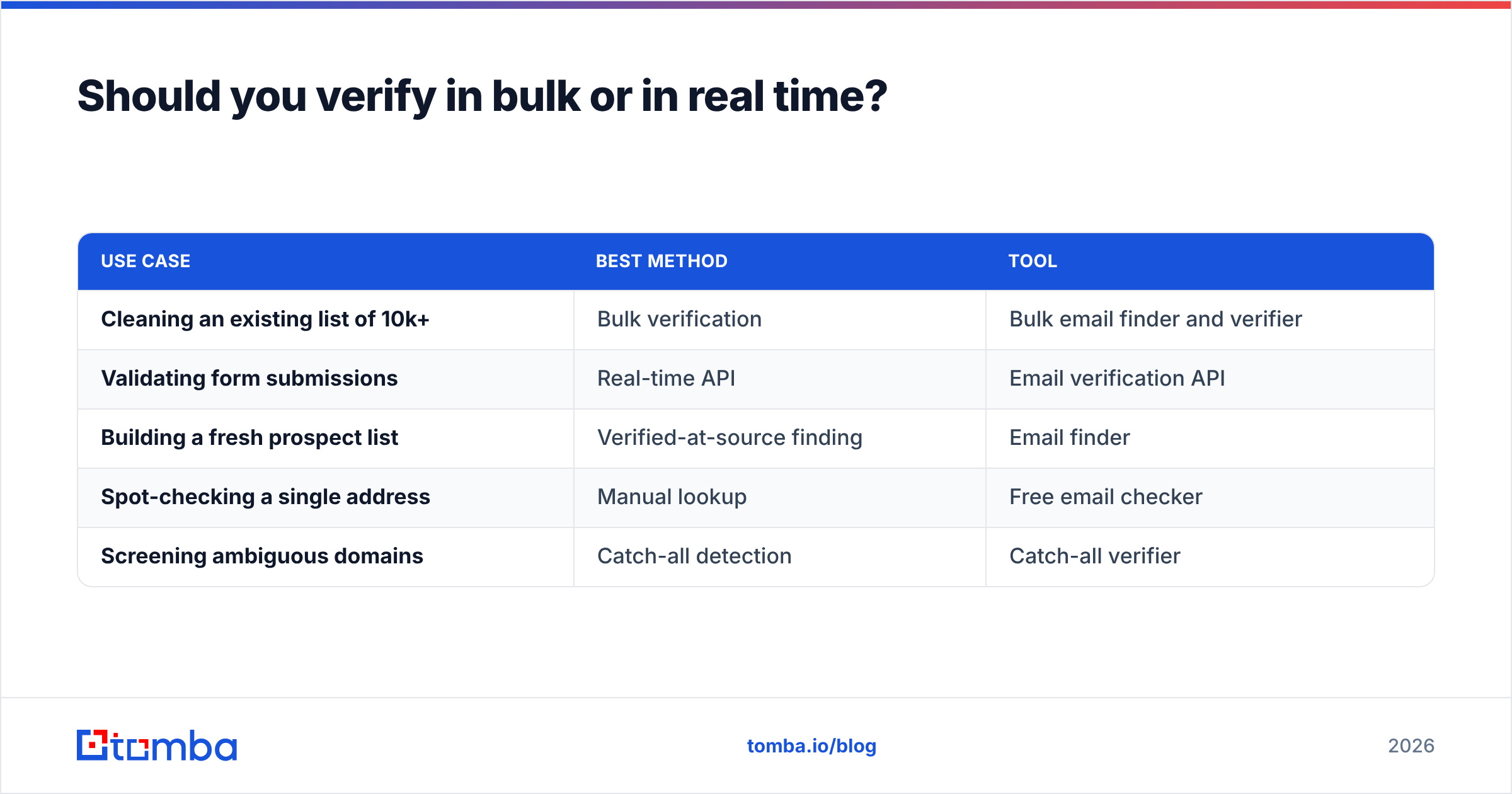
Both, for different jobs. The choice depends on whether you're cleaning an existing list or capturing new contacts.
| Use case | Best method | Tool |
|---|---|---|
| Cleaning an existing list of 10k+ | Bulk verification | Bulk email finder and verifier |
| Validating form submissions | Real-time API | Email verification API |
| Building a fresh prospect list | Verified-at-source finding | Email finder |
| Spot-checking a single address | Manual lookup | Free email checker |
| Screening ambiguous domains | Catch-all detection | Catch-all verifier |
For a quarterly list cleanse, bulk verification is the move — upload the file, get a scored list back, suppress the invalids. For an inbound signup form, real-time API verification stops bad addresses at the door. And when you're sourcing new B2B contacts, finding them through a tool that verifies at discovery means they're clean before they ever hit your calculator.
How accurate are bounce rate predictions from verification?#
A good email verifier won't promise zero bounces — anyone who does is lying — but it will reliably catch the addresses most likely to fail. Quality verification typically reduces bounce rates to under 1%, down from the 8–12% common on raw or scraped lists.
The accuracy comes from layered checks: syntax validation, domain and MX-record checks, SMTP probing, and catch-all detection. No single check is enough on its own, which is why verifiers that only do syntax validation barely move your bounce rate. You want one that probes the actual mail server.
This is also where data freshness matters. A verifier checking against a stale database will pass addresses that have since gone dead. Providers transparent about where their data comes from and how often it refreshes give you predictions you can trust. The closer the verification is to your actual send time, the more accurate your projected bounce rate.
One more nuance: catch-all addresses are the hardest to predict. The server accepts everything, so no verifier can be 100% certain an individual mailbox exists. The honest answer is to score them as "risky" rather than "valid" — and to throttle your sends to catch-all domains rather than blasting them.
What should your bounce-rate workflow look like?#
Tie it together into a repeatable loop so bounce rate becomes a managed metric, not a surprise:
- Before every campaign: verify the segment you're about to send to.
- After every send: read your bounce rate, split hard from soft, suppress hard bounces.
- Every quarter: re-verify the entire active list to fight data decay.
- At every capture point: validate addresses in real time on forms and imports.
- Monthly: check your numbers against the 2% benchmark and watch the trend line, not just the snapshot.
The trend matters more than any single reading. A bounce rate creeping from 1% to 1.5% to 2.2% over three months is a list-hygiene problem forming in slow motion. Catch it at 1.5% and the fix is a routine cleanse. Catch it at 6% and you're doing reputation repair, which takes weeks of careful warming to undo.
Frequently asked questions#
What is a bounce rate calculator used for? It converts your raw send and bounce counts into a percentage so you can benchmark deliverability, decide when to clean your list, and protect your sender reputation before mailbox providers penalize you.
Is a 5% bounce rate bad? Yes. 5% is roughly five times the B2B average and sits at the threshold where providers begin throttling or blocking. Treat anything above 2% as a signal to clean your list.
Do soft bounces hurt my reputation? Far less than hard bounces. Soft bounces are temporary and often resolve on retry. The danger is a soft bounce that keeps failing — eventually it should be treated as a hard bounce and removed.
Can verifying emails really get me to under 1%? For most lists, yes. Moving from a raw list to a verified one routinely takes bounce rates from 8–12% down below 1%, because the dead addresses are removed before they can bounce.
Stop calculating bounces — prevent them#
A bounce rate calculator is diagnostic. It tells you how dirty your list already is, after the damage is partly done. The real win is upstream: stop bad addresses from ever entering your sends.
That's what Tomba's Email Finder is built for — it finds professional email addresses and verifies them at the point of discovery, so the contacts entering your campaigns are clean from the start. Pair it with the email verifier for quarterly list cleanses and you keep your bounce rate parked under 1% without firefighting. The free tier gives you 25 searches a month to test it, and paid plans start at $49/mo when you're ready to scale. Run your numbers through the calculator once — then make sure you never have to worry about the result again.
Ready to find emails that actually work?
Join 150,000+ professionals who stopped guessing and started sending. Free credits on signup — no credit card required.
Get the Tomba newsletter
Practical outbound tactics and product updates — once every two weeks.
About the author