Bounced Email Address: Causes & Fixes to Stop Bounces in 2026
Every bounced email address chips away at your sender reputation. Learn what hard and soft bounces mean, why they happen, and how to keep your bounce rate under 2%.
You hit send on a campaign to 5,000 prospects. Within minutes, 600 failure notices flood your inbox. That is the cost of a bounced email address problem you ignored — and it does more than annoy you. Each bounce signals to mailbox providers that you do not know who you are emailing, and that perception follows your domain everywhere.
This guide breaks down exactly what a bounced email address is, why it happens, and the concrete steps that keep your bounce rate low enough to protect your inbox placement.
TL;DR#
- A bounced email address is one that rejected your message — either permanently (hard bounce) or temporarily (soft bounce).
- Keep your bounce rate under 2%; above 5% and mailbox providers start throttling or blocking you.
- Hard bounces (invalid, non-existent addresses) are the dangerous ones — remove them immediately and never retry.
- The single biggest lever is verifying your list before you send, which catches dead addresses before they ever bounce.
- Authentication (SPF, DKIM, DMARC), list hygiene, and gradual warmup together push bounce rates toward zero.
What is a bounced email address?#
A bounced email address is a recipient address that returned your message instead of delivering it. Think of it like mailing a physical letter: if the house was demolished, the post office stamps it "return to sender" and you never reach anyone. If the mailbox is just stuffed full today, the letter comes back too — but you can try again tomorrow.
Email works the same way. When you send a message, the receiving mail server decides whether to accept it. If it refuses, it sends back a bounce message — technically called a Non-Delivery Report (NDR) — with a status code explaining why. That code is the difference between a problem you should fix and one you should forget.
Mailbox providers like Gmail and Outlook track how often your sends bounce. A high ratio tells them you are emailing a stale or purchased list, which is the classic signature of spam. The result is damage to your sender reputation that suppresses inbox placement for every future campaign — even to valid recipients.

Hard bounce vs soft bounce: what's the difference?#
Bounces split into two categories, and treating them the same way is a common, expensive mistake.
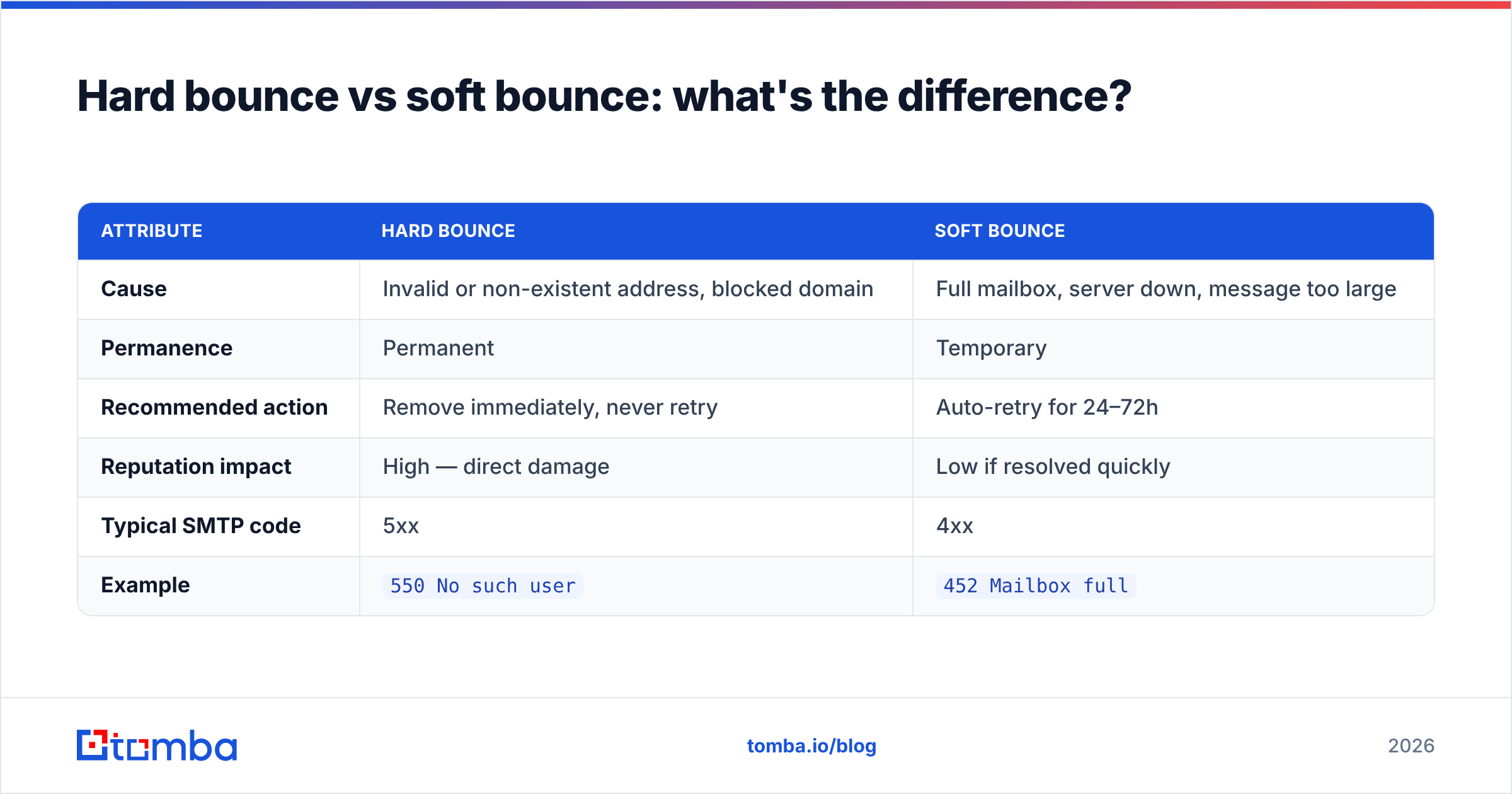
A hard bounce is permanent. The address does not exist, the domain is invalid, or the server has flat-out blocked you. Retrying does nothing except add another black mark to your reputation. Hard bounces must be removed from your list the moment they occur.
A soft bounce is temporary. The mailbox is full, the server is down, or your message exceeded a size limit. These often clear on their own, so most email platforms retry soft bounces automatically for 24 to 72 hours before giving up.
| Attribute | Hard bounce | Soft bounce |
|---|---|---|
| Cause | Invalid or non-existent address, blocked domain | Full mailbox, server down, message too large |
| Permanence | Permanent | Temporary |
| Recommended action | Remove immediately, never retry | Auto-retry for 24–72h |
| Reputation impact | High — direct damage | Low if resolved quickly |
| Typical SMTP code | 5xx | 4xx |
| Example | 550 No such user |
452 Mailbox full |
The practical rule: every hard bounce should leave your list on the first failure. A soft bounce that keeps failing for three days should be reclassified as hard and removed too.
Why do email addresses bounce?#
Bounces are rarely random. They cluster around a handful of root causes, and knowing which one you are facing tells you how to fix it.
- The address never existed or was mistyped. A typo like
jonh@company.comor a guessed pattern that turned out wrong produces an instant hard bounce. This is the most common cause for cold outreach lists built without verification. - The address was abandoned. People leave companies. An email that worked six months ago may now return
550 user unknown. Lists decay roughly 22–30% per year, so old data bounces. - The receiving server blocked you. If your domain or IP landed on a blacklist, or your authentication records are broken, the server rejects you outright. Run a quick blacklist checker if a whole domain suddenly bounces.
- The mailbox is full or the server is temporarily unavailable. Classic soft bounce. Nothing to fix on your end — the retry queue handles it.
- Content or size triggered a filter. Oversized attachments or spam-trigger content can cause a rejection at the gateway before the mailbox is ever checked.
- Catch-all uncertainty. Some domains accept every address at the SMTP layer, then bounce internally later. These need a dedicated catch-all verifier to assess risk before sending.
Authentication deserves its own note. If your SPF, DKIM, and DMARC records are misconfigured, providers may reject mail that would otherwise deliver fine. Confirm your setup with an SPF checker and review your SPF record syntax before blaming the list.
What is a good bounce rate, and how do you measure it?#
Your bounce rate is the percentage of sent emails that bounced: (bounces ÷ emails sent) × 100.
Here is the benchmark scale every sender should memorize:
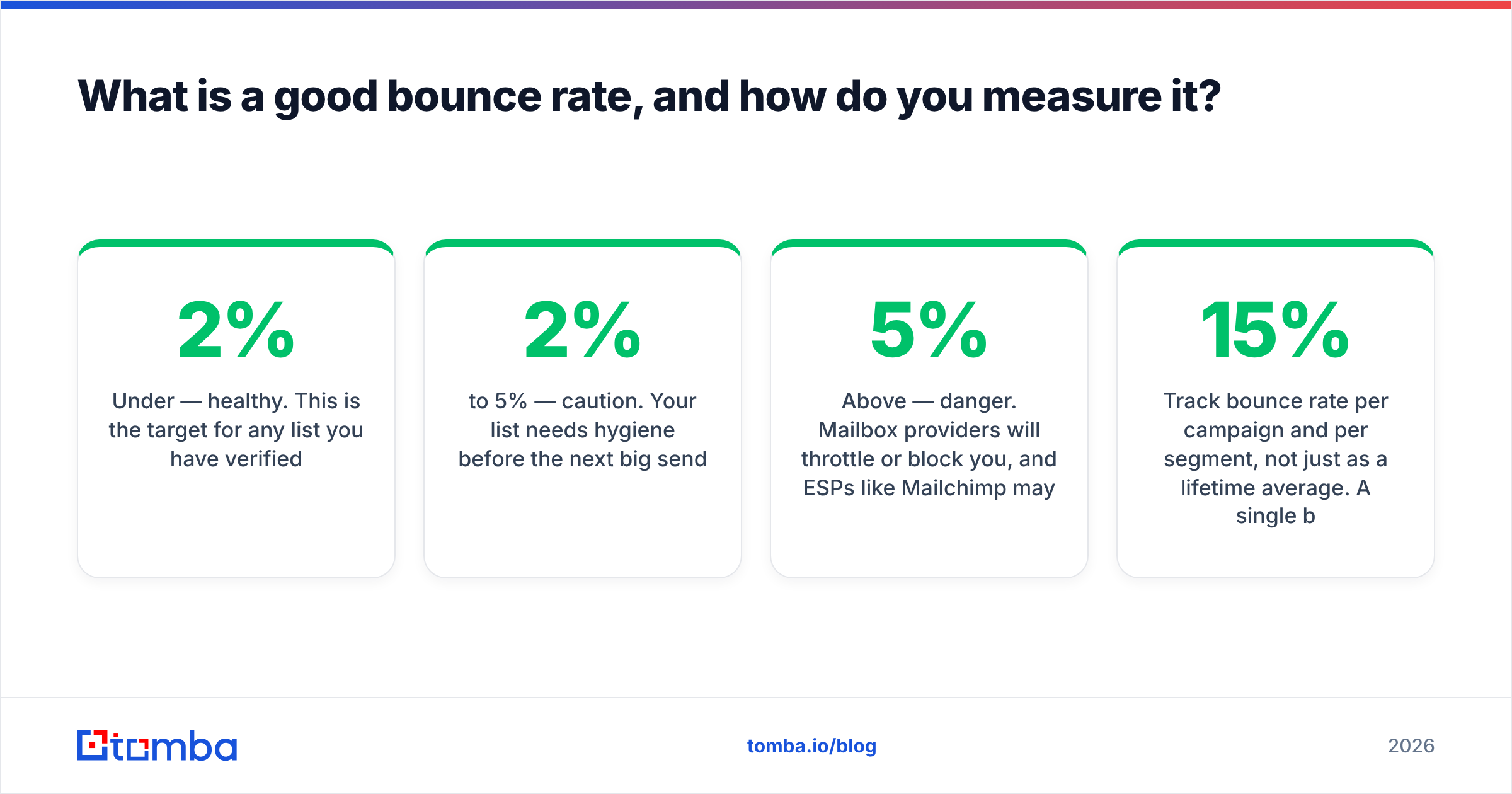
- Under 2% — healthy. This is the target for any list you have verified.
- 2% to 5% — caution. Your list needs hygiene before the next big send.
- Above 5% — danger. Mailbox providers will throttle or block you, and ESPs like Mailchimp may suspend your account.
Major email platforms enforce these limits. Both HubSpot and most ESPs will automatically suppress addresses that hard bounce and may pause accounts that repeatedly exceed safe thresholds. The number is not advisory — it is a gate.
Track bounce rate per campaign and per segment, not just as a lifetime average. A single bad import can spike one campaign to 15% while your overall average still looks fine, and that one campaign is enough to dent your reputation.

How do you fix and prevent a bounced email address?#
Conclusion first: verify before you send, then keep verifying. Prevention beats cleanup every time, because once an address bounces the damage to your reputation is already done.
Here is the layered playbook that keeps bounce rates low.
1. Verify every address before the first send. This is the highest-leverage step. An email verifier checks whether an address exists at the SMTP level without sending a message, catching dead addresses before they ever bounce. Run new lists through it the same day you collect them.
2. Build lists from accurate data, not guesses. Pattern-guessing emails (first.last@domain.com) produces bounces because not every company uses the same format. Sourcing verified addresses through a real email finder or domain search starts you with addresses that already passed validation.
3. Process at scale with bulk tools. For large imports, a bulk verify run sorts thousands of addresses into deliverable, risky, and invalid buckets in one pass so you only send to the safe segment.
4. Remove hard bounces automatically. Configure your ESP to suppress any address that hard bounces on the first failure. Never re-import a cleaned-out address "to try again."
5. Authenticate your domain. Set up SPF, DKIM, and DMARC correctly. Strong authentication reduces server-side rejections that masquerade as bounces and protects your email deliverability overall.
6. Warm up new domains and IPs gradually. Sending 10,000 cold emails from a brand-new domain guarantees rejections. Ramp volume slowly over weeks so providers learn to trust you.
7. Re-verify on a schedule. Because lists decay 20–30% per year, re-run verification on dormant segments every quarter before you reactivate them.
Tool comparison: how senders handle bounces#
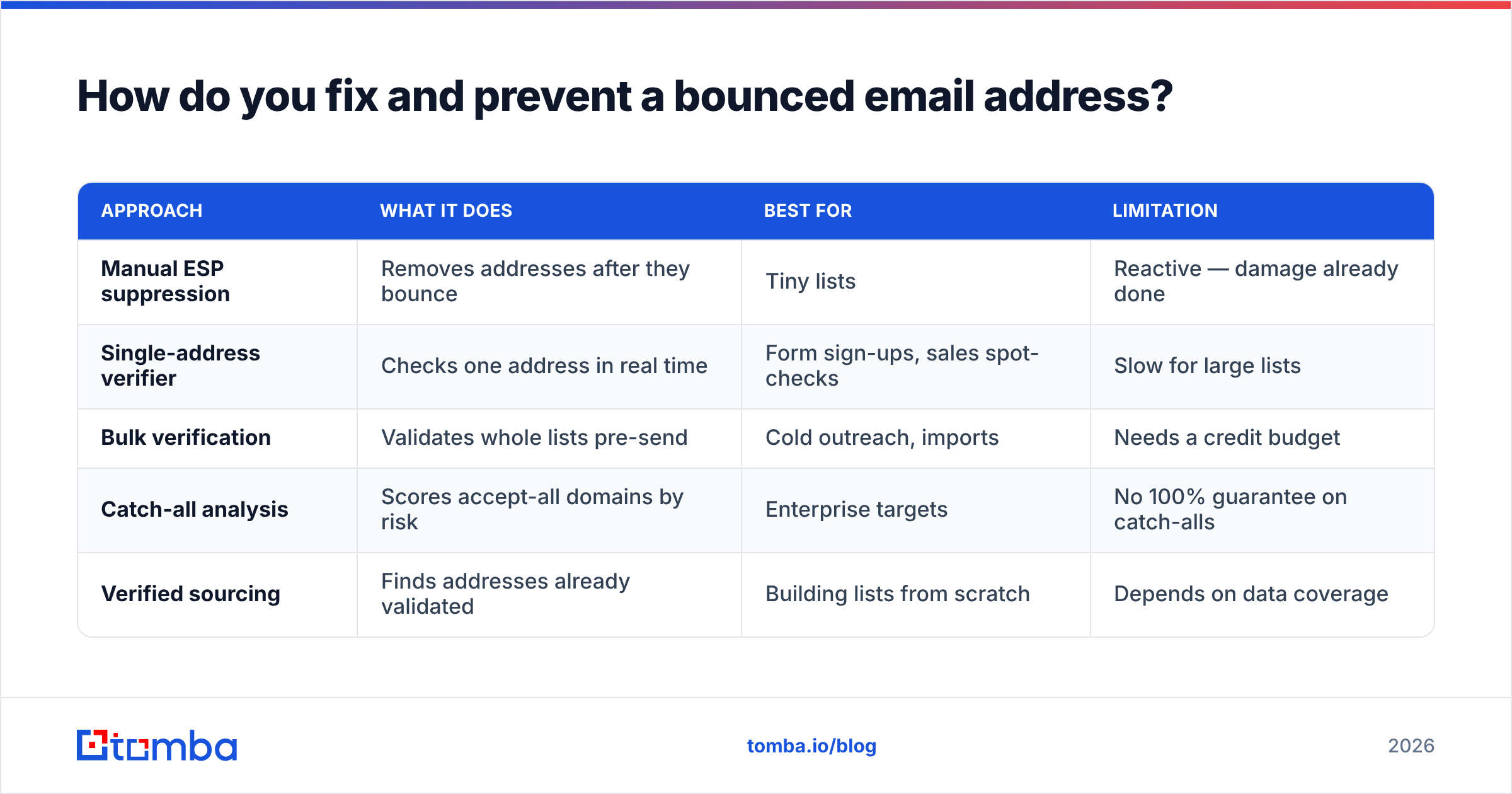
| Approach | What it does | Best for | Limitation |
|---|---|---|---|
| Manual ESP suppression | Removes addresses after they bounce | Tiny lists | Reactive — damage already done |
| Single-address verifier | Checks one address in real time | Form sign-ups, sales spot-checks | Slow for large lists |
| Bulk verification | Validates whole lists pre-send | Cold outreach, imports | Needs a credit budget |
| Catch-all analysis | Scores accept-all domains by risk | Enterprise targets | No 100% guarantee on catch-alls |
| Verified sourcing | Finds addresses already validated | Building lists from scratch | Depends on data coverage |
Notice the pattern: the cheaper-looking reactive options cost you reputation, while proactive verification costs a few credits and protects everything downstream.
How does Tomba reduce bounced email addresses?#
Tomba attacks the bounce problem at both ends — the source and the send. Addresses surfaced through the Tomba Email Finder are checked against multiple data signals before they reach you, and the built-in email verification confirms each one is deliverable at the SMTP layer.
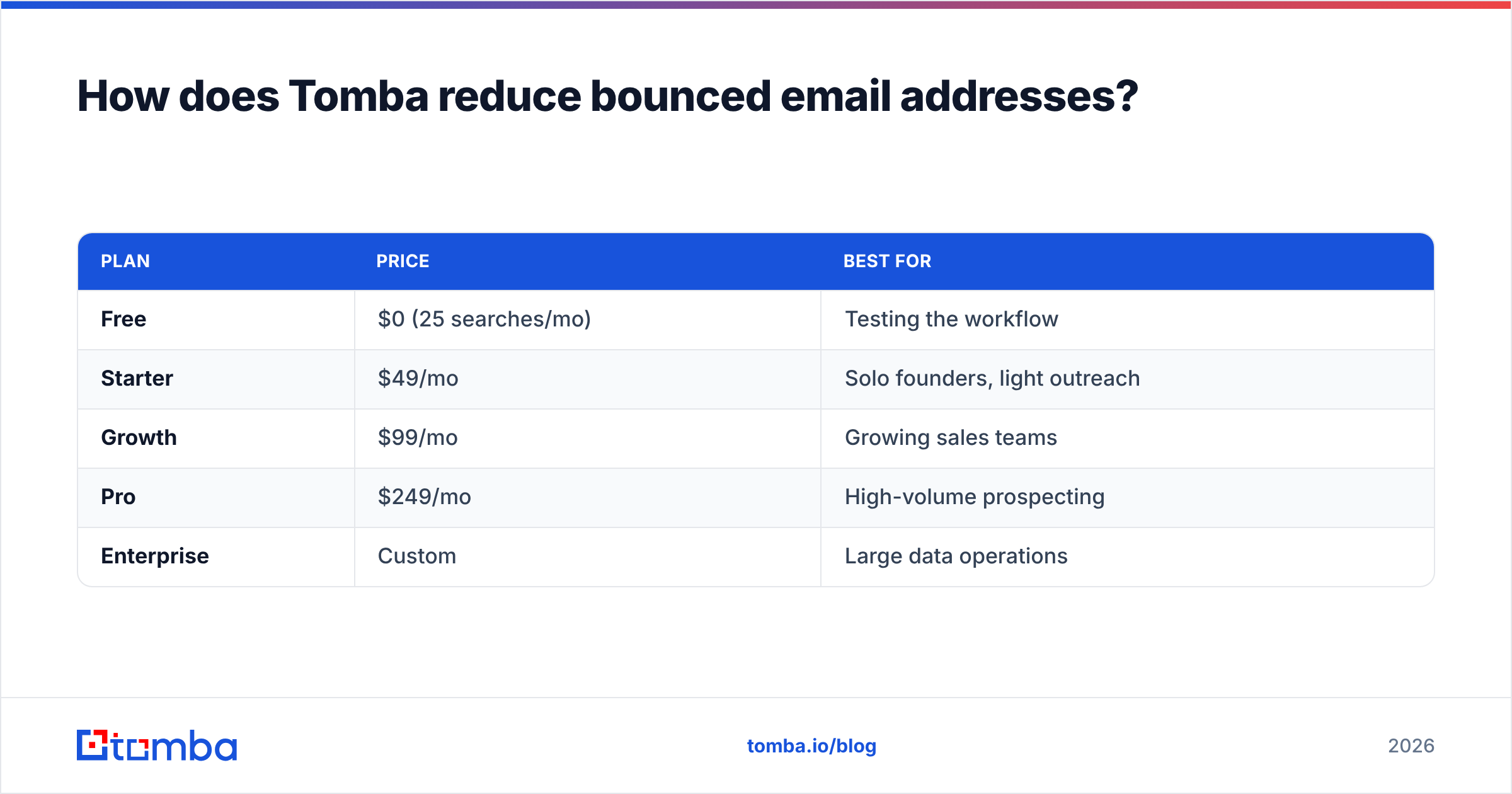
For accept-all domains, the catch-all verifier scores risk instead of guessing, and bulk lead generation workflows let you clean entire lists before a campaign launches. Pricing scales with volume: a Free tier with 25 searches per month, Starter at $49/mo, Growth at $99/mo, and Pro at $249/mo — full details on the Tomba pricing page.
| Plan | Price | Best for |
|---|---|---|
| Free | $0 (25 searches/mo) | Testing the workflow |
| Starter | $49/mo | Solo founders, light outreach |
| Growth | $99/mo | Growing sales teams |
| Pro | $249/mo | High-volume prospecting |
| Enterprise | Custom | Large data operations |
If you want a second opinion on data tools, independent reviews on G2 compare verification accuracy across vendors so you can match a tool to your volume.
Frequently asked questions#
Does one bounce hurt my reputation? A single bounce is negligible. The harm comes from a high ratio of bounces, which signals poor list quality to mailbox providers.
Should I retry a hard bounce? No. Hard bounces are permanent. Retrying adds another failure to your record and worsens your standing. Remove the address.
Can a valid address still bounce? Yes — temporarily. Soft bounces from full mailboxes or downed servers usually clear within a day or two, which is why platforms auto-retry them.
How often should I clean my list? Verify new lists before the first send, and re-verify dormant segments at least quarterly since data decays 20–30% annually.
Stop bounces before they start#
A bounced email address is not just a delivery failure — it is a slow leak in your sender reputation that throttles every campaign you run. The fix is upstream: source accurate addresses, verify before you send, and remove hard bounces on sight.
Start with the Tomba Email Finder to build lists from already-validated data, then run them through verification before launch. Your bounce rate stays under 2%, your domain stays trusted, and your messages land where they belong — in the inbox.
// get started
Find, verify and enrich your first contacts today
Start on the free plan with 25 searches a month, then scale when your team is ready.
Free plan · No credit card required · GDPR & CCPA
// about the author