Bounced Email Meaning: Hard vs Soft Bounces in 2026
A bounced email is a message your server rejected and returned undelivered. Here's what hard and soft bounces really mean, why they happen, and how to stop them in 2026.
TL;DR
- A bounced email is a message that never reached the inbox because the receiving mail server rejected it and returned it to you as undelivered.
- There are two core types: hard bounces (permanent failures like an address that doesn't exist) and soft bounces (temporary failures like a full mailbox or a server timeout).
- Every bounce ships with an SMTP status code and a human-readable reason — learning to read them tells you exactly what to fix.
- A bounce rate above ~2% is a warning sign; above 5% mailbox providers start throttling or blocking you.
- The single biggest lever for fewer bounces is verifying addresses before you send. Cleaning your list up front beats apologizing to Gmail later.
What is the meaning of a bounced email?#
A bounced email is an email that gets returned to the sender instead of being delivered, because the receiving server refused or could not complete delivery. Think of it like physical mail stamped "RETURN TO SENDER — no such address." You dropped the letter in the box, the postal system tried to route it, and somewhere along the chain a carrier decided it could not be handed over. Technically, the receiving Mail Transfer Agent (MTA) issues a rejection during or after the SMTP conversation, and a Delivery Status Notification (DSN) — the message you see in your inbox starting with "Mail Delivery Subsystem" — comes back explaining why.
That bounce notification is not noise. It is a diagnostic. Buried inside it is an SMTP status code and an enhanced status code (like 550 5.1.1) that names the exact failure. Once you can read those codes, you stop guessing and start fixing the real cause.
Bounces matter far beyond a single failed send. Mailbox providers like Gmail and Outlook watch your bounce rate as a proxy for list quality. A sender who repeatedly hammers dead addresses looks like a spammer, because that is exactly what spammers do. So bounces quietly erode your sender reputation, and a damaged reputation drags down deliverability for the good addresses too.
/blog/generated/memes/2026-06-19/bounced-email-meaning-meme-1.png
What are the two main types of email bounces?#
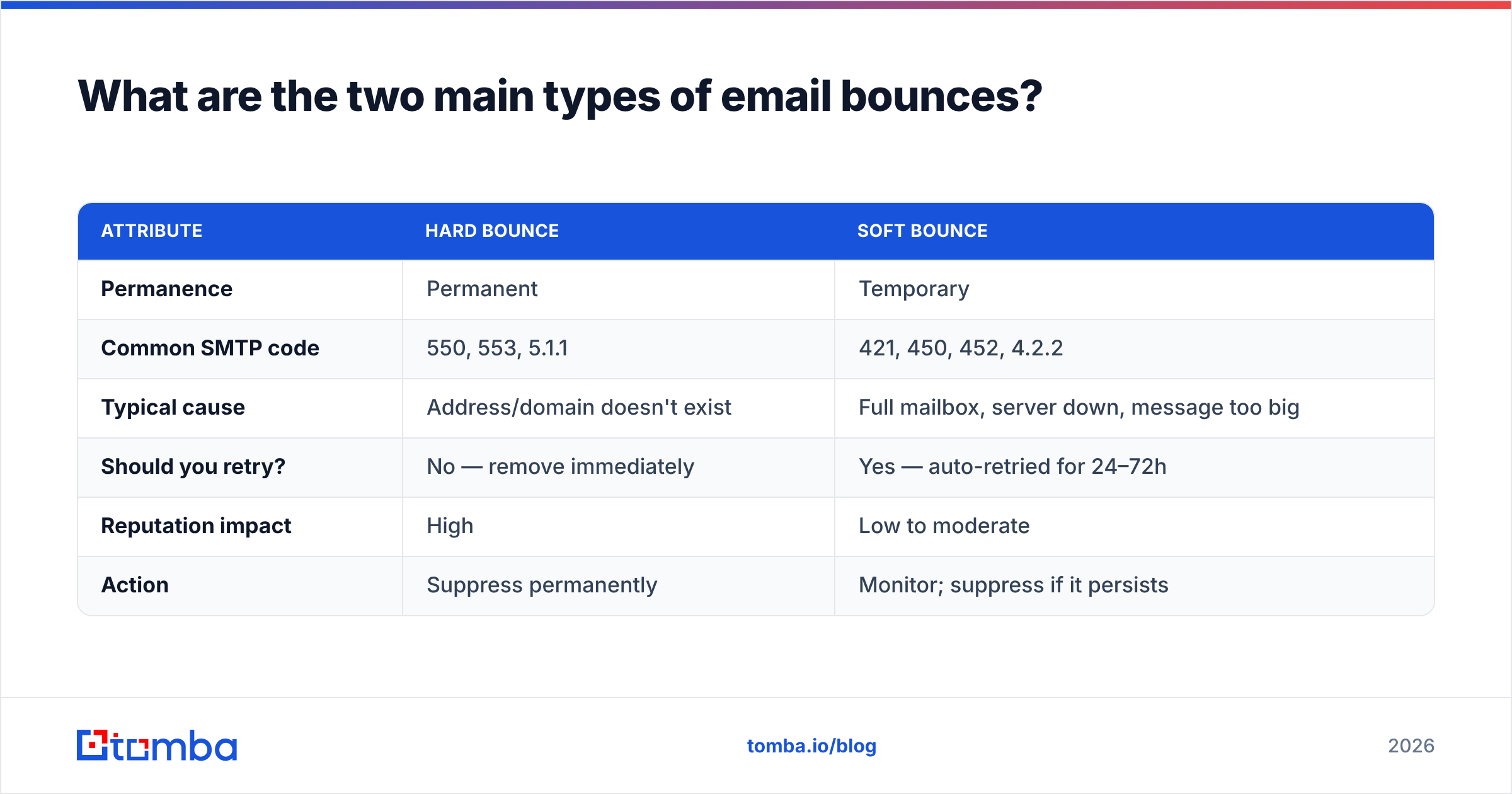
Bounces split into two families, and the difference decides whether you remove the address or retry it.
Hard bounce — a permanent delivery failure. The address is invalid, the domain doesn't exist, or the server flatly refuses you. Hard bounces will never succeed on retry. Keep mailing them and you actively damage your reputation.
Soft bounce — a temporary delivery failure. The address is real, but something blocked this specific attempt: the mailbox is full, the message is too large, or the server was briefly down or rate-limiting you. Most email platforms auto-retry soft bounces for 24–72 hours before giving up and reclassifying them.
Here is how the two compare at a glance:
| Attribute | Hard bounce | Soft bounce |
|---|---|---|
| Permanence | Permanent | Temporary |
| Common SMTP code | 550, 553, 5.1.1 | 421, 450, 452, 4.2.2 |
| Typical cause | Address/domain doesn't exist | Full mailbox, server down, message too big |
| Should you retry? | No — remove immediately | Yes — auto-retried for 24–72h |
| Reputation impact | High | Low to moderate |
| Action | Suppress permanently | Monitor; suppress if it persists |
The practical rule: suppress hard bounces the instant they occur, and watch soft bounces — if the same address soft-bounces across several campaigns, treat it as effectively dead and remove it.
Why do emails bounce in the first place?#
Bounces trace back to a handful of recurring causes. Knowing which one you are dealing with tells you whether the fix is on your side or theirs.
- The address doesn't exist. Typos (
jhon@instead ofjohn@), employees who left, or addresses you guessed and never verified. This is the number-one source of hard bounces. - The domain is dead or misconfigured. The company folded, the domain expired, or its MX records are missing. The mail has nowhere to land.
- The mailbox is full. A classic soft bounce — the recipient exists but their quota is maxed out.
- Your sender reputation or authentication is weak. Missing or broken SPF record, DKIM, or DMARC makes receiving servers reject you outright. In 2026, Gmail and Yahoo enforce authentication for bulk senders, so this bites harder than it used to.
- Content or volume triggers a block. Spam-trigger phrases, a blacklisted IP, or a sudden volume spike from a cold domain can all earn a
550block. - Catch-all ambiguity. Some domains accept everything at the SMTP layer, then silently drop invalid mail later — these inflate your "delivered" numbers while quietly bouncing downstream.
The throughline: most bounces are a data-quality problem, not a sending problem. Garbage addresses in, bounces out.
How do you read a bounce message and its SMTP code?#
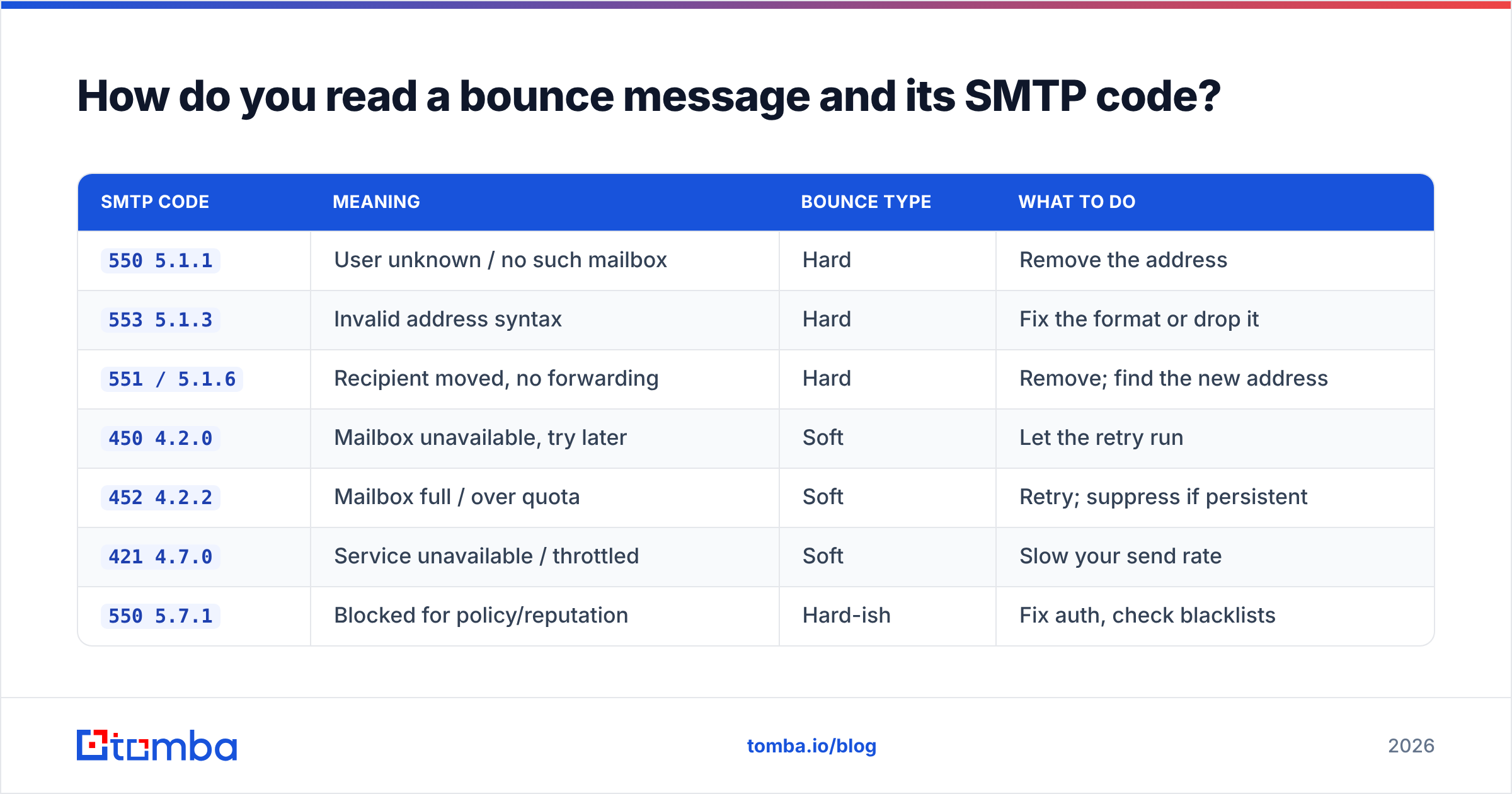
Read the three-digit code first, then the enhanced code, then the text. The leading digit tells you the family: 4xx is temporary (soft), 5xx is permanent (hard). The enhanced code (5.1.1, 4.2.2) narrows it down, and the human text confirms it.
| SMTP code | Meaning | Bounce type | What to do |
|---|---|---|---|
550 5.1.1 |
User unknown / no such mailbox | Hard | Remove the address |
553 5.1.3 |
Invalid address syntax | Hard | Fix the format or drop it |
551 / 5.1.6 |
Recipient moved, no forwarding | Hard | Remove; find the new address |
450 4.2.0 |
Mailbox unavailable, try later | Soft | Let the retry run |
452 4.2.2 |
Mailbox full / over quota | Soft | Retry; suppress if persistent |
421 4.7.0 |
Service unavailable / throttled | Soft | Slow your send rate |
550 5.7.1 |
Blocked for policy/reputation | Hard-ish | Fix auth, check blacklists |
When you see 5.7.1, the address is usually fine — you are the problem. That points at authentication, blacklisting, or content, and the fix lives in your DNS and sending practices, not your list. If you want to confirm your records are clean, run a quick check with a tool like Tomba's SPF checker and blacklist checker before your next campaign.
What is a good email bounce rate in 2026?#
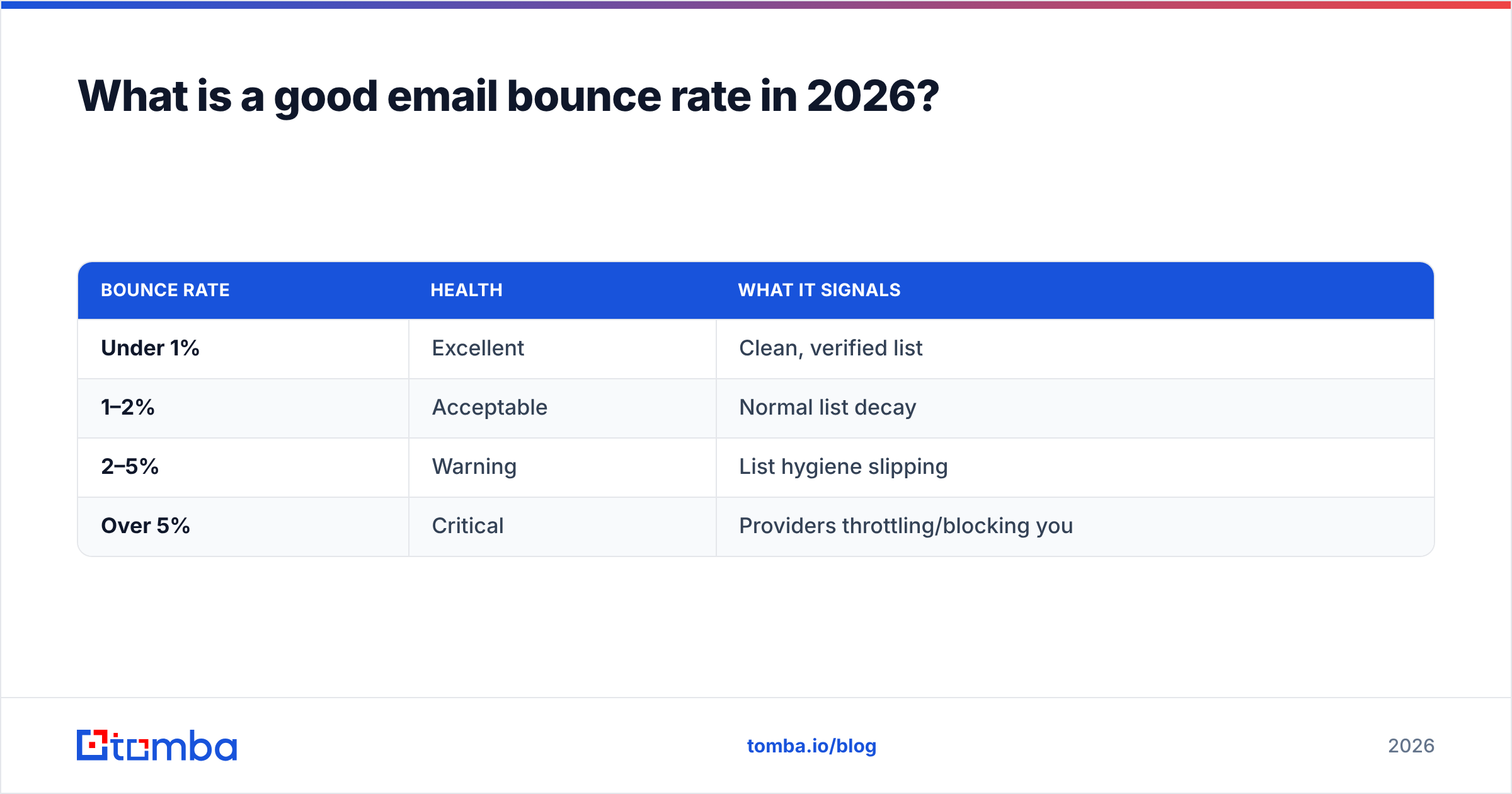
Keep your bounce rate under 2%. That is the working benchmark, and the math is simple: bounce rate equals bounced emails divided by total emails sent, times 100. Send 1,000 emails, get 30 bounces, and you are at 3% — already in the danger zone.
Here is how to read your number:
| Bounce rate | Health | What it signals |
|---|---|---|
| Under 1% | Excellent | Clean, verified list |
| 1–2% | Acceptable | Normal list decay |
| 2–5% | Warning | List hygiene slipping |
| Over 5% | Critical | Providers throttling/blocking you |
B2B email lists decay fast — research from providers like HubSpot has long pegged annual contact-database decay around 22–30% as people change jobs and companies restructure. That means a list that was clean in January is measurably dirty by summer. Bounce rate is not a one-time cleanup; it is a maintenance habit. Mailbox providers including Google now publish explicit sender guidelines that tie acceptable spam and failure rates directly to whether your mail reaches the inbox at all.
/blog/generated/memes/2026-06-19/bounced-email-meaning-meme-2.png
How do you reduce and prevent email bounces?#
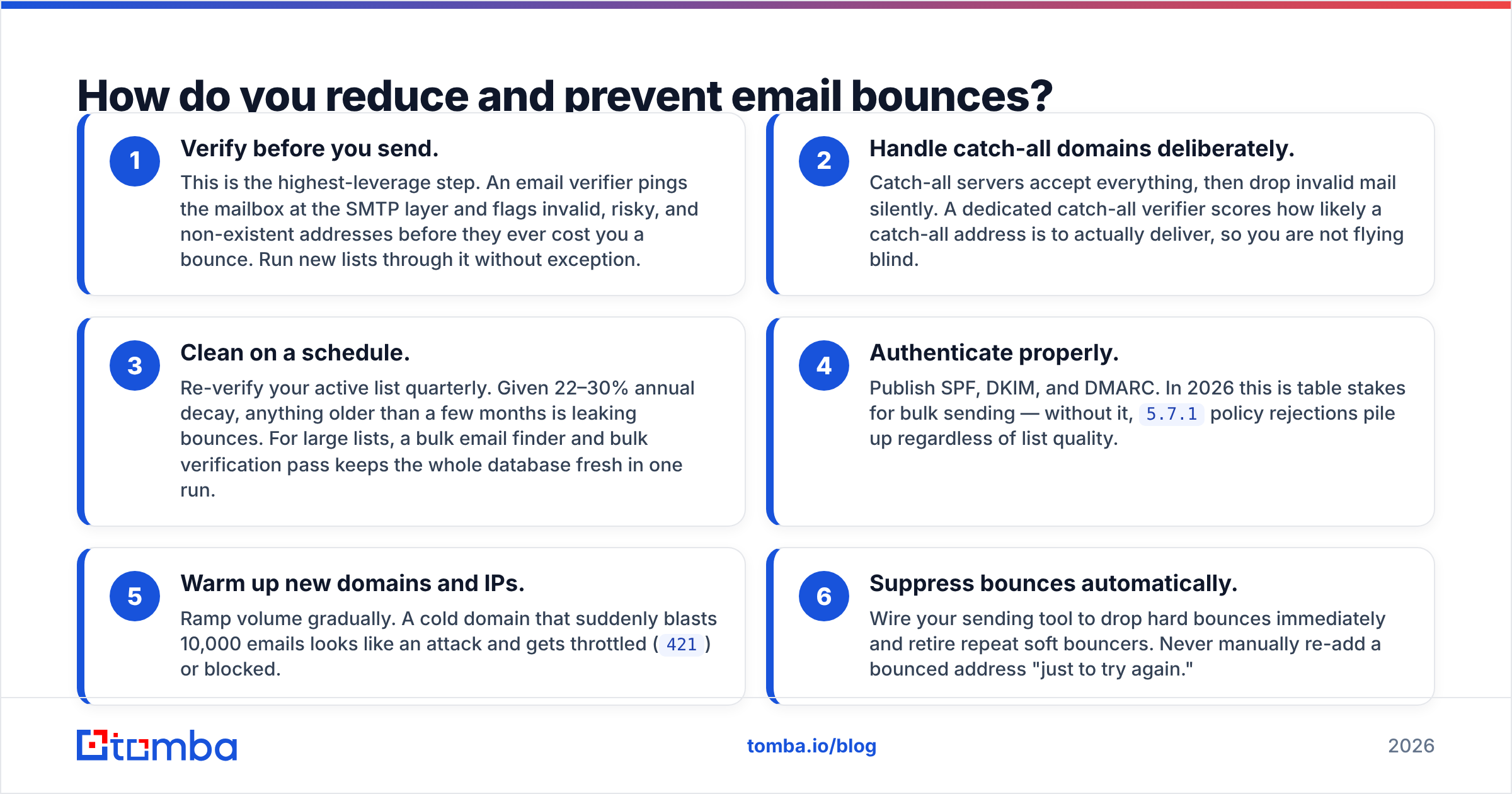
The fix is mostly upstream. Stop bad addresses from entering your sends, and the bounce problem largely disappears on its own. Six moves, in priority order:
- Verify before you send. This is the highest-leverage step. An email verifier pings the mailbox at the SMTP layer and flags invalid, risky, and non-existent addresses before they ever cost you a bounce. Run new lists through it without exception.
- Handle catch-all domains deliberately. Catch-all servers accept everything, then drop invalid mail silently. A dedicated catch-all verifier scores how likely a catch-all address is to actually deliver, so you are not flying blind.
- Clean on a schedule. Re-verify your active list quarterly. Given 22–30% annual decay, anything older than a few months is leaking bounces. For large lists, a bulk email finder and bulk verification pass keeps the whole database fresh in one run.
- Authenticate properly. Publish SPF, DKIM, and DMARC. In 2026 this is table stakes for bulk sending — without it,
5.7.1policy rejections pile up regardless of list quality. - Warm up new domains and IPs. Ramp volume gradually. A cold domain that suddenly blasts 10,000 emails looks like an attack and gets throttled (
421) or blocked. - Suppress bounces automatically. Wire your sending tool to drop hard bounces immediately and retire repeat soft bouncers. Never manually re-add a bounced address "just to try again."
Notice that five of six steps are about data quality and infrastructure, not copy. You cannot write your way out of a dirty list.
Hard bounce vs soft bounce: which hurts more?#
Hard bounces hurt more, and they hurt fast. A hard bounce is a public signal to the mailbox provider that you mailed an address you had no business mailing — and providers weight that heavily against your reputation. A handful of soft bounces from full mailboxes is normal background noise; a spike of hard bounces from invalid addresses is the kind of thing that gets a sending domain throttled within a single campaign.
The asymmetry is why suppression discipline matters. One ignored hard bounce that you keep retrying does more damage than a dozen soft bounces you let the retry logic handle. Treat hard bounces as radioactive: remove on contact. Treat soft bounces as patients in observation: monitor, retry, and only escalate to removal when the pattern repeats.
If you are sourcing brand-new contacts rather than cleaning an existing list, build the list right from the start. A quality email finder that validates as it discovers means the addresses entering your CRM are already vetted — you skip the bounce-then-clean cycle entirely. For full transparency on how that data is sourced and scored, Tomba documents its data sources openly, which is worth checking against any provider you evaluate on G2.
Frequently asked questions#
Does a bounced email mean I was blocked?
Not always. A bounce can mean the address is invalid (hard) or temporarily unavailable (soft). A block specifically shows up as a 5.7.1 policy rejection — that one points at your reputation or authentication, not the recipient's mailbox.
Will one hard bounce ruin my sender reputation? No. A single hard bounce is normal. The damage comes from a pattern — high bounce rates across campaigns, or repeatedly mailing the same dead addresses. Suppress hard bounces immediately and you stay safe.
How long do soft bounces keep retrying? Most platforms retry for 24–72 hours. If the address still fails after the retry window, it gets reclassified — and if it keeps soft-bouncing across multiple campaigns, treat it as dead.
Can verified emails still bounce? Occasionally, yes. Verification dramatically cuts bounces but cannot predict a mailbox that fills up or a domain that dies after you verified it. That is why re-verification on a schedule matters as much as the first check.
The bottom line#
A bounced email is your mail system telling you, in plain SMTP, that a message did not get through — and why. Hard bounces are permanent and demand immediate suppression; soft bounces are temporary and deserve patience. Keep your rate under 2%, read the codes instead of ignoring them, and treat list hygiene as ongoing maintenance rather than a one-time scrub.
Almost every bounce you will ever see traces back to a bad address that should have been caught before sending. The fix is to verify first and send second. Start with the Tomba Email Finder to source pre-validated B2B addresses, pair it with the email verifier to scrub the contacts you already have, and check the Tomba pricing — the free tier covers 25 searches a month, with Starter at $49/mo when you scale. Clean data in means bounces out, and your sender reputation stays exactly where you want it.
// get started
Find, verify and enrich your first contacts today
Start on the free plan with 25 searches a month, then scale when your team is ready.
Free plan · No credit card required · GDPR & CCPA
// about the author