Bouncer Pricing Reviews Pros and Cons: 2026 Guide
A neutral 2026 breakdown of Bouncer pricing, real user reviews, and the honest pros and cons of this email verification tool — plus where it fits and where it falls short.
Bouncer is one of the better-known email verification tools. If you're weighing it for cold outreach or list hygiene, you want the honest version. What does it cost? What do users really say? Where does it quietly let you down? This guide gives you the full Bouncer pricing reviews pros and cons rundown.
TL;DR#
- Bouncer is a focused, GDPR-conscious email verification tool. It has a clean UI, a solid API, and a good name for accuracy on standard mailboxes.
- Pricing is credit-based. Pay-as-you-go credits never expire. There are volume discounts and monthly plans too. Budget single-digit dollars per 1,000 checks at low volume. The price drops as you scale.
- Pros: accurate core verification, fast bulk jobs, a clear credit model, strong privacy, and a handy "Deliverability Kit."
- Cons: it only verifies (no email finding). Catch-all and role accounts are handled cautiously. Per-credit cost adds up if you also need to find contacts.
- Best fit: teams that already have lists and just need them cleaned. If you need to find and verify, a combined tool like Tomba usually wins on total cost.
What is Bouncer and what does it do?#
Bouncer (usebouncer.com) is an email validation service. You feed it a list, or call its API. It tells you which addresses are deliverable, undeliverable, risky, or unknown. That's the whole job. It doesn't try to be a CRM, a sequencer, or a prospecting suite.
It runs the standard checks every serious email verifier performs. These include syntax checks, domain and MX lookups, SMTP handshake tests, disposable-domain detection, and role-account flags (info@, sales@, and so on). Bouncer also adds a "Toxicity Check" and a "Deliverability Kit." The kit audits your sending setup (SPF, DKIM, DMARC, blacklists). These extras push it past a bare-bones validator.
)
There's one clear limit. Bouncer does not find email addresses. It has no domain prospecting, no name-to-email lookup, and no enrichment. If your list is empty, Bouncer can't fill it. That gap matters when you compare total cost later.
How much does Bouncer cost in 2026?#
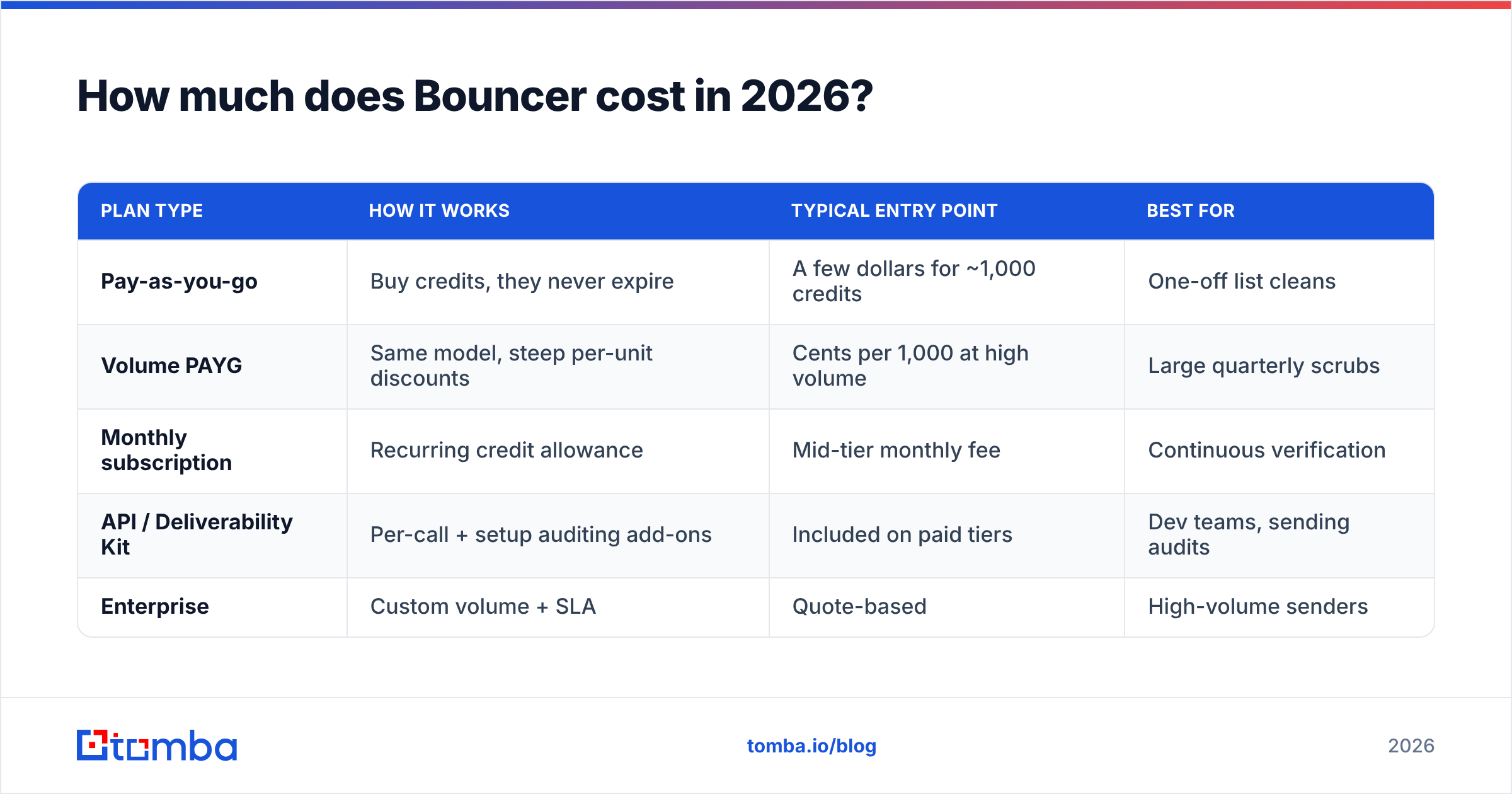
Short answer: Bouncer uses a credit model. One verification equals one credit. The price per credit drops as you buy more. Pay-as-you-go credits don't expire, which is great for spiky workloads. There are also monthly plans for teams that verify all the time.
Vendors change list pricing often. So treat the figures below as the shape of Bouncer's pricing, not a contract. Always confirm live numbers on their official pricing page. The structure, not the cents, is what you compare.
| Plan type | How it works | Typical entry point | Best for |
|---|---|---|---|
| Pay-as-you-go | Buy credits, they never expire | A few dollars for ~1,000 credits | One-off list cleans |
| Volume PAYG | Same model, steep per-unit discounts | Cents per 1,000 at high volume | Large quarterly scrubs |
| Monthly subscription | Recurring credit allowance | Mid-tier monthly fee | Continuous verification |
| API / Deliverability Kit | Per-call + setup auditing add-ons | Included on paid tiers | Dev teams, sending audits |
| Enterprise | Custom volume + SLA | Quote-based | High-volume senders |
The credit model is the headline. It's honest and easy to forecast. 50,000 addresses to clean means 50,000 credits. The catch: "risky" and "unknown" results still use a credit. So a messy list with many catch-all domains can burn budget without giving you clean answers.
What about the free trial?#
Bouncer gives new accounts a small batch of free credits, often around 100. That's enough to test accuracy before you pay. Run a list where you already know the outcomes. Then measure how Bouncer scores it. Don't take any vendor's headline accuracy number on faith, including this one.
What do Bouncer reviews say?#
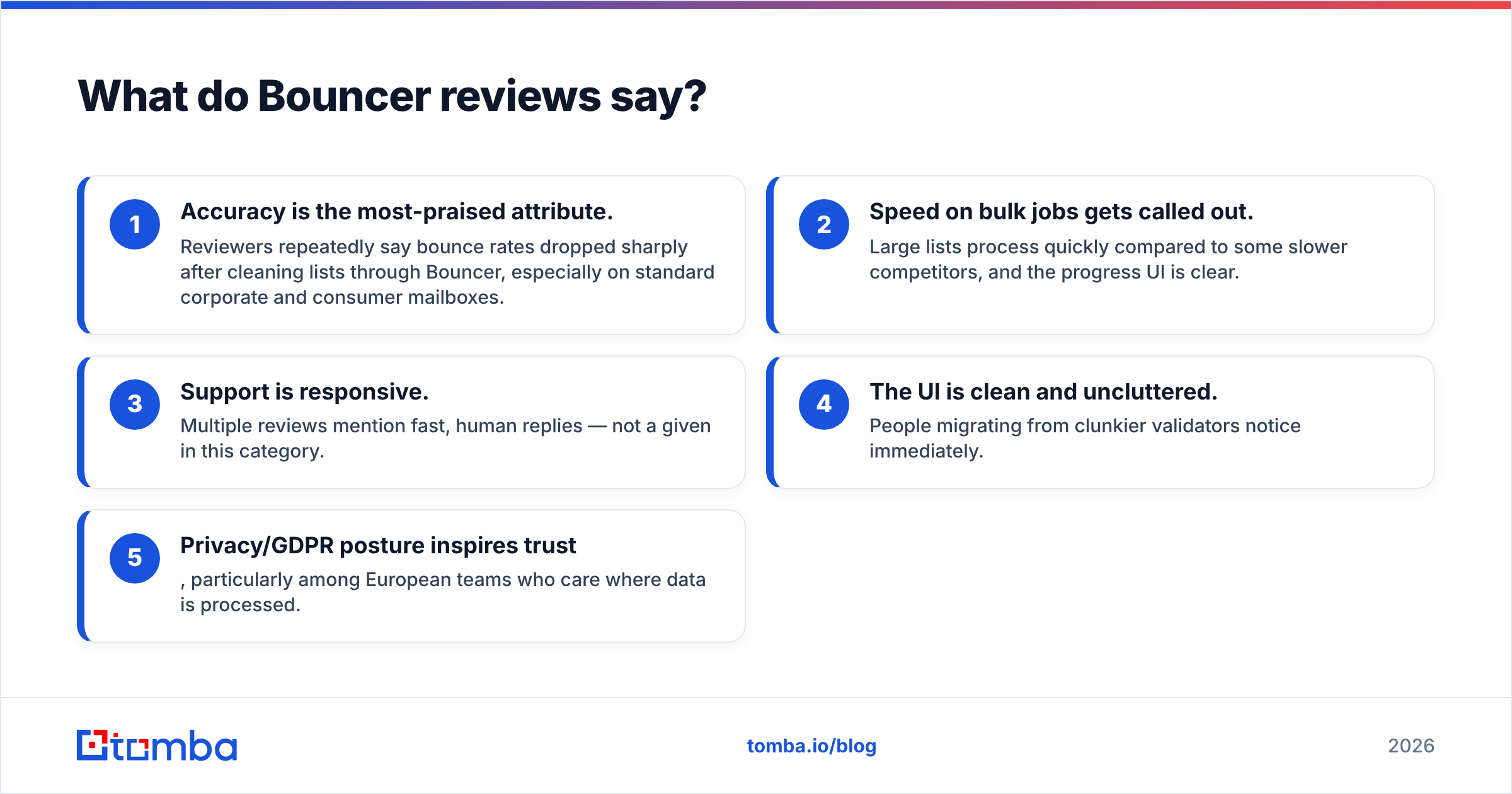
On G2 and other public review sites, Bouncer sits in the 4.5+ range. The themes are very stable:
- Accuracy gets the most praise. Reviewers say bounce rates dropped sharply after they cleaned lists with Bouncer. This is true mostly on standard corporate and consumer mailboxes.
- Speed on bulk jobs stands out. Large lists process fast. The progress UI is clear.
- Support is responsive. Many reviews mention quick, human replies. That's rare in this category.
- The UI is clean. People moving from clunky validators notice right away.
- Privacy and GDPR posture build trust. European teams care where data is handled.
The criticism is narrow. It centers on two points: cost creep at scale for heavy users, and cautious handling of catch-all and risky addresses (more below). A few reviewers wish it did more than verify. That's a scope choice, not a flaw.
)
What are the pros and cons of Bouncer?#
Here's the balanced view. No tool is all upside.
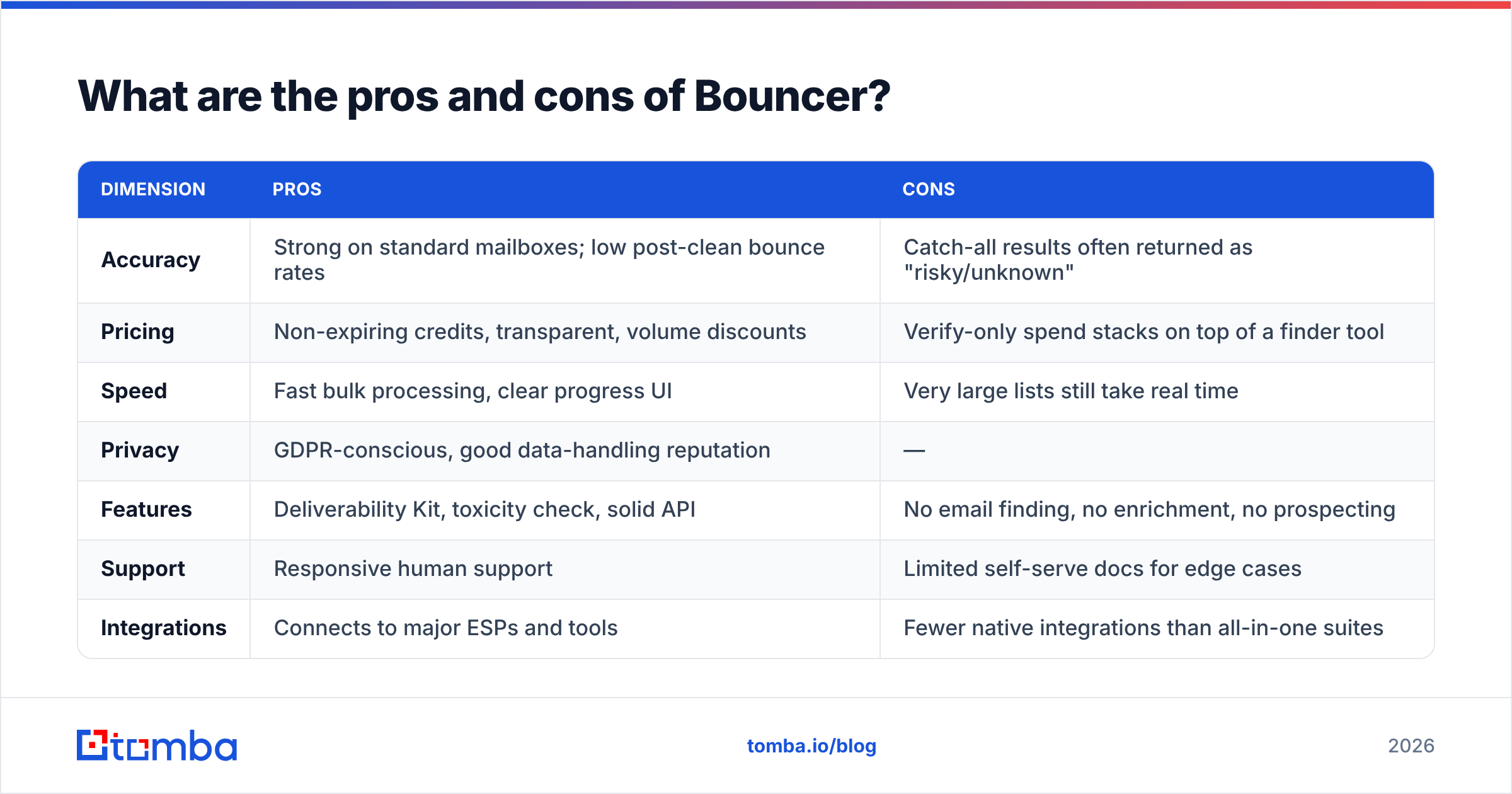
| Dimension | Pros | Cons |
|---|---|---|
| Accuracy | Strong on standard mailboxes; low post-clean bounce rates | Catch-all results often returned as "risky/unknown" |
| Pricing | Non-expiring credits, transparent, volume discounts | Verify-only spend stacks on top of a finder tool |
| Speed | Fast bulk processing, clear progress UI | Very large lists still take real time |
| Privacy | GDPR-conscious, good data-handling reputation | — |
| Features | Deliverability Kit, toxicity check, solid API | No email finding, no enrichment, no prospecting |
| Support | Responsive human support | Limited self-serve docs for edge cases |
| Integrations | Connects to major ESPs and tools | Fewer native integrations than all-in-one suites |
The catch-all problem#
This needs its own note, because it trips people up. Catch-all domains accept mail to any address. So no verifier can get a clear SMTP answer. The honest output is "risky" or "unknown." Bouncer is rightly cautious here. That's correct, but it's frustrating if many of your contacts sit on catch-all domains. In that case, use a dedicated catch-all verifier workflow and set realistic expectations. This is an industry limit, not a Bouncer defect.
Is Bouncer worth it, and who should use it?#
Bouncer is worth it if verification is the only job you need. Maybe you already build lists from events, signups, partners, or a separate tool. You just need them clean before they hit your sender. Then Bouncer is a strong, no-drama pick. The accuracy is there. The pricing is easy to predict. The privacy story is reassuring.
It's a weaker pick in one common case: when you need to build lists from scratch. Outbound teams need to find contacts by domain or name, verify them, sometimes pull phone numbers, and enrich the records. Bolting Bouncer (verify) onto a separate finder, a separate enrichment tool, and a separate bulk workflow means several subscriptions and several credit pools. The per-step cost looks small. The stack cost doesn't.
How does Bouncer compare to an all-in-one tool?#
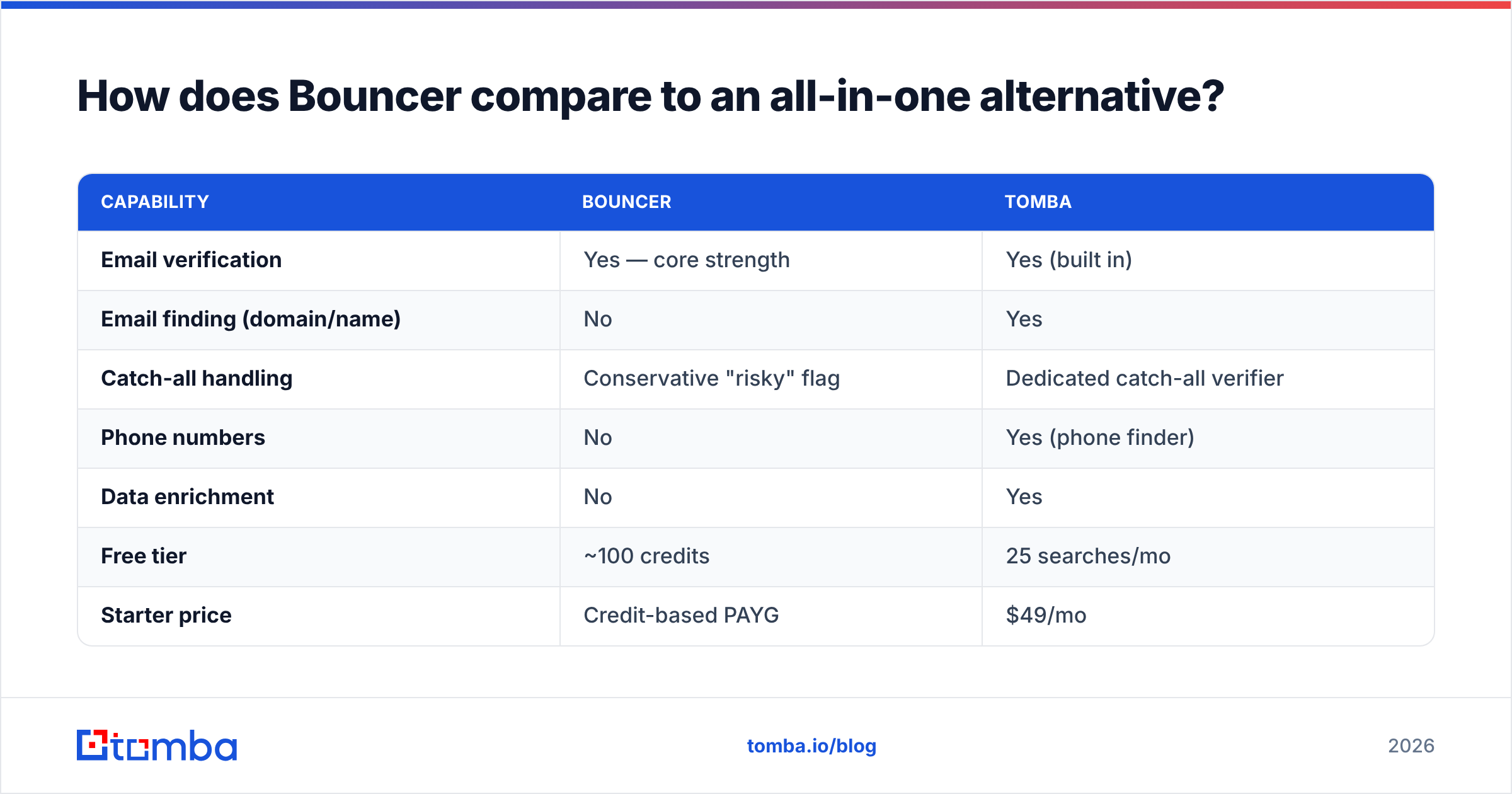
This is where the verify-only scope becomes a real budget question. Bouncer cleans what you already have. A combined finder-plus-verifier runs the whole pipeline in one credit pool. Here's an honest side-by-side. Bouncer is excellent in its lane. The question is whether one lane is enough.
| Capability | Bouncer | Tomba |
|---|---|---|
| Email verification | Yes — core strength | Yes (built in) |
| Email finding (domain/name) | No | Yes |
| Catch-all handling | Conservative "risky" flag | Dedicated catch-all verifier |
| Phone numbers | No | Yes (phone finder) |
| Data enrichment | No | Yes |
| Free tier | ~100 credits | 25 searches/mo |
| Starter price | Credit-based PAYG | $49/mo |
| Pricing model | Credits (non-expiring) | Searches + verifications |
| Best for | Cleaning existing lists | Find + verify in one place |
If your honest need is "I have lists, clean them," Bouncer or a Bouncer alternative built for validation will serve you well. You can stop reading. If your need is "I have a target market and an empty CRM," pick a platform that finds and verifies — see full Tomba pricing. It usually costs less overall, because you're not paying two vendors to do one job.
How do you test Bouncer before paying?#
Don't trust any single accuracy claim, ours included. Run this short test:
- Build a labeled sample. Take 100–200 addresses where you know which bounced and which delivered.
- Run it through the free credits. Compare Bouncer's verdicts to reality. Count false "valid" and false "invalid" calls separately. They cost you in different ways.
- Check the catch-all share. If a big chunk returns "risky/unknown," factor that into budget and expected bounce rate.
- Test the API if you'll automate. Latency and rate limits matter more than the dashboard in production.
- Audit your own sending setup with the Deliverability Kit, or any SPF checker. Verification only helps if your domain reputation is healthy.
This 30-minute test tells you more than every review online. It's your data on your domains.
The bottom line on Bouncer pricing reviews pros and cons#
Bouncer is a genuinely good email verification tool. It's accurate, fast, privacy-minded, fairly priced, and well-reviewed for good reason. Its honest limit is scope: it verifies, and that's all. For teams that only clean lists, that focus is a feature. For teams that need to find, verify, enrich, and reach contacts, paying for verification on its own line item adds up. That's the core of any fair Bouncer pricing reviews pros and cons verdict.
If your workflow is "find the right people, confirm their emails are real, and start outreach" without juggling four tools, start with the Tomba Email Finder. You get domain and name-based email discovery, built-in verification, catch-all checks, and enrichment in one credit pool. The Free tier gives you 25 searches a month to test it. Then it's $49/mo Starter when you're ready to scale. Clean data and full-pipeline coverage in one place beats stitching point tools together.
// get started
Find, verify and enrich your first contacts today
Start on the free plan with 25 searches a month, then scale when your team is ready.
Free plan · No credit card required · GDPR & CCPA
// about the author