BounceRemove vs BrandNav 2026: Email Verification Compared
Choosing between BounceRemove and BrandNav for email verification? We break down accuracy, pricing, integrations, and which one keeps your bounce rate lowest in 2026.
Bad email data is expensive. A bloated list with dead addresses drags down your sender reputation, inflates your sending bill, and quietly tanks the deliverability of every campaign you run. That is why teams reach for a verification layer — and two names that keep coming up are BounceRemove and BrandNav.
This guide puts BounceRemove vs BrandNav side by side: what each one does, how accurate they are, what they cost in 2026, and where each fits in a real outbound stack. No marketing gloss — just the trade-offs you actually need to weigh before you point your list at one of them.
TL;DR#
- BounceRemove is a focused list-cleaning tool: upload a CSV, get back a scored list with hard bounces, risky addresses, and catch-alls flagged. Simple, cheap, batch-first.
- BrandNav leans toward enrichment plus verification — it validates emails but also appends company and contact data, which makes it pricier and heavier.
- Accuracy is close on standard mailbox checks; the real difference shows up on catch-all domains and how each handles "unknown" verdicts.
- Pricing favors BounceRemove for pure cleaning; BrandNav makes more sense if you also need data enrichment in the same pass.
- If you want verification and email finding in one platform with an API, Tomba's email verifier is a strong third option worth pricing against both.
What are BounceRemove and BrandNav?#
BounceRemove is an email verification and list-hygiene tool. You feed it a list of addresses, it runs syntax checks, MX/DNS lookups, and SMTP probing, then returns each address with a status — valid, invalid, risky, or unknown. The product is built around batch cleaning: marketers and cold-email senders use it to strip dead addresses before a campaign so they do not torch their domain reputation.
BrandNav is a verification-plus-enrichment service. It validates email addresses too, but its pitch is broader: alongside the deliverability verdict it can append firmographic and contact details — company name, role, social profiles, and similar fields. That makes it less of a pure cleaner and more of a data layer that happens to verify.
The distinction matters. If all you need is a clean list, an enrichment platform is overkill you pay for. If you need to enrich thin records and verify them in one motion, a cleaner alone leaves you running a second tool.
How does email verification actually work?#
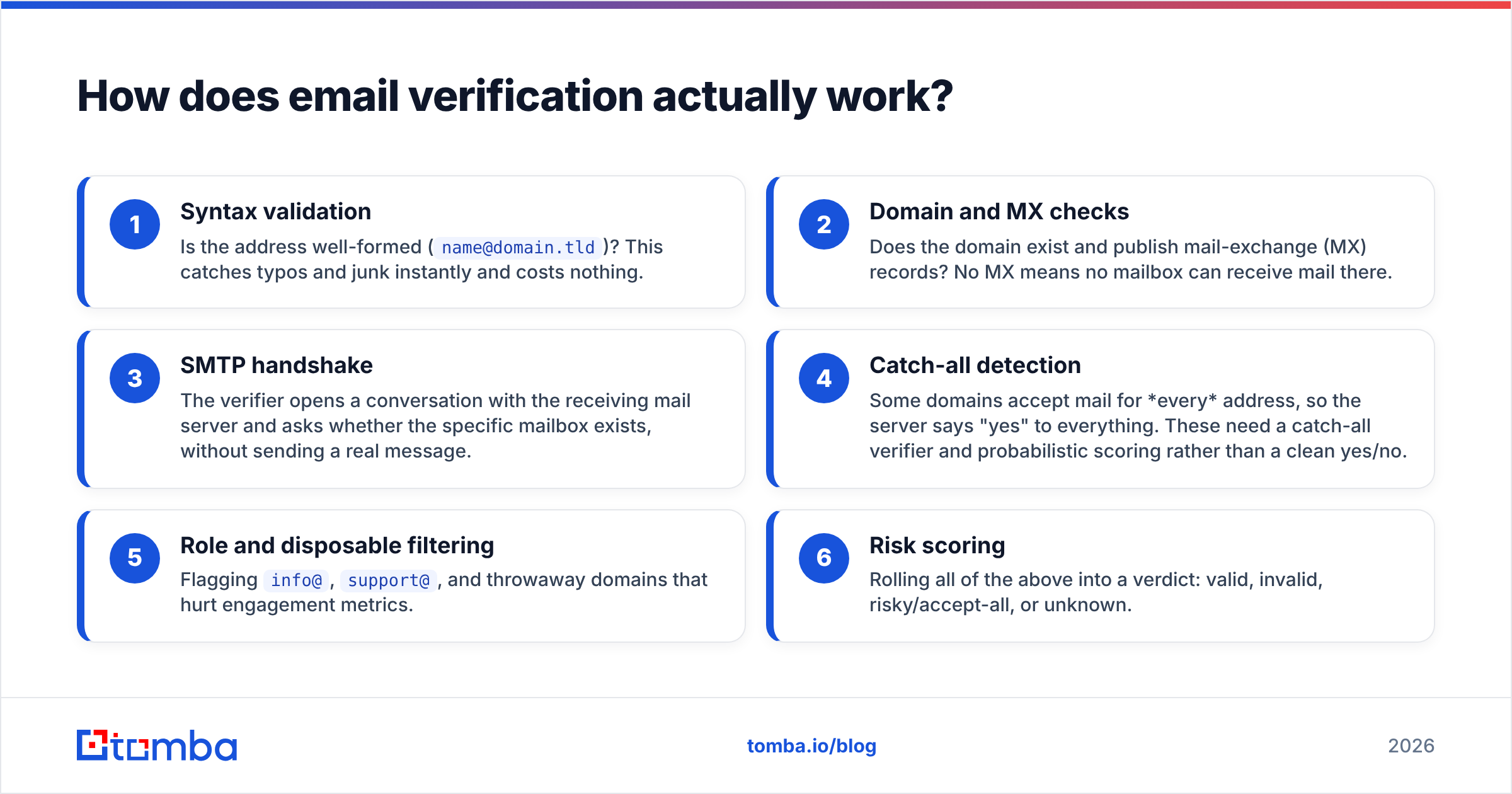
Both tools run the same core pipeline. Knowing the steps helps you read their results — and understand why "unknown" verdicts exist at all. Think of it like a bouncer checking IDs: first the format, then whether the address on the ID is real, then whether the person actually lives there.
- Syntax validation — Is the address well-formed (
name@domain.tld)? This catches typos and junk instantly and costs nothing. - Domain and MX checks — Does the domain exist and publish mail-exchange (MX) records? No MX means no mailbox can receive mail there.
- SMTP handshake — The verifier opens a conversation with the receiving mail server and asks whether the specific mailbox exists, without sending a real message.
- Catch-all detection — Some domains accept mail for every address, so the server says "yes" to everything. These need a catch-all verifier and probabilistic scoring rather than a clean yes/no.
- Role and disposable filtering — Flagging
info@,support@, and throwaway domains that hurt engagement metrics. - Risk scoring — Rolling all of the above into a verdict: valid, invalid, risky/accept-all, or unknown.
The first three steps are nearly identical across vendors. The last three — especially catch-all handling and how aggressively a tool labels something "unknown" versus guessing — are where BounceRemove and BrandNav diverge, and where accuracy claims live or die.
How accurate is BounceRemove vs BrandNav?#
Accuracy is the whole point, so be skeptical of any single headline number. Vendors quote 98–99% under ideal conditions, but the figure that matters is your real bounce rate after cleaning a list that looks like yours.

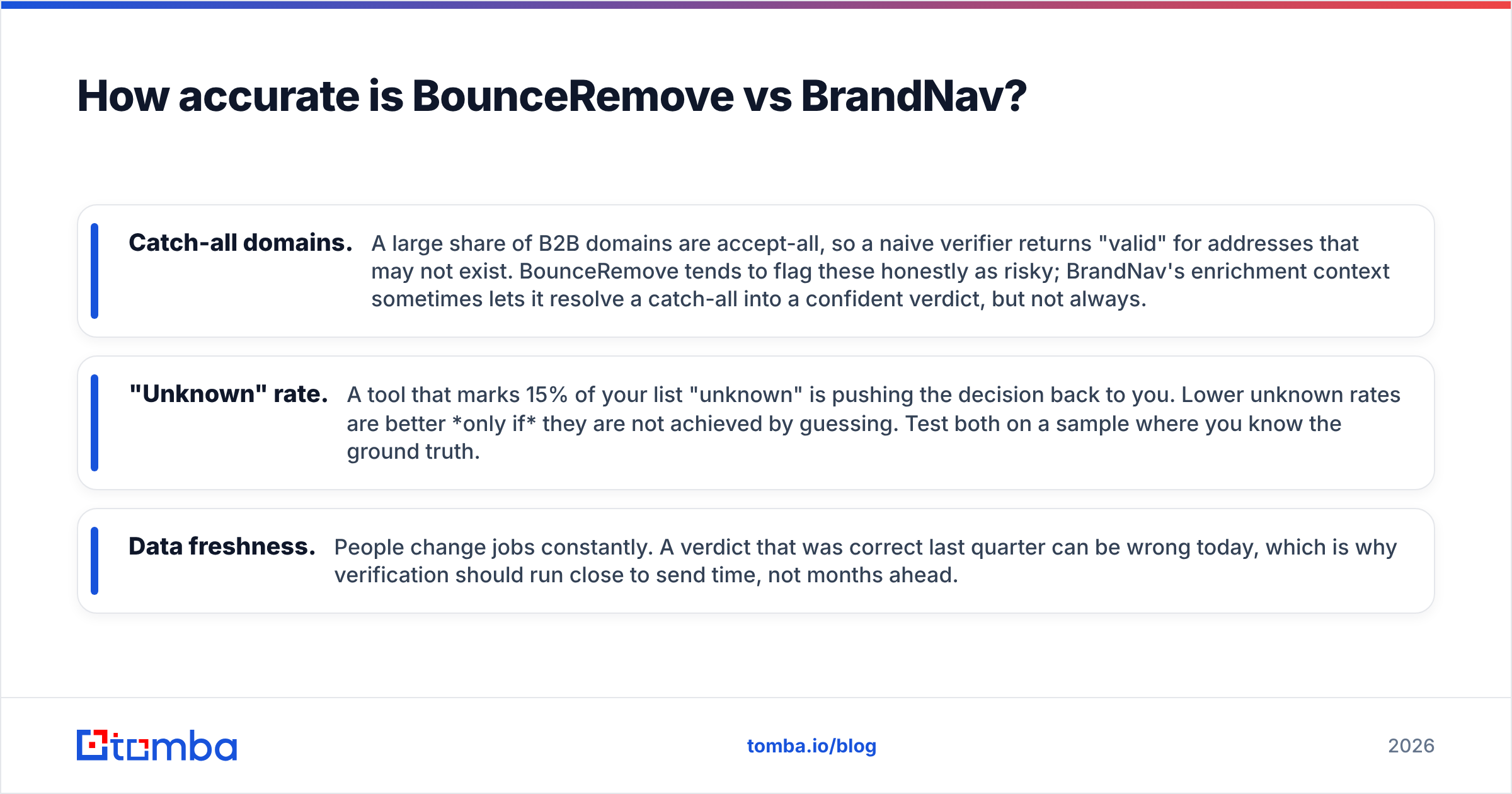
On standard mailbox checks (Google Workspace, Microsoft 365, most corporate domains with clean MX records), BounceRemove and BrandNav perform similarly — both reliably catch hard bounces and obvious invalids. The gap opens in three places:
- Catch-all domains. A large share of B2B domains are accept-all, so a naive verifier returns "valid" for addresses that may not exist. BounceRemove tends to flag these honestly as risky; BrandNav's enrichment context sometimes lets it resolve a catch-all into a confident verdict, but not always.
- "Unknown" rate. A tool that marks 15% of your list "unknown" is pushing the decision back to you. Lower unknown rates are better only if they are not achieved by guessing. Test both on a sample where you know the ground truth.
- Data freshness. People change jobs constantly. A verdict that was correct last quarter can be wrong today, which is why verification should run close to send time, not months ahead.
The honest takeaway: run a free-tier or trial batch of 500–1,000 known addresses through both, then mail a small segment and measure actual bounces. That number beats any vendor benchmark. The same logic applies whether you compare these two or a broader field of email verification tools.
BounceRemove vs BrandNav: feature comparison#
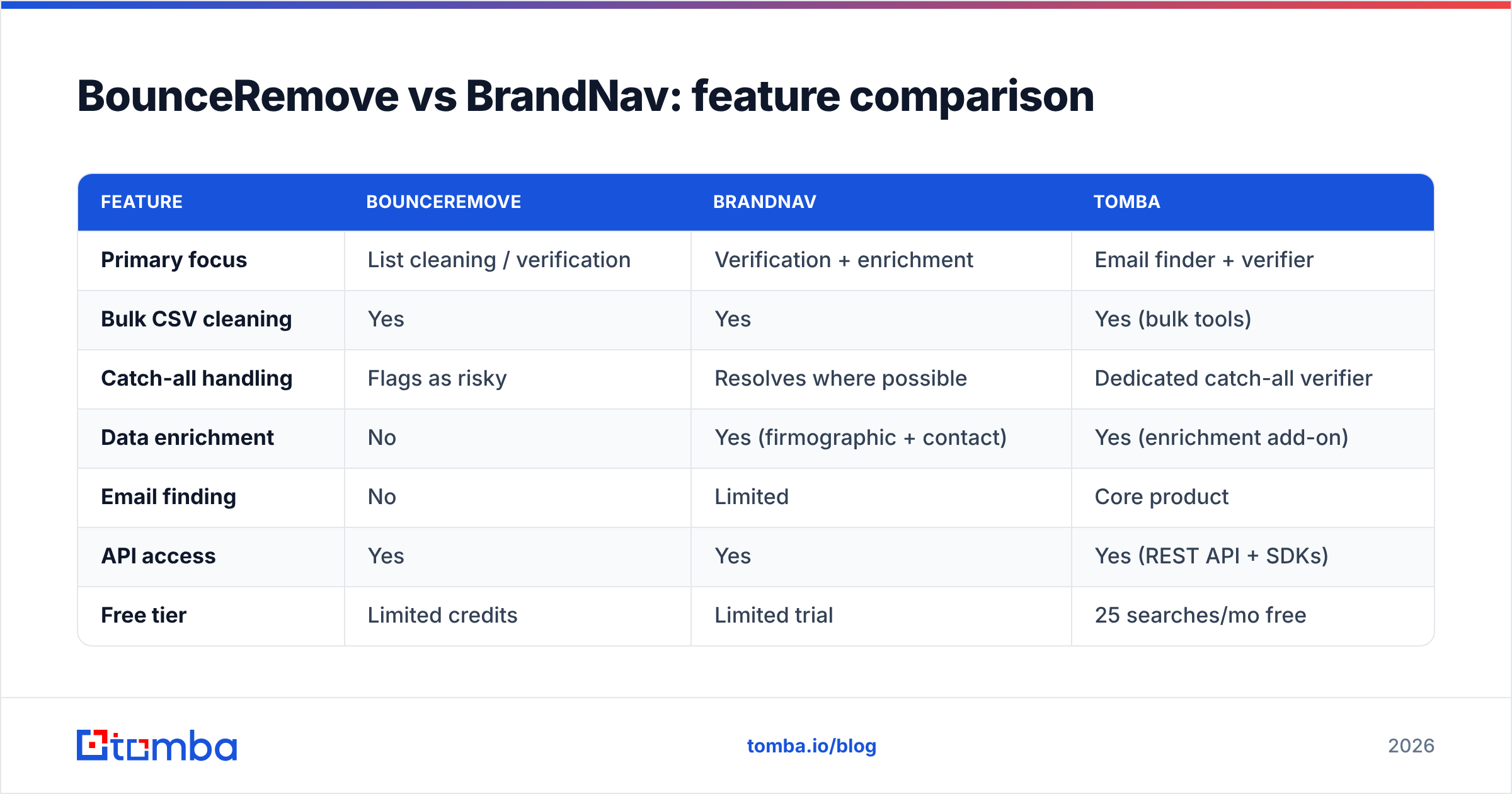
Here is how the two stack up on the attributes that drive day-to-day decisions. Pricing is indicative for 2026 — always confirm current tiers on each vendor's site, since plans shift.

| Feature | BounceRemove | BrandNav | Tomba |
|---|---|---|---|
| Primary focus | List cleaning / verification | Verification + enrichment | Email finder + verifier |
| Bulk CSV cleaning | Yes | Yes | Yes (bulk tools) |
| Catch-all handling | Flags as risky | Resolves where possible | Dedicated catch-all verifier |
| Data enrichment | No | Yes (firmographic + contact) | Yes (enrichment add-on) |
| Email finding | No | Limited | Core product |
| API access | Yes | Yes | Yes (REST API + SDKs) |
| Free tier | Limited credits | Limited trial | 25 searches/mo free |
| Starting paid plan | Low, per-credit | Higher (enrichment bundled) | $49/mo (Starter) |
| Best for | Cheap, fast cleaning | Verify + enrich in one pass | Find, verify, enrich together |
A few things stand out. BounceRemove wins on simplicity and cost-per-clean. BrandNav justifies its higher price only if you genuinely use the enrichment — paying enrichment rates to clean a list is wasted budget. And neither pure-play covers the finding side: if your problem is "I have company domains but no addresses," you need a domain search or email finder, not a verifier.
How much do BounceRemove and BrandNav cost in 2026?#
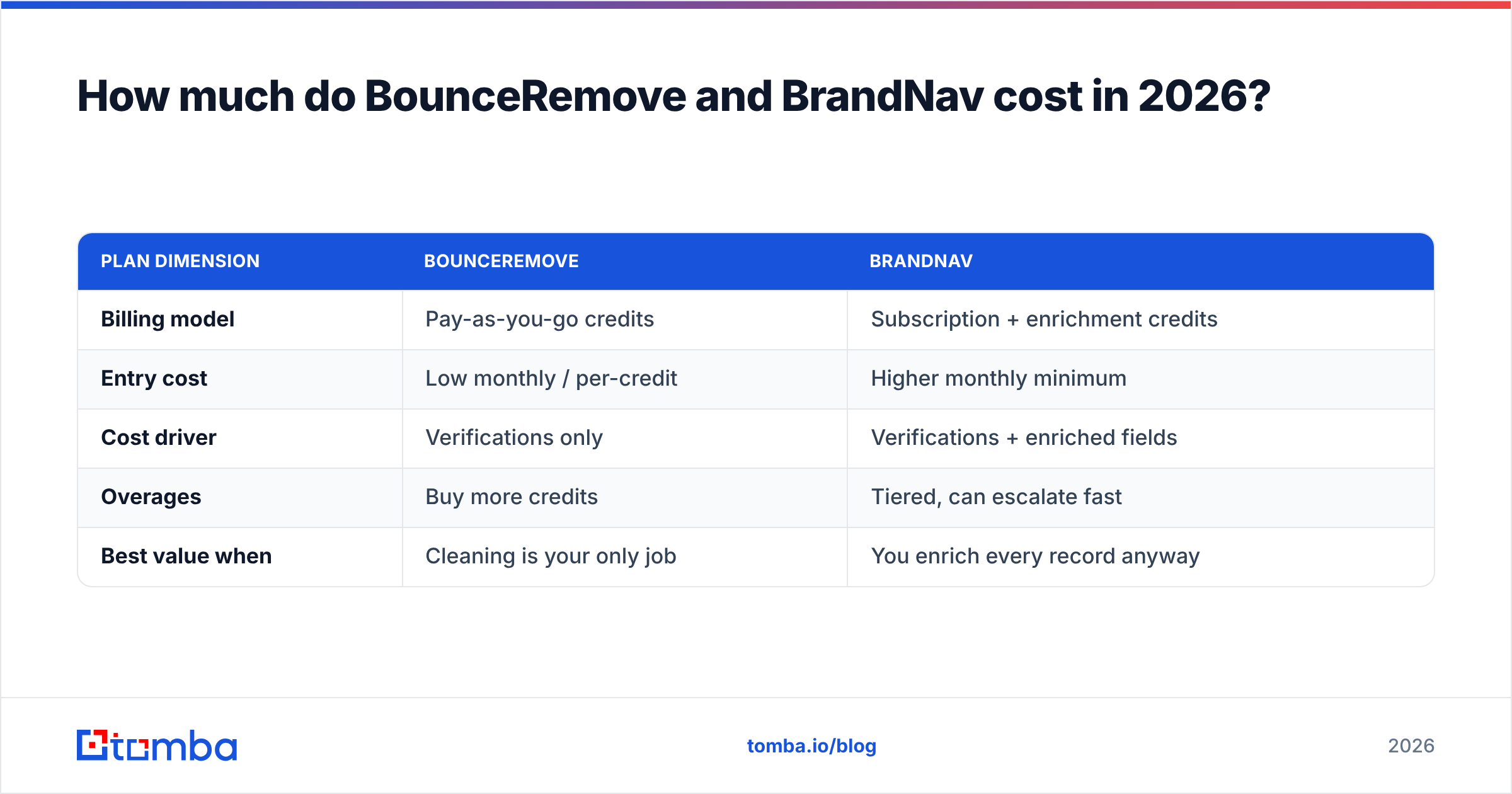
Pricing models differ in kind, not just amount, which makes a flat "cheaper" verdict misleading.
| Plan dimension | BounceRemove | BrandNav |
|---|---|---|
| Billing model | Pay-as-you-go credits | Subscription + enrichment credits |
| Entry cost | Low monthly / per-credit | Higher monthly minimum |
| Cost driver | Verifications only | Verifications + enriched fields |
| Overages | Buy more credits | Tiered, can escalate fast |
| Best value when | Cleaning is your only job | You enrich every record anyway |
BounceRemove is the budget pick for one job done well: cleaning. Its credit model means you pay roughly in proportion to list size, with no enrichment markup.
BrandNav costs more, but if you would otherwise pay a separate enrichment vendor, bundling the two can net out cheaper than running both. The trap is paying enrichment-grade prices when you only wanted bounce removal.
For reference on what an integrated find-plus-verify platform costs, Tomba's pricing starts with a free tier (25 searches/month), then Starter at $49/mo, Growth at $99/mo, and Pro at $249/mo — verification and finding share the same credit pool, so you are not stitching two bills together.
Which tool should you choose?#
Match the tool to the job rather than the loudest accuracy claim:
- Choose BounceRemove if your only problem is a dirty list and you want the cheapest reliable way to strip dead addresses before a send. It is fast, focused, and does not make you pay for features you will not touch.
- Choose BrandNav if you regularly receive thin records (just a name and company, say) and need to enrich and verify in a single pass. The premium pays off only when enrichment is a real, recurring need.
- Choose an all-in-one like Tomba if your workflow spans finding, verifying, and enriching — and you would rather hit one email verification API than wire up two or three vendors. This is also the better fit if you do cold outreach and need to generate verified contacts, not just clean an existing list.
A practical rule: if you already have the addresses, a verifier is enough. If you are still hunting for addresses, lead with a finder that verifies on the way out — cleaning a list you do not have yet is the wrong order of operations.
Where does Tomba fit in the comparison?#
Tomba is not a drop-in clone of either tool — it is the layer above both. Its core product is the email finder, with the email verifier, catch-all verifier, domain search, phone finder, and enrichment sitting alongside it.
That breadth changes the math. With BounceRemove you clean; with BrandNav you verify and enrich; with Tomba you can take a company domain, find the right person's address, verify it, enrich the record, and push it to your CRM — inside one credit pool and one API. For teams doing outbound at scale, collapsing three tools into one usually wins on both cost and maintenance, even when a single-purpose tool edges it on one narrow metric.
That said, if you truly only ever clean lists and never find new contacts, a dedicated cleaner may be all you need. Pick for your actual workflow, not the most impressive feature list.
Frequently asked questions#
Is BounceRemove or BrandNav more accurate?#
They are close on standard mailbox checks. BounceRemove is more conservative on catch-all domains (flagging risk), while BrandNav sometimes resolves them using enrichment context. The only reliable answer is to test both on a sample where you know the real outcome and compare actual bounce rates.
Can I use these tools for email finding, not just verification?#
BounceRemove is verification-only. BrandNav has limited finding via enrichment. If finding new addresses is a core need, use a dedicated finder — Tomba's email finder or domain search — and verify on the way out.
What bounce rate should I aim for?#
Most email service providers want hard bounces under ~2%. Cleaning your list before sending and re-verifying close to send time is the most reliable way to stay under that line. See industry deliverability benchmarks on G2 and guidance from major ESPs like HubSpot for current norms.
How often should I verify my list?#
Verify before every major campaign, and re-verify anything older than 60–90 days. Contact data decays as people change jobs — a "valid" verdict has a shelf life. For more on the mechanics, see the overview of email bounces.
The bottom line#
BounceRemove vs BrandNav comes down to scope. BounceRemove is the lean, low-cost cleaner; BrandNav is the verify-and-enrich bundle that earns its price only if you use the enrichment. Both do the core job well — the difference is everything around that job.
If your stack also needs to find and enrich contacts rather than just scrub a list you already own, start with the Tomba Email Finder. You get finding, verification, catch-all checks, and enrichment in one platform, with a free tier to test against your own data before you commit a dollar. Run the same sample list through all three, measure the real bounce rate, and let your numbers — not the marketing — pick the winner.
Ready to find emails that actually work?
Join 150,000+ professionals who stopped guessing and started sending. Free credits on signup — no credit card required.
Get the Tomba newsletter
Practical outbound tactics and product updates — once every two weeks.
About the author