Bounceremove vs Leadgibbon: Which Email Tool Wins in 2026?
Bounceremove cleans lists; Leadgibbon builds them. See where each tool wins on accuracy, pricing, and workflow — and the single-stack option that beats both.
You are comparing two tools that solve opposite halves of the same problem. That is the first thing to get straight before you spend a dollar on either.
TL;DR
- Bounceremove is an email verification tool — it cleans a list you already have so your bounce rate drops. It does not find new contacts.
- Leadgibbon is a lead/email finder — it sources B2B contacts and exports them, but verification is shallow compared to a dedicated cleaner.
- If you only need one job done, pick by the job: finding contacts → Leadgibbon-style finder; cleaning a list → Bounceremove-style verifier.
- Running two separate logins, two billings, and two export formats is the hidden cost most teams ignore.
- A combined platform like Tomba Email Finder does both finding and verification in one workflow, which usually beats stitching two single-purpose tools together.
What do Bounceremove and Leadgibbon actually do?#
Conclusion first: they are not direct competitors. They are two stages of one pipeline.
Think of building an outbound list like cooking. Leadgibbon is the grocery run — it goes out and brings back raw ingredients (names, companies, email addresses). Bounceremove is washing and trimming — it takes ingredients you already have and throws out the rotten ones (invalid, risky, or dead addresses) so you don't serve a bad dish (a high bounce rate).
- Leadgibbon focuses on prospecting: search by company or role, pull contact data, and push it to a spreadsheet or CRM. Its job ends when the list exists.
- Bounceremove focuses on hygiene: upload a list, run syntax, MX, and SMTP checks, and get back a scored, deliverable-only file. Its job ends when the list is clean.
Because they sit at different stages, "which is better" only makes sense once you know which stage you're stuck at. If your CRM is empty, a verifier won't help you. If your bounce rate is 12%, a finder won't save you.

How do they compare feature by feature?#
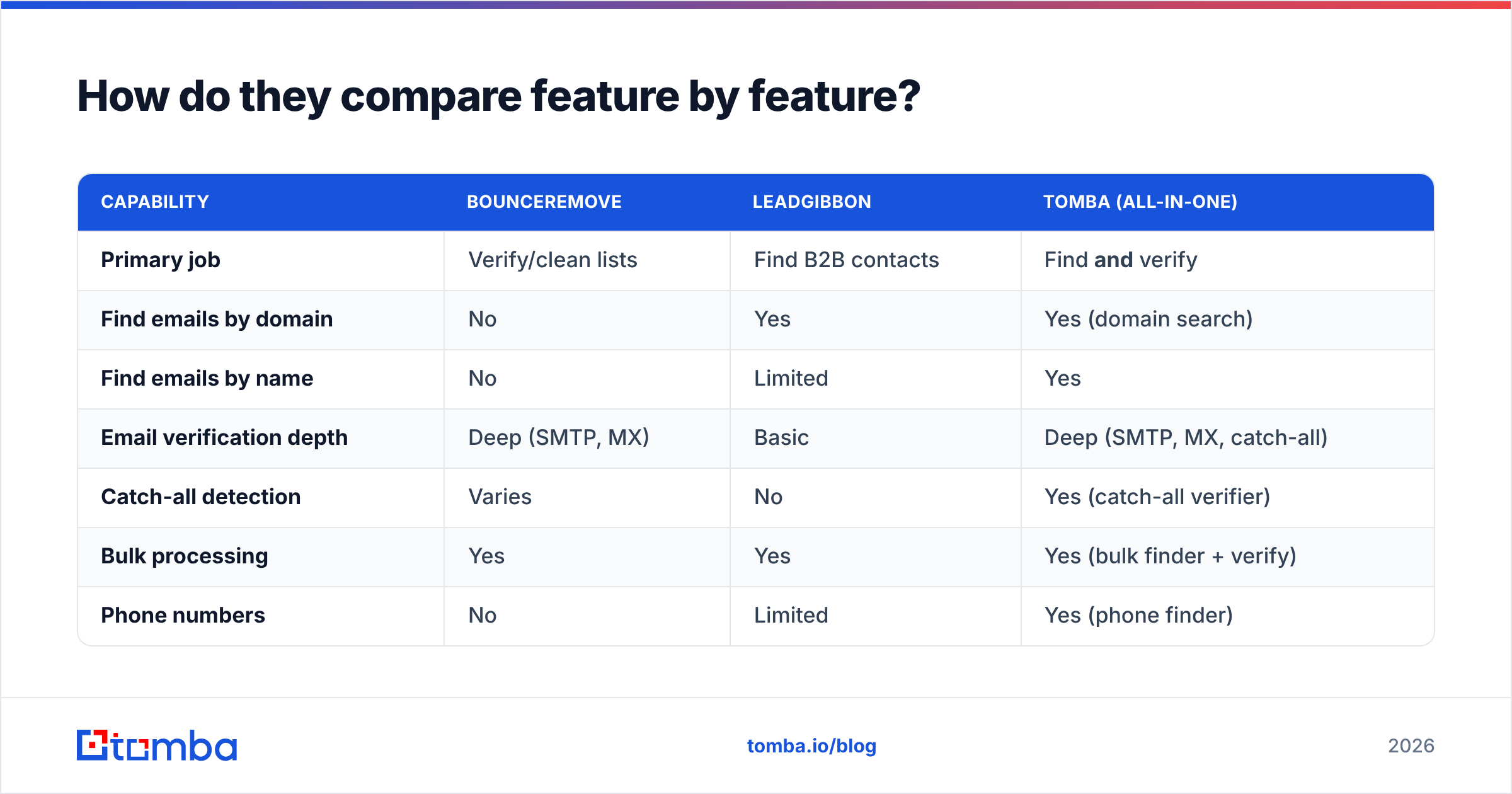
Here is the side-by-side. Note that the two tools barely overlap — which is exactly the point.
| Capability | Bounceremove | Leadgibbon | Tomba (all-in-one) |
|---|---|---|---|
| Primary job | Verify/clean lists | Find B2B contacts | Find and verify |
| Find emails by domain | No | Yes | Yes (domain search) |
| Find emails by name | No | Limited | Yes |
| Email verification depth | Deep (SMTP, MX) | Basic | Deep (SMTP, MX, catch-all) |
| Catch-all detection | Varies | No | Yes (catch-all verifier) |
| Bulk processing | Yes | Yes | Yes (bulk finder + verify) |
| Phone numbers | No | Limited | Yes (phone finder) |
| Native CRM integrations | Limited | Spreadsheet-first | HubSpot, Salesforce, Pipedrive, Zapier |
| Public API | Limited | Limited | Full REST API |
| Free tier | Trial credits | Limited trial | 25 searches/mo, free forever |
The pattern is clear: each single-purpose tool wins inside its lane and loses everywhere else. Bounceremove will not build a list. Leadgibbon will not give you the SMTP-grade confidence you need before a big send. To run a complete pipeline with just those two, you buy both — and then you maintain both.

Is Bounceremove or Leadgibbon more accurate?#
Accuracy means different things for each tool, so judge them on the right metric.
For Leadgibbon, accuracy means match rate and email correctness — when you ask for a contact, how often do you get a real, current address? Finders live and die by their data sources. If the underlying database is stale, you get role-based or abandoned inboxes that look fine until you send.
For Bounceremove, accuracy means verification precision — how reliably does it separate deliverable from undeliverable, and how does it handle the tricky middle (catch-all domains, greylisting, temporary failures)? A verifier that marks too many addresses "unknown" pushes the decision back onto you.
The honest takeaway: a finder's basic verification is not a substitute for a dedicated verifier, and a verifier's lack of sourcing is not something you can work around. This is why accuracy debates between the two are mostly apples and oranges. What actually moves your bounce rate is running a real verification pass after sourcing — regardless of which finder produced the list. If you want to understand how source quality drives match accuracy, Tomba documents its data sources openly, and you can pressure-test any list with a standalone email verifier before you trust it.
For independent signal, check third-party review sites like G2 and Capterra rather than vendor landing pages — accuracy claims on a homepage are marketing, not data.
How does pricing compare?#
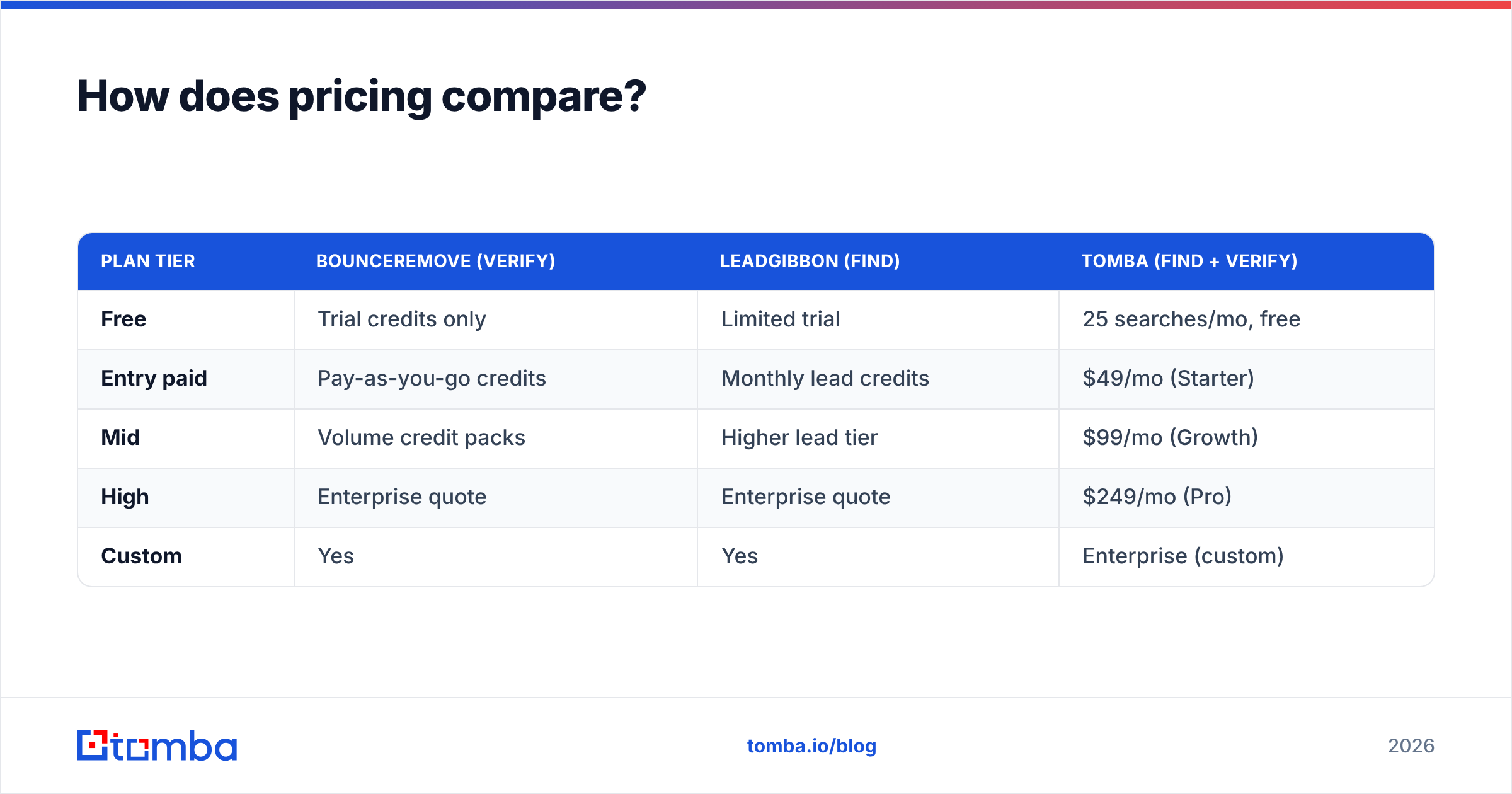
Pricing is where the "two tools" tax shows up. Both Bounceremove and Leadgibbon price for their single function, so a full find-then-verify stack means stacking two bills.
| Plan tier | Bounceremove (verify) | Leadgibbon (find) | Tomba (find + verify) |
|---|---|---|---|
| Free | Trial credits only | Limited trial | 25 searches/mo, free |
| Entry paid | Pay-as-you-go credits | Monthly lead credits | $49/mo (Starter) |
| Mid | Volume credit packs | Higher lead tier | $99/mo (Growth) |
| High | Enterprise quote | Enterprise quote | $249/mo (Pro) |
| Custom | Yes | Yes | Enterprise (custom) |
Two things to flag honestly:
- Credit models differ. Verification credits and lead credits are not the same unit, so you cannot compare a "1,000 credit" pack across tools. Map cost to outcomes (verified, sendable contacts) instead.
- The stack adds up. If you pay an entry tier on both tools, you are often near or above the cost of a single combined plan that does the whole job — without two dashboards. You can sanity-check the math against transparent Tomba pricing.
When should you pick each tool?#
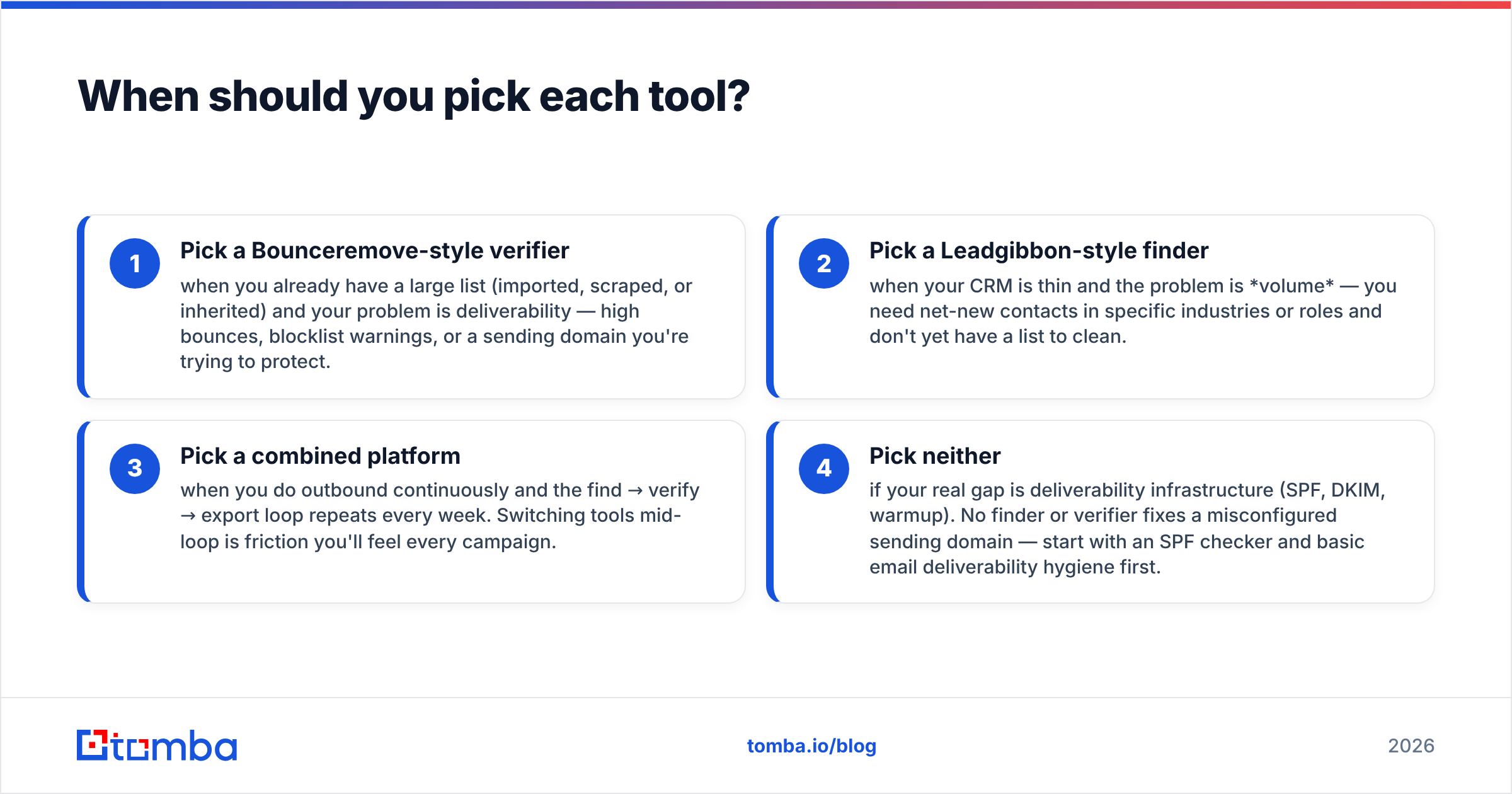
Pick by your current bottleneck, not by feature lists.
- Pick a Bounceremove-style verifier when you already have a large list (imported, scraped, or inherited) and your problem is deliverability — high bounces, blocklist warnings, or a sending domain you're trying to protect.
- Pick a Leadgibbon-style finder when your CRM is thin and the problem is volume — you need net-new contacts in specific industries or roles and don't yet have a list to clean.
- Pick a combined platform when you do outbound continuously and the find → verify → export loop repeats every week. Switching tools mid-loop is friction you'll feel every campaign.
- Pick neither if your real gap is deliverability infrastructure (SPF, DKIM, warmup). No finder or verifier fixes a misconfigured sending domain — start with an SPF checker and basic email deliverability hygiene first.
The most common mistake is buying a finder to fix a deliverability problem, or a verifier to fix an empty pipeline. Diagnose before you subscribe.
Why do most teams end up wanting both jobs in one tool?#
Because outbound is a loop, not a one-time task. You find contacts, verify them, send, learn, and find more. Every handoff between two separate tools is a place where data gets re-formatted, re-exported, and re-uploaded.
Here is the workflow cost of the two-tool approach versus a single stack:
- Two tools: Search in finder → export CSV → re-upload to verifier → run verification → export again → import to CRM. Five steps, two logins, two exports, two formats to reconcile.
- One stack: Search → verify in place → push to CRM. Two steps, one login.
That difference compounds. At 10 lists a month, the two-tool tax is real time lost to file juggling, plus the risk of sending from the unverified export by mistake.
This is the gap an all-in-one platform fills. Tomba pairs an email finder with built-in verification, domain search, catch-all verification, and a bulk email finder so the find-and-verify loop happens in one place. It also exposes a full Tomba API and native connections like the HubSpot integration, so the data lands in your CRM without manual CSV gymnastics.
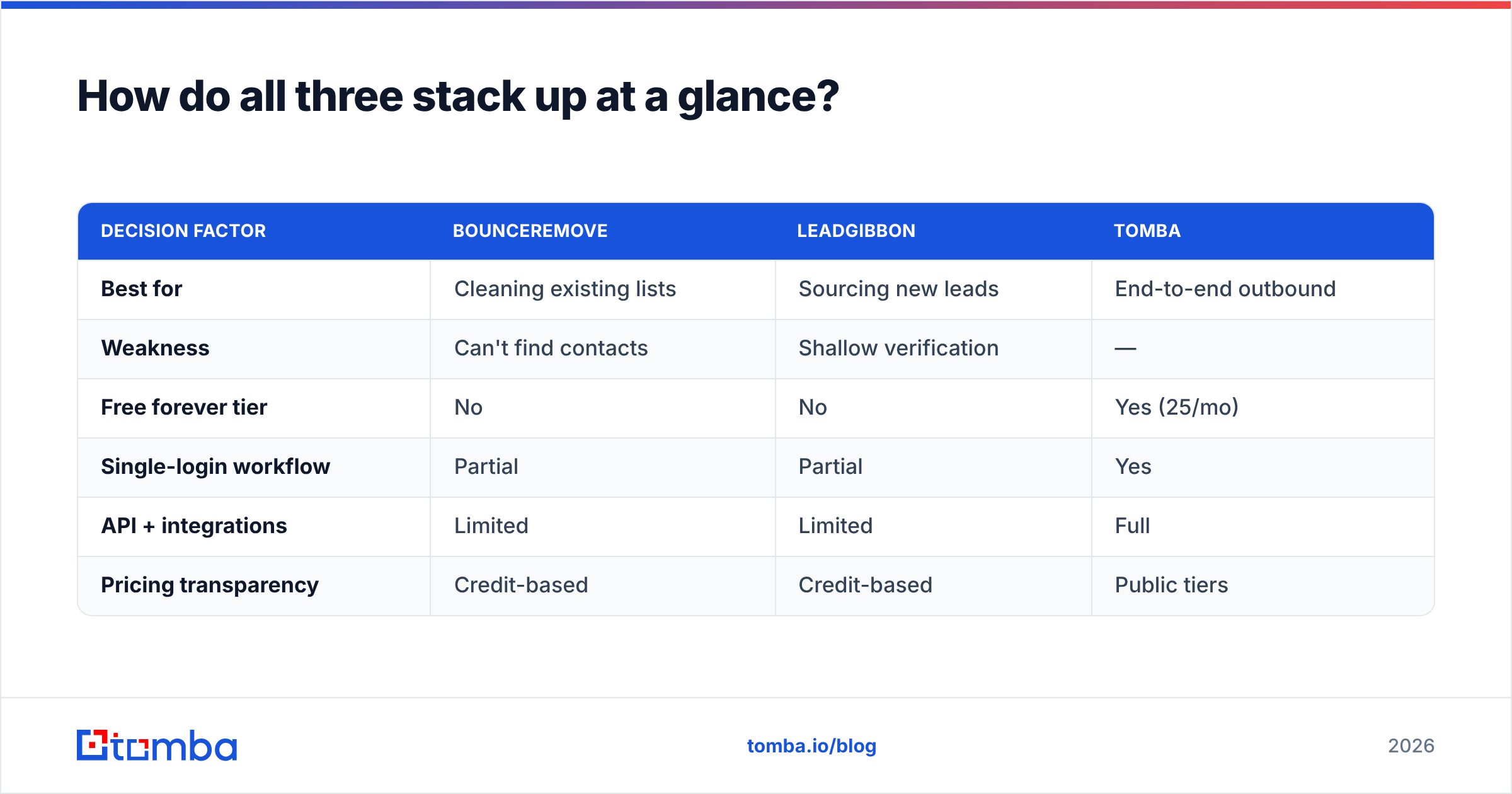
How do all three stack up at a glance?#
| Decision factor | Bounceremove | Leadgibbon | Tomba |
|---|---|---|---|
| Best for | Cleaning existing lists | Sourcing new leads | End-to-end outbound |
| Weakness | Can't find contacts | Shallow verification | — |
| Free forever tier | No | No | Yes (25/mo) |
| Single-login workflow | Partial | Partial | Yes |
| API + integrations | Limited | Limited | Full |
| Pricing transparency | Credit-based | Credit-based | Public tiers |

If you are genuinely committed to best-of-breed and have the ops maturity to manage two vendors, a dedicated finder plus a dedicated verifier can work. For most teams — especially lean sales and growth teams — the combined approach removes a class of busywork and a category of mistakes.
Frequently asked questions#
Is Bounceremove a competitor to Leadgibbon? Not really. Bounceremove verifies and cleans email lists; Leadgibbon finds new B2B contacts. They sit at different stages of the same pipeline, so many teams that buy one eventually want the other.
Can I use Leadgibbon without a separate verifier? You can, but a finder's built-in checks are usually lighter than a dedicated verifier's SMTP-grade validation. For high-volume sends or a protected domain, run a real verification pass before you send.
Which is cheaper, Bounceremove or Leadgibbon? They price in different units (verification credits vs lead credits), so a direct price comparison is misleading. Compare cost per verified, sendable contact instead — and factor in that running both stacks two bills.
Does Tomba replace both? For most workflows, yes — Tomba finds and verifies in one place, with a free tier, public API, and native CRM integrations. Best-of-breed setups may still prefer two specialist tools.
The bottom line#
Bounceremove and Leadgibbon are not rivals — they are two halves of an outbound pipeline, and choosing between them in isolation usually means you'll end up paying for both. Decide by your bottleneck: empty pipeline → finder, dirty list → verifier, continuous outbound → one combined stack.
If you want the find-and-verify loop in a single login — with a genuinely free tier to test it (25 searches a month, no card) — start with the Tomba Email Finder. Source contacts, verify them in place, and push clean data straight to your CRM, without the two-tool tax. When your bounce rate and your pipeline both depend on the same data, keeping them under one roof is the simplest win available.
// get started
Find, verify and enrich your first contacts today
Start on the free plan with 25 searches a month, then scale when your team is ready.
Free plan · No credit card required · GDPR & CCPA
// about the author