Bouncify vs FinalScout (2026): Which Email Tool Wins?
Bouncify verifies email lists; FinalScout finds LinkedIn emails. We compare accuracy, pricing, and use cases in 2026 — plus the all-in-one alternative.
TL;DR
- They solve different problems. Bouncify is an email verification tool that cleans lists you already have. FinalScout is an email finder that pulls contacts (mostly emails) from LinkedIn profiles and writes outreach with AI.
- Pick Bouncify if your only job is scrubbing bounces from an existing list before a send. It is cheap, fast, and focused.
- Pick FinalScout if you live in LinkedIn and want to turn profiles into emails plus AI-drafted messages in one place.
- Neither does the full loop well. You still need a finder and a verifier, or you stitch two subscriptions together.
- The all-in-one play: a platform like Tomba Email Finder finds, verifies, and enriches in one workflow — closing the gap both tools leave open.
What is the real difference between Bouncify and FinalScout?#
Bouncify and FinalScout are not competitors in the strict sense — they sit at opposite ends of the prospecting pipeline. Comparing them is like comparing a water filter to a well. One produces water; the other cleans it. You usually need both.
Bouncify is a bulk email verification service. You upload a CSV of addresses you already collected, and it tells you which ones are valid, invalid, risky, or catch-all so you do not torch your sender reputation on bounces.
FinalScout is a Chrome-extension-driven email finder built around LinkedIn. You browse profiles or search results, and it extracts contact data — primarily work emails — then layers an AI writer on top to draft outreach. It claims high deliverability because it validates before exporting.
So the honest framing of Bouncify vs FinalScout is: do you need to find contacts or clean them? If you answer "both," keep reading, because that is where a single-purpose tool starts costing you a second subscription.

How do Bouncify and FinalScout compare head-to-head?#
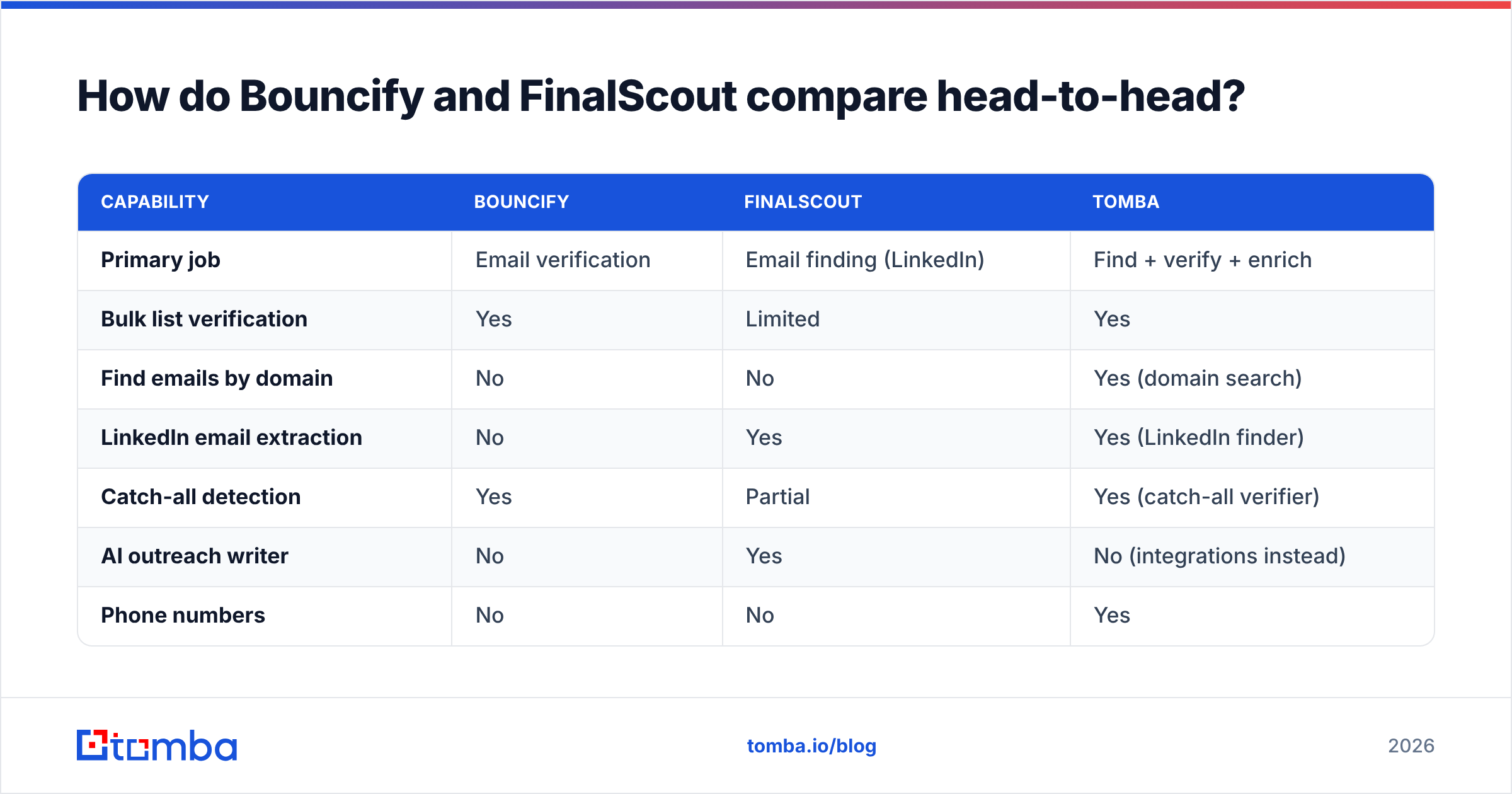
Here is the core feature breakdown. Notice how little overlap there actually is — the green checks rarely land in the same row.
| Capability | Bouncify | FinalScout | Tomba |
|---|---|---|---|
| Primary job | Email verification | Email finding (LinkedIn) | Find + verify + enrich |
| Bulk list verification | Yes | Limited | Yes |
| Find emails by domain | No | No | Yes (domain search) |
| LinkedIn email extraction | No | Yes | Yes (LinkedIn finder) |
| Catch-all detection | Yes | Partial | Yes (catch-all verifier) |
| AI outreach writer | No | Yes | No (integrations instead) |
| Phone numbers | No | No | Yes |
| API access | Yes | Limited | Yes (full REST API) |
| Free tier | 100 credits | Limited trial | 25 searches/mo |
The takeaway: Bouncify is deep on one column, FinalScout is deep on another, and you have to own both columns to run real outbound. That structural gap is the whole reason this comparison exists.
Which tool is more accurate?#
Accuracy means two different things here, so judge each tool on its own job.
For verification accuracy, Bouncify performs in line with mainstream verifiers — solid SMTP checks, syntax and MX validation, and catch-all flagging. Its weakness, like most standalone verifiers, is catch-all domains: it can tell you an address might be valid without confirming it, which leaves you guessing. If catch-alls are a big share of your list, you want a dedicated catch-all verifier that goes further than a simple flag.
For finding accuracy, FinalScout's numbers depend heavily on how complete the LinkedIn profile is and whether the person's work email follows a discoverable pattern. It does a built-in validation pass before export, which helps, but coverage drops on smaller companies and non-standard domains.
The deeper issue: a finder that does light verification, or a verifier that cannot find anything, both leave you exposed. Real deliverability comes from finding the address and confirming it against the live mail server. When you split those steps across two vendors, data drifts between them — you find an email in one tool, it ages, and you verify a stale record in the other. A connected pipeline avoids that. See how source quality drives results on Tomba's data sources page.
What does Bouncify vs FinalScout pricing look like?#
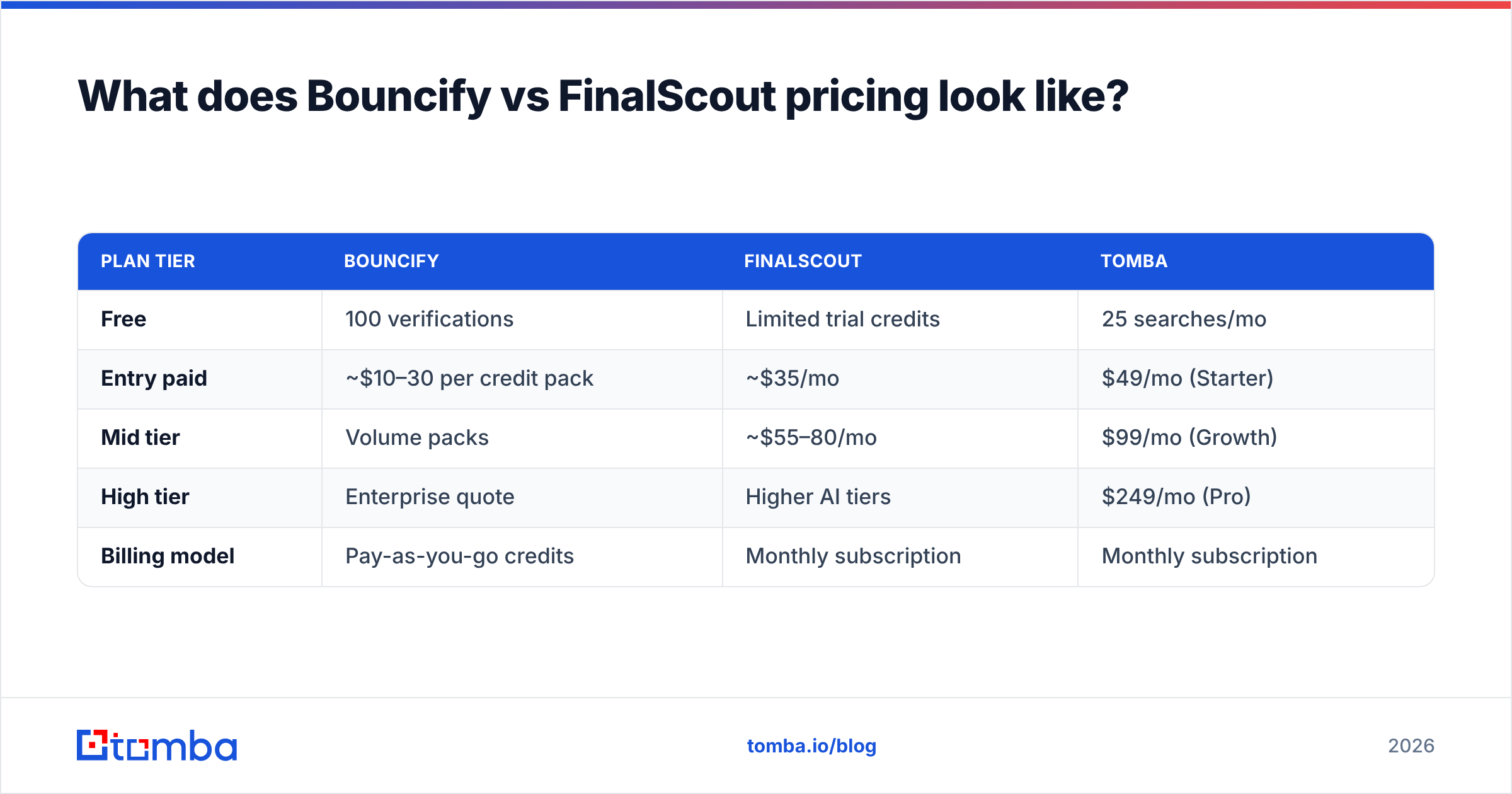
Pricing models are not directly comparable because the units differ — Bouncify sells verification credits, FinalScout sells finder/AI usage. Here is the rough shape as of 2026; always confirm current numbers on each vendor's site.
| Plan tier | Bouncify | FinalScout | Tomba |
|---|---|---|---|
| Free | 100 verifications | Limited trial credits | 25 searches/mo |
| Entry paid | ~$10–30 per credit pack | ~$35/mo | $49/mo (Starter) |
| Mid tier | Volume packs | ~$55–80/mo | $99/mo (Growth) |
| High tier | Enterprise quote | Higher AI tiers | $249/mo (Pro) |
| Billing model | Pay-as-you-go credits | Monthly subscription | Monthly subscription |
Two budgeting traps to flag. First, Bouncify's pay-as-you-go is genuinely cheap for occasional cleaning but adds up if you verify constantly. Second, running FinalScout and a verifier means two line items every month. Stacked, those often exceed a single all-in-one plan that covers both jobs. Compare the math against transparent Tomba pricing before you commit to a two-tool stack.
When should you choose Bouncify?#
Choose Bouncify when verification is your only missing piece. Concrete cases:
- You already have lists. You buy or export contacts elsewhere and just need them scrubbed before a campaign.
- You verify in bursts. Pay-as-you-go suits teams that clean a big list quarterly rather than daily.
- You want a narrow, no-frills tool. No AI, no LinkedIn scraping — just upload, verify, download.
- You need an API for a clean-on-import step. Bouncify exposes a verification API you can wire into your CRM intake.
If that is you, Bouncify does its one job well. But the moment you need to source new contacts, you have hit its ceiling — it will never find an address, only judge one. Pair it with a real email verifier workflow only if you have a finder feeding it.
When should you choose FinalScout?#
Choose FinalScout when LinkedIn is your prospecting home base and you want messaging built in.
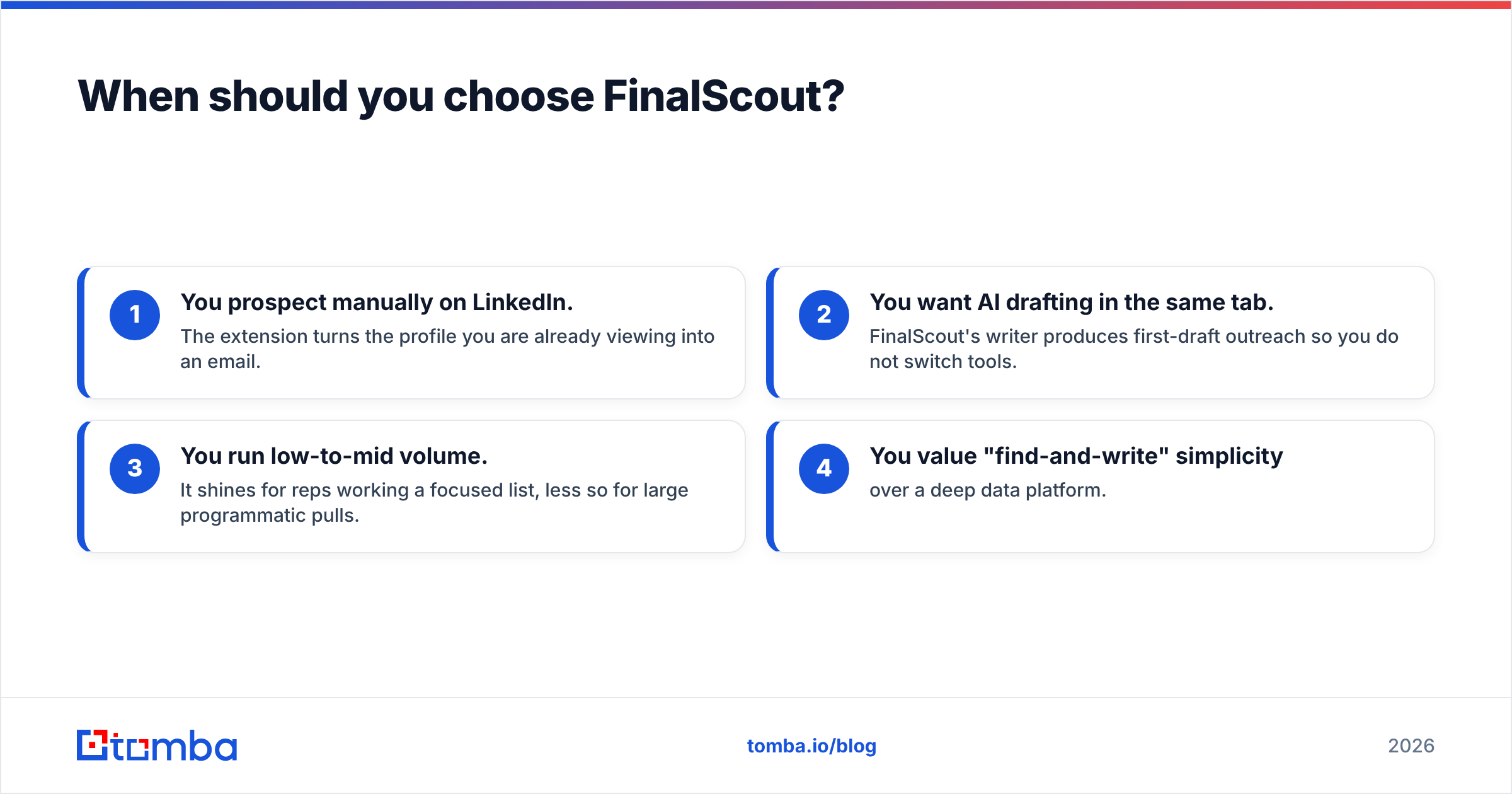
- You prospect manually on LinkedIn. The extension turns the profile you are already viewing into an email.
- You want AI drafting in the same tab. FinalScout's writer produces first-draft outreach so you do not switch tools.
- You run low-to-mid volume. It shines for reps working a focused list, less so for large programmatic pulls.
- You value "find-and-write" simplicity over a deep data platform.
The limits show up at scale and off-LinkedIn. There is no real bulk domain search, no phone data, and coverage leans on profile completeness. If your motion is "give me every reachable contact at these 500 companies," FinalScout is the wrong shape.
Is there a better all-in-one alternative?#
Yes — if you want one workflow instead of two subscriptions. The recurring theme of Bouncify vs FinalScout is that each owns half the job. Bouncify cleans but cannot find; FinalScout finds (on LinkedIn) but cleans lightly and stops there.
An all-in-one platform like Tomba closes that loop:
- Find emails by domain, by name, or from LinkedIn — not just one source.
- Verify in the same place, including proper catch-all verification, so found data is confirmed before it leaves the tool.
- Enrich with company and role data, plus phone numbers, via data enrichment.
- Scale through bulk processing and a full email finder API, or push straight into your CRM via integrations.
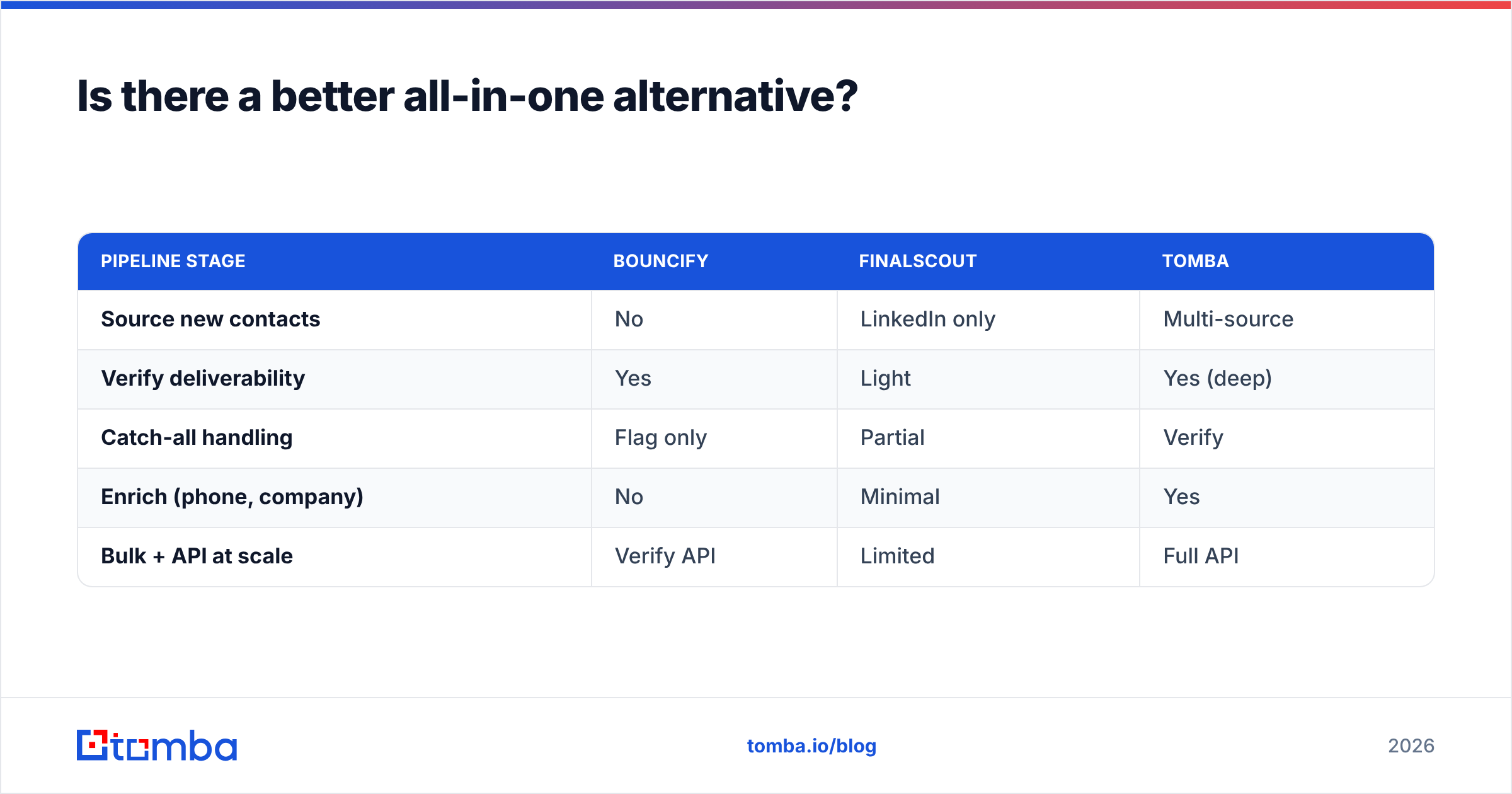
Here is how the three approaches stack up on coverage of the full pipeline:
| Pipeline stage | Bouncify | FinalScout | Tomba |
|---|---|---|---|
| Source new contacts | No | LinkedIn only | Multi-source |
| Verify deliverability | Yes | Light | Yes (deep) |
| Catch-all handling | Flag only | Partial | Verify |
| Enrich (phone, company) | No | Minimal | Yes |
| Bulk + API at scale | Verify API | Limited | Full API |
You do not have to take the vendor's word on either side. Cross-check current reviews on G2 and Capterra, and read each tool's own docs at bouncify.io and finalscout.com before deciding.
How do you decide in 2026?#
Decide by mapping your actual gap, not the marketing:
- Gap = dirty lists, nothing else. Bouncify. Cheap, focused, done.
- Gap = LinkedIn contacts + quick messaging. FinalScout, accepting its scale limits.
- Gap = both, plus you want to stop paying twice. An all-in-one finder-verifier.
Be honest about volume and channel. A solo rep working 30 LinkedIn profiles a day has different needs than a RevOps team enriching thousands of accounts. The two-tool stack (FinalScout to find, Bouncify to clean) is a legitimate setup — it just costs more, adds a data-handoff step, and gives you two dashboards to babysit. For most growing teams, consolidating beats stitching.
One more practical note: deliverability is a system, not a single tool. Even perfect data fails if your sending hygiene is off. Tools like a spam checker and an SPF checker belong in your stack regardless of which finder or verifier you pick.
The bottom line#
Bouncify and FinalScout are good at narrow jobs and silent about the half they do not cover. Bouncify cleans the list you bring; FinalScout finds the LinkedIn contacts you browse. Run real outbound and you need both halves — which is exactly where a two-tool stack starts to feel like a tax.
If you would rather find, verify, and enrich in one place — by domain, by name, or from LinkedIn, with bulk and API on tap — start with the Tomba Email Finder. The free tier gives you 25 searches a month to test accuracy on your own target accounts before you spend a dollar, and the same platform verifies what it finds so you are not exporting bounces into your next campaign. Try it against a list you already trust and compare the results yourself.
Ready to find emails that actually work?
Join 150,000+ professionals who stopped guessing and started sending. Free credits on signup — no credit card required.
Get the Tomba newsletter
Practical outbound tactics and product updates — once every two weeks.
About the author