Brandnav Pros and Cons (2026): Features, Pricing & Verdict
A no-spin breakdown of Brandnav's strengths, weaknesses, pricing, and accuracy in 2026 — plus where it fits and where a dedicated email finder beats it.
Brandnav markets itself as an all-in-one brand and contact data platform: logos, company firmographics, email and phone enrichment, and a bulk API. The question buyers actually ask is narrower — does it find and verify the contacts I need, accurately, at a price that scales? This is a straight, no-spin look at the real trade-offs.
TL;DR#
- Brandnav is broad, not deep. It bundles logos, company data, and contact enrichment, which is convenient — but each module is shallower than a tool built for that one job.
- Best fit: teams that want a single API for brand assets and light contact enrichment, and who can tolerate variable email accuracy.
- Weak fit: outbound teams whose deliverability depends on high-accuracy, verified emails at volume.
- Pricing is credit-based and opaque until you talk to sales for larger tiers, which complicates forecasting.
- The honest verdict: keep Brandnav for enrichment-of-record, but pair it with a dedicated email finder and email verifier when bounce rates matter.
What is Brandnav and who is it for?#
Brandnav is a data-enrichment platform. Think of it like a Swiss Army knife: one handle, many tools, none of them quite as good as the dedicated version you'd keep in a workshop. You feed it a domain, an email, or a company name, and it returns a bundle — brand logo, company metadata, social profiles, and contact details where available.
That positioning attracts two crowds. Developers building apps that need company logos and firmographics on the fly, and growth teams who want "contact data" without buying a separate stack. Brandnav's own homepage leans into the breadth message, and its reviews on directories like G2 and Capterra echo the same theme: handy, broad, occasionally inconsistent.

The core tension shows up immediately when you measure accuracy. A logo API is allowed to be approximate — a slightly wrong logo is a cosmetic miss. A contact email is binary: it either lands in the inbox or it bounces and dents your sender reputation. When one platform tries to serve both jobs, the binary one usually suffers.
What are the pros of Brandnav?#
Credit where it's due — Brandnav does several things well, and for the right buyer those strengths are real.
- Genuine breadth in one call. A single request can return a logo, company description, industry, employee range, and social links. For a CRM-enrichment side feature, that's efficient.
- Developer-friendly API. Clean JSON, predictable endpoints, and decent docs make integration quick. If you're shipping a product that displays company data, this is a strong fit.
- Brand assets are a differentiator. Most email-finder competitors don't return high-quality logos at all. Brandnav does, which is genuinely useful for building directories, marketplaces, or partner pages.
- Reasonable entry pricing. The low tiers are accessible for hobby projects and early-stage validation before you commit serious budget.
- Bulk processing exists. You can push lists rather than only doing one-off lookups, which matters once you move past manual research.
The throughline: Brandnav shines when contact data is a bonus, not the point. If your product needs to look polished with logos and firmographics, it earns its place.
What are the cons of Brandnav?#
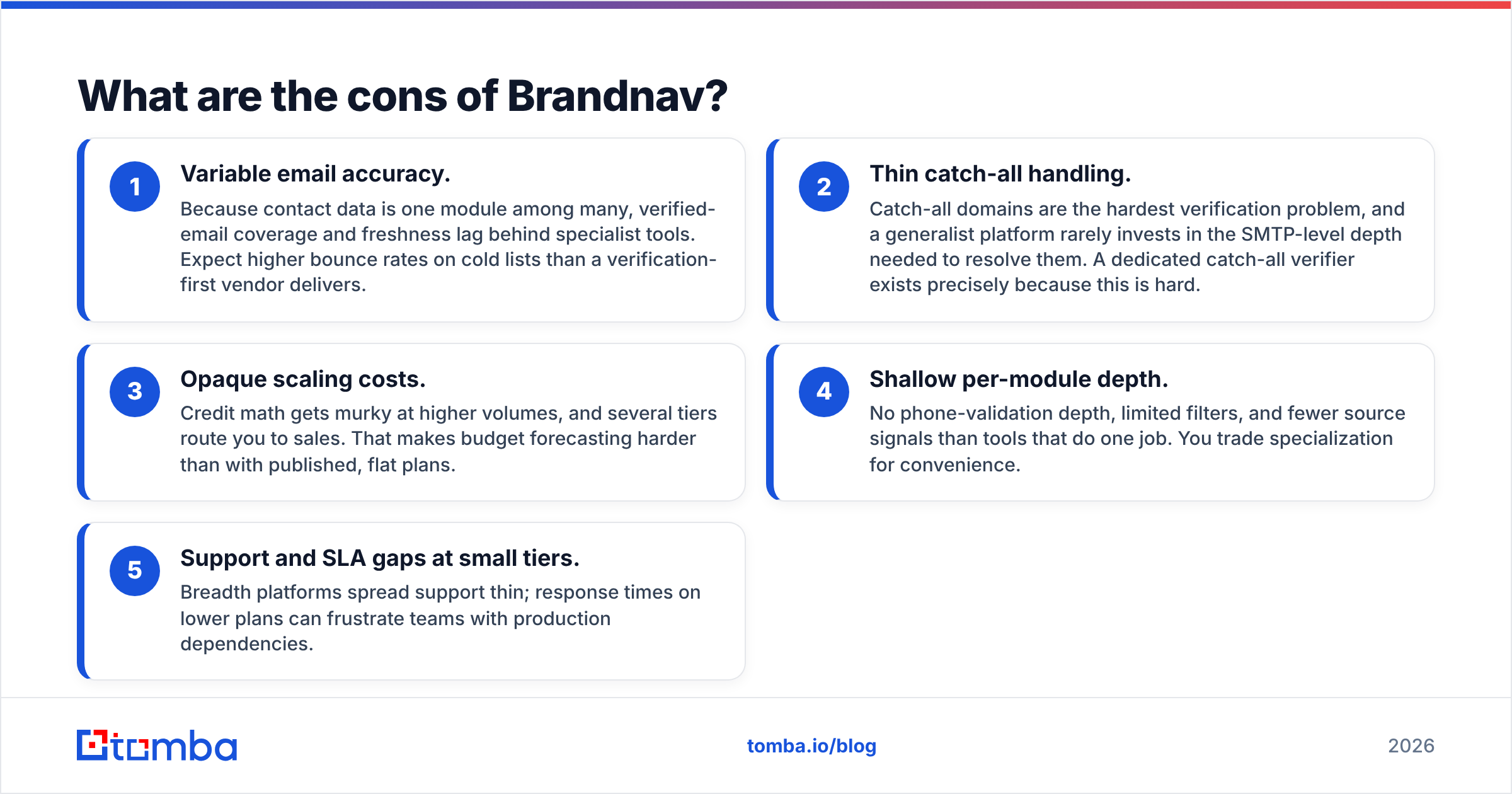
Now the honest part. The weaknesses cluster around the thing outbound teams care about most — email quality and predictable cost.
- Variable email accuracy. Because contact data is one module among many, verified-email coverage and freshness lag behind specialist tools. Expect higher bounce rates on cold lists than a verification-first vendor delivers.
- Thin catch-all handling. Catch-all domains are the hardest verification problem, and a generalist platform rarely invests in the SMTP-level depth needed to resolve them. A dedicated catch-all verifier exists precisely because this is hard.
- Opaque scaling costs. Credit math gets murky at higher volumes, and several tiers route you to sales. That makes budget forecasting harder than with published, flat plans.
- Shallow per-module depth. No phone-validation depth, limited filters, and fewer source signals than tools that do one job. You trade specialization for convenience.
- Support and SLA gaps at small tiers. Breadth platforms spread support thin; response times on lower plans can frustrate teams with production dependencies.
If deliverability is your KPI, these cons aren't edge cases — they're the whole game. A list that's 8% wrong doesn't just waste 8% of sends; it can suppress the entire domain's inbox placement through reputation damage.
How does Brandnav compare to a dedicated email finder?#
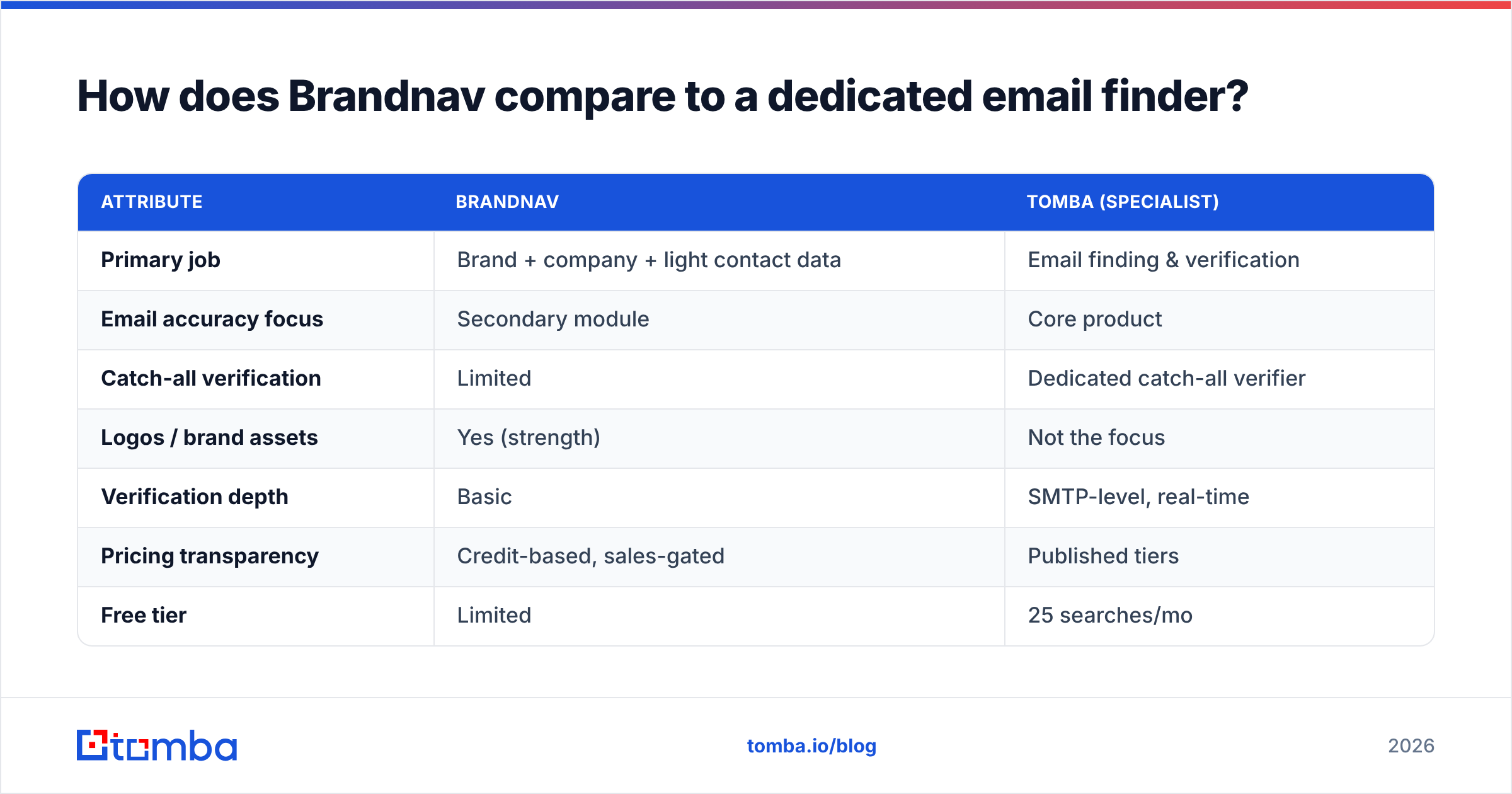
Here's the core decision in one table. The comparison isn't "good vs bad" — it's "generalist vs specialist," and which one fits your job to be done.
| Attribute | Brandnav | Tomba (specialist) |
|---|---|---|
| Primary job | Brand + company + light contact data | Email finding & verification |
| Email accuracy focus | Secondary module | Core product |
| Catch-all verification | Limited | Dedicated catch-all verifier |
| Logos / brand assets | Yes (strength) | Not the focus |
| Verification depth | Basic | SMTP-level, real-time |
| Pricing transparency | Credit-based, sales-gated | Published tiers |
| Free tier | Limited | 25 searches/mo |
| Starter price | Varies by credits | $49/mo |
| Best for | Product enrichment, directories | Outbound, deliverability-critical lists |
The pattern is consistent with how the market segments. When you only need contacts, a specialist wins on accuracy and price clarity. When you need logos and firmographics inside a product, a generalist like Brandnav earns its keep. Many mature teams run both — enrichment-of-record from one source, deliverability-critical sends from another. You can see how Tomba sources and refreshes its records on the data sources page, which is the kind of transparency a verification-first workflow depends on.

What does Brandnav cost, and is it worth it?#
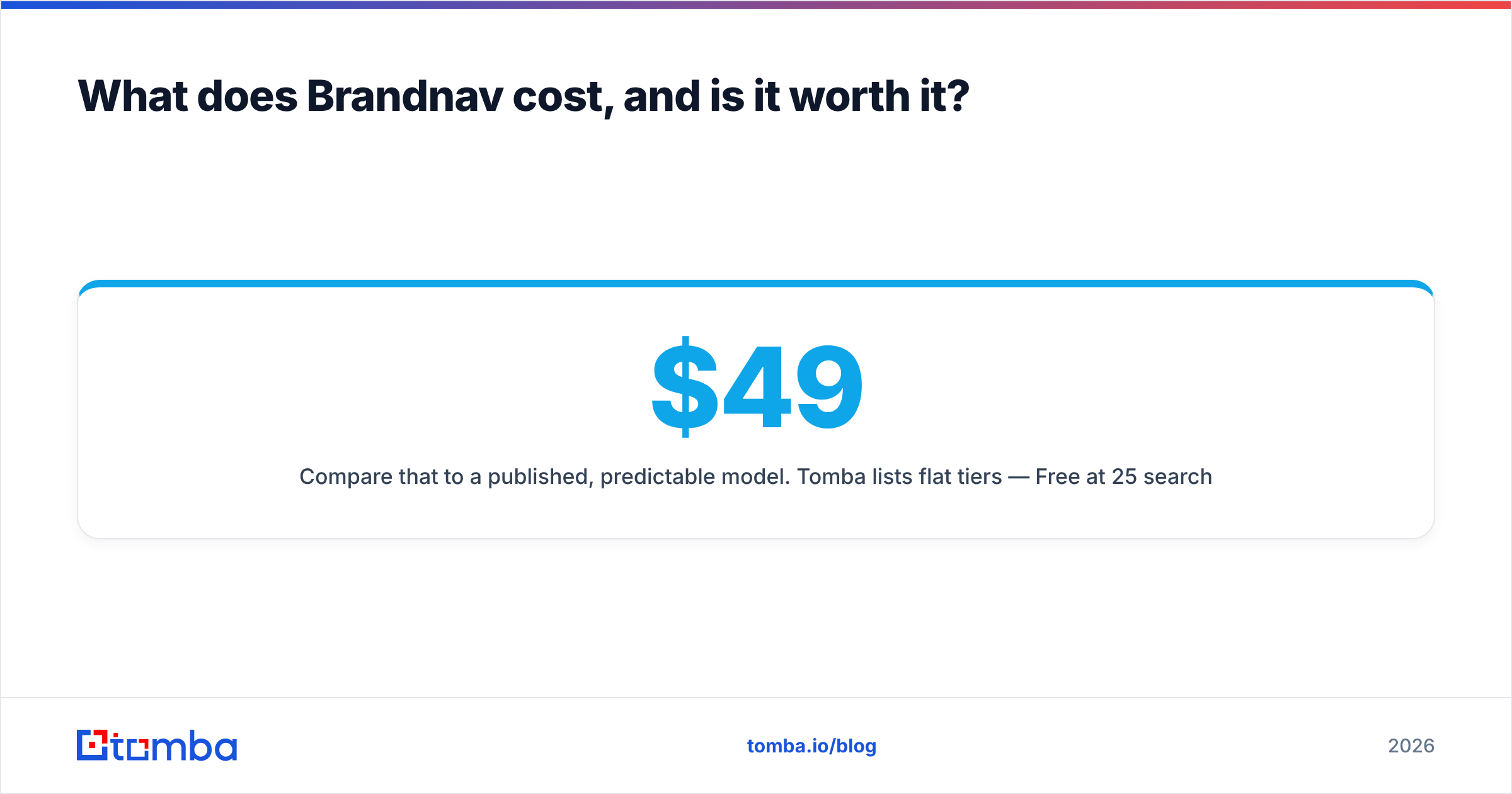
Brandnav uses credit bundles, and the effective price depends entirely on your enrichment mix — a logo lookup and a verified-email lookup may draw different amounts. That flexibility is a double-edged sword: great for mixed workloads, frustrating for forecasting a pure email-finding budget.
Compare that to a published, predictable model. Tomba lists flat tiers — Free at 25 searches/month, Starter at $49/mo, Growth at $99/mo, Pro at $249/mo, and custom Enterprise — so you can map cost to volume before you sign. Full numbers are on the Tomba pricing page.
A simple way to decide on value:
- If logos and firmographics drive real product value for you, Brandnav's bundle can be cheaper than buying three separate vendors.
- If you're paying mostly for emails, you're subsidizing modules you don't use, and a specialist will cost less per usable, verified contact.
- If your volume is spiky, credits can help — but model a worst-case month before committing, because overages add up fast.
The metric that matters isn't price per lookup. It's price per deliverable contact. A cheaper lookup that bounces is more expensive than a pricier one that lands, once you factor in domain reputation recovery.
When should you choose Brandnav anyway?#
Don't let the cons scare you off if your use case matches its strengths. Choose Brandnav when:
- You're building a product that displays company data and logos, and contact enrichment is a nice-to-have layer.
- You want one integration rather than stitching together logo, firmographic, and contact APIs.
- Your contact volume is low and occasional inaccuracy won't tank a campaign.
- You value breadth over depth and have internal verification downstream anyway.
In those scenarios Brandnav is a sensible, time-saving choice. The mistake is using it as your primary cold-outreach data source and then blaming "the list" when reply rates crater. That's a tool-fit problem, not a data problem.
What are the best Brandnav alternatives in 2026?#
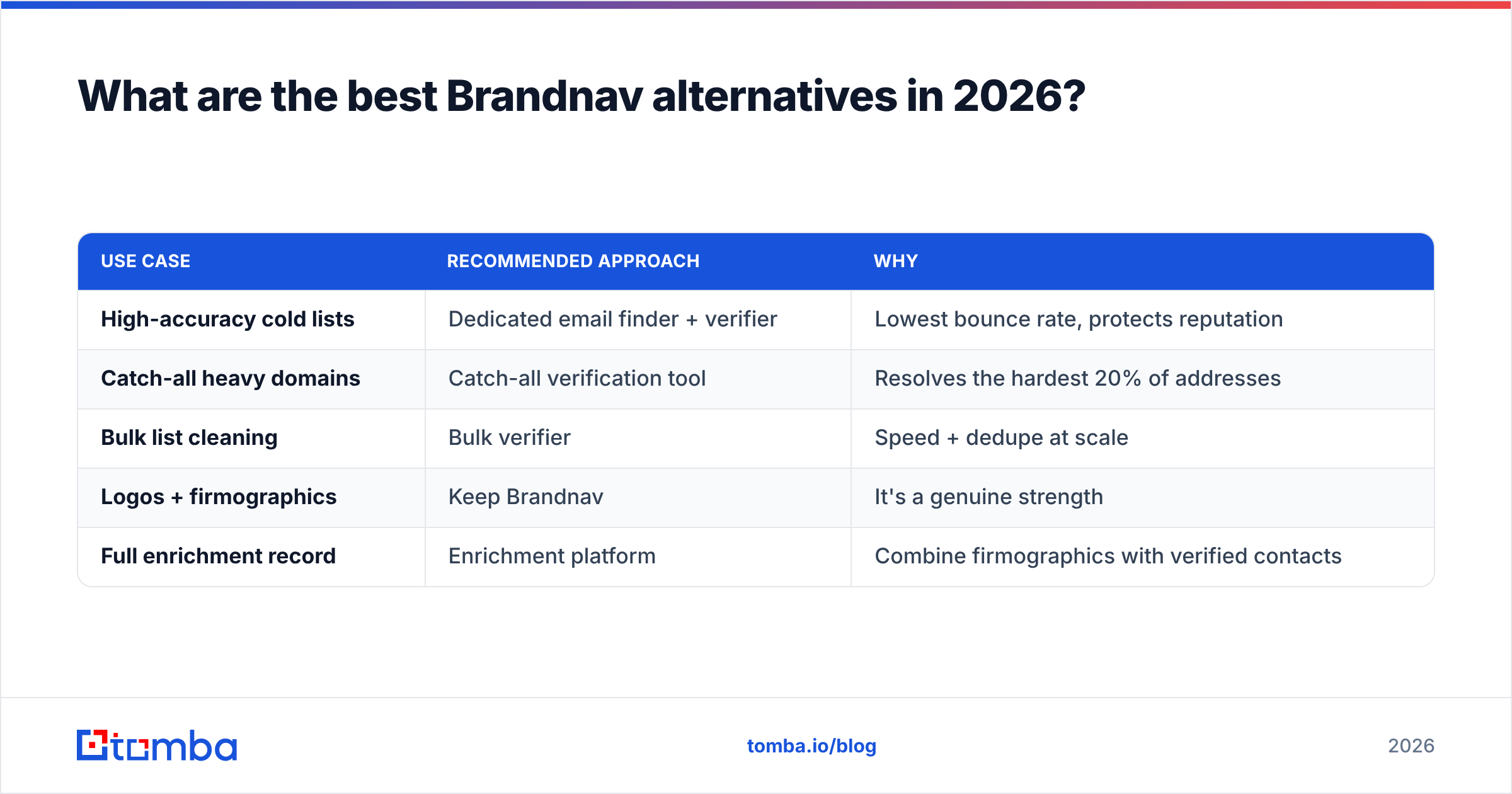
If the pros-and-cons math pushes you toward a specialist, you have good options. The right one depends on whether you need finding, verification, or both.
| Use case | Recommended approach | Why |
|---|---|---|
| High-accuracy cold lists | Dedicated email finder + verifier | Lowest bounce rate, protects reputation |
| Catch-all heavy domains | Catch-all verification tool | Resolves the hardest 20% of addresses |
| Bulk list cleaning | Bulk verifier | Speed + dedupe at scale |
| Logos + firmographics | Keep Brandnav | It's a genuine strength |
| Full enrichment record | Enrichment platform | Combine firmographics with verified contacts |
For most outbound teams, the highest-leverage swap is to route email work through a verification-first stack while keeping Brandnav (or any generalist) for the brand-asset layer. Tomba's data enrichment sits in that combined slot, returning verified contacts alongside company context, so you don't have to choose between accuracy and completeness.
It's also worth doing the basic deliverability hygiene that no data vendor does for you. Verify before you send, warm your domain, and watch your email deliverability signals — even perfect data fails if your sending setup is broken.
How do you actually test Brandnav before committing?#
Don't trust any review — including this one — over your own data. Run a controlled bake-off:
- Pull a known sample. Take 200 contacts you can independently confirm (existing customers, opted-in leads).
- Run them through Brandnav and one specialist for the same fields.
- Measure match rate and accuracy separately. "Returned a value" is not the same as "returned the right value."
- Send a verification pass on both outputs and compare bounce projections.
- Calculate cost per verified contact, not cost per lookup.
This five-step test takes an afternoon and settles the argument with evidence instead of marketing claims. Whatever wins on your data is your answer — that's the only benchmark that pays your bills.
Final verdict: are Brandnav's pros worth its cons?#
Brandnav is a capable generalist, and for product-data and brand-asset use cases the pros clearly outweigh the cons. For deliverability-critical outbound, the math flips: the convenience of one API doesn't offset variable email accuracy, thin catch-all handling, and credit costs that are hard to forecast.
The smart play in 2026 isn't all-or-nothing. Use Brandnav where it's strong, and route your revenue-critical email work to a specialist built for accuracy.
If verified emails and predictable pricing are what you actually need, start free with the Tomba Email Finder — 25 searches a month, published tiers from $49, and SMTP-level verification baked in. Run the bake-off above, compare cost per deliverable contact, and let your own numbers make the call.
Ready to find emails that actually work?
Join 150,000+ professionals who stopped guessing and started sending. Free credits on signup — no credit card required.
Get the Tomba newsletter
Practical outbound tactics and product updates — once every two weeks.
About the author