Brandnav vs Noparam: Which Email Finder Wins in 2026?
Brandnav vs Noparam compared on accuracy, pricing, waterfall enrichment, and API speed — plus where Tomba beats both on cost-per-valid-email in 2026.
Choosing between Brandnav and Noparam usually comes down to one question you can't see on either pricing page: how many of the emails you pay for actually land. Both sell themselves on "waterfall" enrichment — querying multiple data sources and returning the best hit — but they make very different trade-offs on accuracy, transparency, and price per valid email.
This is a neutral teardown. We'll compare both tools on the metrics that matter for cold outreach, then show where a single-vendor finder like Tomba changes the math.
TL;DR#
- Noparam is a waterfall-first enrichment tool: it chains third-party providers and bills credits per enriched row. Strong coverage, but you pay for the markup on every underlying source.
- Brandnav leans into bulk B2B data and brand/company intelligence, with email finding bundled in. Good for list-building, weaker on real-time single-lookup accuracy.
- Accuracy is the deciding factor, and both tools' real-world valid-rate sits below their marketing claims once you filter catch-all and role addresses.
- Cost-per-valid-email — not headline credit price — is the only fair comparison. Waterfall markup makes Noparam pricier than it looks.
- If you want predictable accuracy and a direct API without the reseller markup, Tomba's email finder is the cleaner default for most teams.
What are Brandnav and Noparam?#
Both are lead-enrichment tools, but they grew from different roots.
Noparam is built around the waterfall model. When you submit a contact, it queries a sequence of email-finding providers, stops at the first valid match, and charges you a credit. The pitch is "you only pay for finds." The catch is that you're paying a reseller margin on top of each underlying provider's cost, and you have limited visibility into which source returned the data or how it was verified.
Brandnav positions itself more as a B2B data and brand-intelligence platform. It offers company data, contact records, and bulk export alongside email finding. It's closer in spirit to a database play than a real-time finder — useful when you want to pull a segment of companies and enrich the whole list at once.

If you've used Apollo or RocketReach, think of Noparam as the API-first, pay-per-find layer and Brandnav as the list-and-database layer. Tomba sits in a third spot: a first-party data finder with its own crawling and verification, sold without the waterfall markup.
How accurate are Brandnav and Noparam?#
Accuracy is where these comparisons get slippery, because every vendor measures it differently. A "95% accuracy" claim can mean "95% of returned emails are syntactically valid" — which is almost meaningless — or "95% of returned emails accept mail at the SMTP layer," which is what you actually care about.
Here's how the two approaches behave in practice:
- Noparam (waterfall) — Coverage is genuinely high because it pulls from several providers. But because it stops at the first match rather than the best-verified match, you'll see a meaningful slice of catch-all and stale addresses counted as "found." You then re-verify them yourself, which adds cost.
- Brandnav (database) — Bulk records are convenient, but database freshness is the weak point. Email patterns change after job moves and rebrands, and a static database lags reality. Expect a higher bounce rate on older segments.
- Single-vendor finder (Tomba) — One pipeline, one verification standard, with SMTP and catch-all detection applied before the result is returned. Less raw coverage on obscure domains than a 6-source waterfall, but a cleaner valid-rate on the emails it does return.

The practical takeaway: don't trust any single accuracy number. Run a 200-contact test batch through each tool, then push the results through an independent email verifier and count only the "valid, deliverable, non-catch-all" rows. That number — divided by what you paid — is your real cost-per-valid-email.
Brandnav vs Noparam vs Tomba: feature comparison#
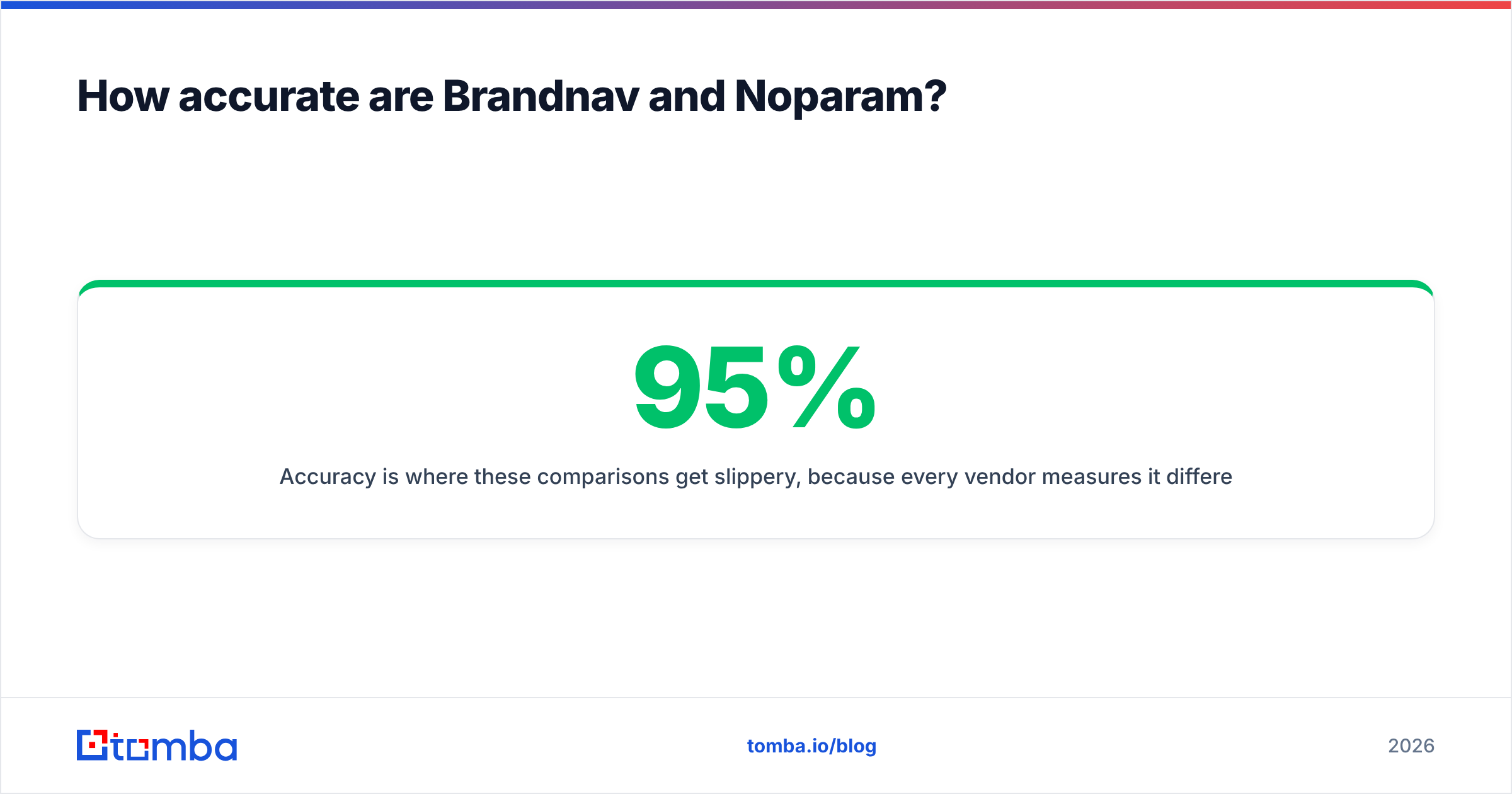
Here's the side-by-side on the attributes that decide real campaigns. Pricing reflects published entry tiers; treat exact numbers as directional since vendors revise them.
| Feature | Brandnav | Noparam | Tomba |
|---|---|---|---|
| Core model | B2B database + enrichment | Waterfall (multi-source) | First-party finder + verifier |
| Starter price | ~$49/mo | ~$49/mo | $49/mo |
| Free tier | Limited trial | Limited trial | 25 searches/mo |
| Single email finder | Yes | Yes | Yes |
| Bulk finder | Strong | Yes | Bulk finder |
| Built-in verification | Partial | Re-verify recommended | SMTP + catch-all included |
| Catch-all handling | Limited | Counts as found | Flagged explicitly |
| Native API | Yes | Yes | Documented API |
| Phone enrichment | Some | Add-on | Phone finder |
| Data transparency | Medium | Low (reseller layer) | Source-cited results |
The pattern: Brandnav wins on bulk list breadth, Noparam wins on raw coverage from chaining sources, and Tomba wins on transparency and verified accuracy per dollar. None of them is best at everything — match the tool to whether your bottleneck is finding more or bouncing less.
Which is better for cold email deliverability?#
Better deliverability comes from lower bounce rates, and lower bounce rates come from verified, non-catch-all addresses — full stop. This is where the waterfall model can quietly hurt you.
When Noparam returns a first-match email without a strict deliverability gate, you inherit the verification burden. Send to that list raw and your bounce rate climbs, which damages your sender reputation and drags down inbox placement for every future send. The "found" credit was cheap; the reputation hit was not.
Brandnav's database model has the opposite failure mode: addresses that were valid when collected but have since gone stale. A contact who changed companies six months ago still sits in the export, and mailing them is a guaranteed bounce.
The defensive move with any of these tools is the same:
- Always re-verify before sending, regardless of vendor claims. Use a standalone catch-all finder to separate risky domains.
- Segment by confidence — send to verified addresses first, warm the domain, then test catch-all rows in small batches.
- Monitor bounces per source so you can cut a provider that's inflating your bounce rate.
If deliverability is the whole point of your outreach, prefer a tool that verifies before it bills you. That's the structural advantage of a single-vendor finder over a reseller waterfall.
How does pricing really compare?#
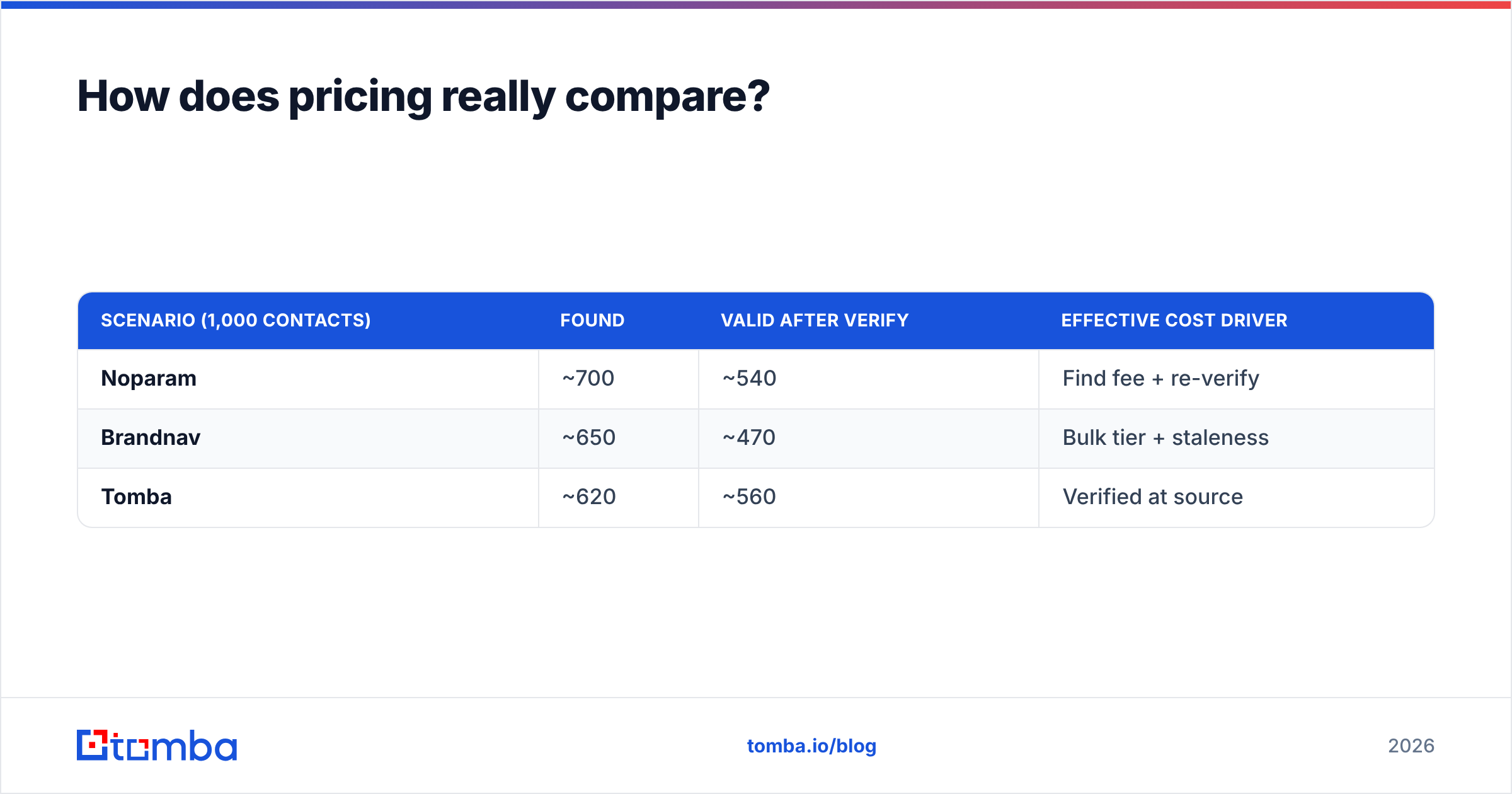
Headline credit prices lie, because a "credit" buys different things in each tool. The honest comparison is cost-per-valid-email after verification.
Walk through a realistic 1,000-contact run:
- Noparam charges per find. Say 700 return as "found." But after independent verification, maybe 540 are genuinely deliverable. You paid for 700 finds plus a verification pass — your true cost-per-valid is the total bill divided by 540, not 700.
- Brandnav bills in bulk-export tiers. The per-row price looks tiny, but on an older segment your valid-rate might be 60%, so the effective cost-per-valid roughly doubles versus the sticker.
- Tomba returns verified results, so the gap between "found" and "valid" is smaller. Across Tomba's plans — Free (25 searches), Starter at $49/mo, Growth at $99/mo, Pro at $249/mo — you're paying for emails that already passed SMTP and catch-all checks, which compresses the find-to-valid leakage.
| Scenario (1,000 contacts) | Found | Valid after verify | Effective cost driver |
|---|---|---|---|
| Noparam | ~700 | ~540 | Find fee + re-verify |
| Brandnav | ~650 | ~470 | Bulk tier + staleness |
| Tomba | ~620 | ~560 | Verified at source |
Notice that the tool with the lowest raw "found" count can still deliver the most valid emails. Coverage without verification is a vanity metric. Run your own batch — the gap between vendors on your specific domains is the only number that matters for your pricing decision.
Who should pick which tool?#
Match the tool to your actual constraint, not the loudest feature list.
Pick Noparam if: you need maximum coverage on hard-to-find or international contacts, you already have a verification step in your stack, and you're comfortable paying a reseller margin for the convenience of one API across many sources.
Pick Brandnav if: your workflow is list-first — you pull segments of companies, enrich in bulk, and feed a CRM. The database breadth and bulk export are the draw, and you accept that you'll prune stale rows.
Pick Tomba if: you want predictable accuracy, verification baked in, and a transparent direct API without the markup. It's the strongest default for cold-email teams whose bottleneck is bounce rate rather than raw list size. Tomba also covers adjacent jobs — domain search for finding every contact at a company, data enrichment for filling gaps in existing rows, and a Chrome extension for finding emails while you browse.
For most outbound teams, the order of operations is: find with a verified-at-source tool, re-verify anything marked catch-all, then send in confidence-ranked segments. That workflow keeps your bounce rate low without paying twice for the same email.
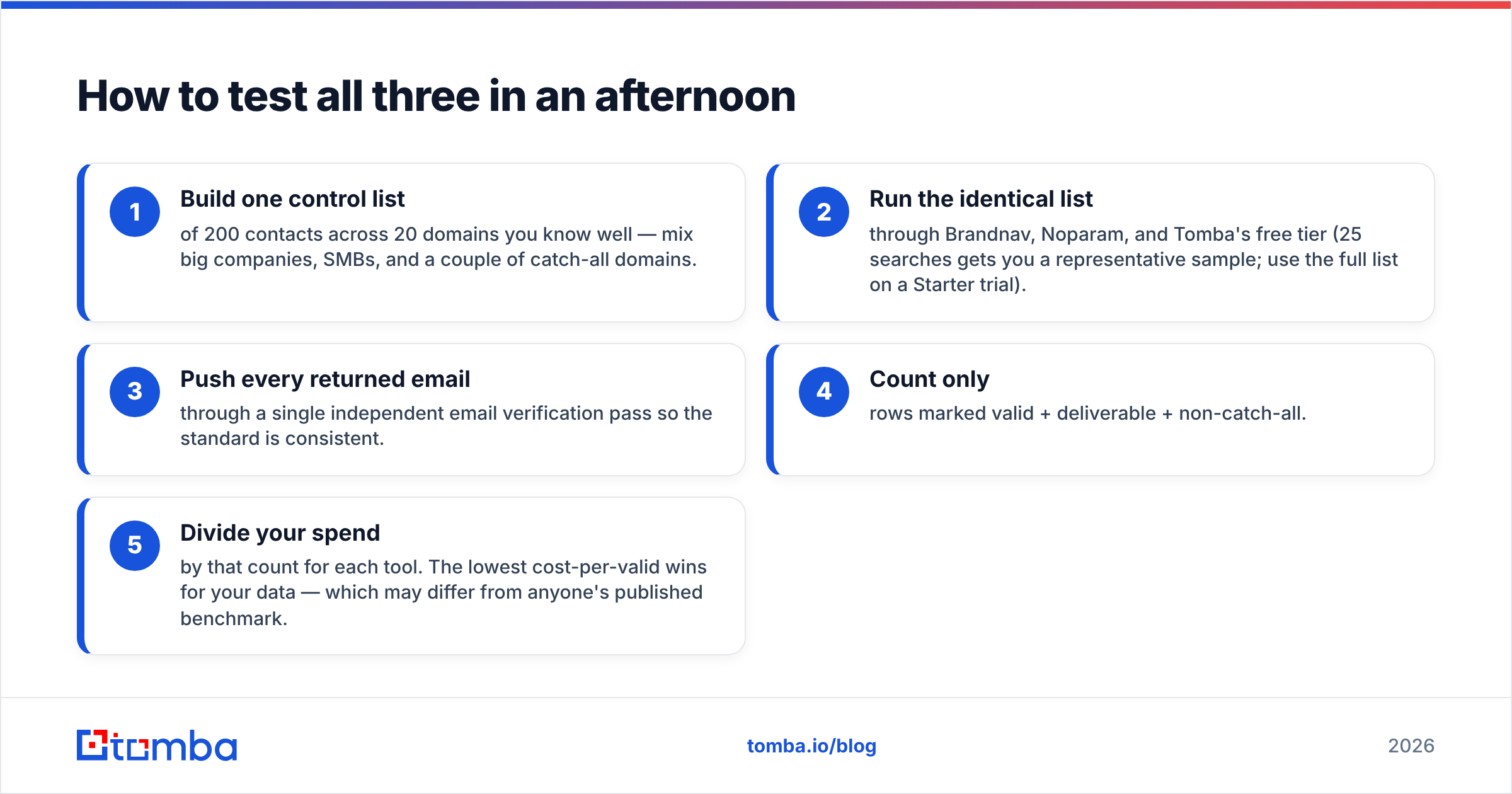
How to test all three in an afternoon#
Don't take any vendor's word, including this article's. Here's a fast, fair bake-off:
- Build one control list of 200 contacts across 20 domains you know well — mix big companies, SMBs, and a couple of catch-all domains.
- Run the identical list through Brandnav, Noparam, and Tomba's free tier (25 searches gets you a representative sample; use the full list on a Starter trial).
- Push every returned email through a single independent email verification pass so the standard is consistent.
- Count only rows marked valid + deliverable + non-catch-all.
- Divide your spend by that count for each tool. The lowest cost-per-valid wins for your data — which may differ from anyone's published benchmark.
This removes the marketing noise. The waterfall might win on a niche international segment; the first-party finder usually wins on cost-per-valid for standard B2B domains. You'll know in an afternoon instead of after a quarter of bounced sends.
The bottom line#
Brandnav and Noparam are both legitimate tools that solve real problems — Brandnav for bulk list-building, Noparam for wide-net coverage. But both push the verification burden (and its cost) onto you, and both obscure the real number that matters: cost-per-valid-email after a strict deliverability check.
If your goal is clean, deliverable contacts without paying a reseller margin or pruning a stale database, start with Tomba's Email Finder. The free tier gives you 25 searches to run the bake-off above, results come verified with SMTP and catch-all flags, and the API is documented and direct. Find the emails that actually land, skip the ones that don't, and let your bounce rate — not a marketing slide — settle the Brandnav vs Noparam debate.
// get started
Find, verify and enrich your first contacts today
Start on the free plan with 25 searches a month, then scale when your team is ready.
Free plan · No credit card required · GDPR & CCPA
// about the author