Brevo Pricing, Reviews, Pros and Cons: Full 2026 Breakdown
A no-fluff look at Brevo pricing, real user reviews, and the honest pros and cons in 2026 — so you know if its volume-based plans actually fit your team before you pay.
TL;DR
- Brevo (formerly Sendinblue) prices by email volume, not contact count — that makes it cheap for big lists and expensive for high-frequency senders.
- Plans run from a genuine Free tier (300 emails/day) up through Starter, Business, and a custom Enterprise tier; SMS, WhatsApp, and CRM are billed separately.
- Reviewers love the price-to-value and the all-in-one toolkit; they complain about support latency, deliverability dips on cheap plans, and a clunky template editor.
- Brevo is a sending platform — it does not find or verify the B2B contacts you load into it. Pair it with a dedicated email finder to keep your lists clean.
- Use the comparison table below to decide between Brevo, Mailchimp, and a finder-first stack before you commit a budget.
What is Brevo and who is it for?#
Brevo is the email marketing, automation, and lightweight CRM platform formerly known as Sendinblue. Think of it as the all-in-one kitchen of email tools: marketing campaigns, transactional email, SMS, WhatsApp, landing pages, and a sales pipeline all live under one login. You are not buying a single appliance — you are renting the whole kitchen and deciding which burners you actually use.
It targets small and mid-market teams who want one bill instead of five. A solo founder sending a weekly newsletter, an e-commerce shop firing order confirmations, and a 20-person sales team running drip sequences can all run on Brevo without stitching together separate vendors. That breadth is the pitch — and, as you will see, also the source of most complaints.
The key thing to understand before we touch a single price: Brevo charges for emails sent, while most competitors (Mailchimp, ActiveCampaign) charge for contacts stored. That one design choice changes the math for every buyer, so let's break it down.
How does Brevo pricing actually work in 2026?#
Brevo's pricing is volume-based: your bill scales with how many emails you send per month, and you can store unlimited contacts on every paid plan. The platform splits into separate product lines (Marketing, Sales, Conversations, Transactional), and you pay for each line independently.
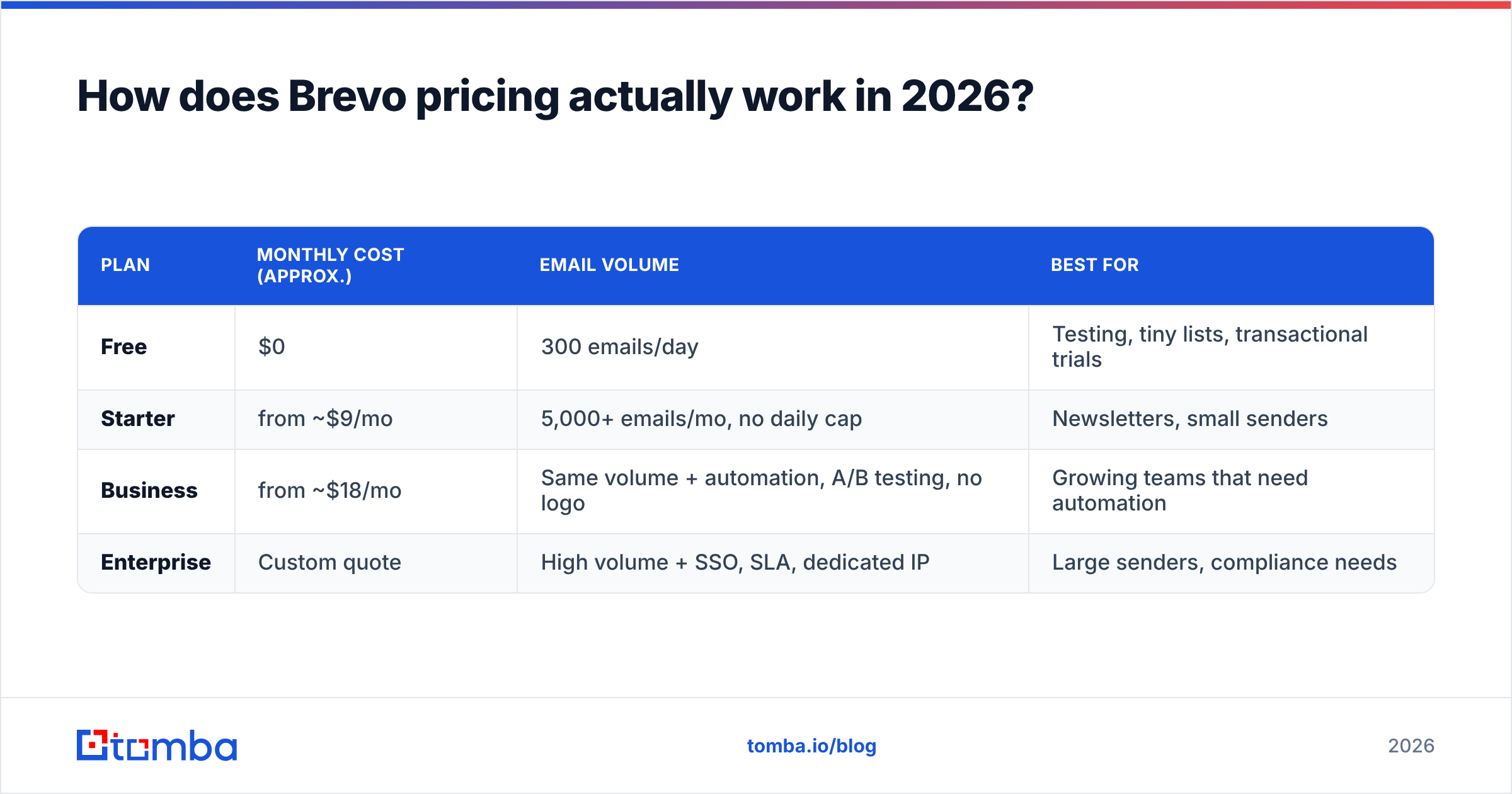
Here is the simplified marketing-plan structure. Always confirm live numbers on the official Brevo pricing page — volume tiers shift often.
| Plan | Monthly cost (approx.) | Email volume | Best for |
|---|---|---|---|
| Free | $0 | 300 emails/day | Testing, tiny lists, transactional trials |
| Starter | from ~$9/mo | 5,000+ emails/mo, no daily cap | Newsletters, small senders |
| Business | from ~$18/mo | Same volume + automation, A/B testing, no logo | Growing teams that need automation |
| Enterprise | Custom quote | High volume + SSO, SLA, dedicated IP | Large senders, compliance needs |
A few things the table can't show you:
- The Free plan is real, not a trap. 300 emails a day (about 9,000/month) with unlimited contacts is genuinely usable for a small operation — most rivals cap contacts, not sends.
- SMS and WhatsApp are pay-as-you-go. They sit on top of your plan and are priced per message by destination country.
- The "Business" tier unlocks the good stuff — marketing automation, A/B testing, and removal of the Brevo logo. If you need automation, budget for Business, not Starter.
- Dedicated IPs cost extra and only matter once you're sending serious volume; on shared IPs your deliverability depends partly on your neighbors.
- The Sales Platform and Conversations (chat) are billed apart from marketing, so the "one bill" promise has asterisks.

The practical takeaway: if you have a large list you email occasionally, Brevo is one of the cheapest options on the market. If you have a small list you email daily, the volume model can quietly cost more than a contact-based competitor. Run your own numbers — sends per month times frequency — before you trust any headline price.
What do real Brevo reviews say (pros and cons)?#
Across G2 and Capterra, Brevo lands in the low-to-mid 4-star range with thousands of reviews. The sentiment is consistent enough to summarize honestly.
What reviewers consistently praise:
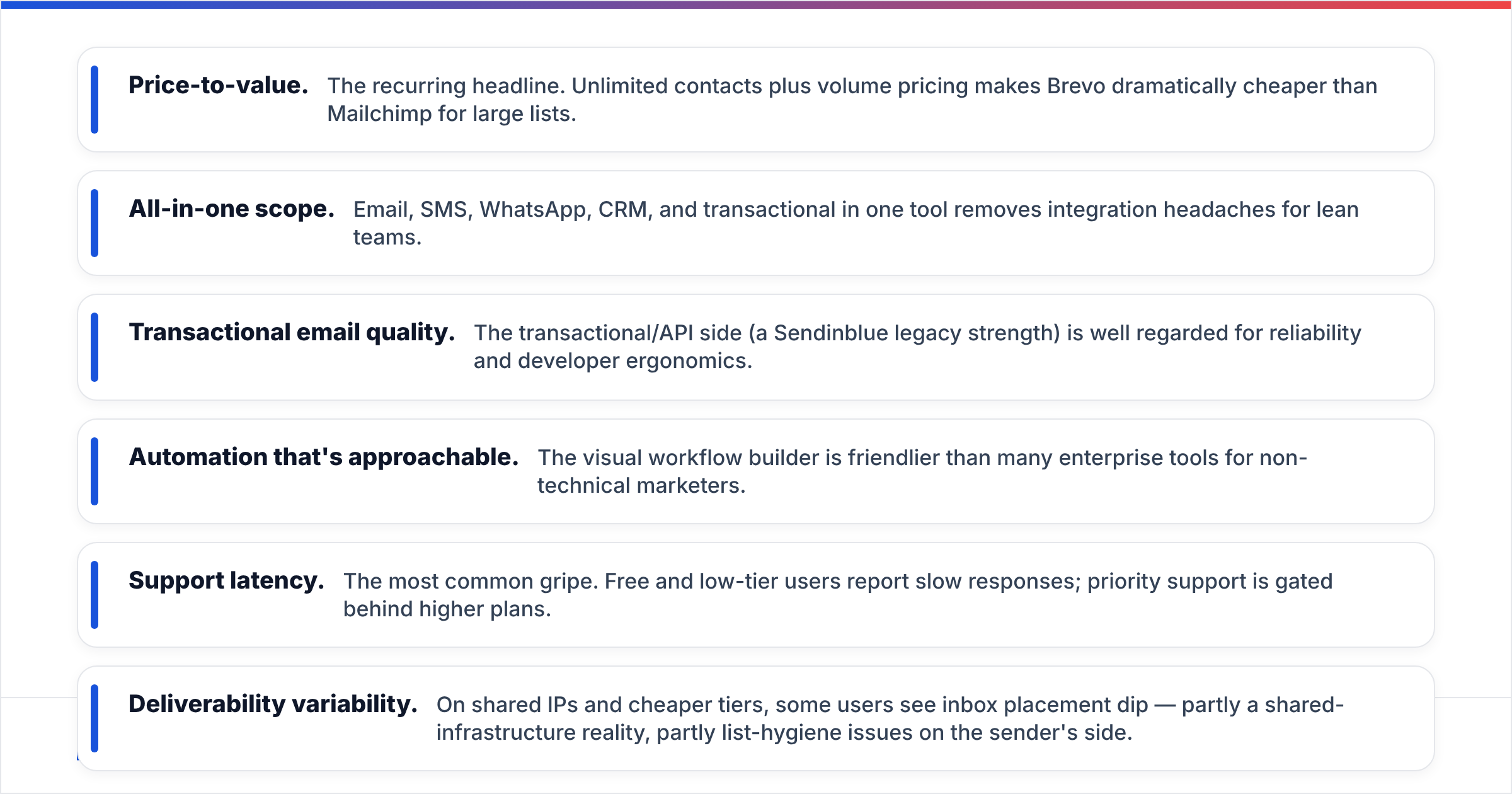
- Price-to-value. The recurring headline. Unlimited contacts plus volume pricing makes Brevo dramatically cheaper than Mailchimp for large lists.
- All-in-one scope. Email, SMS, WhatsApp, CRM, and transactional in one tool removes integration headaches for lean teams.
- Transactional email quality. The transactional/API side (a Sendinblue legacy strength) is well regarded for reliability and developer ergonomics.
- Automation that's approachable. The visual workflow builder is friendlier than many enterprise tools for non-technical marketers.
What reviewers consistently criticize:
- Support latency. The most common gripe. Free and low-tier users report slow responses; priority support is gated behind higher plans.
- Deliverability variability. On shared IPs and cheaper tiers, some users see inbox placement dip — partly a shared-infrastructure reality, partly list-hygiene issues on the sender's side.
- Template editor friction. The drag-and-drop builder is called clunky and occasionally buggy compared to Mailchimp's polish.
- Sending caps and throttling. The daily limit on Free and approval reviews for new accounts frustrate people who want to send immediately.
Notice that two of the four complaints — deliverability and "my emails bounce" — are at least partly list-quality problems, not Brevo problems. If you load a list full of stale, mistyped, or catch-all addresses, no sending platform can save your sender reputation. That's the seam where a finder-and-verifier stack matters, and we'll come back to it.
Is Brevo better than Mailchimp or the alternatives?#
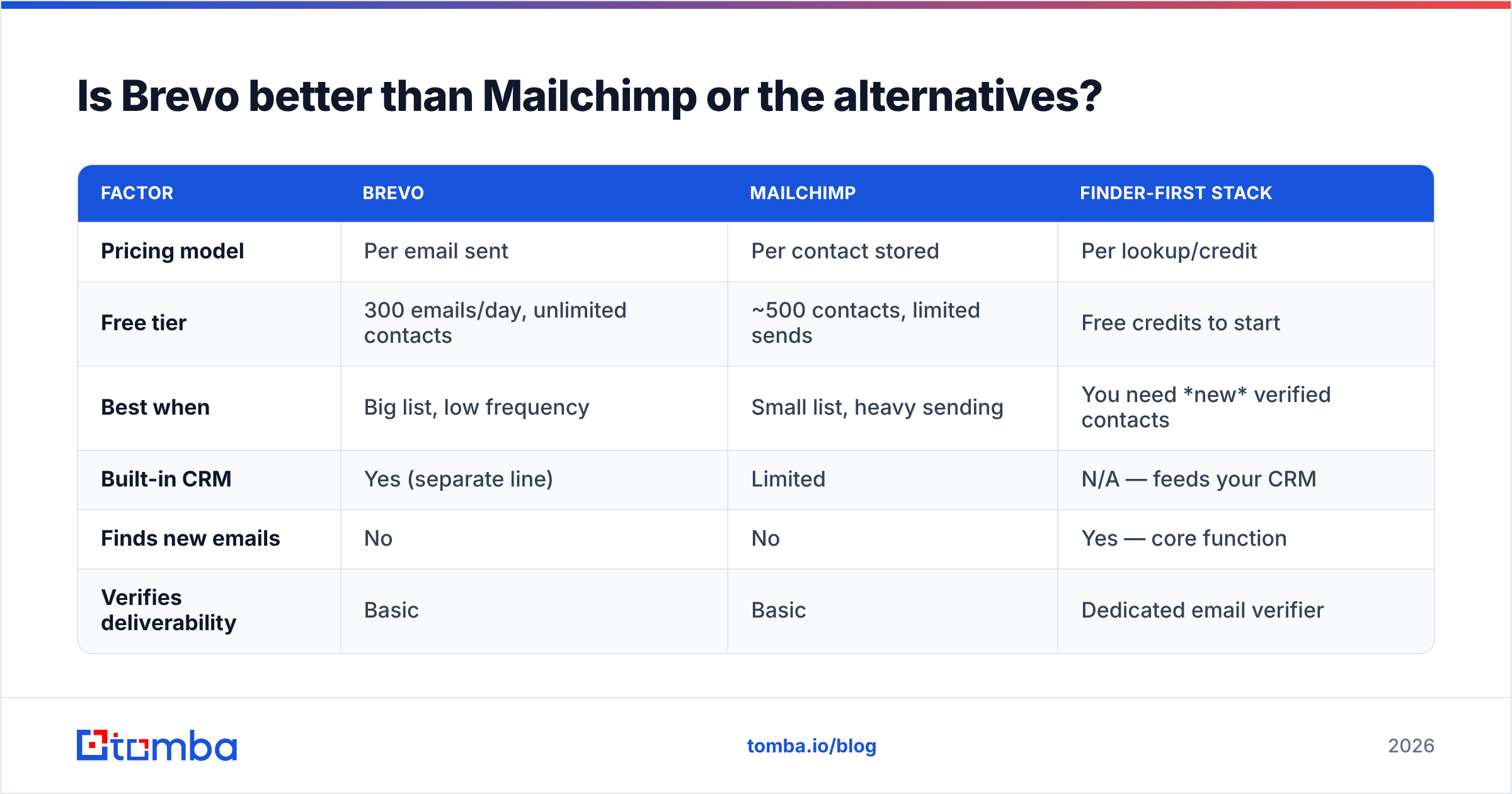
It depends on one variable: how your list size compares to your send frequency. Here's the head-to-head that actually decides it.
| Factor | Brevo | Mailchimp | Finder-first stack |
|---|---|---|---|
| Pricing model | Per email sent | Per contact stored | Per lookup/credit |
| Free tier | 300 emails/day, unlimited contacts | ~500 contacts, limited sends | Free credits to start |
| Best when | Big list, low frequency | Small list, heavy sending | You need new verified contacts |
| Built-in CRM | Yes (separate line) | Limited | N/A — feeds your CRM |
| Finds new emails | No | No | Yes — core function |
| Verifies deliverability | Basic | Basic | Dedicated email verifier |
Choose Brevo if you maintain a large, opt-in subscriber base and email it on a normal marketing cadence. The volume model rewards you and the all-in-one toolkit saves you from buying separate SMS and CRM tools.
Choose Mailchimp if you send very frequently to a small list and you value the most polished template editor and ecosystem of integrations — you'll pay a premium for that polish.
Choose a finder-first stack if your bottleneck isn't sending email — it's sourcing and verifying the right B2B contacts in the first place. Brevo and Mailchimp both assume you already have clean addresses. Neither finds them.
That last point is where most cold-outbound and B2B sales teams get stuck, and it's worth its own section.
Where does Brevo stop — and what fills the gap?#
Brevo's job starts the moment you have a verified contact and ends when the email lands. It does not source net-new prospects, it does not enrich thin records, and it does not deeply validate whether an address is safe to send to before you hit go. Those are different tools.
Think of Brevo as the delivery truck. It's excellent at getting packages out the door — but it can't tell you the addresses on your manifest are real, current, and deliverable. Send to a list full of bad addresses and your bounce rate spikes, your sender reputation craters, and even your good emails start hitting spam folders. The truck is fine; the manifest is the problem.
This is the moment a data enrichment and finder layer earns its keep. Before a contact ever reaches Brevo, you want to:
- Find the right address — by name, company, or domain search rather than guessing the format.
- Verify it's deliverable — catch typos, dead mailboxes, and risky catch-all domains before they bounce.
- Enrich the record — add role, company, and context so your Brevo automation can segment properly.

Done in that order, Brevo's deliverability complaints mostly evaporate — because the list you load is already clean. The platform was never the weak link; the data was. This is the practical reason teams pair a sending tool like Brevo with a finder rather than expecting one product to do both jobs well.
What's the verdict on Brevo pricing, reviews, pros and cons?#
Brevo is a strong, fairly priced all-in-one platform — with caveats you should price in before signing up. Here's the honest scorecard.
The pros:
- Genuinely useful free tier with unlimited contacts
- Volume pricing that's a bargain for large, lower-frequency lists
- Email, SMS, WhatsApp, transactional, and CRM under one roof
- Reliable transactional/API layer with developer-friendly docs
The cons:
- Support is slow unless you pay up
- Deliverability can wobble on shared IPs and cheap plans
- Template editor lags competitors on polish
- "All-in-one" pricing is really several separate bills
- It finds and verifies nothing — your list quality is on you
Who should buy it: small and mid-market teams with a clean, opt-in list and a normal sending cadence who want to consolidate vendors. Who should look elsewhere: teams that send daily to tiny lists (a contact-based tool may be cheaper) or B2B outbound teams whose real problem is sourcing contacts, not sending to them.
The smartest setup for most B2B teams isn't Brevo or a finder — it's both, in sequence. Use a finder to source and verify, then let Brevo do what it does well: deliver.
Build the clean list Brevo needs#
Brevo will happily send to whatever you load — which is exactly why the contacts you load decide your results. Before your next campaign, source and verify your prospects with the Tomba Email Finder: find professional addresses by name, company, or domain, confirm they're deliverable, and hand Brevo a list that won't tank your sender reputation. Start free with 25 searches a month, scale on a plan from $49/mo when you're ready, and stop blaming the truck for a bad manifest. Find better contacts first — then let Brevo deliver them.
// get started
Find, verify and enrich your first contacts today
Start on the free plan with 25 searches a month, then scale when your team is ready.
Free plan · No credit card required · GDPR & CCPA
// about the author